audio LEXUS IS250 2016 Service Manual
[x] Cancel search | Manufacturer: LEXUS, Model Year: 2016, Model line: IS250, Model: LEXUS IS250 2016Pages: 542, PDF Size: 9.65 MB
Page 477 of 542
483
Alphabetical index
Shift lever
Automatic transmission......................131
If the shift lever cannot be
shifted from P ..................................... 415
Manual transmission .......................... 137
Shift lever lighting.................................. 247
Shift lock system ..................................... 415
Shopping bag hooks ............................278
Side airbags ............................................... 84
Side marker lights
Switch ........................................................156
Side mirror
Adjusting and folding ......................... 66
Mirror position memory ................... 48
Smart access system with
push-button start
Entry function .......................................... 24
Starting the engine.............................. 126
Spare tire
Inflation pressure ............................... 336
Storage location................................. 404
Spark plug ............................................... 435
Specifications......................................... 430
Speech command switch*
Speedometer
Speed indicator .................................... 142
Speedometer ........................................ 142
Steering wheel
Audio switches....................................245
Manual adjustment............................... 62
Power adjustment................................. 63
Steering wheel position
memory ..................................................48
Storage feature....................................... 251
Stuck
If your vehicle becomes stuck ..... 427
Sun visors ................................................. 257
Sunshade
Rear........................................................... 273
Roof.............................................................. 72
Switch
ECT switch..............................................132
Emergency flasher switch ............. 372
Engine switch .........................................126
ETCS switch .......................................... 138
Fog light switch .................................... 159
Hazard light switch ........................... 372
Ignition switch ........................................126
Light switches ....................................... 156
Power door lock switch .................... 39
Power window switch ........................69
Satellite switches................................ 260
Transmission shift switches ............ 134
Window lock switch............................69
Wipers and washer switch ............ 160
*: Refer to the “Navigation System Owner’s Manual”
Page 484 of 542
Entering and Exiting
Before Driving
When Driving
Rain and
Night Driving
Driving Comfort
Opening and Closing
What to do if ...
Customizing
Yo u r L e x u s
2
IS_U (L/O_0808)
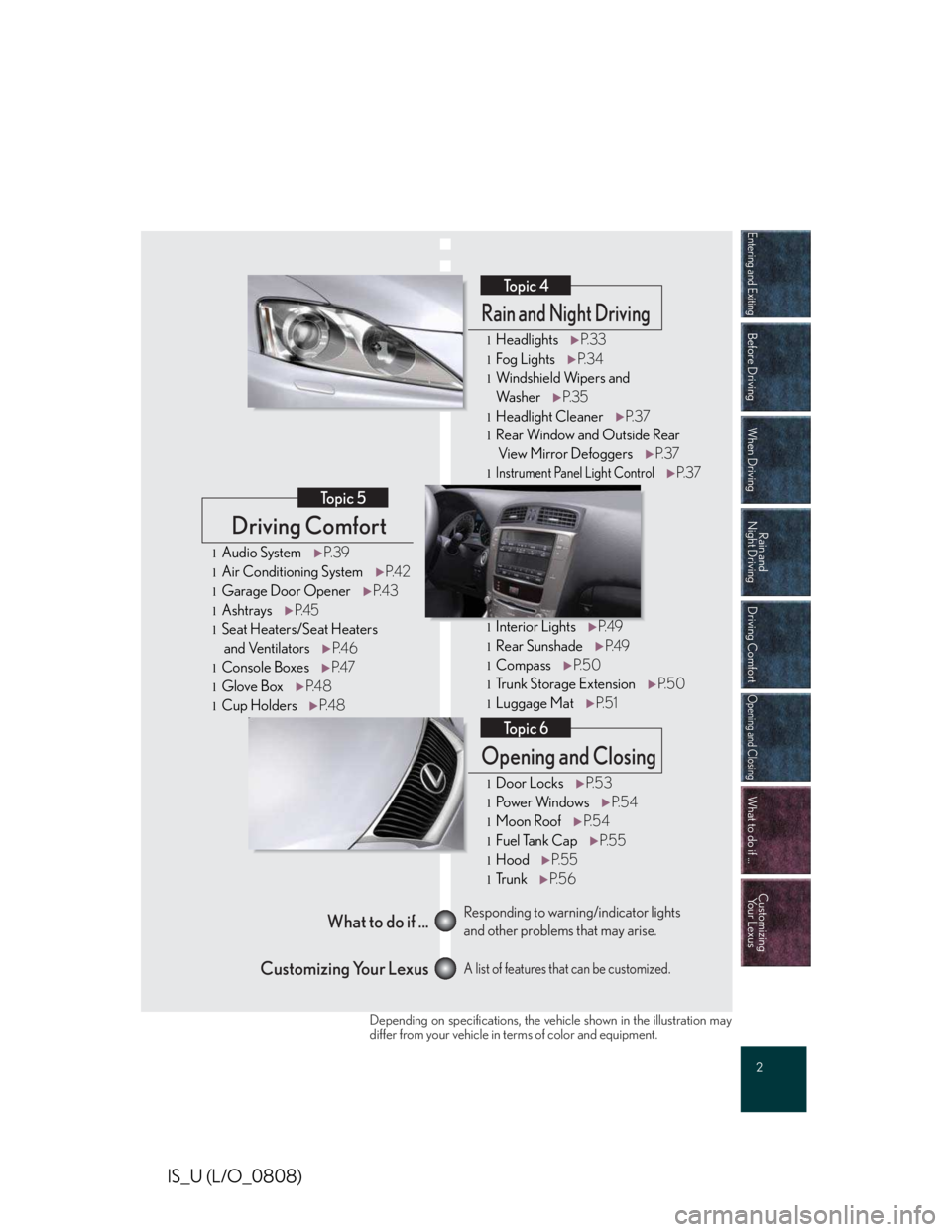
Driving Comfort Topic 5
Opening and ClosingTopic 6
What to do if ...
Customizing Your Lexus Responding to warning/indicator lights
and other problems that may arise.
A list of features that can be customized. Rain and Night DrivingTopic 4
lHeadlightsP. 33
lFog LightsP. 3 4
lWindshield Wipers and
Wa s h e rP. 3 5
lHeadlight CleanerP. 3 7
lRear Window and Outside Rear
View Mirror DefoggersP. 3 7
l
Instrument Panel Light Control
P. 3 7
lInterior LightsP.4 9
lRear SunshadeP. 4 9
lCompassP. 5 0
lTrunk Storage ExtensionP. 5 0
lLuggage MatP. 5 1
lDoor LocksP.5 3
lPo w e r Wi n d o w sP. 5 4
lMoon RoofP. 5 4
lFuel Tank CapP. 5 5
lHoodP. 5 5
lTr u n kP. 5 6
lAudio SystemP.3 9
lAir Conditioning SystemP. 4 2
lGarage Door OpenerP. 4 3
lAshtraysP. 4 5
lSeat Heaters/Seat Heaters
and VentilatorsP. 4 6
lConsole BoxesP. 4 7
lGlove BoxP. 4 8
lCup HoldersP. 4 8
Depending on specifications, the vehicle shown in the illustration maydiffer from your vehicle in terms of color and equipment.
Page 486 of 542
4
IS_U (L/O_0808)
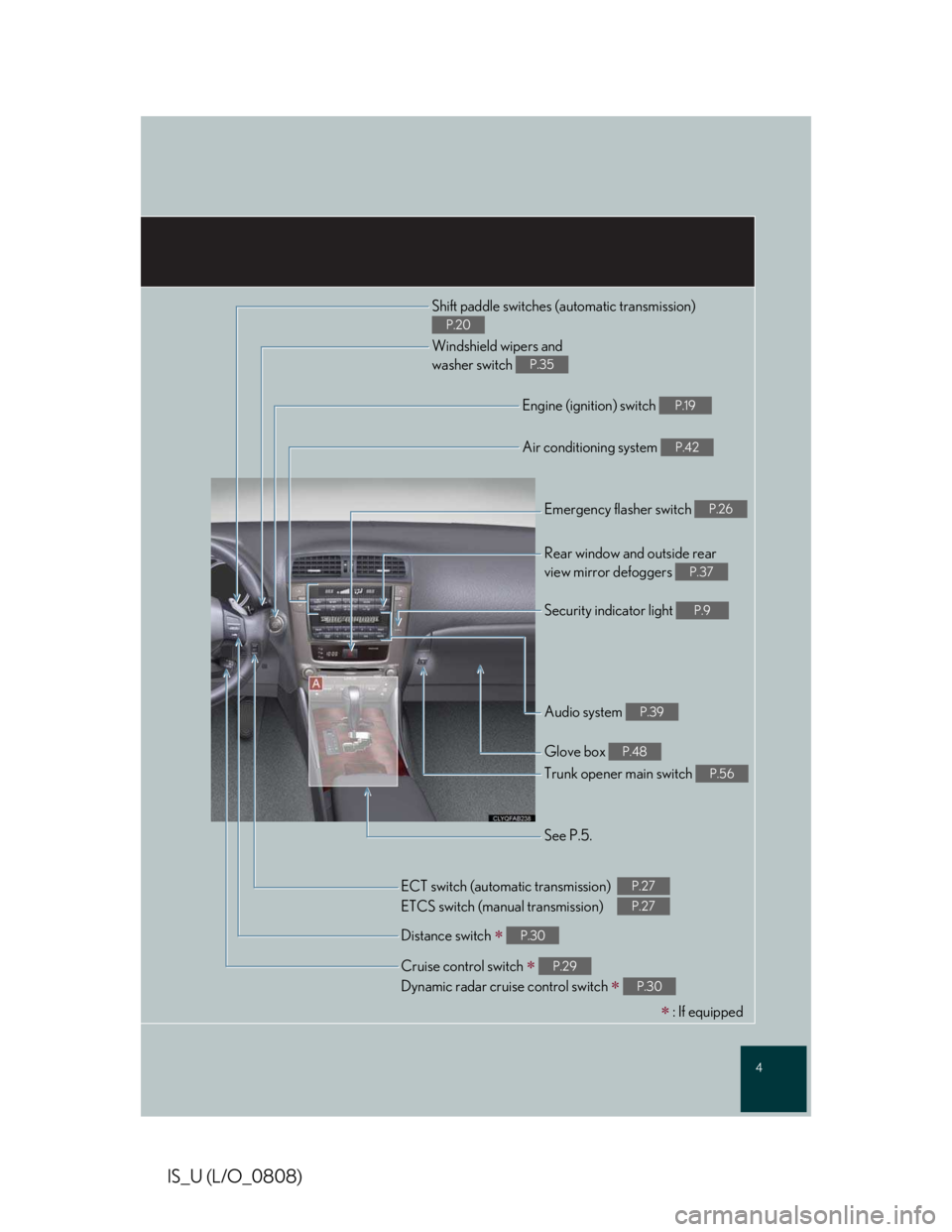
Shift paddle switches (automatic transmission)
P.20
Windshield wipers and
washer switch P.35
Engine (ignition) switch P.19
Air conditioning system P.42
Emergency flasher switch P.26
Rear window and outside rear
view mirror defoggers P.37
Security indicator light P.9
Audio system P.39
Glove box P.48
Trunk opener main switch P.56
See P.5.
Cruise control switch ∗
Dynamic radar cruise control switch ∗
P.29
P.30
Distance switch ∗ P.30
ECT switch (automatic transmission)
ETCS switch (manual transmission)
P.27
P.27
∗ : If equipped
Page 516 of 542
Topic 5
Driving Comfort
39
IS_U (L/O_0808)
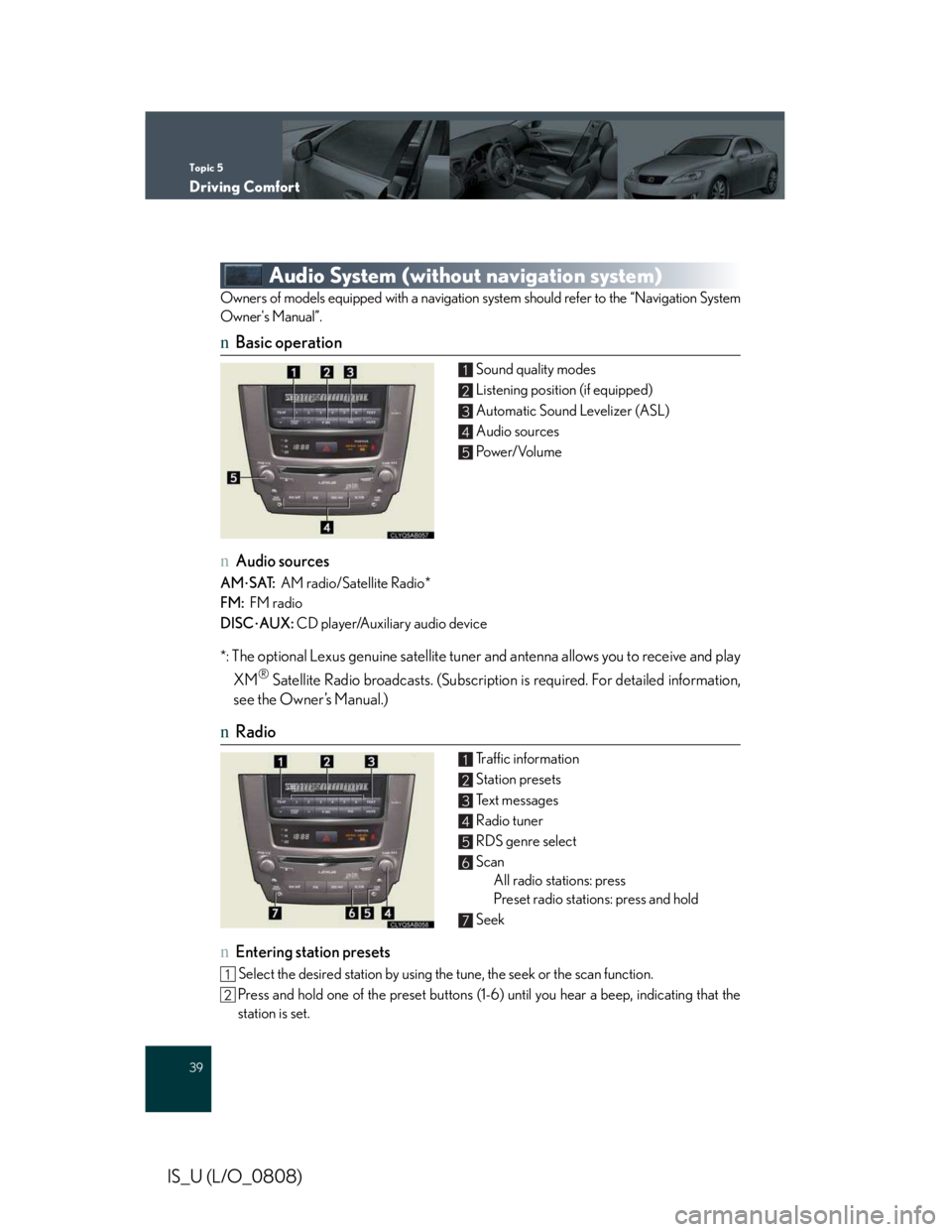
Audio System (without navigation system)
Owners of models equipped with a navigation system should refer to the “Navigation System
Owner's Manual”.
nBasic operation
Sound quality modes
Listening position (if equipped)
Automatic Sound Levelizer (ASL)
Audio sources
Po w e r/ Vo l u m e
nAudio sources
AM⋅SAT: AM radio/Satellite Radio*
FM: FM radio
DISC⋅AUX: CD player/Auxiliary audio device
*: The optional Lexus genuine satellite tuner and antenna allows you to receive and play
XM® Satellite Radio broadcasts. (Subscription is required. For detailed information,
see the Owner’s Manual.)
nRadio
Traffic information
Station presets
Te x t m e s s a g e s
Radio tuner
RDS genre select
Scan
All radio stations: press
Preset radio stations: press and hold
Seek
nEntering station presets
Select the desired station by using the tune, the seek or the scan function.
Press and hold one of the preset buttons (1-6) until you hear a beep, indicating that the
station is set.
1
2
3
4
5
1
2
3
4
5
6
7
Page 517 of 542
Topic 5
Driving Comfort
40
Entering and Exiting
When Driving
Rain and
Night Driving
Driving Comfort
Driving Comfort
Opening and Closing
What to do if ...
Customizing
Yo u r L e x u s
Before Driving
IS_U (L/O_0808)
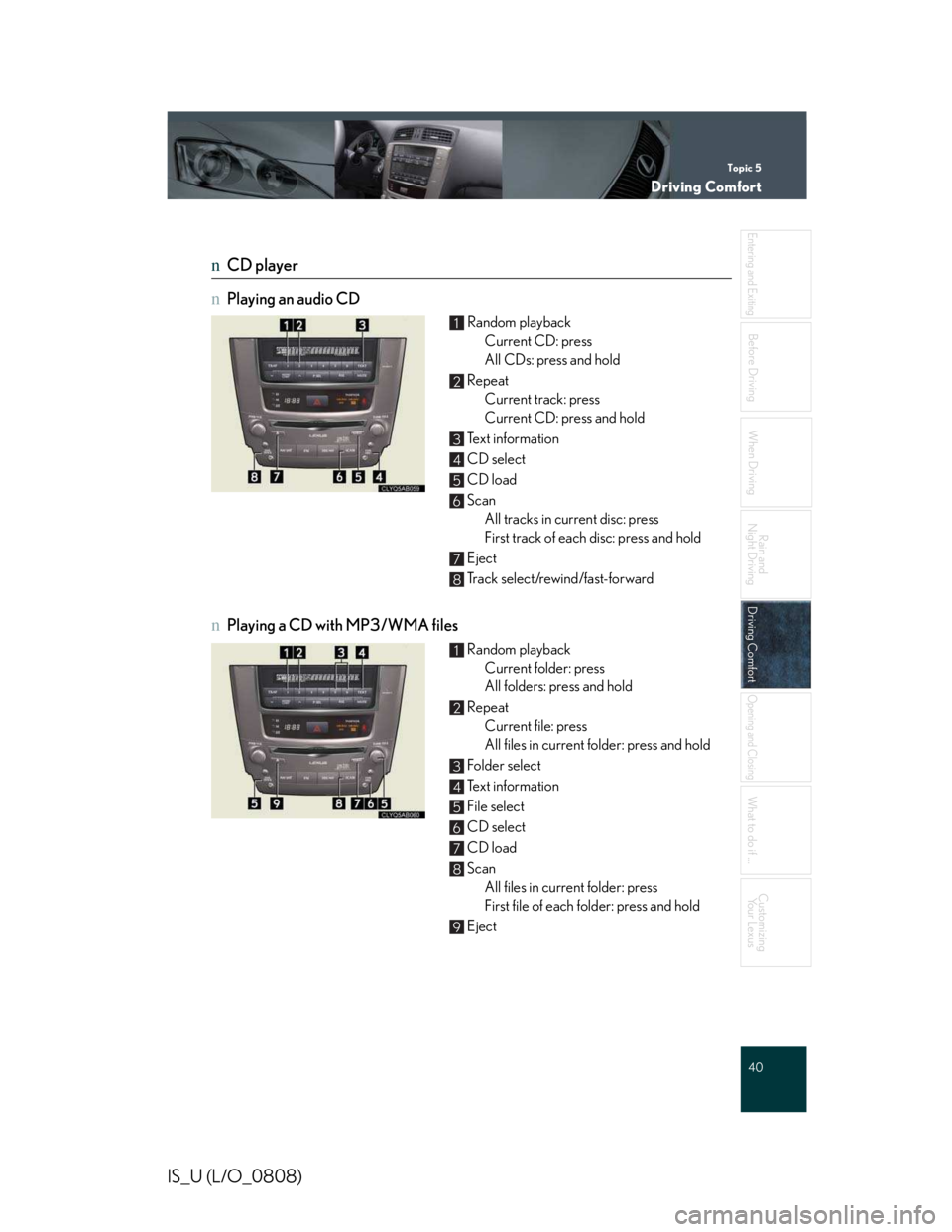
nCD player
nPlaying an audio CD
Random playback
Current CD: press
All CDs: press and hold
Repeat
Current track: press
Current CD: press and hold
Text information
CD select
CD load
Scan
All tracks in current disc: press
First track of each disc: press and hold
Eject
Track select/rewind/fast-forward
nPlaying a CD with MP3/WMA files
Random playback
Current folder: press
All folders: press and hold
Repeat
Current file: press
All files in current folder: press and hold
Folder select
Text information
File select
CD select
CD load
Scan
All files in current folder: press
First file of each folder: press and hold
Eject
1
2
3
4
5
6
7
8
1
2
3
4
5
6
7
8
9