automatic transmission LEXUS IS250 2016 Workshop Manual
[x] Cancel search | Manufacturer: LEXUS, Model Year: 2016, Model line: IS250, Model: LEXUS IS250 2016Pages: 542, PDF Size: 9.65 MB
Page 498 of 542
Topic 3
When Driving
19
IS_U (L/O_0808)
Engine (ignition) Switch
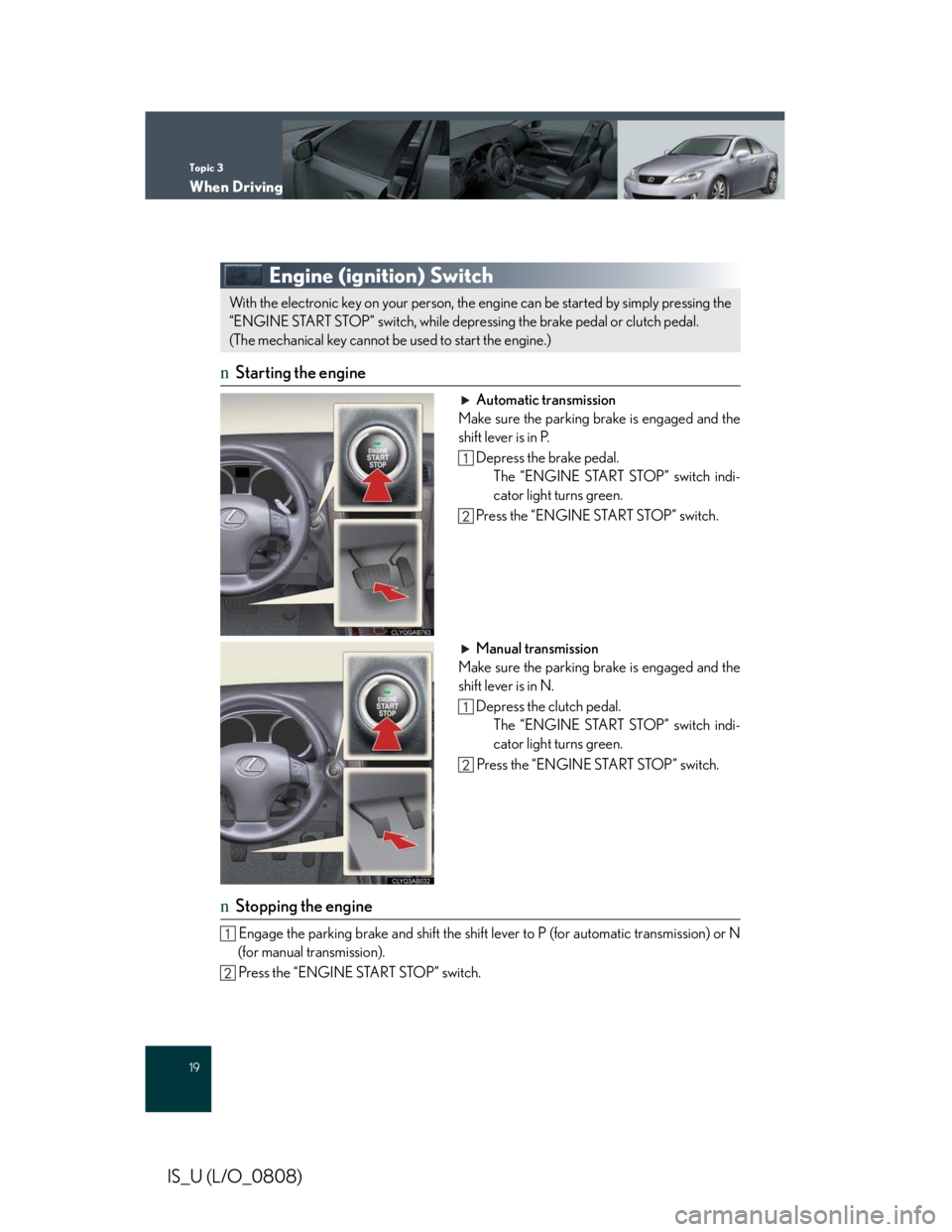
nStarting the engine
Automatic transmission
Make sure the parking brake is engaged and the
shift lever is in P.
Depress the brake pedal.
The “ENGINE START STOP” switch indi-
cator light turns green.
Press the “ENGINE START STOP” switch.
Manual transmission
Make sure the parking brake is engaged and the
shift lever is in N.
Depress the clutch pedal.
The “ENGINE START STOP” switch indi-
cator light turns green.
Press the “ENGINE START STOP” switch.
nStopping the engine
Engage the parking brake and shift the shift lever to P (for automatic transmission) or N
(for manual transmission).
Press the “ENGINE START STOP” switch.
With the electronic key on your person, the engine can be started by simply pressing the
“ENGINE START STOP” switch, while depressing the brake pedal or clutch pedal.
(The mechanical key cannot be used to start the engine.)
Page 499 of 542
Topic 3
When Driving
20
Entering and Exiting
Before Driving
Before Driving
When Driving
When Driving
Rain and
Night Driving
Driving Comfort
Opening and Closing
What to do if ...
Customizing
Yo u r L e x u s
IS_U (L/O_0808)
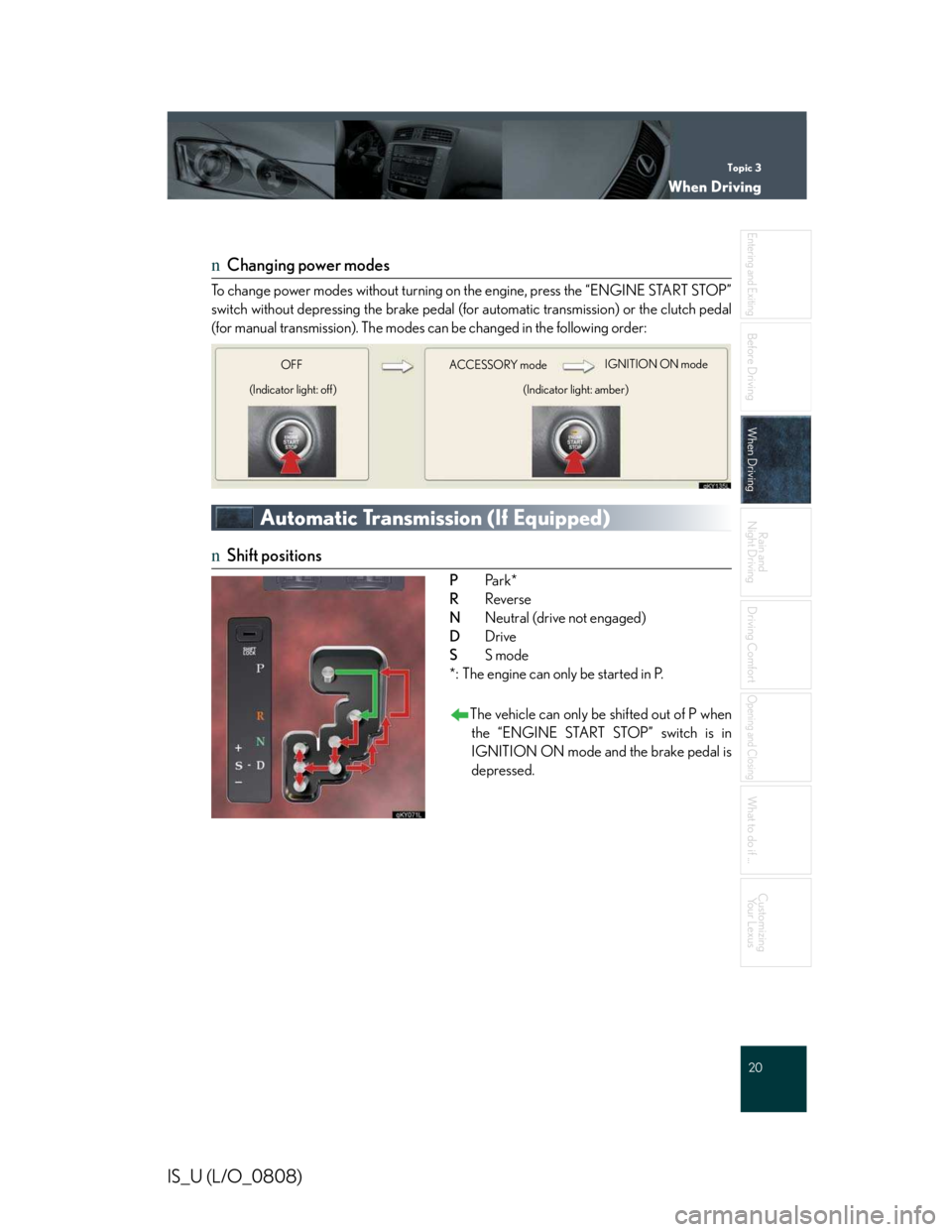
nChanging power modes
To change power modes without turning on the engine, press the “ENGINE START STOP”
switch without depressing the brake pedal (for automatic transmission) or the clutch pedal
(for manual transmission). The modes can be changed in the following order:
Automatic Transmission (If Equipped)
nShift positions
PPa rk *
RReverse
NNeutral (drive not engaged)
DDrive
SS mode
*: The engine can only be started in P.
The vehicle can only be shifted out of P when
the “ENGINE START STOP” switch is in
IGNITION ON mode and the brake pedal is
depressed.
ACCE SSORY modeIGNITION ON mode
(Indicator light: amber)
OFF
(Indicator light: off)
Page 502 of 542
Topic 3
When Driving
23
IS_U (L/O_0808)
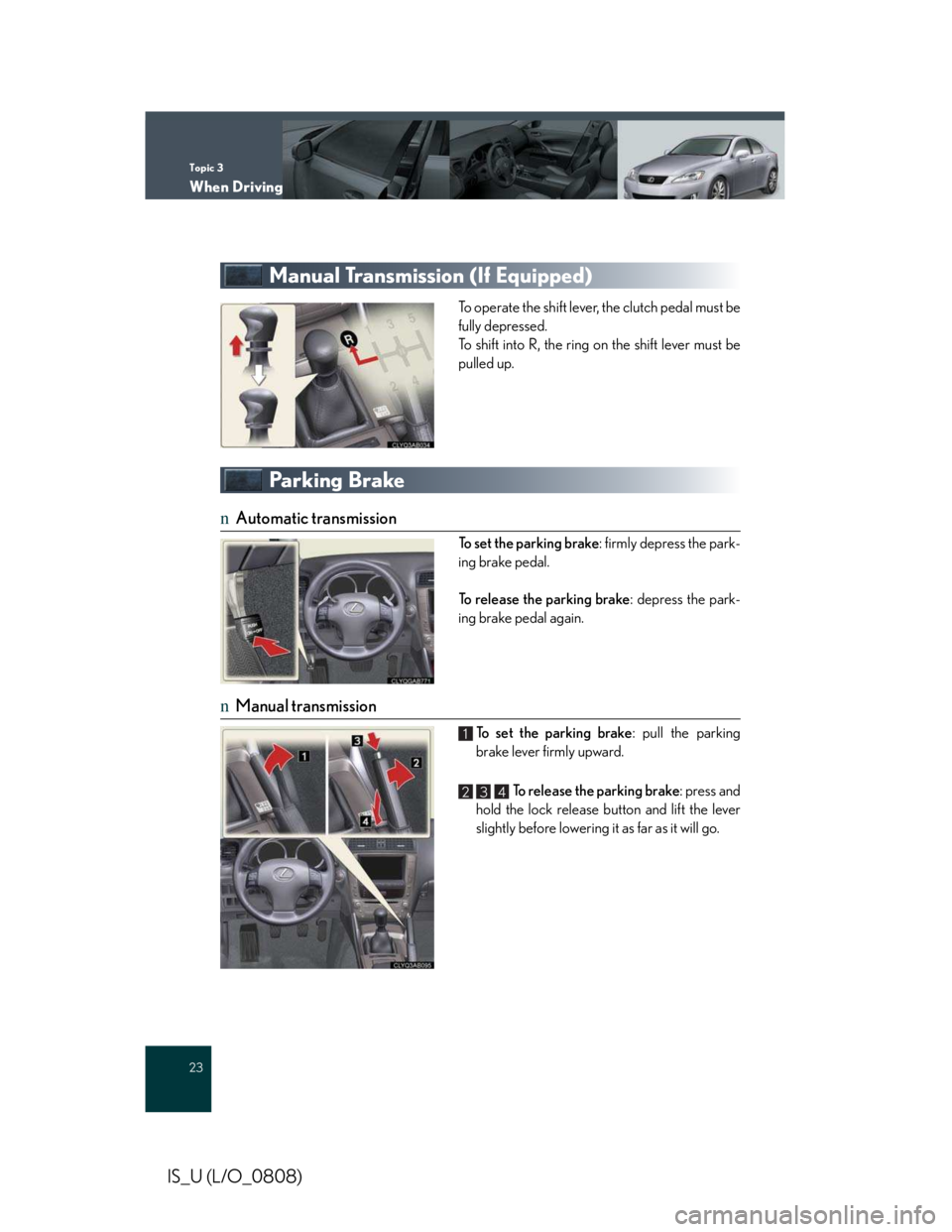
Manual Transmission (If Equipped)
To operate the shift lever, the clutch pedal must be
fully depressed.
To shift into R, the ring on the shift lever must be
pulled up.
Parking Brake
nAutomatic transmission
To set the parking brake: firmly depress the park-
ing brake pedal.
To release the parking brake: depress the park-
ing brake pedal again.
nManual transmission
To set the parking brake: pull the parking
brake lever firmly upward.
To release the parking brake: press and
hold the lock release button and lift the lever
slightly before lowering it as far as it will go.
1
234
Page 503 of 542
Topic 3
When Driving
24
Entering and Exiting
Before Driving
Before Driving
When Driving
When Driving
Rain and
Night Driving
Driving Comfort
Opening and Closing
What to do if ...
Customizing
Yo u r L e x u s
IS_U (L/O_0808)
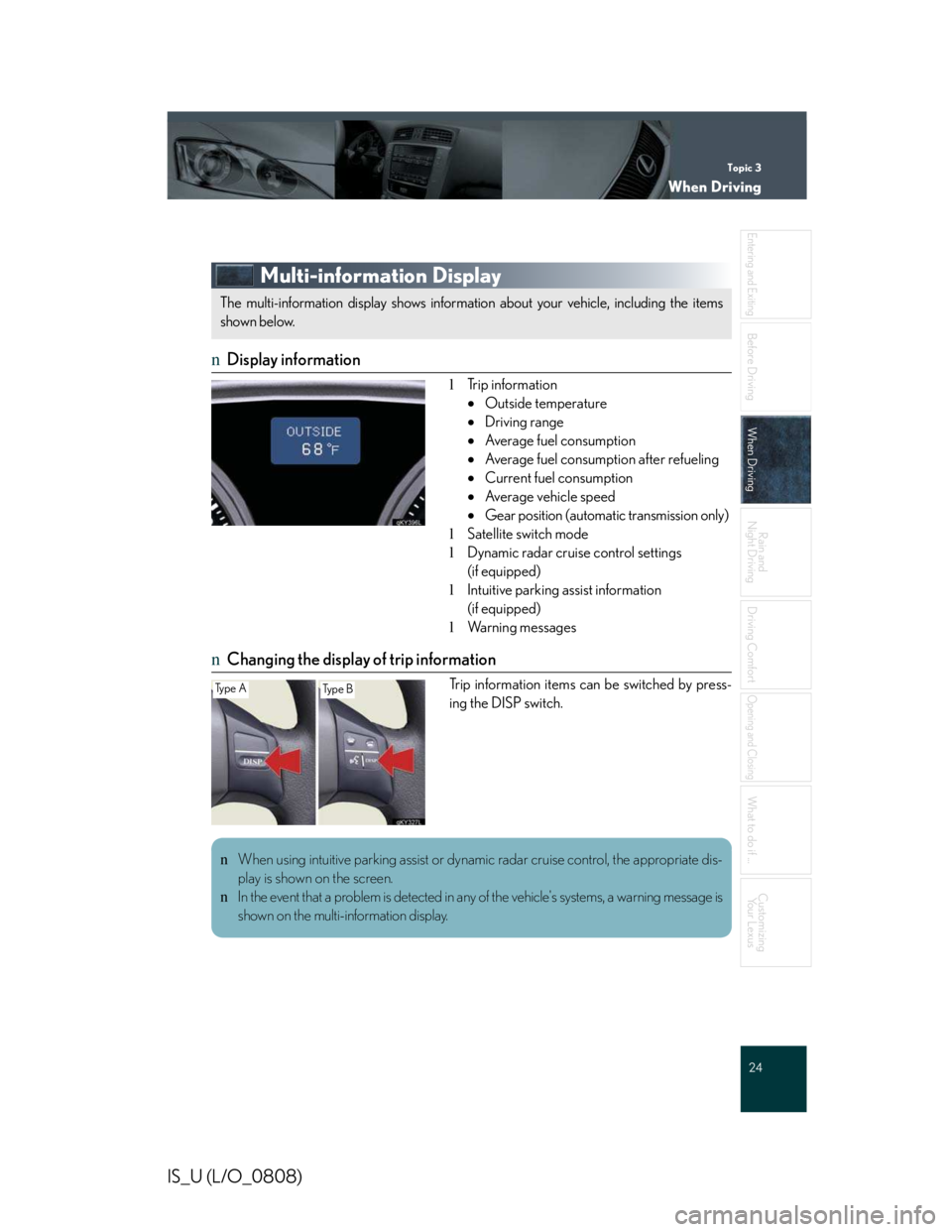
Multi-information Display
nDisplay information
lTrip information
•Outside temperature
•Driving range
•Average fuel consumption
•Average fuel consumption after refueling
•Current fuel consumption
•Average vehicle speed
•Gear position (automatic transmission only)
lSatellite switch mode
lDynamic radar cruise control settings
(if equipped)
lIntuitive parking assist information
(if equipped)
lWa r n i n g m e s s a g e s
nChanging the display of trip information
Trip information items can be switched by press-
ing the DISP switch.
The multi-information display shows information about your vehicle, including the items
shown below.
Ty p e ATy p e B
nWhen using intuitive parking assist or dynamic radar cruise control, the appropriate dis-
play is shown on the screen.
nIn the event that a problem is detected in any of the vehicle's systems, a warning message is
shown on the multi-information display.
Page 506 of 542
Topic 3
When Driving
27
IS_U (L/O_0808)
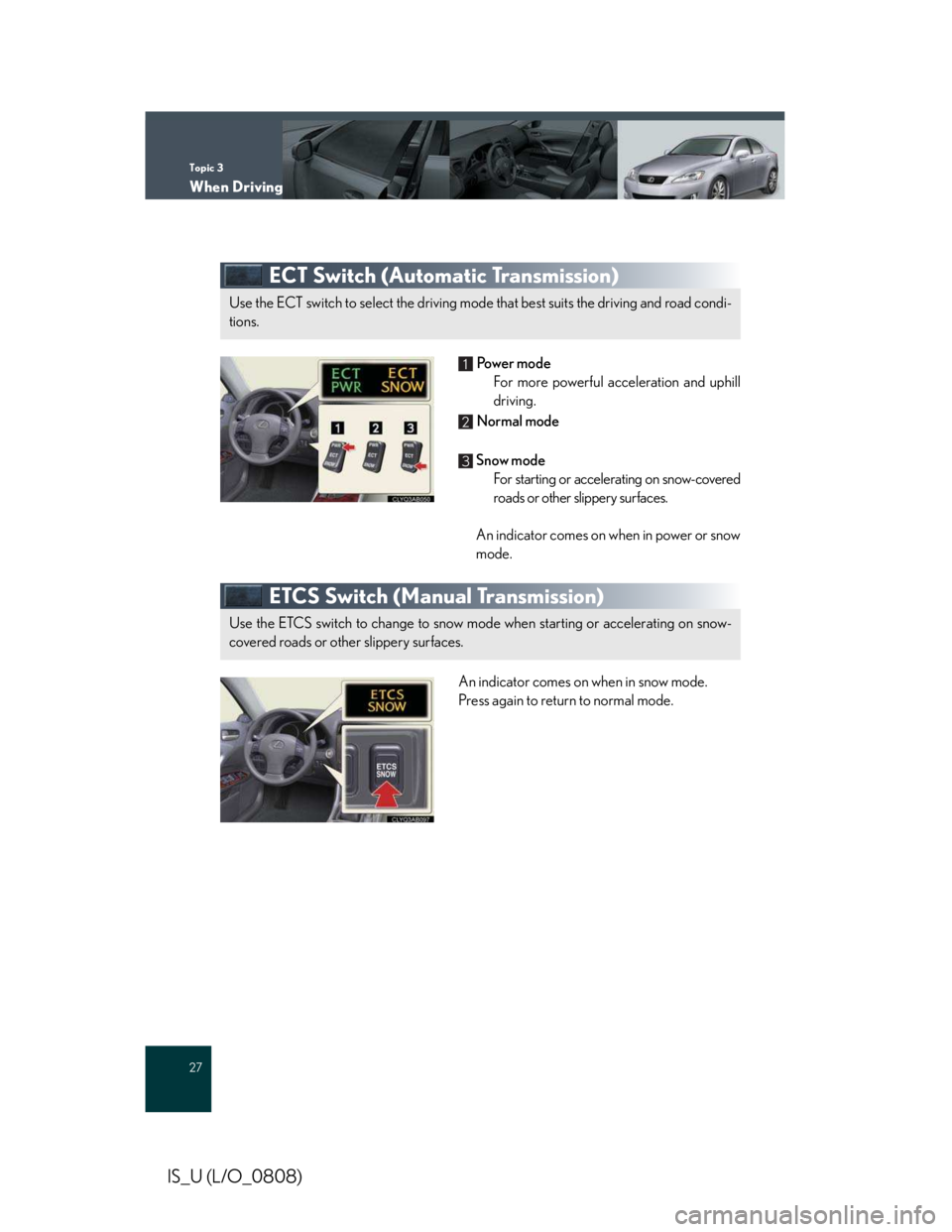
ECT Switch (Automatic Transmission)
Powe r m o d e
For more powerful acceleration and uphill
driving.
Normal mode
Snow mode
For starting or accelerating on snow-covered
roads or other slippery surfaces.
An indicator comes on when in power or snow
mode.
ETCS Switch (Manual Transmission)
An indicator comes on when in snow mode.
Press again to return to normal mode.
Use the ECT switch to select the driving mode that best suits the driving and road condi-
tions.
1
2
3
Use the ETCS switch to change to snow mode when starting or accelerating on snow-
covered roads or other slippery surfaces.
Page 534 of 542
58
Entering and Exiting
Before Driving
When Driving
Rain and
Night Driving
Driving Comfort
Opening and Closing
What to do if ...
Customizing
Yo u r L e x u s
IS_U (L/O_0808)
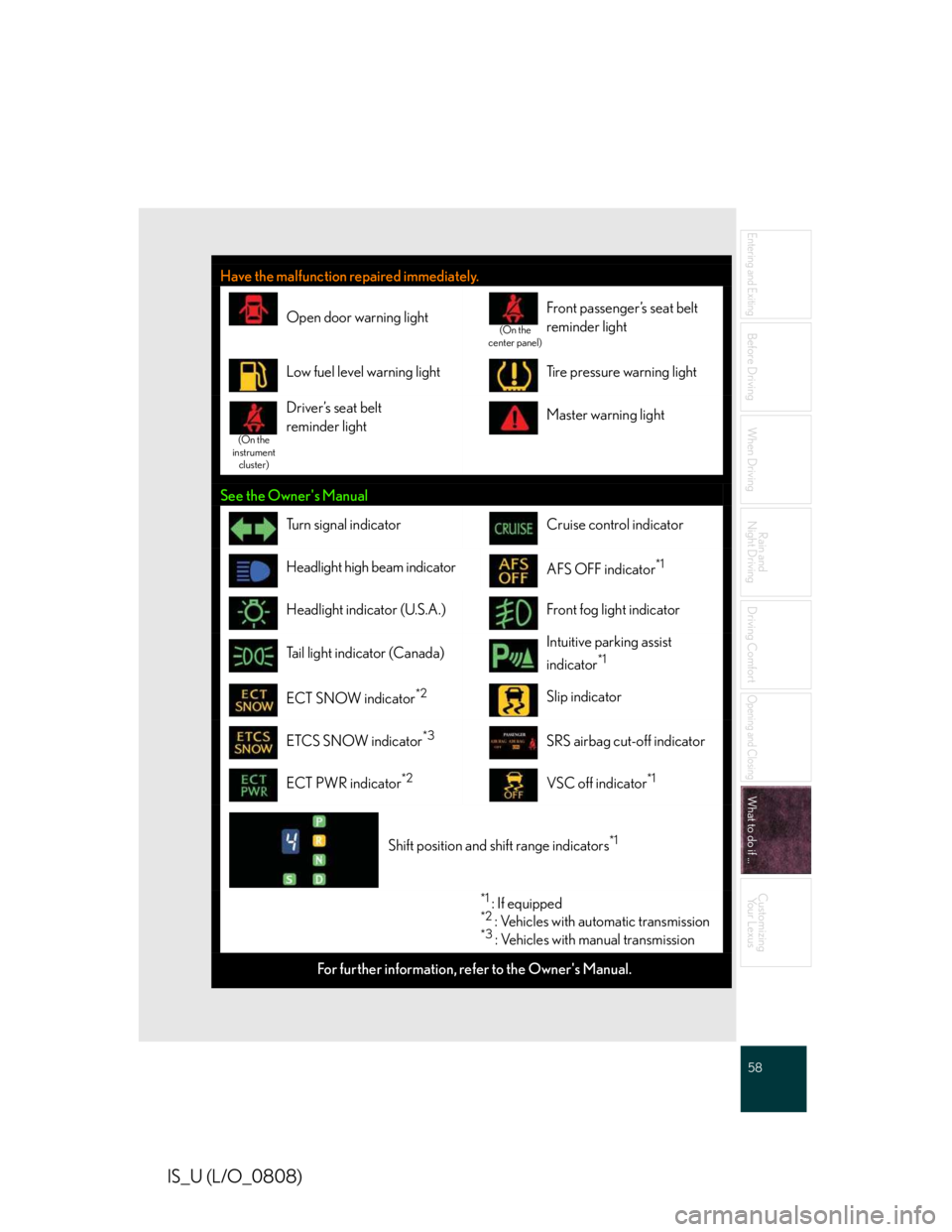
Have the malfunction repaired immediately.
Open door warning light(On the center panel)
Front passenger’s seat belt
reminder light
Low fuel level warning lightTire pressure warning light
(On the instrument cluster)
Driver’s seat belt
reminder lightMaster warning light
See the Owner's Manual
Tu r n s i g n a l i n d i c a t o rCruise control indicator
Headlight high beam indicatorAFS OFF indicator*1
Headlight indicator (U.S.A.)Front fog light indicator
Tail light indicator (Canada)Intuitive parking assist
indicator*1
ECT SNOW indicator*2Slip indicator
ETCS SNOW indicator*3SRS airbag cut-off indicator
ECT PWR indicator*2VSC off indicator*1
Shift position and shift range indicators*1
*1 : If equipped*2 : Vehicles with automatic transmission*3 : Vehicles with manual transmission
For further information, refer to the Owner's Manual.
Page 536 of 542
60
Entering and Exiting
Before Driving
When Driving
Rain and
Night Driving
Driving Comfort
Opening and Closing
What to do if ...
Customizing
Yo u r L e x u s
IS_U (L/O_0808)
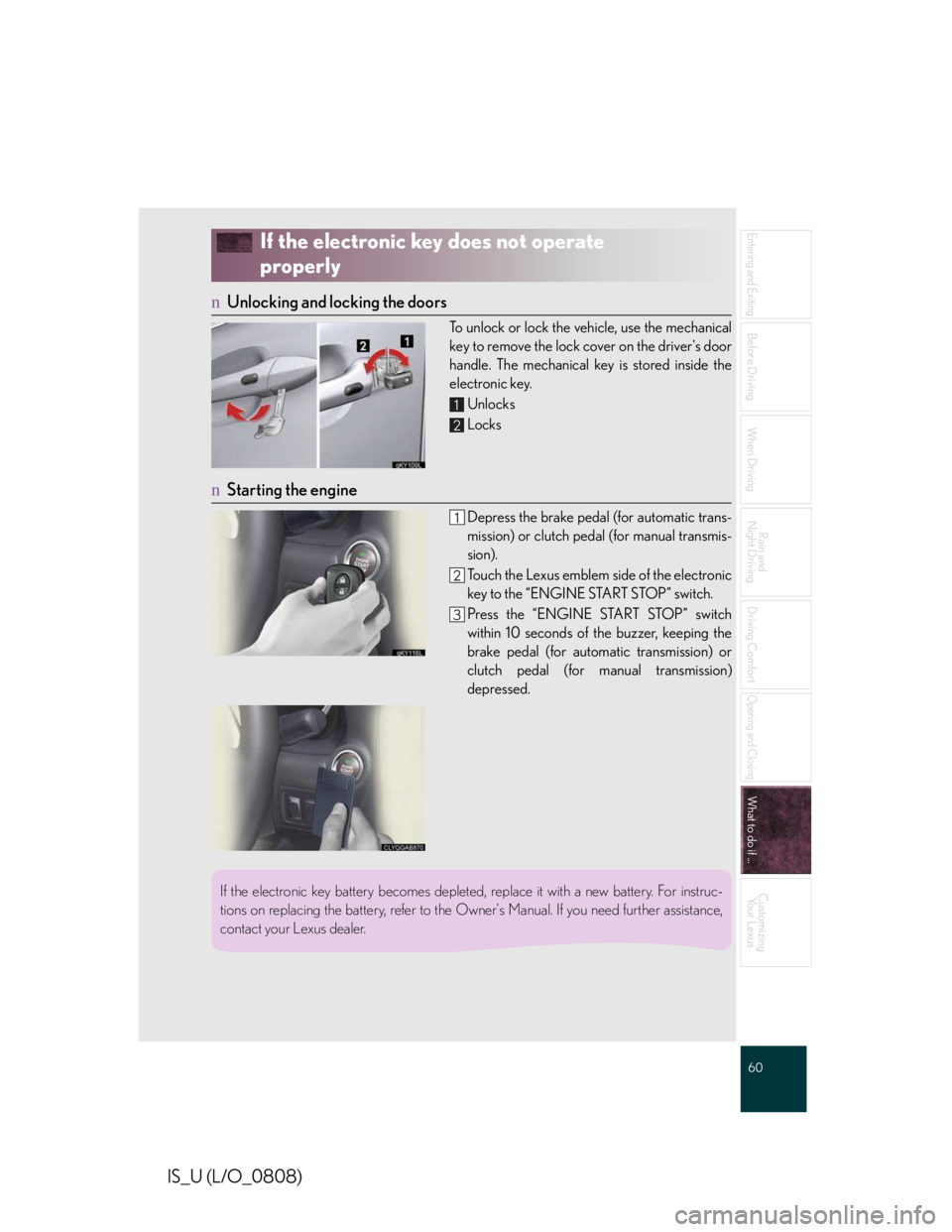
If the electronic key does not operate
properly
nUnlocking and locking the doors
To unlock or lock the vehicle, use the mechanical
key to remove the lock cover on the driver's door
handle. The mechanical key is stored inside the
electronic key.
Unlocks
Locks
nStarting the engine
Depress the brake pedal (for automatic trans-
mission) or clutch pedal (for manual transmis-
sion).
Touch the Lexus emblem side of the electronic
key to the “ENGINE START STOP” switch.
Press the “ENGINE START STOP” switch
within 10 seconds of the buzzer, keeping the
brake pedal (for automatic transmission) or
clutch pedal (for manual transmission)
depressed.
1
2
If the electronic key battery becomes depleted, replace it with a new battery. For instruc-
tions on replacing the battery, refer to the Owner's Manual. If you need further assistance,
contact your Lexus dealer.
Page 537 of 542
What to do if ...
61
IS_U (L/O_0808)
If the engine doesn't start
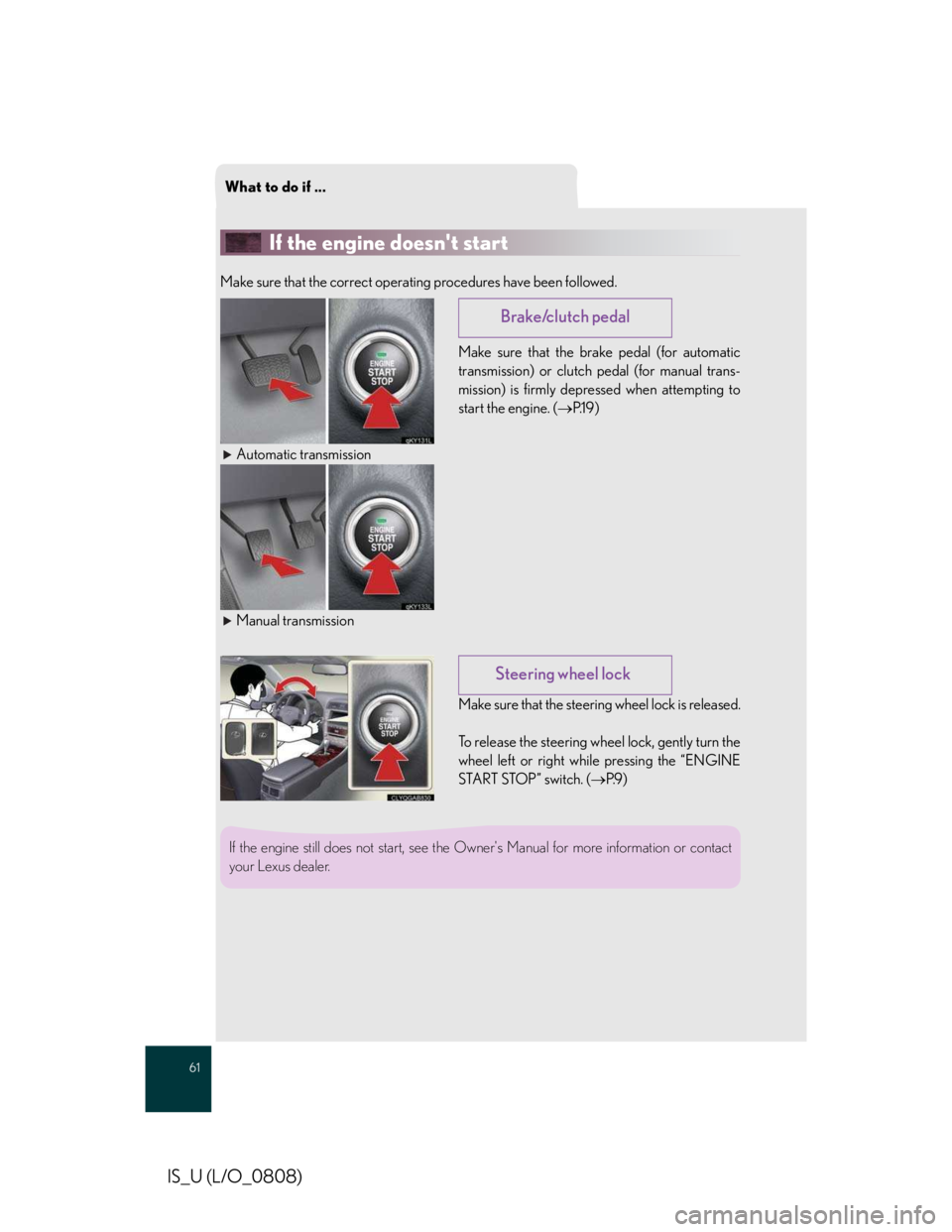
Make sure that the correct operating procedures have been followed.
Make sure that the brake pedal (for automatic
transmission) or clutch pedal (for manual trans-
mission) is firmly depressed when attempting to
start the engine. (→P.1 9 )
Automatic transmission
Manual transmission
Make sure that the steering wheel lock is released.
To release the steering wheel lock, gently turn the
wheel left or right while pressing the “ENGINE
START STOP” switch. (→P.9 )
Brake/clutch pedal
Steering wheel lock
If the engine still does not start, see the Owner's Manual for more information or contact
your Lexus dealer.
Page 538 of 542
62
Entering and Exiting
Before Driving
When Driving
Rain and
Night Driving
Driving Comfort
Opening and Closing
What to do if ...
Customizing
Yo u r L e x u s
IS_U (L/O_0808)
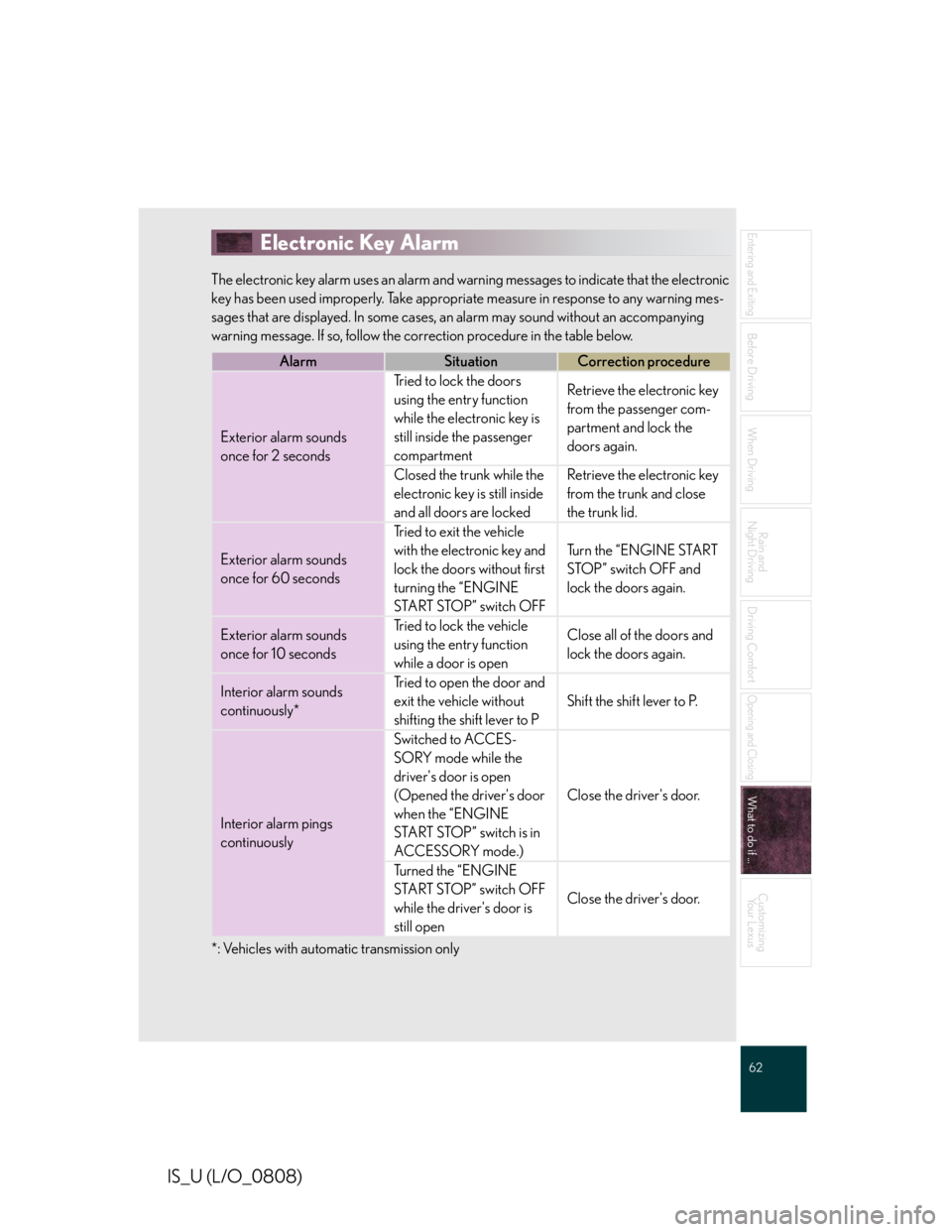
Electronic Key Alarm
The electronic key alarm uses an alarm and warning messages to indicate that the electronic
key has been used improperly. Take appropriate measure in response to any warning mes-
sages that are displayed. In some cases, an alarm may sound without an accompanying
warning message. If so, follow the correction procedure in the table below.
*: Vehicles with automatic transmission only
AlarmSituationCorrection procedure
Exterior alarm sounds
once for 2 seconds
Tried to lock the doors
using the entry function
while the electronic key is
still inside the passenger
compartment
Retrieve the electronic key
from the passenger com-
partment and lock the
doors again.
Closed the trunk while the
electronic key is still inside
and all doors are locked
Retrieve the electronic key
from the trunk and close
the trunk lid.
Exterior alarm sounds
once for 60 seconds
Tried to exit the vehicle
with the electronic key and
lock the doors without first
turning the “ENGINE
START STOP” switch OFF
Turn the “ENGINE START
STOP” switch OFF and
lock the doors again.
Exterior alarm sounds
once for 10 seconds
Tried to lock the vehicle
using the entry function
while a door is open
Close all of the doors and
lock the doors again.
Interior alarm sounds
continuously*
Tried to open the door and
exit the vehicle without
shifting the shift lever to P
Shift the shift lever to P.
Interior alarm pings
continuously
Switched to ACCES-
SORY mode while the
driver's door is open
(Opened the driver's door
when the “ENGINE
START STOP” switch is in
ACCESSORY mode.)
Close the driver's door.
Tu r n e d t h e “ E N G I N E
START STOP” switch OFF
while the driver's door is
still open
Close the driver's door.
Page 540 of 542
64
Entering and Exiting
Before Driving
When Driving
Rain and
Night Driving
Driving Comfort
Opening and Closing
What to do if ...
Customizing
Yo u r L e x u s
IS_U (L/O_0808)
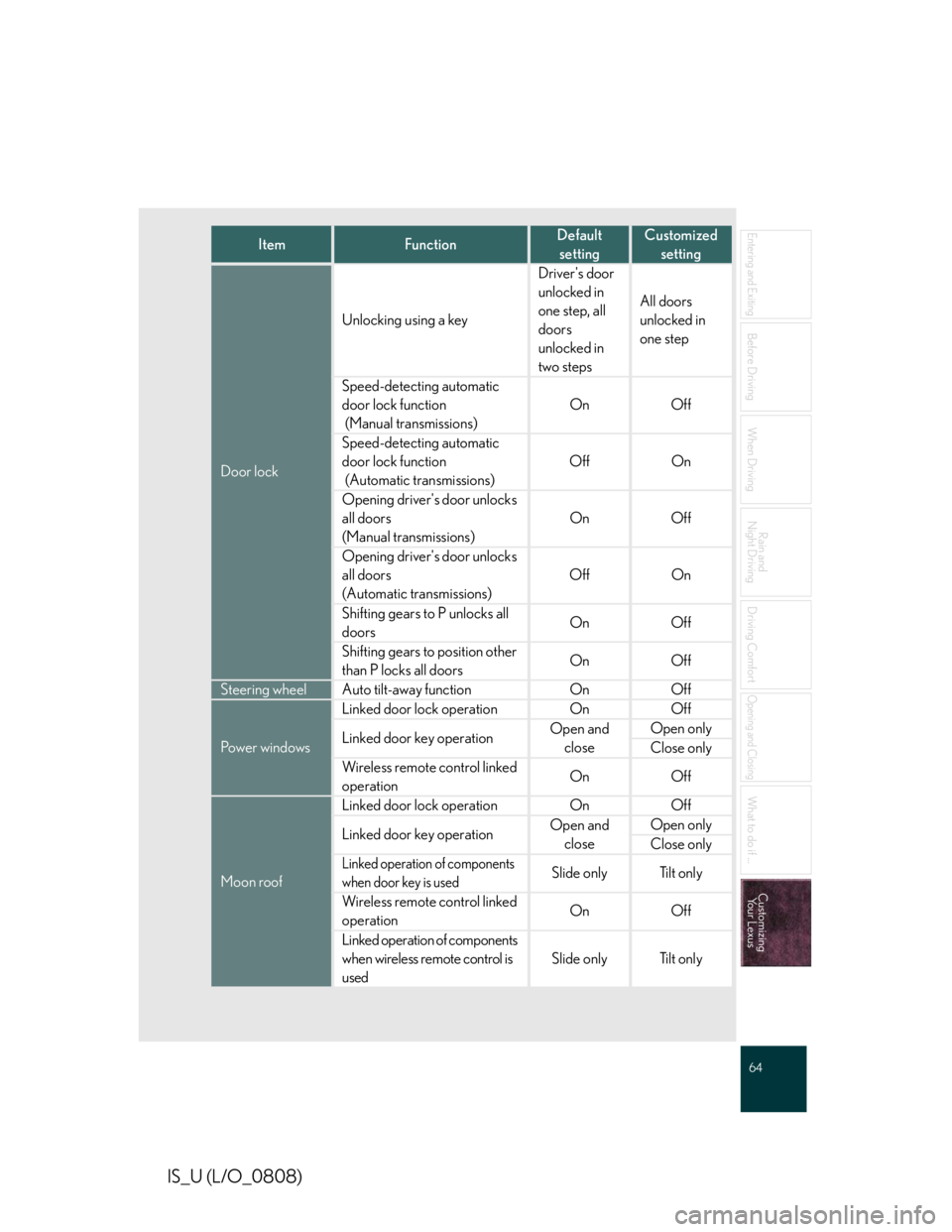
ItemFunctionDefault
setting
Customized
setting
Door lock
Unlocking using a key
Driver's door
unlocked in
one step, all
doors
unlocked in
two steps
All doors
unlocked in
one step
Speed-detecting automatic
door lock function
(Manual transmissions)
OnOff
Speed-detecting automatic
door lock function
(Automatic transmissions)
OffOn
Opening driver's door unlocks
all doors
(Manual transmissions)
OnOff
Opening driver's door unlocks
all doors
(Automatic transmissions)
OffOn
Shifting gears to P unlocks all
doorsOnOff
Shifting gears to position other
than P locks all doorsOnOff
Steering wheelAuto tilt-away functionOnOff
Pow e r w i n d o w s
Linked door lock operationOnOff
Linked door key operationOpen and
close
Open only
Close only
Wireless remote control linked
operationOnOff
Moon roof
Linked door lock operationOnOff
Linked door key operationOpen and
close
Open only
Close only
Linked operation of components
when door key is used
Slide onlyTi l t o n l y
Wireless remote control linked
operationOnOff
Linked operation of components
when wireless remote control is
used
Slide onlyTi l t o n l y