park assist Lexus IS250C 2010 User Guide
[x] Cancel search | Manufacturer: LEXUS, Model Year: 2010, Model line: IS250C, Model: Lexus IS250C 2010Pages: 586, PDF Size: 31.62 MB
Page 200 of 586

199
2-4. Using other driving systems
2
When driving
10_IS250C/350C_U
The display and buzzer system■ Corner sensor operation display and distance to an obstacle
The system operates when the vehicle approaches within approxi-
mately 1.6 ft. (50 cm) of an obstacle.
Approximately 1.2 ft. (37.5 cm)
to 1.6 ft. (50 cm) from the obsta-
cle
Approximately 0.8 ft. (25 cm)
to 1.2 ft. (37.5 cm) from the
obstacle
Flashing: Within 0.8 ft. (25 cm)
of the obstacle
■Intuitive parking assist switch ( →P. 3 4 9 )
When on, an indicator is dis-
played to inform the driver that
the function is operational.
Page 203 of 586

202
2-4. Using other driving systems
10_IS250C/350C_U
■Sensor detection information
●Certain vehicle conditions and the surrounding environment may affect the
ability of the sensor to correctly detect obstacles. Particular instances where this
may occur are listed below.
• There is dirt, snow or ice on the sensor.
• The sensor is frozen.
•The sensor is covered in any way.
• The vehicle is leaning considerably to one side.
• On an extremely bumpy road, on an incline, on gravel, or on grass.
• The vicinity of the vehicle is noisy due to vehicle horns, motorcycle engines,air brakes of large vehicles, or other loud noises producing ultrasonic waves.
• There is another vehicle equipped with parking assist sensors in the vicinity.
• The sensor is coated with a sheet of spray or heavy rain.
• The vehicle is equipped with a fender pole or wireless antenna.
• Towing eyelets are installed.
• The bumper or sensor receives a strong impact.
• The vehicle is approaching a tall or curved curb.
• In harsh sunlight or intense cold weather
In addition to the examples above, there are instances in which, because of their
shapes, signs and other objects may be judged by the sensor to be closer than they
are.
●The shape of the obstacle may prevent the sensor from detecting it. Pay particu-
lar attention to the following obstacles.
• Wires, fences, ropes etc.
• Cotton, snow and other materials that absorb radio waves
• Sharply-angled objects
• Low obstacles
• Tall obstacles with upper sections projecting outwards in the direction of your
vehicle
■When the display flashes and a message is displayed
→ P. 4 7 2
Page 211 of 586

210
2-4. Using other driving systems
10_IS250C/350C_U
Hill-start assist control
■Hill-start assist control can be operated when
●The shift lever is in a position other than P (vehicles with automatic transmis-
sion).
●The parking brake is not applied.
●The accelerator pedal is not depressed.
■Hill-start assist control
●While hill-start assist control is operating, the brakes remain automatically
applied after the driver releases the brake pedal. The stop lights and the high
mounted stoplight turn on.
●Hill-start assist control operates for about 2 seconds after the brake pedal is
released.
●If the slip indicator does not flash and the buzzer does not sound when the brake
pedal is further depressed, slightly reduce the pressure on the brake pedal (do
not allow the vehicle to roll backward) and then firmly depress it again. If the sys-
tem still does not operate, check if the operating conditions explained above
have been met.
Hill-start assist control helps to prevent the vehicle from rolling backwards
when starting on an incline or slippery slope.
To engage hill-start assist con-
trol, further depress the brake
pedal when the vehicle is
stopped completely.
A buzzer will sound once to
indicate the system is activated.
The slip indicator will also start
flashing.
Page 212 of 586

211
2-4. Using other driving systems
2
When driving
10_IS250C/350C_U
■Hill-start assist control buzzer
●When hill-start assist control is activated, the buzzer will sound once.
●In the following situations, hill-start assist control will be canceled and the
buzzer will sound twice.
• No attempt is made to drive the vehicle within approximately 2 seconds ofreleasing the brake pedal.
• The shift lever is moved to P (vehicles with automatic transmission).
• The parking brake is applied.
• The brake pedal is depressed again.
• The brake pedal has been depressed for more than approximately 3 minutes.
■If the slip indicator comes on
It may indicate a malfunction in the system. Contact your Lexus dealer.
CAUTION
■Hill-start assist control
●Do not overly rely on hill-start assist control. Hill-start assist control may not oper-
ate effectively on extremely steep inclines or roads covered in ice.
●Unlike the parking brake, hill-start assist control is not intended to hold the vehi-
cle stationary for an extended period of time. Do not attempt to use hill-start
assist control to hold the vehicle on an incline for an extended period of time, as
doing so may lead to an accident.
Page 351 of 586

350
3-7. Other interior features
10_IS250C/350C_U
Change the settings.
Press the “ON/OFF” button to
change the settings (e.g. on/off).
■Items that can be set us ing the satellite switches
STEP3STEP3
Intuitive parking assist ( →P. 198) on/off (if
equipped)
Tire pressure warning system initialization
(→ P. 4 0 7 )
ID code selection for tire inflation pressure warn-
ing system ( →P. 4 0 9 )
AFS (Adaptive Front-lighting System) ( →P. 1 74 )
on/off (if equipped)
Vehicle speed indicator on/off and speed setting
(→ P. 1 6 1 )
Tacho indicator on/off and engine speed (rpm)
setting ( →P. 1 6 1 )
Page 352 of 586
351
3-7. Other interior features
3
Interior features
10_IS250C/350C_U
■Changing the settings
Each item is displayed and its setting can be changed only in the following condi-
tions:
●Intuitive parking assist: When the “ENGINE START STOP” switch is in IGNI-
TION ON mode.
●Items other than the above: When the “ENGINE START STOP” switch is in
IGNITION ON mode and the vehicle is stopped.
■Display
The display will return to the original display if the satellite switches are not oper-
ated for an extended period.
Even if the display is in satellite switch mode, it will switch in the event of a warning
or when the radar cruise control (if equipped) is used. If this occurs, press any of the
satellite switches or “DISP” switch on the steering wheel to return the display to sat-
ellite switch mode.
Page 438 of 586
437
4-3. Do-it-yourself maintenance
4
Maintenance and care
10_IS250C/350C_U
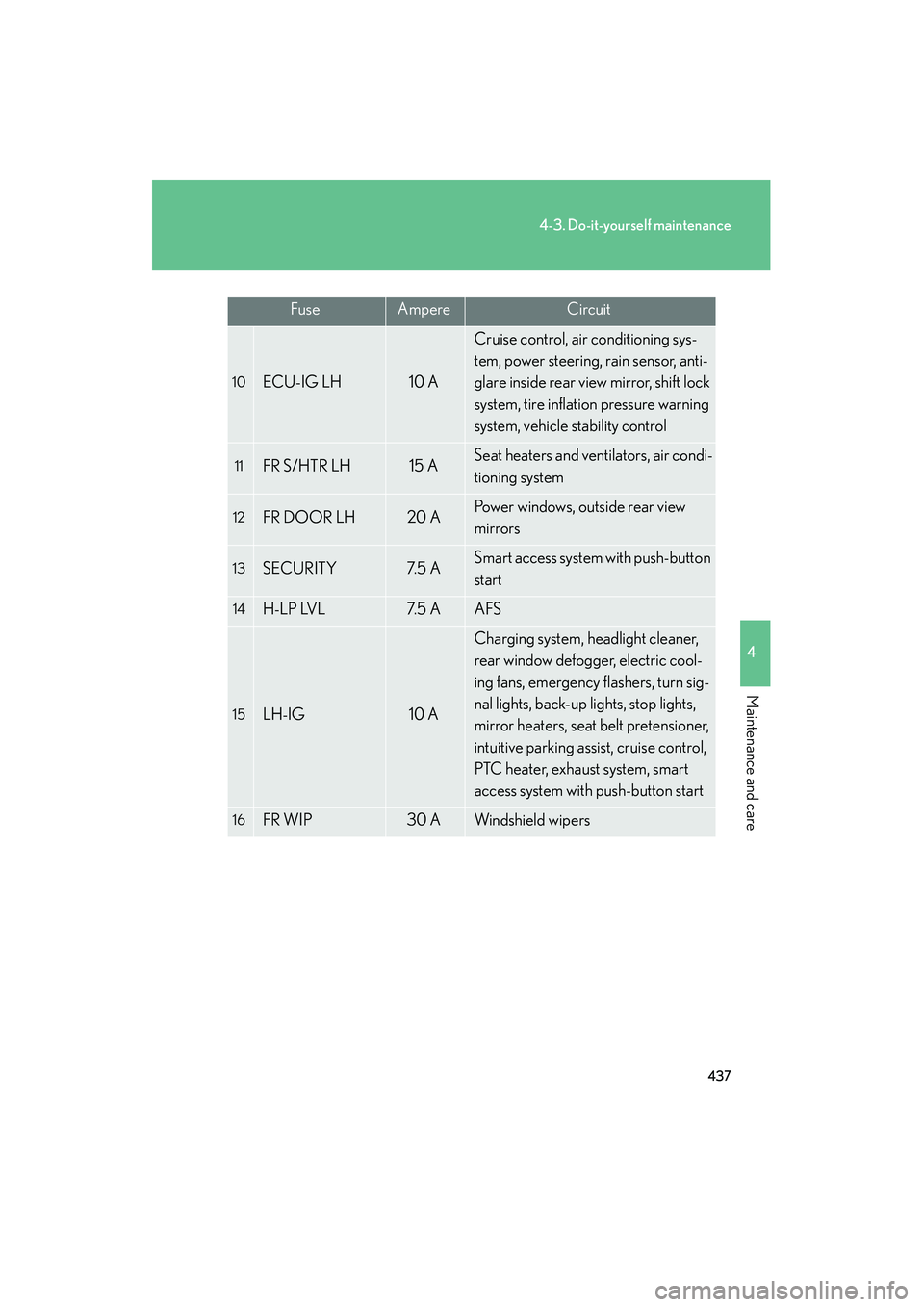
10ECU-IG LH10 A
Cruise control, air conditioning sys-
tem, power steering, rain sensor, anti-
glare inside rear view mirror, shift lock
system, tire inflation pressure warning
system, vehicle stability control
11FR S/HTR LH15 ASeat heaters and ventilators, air condi-
tioning system
12FR DOOR LH20 APower windows, outside rear view
mirrors
13SECURITY7. 5 ASmart access system with push-button
start
14H-LP LVL7. 5 AAFS
15LH-IG10 A
Charging system, headlight cleaner,
rear window defogger, electric cool-
ing fans, emergency flashers, turn sig-
nal lights, back-up lights, stop lights,
mirror heaters, seat belt pretensioner,
intuitive parking assist, cruise control,
PTC heater, exhaust system, smart
access system with push-button start
16FR WIP30 AWindshield wipers
FuseAmpereCircuit
Page 440 of 586

439
4-3. Do-it-yourself maintenance
4
Maintenance and care
10_IS250C/350C_U
10CIG15 ACigarette lighter
11PWR OUTLET15 APo w e r o u t l e t
12FR DOOR RH20 APo w e r w i n d o w s , o u t s i d e r e a r v i e w
mirrors
13AM27. 5 AStarting system
14RH-IG7. 5 A
Seat belt pretensioner, intuitive park-
ing assist, automatic transmission, seat
heater and ventilator
15FR S/HTR RH15 ASeat heaters and ventilators, air condi-
tioning system
16ECU-IG RH10 A
Power seats, headlights, front fog
lights, parking lights, license plate
lights, front side marker lights, wind-
shield washer, outside rear view mir-
rors, VDIM, air conditioning system,
pre-collision seat belt, electric tilt and
telescopic steering, power windows,
navigation system, vehicle stability
control, retractable hardtop, clock
FuseAmpereCircuit
Page 455 of 586

454
5-1. Essential information
10_IS250C/350C_U
■Emergency towing procedureRelease the parking brake.
Shift the shift lever to N.
Put the “ENGINE START STOP” switch in ACCESSORY mode or IGNI-
TION ON mode.
CAUTION
■Caution while towing
●Use extreme caution when towing the vehicle.
Avoid sudden starts or erratic driving maneuvers which place excessive stress on
the emergency towing eyelets and the cables or chains.
●If the engine is not running, the power assist for the brakes and steering will not
function, making steering and braking more difficult.
NOTICE
■To prevent causing serious da mage to the transmission
(vehicles with an automatic transmission)
Never tow this vehicle from the front with the rear wheels on the ground.
This may cause serious damage to the transmission.
■When towing a vehicle without using a towing dolly
(vehicles with a manual transmission)
The “ENGINE START STOP” switch must not be OFF.
STEP1
STEP2
STEP3
Page 474 of 586

5
When trouble arises
473
5-2. Steps to take in an emergency
10_IS250C/350C_U
Have the vehicle inspected by your Lexus dealer immediately.
A buzzer sounds and a message is shown. Failure to investigate the cause
of the following messages may lead to the system operating abnormally
and possibly cause an accident. Have the vehicle inspected by your
Lexus dealer immediately.
MessageDetails
(Flashing)
Indicates a malfunction in the steering lock system.
(If equipped)
Indicates a malfunction in the pre-collision system.
(If equipped)
Indicates intuitive parking assist malfunction. The malfunctioning assist-sensor is shown flashing on
the display.