automatic transmission Lexus IS250C 2010 Owner's Guide
[x] Cancel search | Manufacturer: LEXUS, Model Year: 2010, Model line: IS250C, Model: Lexus IS250C 2010Pages: 586, PDF Size: 31.62 MB
Page 154 of 586

153
2-1. Driving procedures
2
When driving
10_IS250C/350C_U
■If does not come on even after shifting the shift lever to S
This may indicate a malfunction in the automatic transmission system. Have the
vehicle inspected by your Lexus dealer immediately.
(In this situation, the vehicle will operate as if the shift lever is in D.)
■AI-SHIFT
The AI-SHIFT automatically shifts the gear to the optimal position according to the
driver performance and driving conditions.
The AI-SHIFT automatically operates when the shift lever is in the D position. How-
ever, operating the “-” shift paddle switch will restrict the function’s operation. (Shift-
ing the shift lever to the S position cancels the function.)
CAUTION
■When driving on slippery road surfaces
Be careful of downshifting and sudden acceleration, as this could result in the vehi-
cle skidding to the side or spinning.
Page 158 of 586

157
2-1. Driving procedures
2
When driving
10_IS250C/350C_U
Parking brake
■Usage in winter time
See “Winter driving tips” for parking brake usage in winter time. (→P. 220)
NOTICE
■Before driving
Fully release the parking brake.
Driving the vehicle with the parking brake set will lead to brake components over-
heating, which may affect braking performance and increase brake wear.
Vehicles with an automatic transmission
Sets the parking brake
*
(Depressing the pedal again
releases the parking brake.)
*: Fully depress the parkingbrake pedal with your left
foot while depressing the
brake pedal with your right
foot.
Vehicles with a manual transmission
Sets
the parking brake
Fully set the parking brake while depressing the brake pedal.
Releases the parking brake
Slightly raise the lever and lower it completely while pressing the button.
Canada
U.S .A .
Canada
U.S.A.
Page 167 of 586

166
2-2. Instrument cluster
10_IS250C/350C_U
■Indicators
The indicators inform the driver of the operating state of the vehi-
cle’s various systems.
Turn signal indicator
(→ P. 1 5 6 )
(vehicles with
an automatic
transmission)
“ECT SNOW” indicator
(→ P. 1 4 8 )
Headlight high beam indi-
cator ( →P. 1 7 3 )
(vehicles with
a manual
transmission)
“ETCS SNOW” indicator
(→ P. 1 5 5 )
(U.S.A.)
Headlight indicator
(→ P. 1 7 3 )
(vehicles with
an automatic
transmission)
“ECT PWR” indicator
(→ P. 1 4 8 )
(Canada)
Tail light indicator
(→ P. 1 7 3 ) Cruise control indicator
(→ P. 1 8 3 )
Front fog light indicator
(→ P. 1 76 )
(if equipped)
“AFS OFF” indicator
(→ P. 1 74 )
(vehicles with an automatic trans-
mission)
Shift position and shift range indica-
tors ( →P. 1 4 7 )
(if equipped)
Intuitive parking assist
indicator ( →P. 1 9 8 )
Slip indicator ( →P. 2 0 5 )
VSC off indicator
(→ P. 2 0 6 )
SRS airbag on-off indica-
tor (→ P. 111)
*
*
*
*
Page 172 of 586

171
2-2. Instrument cluster
2
When driving
10_IS250C/350C_U■
Gear position display
(vehicles with an automatic transmission only)
Indicates the current gear, and the range of gears
that is available when the shift lever is in the D or S
position. The gear range is shown by the number of
dots ( •) and the current gear is shown as a number.
The transmission automatically selects the gears
within the driver selected gear range.
In the illustration to the left, a range of 6 available gears
(1 through 6) has been selected by the driver. (The shift
lever is in the D or S position with 6 ranges enabled) It is
possible for the transmission to automatically select
between all 6 of the gears. In this case, the transmission
has selected third gear.
■System check display
After switching the “ENGINE START STOP” switch to IGNITION ON mode,
“CHECK” is displayed while system operation is checked. When the system check
is complete, “COMPLETE” is displayed before returning to the normal screen.
■Outside temperature display
In the following situations, the correct outside temperature may not be displayed, or
the display may take longer than normal to change.
●When stopped, or driving at low speeds (less than 12 mph [20 km/h])
●When the outside temperature has changed suddenly (at the entrance/exit of a
garage, tunnel, etc.)
Page 186 of 586

185
2-4. Using other driving systems
2
When driving
10_IS250C/350C_U
■Cruise control can be set when
●Vehicles with an automatic transmission: the shift lever is in the D position or S
position. However, it cannot be set if any of the ranges 1 through 3 has been
selected.
●Vehicle speed is more than approximately 25 mph (40 km/h).
■Accelerating
The vehicle can be accelerated normally. After acceleration, the set speed
resumes.
■Automatic cruise control cancellation
The set speed is automatically cancelled in any of the following situations.
●Actual vehicle speed falls more than 10 mph (16 km/h) below the preset vehicle
speed
At this time, the memorized set speed is not retained.
●Actual vehicle speed is below 25 mph (40km/h)
●VSC is activated
■If the cruise control indicator light flashes
Turn the “ON-OFF” button off once, and then reactivate the system.
If the cruise control speed cannot be set or if the cruise control cancels immediately
after being activated, there may be a malfunction in the cruise control system. Have
the vehicle inspected by your Lexus dealer.
Page 212 of 586

211
2-4. Using other driving systems
2
When driving
10_IS250C/350C_U
■Hill-start assist control buzzer
●When hill-start assist control is activated, the buzzer will sound once.
●In the following situations, hill-start assist control will be canceled and the
buzzer will sound twice.
• No attempt is made to drive the vehicle within approximately 2 seconds ofreleasing the brake pedal.
• The shift lever is moved to P (vehicles with automatic transmission).
• The parking brake is applied.
• The brake pedal is depressed again.
• The brake pedal has been depressed for more than approximately 3 minutes.
■If the slip indicator comes on
It may indicate a malfunction in the system. Contact your Lexus dealer.
CAUTION
■Hill-start assist control
●Do not overly rely on hill-start assist control. Hill-start assist control may not oper-
ate effectively on extremely steep inclines or roads covered in ice.
●Unlike the parking brake, hill-start assist control is not intended to hold the vehi-
cle stationary for an extended period of time. Do not attempt to use hill-start
assist control to hold the vehicle on an incline for an extended period of time, as
doing so may lead to an accident.
Page 222 of 586
221
2-5. Driving information
2
When driving
10_IS250C/350C_U
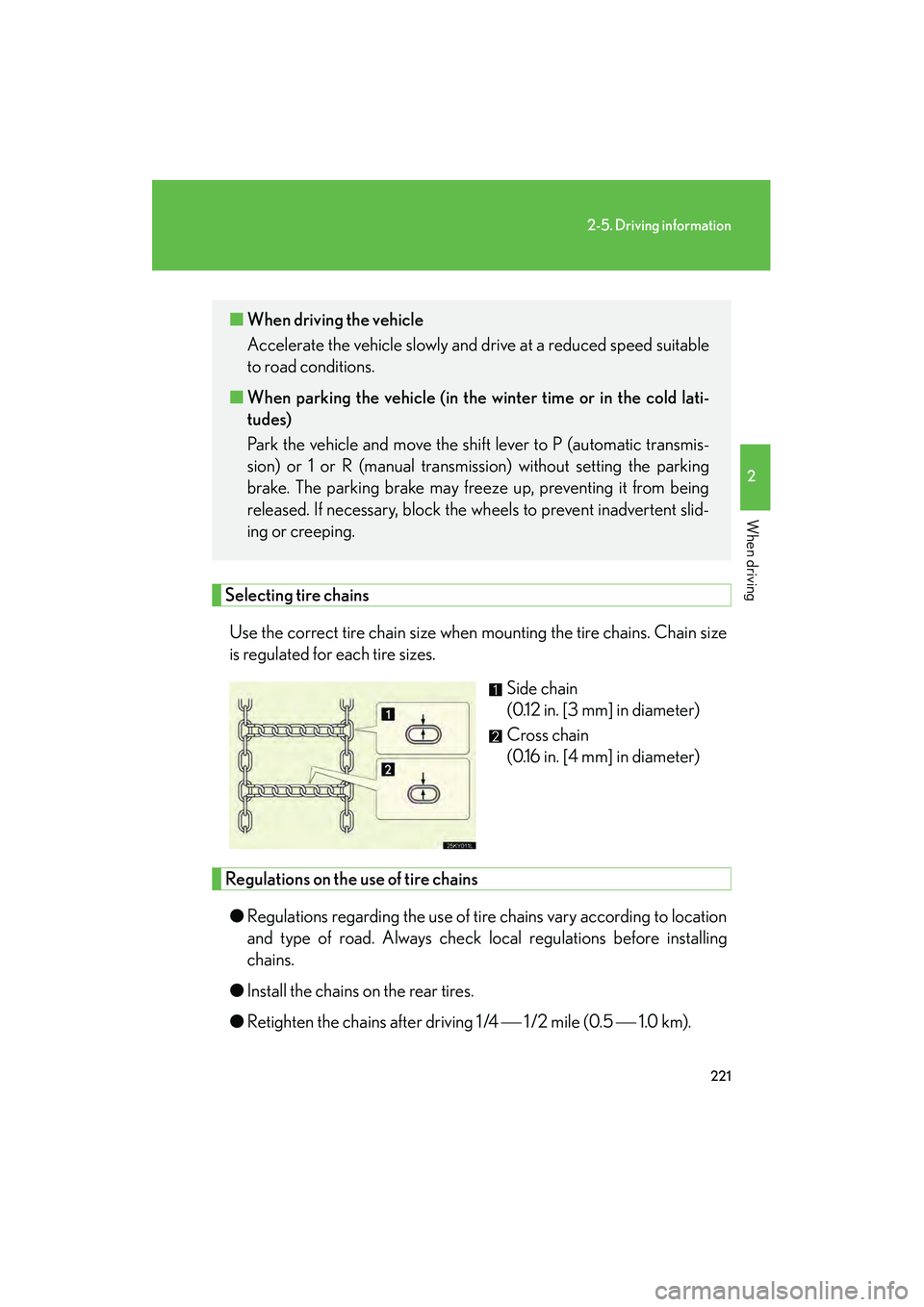
Selecting tire chainsUse the correct tire chain size when mounting the tire chains. Chain size
is regulated for each tire sizes. Side chain
(0.12 in. [3 mm] in diameter)
Cross chain
(0.16 in. [4 mm] in diameter)
Regulations on the use of tire chains
● Regulations regarding the use of tire chains vary according to location
and type of road. Always check local regulations before installing
chains.
● Install the chains on the rear tires.
● Retighten the chains after driving 1 /4 1 /2 mile (0.5 1.0 km).
■When driving the vehicle
Accelerate the vehicle slowly and drive at a reduced speed suitable
to road conditions.
■ When parking the vehicle (in the wi nter time or in the cold lati-
tudes)
Park the vehicle and move the shift lever to P (automatic transmis-
sion) or 1 or R (manual transmission) without setting the parking
brake. The parking brake may freeze up, preventing it from being
released. If necessary, block the wheels to prevent inadvertent slid-
ing or creeping.
Page 226 of 586

225
2-5. Driving information
2
When driving
10_IS250C/350C_U
Dinghy towing (vehicles with an automatic transmission)
NOTICE
■To avoid serious damage to your vehicle
Do not tow your vehicle with four wheels on the ground.
Your vehicle is not designed to be dinghy towed (with 4 wheels on the
ground) behind a motor home.
Page 356 of 586

355
3-7. Other interior features
3
Interior features
10_IS250C/350C_U
Seat heaters and ventilators∗
The seat heaters and ventilators heat the seats and maintain good airflow
by blowing air from the seats.
Vehicles with an automatic transmissionHeats the seats
The indicator light (amber)
comes on.
The higher the number, the
warmer the seats become.
Blows air from the seats
The indicator light (green)
comes on.
The higher the number, the
stronger the airflow becomes.
Driver’s
seat
Front
passenger’s
seat
∗: If equipped
Page 384 of 586

383
4-2. Maintenance
4
Maintenance and care
10_IS250C/350C_U
Vehicle interior
ItemsCheck points
Accelerator pedal• Moves smoothly (without uneven pedal effort or catching)?
Automatic transmission “Park”
mechanism• Can the vehicle be hold securely on an incline with the shift lever in
P?
Brake pedal
• Moves smoothly?
• Does it have appropriate clearance and correct amount of free play?
Brakes
• Not pull to one side when applied?
• Loss of brake effectiveness?
• Spongy feeling brake pedal?
• Pedal almost touches floor?
Clutch pedal• Moves smoothly?
Head restraints• Move smoothly and lock securely?
Indicators/buzzers•Function properly?
Lights
• Do all the lights come on?
• Headlights aimed correctly? (→ P. 4 4 2 )
Pa r k i n g b r a ke
• Moves smoothly?
• Can hold the vehicle securely on
an incline?
Seat belts
• Does the seat belt system operate smoothly?
• Are the belts undamaged?
Seats• Do the seat controls operate prop- erly?