phone Lexus IS250C 2010 Owner's Guide
[x] Cancel search | Manufacturer: LEXUS, Model Year: 2010, Model line: IS250C, Model: Lexus IS250C 2010Pages: 586, PDF Size: 31.62 MB
Page 317 of 586
316
3-4. Using the hands-free phone system (for mobile phones)
10_IS250C/350C_U
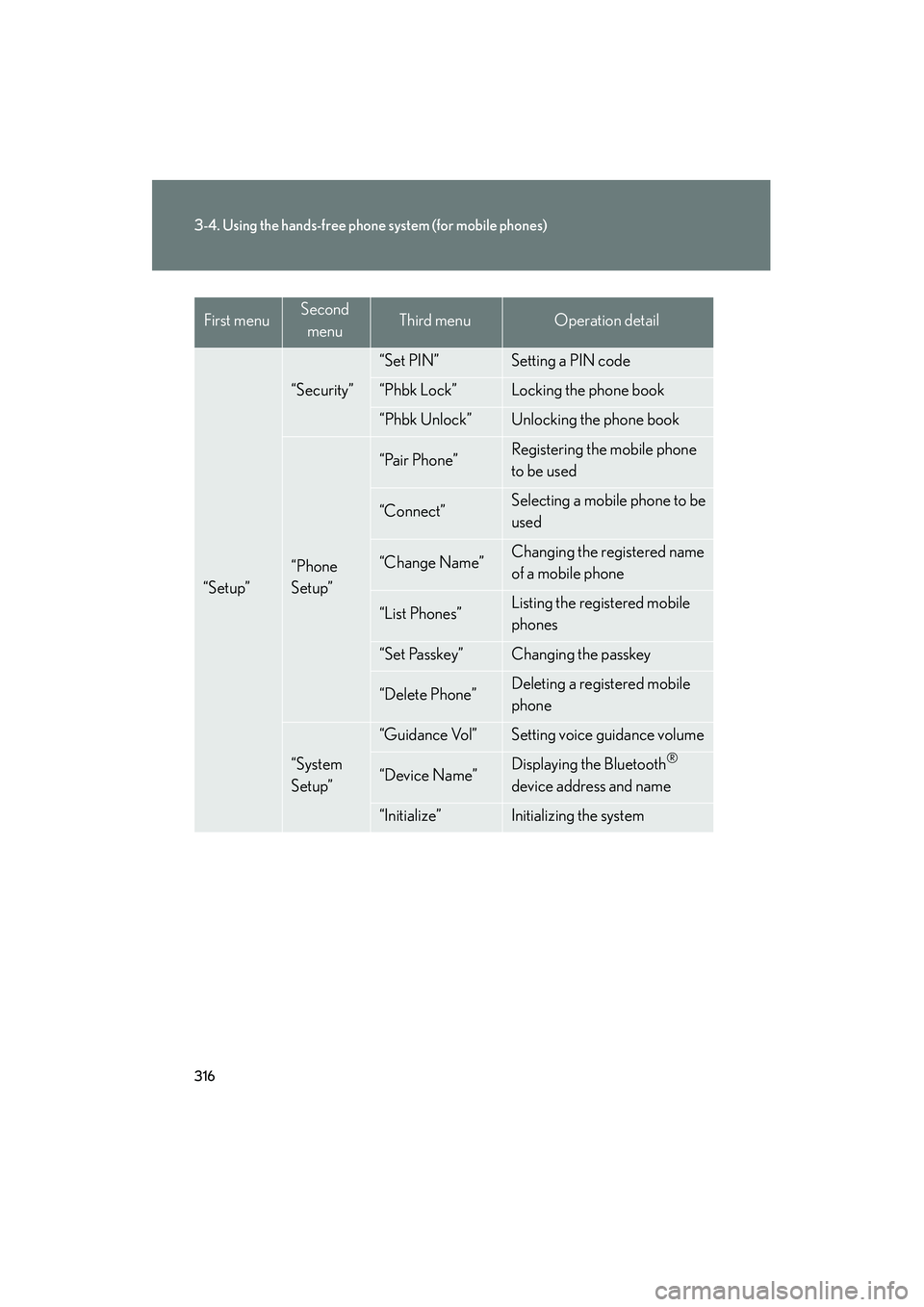
“Setup”
“Security”
“Set PIN”Setting a PIN code
“Phbk Lock”Locking the phone book
“Phbk Unlock”Unlocking the phone book
“Phone
Setup”
“Pair Phone”Registering the mobile phone
to be used
“Connect”Selecting a mobile phone to be
used
“Change Name”Changing the registered name
of a mobile phone
“List Phones”Listing the registered mobile
phones
“Set Passkey”Changing the passkey
“Delete Phone”Deleting a registered mobile
phone
“System
Setup”
“Guidance Vol”Setting voice guidance volume
“Device Name”Displaying the Bluetooth®
device address and name
“Initialize”Initializing the system
First menuSecond menuThird menuOperation detail
Page 318 of 586

317
3-4. Using the hands-free phone system (for mobile phones)
3
Interior features
10_IS250C/350C_U■
Short cut key operation
First menuSecond menuOperation detail
“Dial XXX (name)”-Dialing a name registered in the
phone book
“Phone book add
Entry”-Adding a new phone number
“Phone book Change
name”-Changing a registered name in
the phone book
“Phone book Delete
Entry”-Deleting the registered data
“Phone book List
names”-Listing the registered data
“Phone book Set
Speed Dial”-Setting speed dials
“Phone book Delete
Speed Dial”-Deleting speed dials
“Dial XXX (number)”-Dialing by inputting a number
“Phonebook”“Phonebook Unlock”Unlocking the phone book
“Phonebook Lock”Locking the phone book
Page 319 of 586

318
3-4. Using the hands-free phone system (for mobile phones)
10_IS250C/350C_U
■Automatic volume adjustment
When vehicle speed reaches 50 mph (80 km/h) or more, the volume automati-
cally increases. The volume returns to the previous volume setting when vehicle
speed drops to 43 mph (70 km/h) or less.
■When using a voice command
For numbers, say a combination of single digits from zero to nine, # (pound),
∗ (star), and + (plus).
Say the command correctly and clearly.
■Situations in which the system may not recognize your voice
●When driving on rough roads
●When driving at high speeds
●When air is blowing out of the vents onto the microphone
●When the air conditioning fan emits a loud noise
■Operations that cannot be performed while driving
●Operating the system with , and
●Registering a mobile phone to the system
■Changing the passkey
→ P. 3 2 6
Page 320 of 586

319
3-4. Using the hands-free phone system (for mobile phones)
3
Interior features
10_IS250C/350C_U
Making a phone call
■Making a phone call
●Dialing by inputting a number
“Dial by number”
● Dialing by inputting a name
“Dial by name”
● Speed dialing
● Dialing a number stored in the outgoing history memory
“Redial”
● Dialing a number stored in the incoming history memory
“Call back”
■ Receiving a phone call
●Answering a phone call
● Refusing a phone call
■ Transferring a phone call
■ Call waiting
■ Using the call history memory
●Dialing
● Storing data in the phone book
● Deleting
Page 321 of 586

320
3-4. Using the hands-free phone system (for mobile phones)
10_IS250C/350C_U
Dialing by inputting a numberPress the talk switch and say “Dial by number”.
Press the talk switch and say the phone number.
Dial by one of the following methods:
a. Press the off-hook switch.
b. Press the talk switch and say “Dial”.
c. Select “Dial” using , and .
Dialing by inputting a namePress the talk switch and say “Dial by name”.
Select a registered name to be input by either of the following
methods:
a. Press the talk switch and say a registered name.
b. Press the talk switch and say “List Names”. Press the talk switchwhen the desired name is read aloud.
Dial by one of the following methods:
a. Press the off-hook switch.
b. Press the talk switch and say “Dial”.
c. Select “Dial” using , and .
Speed dialing
Press the off-hook switch.
Press the preset button in which the desired number is registered.
Press the off-hook switch.
STEP1
STEP2
STEP3
STEP1
STEP2
STEP3
STEP1
STEP2
STEP3
Page 322 of 586
321
3-4. Using the hands-free phone system (for mobile phones)
3
Interior features
10_IS250C/350C_U
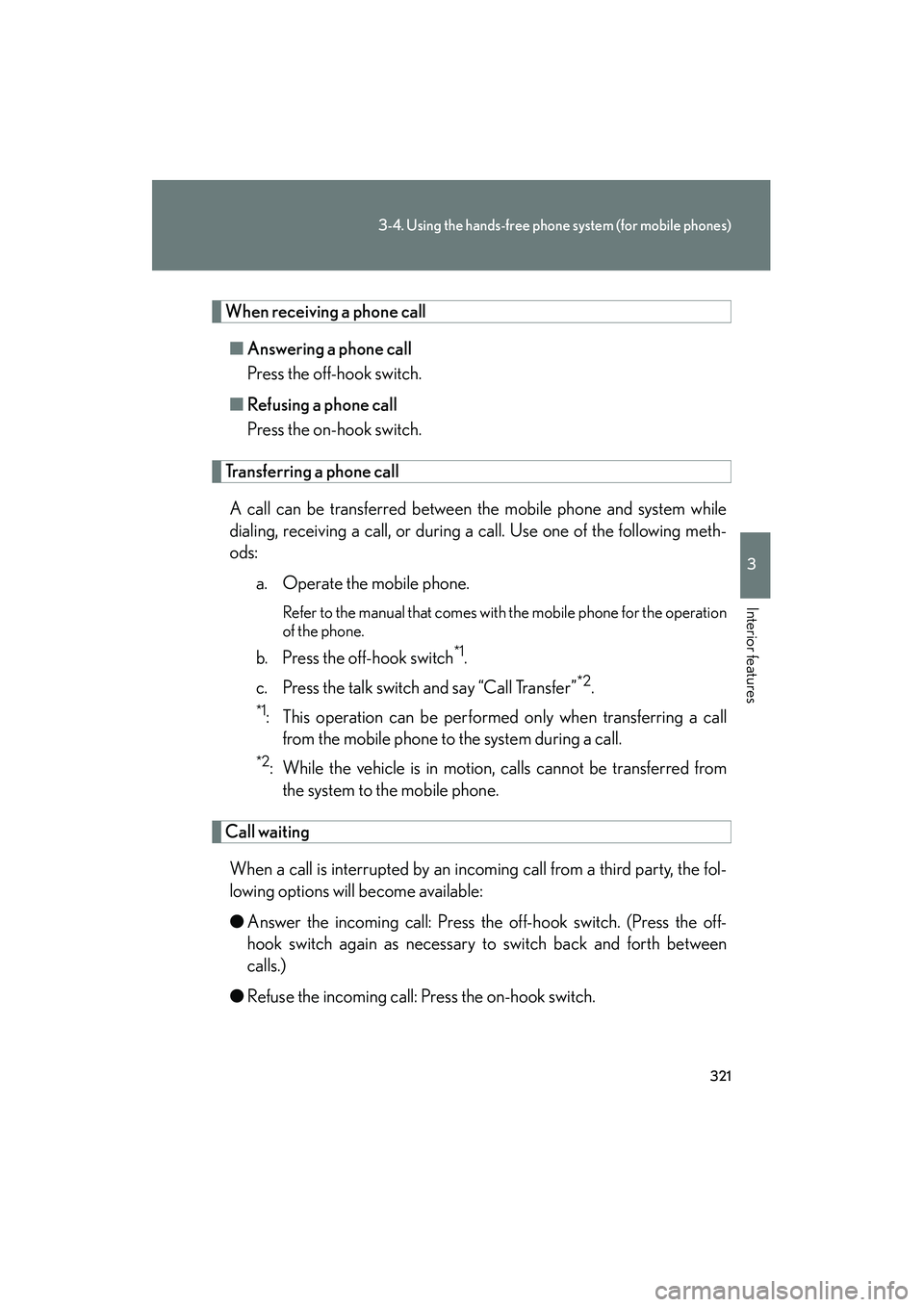
When receiving a phone call■ Answering a phone call
Press the off-hook switch.
■ Refusing a phone call
Press the on-hook switch.
Transferring a phone call
A call can be transferred between the mobile phone and system while
dialing, receiving a call, or during a call. Use one of the following meth-
ods: a. Operate the mobile phone.
Refer to the manual that comes with the mobile phone for the operation
of the phone.
b. Press the off-hook switch*1.
c. Press the talk switch and say “Call Transfer”
*2.
*1: This operation can be performed only when transferring a call from the mobile phone to the system during a call.
*2: While the vehicle is in motion, calls cannot be transferred fromthe system to the mobile phone.
Call waiting
When a call is interrupted by an incoming call from a third party, the fol-
lowing options will become available:
● Answer the incoming call: Press the off-hook switch. (Press the off-
hook switch again as necessary to switch back and forth between
calls.)
● Refuse the incoming call: Press the on-hook switch.
Page 323 of 586

322
3-4. Using the hands-free phone system (for mobile phones)
10_IS250C/350C_U
Using the call history memoryFollow the procedure below to use a number stored in the call history
memory: Press the talk switch and say “Redial” (when using a number
stored in the outgoing call history memory) or “Call back” (when
using a number stored in the incoming call history memory).
Select the number by either of the following methods:
a. Say “Previous” or “Go back” until the desired number is dis-played.
b. Select the desired number using , and .
The following operations can be performed:
Dialing: Press the off-hook switch or select “Dial” using a voice com-
mand or , and .
Storing the number in the phone book: Select “Store” and then
“Confirm” using a voice command or , and .
Deleting: Select “Delete” and then “Confirm” using a voice command
or , and .
■Call waiting
●If your phone does not support HFP Ver. 1.5, this function cannot be used.
●Call waiting operation may differ depending on your mobile phone and service
provider.
■Call history
Up to 5 numbers can be stored in each of the outgoing and incoming call history
memories.
■When talking on the phone
●Do not talk at the same time as with the other party.
●Keep the volume of the incoming voice down. Otherwise, voice echo will
increase.
STEP1
STEP2
STEP3
Page 324 of 586

323
3-4. Using the hands-free phone system (for mobile phones)
3
Interior features
10_IS250C/350C_U
Setting a mobile phone
Registering a mobile phoneSelect “Pair Phone” using a voice command or , and ,
and perform the procedure for registering a mobile phone. ( →P. 314)
Registering a mobile phone in the ha nds-free phone system allows the sys-
tem to function. The following functions can be used for registered mobile
phones:
■ Functions and operation procedures
To enter the menu for each function, follow the steps below using a
voice command or , and :
●Registering a mobile phone
1. “Setup” → 2. “Phone Setup” → 3. “Pair Phone”
● Selecting a mobile phone to be used
1. “Setup” → 2. “Phone Setup” → 3. “Connect Phone (Connect)”
● Changing the registered name of a mobile phone
1. “Setup” → 2. “Phone Setup” → 3. “Change Name”
● Listing the registered mobile phones
1. “Setup” → 2. “Phone Setup” → 3. “List Phones”
● Changing the passkey
1. “Setup” → 2. “Phone Setup” → 3. “Set Passkey”
● Deleting a registered mobile phone
1. “Setup” → 2. “Phone Setup” → 3. “Delete Phone”
Page 325 of 586

324
3-4. Using the hands-free phone system (for mobile phones)
10_IS250C/350C_U
Selecting a mobile phone to be usedSelect “Connect Phone (Connect)” using a voice command or, and .
Pattern A
Select the mobile phone to be used by either of the following
methods, and select “Confirm” by using a voice command or , and :
a. Press the talk switch and say the name of the desired mobile phone.
b. Press the talk switch and say “List Phones”. When the name of the desired mobile phone is read aloud, press the talk switch.
Pattern B
Select the mobile phone to be used using , and .
STEP1
STEP2
STEP2
Page 326 of 586

325
3-4. Using the hands-free phone system (for mobile phones)
3
Interior features
10_IS250C/350C_U
Changing the registered name of a mobile phoneSelect “Change Name” using a voice command or ,
and .
Pattern A
Select the name of the mobile phone to be changed by either of
the following methods, and select “Confirm” using a voice com-
mand or , and :
a. Press the talk switch and say the name of the desired mobilephone.
b. Press the talk switch and say “List Phones”. When the name of the desired mobile phone is read aloud, press the talk switch.
Pattern B
Select the desired mobile ph one name to be changed using
, and .
Press the talk switch or select “Record Name” using , and , and say the new name.
Select “Confirm” using a voice command or , and .
STEP1
STEP2
STEP2
STEP3
STEP4