brake light LEXUS IS250C 2013 User Guide
[x] Cancel search | Manufacturer: LEXUS, Model Year: 2013, Model line: IS250C, Model: LEXUS IS250C 2013Pages: 624, PDF Size: 6.58 MB
Page 217 of 624

217
2-4. Using other driving systems
2
When driving
■When the message is displayed on the multi-information display showing that
TRAC has been disabled even if the VSC off switch has not been pressed
TRAC and hill-start assist control cannot be operated. Contact your Lexus dealer.
■Automatic reactivation of the TRAC/VSC systems
If the TRAC/VSC systems are turned off, re-starting the engine will automatically
reactivate them.
■Automatic TRAC reactivation
If only the TRAC system is turned off, the TRAC system will turn on when vehicle
speed increases.
■Automatic TRAC and VSC reactivation
If the TRAC and VSC systems are turned off, the systems will not turn on even when
vehicle speed increases.
■Sounds and vibrations caused by the ABS, brake assist, VSC and TRAC systems
●A sound may be heard from the engine compartment if the brake pedal is
depressed repeatedly when the engine is started or just after the vehicle begins
to move. This sound does not indicate th at a malfunction has occurred in any of
these systems.
●Any of the following conditions may occur when the above systems are operat-
ing. None of these indicates that a malfunction has occurred.
• Vibrations may be felt through the vehicle body and steering.
• A motor sound may be heard after the vehicle comes to a stop.
• The brake pedal may pulsate slightly after the ABS is activated.
• The brake pedal may move down s lightly after the ABS is activated.
Page 220 of 624
220
2-4. Using other driving systems
Hill-start assist control
■Hill-start assist control can be operated when
●The shift lever is in a position other than P.
●The parking brake is not applied.
●The accelerator pedal is not depressed.
■Hill-start assist control
●While hill-start assist control is operating, the brakes remain automatically
applied after the driver releases the br ake pedal. The stop lights and the high
mounted stoplight turn on.
●Hill-start assist control operates for about 2 seconds after the brake pedal is
released.
●If the slip indicator does not flash and the buzzer does not sound when the brake
pedal is further depressed, slightly redu ce the pressure on the brake pedal (do
not allow the vehicle to roll backward) and then firmly depress it again. If the sys-
tem still does not operate, check if th e operating conditions explained above
have been met.
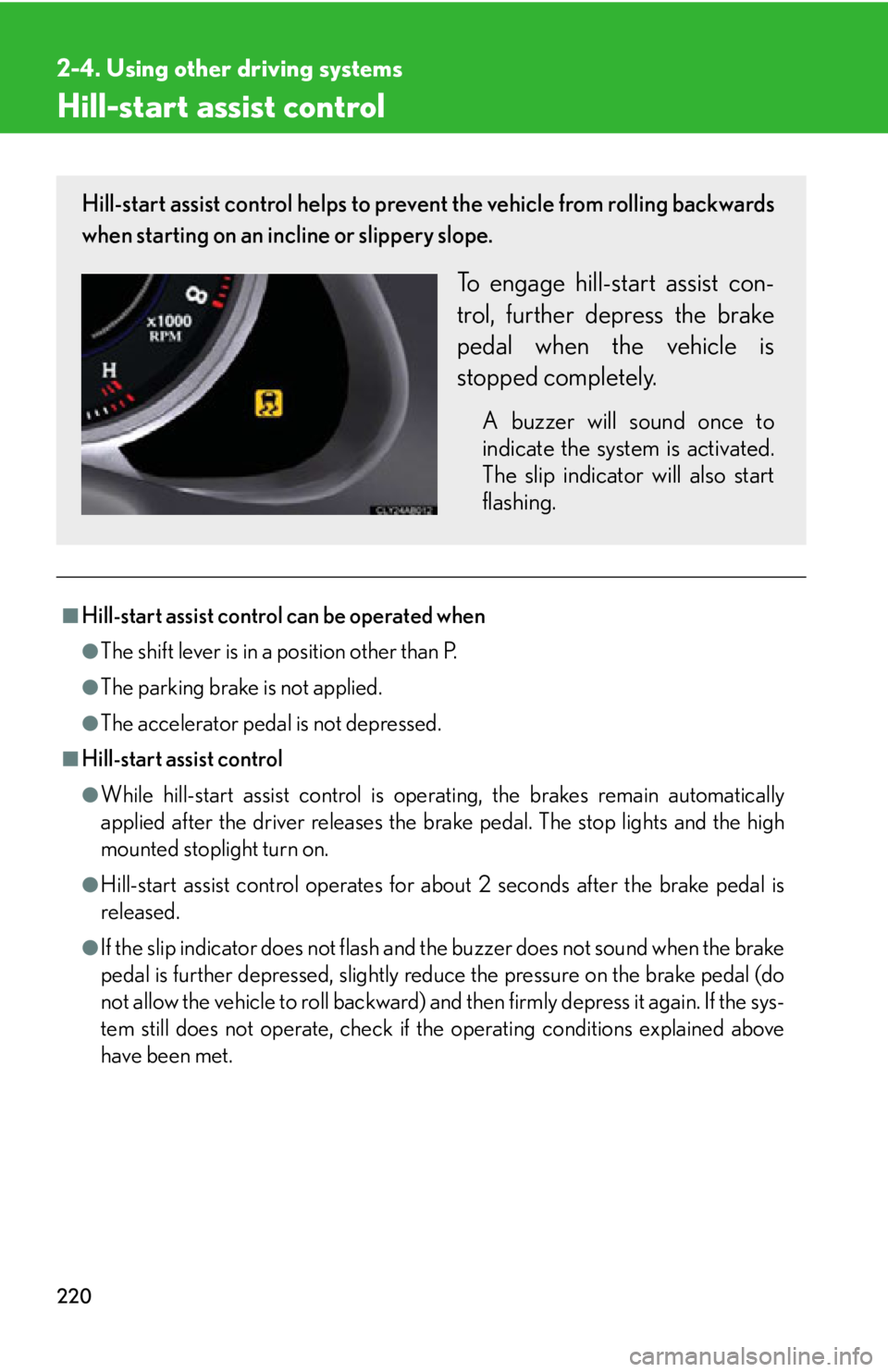
Hill-start assist control helps to prevent the vehicle from rolling backwards
when starting on an incline or slippery slope.
To engage hill-start assist con-
trol, further depress the brake
pedal when the vehicle is
stopped completely.
A buzzer will sound once to
indicate the system is activated.
The slip indicator will also start
flashing.
Page 222 of 624

222
2-4. Using other driving systems
PCS (Pre-Collision System)
When the radar sensor detects possibility of a frontal collision, the pre-col-
lision systems such as the brakes and seat belts are automatically engaged
in an attempt to lessen damage.
■ Pre-collision seat belts
If the pre-collision sensor detects that a collision is unavoidable, the pre-
collision system will retract the seat belt before the collision occurs.
The same will happen if the driver makes an emergency braking or loses
control of the vehicle. ( P. 7 2 )
However, the system will not operate in the event of skidding when the
VSC systems are disabled.
■ Pre-collision brake assist
When there is a high possibility of a frontal collision, the system applies
greater braking force in relation to how strongly the brake pedal is
depressed.
■Pre-collision braking
When there is a high possibility of a frontal collision, the system warns the
driver using a warning light, warnin g display and buzzer. If the system
determines that a collision is unavoidable, the brakes are automatically
applied to reduce the collision speed. The pre-collision braking function
can be turned on and off using the satellite switch.
: If equipped
Page 223 of 624

223
2-4. Using other driving systems
2
When driving
Disabling the pre-collision brakingThe pre-collision braking function
can be turned on and off using the
satellite switch. (P. 365)
Press “ ”or “ ” to display the PCS
brake setting ( ). Then, press the
“ON/OFF” button in the middle of
the switch to select either “ON” or
“OFF” ( ).
It may take approximately 3 sec-
onds for the display to change after
the satellite switch is operated.
The pre-collision system warning
light flashes when “OFF” is
selected.
Radar sensor
Detects vehicles or other obsta-
cles on or near the road ahead and
determines whether a collision is
imminent based on the position,
speed, and heading of the obsta-
cles. Grille cover
Radar sensor
■Obstacles not detected
The sensor cannot detect plastic obstacles such as pylons. There may also be occa-
sions when the sensor cannot detect pedestrians, animals, bicycles, motorcycles,
trees, or snowdrifts.
Page 225 of 624

225
2-4. Using other driving systems
2
When driving
■ Conditions that may trigger the system even if there is no possibility of collision
●When there is an object by the roadside at the entrance to a curve
●When passing an oncoming vehicle on a curve
●When driving over a narrow iron bridge
●When there is a metal object on the road surface
●When driving on an uneven road surface
●When passing an oncoming vehicle on a left-turn
●When your vehicle rapidly closes on the vehicle in front
●When a grade separation/interchange, sign, billboard, or other structure
appears to be directly in the vehicle’s line of travel.
●When an overhead billboard or other me tallic structure appears to be in the
vehicle’s direct line of travel due to driving on a hill.
●When an extreme change in vehicle height occurs
●When the axis of the radar is out of adjustment
●When passing through certain toll gates
●When driving on a bridge.
When the system is activated in the situations described above there is also a possi-
bility that the seat belts will retract quickly and the brakes will be applied with a force
greater than normal. When the seat belt is locked in the retracted position, stop the
vehicle in a safe place, release the seat belt and refasten.
■Automatic cancelation of the pre-collision system
When a malfunction occurs due to sensor contamination, etc. that results in the
sensors being unable to detect obstacles, the pre-collision system will be automati-
cally disabled. In this case, the system will not activate even if there is a collision pos-
sibility.
■When there is a malfunction in the system
Warning lights and/or warning mess ages will turn on or flash. (P. 491, 500)
Page 407 of 624
407
4-2. Maintenance
4
Maintenance and care
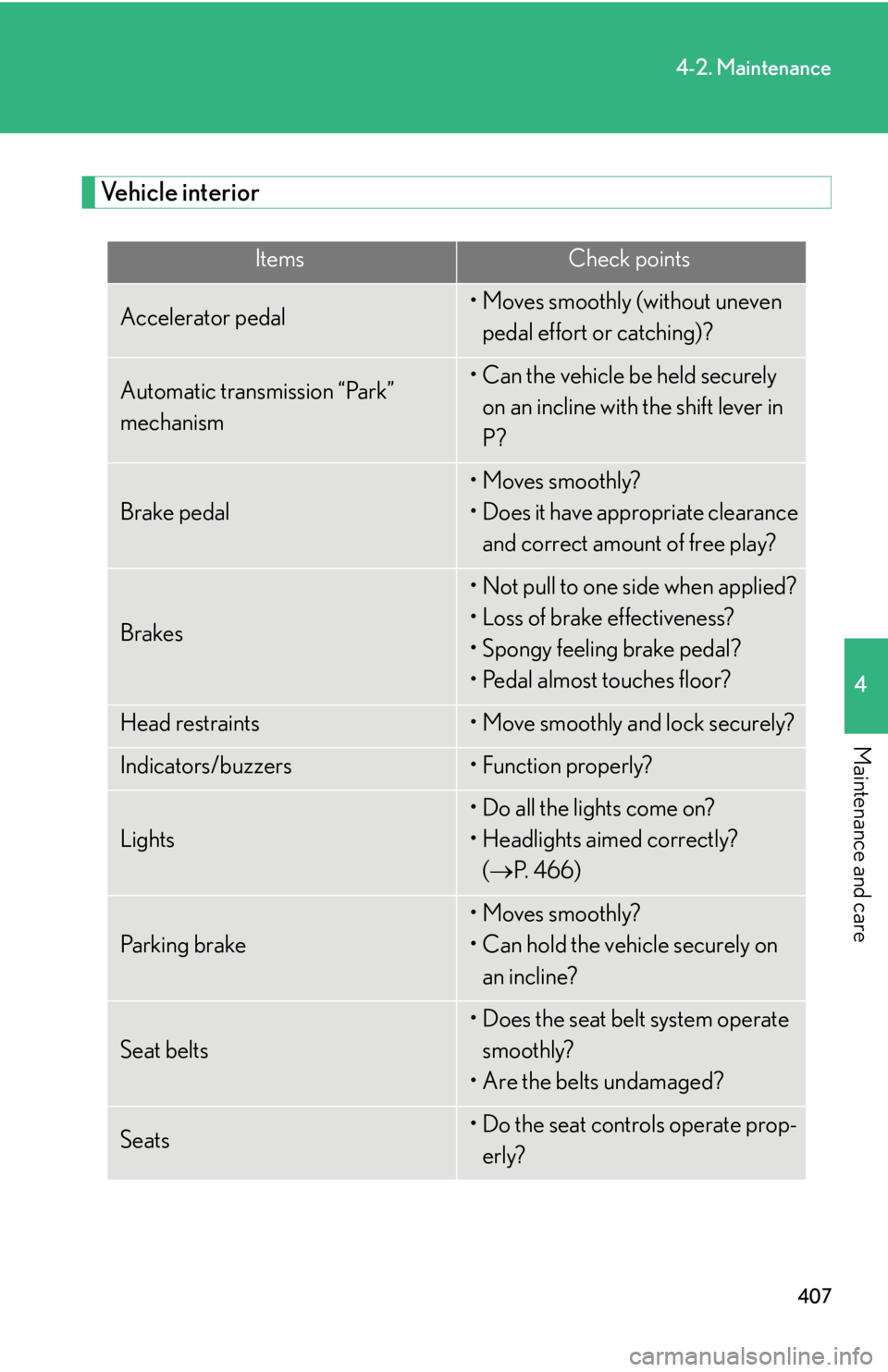
Vehicle interior
ItemsCheck points
Accelerator pedal• Moves smoothly (without uneven pedal effort or catching)?
Automatic transmission “Park”
mechanism• Can the vehicle be held securely on an incline with the shift lever in
P?
Brake pedal
• Moves smoothly?
• Does it have appropriate clearance and correct amount of free play?
Brakes
• Not pull to one side when applied?
• Loss of brake effectiveness?
• Spongy feeling brake pedal?
• Pedal almost touches floor?
Head restraints• Move smoothly and lock securely?
Indicators/buzzers• Function properly?
Lights
• Do all the lights come on?
• Headlights aimed correctly? ( P. 4 6 6 )
Pa r k i n g b r a ke
• Moves smoothly?
• Can hold the vehicle securely on
an incline?
Seat belts
• Does the seat belt system operate smoothly?
• Are the belts undamaged?
Seats• Do the seat controls operate prop- erly?
Page 415 of 624

415
4-3. Do-it-yourself maintenance
4
Maintenance and care
CAUTION
■When raising your vehicle
Make sure to observe the following to reduce the possibility of death or serious
injury.
●When using a floor jack, follow the instructions of the manual provided with the
jack.
●Do not use the jack that was supplied with your vehicle.
●Do not put any part of your body or get underneath the vehicle supported only by
the floor jack.
●Always use floor jack and/or automotive jack stands on a solid, flat, level surface.
●Do not start the engine while the vehicle is supported by the floor jack.
●Stop the vehicle on level firm ground, firmly set the parking brake and put the shift
lever in P.
●Make sure to set the floor jack properly at the jack point.
Raising the vehicle with an improperly positioned floor jack will damage the vehi-
cle and may cause the vehicle to fall off the floor jack.
●Do not raise the vehicle while someone is in the vehicle.
●When raising the vehicle, do not place any objects on top of or underneath the
floor jack.
●When raising the vehicle, ensure that there is sufficient surrounding space. The
vehicle’s position may change slightly when lowered.
●Lift up the vehicle using a floor jack such as
the one shown in the illustration.
Page 426 of 624

426
4-3. Do-it-yourself maintenance
CAUTION
■When filling the reservoir
Take care because brake fluid can harm your hands or eyes and damage painted
surfaces.
If fluid gets in your eyes, flush your eyes with clean water immediately.
If you still experience discomfort, see a doctor.
NOTICE
■If the fluid level is low or high
It is normal for the brake fluid level to go down slightly as the brake pads wear or
when the fluid level in the accumulator is high.
If the reservoir needs frequent refilli ng, it may indicate a serious problem.
Page 491 of 624

5
When trouble arises
491
5-2. Steps to take in an emergency
If a warning light turns on or a warning buzzer sounds...
Stop the vehicle immediately. Continuing to drive the vehicle may be dangerous.
The following warning indicates a possible problem in the brake system.
Immediately stop the vehi cle in a safe place and contact your Lexus
dealer.
*: Parking brake engaged warning buzzer
P. 5 0 3
Stop the vehicle immediately.
The following warning indicates the po ssibility of damage to the vehicle
that may lead to an ac cident. Immediately stop the vehicle in a safe place
and contact your Lexus dealer.
Warning lightWarning light/Details
(U.S.A.)
(Canada)
Brake system warning light (warning buzzer)*
•Low brake fluid
• Malfunction in the brake booster system
This light also comes on when the parking brake is not
released. If the light turns off after the parking brake is fully
released the system is operating normally.
Warning lightWarning light/Details
Charging system warning lightIndicates a malfunction in the vehicle’s charging system.
Calmly perform the following actions if any of the warning lights turn on or
flash. If a light turns on or flashes, bu t then turns off, this does not necessar-
ily indicate a malfunction in the system.
Page 492 of 624

492
5-2. Steps to take in an emergency
Have the vehicle inspected by your Lexus dealer immediately.
Failing to investigate the cause of the following warnings may lead to the
system operating abnormally and possibly cause an accident. Have the
vehicle inspected by your Lexus dealer immediately.
Warning lightWarning light/Details
(U.S.A.)
(Canada)
Malfunction indicator lamp
Indicates a malfunction in:
• The electronic engine control system;
• The electronic throttle control system; or
• The electronic automatic transmission control system.
SRS warning lightIndicates a malfunction in:
• The SRS airbag system; or
• The seat belt pretensioner system.
(U.S.A.)
(Canada)
“ABS” warning lightIndicates a malfunction in:
•The ABS;
• The brake assist system.
Electric power steering system warning light
Indicates a malfunction in the EPS (Electric Power Steering)
system.
Pre-collision system warning light (if equipped)Indicates a malfunction in the pre-collision system.
The warning light will operate as follows, even when the sys-
tem is not malfunctioning:
• The light will flash quickly wh en the system is operating.
( P. 222)
• The light will flash when the pre-collision braking is dis- abled. ( P. 223)
• The light will flash when the system cannot temporarily be
used. ( P. 5 0 3 )