ECO Lexus IS300 2016 Quick Guide / LEXUS 2016 IS200T,IS300,IS350 OWNERS MANUAL QUICK GUIDE (OM53D43U)
[x] Cancel search | Manufacturer: LEXUS, Model Year: 2016, Model line: IS300, Model: Lexus IS300 2016Pages: 82, PDF Size: 4.43 MB
Page 18 of 82

18
Wiper intervals can be adjusted when inter-
mittent operation is selected.
Increases the intermittent windshield
wiper frequency
Decreases the intermittent windshield
wiper frequency
The intermittent windshield wiper
operates more frequently as vehicle
speed becomes higher.
Washer/wiper dual operation
The wipers will automatically operate a
couple of times after the washer
squirts.
Vehicles with headlight cleaners:
When the engine switch is in IGNI-
TION ON mode and the headlights
are on, if the lever is pulled, the head-
light cleaners will operate once. After
this, the headlight cleaners will operate
every 5th time the lever is pulled.
5
6
7
Page 21 of 82

21
Cruise Control (if equipped)
Indicators
Cruise control switch
■Setting the vehicle speed
Press the “ON/OFF” button to activate
the cruise control.
Cruise control indicator will come on.
Press the button again to deactivate
the cruise control.
Accelerate or decelerate the vehicle to
the desired speed, and push the lever
down to set the speed.
“SET” indicator will come on.
The vehicle speed at the moment the
lever is released becomes the set
speed.
Use the cruise control to maintain a set speed without depressing the accelerator pedal.
1
2
1
2
Page 23 of 82

23
Dynamic Radar Cruise Control (if equipped)
Vehicle-to-vehicle distance button
Display
Set speed
Indicators
Cruise control switch
■Setting the vehicle speed (vehicle-to-vehicle distance control mode)
Press the “ON/OFF” button to activate
the cruise control.
Radar cruise control indicator will
come on and a message will be dis-
played on the multi-information dis-
play.
Press the button again to deactivate
the cruise control.
Accelerate or decelerate, with accel-
erator pedal operation, to the desired
vehicle speed (above approximately
30 mph [50 km/h]) and push the lever
down to set the speed.
Cruise control “SET” indicator and set
speed will be displayed.
The vehicle speed at the moment the
lever is released becomes the set
speed.
Without accelerator pedal operation by the driver, in vehicle-to-vehicle distance control
mode, the vehicle automatically accelerates and decelerates in accordance to the
changes in speed of the preceding vehicle. In constant speed control mode, the vehicle
runs at a fixed speed.
Use the dynamic radar cruise control on freeways and highways.
1
2
3
4
5
1
2
Page 25 of 82
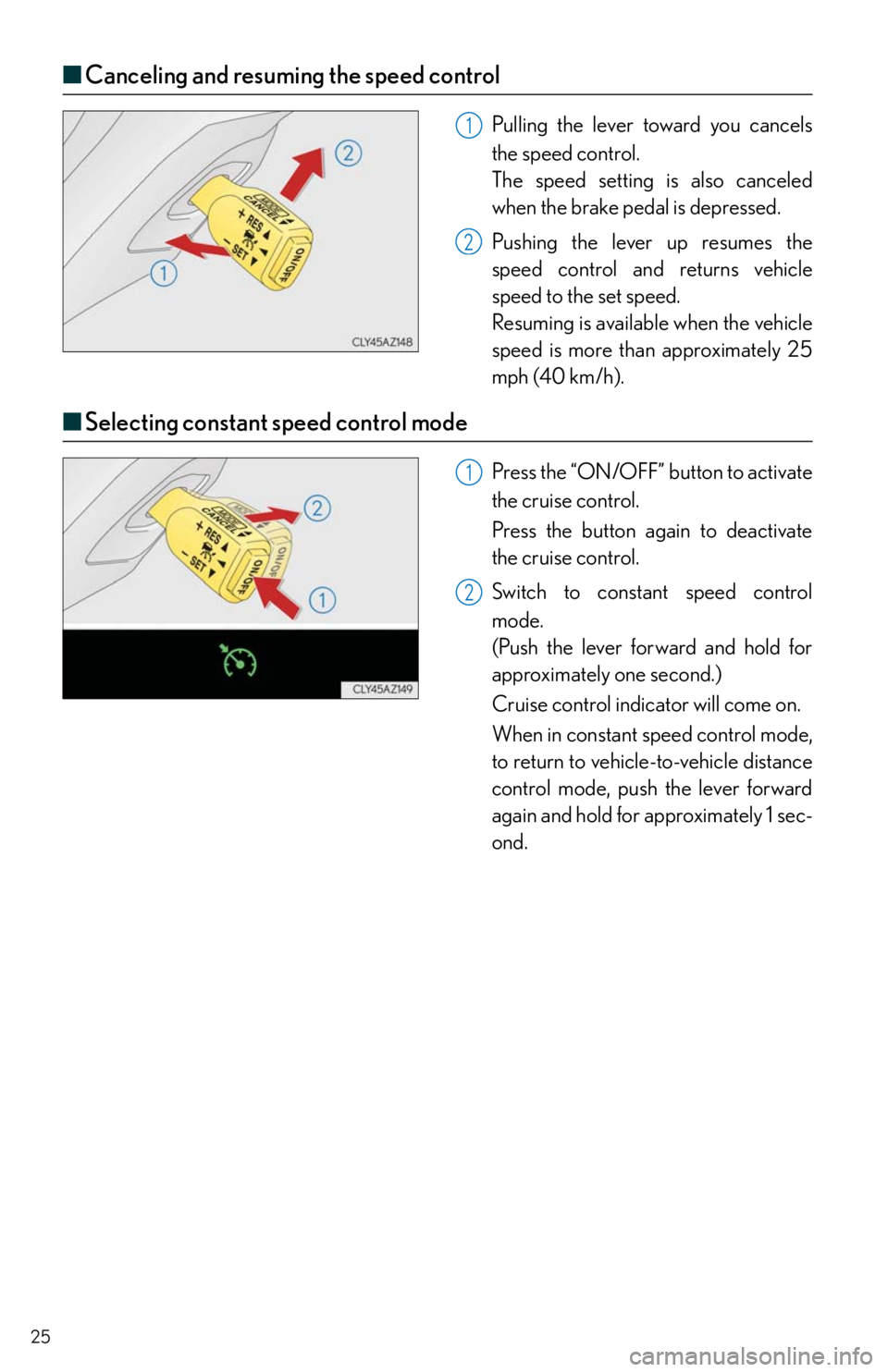
25
■Canceling and resuming the speed control
Pulling the lever toward you cancels
the speed control.
The speed setting is also canceled
when the brake pedal is depressed.
Pushing the lever up resumes the
speed control and returns vehicle
speed to the set speed.
Resuming is available when the vehicle
speed is more than approximately 25
mph (40 km/h).
■Selecting constant speed control mode
Press the “ON/OFF” button to activate
the cruise control.
Press the button again to deactivate
the cruise control.
Switch to constant speed control
mode.
(Push the lever forward and hold for
approximately one second.)
Cruise control indicator will come on.
When in constant speed control mode,
to return to vehicle-to-vehicle distance
control mode, push the lever forward
again and hold for approximately 1 sec-
ond.
1
2
1
2
Page 26 of 82

26
LDA (Lane Departure Alert) (if equipped)
■Tu r n i n g t h e L D A s y s t e m o n
Press the LDA switch to activate the system.
The LDA indicator and lane lines will
come on.
Press the switch again to turn the LDA
system off.
The LDA system will remain on or off
even if the engine switch is turned to
IGNITION ON mode.
While driving on a road that has lane markers, this system recognizes the lane markers
using a camera as a sensor to alert the driver when the vehicle deviates from its lane.
If the system judges that the vehicle has deviated from its lane, it alerts the driver using a
buzzer and indications on the multi-information display.
Page 69 of 82

69
■Programming HomeLink®
Hold your hand-held transmitter 1 to 3
in. (25 to 75 mm) of the HomeLink
®
buttons.
Press and hold down the desired
HomeLink
® button.
For U.S.A. owners:
While pressing the HomeLink
® but-
ton, press and hold down the button
on the hand-held transmitter until the
indicator light changes from a slow to
a rapid flash.
For Canadian owners:
While pressing the HomeLink
® but-
ton, repeatedly press and release
(cycle) the button on the hand-held
transmitter every 2 seconds until the
indicator light changes from a slow to
a rapid flash.
If your garage door is of the rolling code
type:
Press the training button on the motor-
head unit in your garage.
Press and hold the vehicle’s pro-
grammed HomeLink
® button for 2
seconds and release it. Repeat this step
once again.
If the door does not open, press and
release the same button once again.
1
2
3
4
5
Page 71 of 82

71
■Services
Subscribers have the following Safety Connect services available:
●Automatic Collision Notification
*
In case of either airbag deployment or severe rear-end collision, the system is designed
to automatically call the response center. The responding agent receives the vehicle’s
location and attempts to speak with the vehicle occupants to assess the level of emer-
gency. If the occupants are unable to communicate, the agent automatically treats the
call as an emergency, contacts the nearest emergency services provider to describe the
situation, and requests that assistance be sent to the location.
*: U.S. Patent No. 7,508,298 B2
●Stolen Vehicle Location
If your vehicle is stolen, Safety Connect can work with local authorities to assist them in
locating and recovering the vehicle. After filing a police report, call the Safety Connect
response center at 1-800-25-LEXUS (1-800-255-3987) and follow the prompts for
Safety Connect to initiate this service.
In addition to assisting law enforcement with recovery of a stolen vehicle, Safety-Con-
nect-equipped vehicle location data may, under certain circumstances, be shared with
third parties to locate your vehicle. Further information is available at Lexus.com.
●Emergency Assistance Button (“SOS”)
In the event of an emergency on the road, push the “SOS” button to reach the Safety
Connect response center. The answering agent will determine your vehicle’s location,
assess the emergency, and dispatch the necessary assistance required.
If you accidentally press the “SOS” button, tell the response-center agent that you are
not experiencing an emergency.
●Enhanced Roadside Assistance
Enhanced Roadside Assistance adds GPS data to the already included warranty-based
Lexus roadside service.
Subscribers can press the “SOS” button to reach a Safety Connect response-center
agent, who can help with a wide range of needs, such as: towing, flat tire, fuel delivery, etc.
For a description of the Roadside Assistance services and their limitations, please see the
Safety Connect Terms and Conditions, which are available at Lexus.com.
■Subscription
After you have signed the Telematics Subscription Service Agreement and are enrolled,
you can begin receiving services.
A variety of subscription terms are available. Contact your Lexus dealer, call 1-800-25-
LEXUS (1-800-255-3987) or push the “SOS” button in your vehicle for further subscrip-
tion details.
Page 76 of 82

76
What to do if...
Follow the correction procedures.
Open door warning lightMaster warning light
Low fuel level warning light
(Illuminates
without
blinking)Tire pressure warning light*1
Seat belt reminder light
See the Owner’s Manual
Tu r n s i g n a l i n d i c a t o rIntuitive parking assist
indicator (if equipped)
Headlight indicator (U.S.A.)
(Flashes)
Slip indicator
Tail light indicator (Canada)VSC OFF indicator
Headlight high beam indicator(Flashes
faster)
Pre-collision system warning
light (if equipped)
Automatic High Beam
indicator (if equipped) BSM (Blind Spot Monitor)
outside rear view mirror
indicators (if equipped)
Fog light indicator
(if equipped) Security indicator
Cruise control indicatorLow outside temperature
indicator
Dynamic radar cruise control
indicator (if equipped)Eco Driving Indicator Light
Cruise control “SET” indicatorEco drive mode indicator*2
LDA (Lane Departure Alert)
indicator (if equipped)
Page 77 of 82

What to do if...
77
*1: It also comes on due to natural causes such as natural air leaks and tire inflation pressure
changes caused by temperature. Adjust the tire inflation pressure to the specified level.
The light will turn off after a few minutes. In case the light does not turn off even if the tire
inflation pressure is adjusted, have the system checked by your Lexus dealer.
*2:Except F SPORT models
*3:F SPORT models
If the engine doesn’t start
Make sure that the correct operating procedures have been followed.
Make sure that the brake pedal is firmly
depressed when attempting to start the
engine.
Eco drive mode indicator*3“SPORT S+” indicator
(if equipped)
*3
“SPORT” indicator*2Snow mode indicator*2
“SPORT” indicator
(if equipped)
*3Snow mode indicator*3
“SPORT S” indicator
(if equipped)
*3“A I R B A G O N / O F F ”
indicator
For further information, refer to the Owner’s Manual.
Brake pedal
If the engine still does not start, see the “OWNER’S MANUAL” for more information or
contact your Lexus dealer.
Page 78 of 82

78
What to do if...
If the electronic key does not operate properly
■Unlocking and locking the doors
Use the mechanical key in order to perform
the following operations:
Locks all the doors
Closes the windows and moon roof
(turn and hold)
*
Unlocks all the doors
Turning the key rearward unlocks the
driver’s door. Turning the key once
again within 5 seconds unlocks the
other doors.
Opens the windows and moon roof
(turn and hold)
*
*
: This setting must be customized at your
Lexus dealer.
■Unlocking the trunk
Turn the mechanical key clockwise to open.
1
2
3
4