key battery Lexus IS300 2018 / LEXUS 2018 IS300,IS350 (OM53E34U) User Guide
[x] Cancel search | Manufacturer: LEXUS, Model Year: 2018, Model line: IS300, Model: Lexus IS300 2018Pages: 656, PDF Size: 10.37 MB
Page 129 of 656

1293-2. Opening, closing and locking the doors and trunk
3
Operation of each component
IS350 AWD/IS350/IS300 AWD/IS300_U(OM53E34U)
■Conditions affecting operation
The smart access system with push-button st art uses weak radio waves. In the following
situations, the communication between the electronic key and the vehicle may be
affected, preventing the smar t access system with push-but ton start, wireless remote
control and engine immobilizer system from operating properly.
(Ways of coping: →P. 569)
●When the electronic key battery is depleted
●Near a TV tower, electric power plant, gas st ation, radio station, large display, airport or
other facility that generates strong radio wave s or electrical noise
●When carrying a portable radio, cellular phone, cordless phone or other wireless com-
munication device
●When the electronic key is in contact wi th, or is covered by the following metallic
objects
• Cards to which aluminum foil is attached
• Cigarette boxes that have aluminum foil inside
• Metallic wallets or bags
•Coins
• Hand warmers made of metal
• Media such as CDs and DVDs
●When other wireless keys (that emit radio waves) are being used nearby
●When carrying the electronic key together with the following devices that emit radio
waves
• Another vehicle’s electronic key or a wireless key that emits radio waves
• Personal computers or person al digital assistants (PDAs)
• Digital audio players
• Portable game systems
●If window tint with a metallic content or me tallic objects are attached to the rear win-
dow
Page 130 of 656

1303-2. Opening, closing and locking the doors and trunk
IS350 AWD/IS350/IS300 AWD/IS300_U(OM53E34U)
■Note for the entry function
●Even when the electronic key is within the effective range (detection areas), the system
may not operate properly in the following cases:
• The electronic key is too close to the window or outside door handle, near the ground, or in a high place when the doors are locked or unlocked.
• The electronic key is near the ground or in a high place, or too close to the rear
bumper center when the trunk is opened.
• The electronic key is on th e instrument panel, rear pack age tray or floor, or in the
door pockets or glove box when the engine is started or engine switch modes are
changed.
●Do not leave the electronic key on top of th e instrument panel or near the door pockets
when exiting the vehicle. Depending on the radio wave reception conditions, it may be
detected by the antenna outside the cabin an d the doors will become lockable from the
outside, possibly trapping the electronic key inside the vehicle.
●As long as the electronic key is within th e effective range, the doors may be locked or
unlocked by anyone. However, only the door s detecting the electronic key can be used
to unlock the vehicle.
●Even if the electronic key is not inside the vehicle, it may be possible to start the engine
if the electronic key is near the window.
●The doors may unlock or lock if a large amou nt of water splashes on the door handle,
such as in the rain or in a car wash, when th e electronic key is within the effective range.
(The doors will automatically be locked after approximately 30 seconds if the doors
are not opened and closed.)
●If the wireless remote control is used to lo ck the doors when the electronic key is near
the vehicle, there is a possibility that the d oor may not be unlocked by the entry func-
tion. (Use the wireless remote control to unlock the doors.)
●Touching the door lock or unlock sensor while wearing gloves may prevent lock or
unlock operation.
●When the lock operation is performed using the lock sensor, recognition signals will be
shown up to two consecutive times. After this, no recognition signals will be given.
●If the door handle becomes wet while the el ectronic key is within the effective range,
the door may lock and unlock repeatedly. In this case, follow the following correction
procedures to wash the vehicle:
• Place the electronic key in a location 6 ft. (2 m) or more away from the vehicle. (Take care to ensure that the key is not stolen.)
• Set the electronic key to battery-saving mode to disable the smart access system with push-button start. ( →P. 128)
●If the electronic key is inside the vehicle and a door handle becomes wet during a car
wash, a message may be shown on the mult i-information display and a buzzer will
sound outside the vehicle. To turn off the alarm, lock all the doors.
●The lock sensor may not work properly if it comes into contact with ice, snow, mud, etc.
Clean the lock sensor and attempt to operate it again, or use the lock sensor on the
lower part of the door handle.
●A sudden handle operation or a handle operation immediately after entering the effec-
tive range may prevent the doors from bein g unlocked. Touch the door unlock sensor
and check that the doors are unlocked before pulling the door handle again.
●Unlocking the vehicle may take more time if another electronic key is within the effec-
tive range.
Page 156 of 656

1563-5. Opening, closing the windows and moon roof
IS350 AWD/IS350/IS300 AWD/IS300_U(OM53E34U)
■Door lock linked window operation
●The power windows can be opened an d closed using the mechanical key.*(→ P. 569)
●The power windows can be opened using the wireless remote control.* (→ P. 116)
*: These settings must be cust omized at your Lexus dealer.
■When the battery is disconnected
The window lock switch is disabled. If nece ssary, press the window lock switch after
reconnecting the battery.
■Power windows open warning buzzer
The buzzer sounds and a message is shown on the multi-information display in the instru-
ment cluster when the engine switch is turned off and the driver’s door is opened with the
power windows open.
■Customization
Settings (e.g. linked door lock operation) can be changed.
(Customizable features: →P. 611)
Page 180 of 656
1804-2. Driving procedures
IS350 AWD/IS350/IS300 AWD/IS300_U(OM53E34U)
■Auto power off function
If the vehicle is left in ACCESSORY mode for more than 20 minutes or IGNITION ON
mode (the engine is not running) for more than an hour with the shift lever in P, the engine
switch will automatically turn off. However, this function cannot entirely prevent battery
discharge. Do not leave the vehicle with the engine switch in ACCESSORY or IGNI-
TION ON mode for long periods of ti me when the engine is not running.
■Electronic key battery depletion
→P. 113
■Conditions affe cting operation
→ P. 129
■Notes for the entry function
→P. 130
■If the engine does not start
●Check that the shift lever is se curely set in P. The engine may not start if the shift lever is
displaced out of P.
●The engine immobilizer system ma y not have been deactivated. (→P. 68)
Contact your Lexus dealer.
■Steering lock
After turning the engine switch off and opening and closing the doors, the steering wheel
will be locked due to the steering lock func tion. Operating the engine switch again auto-
matically cancels the steering lock.
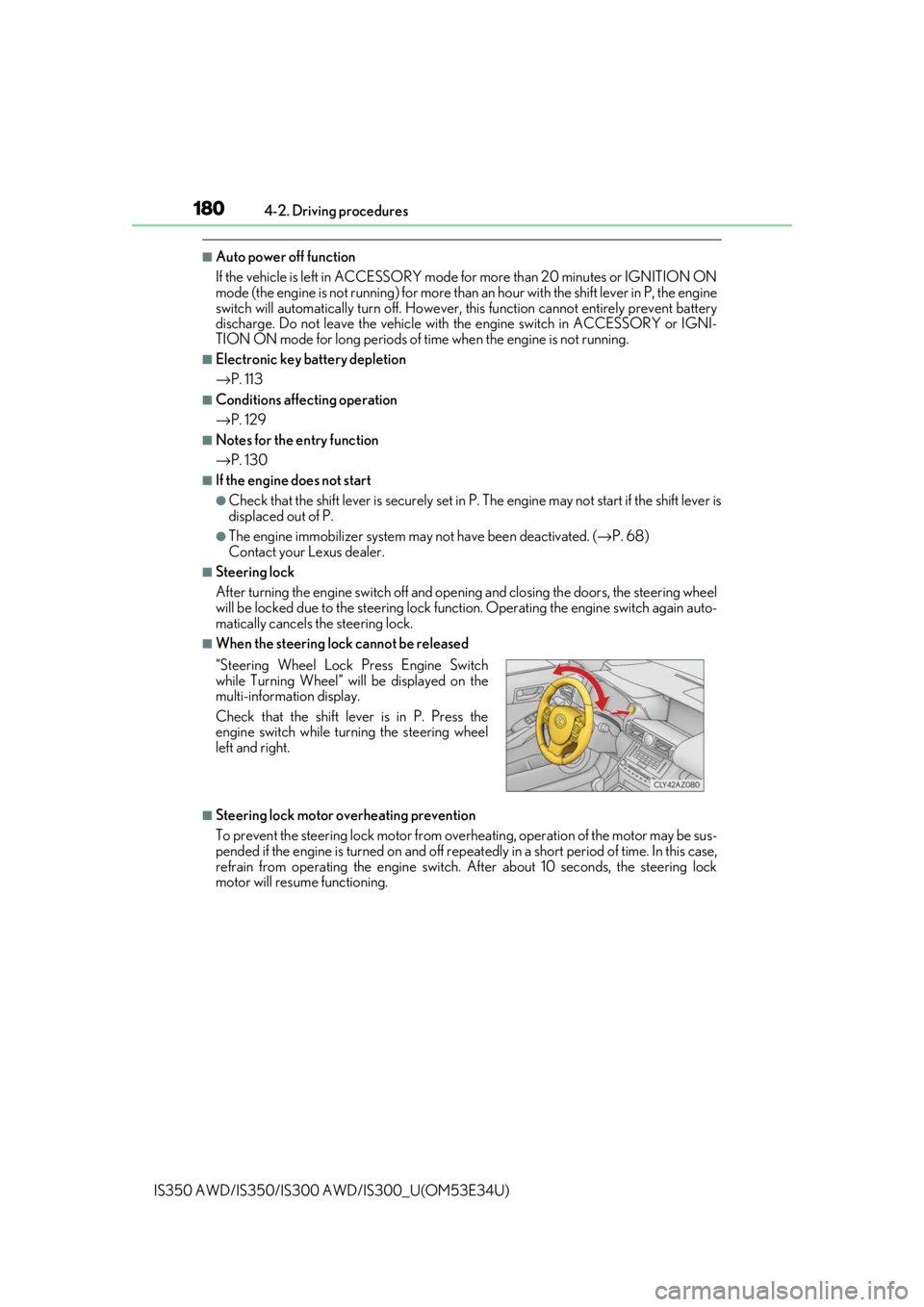
■When the steering lock cannot be released
■Steering lock motor overheating prevention
To prevent the steering lock motor from overheating, operation of the motor may be sus-
pended if the engine is turned on and off repeat edly in a short period of time. In this case,
refrain from operating the engine switch. After about 10 seconds, the steering lock
motor will resume functioning. “Steering Wheel Lock Press Engine Switch
while Turning Wheel” w ill be displayed on the
multi-information display.
Check that the shift leve r is in P. Press the
engine switch while turn ing the steering wheel
left and right.
Page 181 of 656

1814-2. Driving procedures
4
Driving
IS350 AWD/IS350/IS300 AWD/IS300_U(OM53E34U)
■When “Access System with Elec. Key Malf unction See Owner’s Manual” is displayed
on the multi-information display
The system may be malfunctio ning. Have the vehicle inspected by your Lexus dealer
immediately.
■If the electronic key battery is depleted
→ P. 500
■Operation of the engine switch
●If the switch is not pressed shortly and firmly, the engine switch mode may not change
or the engine may not start.
●If attempting to restart the engine immediately after turning the engine switch off, the
engine may not start in some cases. After turning the engine switch off, please wait a
few seconds before restarting the engine.
■If the smart access system wi th push-button start has been deactivated by a customized
setting
→ P. 569
WARNING
■When starting the engine
Always start the engine while sitting in the driver’s seat. Do not depress the accelerator
pedal while starting the engine under any circumstances.
Doing so may cause an accident resu lting in death or serious injury.
■Caution while driving
If engine failure occurs while the vehicle is moving, do not lock or open the doors until
the vehicle reaches a safe and complete stop. Activation of the steering lock in this cir-
cumstance may lead to an accident, re sulting in death or serious injury.
■Stopping the engine in an emergency
If you want to stop the engine in an emergency while driving the vehicle, press and hold
the engine switch for more than 2 seconds, or press it briefly 3 times or more in succes-
sion. ( →P. 513)
However, do not touch the engi ne switch while driving except in an emergency. Turning
the engine off while driving will not cause lo ss of steering or braking control, but the
power assist to these systems will be lost. Th is will make it more difficult to steer and
brake, so you should pull over and stop the vehicle as soon as it is safe to do so.
Page 420 of 656
4206-3. Using the interior lights
IS350 AWD/IS350/IS300 AWD/IS300_U(OM53E34U)
■The interior lights and personal lights can be operated when
The interior lights and personal lights can be used regardless of the engine switch mode.
However, when the engine switch is turned off, they can be used only when the battery
protection function is not operating.
■Battery protection function
To prevent the battery from being discha rged, approximately 20 minutes after the
engine switch is turned off, the power supplied to the interi or lights, personal lights, and
other lights will be cut off automatically. (If the interior lights, etc. are left on when the
engine switch is turned off, they will be turned off automatically.)
To turn the interior lights, etc. back on, tu rn the engine switch to ACCESSORY or IGNI-
TION ON mode or operate the interior light switch until the interior lights turn on.
If any of the lights are illuminated automatica lly due to the illuminated entry system, the
battery protection function will be canceled.
■Illuminated entry system
The lights automatically turn on/off according to engine switch mode, the presence of the
electronic key, whether the doors are locked/unlocked, and whether the doors are
opened/closed.
■Customization
Setting (e.g. the time elapsed before lights turn off) can be changed.
(Customizable features: →P. 611)
NOTICE
To prevent battery discharge, do not leave th e lights on longer than necessary when the
engine is off.
Page 451 of 656

451
Maintenance and care7
IS350 AWD/IS350/IS300 AWD/IS300_U(OM53E34U)
7-1. Maintenance and care
Cleaning and protecting the vehicle exterior ................ 452
Cleaning and protecting the vehicle interior.................. 456
7-2. Maintenance Maintenance requirements ............................ 459
General maintenance.............. 462
Emission inspection and maintenance (I/M)
programs .................................... 465
7-3. Do-it-yourself maintenance
Do-it-yourself service precautions................................ 466
Hood ...............................................468
Positioning a floor jack ............ 469
Engine compartment .................471
Tires .................................................483
Tire inflation pressure............... 493
Wheels ........................................... 496
Air conditioning filter ...............498
Electronic key battery ............. 500
Checking and replacing fuses ..............................................502
Light bulbs.................................... 505
Page 453 of 656

4537-1. Maintenance and care
7
Maintenance and care
IS350 AWD/IS350/IS300 AWD/IS300_U(OM53E34U)
■When using a car wash
If the door handle becomes wet while the electronic key is within the effective range, the
door may lock and unlock repeatedly. In that case, follow the following correction proce-
dures to wash the vehicle:
●Place the key in a position 6 ft. (2 m) or more separate from the vehicle while the vehi-
cle is being washed. (Take care to ensure that the key is not stolen.)
●Set the electronic key to battery-saving mode to disable the sm art access system with
push-button start. ( →P. 128)
■Aluminum wheels
●Remove any dirt immediately by using a neutral detergent.
●Wash detergent off with water immediately after use.
●To protect the paint from damage, make sure to observe the following precautions.
• Do not use acidic, alkaline or abrasive detergent
• Do not use hard brushes
• Do not use detergent on the wheels when they are hot, such as after driving or park- ing in hot weather
■Bumpers
Do not scrub with abrasive cleaners.
■Front side windows water-repellent coating (if equipped)
●The following precautions can extend the effectiveness of the water-repellent coating.
• Remove any dirt, etc. from the front side windows regularly.
• Do not allow dirt and dust to accumulate on the windows for a long period.Clean the windows with a soft, damp cloth as soon as possible.
• Do not use wax or glass cleaners that co ntain abrasives when cleaning the windows.
• Do not use any metallic objects to remove condensation build up.
●When the water-repellent performance has become insufficient, the coating can be
repaired. Contact your Lexus dealer.
Page 480 of 656
4807-3. Do-it-yourself maintenance
IS350 AWD/IS350/IS300 AWD/IS300_U(OM53E34U)
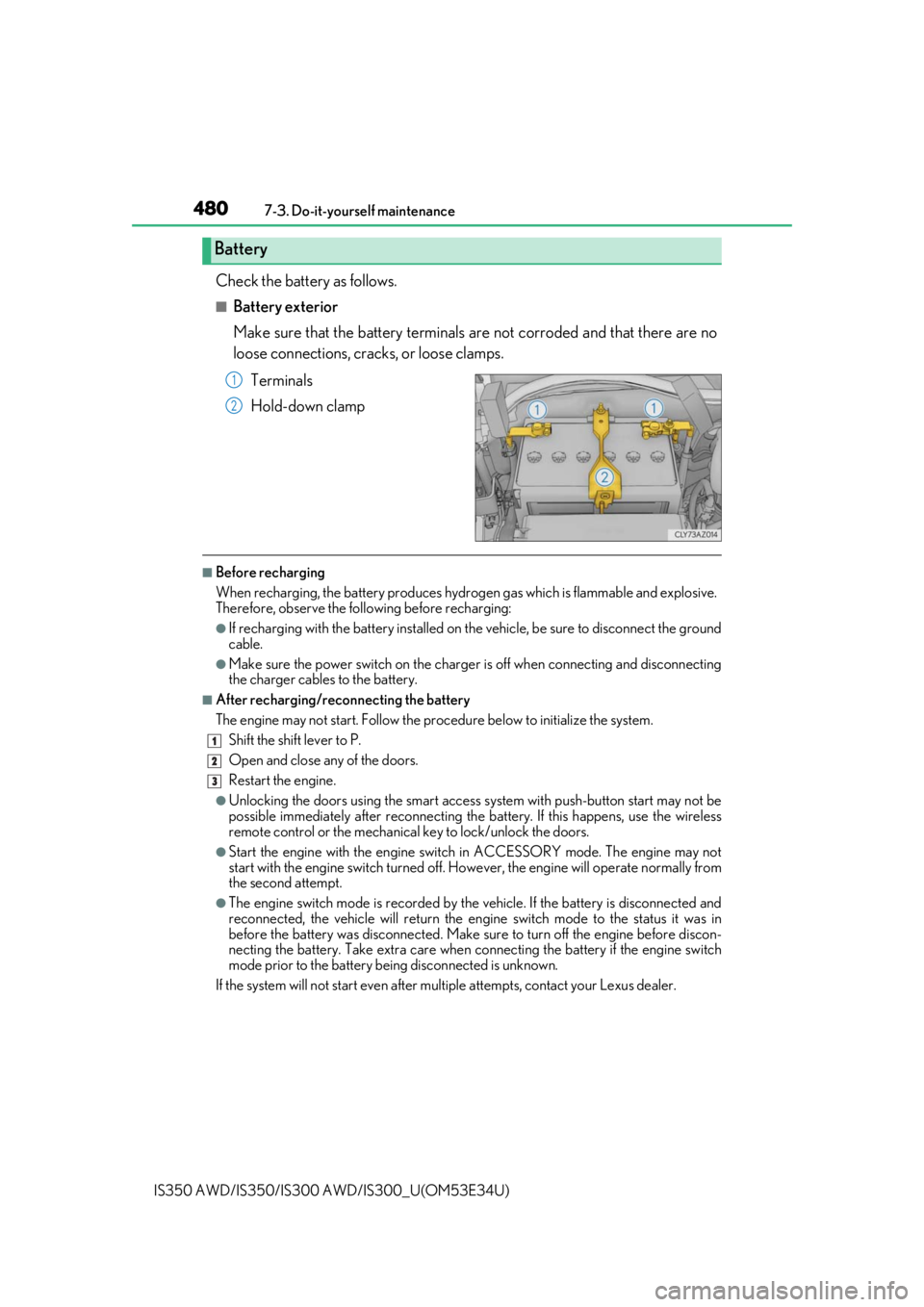
Check the battery as follows.
■Battery exterior
Make sure that the battery terminals are not corroded and that there are no
loose connections, cracks, or loose clamps.
Terminals
Hold-down clamp
■Before recharging
When recharging, the battery produces hydrogen gas which is flammable and explosive.
Therefore, observe the following before recharging:
●If recharging with the battery installed on the vehicle, be sure to disconnect the ground
cable.
●Make sure the power switch on the charge r is off when connecting and disconnecting
the charger cables to the battery.
■After recharging/reconnecting the battery
The engine may not start. Follow the procedure below to initialize the system.
Shift the shift lever to P.
Open and close any of the doors.
Restart the engine.
●Unlocking the doors using the smart access system with push-button start may not be
possible immediately after reconnecting the battery. If this happens, use the wireless
remote control or the mechanical key to lock/unlock the doors.
●Start the engine with the engine switch in ACCESSORY mode. The engine may not
start with the engine switch turned off. However, the engine will operate normally from
the second attempt.
●The engine switch mode is recorded by the vehicle. If the battery is disconnected and
reconnected, the vehicle will return the engi ne switch mode to the status it was in
before the battery was disconnected. Make su re to turn off the engine before discon-
necting the battery. Take extra care when connecting the battery if the engine switch
mode prior to the battery being disconnected is unknown.
If the system will not start even after mult iple attempts, contact your Lexus dealer.
Battery
1
2
1
2
3
Page 500 of 656
5007-3. Do-it-yourself maintenance
IS350 AWD/IS350/IS300 AWD/IS300_U(OM53E34U)
●Flathead screwdriver
●Small flathead screwdriver
●Lithium battery CR2032
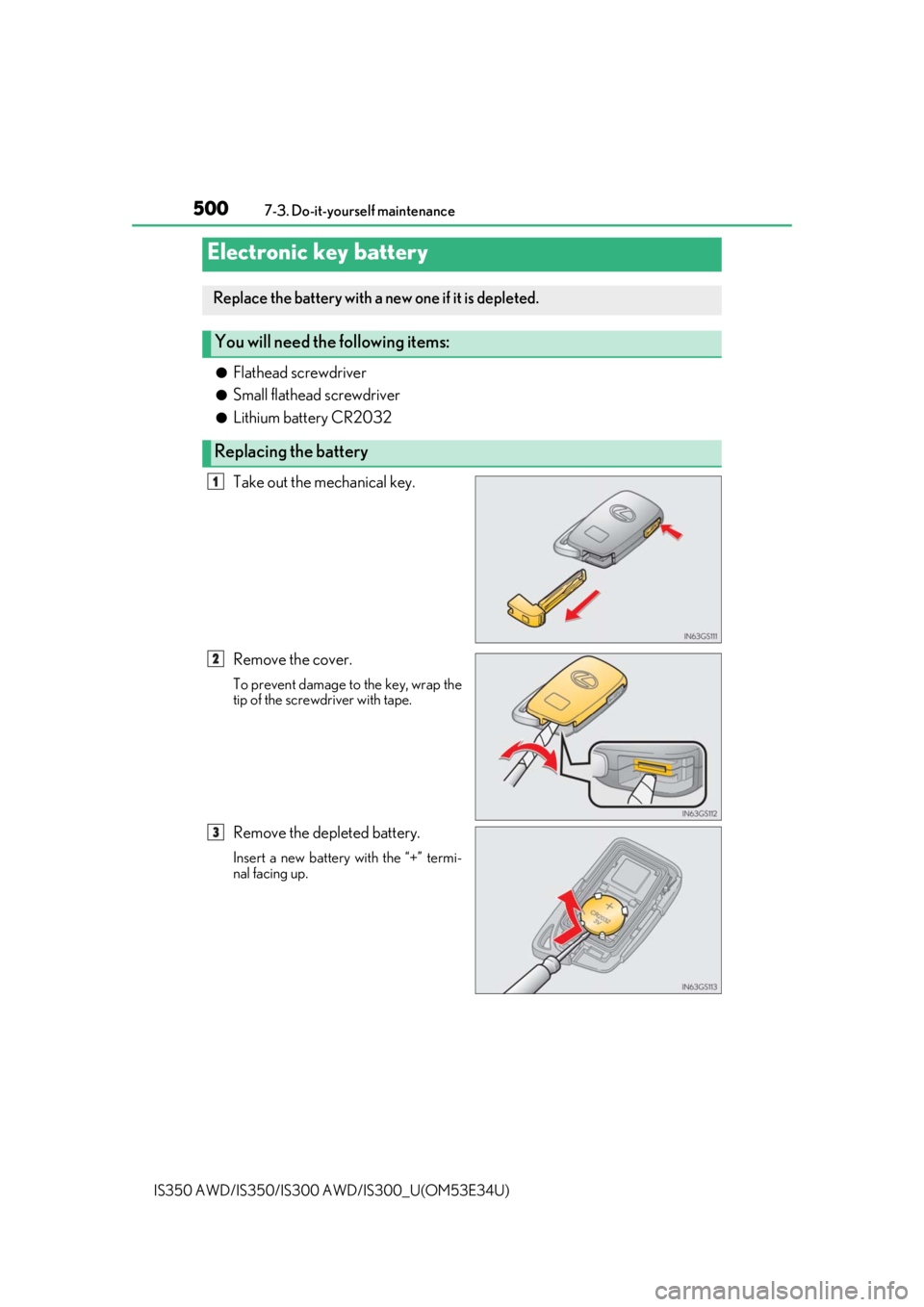
Take out the mechanical key.
Remove the cover.
To prevent damage to the key, wrap the
tip of the screwdriver with tape.
Remove the depleted battery.
Insert a new battery with the “+” termi-
nal facing up.
Electronic key battery
Replace the battery with a new one if it is depleted.
You will need the following items:
Replacing the battery
1
2
3