lane assist Lexus IS300 2018 Owner's Manual / LEXUS 2018 IS300,IS350 OWNER'S MANUAL (OM53E34U)
[x] Cancel search | Manufacturer: LEXUS, Model Year: 2018, Model line: IS300, Model: Lexus IS300 2018Pages: 656, PDF Size: 10.37 MB
Page 3 of 656

3
1
9 8
7 5 4
3
2
10
IS350 AWD/IS350/IS300 AWD/IS300_U(OM53E34U)
6
4-1. Before driving
Driving the vehicle ......................164
Cargo and luggage .................... 172
Vehicle load limits .......................175
Trailer towing ................................ 176
Dinghy towing ............................... 177
4-2. Driving procedures Engine (ign ition) switch .............178
Automatic transmission ........... 183
Turn signal lever .......................... 190
Parking brake ................................192
ASC (Active Sound Control) .........193
4-3. Operating the lights and wipers
Headlight switch ..........................194
Automatic High Beam.............. 198
Windshield wipers and washer ......................................... 202
4-4. Refueling Opening the fuel tank cap ...... 210 4-5. Using the driving support
systems
Lexus Safety System+ ................ 214
PCS (Pre-Collision System) ........... 221
LDA (Lane Departure Alert with steering co ntrol) ............ 232
Dynamic radar cruise control ......................................... 239
Intuitive parking assist................251
Lexus parking assist monitor........................................ 260
BSM (Blind Spot Monitor)......276
• BSM function.........................280
• RCTA function...................... 283
Driving mode select switch ...........................................288
Driving assist systems .............. 292
4-6. Driving tips Winter driving tips..................... 297
4Driving
Page 78 of 656
782. Instrument cluster
IS350 AWD/IS350/IS300 AWD/IS300_U(OM53E34U)
*1: These lights turn on when the engine switch is turned to IGNITION ON mode to
indicate that a system check is being performed. They will turn off after the engine is
started, or after a few seconds. There may be a malfunction in a system if a light does
not come on, or turn off. Have the ve hicle inspected by your Lexus dealer.
*2: The light flashes to indicate a malfunction.
*3: This light illuminates on the center panel.
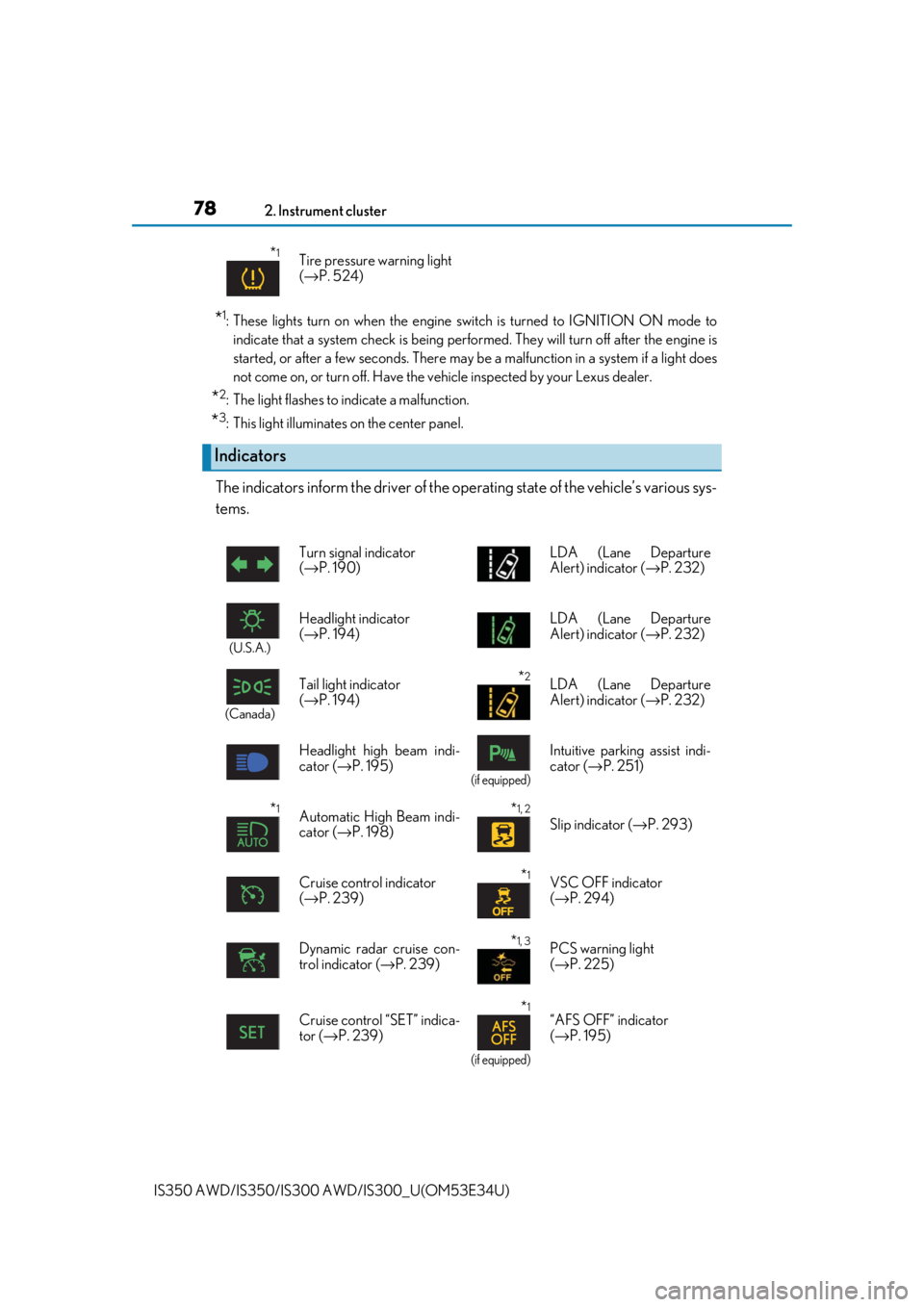
The indicators inform the driver of the op erating state of the vehicle’s various sys-
tems.
*1Tire pressure warning light
( → P. 524)
Indicators
Turn signal indicator
(→ P. 190) LDA (Lane Departure
Alert) indicator (
→P. 232)
(U.S.A.)
Headlight indicator
(→ P. 194) LDA (Lane Departure
Alert) indicator (
→P. 232)
(Canada)
Tail light indicator
(→ P. 194) *2LDA (Lane Departure
Alert) indicator ( →P. 232)
Headlight high beam indi-
cator (→ P. 195)
(if equipped)
Intuitive parkin g assist indi-
cator ( →P. 251)
*1Automatic High Beam indi-
cator (→ P. 198)*1, 2
Slip indicator ( →P. 293)
Cruise control indicator
( → P. 239)
*1VSC OFF indicator
(→ P. 294)
Dynamic radar cruise con-
trol indicator ( →P. 239)
*1, 3PCS warning light
(→ P. 225)
Cruise control “SET” indica-
tor (→ P. 239)
*1
(if equipped)
“AFS OFF” indicator
(→ P. 195)
Page 91 of 656
912. Instrument cluster
2
Instrument cluster
IS350 AWD/IS350/IS300 AWD/IS300_U(OM53E34U)
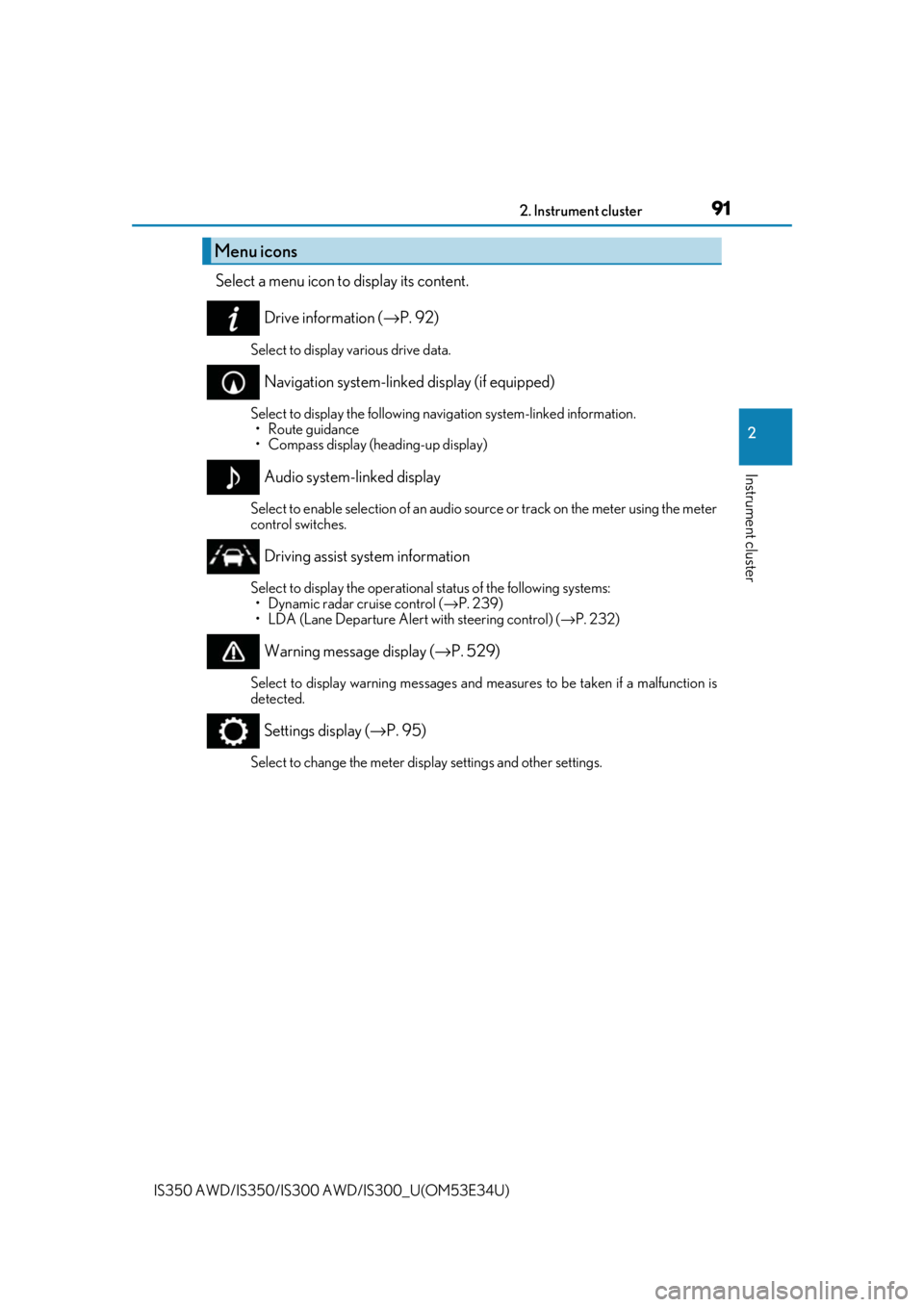
Select a menu icon to display its content.
Drive information ( →P. 92)
Select to display various drive data.
Navigation system-linked display (if equipped)
Select to display the following na vigation system-linked information.
•Route guidance
• Compass display (heading-up display)
Audio system-linked display
Select to enable selection of an audio source or track on the meter using the meter
control switches.
Driving assist system information
Select to display the operational status of the following systems: • Dynamic radar cruise control ( →P. 239)
• LDA (Lane Departure Alert with steering control) ( →P. 232)
Warning message display ( →P. 529)
Select to display warning messages and me asures to be taken if a malfunction is
detected.
Settings display ( →P. 95)
Select to change the meter display settings and other settings.
Menu icons
Page 95 of 656
952. Instrument cluster
2
Instrument cluster
IS350 AWD/IS350/IS300 AWD/IS300_U(OM53E34U)
■Units (if equipped) *2
The units of measure used can be changed while driving.
Unlike the units setting performed on , the units setting performed on can
be changed while driving.
*2: For F SPORT models, this item is not available when the main meter is in the right-side
position.
■Blank (No items)
Displays no drive information contents.
◆Changing settings
Use the meter control switches on th e steering wheel to change settings.
Press or to select .
Operate the switches to select a desired item.
Change the setting by referring to the message displayed on the screen.
◆Setting items
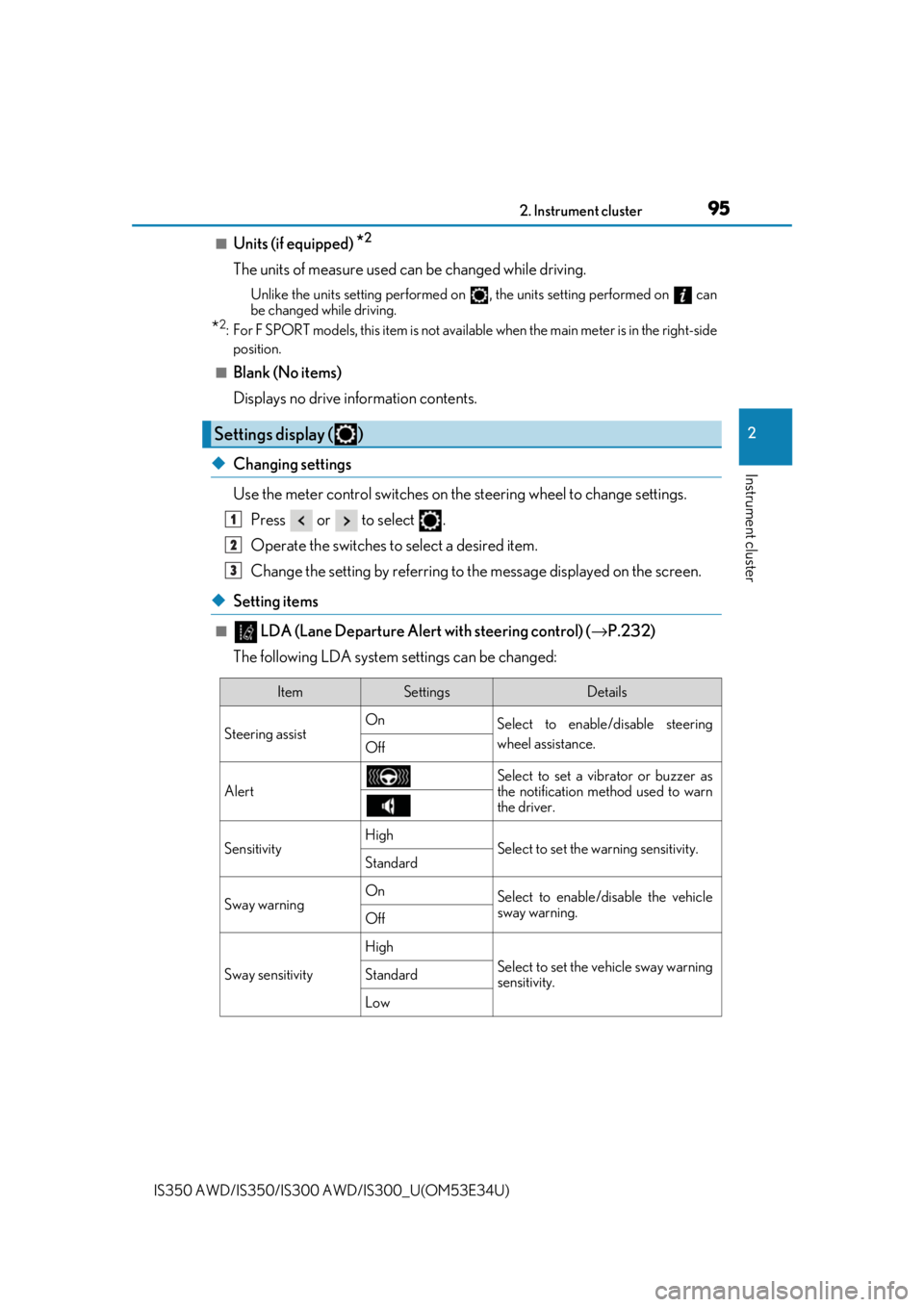
■ LDA (Lane Departure Alert with steering control) ( →P.232)
The following LDA system settings can be changed:
Settings display ( )
1
2
3
ItemSettingsDetails
Steering assist On
Select to enable/disable steering
wheel assistance.
Off
AlertSelect to set a vibrator or buzzer as
the notification method used to warn
the driver.
SensitivityHighSelect to set the warning sensitivity.Standard
Sway warningOnSelect to enable/disable the vehicle
sway warning.
Off
Sway sensitivity
High
Select to set the vehicle sway warning
sensitivity.Standard
Low
Page 163 of 656

163
Driving4
IS350 AWD/IS350/IS300 AWD/IS300_U(OM53E34U)
4-1. Before driving
Driving the vehicle ...................... 164
Cargo and luggage .................... 172
Vehicle load limits ....................... 175
Trailer towing ................................ 176
Dinghy towing ...............................177
4-2. Driving procedures Engine (ignition) switch ............ 178
Automatic transmission............ 183
Turn signal lever........................... 190
Parking brake ............................... 192
ASC (Active Sound Control)......... 193
4-3. Operating the lights and wipers
Headlight switch .......................... 194
Automatic High Beam .............. 198
Windshield wipers and washer..........................................202
4-4. Refueling Opening the fuel tank cap....... 210 4-5. Using the driving support
systems
Lexus Safety System+ ................214
PCS (Pre-Collision System) ...........221
LDA (Lane Departure Alert with steering control) ............ 232
Dynamic radar cruise control ......................................... 239
Intuitive parking assist ............... 251
Lexus parking assist monitor ........................................ 260
BSM (Blind Spot Monitor) ..... 276
• BSM function .........................280
• RCTA function......................283
Driving mode select switch .......................................... 288
Driving assist systems .............. 292
4-6. Driving tips Winter driving tips ..................... 297
Page 214 of 656
214
IS350 AWD/IS350/IS300 AWD/IS300_U(OM53E34U)
4-5. Using the driving support systems
◆PCS (Pre-Collision System)
→
P. 221
◆LDA (Lane Departure Alert with steering control)
→P. 232
◆Automatic High Beam
→P. 198
◆Dynamic radar cruise control
→P. 239
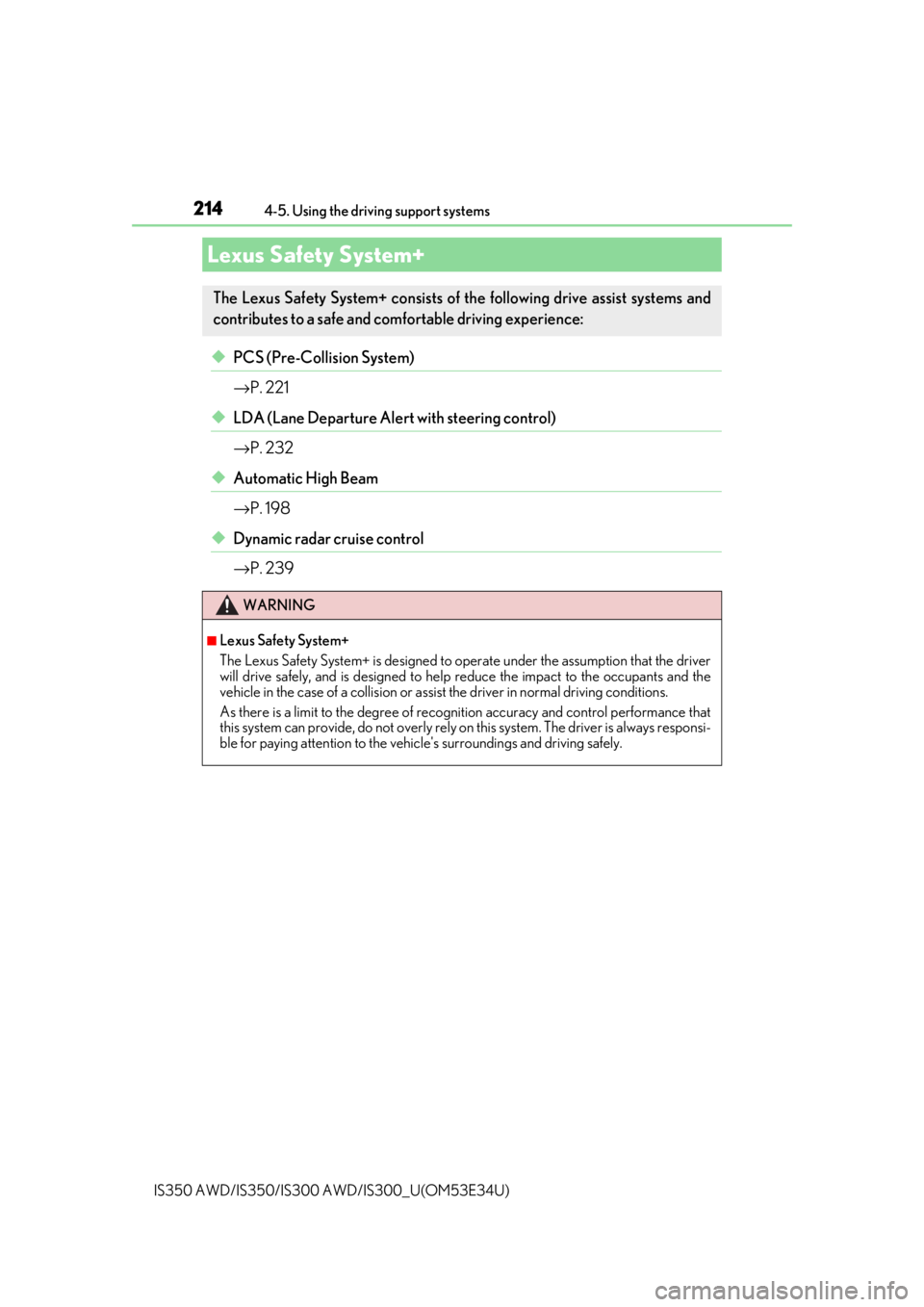
Lexus Safety System+
The Lexus Safety System+ consists of the following drive assist systems and
contributes to a safe and comfo rtable driving experience:
WARNING
■Lexus Safety System+
The Lexus Safety System+ is designed to operate under the assumption that the driver
will drive safely, and is designed to help reduce the impact to the occupants and the
vehicle in the case of a collision or assist the driver in normal driving conditions.
As there is a limit to the degree of reco gnition accuracy and control performance that
this system can provide, do not overly rely on this system. The driver is always responsi-
ble for paying attention to the vehicle's surroundings and driving safely.
Page 233 of 656
2334-5. Using the driving support systems
4
Driving
IS350 AWD/IS350/IS300 AWD/IS300_U(OM53E34U)
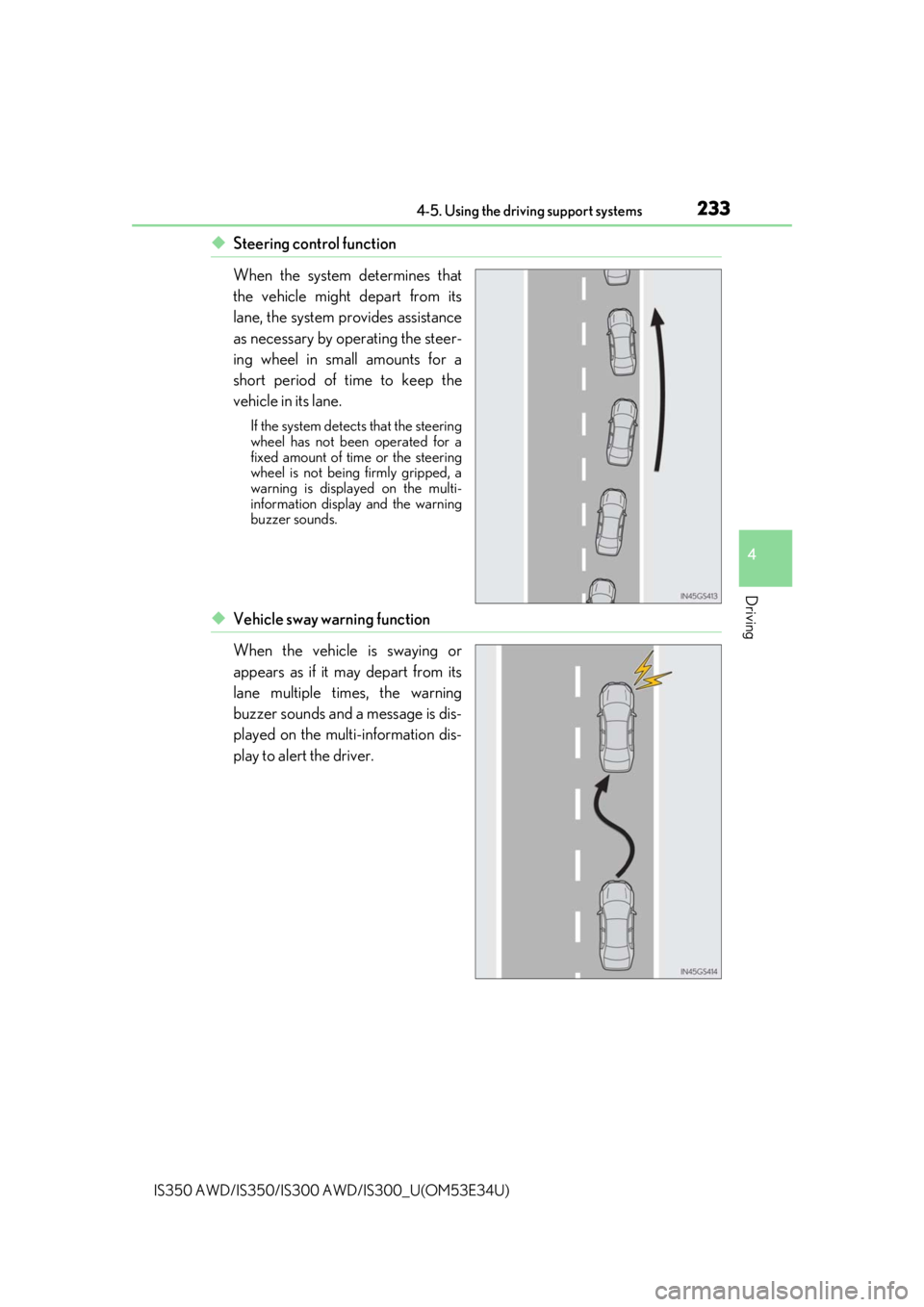
◆Steering control function
When the system determines that
the vehicle might depart from its
lane, the system provides assistance
as necessary by operating the steer-
ing wheel in small amounts for a
short period of time to keep the
vehicle in its lane.
If the system detects that the steering
wheel has not been operated for a
fixed amount of time or the steering
wheel is not being firmly gripped, a
warning is displayed on the multi-
information display and the warning
buzzer sounds.
◆Vehicle sway warning function
When the vehicle is swaying or
appears as if it may depart from its
lane multiple times, the warning
buzzer sounds and a message is dis-
played on the multi-information dis-
play to alert the driver.
Page 236 of 656
2364-5. Using the driving support systems
IS350 AWD/IS350/IS300 AWD/IS300_U(OM53E34U)
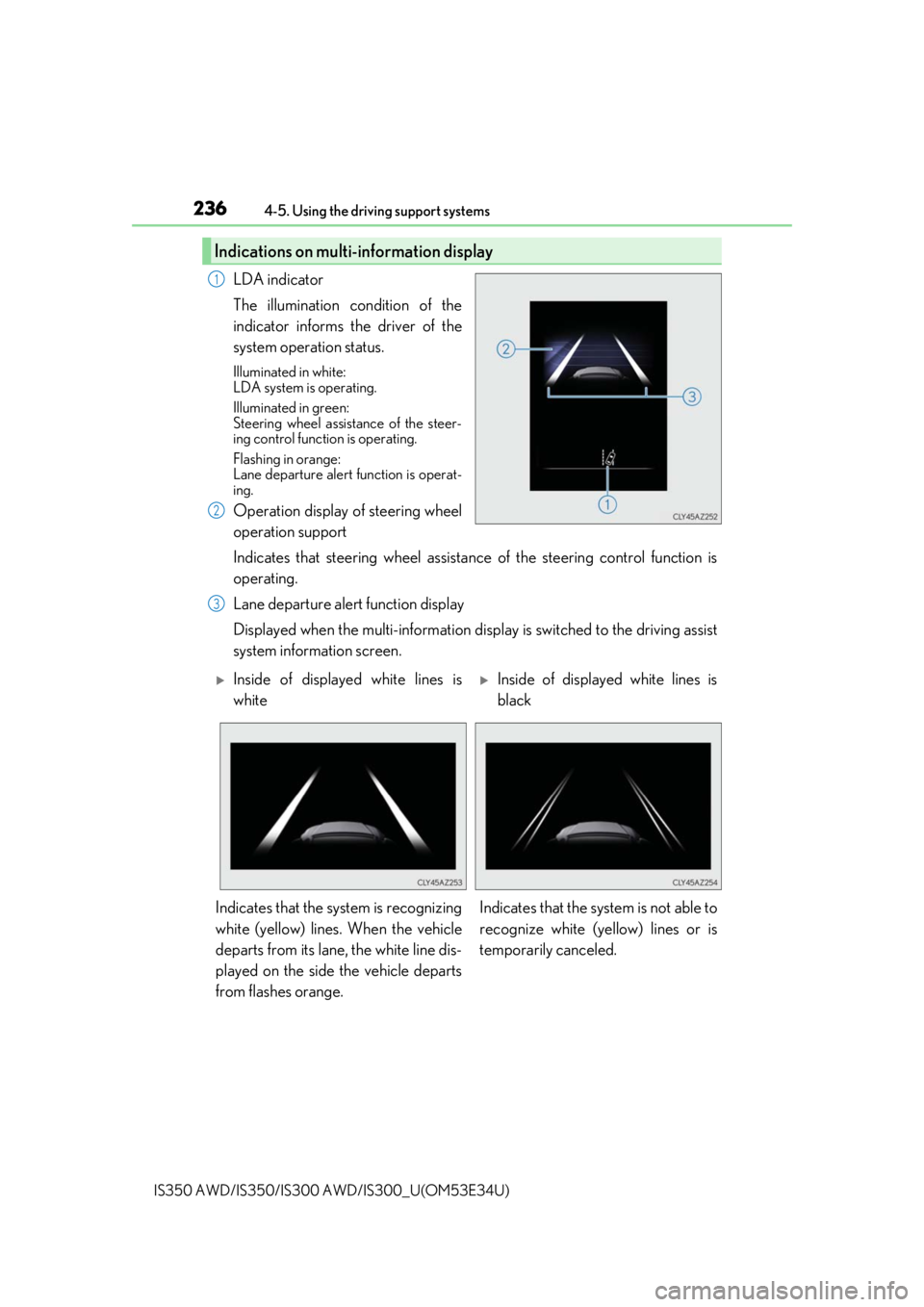
LDA indicator
The illumination condition of the
indicator informs the driver of the
system operation status.
Illuminated in white:
LDA system is operating.
Illuminated in green:
Steering wheel assistance of the steer-
ing control function is operating.
Flashing in orange:
Lane departure alert function is operat-
ing.
Operation display of steering wheel
operation support
Indicates that steering wheel assistance of the steering control function is
operating.
Lane departure alert function display
Displayed when the multi-information disp lay is switched to the driving assist
system information screen.
Indications on multi-information display
1
2
3
Inside of displayed white lines is
whiteInside of displayed white lines is
black
Indicates that the system is recognizing
white (yellow) lines. When the vehicle
departs from its lane, the white line dis-
played on the side the vehicle departs
from flashes orange. Indicates that the system is not able to
recognize white (ye
llow) lines or is
temporarily canceled.
Page 237 of 656
2374-5. Using the driving support systems
4
Driving
IS350 AWD/IS350/IS300 AWD/IS300_U(OM53E34U)
■Operation conditions of each function
●Lane departure alert function
This function operates when all of the following conditions are met.
• LDA is turned on.
• Vehicle speed is approximatel y 32 mph (50 km/h) or more.
• System recognizes white (yellow) lines.
• Width of traffic lane is approx imately 9.8 ft. (3 m) or more.
• Turn signal lever is not operated.
• Vehicle is driven on a straight road or around a gentle curve with a radius of more
than approximately 492 ft. (150 m).
• No system malfunctions are detected. ( →P. 522)
●Steering control function
This function operates when all of the follo wing conditions are met in addition to the
operation conditions for the lane departure alert function.
• Setting for Steering Assist in of th e multi-information display is set to On.
( → P. 95)
• Vehicle is not accelerated or dece lerated by a fixed amount or more.
• Steering wheel is not operated with a steering force level suitable for changing
lanes.
• ABS, VSC, TRAC and PCS are not operating.
• TRAC or VSC is not turned off.
●Vehicle sway warning function
This function operates when all of the following conditions are met.
• Setting for Sway Warning in of the multi-information display is set to On.
( → P. 95)
• Vehicle speed is approximatel y 32 mph (50 km/h) or more.
• Width of traffic lane is approx imately 9.8 ft. (3 m) or more.
• No system malfunctions are detected. ( →P. 522)
■Temporary cancellation of functions
When operation conditions are no longer met, a function may be temporarily canceled.
However, when the operation conditions are met again, operat ion of the function is auto-
matically restored. ( →P. 237)
■Steering control function
Depending on the vehicle speed, lane depart ure situation, road conditions, etc., the
driver may not feel the function is operating or the function may not operate at all.
■Lane departure alert function
The warning buzzer may be difficult to hear due to external noise, audio playback, etc.
Also, it may be difficult to f eel steering wheel vibrations due to the road conditions, etc.
■Hands off steering wheel alert
When the system determines that the driver has removed the hands from the steering
wheel while the steering control function is operating, a warning message is displayed on
the multi-information display.
If the driver continues to keep the hands off of the steering wheel, a buzzer sounds, a
warning message is displayed. This alert also operates in the same way when the driver
continuously operates the steering wheel only a small amount. However, depending on
the road conditions, etc., the function may not cancel.
Page 276 of 656

2764-5. Using the driving support systems
IS350 AWD/IS350/IS300 AWD/IS300_U(OM53E34U)
The Blind Spot Monitor is a system that has 2 functions:
●The BSM (Blind Spot Monitor) function
Assists the driver in making a decision when changing lanes
●The RCTA (Rear Cross Traffic Alert) function
Assists the driver when backing up
These functions use same sensors.
BSM (Blind Spot Monitor)∗
∗
: If equipped
Summary of the Blind Spot Monitor