automatic Lexus IS300 2019 Owner's Manual / LEXUS 2019 IS300,IS350 OWNER'S MANUAL QUICK GUIDE (OM53E86U)
[x] Cancel search | Manufacturer: LEXUS, Model Year: 2019, Model line: IS300, Model: Lexus IS300 2019Pages: 74, PDF Size: 2 MB
Page 1 of 74
Contents
The Quick Guide is not intended as a substitute for your Owner’s
Manual. We strongly encourage you to review the Owner’s
Manual and supplementary manuals so you will have a better
understanding of your vehicle’s capabilities and limitations.
1
Air Conditioning System*
Adjusting the temperature ...................................................................................................... .. 53
Air conditioning control screen .............................................................................................. 54
Using automatic mode........................................................................................................... ..... 56
Adjusting the temperature for driver and passenger seats separately (“DUAL” mode) .................................................................................................................. ....... 56
Audio System (with Lexus Display Audio)*
Lexus Display Audio operation bu ttons .............................................................................. 49
Using the steering whee l switches to change audio sources ..................................... 49
Audio menu screen .............................................................................................................. ........ 50
Operating the audio system using the steering wheel switches ............................... 52
Audio System (with Navigation System)*
Audio control screen ................................................................................................................... 40
Remote control (steering wheel audio switches) . ........................................................... 40
Basic operation ................................................................................................................ ................ 41
Radio.......................................................................................................................... ........................... 41
DVD player/CD player........................................................................................................... ... 42
Operating an iPod .............................................................................................................. .......... 43
Automatic High Beam .......................................................................................................................18
BSM (Blind Spot Monitor) .............................................................................................................. 30
Dynamic Radar Cruise Control .................................................................................................. 25
Floor Mat Installation ...........................................................................................................................4
Garage Door Opener ..................................................................................................................... 62
*: This feature may be operated by Voice command (See P.58)
Page 7 of 74
7
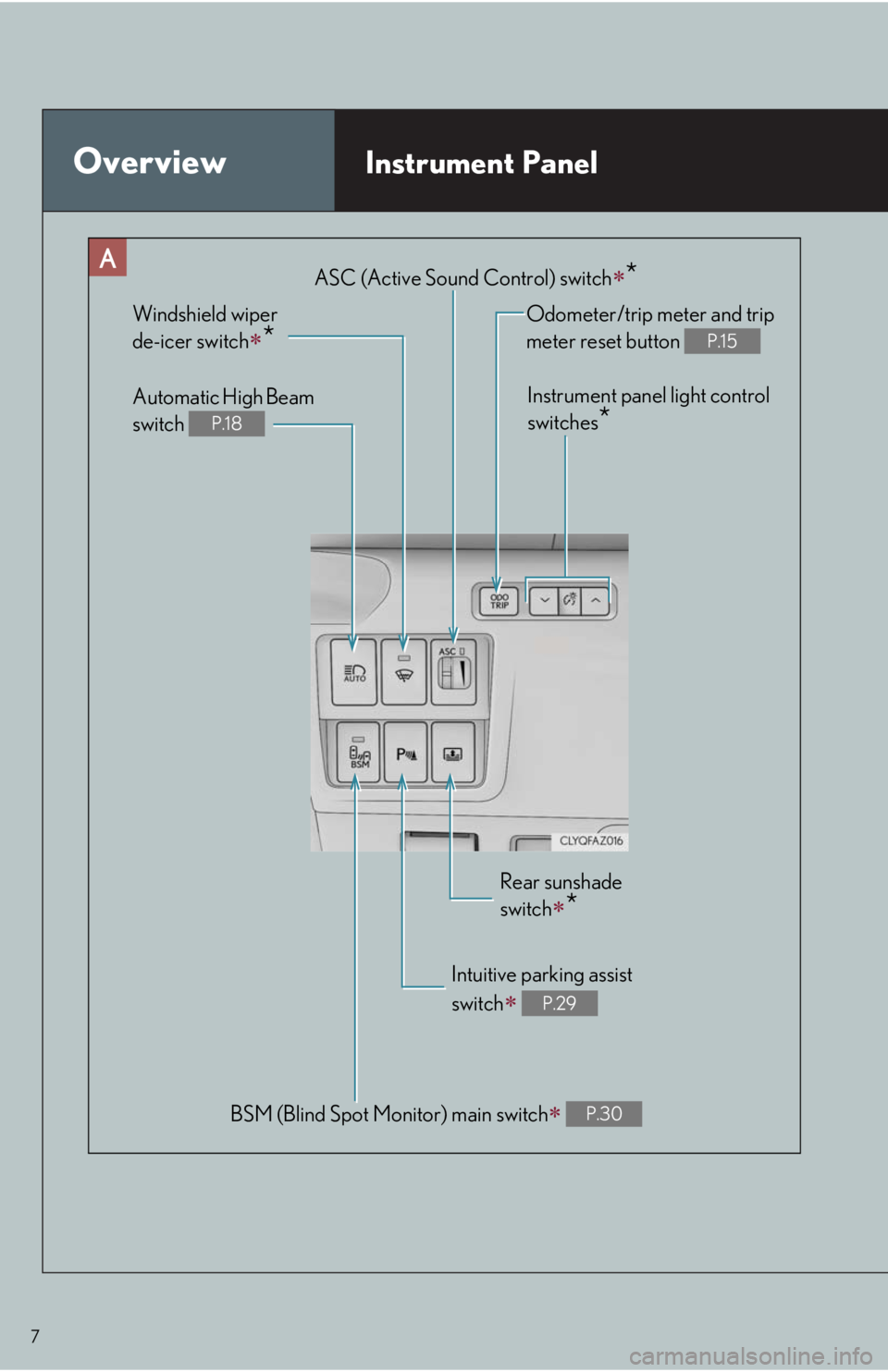
OverviewInstrument Panel
BSM (Blind Spot Monitor) main switch P.30
Odometer/trip meter and trip
meter reset button
P.15
Instrument panel light control
switches
*
Windshield wiper
de-icer switch
*
Rear sunshade
switch
*
Intuitive parking assist
switch
P.29
Automatic High Beam
switch
P.18
ASC (Active Sound Control) switch*
Page 17 of 74
17
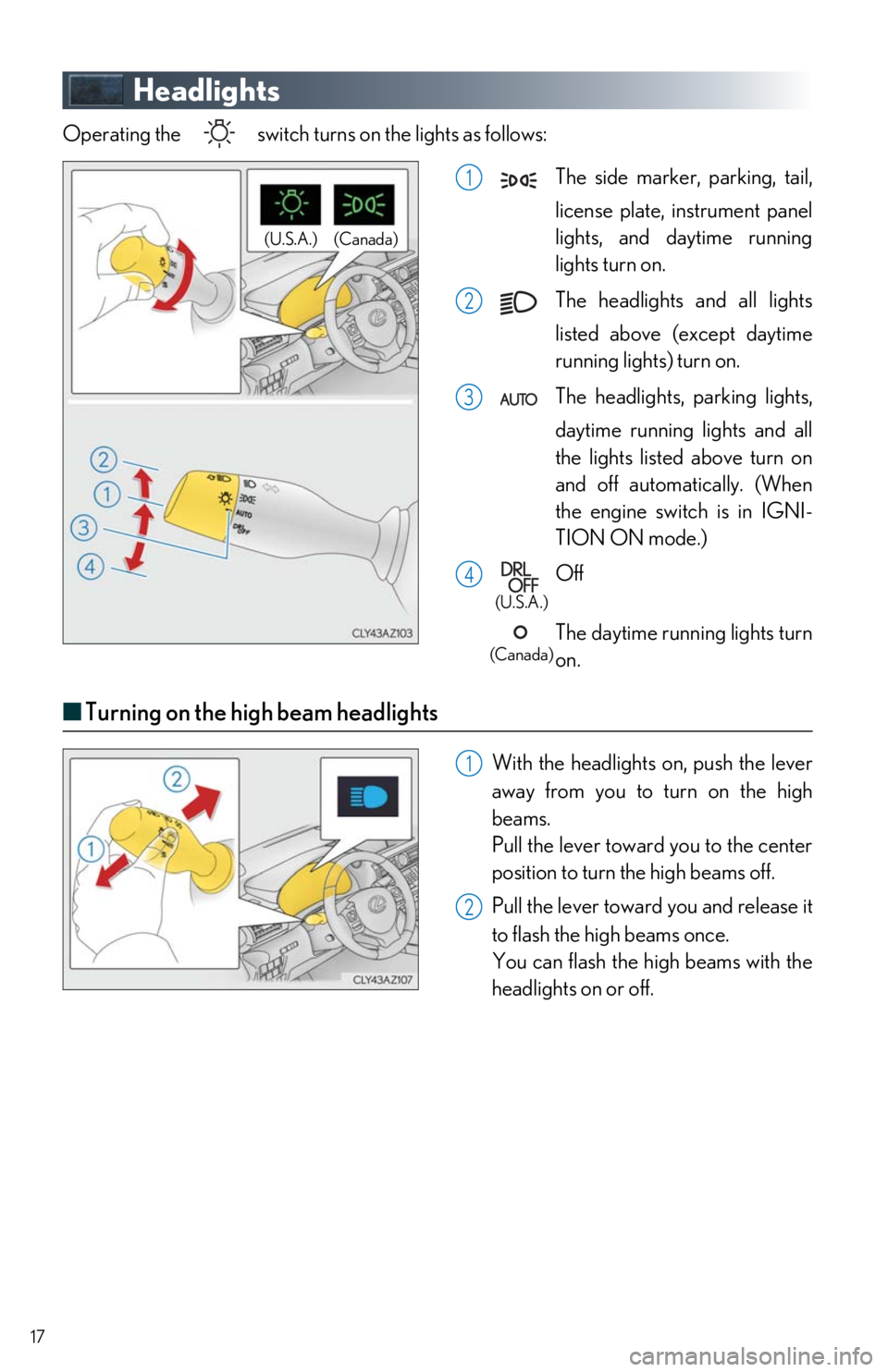
Headlights
Operating the switch turns on the lights as follows: The side marker, parking, tail, license plate, in strument panel
lights, and daytime running
lights turn on.
The headlights and all lights
listed above (except daytime
running lights) turn on.
The headlights, parking lights, daytime running lights and all
the lights listed above turn on
and off automatically. (When
the engine switch is in IGNI-
TION ON mode.)
Off
The daytime running lights turn
on.
■ Turning on the high beam headlights
With the headlights on, push the lever
away from you to turn on the high
beams.
Pull the lever toward you to the center
position to turn the high beams off.
Pull the lever toward you and release it
to flash the high beams once.
You can flash the high beams with the
headlights on or off.
(Canada)
(U.S.A.)
1
2
3
4
(U.S.A.)
(Canada)
1
2
Page 18 of 74
18
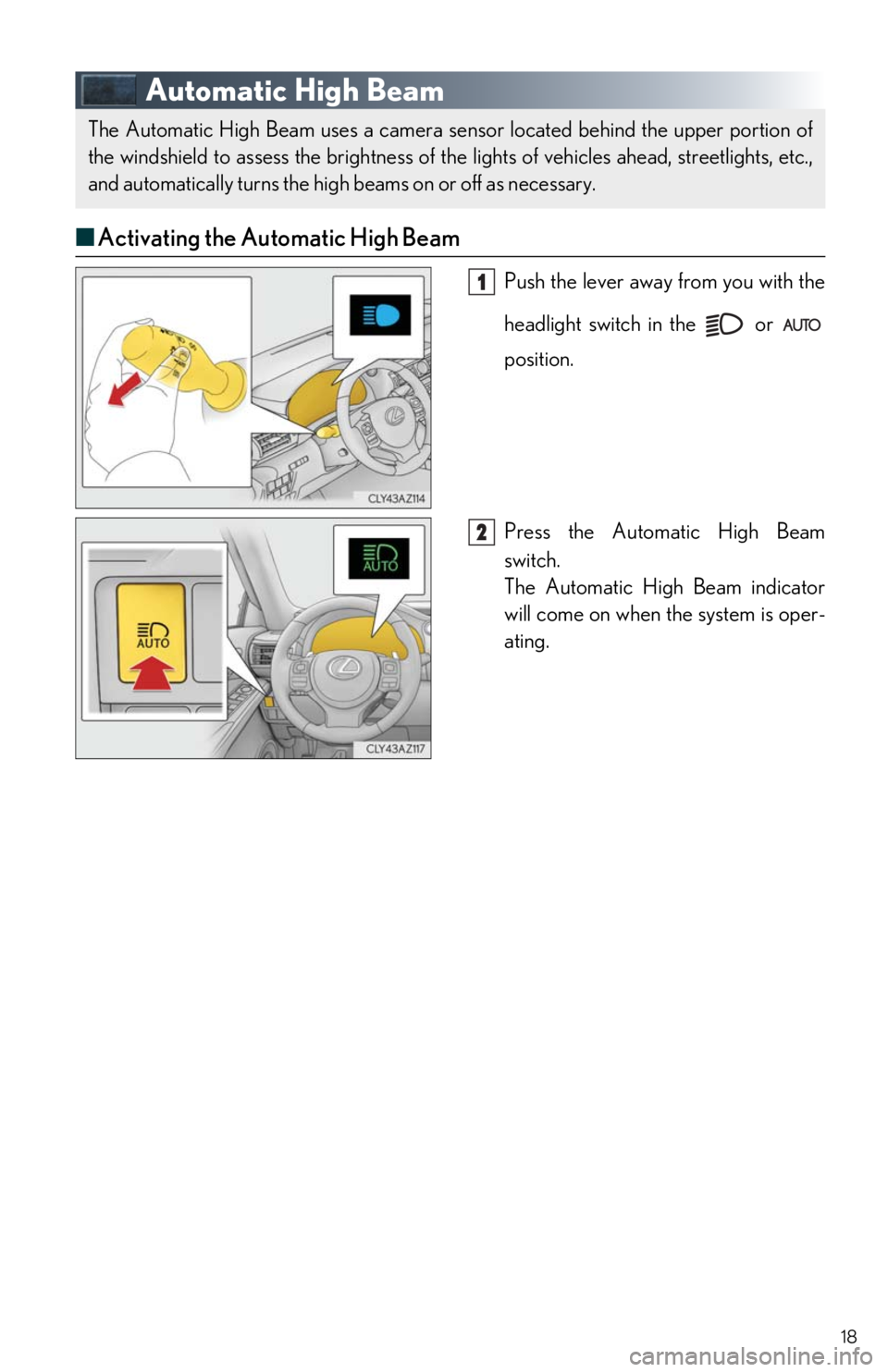
Automatic High Beam
■Activating the Automatic High Beam
Push the lever away from you with the
headlight switch in the or
position.
Press the Automatic High Beam
switch.
The Automatic High Beam indicator
will come on when the system is oper-
ating.
The Automatic High Beam uses a camera sens or located behind the upper portion of
the windshield to assess the brightness of the lights of vehicles ahead, streetlights, etc.,
and automatically turns the high beams on or off as necessary.
1
2
Page 19 of 74
19
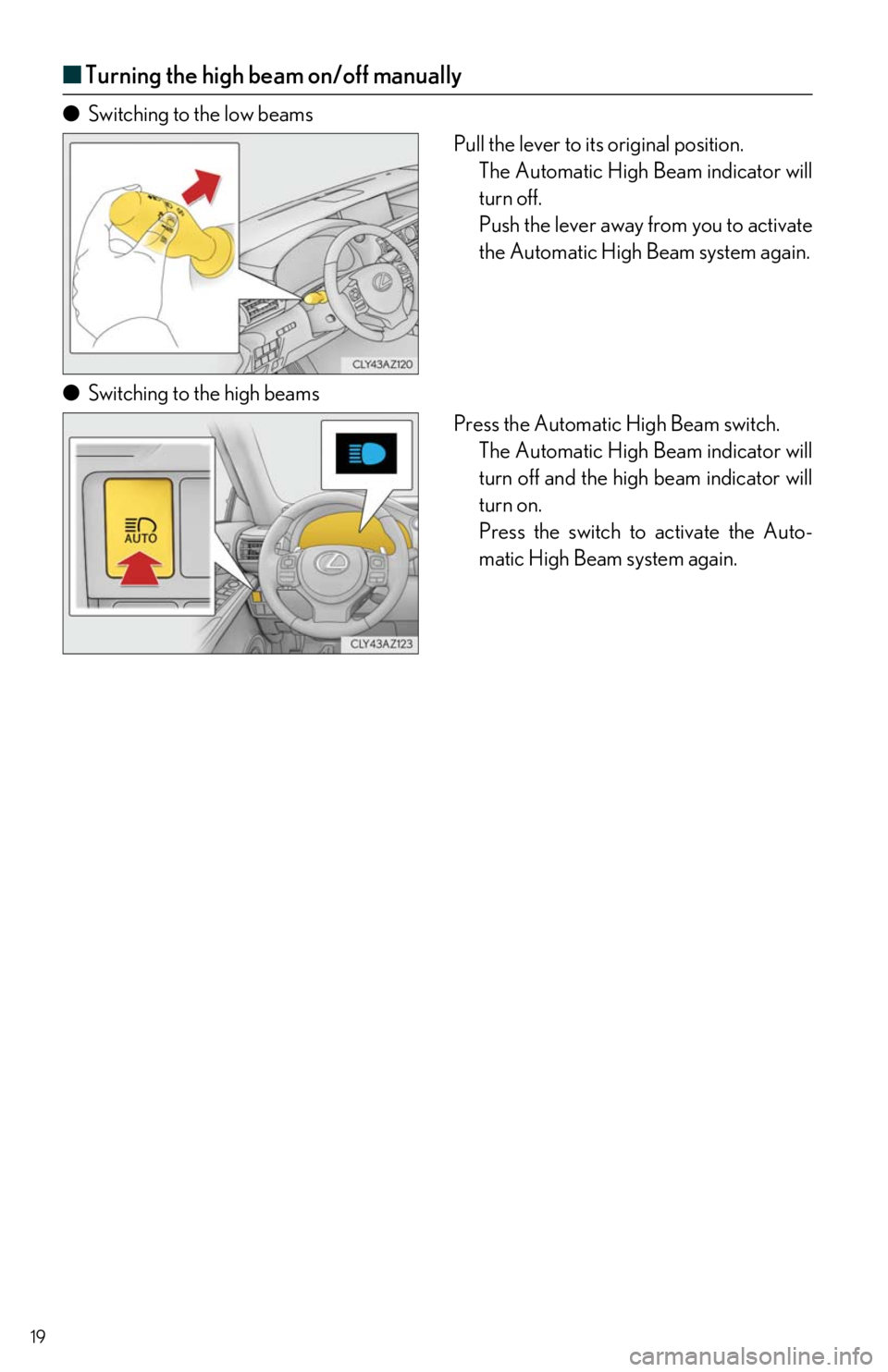
■Turning the high beam on/off manually
● Switching to the low beams
Pull the lever to its original position.The Automatic High Beam indicator will
turn off.
Push the lever away from you to activate
the Automatic High Beam system again.
● Switching to the high beams
Press the Automatic High Beam switch.The Automatic High Beam indicator will
turn off and the high beam indicator will
turn on.
Press the switch to activate the Auto-
matic High Beam system again.
Page 21 of 74
21
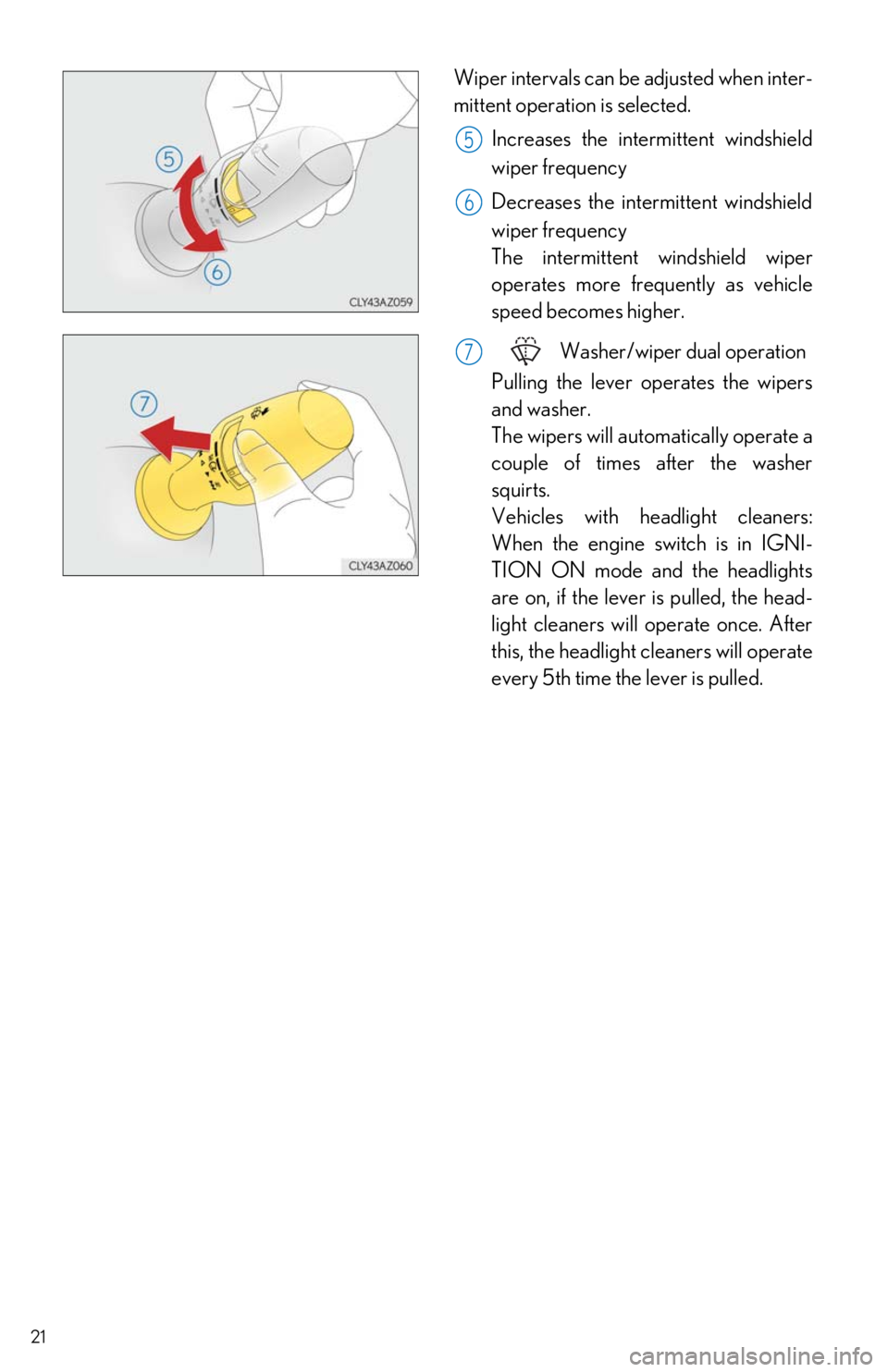
Wiper intervals can be adjusted when inter-
mittent operation is selected.Increases the interm ittent windshield
wiper frequency
Decreases the intermittent windshield
wiper frequency
The intermittent windshield wiper
operates more frequently as vehicle
speed becomes higher.
Washer/wiper dual operation
Pulling the lever op erates the wipers
and washer.
The wipers will automatically operate a
couple of times after the washer
squirts.
Vehicles with headlight cleaners:
When the engine switch is in IGNI-
TION ON mode and the headlights
are on, if the lever is pulled, the head-
light cleaners will operate once. After
this, the headlight cleaners will operate
every 5th time the lever is pulled.
5
6
7
Page 22 of 74
22
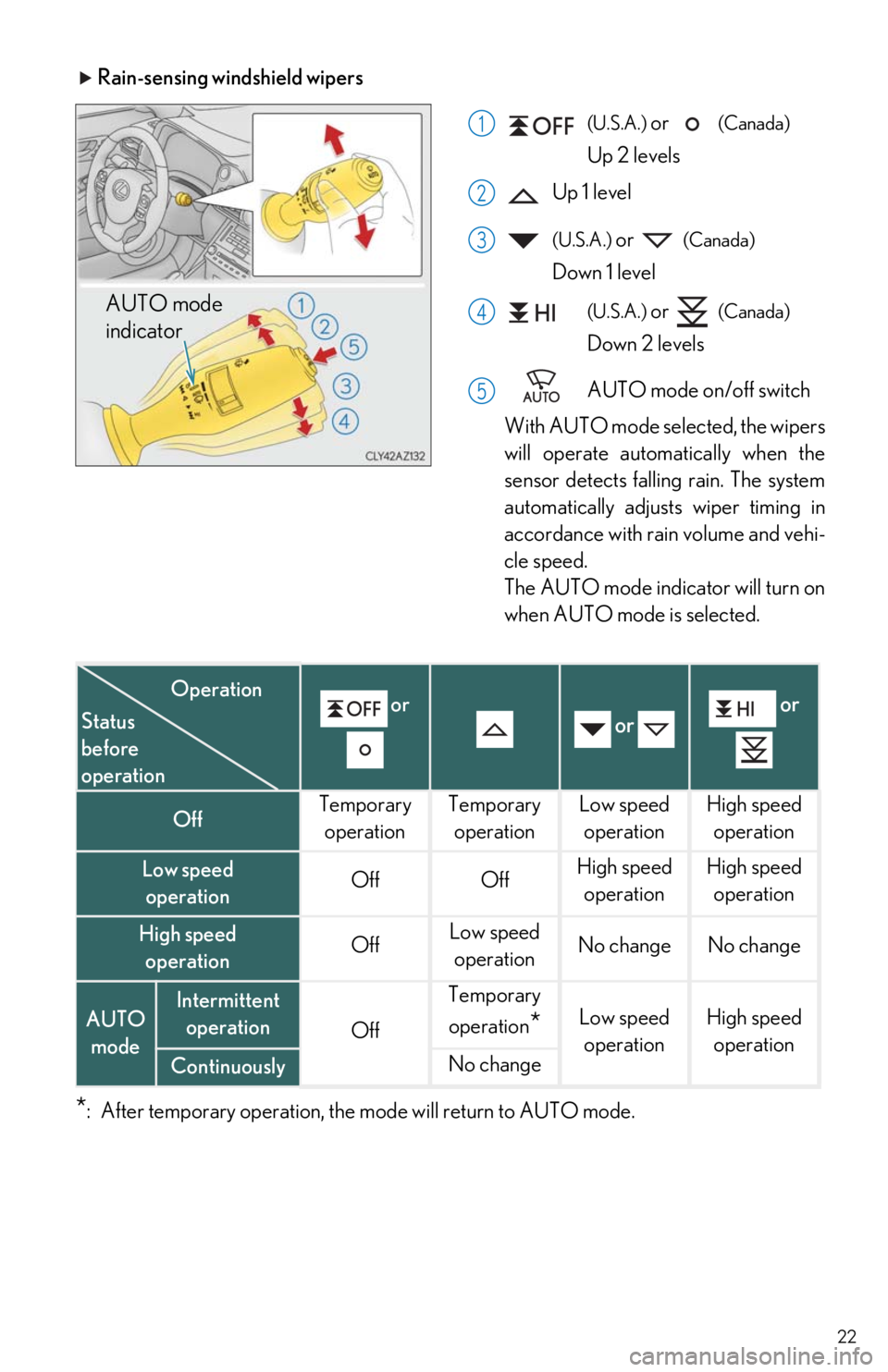
Rain-sensing windshield wipers
(U.S.A.) or (Canada)
Up 2 levels
Up 1 level
(U.S.A.) or (Canada)
Down 1 level
(U.S.A.) or (Canada)
Down 2 levels
AUTO mode on/off switch
With AUTO mode selected, the wipers
will operate automatically when the
sensor detects falling rain. The system
automatically adjusts wiper timing in
accordance with rain volume and vehi-
cle speed.
The AUTO mode indicator will turn on
when AUTO mode is selected.
*: After temporary operation, the mode will return to AUTO mode.
AUTO mode
indicator
1
2
3
4
5
or or or
OffTemporary
operationTemporary operationLow speedoperationHigh speed operation
Low speed operationOffOffHigh speed operationHigh speedoperation
High speed operationOffLow speedoperationNo changeNo change
AUTO modeIntermittent operation
Off
Temporary
operation
*Low speed operationHigh speed operation
ContinuouslyNo change
Status
before
operation
Operation
Page 23 of 74
23
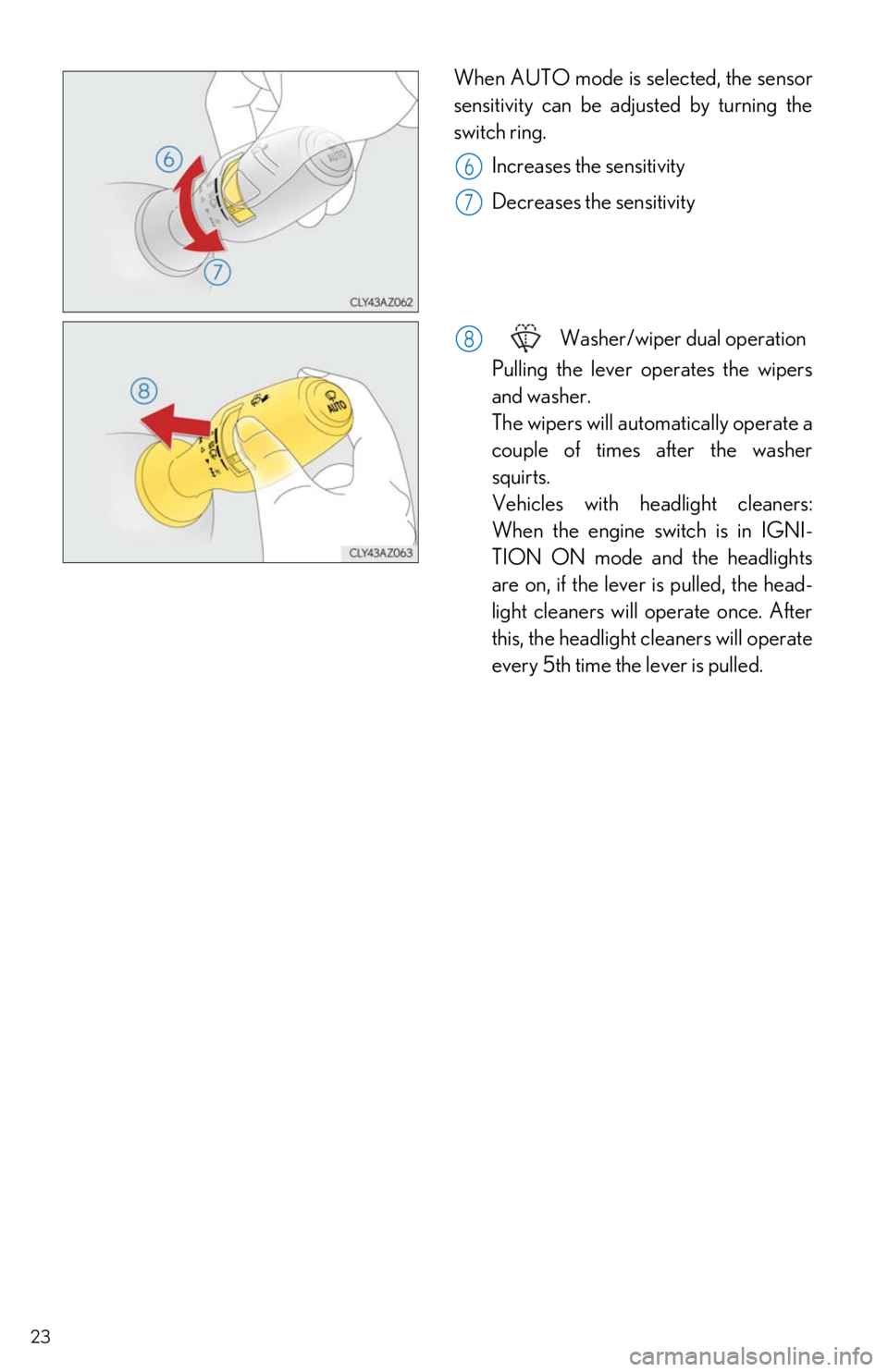
When AUTO mode is selected, the sensor
sensitivity can be adjusted by turning the
switch ring.
Increases the sensitivity
Decreases the sensitivity
Washer/wiper dual operation
Pulling the lever op erates the wipers
and washer.
The wipers will automatically operate a
couple of times after the washer
squirts.
Vehicles with headlight cleaners:
When the engine switch is in IGNI-
TION ON mode and the headlights
are on, if the lever is pulled, the head-
light cleaners will operate once. After
this, the headlight cleaners will operate
every 5th time the lever is pulled.
6
7
8
Page 24 of 74
24
Lexus Safety System +
■PCS (Pre-Collision System)
The pre-collision system uses a radar sensor and camera sensor to detect vehicles and
pedestrians in front of your vehicle. When th e system determines that the possibility of a
frontal collision with a vehicle or pedestrian is high, a warning operates to urge the driver to
take evasive action and the potential brake pressure is increase d to help the driver avoid the
collision. If the system determin es that the possibility of a frontal collision with a vehicle or
pedestrian is extremely high, the brakes are au tomatically applied to help avoid the collision
or help reduce the impact of the collision.
■ LDA (Lane Departure Alert with steering control)
P. 28
■Automatic High Beam
P. 18
■Dynamic radar cruise control
P. 25
The Lexus Safety System + consists of the fo llowing drive assist systems and contributes
to a safe and comfortable driving experience:
Page 25 of 74
25
Dynamic Radar Cruise Control
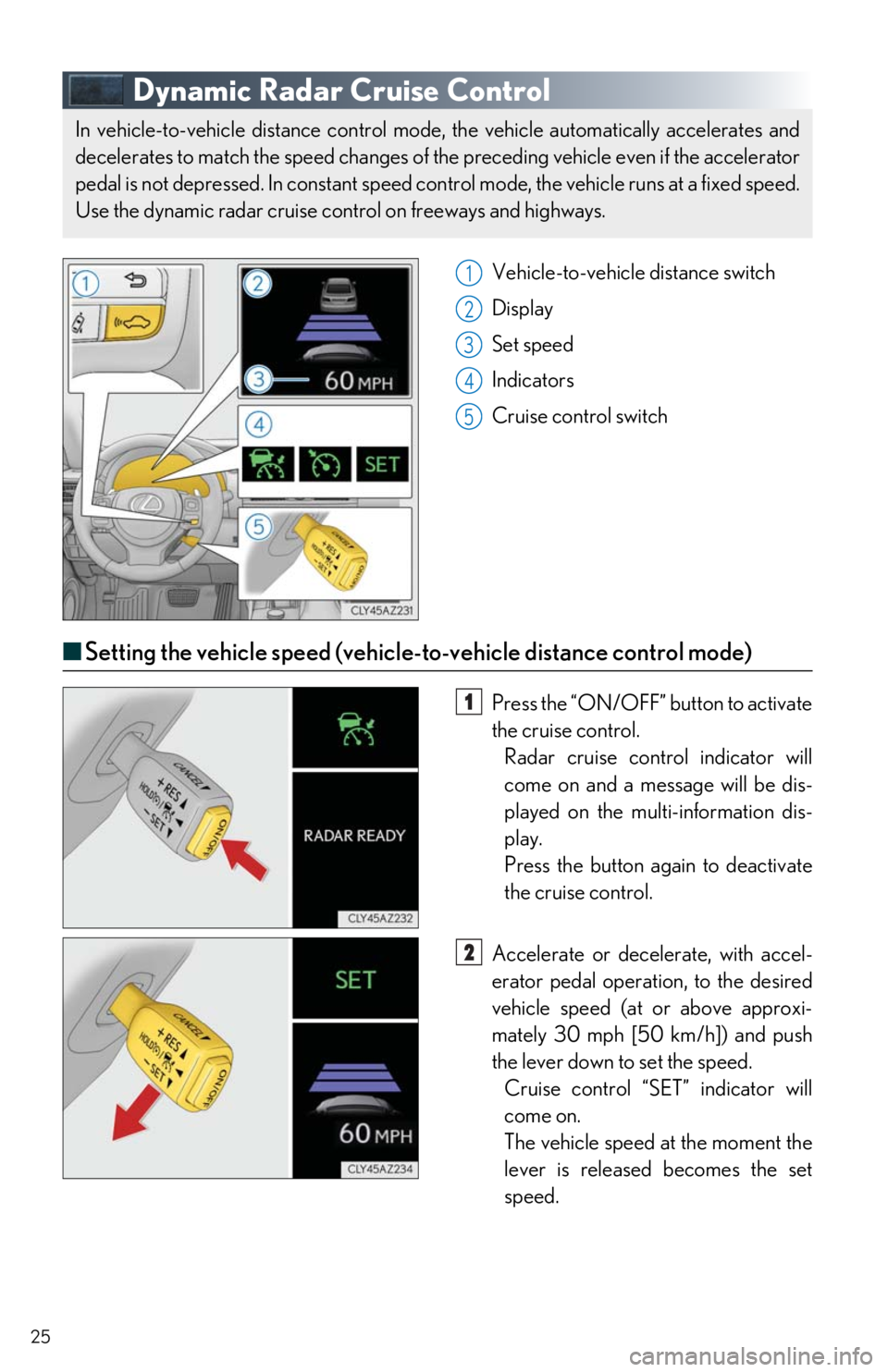
Vehicle-to-vehicle distance switch
Display
Set speed
Indicators
Cruise control switch
■Setting the vehicle speed (vehicle-t o-vehicle distance control mode)
Press the “ON/OFF” button to activate
the cruise control. Radar cruise control indicator will
come on and a message will be dis-
played on the multi-information dis-
play.
Press the button again to deactivate
the cruise control.
Accelerate or dece lerate, with accel-
erator pedal operation, to the desired
vehicle speed (at or above approxi-
mately 30 mph [50 km/h]) and push
the lever down to set the speed. Cruise control “SET” indicator will
come on.
The vehicle speed at the moment the
lever is released becomes the set
speed.
In vehicle-to-vehicle distance control mode , the vehicle automatically accelerates and
decelerates to match the speed changes of the preceding vehicle even if the accelerator
pedal is not depressed. In constant speed control mode, the vehicle runs at a fixed speed.
Use the dynamic radar cruise control on freeways and highways.
1
2
3
4
5
1
2