sport mode Lexus IS300 2020 / LEXUS 2020 IS300,IS350 (OM53F29U) User Guide
[x] Cancel search | Manufacturer: LEXUS, Model Year: 2020, Model line: IS300, Model: Lexus IS300 2020Pages: 660, PDF Size: 10.84 MB
Page 97 of 660
972. Instrument cluster
2
Instrument cluster
IS350 AWD/IS350/IS300 AWD/IS300_U
◆Using the content display area
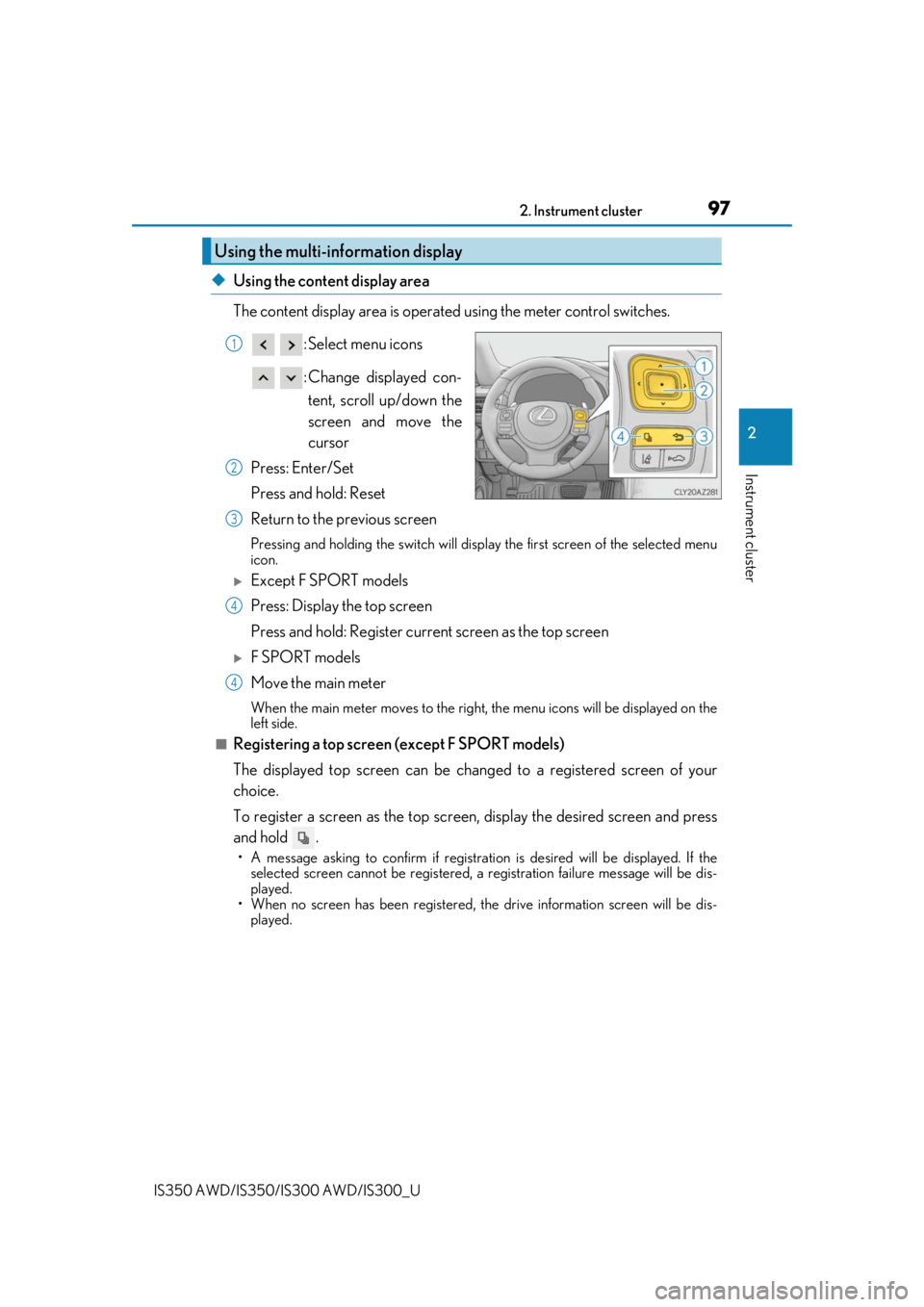
The content display area is operated using the meter control switches. : Select menu icons
: Change displayed con-tent, scroll up/down the
screen and move the
cursor
Press: Enter/Set
Press and hold: Reset
Return to the previous screen
Pressing and holding the swit ch will display the first screen of the selected menu
icon.
Except F SPORT models
Press: Display the top screen
Press and hold: Register current screen as the top screen
F SPORT models
Move the main meter
When the main meter moves to the right, the menu icons will be displayed on the
left side.
■Registering a top screen (except F SPORT models)
The displayed top screen can be chan ged to a registered screen of your
choice.
To register a screen as the top screen, display the desired screen and press
and hold .
• A message asking to confirm if registrati on is desired will be displayed. If the
selected screen canno t be registered, a registration failure message will be dis-
played.
• When no screen has been registered, the drive information screen will be dis-
played.
Using the multi-information display
1
2
3
4
4
Page 100 of 660
1002. Instrument cluster
IS350 AWD/IS350/IS300 AWD/IS300_U
F SPORT models: Some drive information items can only be displayed when the
main meter is in the center position or when it is moved to the right.
■Drive information 1/Drive information 2/Drive information 3
Displays drive information such as the following.
F SPORT models (when the main meter is in the center position): Each item is dis-
played separately.
●Drive information 1
• Current fuel consumption
• Average fuel economy (after reset)
●Drive information 2• Distance (driving range)
• Average vehicle speed (after reset)
●Drive information 3• Average fuel economy (after refuel)
• Elapsed time (after start)
Displayed items (listed below) can be changed on . ( P. 103)
Drive information ( )
ItemContent
Current fuel consumption Displays in stantaneous current fuel consumption
Average fuel
economy
After resetDisplays average fuel consumption since display
reset
*1, 2
After startDisplays average fuel consumption since engine
start
*2
After refuelDisplays average fuel consumption since refuel*2, 3
Average
vehicle
speedAfter resetDisplays average vehicle speed since display
reset
*1
After startDisplays average vehicle speed since engine start
Elapsed timeAfter resetDisplays elapsed time since display reset*1
After startDisplays elapsed time since engine start
DistanceDriving rangeDisplays driving range with remaining fuel*3, 4
After startDisplays drive distance since vehicle start
OtherBlankNo item
Page 101 of 660
1012. Instrument cluster
2
Instrument cluster
IS350 AWD/IS350/IS300 AWD/IS300_U
*1:Resetting: P. 98
*2: Use the displayed fuel consumption as a reference.
*3: When only a small amount of fuel is added to the tank, the display may not be
updated.
When refueling, turn the engine switch off. If the vehicle is refueled without turning the
engine switch off, the display may not be updated.
*4: This distance is computed based on your average fuel consumption. As a result, the
actual distance that can be driven may differ from that displayed.
■Eco Driving Indicator
P. 109
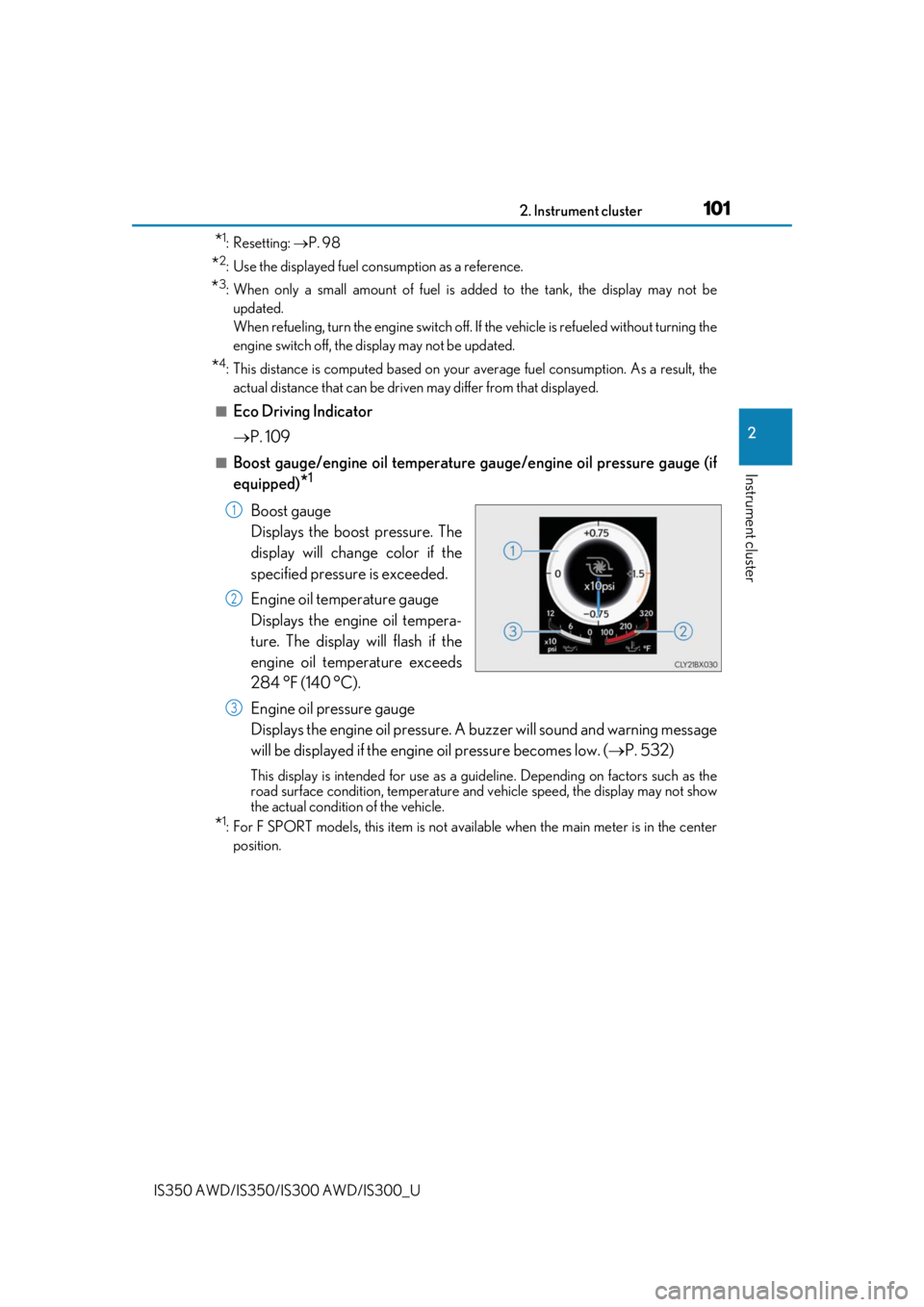
■Boost gauge/engine oil temperature ga uge/engine oil pressure gauge (if
equipped)
*1
Boost gauge
Displays the boost pressure. The
display will change color if the
specified pressure is exceeded.
Engine oil temperature gauge
Displays the engine oil tempera-
ture. The display will flash if the
engine oil temperature exceeds
284 °F (140 °C).
Engine oil pressure gauge
Displays the engine oil pressure. A buzzer will sound and warning message
will be displayed if the engine oil pressure becomes low. ( P. 532)
This display is intended for use as a guideline. Depending on factors such as the
road surface condition, temperature and vehicle speed, the display may not show
the actual condition of the vehicle.
*1: For F SPORT models, this item is not ava ilable when the main meter is in the center
position.
1
2
3
Page 102 of 660
1022. Instrument cluster
IS350 AWD/IS350/IS300 AWD/IS300_U
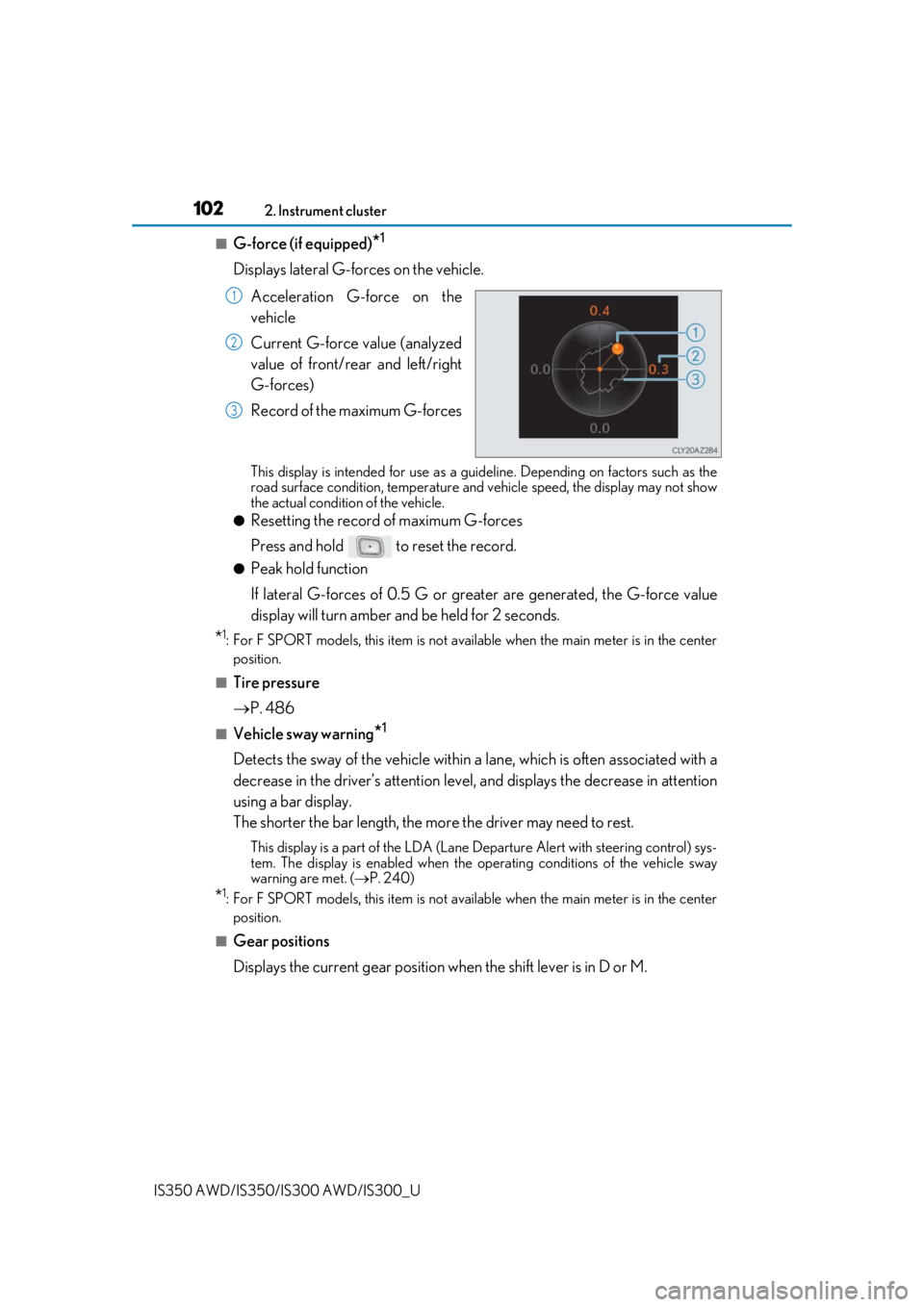
■G-force (if equipped)*1
Displays lateral G-forces on the vehicle.
Acceleration G-force on the
vehicle
Current G-force value (analyzed
value of front/rear and left/right
G-forces)
Record of the maximum G-forces
This display is intended for use as a guideline. Depending on factors such as the
road surface condition, temperature and vehicle speed, the display may not show
the actual condition of the vehicle.
●Resetting the record of maximum G-forces
Press and hold to reset the record.
●Peak hold function
If lateral G-forces of 0.5 G or grea ter are generated, the G-force value
display will turn amber and be held for 2 seconds.
*1: For F SPORT models, this item is not ava ilable when the main meter is in the center
position.
■Tire pressure
P. 486
■Vehicle sway warning*1
Detects the sway of the vehicle within a lane, which is often associated with a
decrease in the driver’s at tention level, and displays the decrease in attention
using a bar display.
The shorter the bar length, the more the driver may need to rest.
This display is a part of the LDA (Lane Departure Alert with steering control) sys-
tem. The display is enabled when the op erating conditions of the vehicle sway
warning are met. ( P. 240)
*1: For F SPORT models, this item is not ava ilable when the main meter is in the center
position.
■Gear positions
Displays the current gear position when the shift lever is in D or M.
1
2
3
Page 103 of 660
1032. Instrument cluster
2
Instrument cluster
IS350 AWD/IS350/IS300 AWD/IS300_U
■Units (if equipped) *2
The units of measure used can be changed while driving.
Unlike the units setting performed on , the units setting performed on can
be changed while driving.
*2: For F SPORT models, this item is not available when the main meter is in the right-side
position.
■Blank (No items)
Displays no drive information contents.
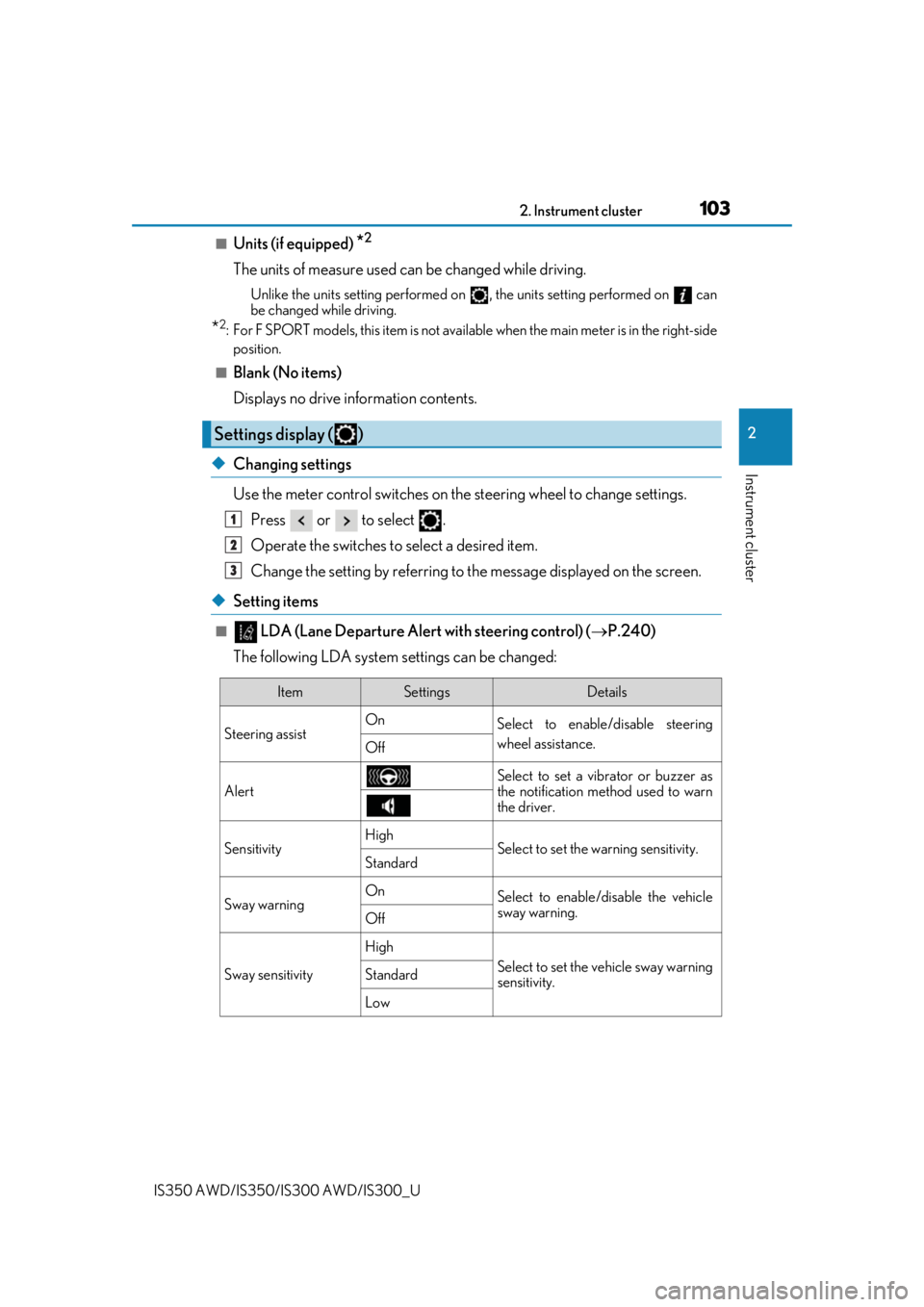
◆Changing settings
Use the meter control switches on th e steering wheel to change settings.
Press or to select .
Operate the switches to select a desired item.
Change the setting by referring to the message displayed on the screen.
◆Setting items
■ LDA (Lane Departure Alert with steering control) ( P.240)
The following LDA system settings can be changed:
Settings display ( )
1
2
3
ItemSettingsDetails
Steering assist On
Select to enable/disable steering
wheel assistance.
Off
AlertSelect to set a vibrator or buzzer as
the notification method used to warn
the driver.
SensitivityHighSelect to set the warning sensitivity.Standard
Sway warningOnSelect to enable/disable the vehicle
sway warning.
Off
Sway sensitivity
High
Select to set the vehicle sway warning
sensitivity.Standard
Low
Page 105 of 660

1052. Instrument cluster
2
Instrument cluster
IS350 AWD/IS350/IS300 AWD/IS300_U
■Speed indicator (F SPORT models) (P. 91)
The following speed indicator settings can be changed:
*: Always observe the legal speed li mit when driving on public roads.
■Clock (on multi-information display) ( P. 89)
Vehicles with a navigation system
The following clock setting can be changed:
Vehicles with a Lexus Display Audio system
The following clock settings can be changed:
Press the / switch to select an it em and then press the / switch to
change the setting or adjust the time.
ItemSettingsDetails
Speed Indicator On
Select to enable/disable the speed
indicator.
Off
Speed Setting
30 mph to 100 mph
(50 km/h to 160
km/h)
*
Select to set the desired vehicle
speed at which the speed indicator
will begin to be displayed.
ItemSettingsDetails
Display mode 12-hour display
Select to set the display mode of the
clock.
24-hour display
ItemSettingsDetails
Display mode 12-hour display
Select to set the display mode of the
clock.
24-hour display
Adjust timeSelect to adjust the hour/minute.
Page 107 of 660
1072. Instrument cluster
2
Instrument cluster
IS350 AWD/IS350/IS300 AWD/IS300_U
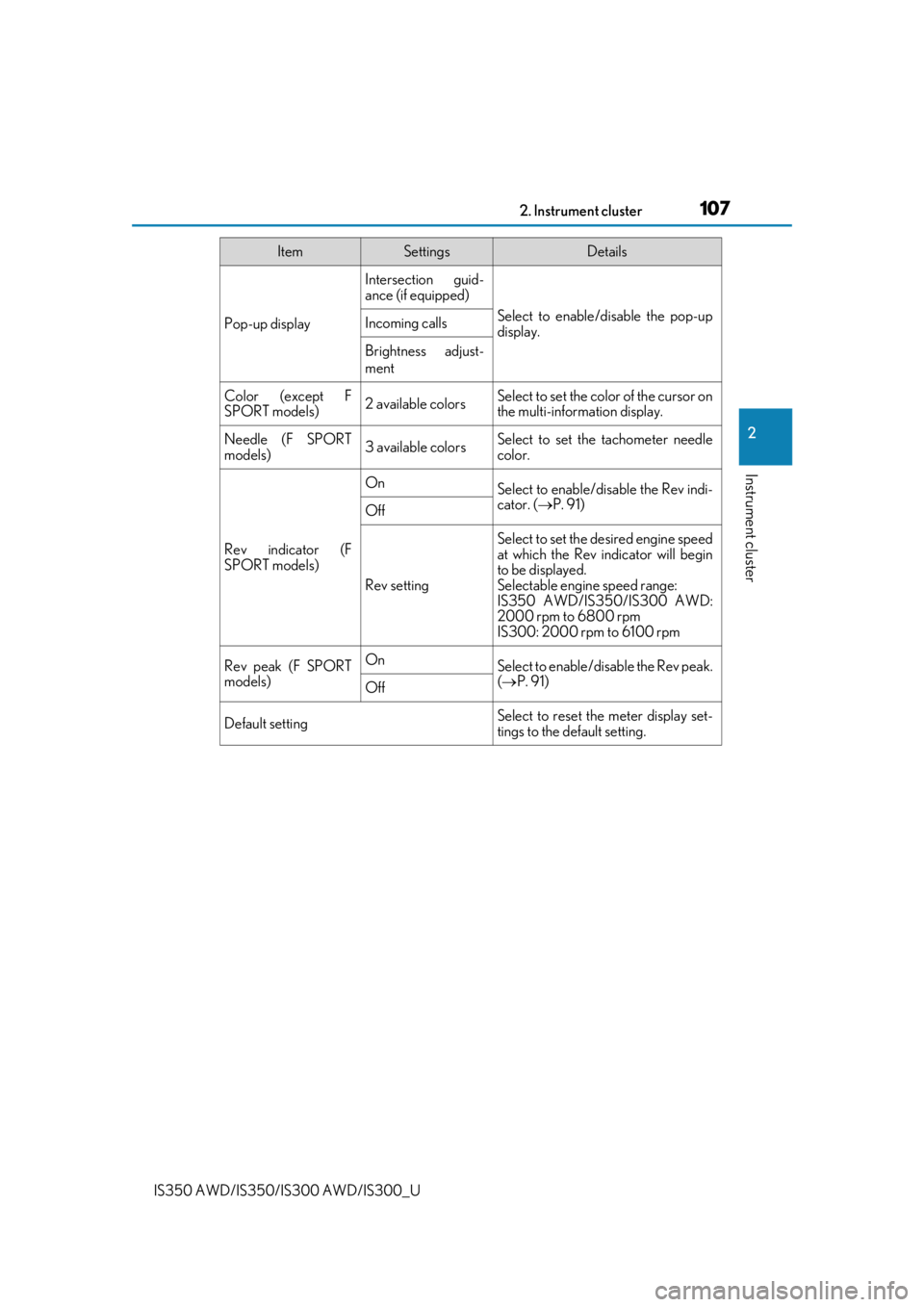
Pop-up display
Intersection guid-
ance (if equipped)
Select to enable/disable the pop-up
display.Incoming calls
Brightness adjust-
ment
Color (except F
SPORT models)2 available colorsSelect to set the color of the cursor on
the multi-information display.
Needle (F SPORT
models)3 available colorsSelect to set the tachometer needle
color.
Rev indicator (F
SPORT models)
OnSelect to enable/disable the Rev indi-
cator. (P. 91)
Off
Rev setting
Select to set the desired engine speed
at which the Rev indicator will begin
to be displayed.
Selectable engine speed range:
IS350 AWD/IS350/IS300 AWD:
2000 rpm to 6800 rpm
IS300: 2000 rpm to 6100 rpm
Rev peak (F SPORT
models)OnSelect to enable/disable the Rev peak.
( P. 91)
Off
Default settingSelect to reset the meter display set-
tings to the default setting.
ItemSettingsDetails
Page 109 of 660
1092. Instrument cluster
2
Instrument cluster
IS350 AWD/IS350/IS300 AWD/IS300_U
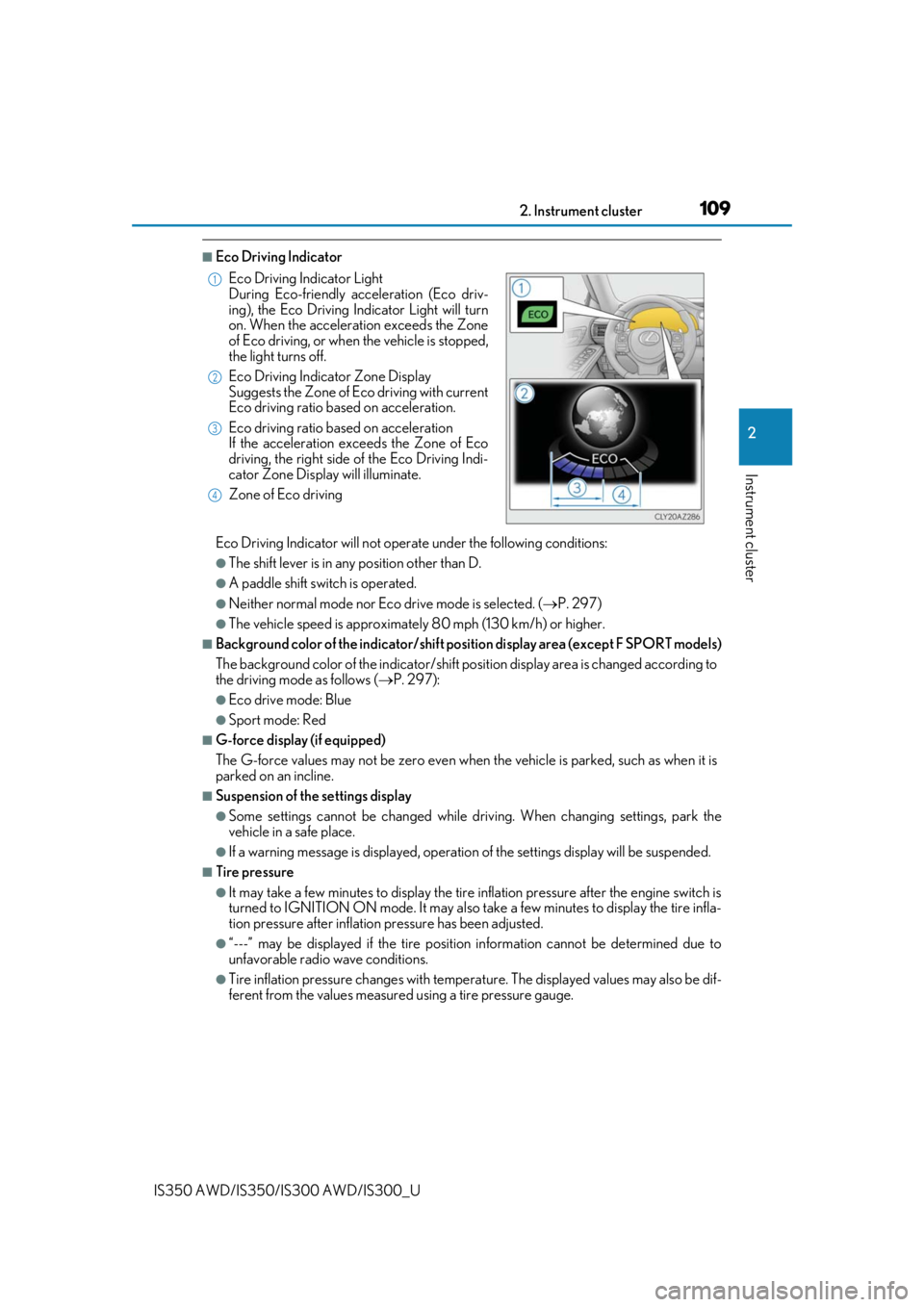
■Eco Driving Indicator
Eco Driving Indicator will not operate under the following conditions:
●The shift lever is in any position other than D.
●A paddle shift switch is operated.
●Neither normal mode nor Eco drive mode is selected. ( P. 297)
●The vehicle speed is approximately 80 mph (130 km/h) or higher.
■Background color of the indicator/shift posi tion display area (except F SPORT models)
The background color of the indicator/shift position display area is changed according to
the driving mode as follows ( P. 297):
●Eco drive mode: Blue
●Sport mode: Red
■G-force display (if equipped)
The G-force values may not be zero even when the vehicle is parked, such as when it is
parked on an incline.
■Suspension of the settings display
●Some settings cannot be changed while driv ing. When changing settings, park the
vehicle in a safe place.
●If a warning message is displa yed, operation of the settings display will be suspended.
■Tire pressure
●It may take a few minutes to display the tire inflation pressure after the engine switch is
turned to IGNITION ON mode. It may also take a few minutes to display the tire infla-
tion pressure after inflation pressure has been adjusted.
●“---” may be displayed if the tire position information cannot be determined due to
unfavorable radio wave conditions.
●Tire inflation pressure changes with temperat ure. The displayed values may also be dif-
ferent from the values measured using a tire pressure gauge. Eco Driving Indicator Light
During Eco-friendly acceleration (Eco driv-
ing), the Eco Driving Indicator Light will turn
on. When the acceleration exceeds the Zone
of Eco driving, or when the vehicle is stopped,
the light turns off.
Eco Driving Indicator Zone Display
Suggests the Zone of Eco driving with current
Eco driving ratio based on acceleration.
Eco driving ratio based on acceleration
If the acceleration exceeds the Zone of Eco
driving, the right side of the Eco Driving Indi-
cator Zone Display will illuminate.
Zone of Eco driving
1
2
3
4
Page 173 of 660

1734-1. Before driving
4
Driving
IS350 AWD/IS350/IS300 AWD/IS300_U
■When starting off on an uphill
The hill-start assist control will activate. (P. 301)
■Driving in the rain
●Drive carefully when it is ra ining, because visibility will be reduced, the windows may
become fogged-up, and the road will be slippery.
●Drive carefully when it starts to rain, beca use the road surface will be especially slip-
pery.
●Refrain from high speeds when driving on an expressway in the rain, because there may
be a layer of water between the tires and th e road surface, preventing the steering and
brakes from operating properly.
■Engine speed while driving
In the following conditions, th e engine speed may become high while driving. This is due
to automatic up-shifting control or down-shi fting implementation to meet driving condi-
tions. It does not indica te sudden acceleration.
●The vehicle is judged to be driving uphill or downhill
●When the accelerator pedal is released
●When the brake pedal is depressed while sport mode is selected
■Restraining the engine output (Brake Override System)
●When the accelerator and brake pedals are depressed at the same time, the engine
output may be restrained.
●A warning message is displayed on the mult i-information display while the system is
operating. ( P. 547)
■Restraining sudden start (Drive-Start Control)
●When the following unusual operation is performed, the engine output may be
restrained.
• When the shift lever is shifted from R to D, D to R, N to R, P to D, or P to R (D
includes M) with the accelerator pedal depressed, a warning message appears on
the multi-information display. ( P. 537)
• When the accelerator pedal is depressed t oo much while the vehicle is in reverse.
●While Drive-Start Control is being activated, your vehicle may have trouble escaping
from the mud or fresh snow. In such case, deactivate TRAC (P. 303) to cancel Drive-
Start Control so that the vehicle may beco me able to escape from the mud or fresh
snow.
Page 192 of 660
1924-2. Driving procedures
IS350 AWD/IS350/IS300 AWD/IS300_U
*1: To improve fuel efficiency and reduce noise, shift the shift lever to D for normal driv-
ing.
*2: Any gear range can be fixed when driving in M mode.
■Sport mode/Eco drive mode
P. 297
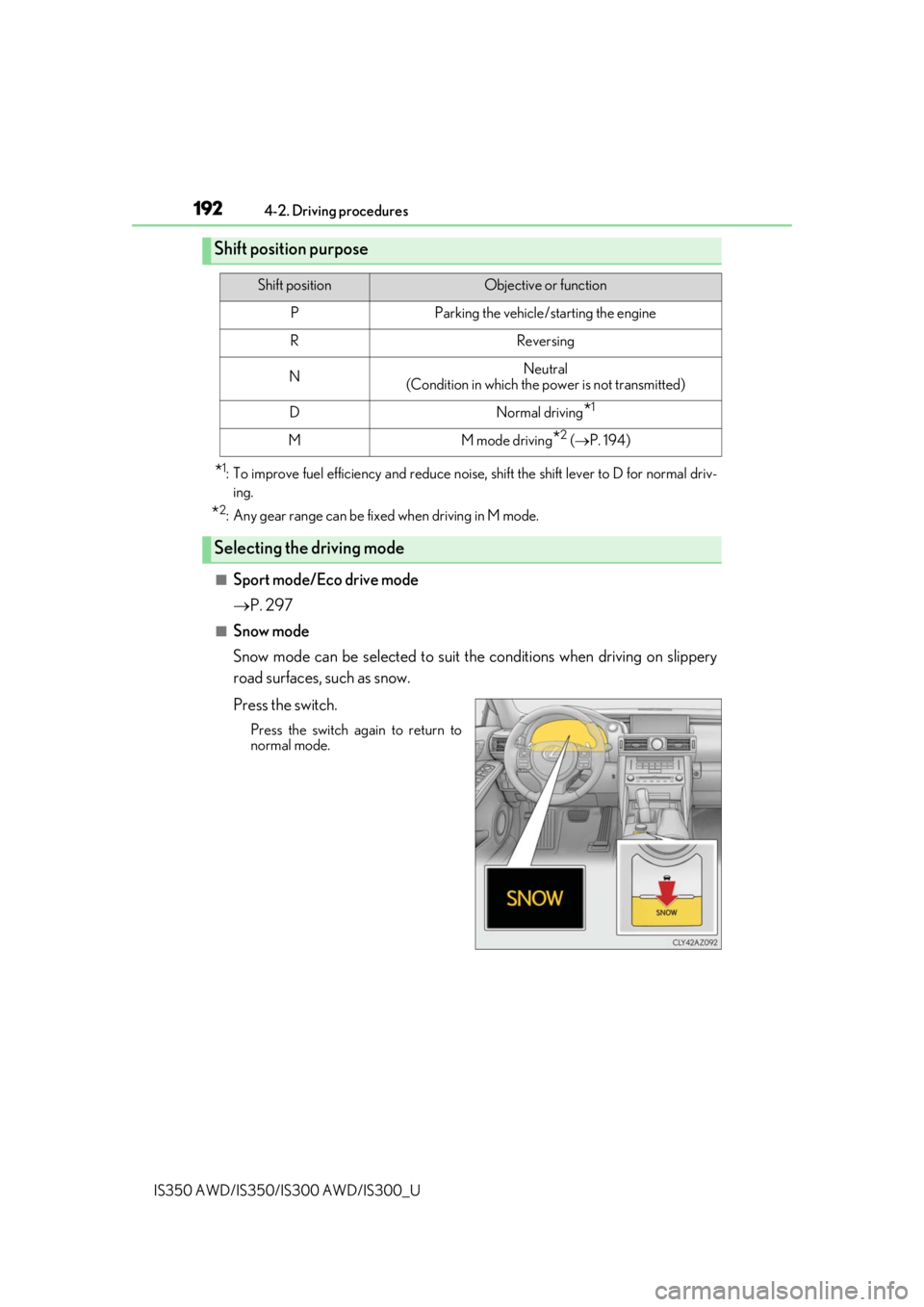
■Snow mode
Snow mode can be selected to suit th e conditions when driving on slippery
road surfaces, such as snow.
Press the switch.
Press the switch again to return to
normal mode.
Shift position purpose
Shift positionObjective or function
PParking the vehicle/starting the engine
RReversing
NNeutral
(Condition in which the power is not transmitted)
DNormal driving*1
MM mode driving*2 ( P. 194)
Selecting the driving mode