ignition Lexus IS300 2020 / LEXUS 2020 IS300,IS350 (OM53F29U) Service Manual
[x] Cancel search | Manufacturer: LEXUS, Model Year: 2020, Model line: IS300, Model: Lexus IS300 2020Pages: 660, PDF Size: 10.84 MB
Page 424 of 660

4246-2. Using the air conditioning system
IS350 AWD/IS350/IS300 AWD/IS300_U
■Using automatic mode
Fan speed is adjusted automatically according to the temperature setting and the ambi-
ent conditions.
Therefore, the fan may stop for a while until wa rm or cool air is ready to flow immediately
after is pressed or “AUTO” is selected.
■Using the voice command system (vehicles with a navigation system)
Air conditioning system can be operated using voice commands. For details, refer to the
“NAVIGATION SYSTEM OWNER’S MANUAL”.
■Fogging up of the windows
The windows will easily fog up when the humidity in the vehicle is high. Turning
(“A/C”) on will dehumidify the air from the outlets and defog the windshield effectively.
●If you turn (“A/C”) off, the windows may fog up more easily.
●The windows may fog up if the recirculated air mode is used.
■When driving on dusty roads
Close all windows. If dust thrown up by the ve hicle is still drawn into the vehicle after clos-
ing the windows, it is recommended that the air intake mode be set to outside air mode
and the fan speed to any setting except off.
■Outside/recirculated air mode
●Setting to the recirculated air mode temporarily is recommended in preventing dirty air
from entering the vehicle interior and helping to cool the vehicle when the outside air
temperature is high.
●Outside/recirculated air mode may automa tically switch depending on the tempera-
ture setting or the inside temperature.
■When the outside temperature exceeds 75 F (24 C) and the air conditioning system
is on
●In order to reduce the air co nditioning power consumption, the air conditioning system
may switch to recirculated air mode automa tically. This may also reduce fuel consump-
tion.
●Recirculated air mode is selected as a defaul t mode when the engine switch is turned to
IGNITION ON mode.
●It is possible to switch to outside air mode at any time by pressing .
■Operation of the air conditioning system in Eco drive mode
In Eco drive mode, the air conditioning system is controlled as follows to prioritize fuel
efficiency:
●Engine speed and compressor operation controlled to restrict heating/cooling capac-
ity
●Fan speed restricted when automatic mode is selected
To improve air conditioning performanc e, perform the following operations:
●Adjust the fan speed
●Turn off Eco drive mode
Page 426 of 660
4266-2. Using the air conditioning system
IS350 AWD/IS350/IS300 AWD/IS300_U
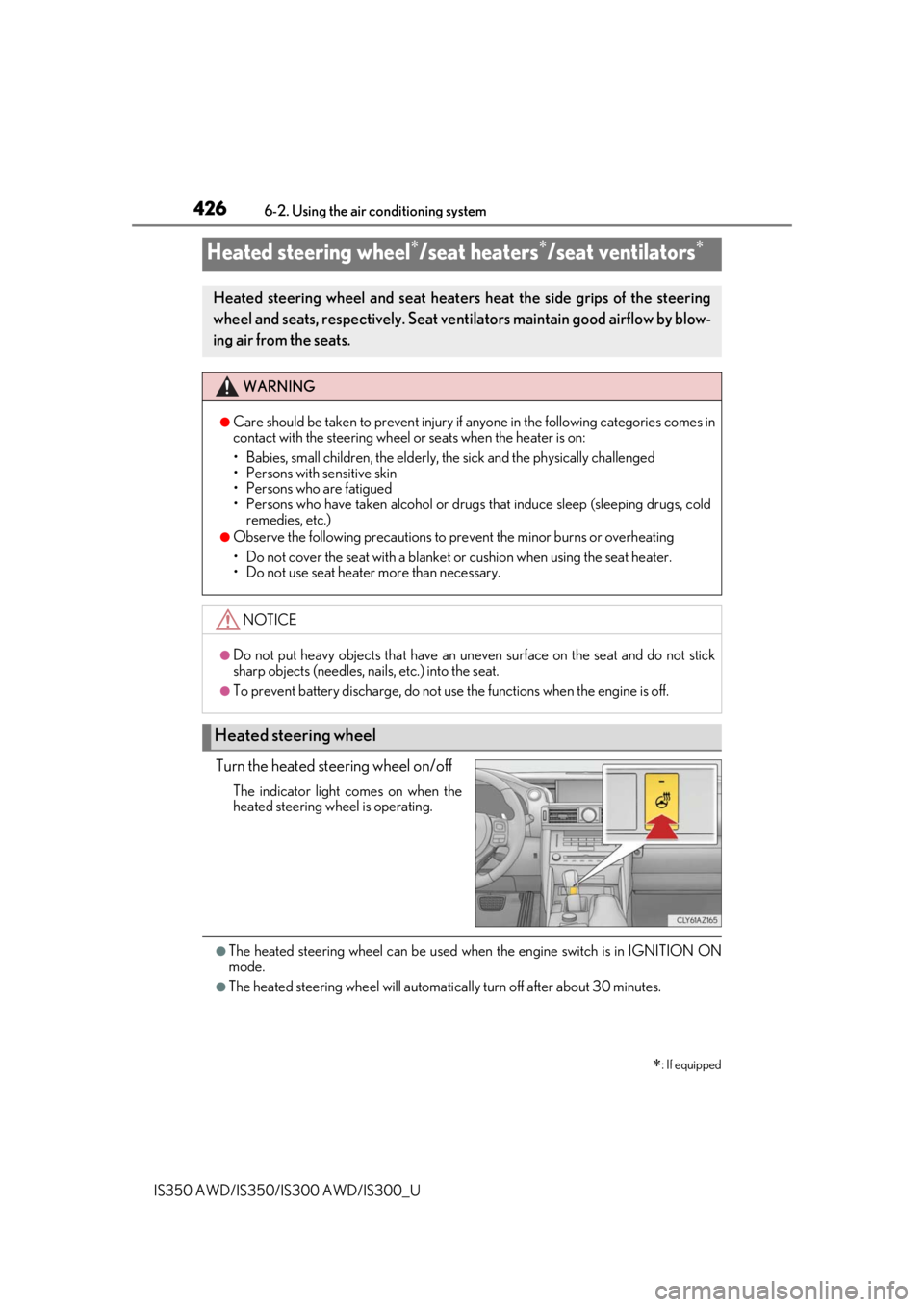
Turn the heated steering wheel on/off
The indicator light comes on when the
heated steering wheel is operating.
●The heated steering wheel can be used when the engine switch is in IGNITION ON
mode.
●The heated steering wheel will automatically turn off after about 30 minutes.
Heated steering wheel/seat heaters/seat ventilators
: If equipped
Heated steering wheel and seat heaters heat the side grips of the steering
wheel and seats, respectively. Seat ventilators maintain good airflow by blow-
ing air from the seats.
WARNING
●Care should be taken to prevent injury if anyone in the following categories comes in
contact with the steering wheel or seats when the heater is on:
• Babies, small children, the elderly, the sick and the physically challenged
• Persons with sensitive skin
• Persons who are fatigued
• Persons who have taken alcohol or drugs that induce sleep (sleeping drugs, cold
remedies, etc.)
●Observe the following precautions to prevent the minor burns or overheating
• Do not cover the seat with a blanket or cushion when using the seat heater.
• Do not use seat heater more than necessary.
NOTICE
●Do not put heavy objects that have an unev en surface on the seat and do not stick
sharp objects (needles, nails, etc.) into the seat.
●To prevent battery discharge, do not use the functions when the engine is off.
Heated steering wheel
Page 427 of 660
4276-2. Using the air conditioning system
6
Interior features
IS350 AWD/IS350/IS300 AWD/IS300_U
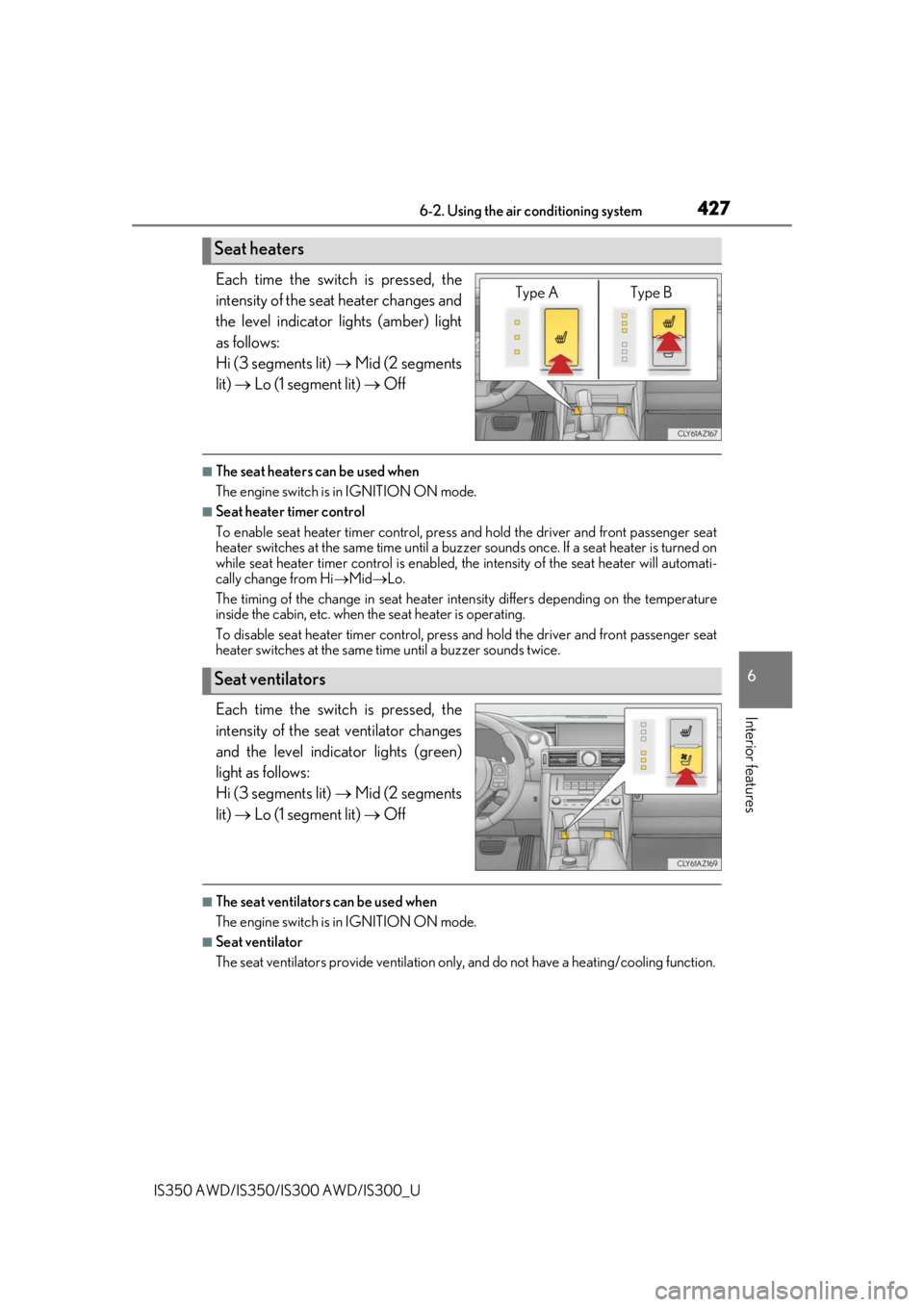
Each time the switch is pressed, the
intensity of the seat heater changes and
the level indicator lights (amber) light
as follows:
Hi (3 segments lit) Mid (2 segments
lit) Lo (1 segment lit) Off
■The seat heaters can be used when
The engine switch is in IGNITION ON mode.
■Seat heater timer control
To enable seat heater timer control, press and hold the driver and front passenger seat
heater switches at the same time until a buzzer sounds once. If a seat heater is turned on
while seat heater timer control is enabled, the intensity of the seat heater will automati-
cally change from Hi Mid Lo.
The timing of the change in seat heater in tensity differs depending on the temperature
inside the cabin, etc. when the seat heater is operating.
To disable seat heater timer control, press and hold the driver and front passenger seat
heater switches at the same time until a buzzer sounds twice.
Each time the switch is pressed, the
intensity of the seat ventilator changes
and the level indicator lights (green)
light as follows:
Hi (3 segments lit) Mid (2 segments
lit) Lo (1 segment lit) Off
■The seat ventilators can be used when
The engine switch is in IGNITION ON mode.
■Seat ventilator
The seat ventilators provide ventilation only, and do not have a heating/cooling function.
Seat heaters
Type A Type B
Seat ventilators
Page 432 of 660
4326-4. Using the storage features
IS350 AWD/IS350/IS300 AWD/IS300_U
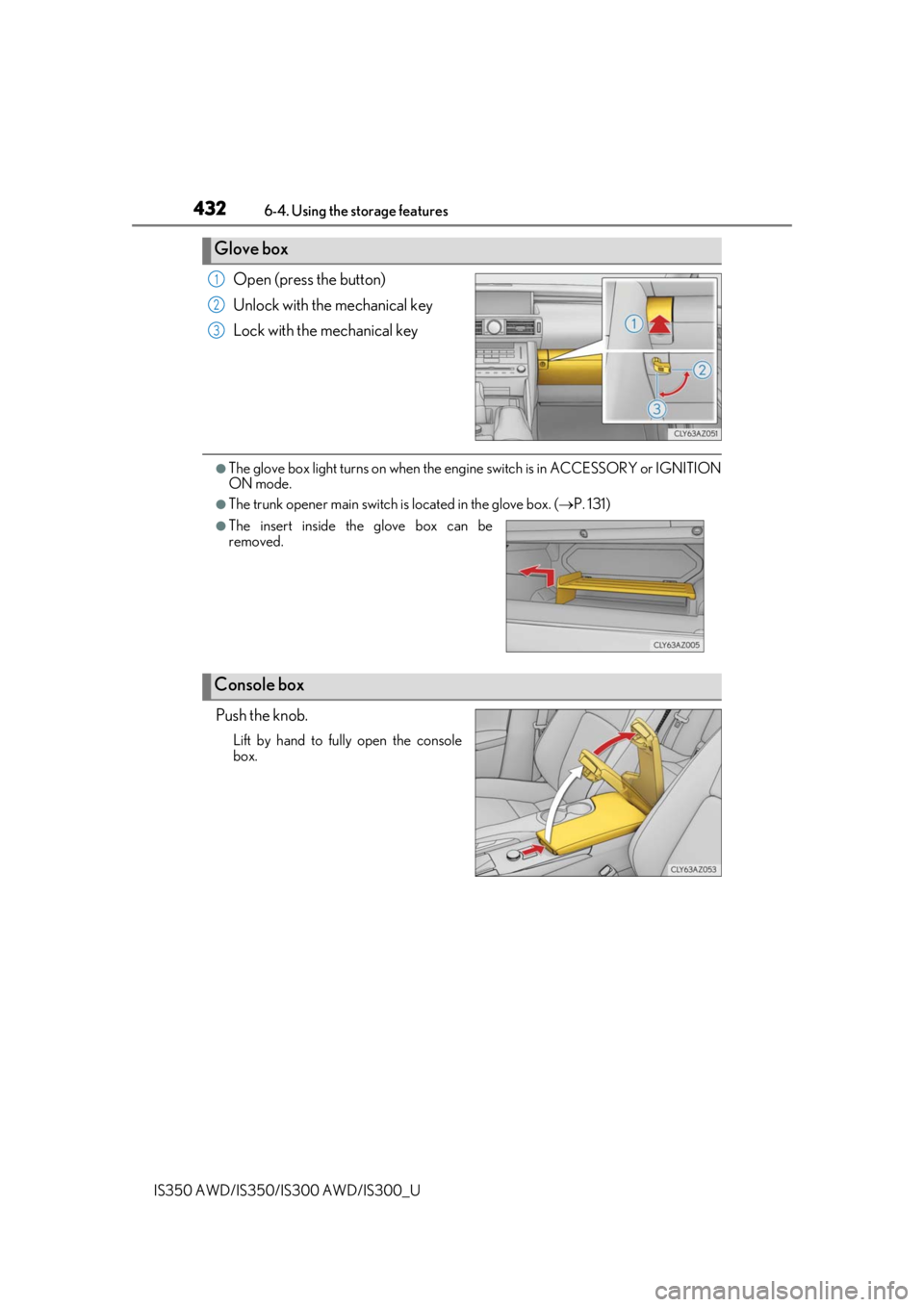
Open (press the button)
Unlock with the mechanical key
Lock with the mechanical key
●The glove box light turns on when the engine switch is in ACCESSORY or IGNITION
ON mode.
●The trunk opener main switch is located in the glove box. (P. 131)
Push the knob.
Lift by hand to fully open the console
box.
Glove box
1
2
3
●The insert inside the glove box can be
removed.
Console box
Page 438 of 660

4386-5. Using the other interior features
IS350 AWD/IS350/IS300 AWD/IS300_U
Vehicles with a navigation system
The GPS clock's time is automatically
adjusted by utilizing GPS time informa-
tion.
For details, refer to “NAVIGATION
SYSTEM OWNER’S MANUAL”.
The power outlet can be used for 12 V a ccessories that run on less than 10 A.
Open the lid.
■The power outlet can be used when
The engine switch is in ACCESSORY or IGNITION ON mode.
■When turning the engine switch off
Disconnect electrical devices with charging functions, such as mobile battery packs.
If such devices are left connected, the engine switch may not be turned off normally.
Power outlet
NOTICE
●To avoid the damaging the power outlet, close the power outlet lid when the power
outlet is not in use. Foreign objects or li quids that enter the power outlet may cause a
short circuit.
●To prevent blown fuse, do not use an acce ssory that uses more than 12 V 10 A.
●To prevent battery discharge, do not use the power outlet longer than necessary
when the engine is off.
Page 439 of 660
4396-5. Using the other interior features
6
Interior features
IS350 AWD/IS350/IS300 AWD/IS300_U
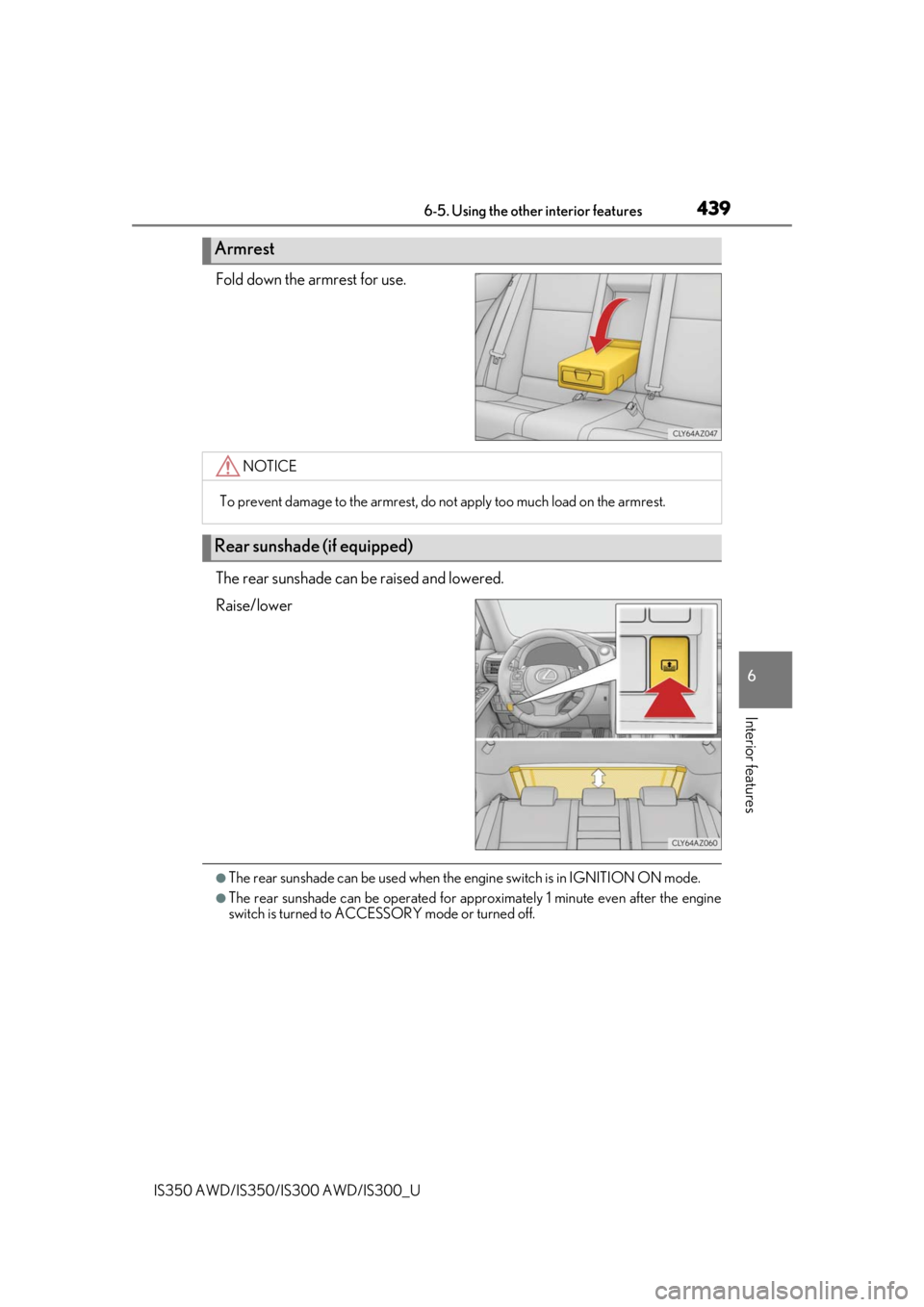
Fold down the armrest for use.
The rear sunshade can be raised and lowered.
Raise/lower
●The rear sunshade can be used when the engine switch is in IGNITION ON mode.
●The rear sunshade can be operated for approximately 1 minute even after the engine
switch is turned to ACCESSORY mode or turned off.
Armrest
NOTICE
To prevent damage to the armrest, do not apply too much load on the armrest.
Rear sunshade (if equipped)
Page 469 of 660

4697-3. Do-it-yourself maintenance
7
Maintenance and care
IS350 AWD/IS350/IS300 AWD/IS300_U
WARNING
The engine compartment contains many mechan isms and fluids that may move suddenly,
become hot, or become electrically energize d. To avoid death or serious injury, observe
the following precautions.
■When working on the engine compartment
●Keep hands, clothing and tools away from the moving fan and engine drive belt.
●Be careful not to touch the engine, radiator, exhaust manifold, etc. right after driving
as they may be hot. Oil and other fluids may also be hot.
●Do not leave anything that may burn easily, such as paper and rags, in the engine
compartment.
●Do not smoke, cause sparks or expose an open flame to fuel or the battery. Fuel and
battery fumes are flammable.
●Be extremely cautious when working on the battery. It contains poisonous and corro-
sive sulfuric acid.
■When working near the electric cooling fans or radiator grille
Be sure the engine switch is off.
With the engine switch in IGNITION ON mode, the electric cooling fans may auto-
matically start to run if the air conditioning is on and/or the coolant temperature is high.
( P. 480)
■Safety glasses
Wear safety glasses to prevent flying or falling material, fluid spray, etc. from getting in
your eyes.
NOTICE
■If you remove the air cleaner filter
Driving with the air cleaner f ilter removed may cause excessive engine wear due to dirt
in the air.
Page 487 of 660
4877-3. Do-it-yourself maintenance
7
Maintenance and care
IS350 AWD/IS350/IS300 AWD/IS300_U
◆Initializing the tire pressure warning system
■The tire pressure warning system must be initialized in the following circum-
stances:
●When rotating the tires.
When the tire pressure warning system is initialized, the current tire inflation
pressure is set as the benchmark pressure.
■How to initialize the tire pressure warning system
Park the vehicle in a safe place and turn the engine switch off.
Initialization cannot be performed while the vehicle is moving.
Adjust the tire inflation pressure to th e specified cold tire inflation pressure
level. ( P. 595)
Make sure to adjust the tire pressure to the specified cold tire inflation pressure
level. The tire pressure warning system will operate based on this pressure level.
Turn the engine switch to IGNITION ON mode.
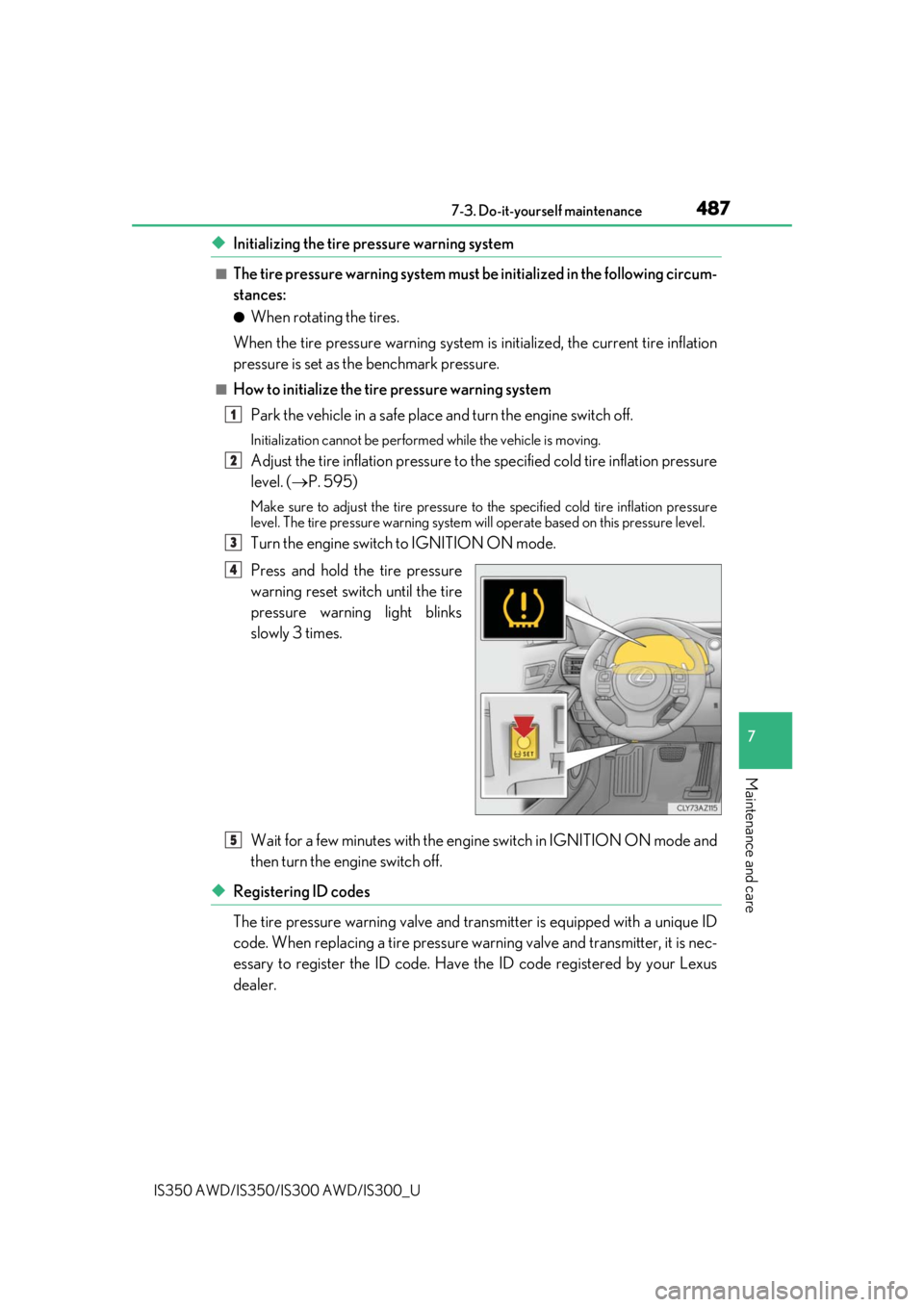
Press and hold the tire pressure
warning reset switch until the tire
pressure warning light blinks
slowly 3 times.
Wait for a few minutes with the engine switch in IGNITION ON mode and
then turn the engine switch off.
◆Registering ID codes
The tire pressure warning valve and tran smitter is equipped with a unique ID
code. When replacing a tire pressure warning valve and transmitter, it is nec-
essary to register the ID code. Have the ID code registered by your Lexus
dealer.
1
2
3
4
5
Page 488 of 660

4887-3. Do-it-yourself maintenance
IS350 AWD/IS350/IS300 AWD/IS300_U
■When to replace your vehicle’s tires
Tires should be replaced if:
●The treadwear indicators are showing on a tire.
●You have tire damage such as cuts, splits, cracks deep enough to expose the fabric, and
bulges indicating internal damage
●A tire goes flat repeatedly or cannot be properly repaired due to the size or location of
a cut or other damage
If you are not sure, consult your Lexus dealer.
■Replacing tires and wheels
If the ID code of the tire pressure warning valve and transmitter is not registered, the tire
pressure warning system will not work proper ly. After driving for about 20 minutes, the
tire pressure warning light blinks for 1 minu te and stays on to indicate a system malfunc-
tion.
■Tire life
Any tire over 6 years old must be checked by a qualified technician even if it has seldom
or never been used or damage is not obvious.
■Routine tire inflation pressure checks
The tire pressure warning syst em does not replace routine tire inflation pressure checks.
Make sure to check tire inflat ion pressure as part of your routine of daily vehicle checks.
■When rotating the tires
Make sure that the engine switch is off. If the tires are rotated while the engine switch is in
IGNITION ON mode, the tire position information will not be updated.
If this accidentally occurs, either turn the engine switch to off and then to IGNITION ON
mode, or initialize the system after checking th at the tire pressure is properly adjusted.
■Low profile tires
Generally, low profile tires will wear more rapidly and tire grip performance will be
reduced on snowy and/or icy roads when comp ared to standard tires. Be sure to use
snow tires or tire chains
* on snowy and/or icy roads and drive carefully at a speed appro-
priate for road and weather conditions.
*: Tire chains cannot be mounted on the 18-inch tires. Snow tires should be used instead.
Page 520 of 660
5208-2. Steps to take in an emergency
IS350 AWD/IS350/IS300 AWD/IS300_U
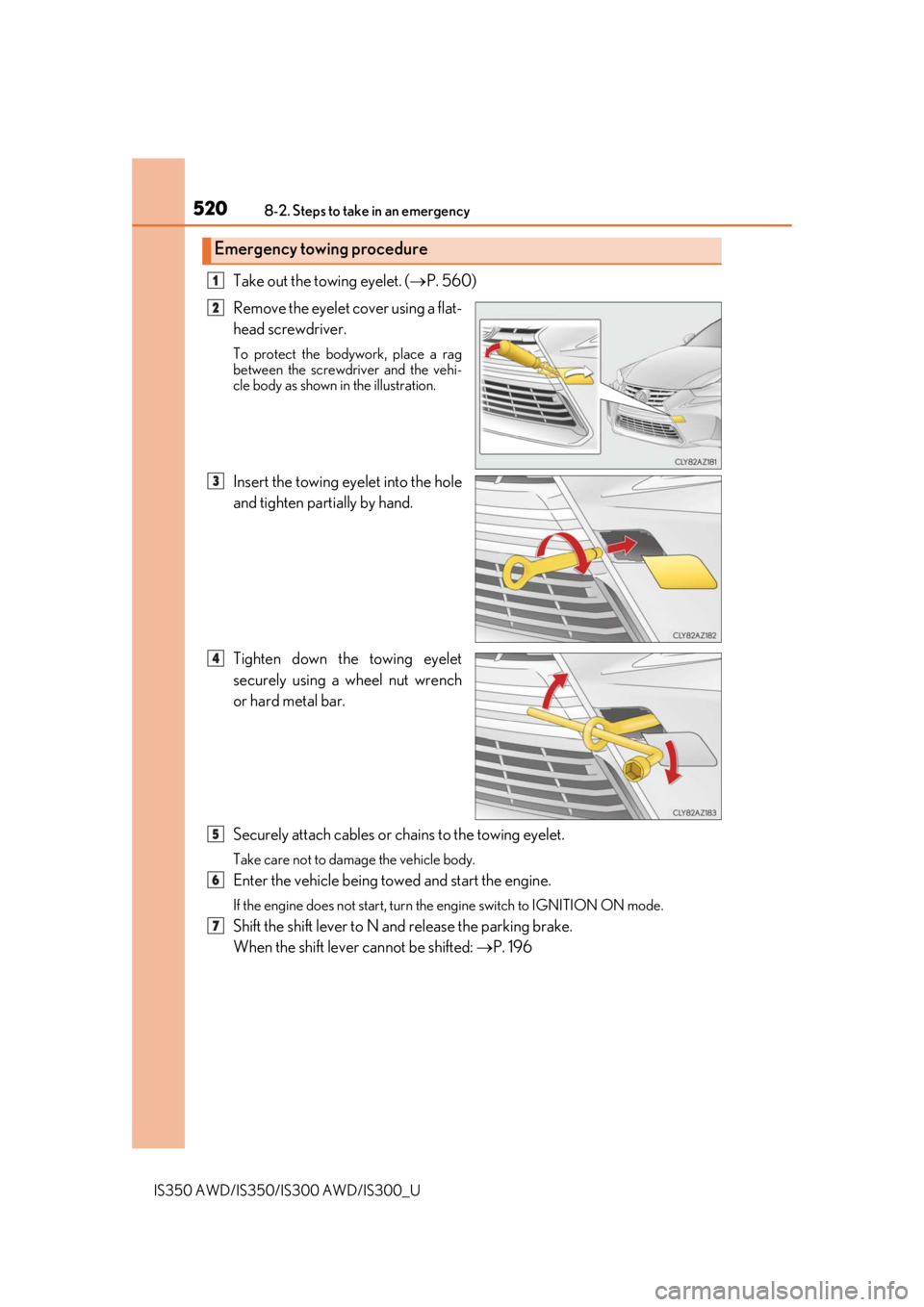
Take out the towing eyelet. (P. 560)
Remove the eyelet cover using a flat-
head screwdriver.
To protect the bodywork, place a rag
between the screwdriver and the vehi-
cle body as shown in the illustration.
Insert the towing eyelet into the hole
and tighten partially by hand.
Tighten down the towing eyelet
securely using a wheel nut wrench
or hard metal bar.
Securely attach cables or chains to the towing eyelet.
Take care not to damage the vehicle body.
Enter the vehicle being towed and start the engine.
If the engine does not start, turn the engine switch to IGNITION ON mode.
Shift the shift lever to N and release the parking brake.
When the shift lever cannot be shifted: P. 196
Emergency towing procedure
1
2
3
4
5
6
7