driver Lexus IS300 2020 Owner's Manual / LEXUS 2020 IS300,IS350 OWNER'S MANUAL QUICK GUIDE (OM53F44U)
[x] Cancel search | Manufacturer: LEXUS, Model Year: 2020, Model line: IS300, Model: Lexus IS300 2020Pages: 74, PDF Size: 2 MB
Page 1 of 74
Contents
The Quick Guide is not intended as a substitute for your Owner’s
Manual. We strongly encourage you to review the Owner’s
Manual and supplementary manuals so you will have a better
understanding of your vehicle’s capabilities and limitations.
1
Air Conditioning System*
Adjusting the temperature ...................................................................................................... .. 53
Air conditioning control screen .............................................................................................. 54
Using automatic mode........................................................................................................... ..... 56
Adjusting the temperature for driver and passenger seats separately (“DUAL” mode) .................................................................................................................. ....... 56
Audio System (with Lexus Display Audio)*
Lexus Display Audio operation bu ttons .............................................................................. 49
Using the steering whee l switches to change audio sources ..................................... 49
Audio menu screen .............................................................................................................. ........ 50
Operating the audio system using the steering wheel switches ............................... 52
Audio System (with Navigation System)*
Audio control screen ................................................................................................................... 40
Remote control (steering wheel audio switches) . ........................................................... 40
Basic operation ................................................................................................................ ................ 41
Radio.......................................................................................................................... ........................... 41
DVD player/CD player........................................................................................................... ... 42
Operating an iPod .............................................................................................................. .......... 43
Automatic High Beam .......................................................................................................................18
BSM (Blind Spot Monitor) .............................................................................................................. 30
Dynamic Radar Cruise Control .................................................................................................. 25
Floor Mat Installation ...........................................................................................................................4
Garage Door Opener ..................................................................................................................... 62
*: This feature may be operated by Voice command (See P.58)
Page 24 of 74

24
Lexus Safety System +
■PCS (Pre-Collision System)
The pre-collision system uses a radar sensor and camera sensor to detect vehicles and
pedestrians in front of your vehicle. When th e system determines that the possibility of a
frontal collision with a vehicle or pedestrian is high, a warning operates to urge the driver to
take evasive action and the potential brake pressure is increase d to help the driver avoid the
collision. If the system determin es that the possibility of a frontal collision with a vehicle or
pedestrian is extremely high, the brakes are au tomatically applied to help avoid the collision
or help reduce the impact of the collision.
■ LDA (Lane Departure Alert with steering control)
P. 28
■Automatic High Beam
P. 18
■Dynamic radar cruise control
P. 25
The Lexus Safety System + consists of the fo llowing drive assist systems and contributes
to a safe and comfortable driving experience:
Page 28 of 74
28
LDA (Lane Departure Alert
with Steering Control)
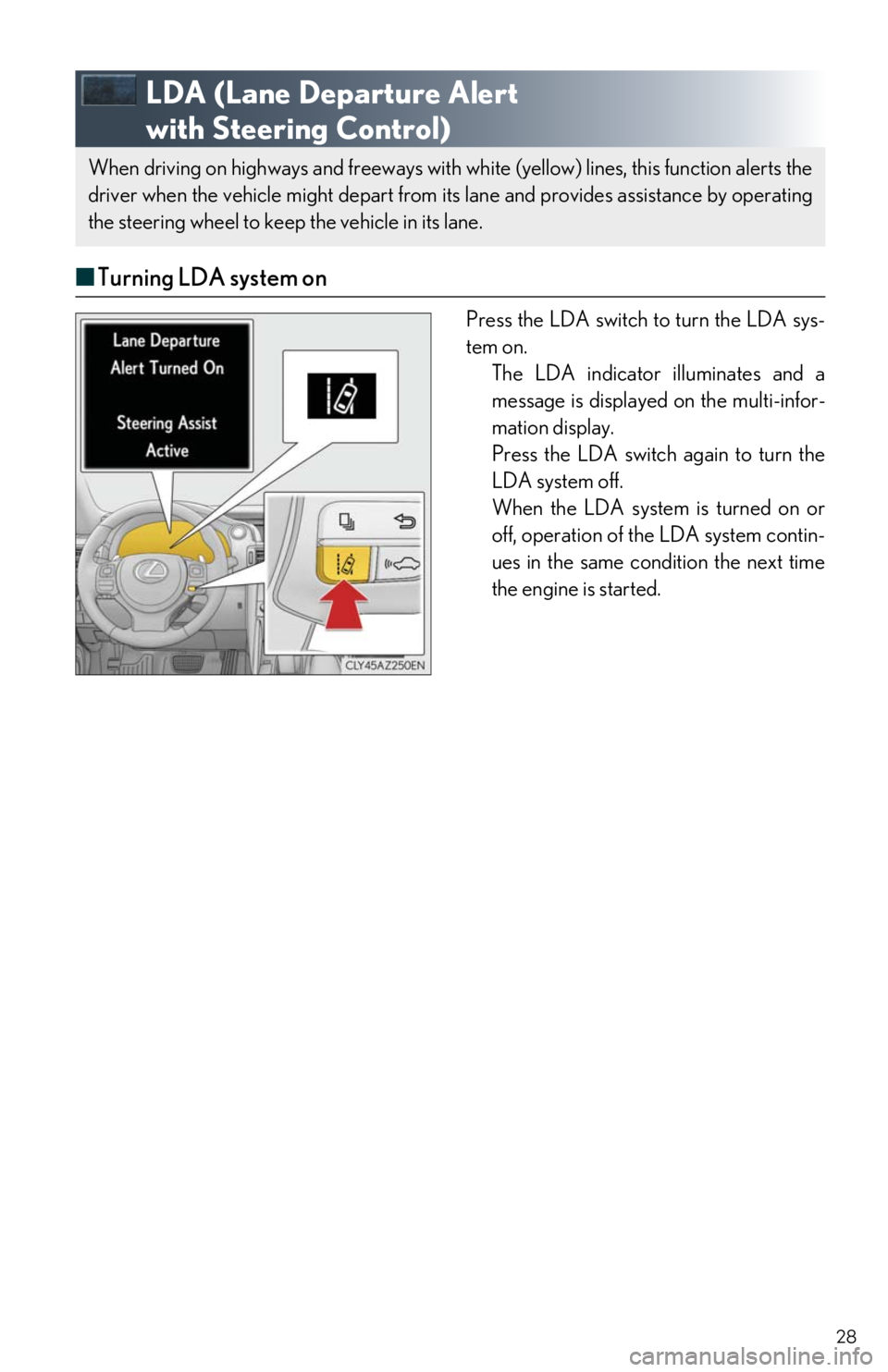
■ Turning LDA system on
Press the LDA switch to turn the LDA sys-
tem on.
The LDA indicator illuminates and a
message is displayed on the multi-infor-
mation display.
Press the LDA switch again to turn the
LDA system off.
When the LDA system is turned on or
off, operation of the LDA system contin-
ues in the same condition the next time
the engine is started.
When driving on highways and freeways with white (yellow) lines, this function alerts the
driver when the vehicle might depart from it s lane and provides assistance by operating
the steering wheel to keep the vehicle in its lane.
Page 29 of 74
29
Intuitive Parking Assist (if equipped)
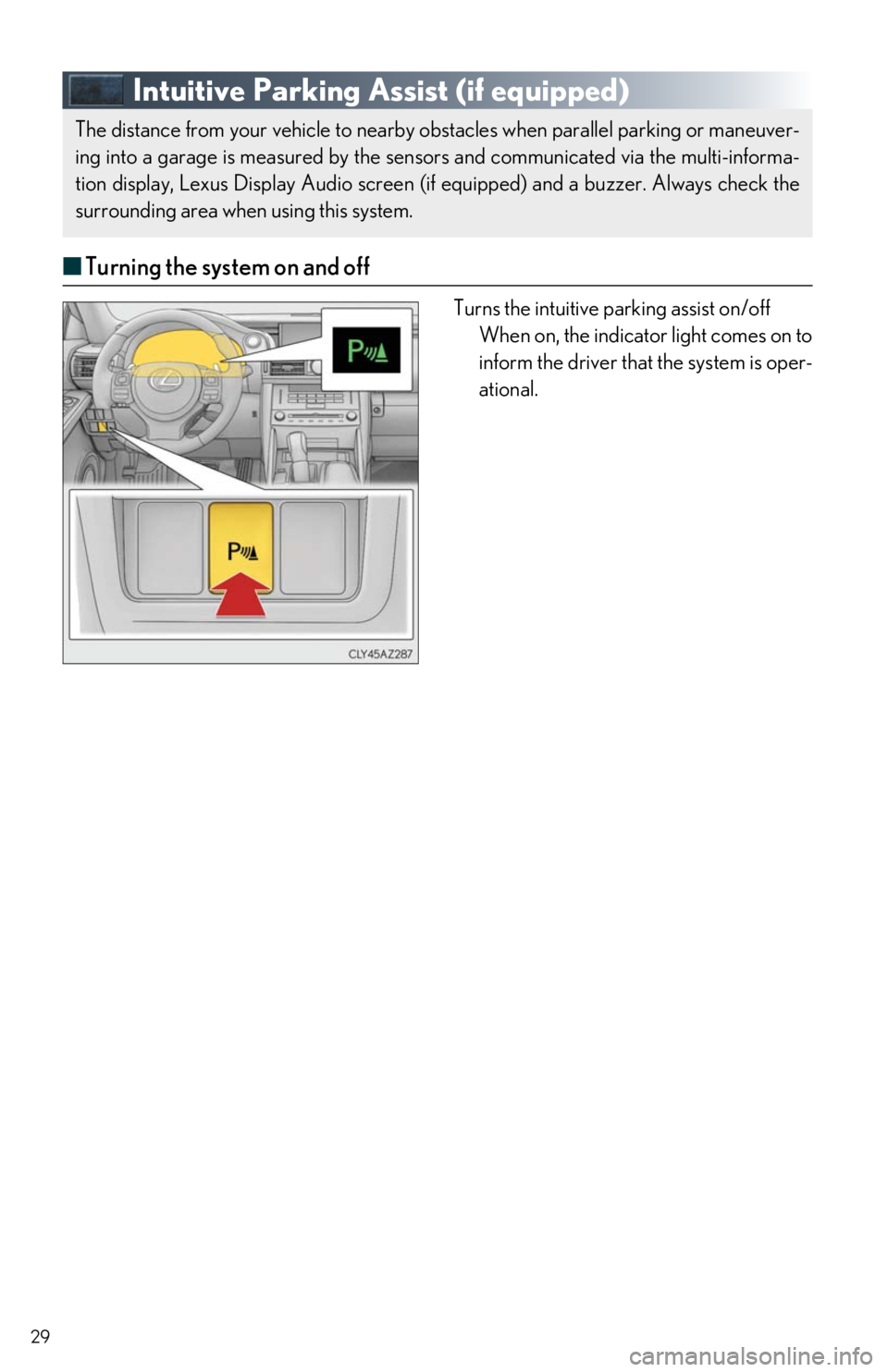
■Turning the system on and off
Turns the intuitive parking assist on/off
When on, the indicator light comes on to
inform the driver that the system is oper-
ational.
The distance from your vehicle to nearby obstacles when parallel parking or maneuver-
ing into a garage is measured by the sensors and communicated via the multi-informa-
tion display, Lexus Display Audio screen (if equipped) and a buzzer. Always check the
surrounding area when using this system.
Page 30 of 74
30
BSM (Blind Spot Monitor) (if equipped)
The Blind Spot Monitor is a system that has 2 functions:
● The BSM (Blind Spot Monitor) function
Assists the driver in making a decision when changing lanes
● The RCTA (Rear Cross Traffic Alert) function
Assists the driver when backing up
These functions use same sensors.
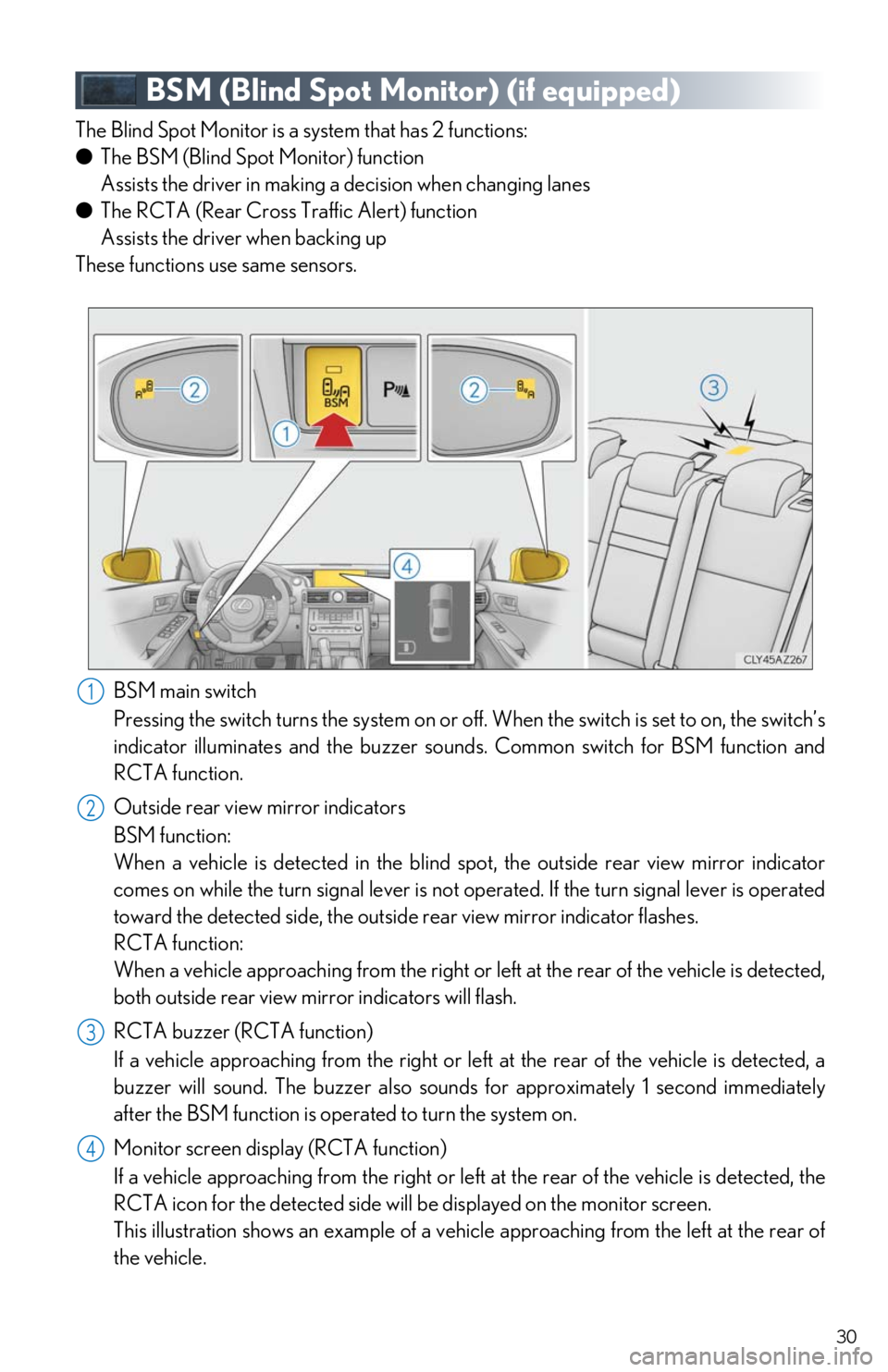
BSM main switch
Pressing the switch turns the sy stem on or off. When the switch is set to on, the switch’s
indicator illuminates and the buzzer sounds. Common switch for BSM function and
RCTA function.
Outside rear view mirror indicators
BSM function:
When a vehicle is detected in the blind spot, the outside rear view mirror indicator
comes on while the turn signal lever is not operated. If the turn signal lever is operated
toward the detected side, the outsid e rear view mirror indicator flashes.
RCTA function:
When a vehicle approaching from the right or le ft at the rear of the vehicle is detected,
both outside rear view mirr or indicators will flash.
RCTA buzzer (RCTA function)
If a vehicle approaching from the right or left at the rear of the vehicle is detected, a
buzzer will sound. The buzzer also sounds for approximately 1 second immediately
after the BSM function is operated to turn the system on.
Monitor screen display (RCTA function)
If a vehicle approaching from the right or left at the rear of the vehicle is detected, the
RCTA icon for the detected side will be displayed on the monitor screen.
This illustration shows an example of a vehicle approaching from the left at the rear of
the vehicle.
1
2
23
44
Page 54 of 74

54
■Air conditioning control screen
With a Lexus Display Audio
Adjust the left-hand side temperature
setting
Adjust the fan speed setting
Select to set auto mode on/off
Select to set eco mode on/off
Select to set cooling and dehumidifica-
tion function on/off
If the “A/C” indicator is turned off, the
system will blow ambient temperature
air or heated air.
Adjust the temperature for driver and
passenger seats se parately (“DUAL”
mode)
Display the option control screen
Select the air flow mode
Adjust the right-hand side temperature
setting
With a navigation system
Adjust the left-hand side temperature
setting
Adjust the fan speed setting
Select the air flow mode
Adjust the right-hand side temperature
setting
Display the option control screen
Select to set automatic mode on/off
Select to set cooling and dehumidifica-
tion function on/off
If the “A/C” indicator is turned off, the
system will blow ambient temperature
air or heated air.
Adjust the temperature for driver and
passenger seats se parately (“DUAL”
mode)
Select to set eco mode on/off
1
2
3
4
5
6
7
8
9
1
2
3
4
5
6
7
8
9
Page 55 of 74
55
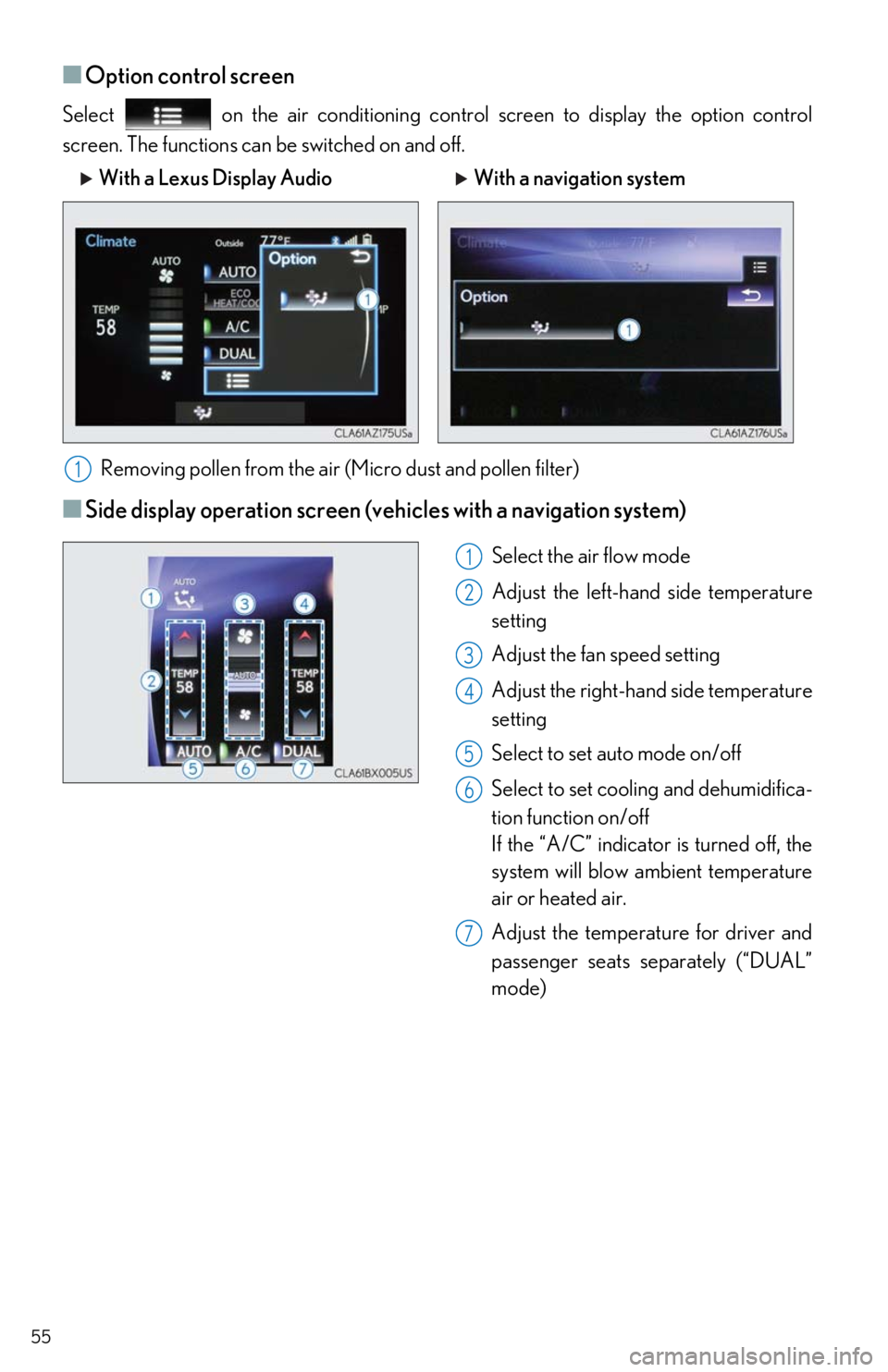
■Option control screen
Select on the air conditioning control screen to display the option control
screen. The functions can be switched on and off.
Removing pollen from the air (M icro dust and pollen filter)
■Side display operation screen (veh icles with a navigation system)
Select the air flow mode
Adjust the left-hand side temperature
setting
Adjust the fan speed setting
Adjust the right-hand side temperature
setting
Select to set auto mode on/off
Select to set cooling and dehumidifica-
tion function on/off
If the “A/C” indicator is turned off, the
system will blow ambient temperature
air or heated air.
Adjust the temperature for driver and
passenger seats separately (“DUAL”
mode)
With a Lexus Display Audio With a navigation system
1
1
2
3
4
5
6
7
Page 56 of 74

56
■Using automatic mode
Press the automatic mode button to turn on the airflow and adjust the temperature setting.
■Adjusting the temperature for driv er and passenger seats separately
(“DUAL” mode)
In dual mode, driver and passenger side temp erature settings can be adjusted separately.
To turn on the “DUAL” mode, perfor m any of the following procedures:
● Press or select “DUAL” on the air conditioning control screen.
● Select “DUAL” on the side display operation screen. (vehicles with a navigation system)
● Adjust the passenger’s side temperature setting.
The indicator comes on when the “DUAL” mode is on.
While in “DUAL” mode, the temperature of the rear air outlets is set at the right-hand side
temperature setting.
Page 57 of 74
57
Seat Heaters (if equipped)/
Seat Ventilators (if equipped)
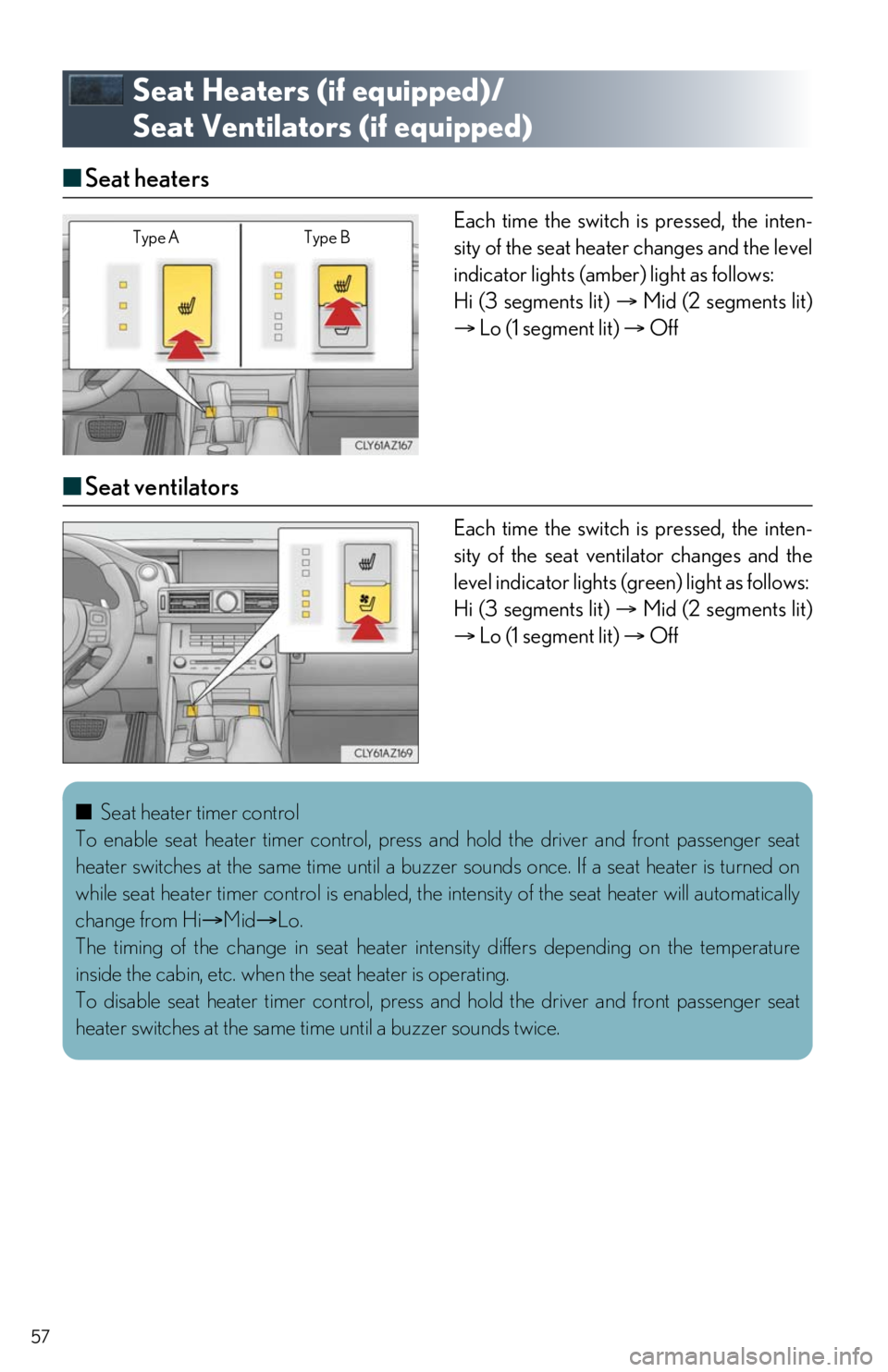
■ Seat heaters
Each time the switch is pressed, the inten-
sity of the seat heater changes and the level
indicator lights (amber) light as follows:
Hi (3 segments lit) Mid (2 segments lit)
Lo (1 segment lit) Off
■Seat ventilators
Each time the switch is pressed, the inten-
sity of the seat vent ilator changes and the
level indicator lights (g reen) light as follows:
Hi (3 segments lit) Mid (2 segments lit)
Lo (1 segment lit) Off
Type A Type B
■Seat heater timer control
To enable seat heater timer control, press and hold the driver and front passenger seat
heater switches at the same time until a buzz er sounds once. If a seat heater is turned on
while seat heater timer control is enabled, the intensity of the seat heater will automatically
change from Hi Mid Lo.
The timing of the change in seat heater in tensity differs depending on the temperature
inside the cabin, etc. when the seat heater is operating.
To disable seat heater timer control, press and hold the driver and front passenger seat
heater switches at the same ti me until a buzzer sounds twice.
Page 67 of 74

67
●Destination Assist
Destination Assist provides yo u with live assistance for finding destinations via the Lexus
response center. You can requ est either a specific business, address, or ask for help
locating your desired destination by category , such as restaurants, gas stations, shopping
centers or other points of interest (POI).
After you tell the agent your choice of destin ation, its coordinates are sent wirelessly to
your vehicle’s navigation system.
● eDestination
With the eDestination feature, you can go online, and via the Lexus.com owner’s Web
site, select and organize destinations of your choice and then wi relessly send them to
your vehicle’s navigation system.
Up to 200 locations can be stored onli ne and accessed or updated at any time.
Locations can be organized into up to 20 personalized folders.
You must first go online at www.lexus.com/drivers/
to view the Owners site where you
will need to register and log in. After this, pe rsonalized folders that contain the locations
to be sent to your vehicle can be created. (See Lexus Enform Guide for more informa-
tion.)
● Lexus Insider
Lexus Insider is an optional service that can send audio messages, or articles, to partici-
pating owners’ vehicles via the navigation sy stem. Potential Lexus Insider subjects might
include, for example, Lexus vehicle technology tips, updates on regional Lexus events, or
audio excerpts from Lexus Magazine articles.
■Subscription
After you have signed the Telematics Subscription Service Agreement and are enrolled,
you can begin receiving services. A variet y of subscription terms are available.
Contact your Lexus dealer, call the following, or select the “Destination Assist” in your vehi-
cle for further subscription details. •The United States
1-800-25-LEXUS (1-800-255-3987)
•Canada
1-800-26-LEXUS (1-800-265-3987)
•Puerto Rico
1-877-539-8777