cruise control LEXUS IS300 2021 User Guide
[x] Cancel search | Manufacturer: LEXUS, Model Year: 2021, Model line: IS300, Model: LEXUS IS300 2021Pages: 436, PDF Size: 8.27 MB
Page 193 of 436
1934-5. Using the driving support systems
4
Driving
WARNING
■Cautions regarding the driving assist
systems
Observe the following precautions, as
there are limitations to the assistance
provided by the system. Failure to do so
may cause an accident resulting in death
or serious injury.
●Assisting the driver to measure follow-
ing distance
The dynamic radar cruise control with
full-speed range is only intended to help
the driver in determining the following
distance between the driver’s own vehi-
cle and a designated vehicle traveling
ahead. It is not a me chanism that allows
careless or inattentive driving, and it is
not a system that can assist the driver in
low-visibility conditions.
It is still necessary for driver to pay close
attention to the vehicle’s surroundings.
●Assisting the driver to judge proper
following distance
The dynamic radar cruise control with
full-speed range determines whether the
following distance be tween the driver’s
own vehicle and a designated vehicle
traveling ahead is within a set range. It is
not capable of making any other type of
judgement. Therefore, it is absolutely
necessary for the driver to remain vigi-
lant and to determine whether or not
there is a possibility of danger in any
given situation.
●Assisting the driver to operate the
vehicle
The dynamic radar cruise control with
full-speed range does not include func-
tions which will prevent or avoid colli-
sions with vehicles ahead of your vehicle.
Therefore, if there is ever any possibility
of danger, the driver must take immedi-
ate and direct control of the vehicle and
act appropriately in order to ensure the
safety of all involved.
■Situations unsuitable for dynamic
radar cruise control with full-speed
range
Do not use dynamic radar cruise control
with full-speed range in any of the follow-
ing situations. Doing so may result in
inappropriate speed control and could
cause an accident resulting in death or
serious injury.
●Roads where there are pedestrians,
cyclists, etc.
●In heavy traffic
●On roads with sharp bends
●On winding roads
●On slippery roads, such as those cov-
ered with rain, ice or snow
●On steep downhills, or where there
are sudden changes between sharp up
and down gradients
Vehicle speed may exceed the set speed
when driving down a steep hill.
●At entrances to freeways and highways
●When weather conditions are bad
enough that they may prevent the sen-
sors from detectin g correctly (fog,
snow, sandstorm, heavy rain, etc.)
●When there is rain, snow, etc. on the
front surface of the radar or front cam-
era
●In traffic conditions that require fre-
quent repeated acceleration and
deceleration
●During emergency towing
●When an approach warning buzzer is
heard often
Page 194 of 436

1944-5. Using the driving support systems
This mode employs a radar to detect the presence of vehicles up to approximately
328 ft. (100 m) ahead, determines the cu rrent vehicle-to-vehicle following dis-
tance, and operates to maintain a suitab le following distance from the vehicle
ahead. The desired vehicle-to-vehicle distance can also be set by operating the
vehicle-to-vehicle distance switch.
When driving on downhill slopes, the vehicl e-to-vehicle distance may become shorter.
Example of constant speed cruising
When there are no vehicles ahead
The vehicle travels at the speed set by the driver.
Example of deceleration cruising and follow-up cruising
When a preceding vehicle driving slower than the set speed appears
When a vehicle is detected running ahead of you, the system automatically decelerates
your vehicle. When a greater reduction in vehicle speed is necessary, the system applies
the brakes (the stop lights will come on at this time). The system will respond to changes in
the speed of the vehicle ahead in order to maintain the vehicle-to-vehicle distance set by
the driver. Approach warning warns you when th e system cannot decelerate sufficiently to
prevent your vehicle from closing in on the vehicle ahead.
When the vehicle ahead of you stops, your vehi cle will also stop (vehicle is stopped by sys-
tem control). After the vehicle ahead starts off, pushing the cruise control lever up or
depressing the accelerator pedal (start-off operation) will resume follow-up cruising. If the
start-off operation is not performed, system control continues to keep your vehicle
stopped.
When the turn signal lever is operated and yo ur vehicle moves to an overtaking lane while
driving at 50 mph (80 km/h) or more, the vehicle will accelerate to help to overtake a
passing vehicle.
The system’s identification of what is an over taking lane may be determined solely based on
Driving in vehicle-to-vehicle distance control mode
A
B
Page 195 of 436
1954-5. Using the driving support systems
4
Driving
the location of the steering wheel in the vehicle (left side driver position versus right side
driver position.) If the vehicle is driven to a re gion where the overtaking lane is on a different
side from where the vehicle is normally driven, the vehicle may accelerate when the turn
signal lever is operated in the opposite direction to the overtaking lane (e.g., if the driver
normally operates the vehicle in a region where the overtaking lane is to the right but then
drives to a region where the overtaking lane is to the left, the vehicle may accelerate when
the right turn signal is activated).
Example of acceleration
When there are no longer any preceding vehicles driving slower than the set
speed
The system accelerates until the set speed is re ached. The system then returns to constant
speed cruising.
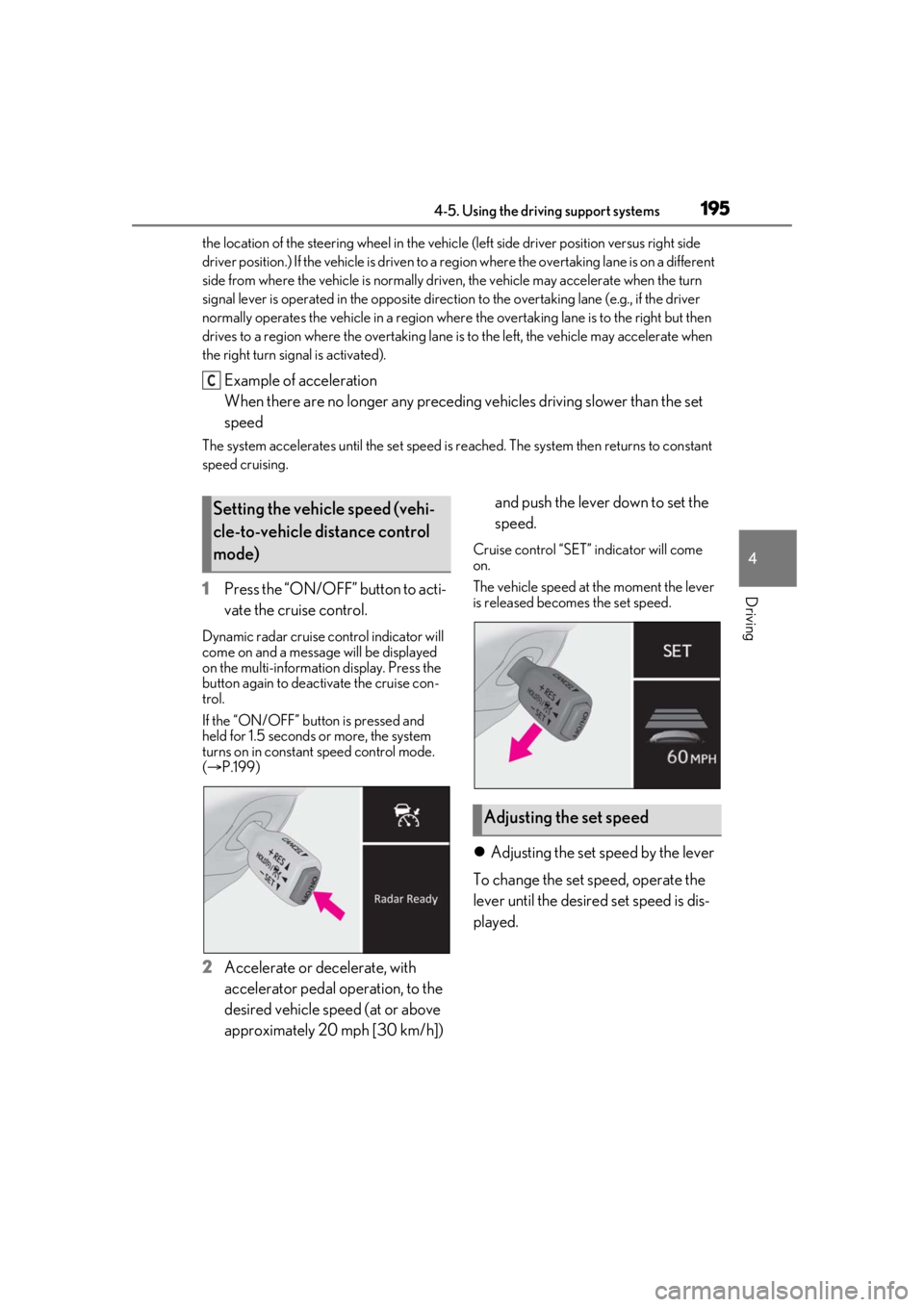
1 Press the “ON/OFF” button to acti-
vate the cruise control.
Dynamic radar cruise control indicator will
come on and a message will be displayed
on the multi-information display. Press the
button again to deactivate the cruise con-
trol.
If the “ON/OFF” button is pressed and
held for 1.5 seconds or more, the system
turns on in constant speed control mode.
( P.199)
2 Accelerate or decelerate, with
accelerator pedal operation, to the
desired vehicle speed (at or above
approximately 20 mph [30 km/h]) and push the lever down to set the
speed.
Cruise control “SET”
indicator will come
on.
The vehicle speed at the moment the lever
is released beco mes the set speed.
Adjusting the set speed by the lever
To change the set speed, operate the
lever until the desired set speed is dis-
played.
C
Setting the vehicle speed (vehi-
cle-to-vehicle distance control
mode)
Adjusting the set speed
Page 197 of 436

1974-5. Using the driving support systems
4
Driving
Select a distance from the table below.
Note that the distances shown corre-
spond to a vehicle speed of 50 mph
(80 km/h). Vehicle-to-vehicle distance
increases/decreases in accordance
with vehicle speed. When the vehicle is
stopped by system control, the vehicle
stops at a certain vehicle-to-vehicle
distance depending on the situation.
After the vehicle ahead of you starts
off, push the lever up.
Your vehicle will also resume follow-up
cruising if the accelerator pedal is
depressed after the vehicle ahead of
you starts off.1
Pulling the lever toward you can-
cels the speed control.
The speed control is also canceled when
the brake pedal is depressed. (When the
vehicle has been stopped by system con-
trol, depressing the brake pedal does not
cancel the setting.)
2Pushing the lever up resumes the
cruise control and returns vehicle
speed to the set speed.
When your vehicle is too close to a
vehicle ahead, and sufficient automatic
deceleration via the cruise control is
not possible, the display will flash and
the buzzer will sound to alert the driver.
Vehicle-to-vehicle distance set-
tings (vehicle-to-vehicle dis-
tance control mode)
Distance optionsVehicle-to-vehicle dis- tance
LongApproximately 160 ft. (50 m)
MediumApproximately 130 ft. (40 m)
ShortApproximately 100 ft. (30 m)
Resuming follow-up cruising
when the vehicle has been
stopped by system control (vehi-
cle-to-vehicle distance control
mode)
Canceling and resuming the
speed control
Approach warning (vehi-
cle-to-vehicle distance control
mode)
Page 198 of 436
1984-5. Using the driving support systems
An example of this would be if another
driver cuts in front of you while you are
following a vehicle. Depress the brake
pedal to ensure an appropriate vehi-
cle-to-vehicle distance.
■Warnings may not occur when
In the following instances, warnings
may not occur even when the vehi-
cle-to-vehicle distance is small.
When the speed of the preceding
vehicle matches or exceeds your
vehicle speed
When the preceding vehicle is trav-
eling at an extremely slow speed
Immediately after the cruise control
speed was set
When depressing the accelerator
pedal
While driving in vehicle-to-vehicle dis-
tance control mode, this function will
reduce the vehicle speed, if it is deter-
mined to be necessary.
■Function operation
When the steering wheel begins to be
turned, the vehicle speed will begin
being reduced. When the steering wheel is returned to the center posi-
tion, the vehicle speed reduction will
end.
Depending on the situation, the vehicle
speed will then return to the vehi-
cle-to-vehicle distance control mode
set speed.
In situations where vehicle-to-vehicle
distance control needs to operate,
such as when a preceding vehicle cuts
in front of your vehicle, the curve speed
reduction function will be canceled.
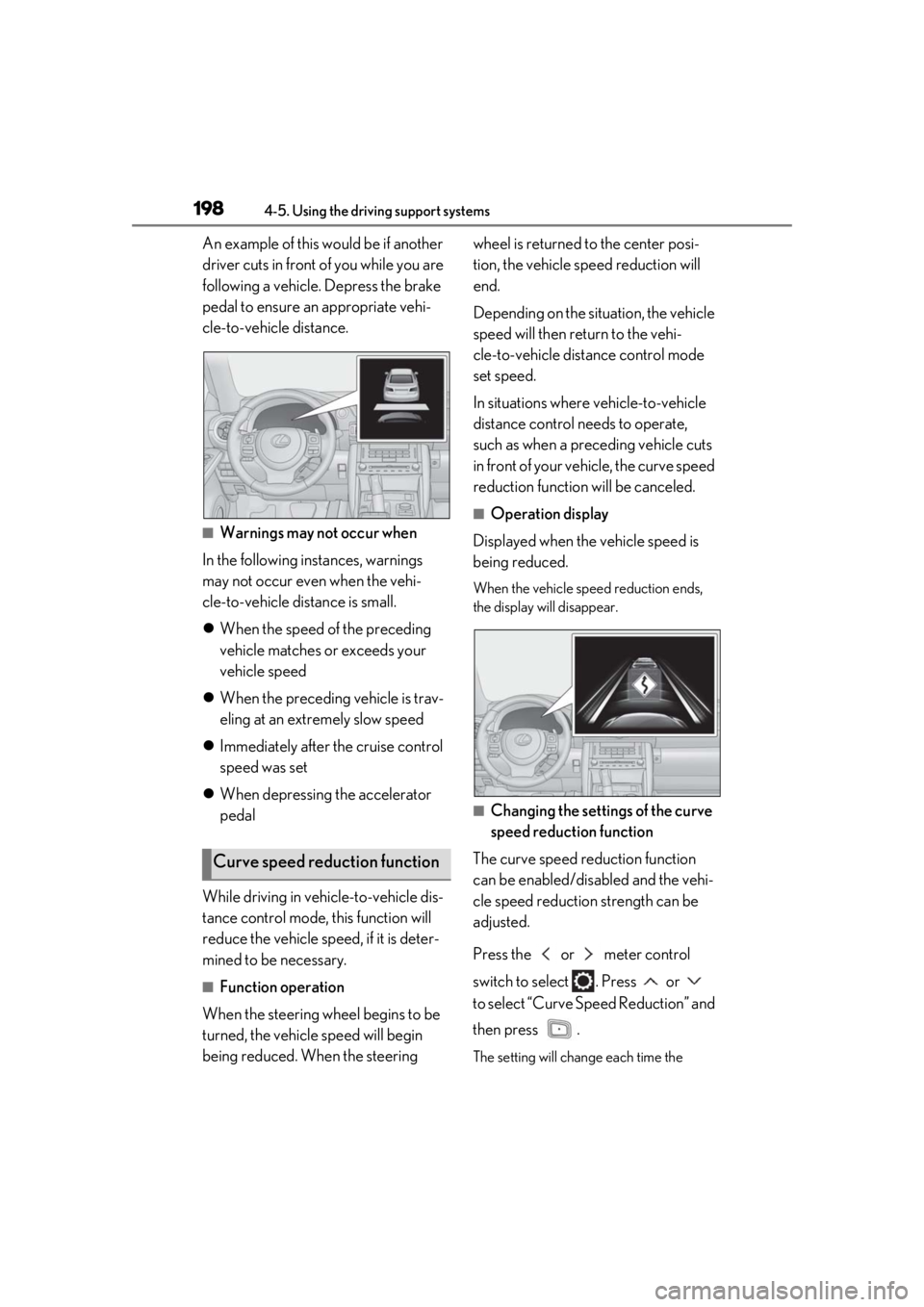
■Operation display
Displayed when the vehicle speed is
being reduced.
When the vehicle speed reduction ends,
the display will disappear.
■Changing the settings of the curve
speed reduction function
The curve speed reduction function
can be enabled/disabled and the vehi-
cle speed reduction strength can be
adjusted.
Press the or meter control
switch to select . Press or
to select “Curve Speed Reduction” and
then press .
The setting will chan ge each time the
Curve speed reduction function
Page 199 of 436

1994-5. Using the driving support systems
4
Driving
meter control switch is pressed.
When constant speed control mode is
selected, your vehicle will maintain a
set speed without controlling the vehi-
cle-to-vehicle distance. Select this
mode only when vehicle-to-vehicle dis-
tance control mode does not function
correctly due to a dirty radar, etc.
1With the cruise control off, press
and hold the “ON/ OFF” button for
1.5 seconds or more.
Immediately after the “ON/OFF” button is
pressed, the dynamic radar cruise control
indicator will come on. Afterwards, it
switches to the cruise control indicator.
Switching to constant speed control mode
is only possible when operating the lever
with the cruise control off.
2 Accelerate or decelerate, with
accelerator pedal operation, to the
desired vehicle speed (at or above
approximately 20 mph [30 km/h])
and push the lever down to set the
speed.
Cruise control “SET” indicator will come
on.
The vehicle speed at the moment the lever
is released becomes the set speed. Adjusting the speed setting:
P.195
Canceling and resuming the speed setting:
P.197
■Dynamic radar cruise control with
full-speed range can be set when
●The shift lever is in D.
●The desired set spee d can be set when
the vehicle speed is approximately 20
mph (30 km/h) or more.
(However, when the vehicle speed is set
while driving at belo w approximately 20
mph [30 km/h], the se t speed will be set
to approximately 20 mph [30 km/h].)
■Accelerating after setting the vehicle
speed
The vehicle can accelerate by operating the
accelerator pedal. After accelerating, the
set speed resumes. Ho wever, during vehi-
cle-to-vehicle distance control mode, the
vehicle speed may decrease below the set
speed in order to main tain the distance to
the preceding vehicle.
■When the vehicle stops while follow-up
cruising
●Pushing the lever up while the vehicle
ahead stops will resu me follow-up cruis-
ing if the vehicle ahead starts off within
approximately 3 seconds after the lever
is pushed up.
●If the vehicle ahead starts off within 3 sec-
onds after your vehicle stops, follow-up
cruising will be resumed.
■Automatic cancelation of vehi-
cle-to-vehicle dist ance control mode
Vehicle-to-vehicle distance control mode is
automatically canceled in the following situ-
ations.
Selecting constant speed con-
trol mode
Page 200 of 436
2004-5. Using the driving support systems
●VSC is activated.
●TRAC is activated for a period of time.
●When the VSC or TRAC system is
turned off.
●The sensor cannot detect correctly
because it is covered in some way.
●When the brake control or output restric-
tion control of a driving support system
operates.
(For example: Pre-Collision System,
Drive-Start Control)
●The parking brake is operated.
●The vehicle is stopped by system control
on a steep incline.
●The following are detected when the
vehicle has been stopped by system con-
trol:
• The driver is not wearing a seat belt.
• The driver’s door is opened.
• The vehicle has been stopped for about 3 minutes.
If vehicle-to-vehicle distance control mode
is automatically canceled for any reasons
other than the above, there may be a mal-
function in the system . Contact your Lexus
dealer.
■Automatic cancelation of constant
speed control mode
Constant speed control mode is automati-
cally canceled in the following situations:
●Actual vehicle speed is more than
approximately 10 mph (16 km/h) below
the set vehicle speed.
●Actual vehicle speed falls below approxi-
mately 20 mph (30 km/h).
●VSC is activated.
●TRAC is activated for a period of time.
●When the VSC or TRAC system is
turned off.
●When the brake control or output restric-
tion control of a driving support system
operates.
(For example: Pre-Collision System,
Drive-Start Control)
●The parking brake is operated.
If constant speed cont rol mode is automati-
cally canceled for any reasons other than the above, there may be a malfunction in the
system. Contact your Lexus dealer.
■Situations in which the curve speed
reduction function may not operate
In situations such as the following, the curve
speed reduction function may not operate:
●When the vehicle is being driven around
a gentle curve
●When the accelerato r pedal is being
depressed
●When the vehicle is being driven around
an extremely short curve
■Brake operation
A brake operation sound may be heard and
the brake pedal response may change, but
these are not malfunctions.
■Warning messages and buzzers for
dynamic radar cruise control with
full-speed range
Warning messages and buzzers are used to
indicate a system malfunction or to inform
the driver of the need for caution while driv-
ing. If a warning messa ge is shown on the
multi-information displa y, read the message
and follow the instructions. ( P.168, 346)
■When the sensor may not be correctly
detecting the vehicle ahead
In the case of the fo llowing and depending
on the conditions, operate the brake pedal
when deceleration of the system is insuffi-
cient or operate the accelerator pedal
when acceleration is required.
As the sensor may not be able to correctly
detect these types of vehicles, the approach
warning ( P.197) may not be activated.
●Vehicles that cut in suddenly
●Vehicles traveling at low speeds
●Vehicles that are not moving in the same
lane
●Vehicles with small rear ends (trailers
with no load on board, etc.)
Page 347 of 436

3477-2. Steps to take in an emergency
7
When trouble arises
■If “Engine Stopped Steering Power
Low” is displayed
This message is displa yed if the engine is
stopped while driving.
When steering wheel operations are
heavier than usual, grip the steering wheel
firmly and operate it using more force than
usual.
■If “Auto Power Off to Conserve Battery”
is displayed
Power was turned off due to the automatic
power off function. Next time when starting
the engine, increase the engine speed
slightly and maintain that level for approxi-
mately 5 minutes to recharge the battery.
■If “Headlight System Malfunction Visit
Your Dealer” is displayed
The following systems may be malfunction-
ing. Have the vehicle inspected by your
Lexus dealer immediately.
●The LED headlight system
●The automatic headlight leveling system
(if equipped)
●Automatic High Beam
■If “Radar Cruise Control Unavailable
See Owner's Manual” is displayed
The dynamic radar cruise control with
full-speed range system is suspended tem-
porarily or until the problem shown in the
message is resolved. (causes and coping
methods: P.168)
■If “Radar Cruise Control Unavailable” is
displayed
The dynamic radar cruise control with
full-speed range system cannot be used
temporarily. Use the system when it
becomes available again.
■If a message that indicates the malfunc-
tion of front camera is displayed
The following systems may be suspended
until the problem shown in the message is
resolved. ( P.168, 337)
●PCS (Pre-Collision system)
●LTA (Lane Tracing Assist)
●Automatic High Beam
●RSA (Road Sign Assist) (if equipped)
●Dynamic radar cruise control with
full-speed range
■If a message that indicates the malfunc-
tion of radar sensor is displayed
The following systems may be suspended
until the problem shown in the message is
resolved. ( P.168, 337)
●PCS (Pre-Collision system)
●LTA (Lane Tracing Assist)
●Dynamic radar cruise control with
full-speed range
■If “Maintenance Required Soon” is dis-
played
Indicates that all maintenance according to
the driven distance on the maintenance
schedule
* should be performed soon.
Comes on approximately 4500 miles
(7200 km) after the message has been
reset. If necessary, perform maintenance.
Please reset the message after the mainte-
nance is performed. ( P.286)
*: Refer to the separate “Scheduled Main-
tenance” or “Owner’s Manual Supple-
ment” for the main tenance interval
applicable to your vehicle.
■If “Maintenance Required Visit Your
Dealer” is displayed
Indicates that all mainte nance is required to
correspond to the driven distance on the
maintenance schedule
*.
Comes on approximately 5000 miles
(8000 km) after the message has been
reset. (The indicator will not work properly
unless the message ha s been reset.) Per-
form the necessary maintenance. Please
reset the message after the maintenance is
performed. ( P.286)
*: Refer to the separate “Scheduled Main-
tenance” or “Owner’s Manual Supple-
ment” for the main tenance interval
applicable to your vehicle.
■If “Oil Maintenance Required Soon” is
displayed
Indicates that the engine oil should be
scheduled to be changed.
Page 355 of 436
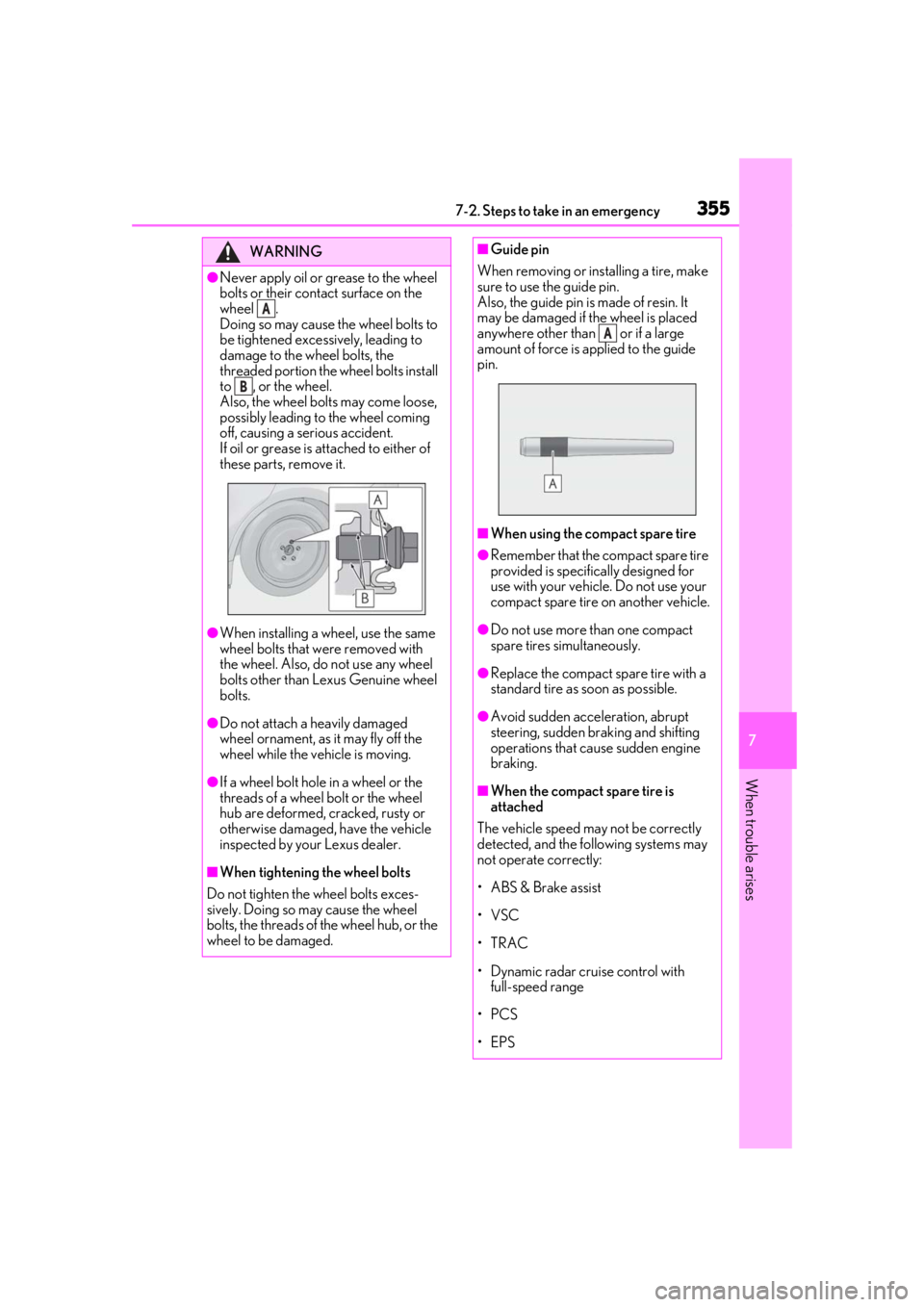
3557-2. Steps to take in an emergency
7
When trouble arises
WARNING
●Never apply oil or grease to the wheel
bolts or their contact surface on the
wheel .
Doing so may cause the wheel bolts to
be tightened excessively, leading to
damage to the wheel bolts, the
threaded portion the wheel bolts install
to , or the wheel.
Also, the wheel bolts may come loose,
possibly leading to the wheel coming
off, causing a serious accident.
If oil or grease is at tached to either of
these parts, remove it.
●When installing a wheel, use the same
wheel bolts that we re removed with
the wheel. Also, do not use any wheel
bolts other than Lexus Genuine wheel
bolts.
●Do not attach a heavily damaged
wheel ornament, as it may fly off the
wheel while the vehicle is moving.
●If a wheel bolt hole in a wheel or the
threads of a wheel bolt or the wheel
hub are deformed, cracked, rusty or
otherwise damaged, have the vehicle
inspected by your Lexus dealer.
■When tightening the wheel bolts
Do not tighten the wheel bolts exces-
sively. Doing so may cause the wheel
bolts, the threads of the wheel hub, or the
wheel to be damaged.
A
B
■Guide pin
When removing or installing a tire, make
sure to use the guide pin.
Also, the guide pin is made of resin. It
may be damaged if the wheel is placed
anywhere other than or if a large
amount of force is applied to the guide
pin.
■When using the compact spare tire
●Remember that the compact spare tire
provided is specific ally designed for
use with your vehicle. Do not use your
compact spare tire on another vehicle.
●Do not use more than one compact
spare tires simultaneously.
●Replace the compact spare tire with a
standard tire as soon as possible.
●Avoid sudden acceleration, abrupt
steering, sudden br aking and shifting
operations that cause sudden engine
braking.
■When the compact spare tire is
attached
The vehicle speed may not be correctly
detected, and the following systems may
not operate correctly:
• ABS & Brake assist
•VSC
•TRAC
• Dynamic radar cruise control with full-speed range
•PCS
•EPS
A
Page 422 of 436

422Alphabetical Index
BuzzerHands off steering wheel warning (LTA).......................................................................... 188
C
Card key ............................................................ 88
Care Exterior ...........................................................280
Interior ............................................................. 283
Seat belts........................................................ 283
Wheels and wheel ornaments............280
Cargo capacity...............................................132
Cargo net ....................................................... 268
Center Display ............................................. 250
Chains .............................................................. 244
Child restraint system Fixed with a LATCH system .................. 49
Fixed with a seat belt................................... 45
Front passenger occupant classification system ............................................................. 36
Points to remember ...................................... 41
Riding with children ....................................... 41
Types of child restraint system installation method ............................................................42
Using an anchor bracket ............................ 51
Child safety Airbag precautions...................................... 33
Battery precautions .................................. 364
Child restraint system..................................42
Heated steering wheel and seat heater precautions.................................................. 261
How your child should wear the seat belt ............................................................................ 25
Moon roof precautions ............................ 122
Power window lock switch...................... 119
Power window precautions .................... 119
Rear door child-protectors ..................... 94
Removed electronic key battery precau- tions ................................................................. 317
Seat belt extender precautions ............. 25
Seat belt precautions .................................... 41
Trunk precautions ........................................ 96 Child-protectors............................................. 94
Cleaning
Exterior........................................................... 280
Interior .............................................................283
Radar sensor ................................................. 164
Seat belts ........................................................283
Wheels and wheel ornaments ........... 280
Clock ..................................................71, 72, 270
Coat hooks..................................................... 270
Condenser .....................................................300
Console box ...................................................267
Consumption screen .................................... 83
Cooling system............................................. 298 Engine overheating.................................. 365
Cruise control Dynamic radar cruise control with full-speed range ........................................192
Cup holders ....................................................267
Current fuel consumption ...........................79
Curtain shield airbags .................................. 28
Customizable features .............................. 394
D
Daytime running light system ...................149
Defogger Outside rear view mirrors.....................255
Rear window ................................................255
Windshield ....................................................255
Differential Front differential oil............. ....................... 377
Rear differential oil......... ..................... ....... 377
Dimensions .................................................... 372
Dinghy towing.................................................133
Display Center Display ........................................... 250
Dynamic radar cruise control with full-speed range ........................................192
Intuitive parking assist ............................... 210
LTA (Lane Tracing Assist) ..................... 185
Multi-information display .......................... 76
RCTA.................................................................216
Warning message .....................................346