fog light LEXUS IS300 2021 User Guide
[x] Cancel search | Manufacturer: LEXUS, Model Year: 2021, Model line: IS300, Model: LEXUS IS300 2021Pages: 436, PDF Size: 8.27 MB
Page 191 of 436
1914-5. Using the driving support systems
4
Driving
2Press or of the meter control
switches and select , then press
.
3 Press or of the meter control
switches and select “RSA”, then press
.
■Automatic turn-off of RSA sign display
In the following situations, a displayed
speed limit sign and/or do not enter sign will
stop being displayed automatically:
●No sign has been recognized for a cer-
tain distance.
●The road changes due to a left or right
turn, etc.
In the following situations, stop and yield
signs will stop being displayed automati-
cally:
●The system determines that your vehicle
has passed the sign.
●The road changes due to a left or right
turn, etc.
■Conditions in whic h the function may
not operate or detect correctly
In the following situations, RSA does not
operate normally and may not recognize
signs, display the incorrect sign, etc. How-
ever, this does not indicate a malfunction.
●The front camera is misaligned due to a
strong impact being applied to the sen-
sor, etc.
●Dirt, snow, stickers, etc. are on the wind-
shield near the front camera.
●In inclement weather such as heavy rain,
fog, snow or sand storms.
●Light from an oncoming vehicle, the sun,
etc. enters the front camera.
●The sign is dirty, faded, tilted or bent.
●The contrast of electronic sign is low.
●All or part of the sign is hidden by the
leaves of a tree, a pole, etc.
●The sign is only visible to the front camera
for a short amount of time.
●The driving scene (turning, lane change,
etc.) is judged incorrectly.
●If a sign not appropriate for the currently
traveled lane, but the sign exists directly
after a freeway branches, or in an adja-
cent lane just before merging.
●Stickers are attached to the rear of the
preceding vehicle.
●A sign resembling a system compatible
sign is recognized.
●Side road speed signs may be detected
and displayed (if positioned in sight of the
front camera) while the vehicle is travel-
ing on the main road.
●Roundabout exit road speed signs may
be detected and displayed (if positioned
in sight of the front camera) while travel-
ing on a roundabout.
●The front of the vehicle is raised or low-
ered due to the carried load.
●The surrounding brightness is not suffi-
cient or changes suddenly.
●When a sign intended for trucks, etc. is
recognized.
●The navigation system map data is out-
dated.
●The navigation system is not operating.
●The speed information displayed on the
meter and on the navigation system may
be different due to th e navigation system
using map data.
■Speed limit sign display
If the engine switch wa s last turned off while
a speed limit sign was displayed on the
multi-information display, the same sign dis-
plays again when the engine switch is
turned to IGNITION ON mode.
■Customization
Some functions can be customized. (Cus-
tomizable features: P.394)
Page 211 of 436

2114-5. Using the driving support systems
4
Driving
ing assist monitor is displayed.
A simplified image is displayed on the
Center Display when an object is detected.
Center Display (vehicles with a Pan-
oramic view monitor)
When an object is detected, a graphic will
be displayed on the panoramic view moni-
tor.
Use the meter control switches to
enable/disable the Lexus parking
assist-sensor. ( P.77)
1 Press or to select .
2 Press or to select “PKSA”
and then press .
3 Press or to select and
then press .
When the intuitive parking assist func- tion is disabled, th
e intuitive parking
assist OFF indicator ( P.68) illumi-
nates on the multi-information display .
When the intuitive parking assist func-
tion is turned on or off, operation of the
intuitive parking assist function contin-
ues in the same condition the next time
the engine is started.
Turning intuitive parking assist
on/off
WARNING
■When using the intuitive parking
assist
Observe the following precautions.
Failing to do so may result in the vehicle
being unable to be driven safely and pos-
sibly cause an accident.
●Do not use the sensor at speeds in
excess of 6 mph (10 km/h).
●The sensors’ detection areas and reac-
tion times are limited. When moving
forward or reversin g, check the areas
surrounding the vehicle (especially the
sides of the vehicl e) for safety, and
drive slowly, using the brake to control
the vehicle’s speed.
●Do not install accessories within the
sensors’ detection areas.
●The area directly under the bumpers is
not detected.
Thin posts or objects lower than the
sensor may not be detected when
approached, even if they have been
detected once.
■When to disable the function
In the following situations, disable the
function as it may operate even though
there is no possibility of a collision.
●The vehicle is equipped with a fender
pole, wireless antenna or fog lights.
●The front or rear bumper or a sensor
receives a strong impact.
●A non-genuine Lexus suspension
(lowered suspension, etc.) is installed.
Page 230 of 436

2304-5. Using the driving support systems
• When parallel parking
• When there is a rut or hole in the surface of the road
• When driving on a metal cover (grating), such as those used for drainage ditches
• When driving on a steep slope
• If a sensor is hit by a large amount of
water, such as when driving on a flooded
road
●Weather
• If a sensor is covered with ice, snow, dirt,
etc. (when cleared, the system will return
to normal)
• If heavy rain or water strikes a sensor
• When driving in incl ement weather such
as fog, snow or a sandstorm
• When strong winds are blowing
●Other ultrasonic wave sources
• When vehicle horns, vehicle detectors,
motorcycle engines, air brakes of large
vehicles, the clearance sonar of other
vehicles or other devices which produce
ultrasonic waves are near the vehicle
• If a sticker or an el ectronic component,
such as a backlit license plate (especially
fluorescent type), fog lights, fender pole
or wireless antenna is installed near a
sensor
●Changes in the vehicle posture
• If the vehicle is significantly tilted
• If the front of the vehicle is raised or low-
ered due to the carried load
• If the orientation of a sensor has been
changed due to a collision or other
impact
■Situations in which the Parking Support
Brake function (stati c objects) may not
operate properly
In some situations, such as the following, this
function may not operate properly.
●Weather
• When a sensor or the area around a sen- sor is extremely hot or cold • When strong winds are blowing
• If a sensor is covered with ice, snow, dirt,
etc. (when cleared, the system will return
to normal)
• If heavy rain or water strikes a sensor
• When driving in incl ement weather such
as fog, snow or a sandstorm
• When the sensor is frozen (Once the
sensor thaws, the system will return to
normal)
●Vehicle surroundings
• When an object that cannot be detected is between the vehicle and a detected
object
• If an object such as a vehicle, motorcycle, bicycle or pedestrian cuts in front of the
vehicle or runs out from the side of the
vehicle
• The vehicle is approaching a tall or
curved curb.
• On an extremely bumpy road, on an incline, on gravel, or on grass.
• If objects draw too close to the sensor.
●Other ultrasonic waves sources
• When vehicle horns, vehicle detectors, motorcycle engines, air brakes of large
vehicles, the clearance sonar of other
vehicles or other de vices which produce
ultrasonic waves are near the vehicle
• If a sticker or an electronic component, such as a backlit license plate (especially
fluorescent type), fog lights, fender pole
or wireless antenna is installed near a
sensor
Page 235 of 436

2354-5. Using the driving support systems
4
Driving
snow, dirt, etc.
●When it is raining heavily or water strikes
the vehicle
●When the detection area of a radar sen-
sor is obstructed by an adjacent vehicle
●If the vehicle is significantly tilted
●When equipment that may obstruct a
sensor is installed, such as a towing eye-
let, bumper protector (an additional trim
strip, etc.), bicycle carrier, or snow plow
●If the suspension has been modified or
tires of a size other than specified are
installed
●If the front of the vehicle is raised or low-
ered due to the carried load
●If a sticker or an electronic component,
such as a backlit license plate (especially
fluorescent type), fog lights, fender pole
or wireless antenna is installed near a
radar sensor
●If the orientation of a radar sensor has
been changed
●When multiple vehicles are approaching
with only a small gap between each vehi-
cle
●If a vehicle is approaching the rear of
your vehicle rapidly
●Situations in which the radar sensor may
not detect a vehicle
• When a vehicle approaches from the right or left at the rear of the vehicle while
you are turning while backing up
• When turning while backing up
• When backing out of a shallow angle parking spot • When backing up on
a slope with a sharp
change in grade
• When a vehicle turns into the detection area
Page 247 of 436
247
5
5
Interior features
Interior features
.5-1. Remote Touch/DisplayRemote Touch ............................ 248
Center Display ........................... 250
5-2. Using the air conditioning system and defogger
Automatic air conditioning system ........................................................ 253
Heated steering wheel/seat heat- ers/seat ventilators ................. 261
5-3. Using the interior lights Interior lights list......................... 263
5-4. Using the storage features List of storage features............ 266
Trunk features............................. 268
5-5. Using the other interior features Other interior features ........... 270
Garage door opener............... 273
Page 259 of 436
2595-2. Using the air conditioning system and defogger
5
Interior features
pollen filter is turned off.
1Press the automatic mode switch or
select “AUTO” on the sub function
menu. ( P.257)
2 Adjust the temperature setting.
3 To stop the operation, press the off
switch or select “OFF” on the sub
function menu. ( P.257)
If the fan speed settin g or air flow modes
are operated, the automatic mode indica-
tor goes off. However, automatic mode for
functions other than th at operated is main-
tained.
■Using automatic mode
Fan speed is adjusted automatically accord-
ing to the temperature setting and the
ambient conditions.
Therefore, the fan may stop for a while until
warm or cool air is ready to flow immedi-
ately after the automatic mode switch is
pressed or “AUTO” is selected.
Cool air may blow around the upper body
even when the heater is on due to sunlight.
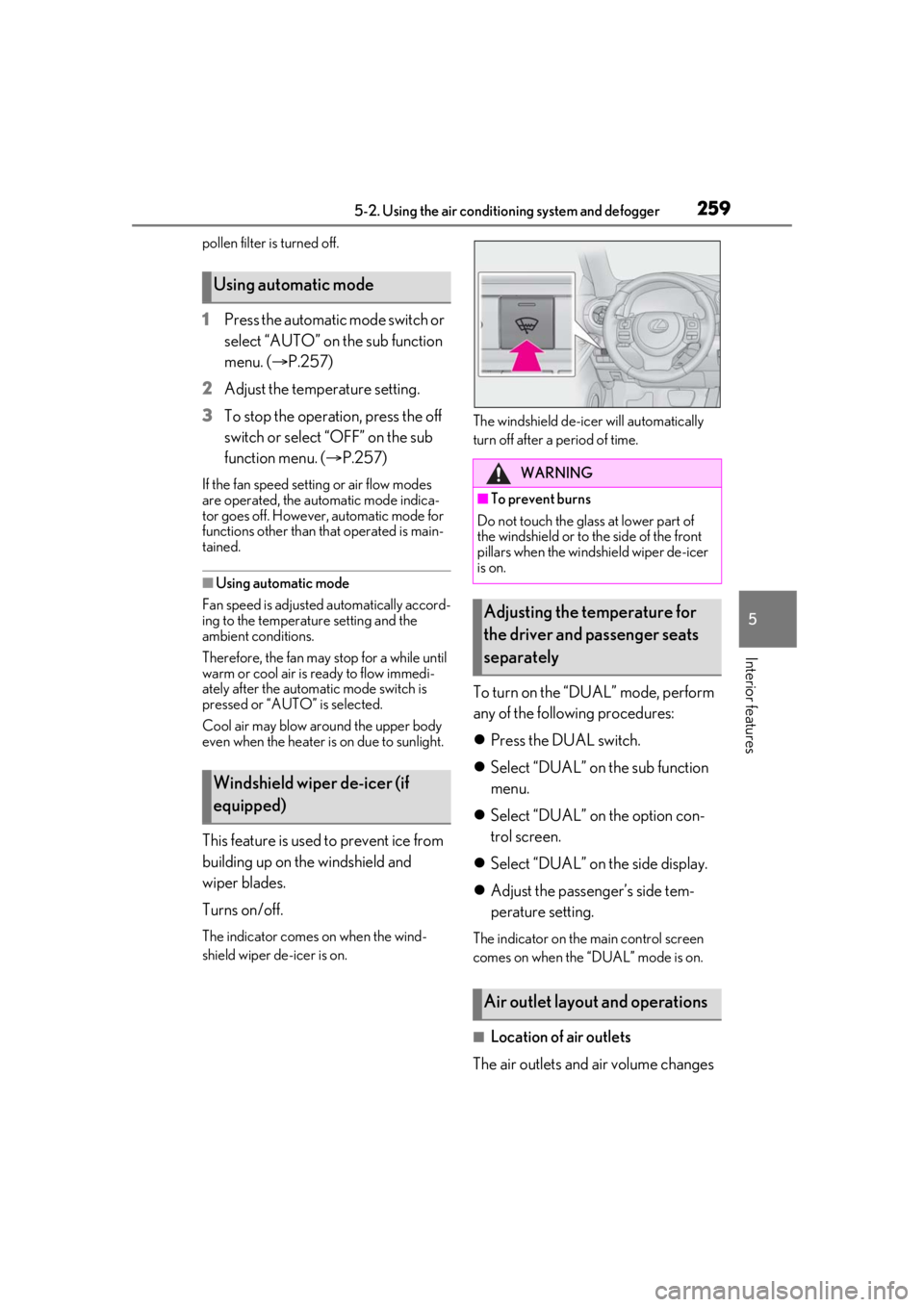
This feature is used to prevent ice from
building up on the windshield and
wiper blades.
Turns on/off.
The indicator comes on when the wind-
shield wiper de-icer is on. The windshield de-icer will automatically
turn off after a period of time.
To turn on the “DUAL” mode, perform
any of the following procedures:
Press the DUAL switch.
Select “DUAL” on the sub function
menu.
Select “DUAL” on the option con-
trol screen.
Select “DUAL” on the side display.
Adjust the passenger’s side tem-
perature setting.
The indicator on the main control screen
comes on when the “DUAL” mode is on.
■Location of air outlets
The air outlets and air volume changes
Using automatic mode
Windshield wiper de-icer (if
equipped)
WARNING
■To prevent burns
Do not touch the glass at lower part of
the windshield or to the side of the front
pillars when the windshield wiper de-icer
is on.
Adjusting the temperature for
the driver and passenger seats
separately
Air outlet layout and operations
Page 261 of 436
2615-2. Using the air conditioning system and defogger
5
Interior features
*:If equipped
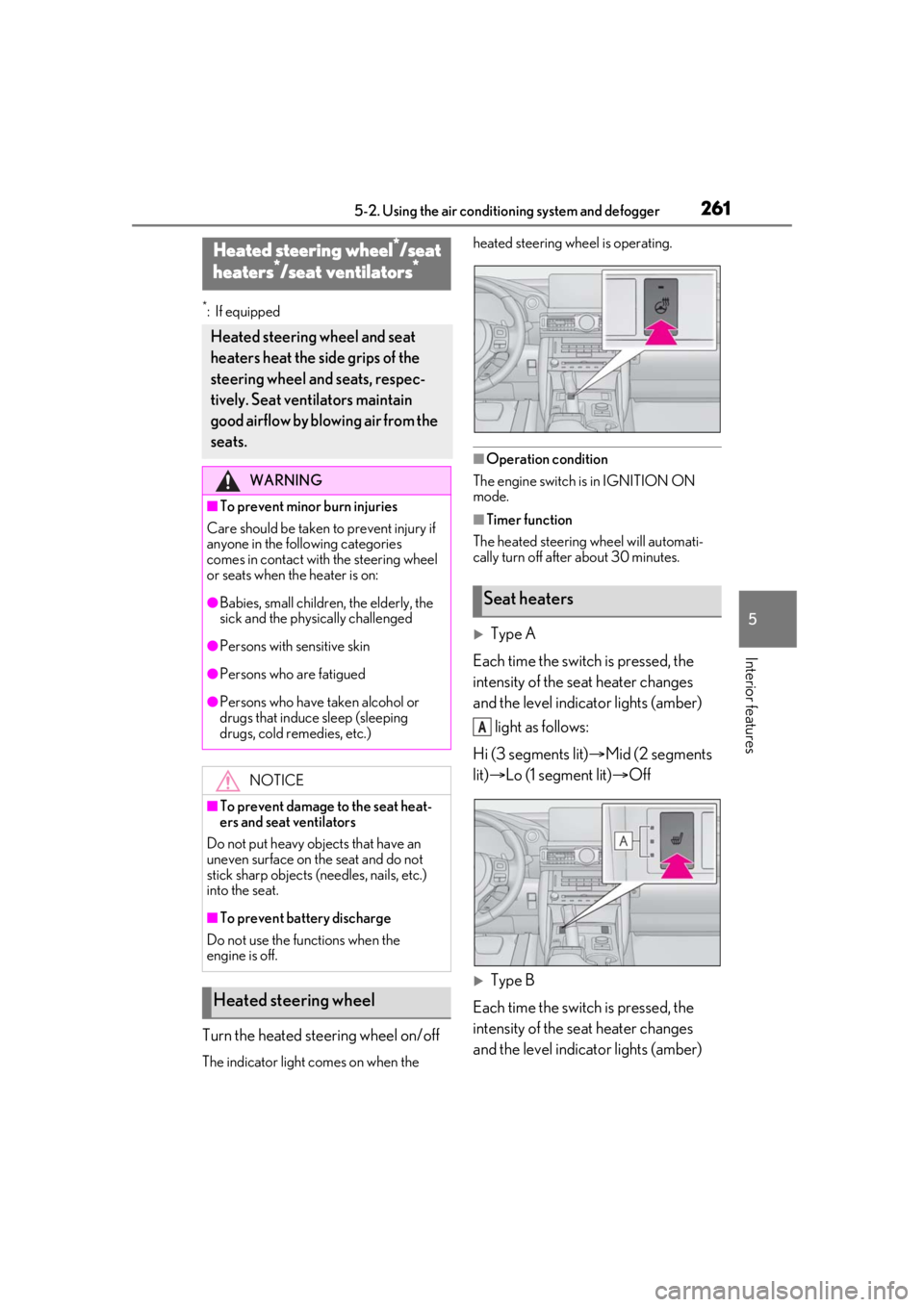
Turn the heated steering wheel on/off
The indicator light comes on when the heated steering wheel is operating.
■Operation condition
The engine switch is in IGNITION ON
mode.
■Timer function
The heated steering wheel will automati-
cally turn off after about 30 minutes.
Type A
Each time the switch is pressed, the
intensity of the seat heater changes
and the level indicator lights (amber) light as follows:
Hi (3 segments lit) Mid (2 segments
lit) Lo (1 segment lit) Off
Type B
Each time the switch is pressed, the
intensity of the seat heater changes
and the level indicator lights (amber)
Heated steering wheel*/seat
heaters*/seat ventilators*
Heated steering wheel and seat
heaters heat the side grips of the
steering wheel and seats, respec-
tively. Seat ventilators maintain
good airflow by blowing air from the
seats.
WARNING
■To prevent minor burn injuries
Care should be taken to prevent injury if
anyone in the following categories
comes in contact with the steering wheel
or seats when the heater is on:
●Babies, small children, the elderly, the
sick and the phys ically challenged
●Persons with sensitive skin
●Persons who are fatigued
●Persons who have taken alcohol or
drugs that induce sleep (sleeping
drugs, cold remedies, etc.)
NOTICE
■To prevent damage to the seat heat-
ers and seat ventilators
Do not put heavy objects that have an
uneven surface on the seat and do not
stick sharp objects (needles, nails, etc.)
into the seat.
■To prevent battery discharge
Do not use the functions when the
engine is off.
Heated steering wheel
Seat heaters
A
Page 262 of 436
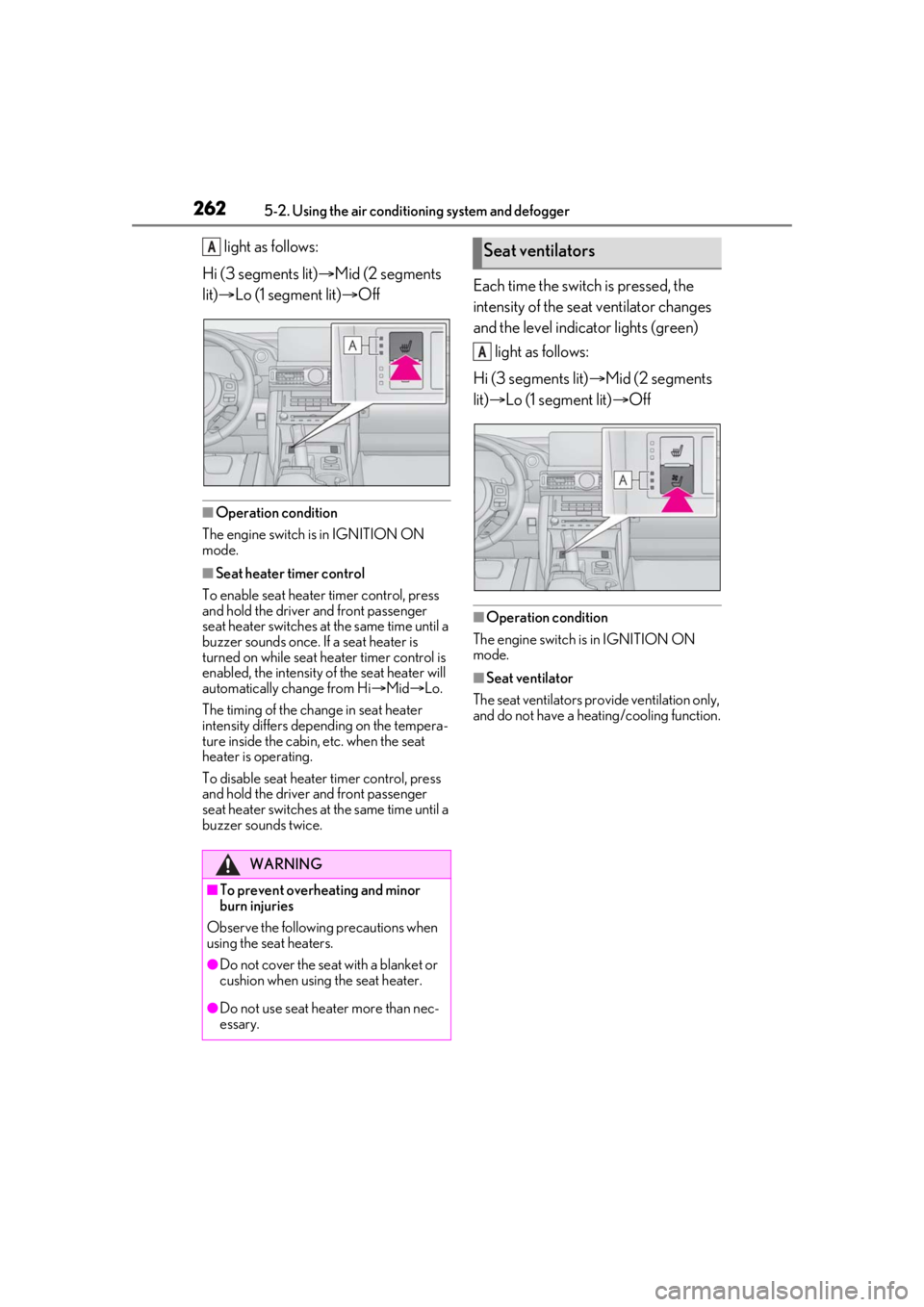
2625-2. Using the air conditioning system and defogger
light as follows:
Hi (3 segments lit) Mid (2 segments
lit) Lo (1 segment lit) Off
■Operation condition
The engine switch is in IGNITION ON
mode.
■Seat heater timer control
To enable seat heater timer control, press
and hold the driver and front passenger
seat heater switches at the same time until a
buzzer sounds once. If a seat heater is
turned on while seat he ater timer control is
enabled, the intensity of the seat heater will
automatically change from Hi Mid Lo.
The timing of the change in seat heater
intensity differs depending on the tempera-
ture inside the cabin, etc. when the seat
heater is operating.
To disable seat heater timer control, press
and hold the driver and front passenger
seat heater switches at the same time until a
buzzer sounds twice.
Each time the switch is pressed, the
intensity of the seat ventilator changes
and the level indicator lights (green) light as follows:
Hi (3 segments lit) Mid (2 segments
lit) Lo (1 segment lit) Off
■Operation condition
The engine switch is in IGNITION ON
mode.
■Seat ventilator
The seat ventilators pr ovide ventilation only,
and do not have a heating/cooling function.
WARNING
■To prevent overheating and minor
burn injuries
Observe the following precautions when
using the seat heaters.
●Do not cover the seat with a blanket or
cushion when using the seat heater.
●Do not use seat heater more than nec-
essary.
ASeat ventilators
A
Page 284 of 436
2846-1. Maintenance and care
WARNING
■Water in the vehicle
●Do not splash or spill liquid in the vehi-
cle.
Doing so may cause electrical compo-
nents, etc. to malfunction or catch fire.
●Do not get any of the SRS components
or wiring in the vehicle interior wet.
( P.28)
An electrical malfunction may cause
the airbags to deploy or not function
properly, resulting in death or serious
injury.
■Cleaning the interior (especially
instrument panel)
Do not use polish wax or polish cleaner.
The instrument panel may reflect off the
windshield, obstructing the driver’s view
and leading to an accident, resulting in
death or serious injury.
NOTICE
■Cleaning detergents
●Do not use the following liquids, as
they may discolor the vehicle interior
or cause streaks or damage to painted
surfaces:
• Audio system screen: Organic sub- stances such as benzine or gasoline,
alkaline solutions, and alcohol
• Seats: Alkaline solutions, organic sub- stances such as thinner or benzine,
and alcohol
• Other parts: Organic substances such as benzine or gasoline, alkaline or
acidic solutions, dye, and bleach
●Do not use polish wax or polish
cleaner. The instrument panel’s or
other interior part’s painted surface
may be damaged.
■Preventing damage to leather sur-
faces
Observe the following precautions to
avoid damage to and deterioration of
leather surfaces:
●Remove any dust or dirt from leather
surfaces immediately.
●Do not expose the vehicle to direct
sunlight for extended periods of time.
Park the vehicle in the shade, espe-
cially during summer.
●Do not place items made of vinyl, plas-
tic, or containing wax on the uphol-
stery, as they may stick to the leather
surface if the vehicle interior heats up
significantly.
■Water on the floor
Do not wash the vehicle floor with water.
Vehicle systems such as the audio system
may be damaged if water comes into
contact with electrical components such
as the audio system above or under the
floor of the vehicle. Water may also
cause the body to rust.
■When cleaning the inside of the wind-
shield
Do not allow glass cleaner to contact the
lens. Also, do not touch the lens.
(
P.164)
■Cleaning the inside of the rear win-
dow
●Do not use glass cleaner to clean the
rear window, as this may cause dam-
age to the rear window defogger
heater wires or antenna. Use a cloth
dampened with lukewarm water to
gently wipe the window clean. Wipe
the window in strokes running parallel
to the heater wires or antenna.
●Be careful not to scratch or damage
the heater wires or antenna.
Page 422 of 436

422Alphabetical Index
BuzzerHands off steering wheel warning (LTA).......................................................................... 188
C
Card key ............................................................ 88
Care Exterior ...........................................................280
Interior ............................................................. 283
Seat belts........................................................ 283
Wheels and wheel ornaments............280
Cargo capacity...............................................132
Cargo net ....................................................... 268
Center Display ............................................. 250
Chains .............................................................. 244
Child restraint system Fixed with a LATCH system .................. 49
Fixed with a seat belt................................... 45
Front passenger occupant classification system ............................................................. 36
Points to remember ...................................... 41
Riding with children ....................................... 41
Types of child restraint system installation method ............................................................42
Using an anchor bracket ............................ 51
Child safety Airbag precautions...................................... 33
Battery precautions .................................. 364
Child restraint system..................................42
Heated steering wheel and seat heater precautions.................................................. 261
How your child should wear the seat belt ............................................................................ 25
Moon roof precautions ............................ 122
Power window lock switch...................... 119
Power window precautions .................... 119
Rear door child-protectors ..................... 94
Removed electronic key battery precau- tions ................................................................. 317
Seat belt extender precautions ............. 25
Seat belt precautions .................................... 41
Trunk precautions ........................................ 96 Child-protectors............................................. 94
Cleaning
Exterior........................................................... 280
Interior .............................................................283
Radar sensor ................................................. 164
Seat belts ........................................................283
Wheels and wheel ornaments ........... 280
Clock ..................................................71, 72, 270
Coat hooks..................................................... 270
Condenser .....................................................300
Console box ...................................................267
Consumption screen .................................... 83
Cooling system............................................. 298 Engine overheating.................................. 365
Cruise control Dynamic radar cruise control with full-speed range ........................................192
Cup holders ....................................................267
Current fuel consumption ...........................79
Curtain shield airbags .................................. 28
Customizable features .............................. 394
D
Daytime running light system ...................149
Defogger Outside rear view mirrors.....................255
Rear window ................................................255
Windshield ....................................................255
Differential Front differential oil............. ....................... 377
Rear differential oil......... ..................... ....... 377
Dimensions .................................................... 372
Dinghy towing.................................................133
Display Center Display ........................................... 250
Dynamic radar cruise control with full-speed range ........................................192
Intuitive parking assist ............................... 210
LTA (Lane Tracing Assist) ..................... 185
Multi-information display .......................... 76
RCTA.................................................................216
Warning message .....................................346