headlights LEXUS IS300 2021 User Guide
[x] Cancel search | Manufacturer: LEXUS, Model Year: 2021, Model line: IS300, Model: LEXUS IS300 2021Pages: 436, PDF Size: 8.27 MB
Page 159 of 436

1594-3. Operating the lights and wipers
4
Driving
Wiper intervals can be adjusted when
intermittent operation is selected.
5Increases the intermittent wind-
shield wiper frequency
6 Decreases the intermittent wind-
shield wiper frequency
The intermittent windshield wiper operates
more frequently as vehicle speed becomes
higher.
7 Washer/wiper dual opera-
tion
Pulling the lever operates the wipers and
washer.
The wipers will automatically operate a
couple of times afte r the washer squirts.
Vehicles with headlight cleaners: When the engine swit
ch is in IGNITION
ON mode and the headlights are on, if the
lever is pulled, the he adlight cleaners will
operate once. After this, the headlight
cleaners will operate every 5th time the
lever is pulled.
■The windshield wiper and washer can be
operated when
The engine switch is in IGNITION ON
mode.
■Dripping prevention wiper sweep
After performing a washing and wiping
operation several times, the wipers operate
one more time after a short delay to prevent
dripping.
However, this final wiper operation will not
be performed while driving.
■Effects of vehicle speed on wiper opera-
tion (vehicles with rain-sensing wind-
shield wipers)
Vehicle speed affects the following even
when the wipers are not in AUTO mode.
●Intermittent wiper interval
●Wiper operation when the washer is
being used (delay un til drip prevention
wiper sweep occurs)
With low speed windsh ield wiper operation
selected, wiper operation will be switched
from low speed to intermittent wiper opera-
tion only when the vehicle is stationary.
■Raindrop sensor (vehicles with
rain-sensing wind shield wipers)
●The raindrop sensor judges the amount
of raindrops.
An optical sensor is adopted. It may not
operate properly when sunlight from the
rising or setting of the sun intermittently
strikes the windshield, or if bugs etc. are
present on the windshield.
or No change
or No change
Wiper lever oper-
ationWiper operation
Page 166 of 436
1664-5. Using the driving support systems
WARNING
●If the part of the windshield in front of
the front camera is fogged up or cov-
ered with condensation or ice, use the
windshield defogger to remove the
fog, condensation or ice. (P.255)
●If water droplets cannot be properly
removed from the area of the wind-
shield in front of the front camera by
the windshield wipers, replace the
wiper insert or wiper blade.
●Do not attach window tint to the wind-
shield.
●Replace the windshield if it is damaged
or cracked.
After replacing the windshield, the
front camera must be recalibrated.
Contact your Lexus dealer for details.
●Do not allow liquids to contact the
front camera.
●Do not allow bright lights to shine into
the front camera.
●Do not dirty or damage the front cam-
era.
When cleaning the inside of the wind-
shield, do not allow glass cleaner to
contact the lens of the front camera.
Also, do not touch the lens.
If the lens is dirty or damaged, contact
your Lexus dealer.
●Do not subject the front camera to a
strong impact.
●Do not change the installation position
or direction of the front camera or
remove it.
●Do not disassemble the front camera.
●Do not modify any components of the
vehicle around the front camera
(inside rear view mirror, etc.) or ceiling.
●Do not attach any accessories to the
hood, front grille or front bumper that
may obstruct the front camera. Con-
tact your Lexus dealer for details.
●If a surfboard or other long object is to
be mounted on the roof, make sure
that it will not obstruct the front cam-
era.
●Do not modify the headlights or other
lights.
Page 178 of 436
1784-5. Using the driving support systems
radar sensor and front camera, prevent-
ing the system from operating properly:
• When a detectable object is approaching
your vehicle
• When your vehicle or a detectable object
is wobbling
• If a detectable object makes an abrupt maneuver (such as sudden swerving,
acceleration or deceleration)
• When your vehicle approaches a detect- able object rapidly
• When a detectable object is not directly
in front of your vehicle
• When a detectable object is near a wall, fence, guardrail, manhole cover, vehicle,
steel plate on the road, etc.
• When a detectable object is under a
structure
•When part of a detect able object is hid-
den by an object, such as large baggage,
an umbrella, or guardrail
• When there are many things which can reflect the radio waves of the radar in the
vicinity (tunnels, truss bridges, gravel
roads, snow covered road that have
tracks, etc.)
• When there is an effect on the radio waves to the radar that is installed on
another vehicle
• When multiple dete ctable objects are
close together
• If the sun or other light is shining directly
on a detectable object
• When a detectable object is a shade of white and looks extremely bright
• When a detectable object appears to be nearly the same color or brightness as its
surroundings
• If a detectable object cuts or suddenly
emerges in front of your vehicle
• When the front of your vehicle is hit by water, snow, dust, etc.
• When a very bright light ahead, such as the sun or the headlights of oncoming traffic, shines direct
ly into the front cam-
era
• When approaching the side or front of a
vehicle ahead
• If a vehicle ahead is a motorcycle
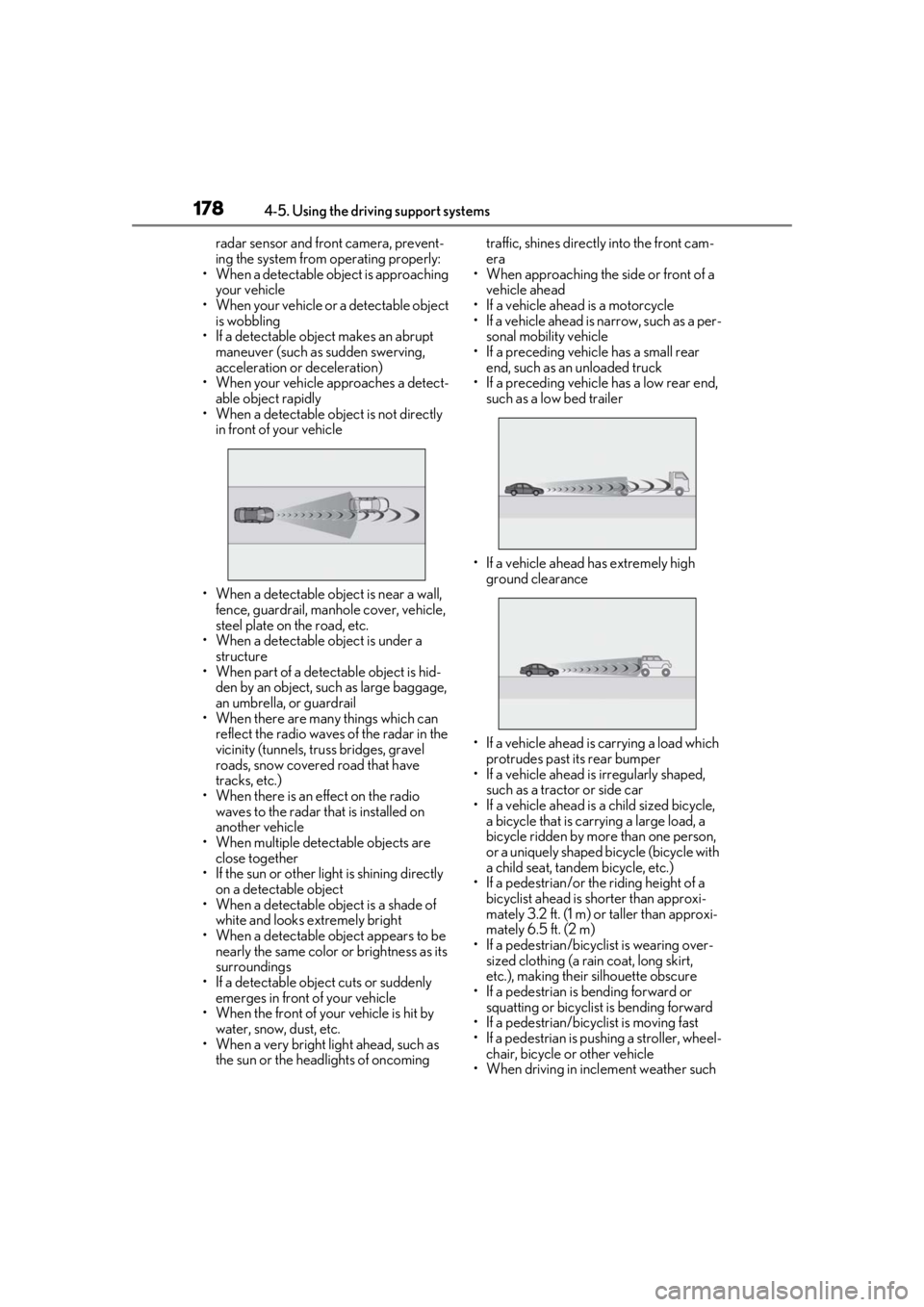
• If a vehicle ahead is narrow, such as a per- sonal mobility vehicle
• If a preceding vehicle has a small rear end, such as an unloaded truck
• If a preceding vehicle has a low rear end, such as a low bed trailer
• If a vehicle ahead has extremely high ground clearance
• If a vehicle ahead is carrying a load which protrudes past its rear bumper
• If a vehicle ahead is irregularly shaped,
such as a tractor or side car
• If a vehicle ahead is a child sized bicycle, a bicycle that is carrying a large load, a
bicycle ridden by more than one person,
or a uniquely shaped bicycle (bicycle with
a child seat, tandem bicycle, etc.)
• If a pedestrian/or the riding height of a bicyclist ahead is shorter than approxi-
mately 3.2 ft. (1 m) or taller than approxi-
mately 6.5 ft. (2 m)
• If a pedestrian/bicyclist is wearing over- sized clothing (a rain coat, long skirt,
etc.), making their silhouette obscure
• If a pedestrian is bending forward or squatting or bicyclist is bending forward
• If a pedestrian/bicyclist is moving fast
• If a pedestrian is pushing a stroller, wheel-
chair, bicycle or other vehicle
• When driving in incl ement weather such
Page 181 of 436
1814-5. Using the driving support systems
4
Driving
WARNING
■Before using LTA system
●Do not rely solely upon the LTA sys-
tem. The LTA system does not auto-
matically drive the vehicle or reduce
the amount of attention that must be
paid to the area in front of the vehicle.
The driver must always assume full
responsibility for driving safely by pay-
ing careful attention to the surround-
ing conditions and operating the
steering wheel to correct the path of
the vehicle. Also, the driver must take
adequate breaks when fatigued, such
as from driving for a long period of
time.
●Failure to perform appropriate driving
operations and pay careful attention
may lead to an accident, resulting in
death or serious injury.
■Situations unsuitable for LTA system
In the following situations, use the LTA
switch to turn the system off. Failure to do
so may lead to an acc ident, resulting in
death or serious injury.
●Vehicle is driven on a road surface
which is slippery due to rainy weather,
fallen snow, freezing, etc.
●Vehicle is driven on a snow-covered
road.
●White (yellow) lines are difficult to see
due to rain, snow, fog, dust, etc.
●Vehicle is driven in a temporary lane or
restricted lane due to construction
work.
●Vehicle is driven in a construction
zone.
●A spare tire, tire chains, etc. are
equipped.
●When the tires have been excessively
worn, or when the tire inflation pres-
sure is low.
●During emergency towing.
■Preventing LTA system malfunctions
and operations performed by mistake
●Do not modify the headlights or place
stickers, etc. on the surface of the
lights.
●Do not modify the suspension etc. If
the suspension etc. needs to be
replaced, contact your Lexus dealer.
●Do not install or place anything on the
hood or grille. Also, do not install a
grille guard (bull bars, kangaroo bar,
etc.).
●If your windshield needs repairs, con-
tact your Lexus dealer.
■Conditions in which functions may
not operate properly
In the following situations, the functions
may not operate properly and the vehicle
may depart from its la ne. Drive safely by
always paying careful attention to your
surroundings and operate the steering
wheel to correct the path of the vehicle
without relying solely on the functions.
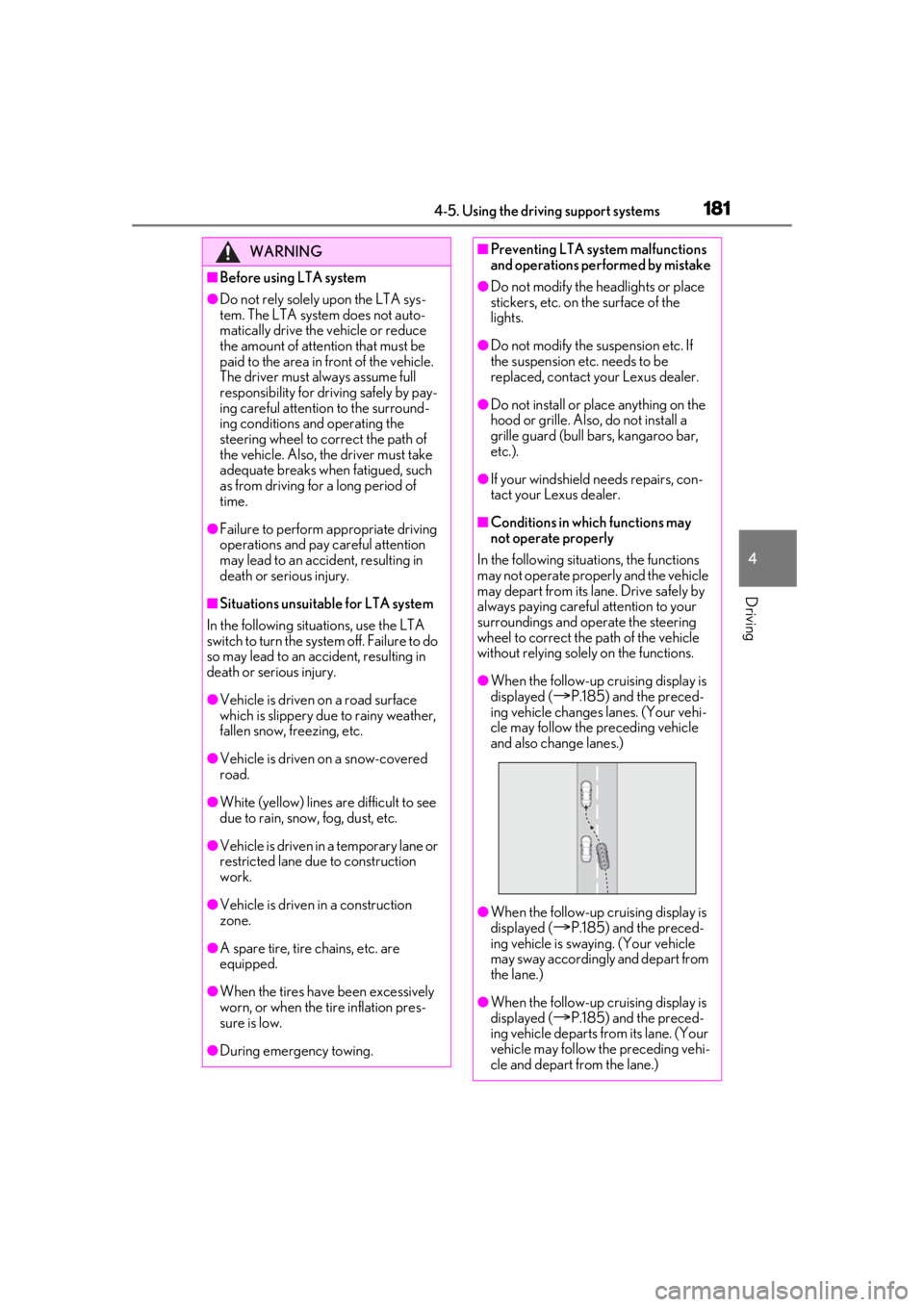
●When the follow-up cruising display is
displayed (
P.185) and the preced-
ing vehicle changes lanes. (Your vehi-
cle may follow the preceding vehicle
and also change lanes.)
●When the follow-up cruising display is
displayed (
P.185) and the preced-
ing vehicle is swaying. (Your vehicle
may sway accordingly and depart from
the lane.)
●When the follow-up cruising display is
displayed (
P.185) and the preced-
ing vehicle departs from its lane. (Your
vehicle may follow the preceding vehi-
cle and depart from the lane.)
Page 183 of 436

1834-5. Using the driving support systems
4
Driving
■Lane departure alert function
When the system determines that the
vehicle might depart from its lane or
course
*, a warning is displayed on the
multi-information display, and either a
warning buzzer will sound or the steer-
ing wheel will vibrate to alert the driver.
When the warning buzzer sounds or the
steering wheel vibrates, check the area
around your vehicle and carefully operate
the steering wheel to move the vehicle
back to the center of the lane.
Vehicle with BSM: When the system deter-
mines that the vehicle might depart from its
lane and that the po ssibility of a collision
with an overtaking vehicle in the adjacent
lane is high, the lane departure alert will
operate even if the turn signals are operat-
ing.
*: Boundary between asphalt and the side of the road, such as grass, soil, or a curb
WARNING
●Light from the headlights of an oncom-
ing vehicle, the sun, etc. enters the
camera.
●The vehicle is driven on a slope.
●The vehicle is driven on a road which
tilts left or right, or a winding road.
●The vehicle is driven on an unpaved or
rough road.
●The traffic lane is excessively narrow
or wide.
●The vehicle is extremely tilted due to
carrying heavy luggage or having
improper tire pressure.
●The distance to the preceding vehicle
is extremely short.
●The vehicle is moving up and down a
large amount due to road conditions
during driving (poor roads or road
seams).
●When driving in a tunnel or at night
with the headlights off or when a head-
light is dim due to its lens being dirty or
it being misaligned.
●The vehicle is struck by a crosswind.
●The vehicle is affected by wind from a
vehicle driven in a nearby lane.
●The vehicle has just changed lanes or
crossed an intersection.
●Tires which differ by structure, manu-
facturer, brand or tread pattern are
used.
●When tires of a size other than speci-
fied are installed.
●Snow tires, etc. are equipped.
●The vehicle is being driven at
extremely high speeds.
Functions included in LTA system
Page 320 of 436
3206-3. Do-it-yourself maintenance
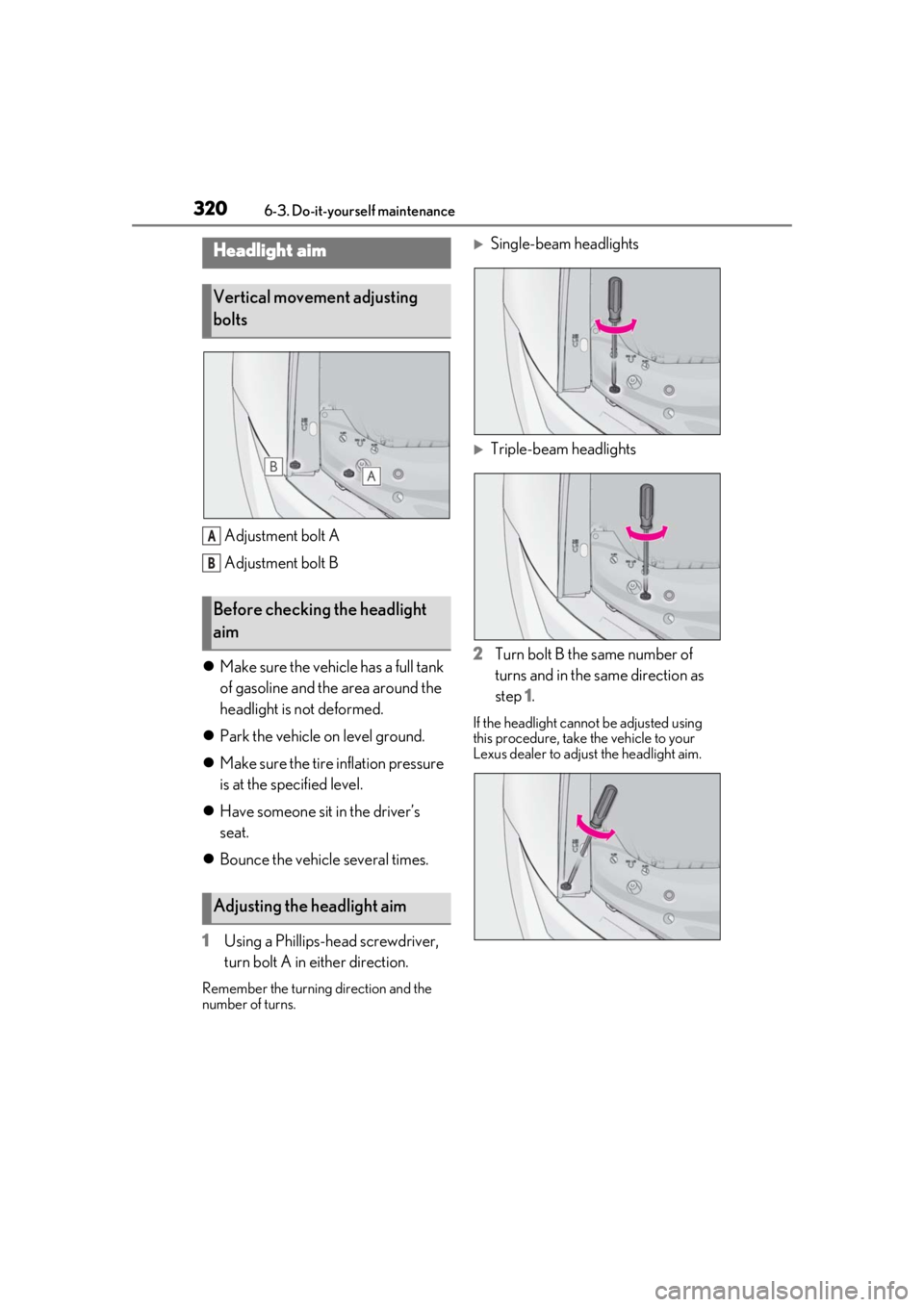
Adjustment bolt A
Adjustment bolt B
Make sure the vehicle has a full tank
of gasoline and the area around the
headlight is not deformed.
Park the vehicle on level ground.
Make sure the tire inflation pressure
is at the specified level.
Have someone sit in the driver’s
seat.
Bounce the vehicle several times.
1 Using a Phillips-head screwdriver,
turn bolt A in either direction.
Remember the turning direction and the
number of turns.
Single-beam headlights
Triple-beam headlights
2 Turn bolt B the same number of
turns and in the same direction as
step 1.
If the headlight cannot be adjusted using
this procedure, take the vehicle to your
Lexus dealer to adjust the headlight aim.
Headlight aim
Vertical movement adjusting
bolts
Before checking the headlight
aim
Adjusting the headlight aim
A
B
Page 325 of 436
3256-3. Do-it-yourself maintenance
6
Maintenance and care
by inserting it and turning it clock-
wise.
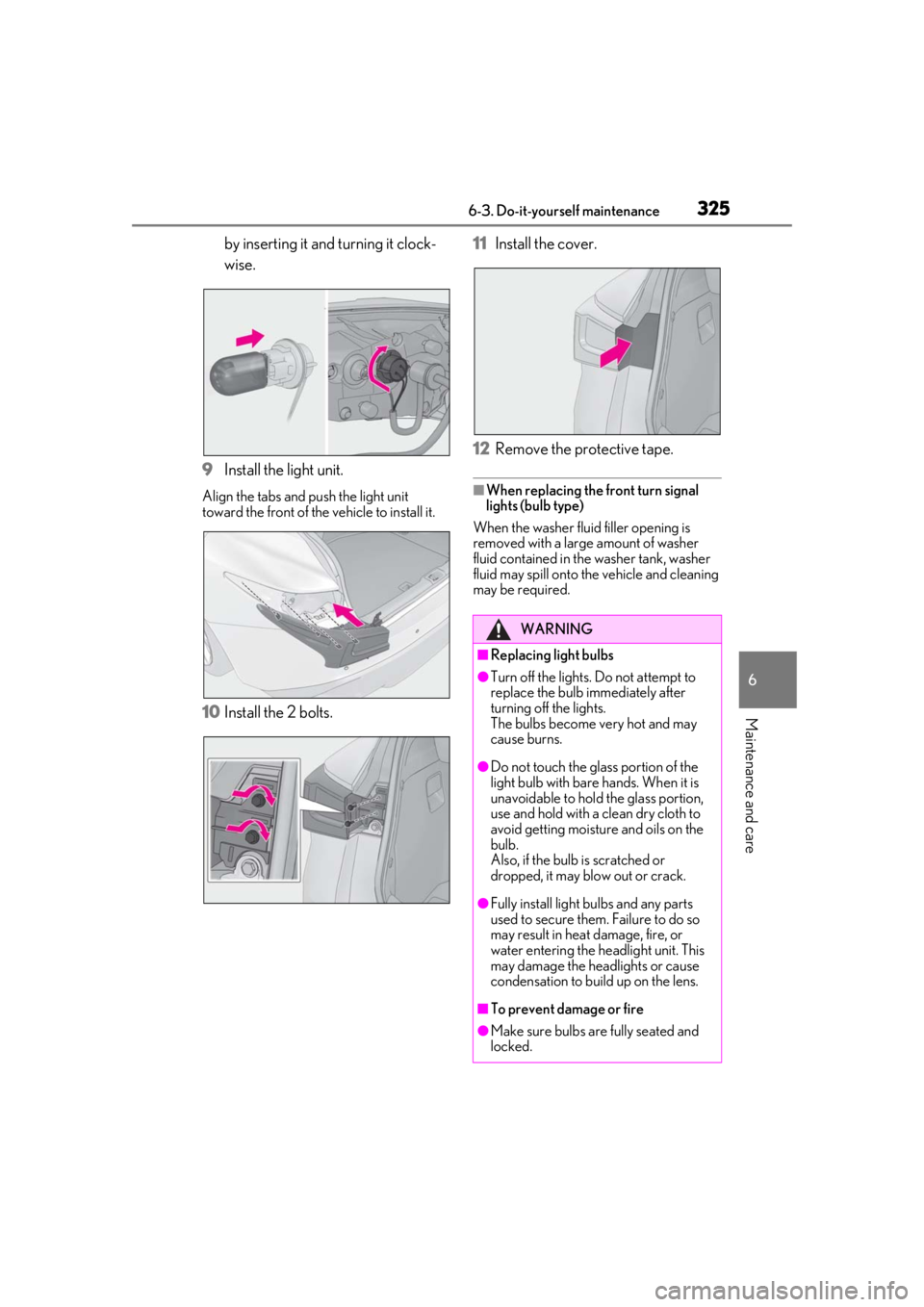
9 Install the light unit.
Align the tabs and push the light unit
toward the front of the vehicle to install it.
10Install the 2 bolts. 11
Install the cover.
12 Remove the protective tape.
■When replacing the front turn signal
lights (bulb type)
When the washer fluid filler opening is
removed with a large amount of washer
fluid contained in the washer tank, washer
fluid may spill onto the vehicle and cleaning
may be required.
WARNING
■Replacing light bulbs
●Turn off the lights. Do not attempt to
replace the bulb immediately after
turning off the lights.
The bulbs become very hot and may
cause burns.
●Do not touch the glass portion of the
light bulb with bare hands. When it is
unavoidable to hold the glass portion,
use and hold with a clean dry cloth to
avoid getting moisture and oils on the
bulb.
Also, if the bulb is scratched or
dropped, it may blow out or crack.
●Fully install light bulbs and any parts
used to secure them. Failure to do so
may result in heat damage, fire, or
water entering the he adlight unit. This
may damage the headlights or cause
condensation to build up on the lens.
■To prevent damage or fire
●Make sure bulbs are fully seated and
locked.
Page 357 of 436
3577-2. Steps to take in an emergency
7
When trouble arises
One of the following may be the cause
of the problem:
There may not be sufficient fuel in
the vehicle’s tank.
Refuel the vehicle.
The engine may be flooded.
Try to restart the engine again fol-
lowing correct starting procedures.
( P.134)
There may be a malfunction in the
engine immobilizer system.
( P.60)
One of the following may be the cause
of the problem:
The battery may be discharged.
( P.361)
The battery terminal connections
may be loose or corroded.
( P.301) The engine starting system may be
malfunctioning due to an electrical
problem such as electronic key battery
depletion or a blown fuse. However, an
interim measure is available to start the
engine. (
P.357)
One of the following may be the cause
of the problem:
One or both of the battery terminals
may be disconnected. ( P.301)
The battery may be discharged.
( P.361)
There may be a malfunction in the
steering lock system.
Contact your Lexus dealer if the problem
cannot be repaired, or if repair procedures
are unknown.
When the engine does not start, the
following steps can be used as an
interim measure to start the engine if
the engine switch is functioning nor-
mally:
1 Push the parking brake switch to
check that the parking brake is set.
(P.143)
Parking brake indicator will come on.
If the engine will not start
If the engine will not start even
though correct starting procedures
are being followed ( P.134), con-
sider each of the following points:
The engine will not start even
though the starter motor oper-
ates normally.
The starter motor turns over
slowly, the interior lights and
headlights are dim, or the horn
does not sound or sounds at a low
volume.
The starter motor does not turn
over
The starter motor does not turn
over, the interior lights and head-
lights do not turn on, or the horn
does not sound.
Starting the engine in an emer-
gency
Page 363 of 436
3637-2. Steps to take in an emergency
7
When trouble arises
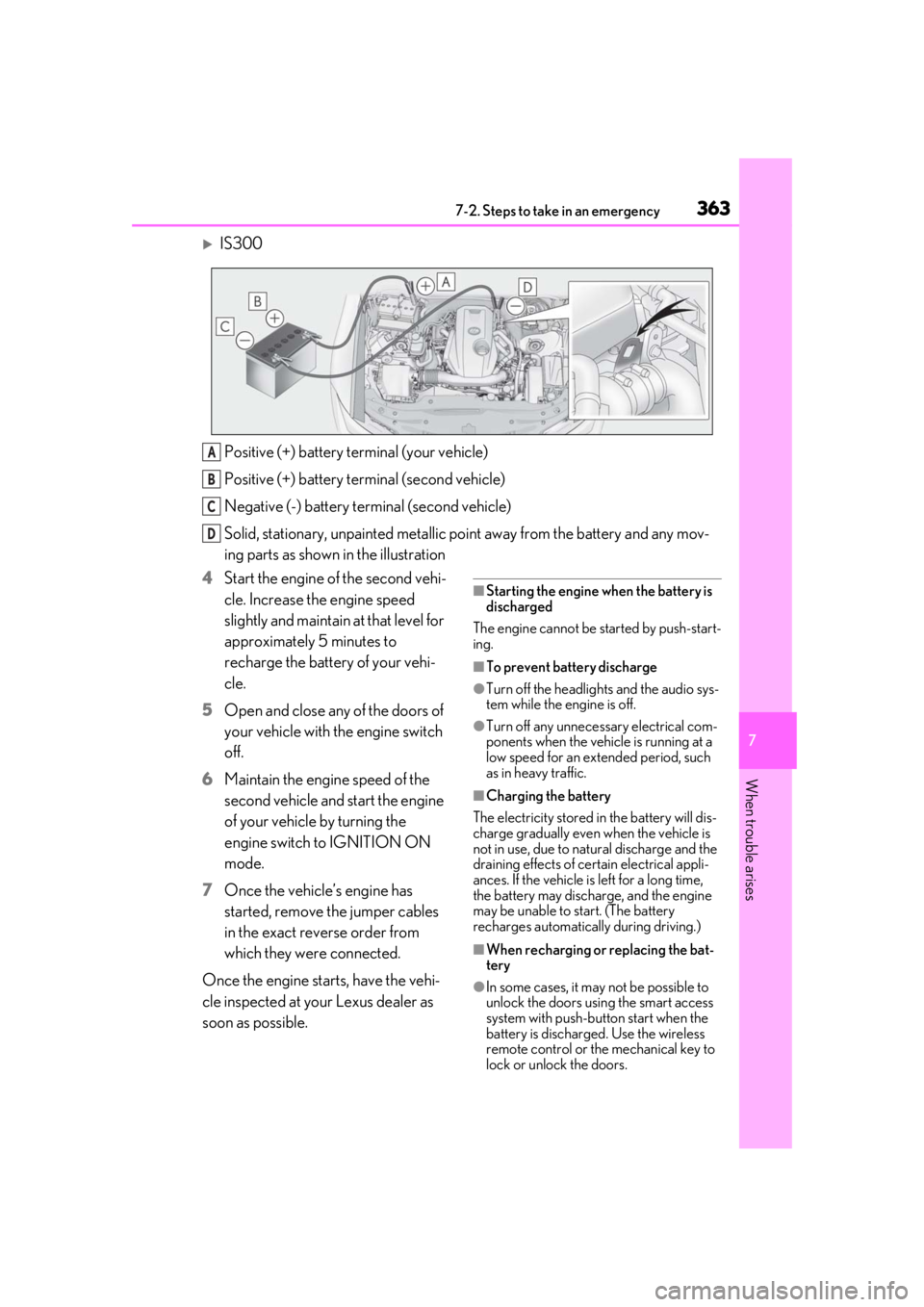
IS300Positive (+) battery terminal (your vehicle)
Positive (+) battery terminal (second vehicle)
Negative (-) battery terminal (second vehicle)
Solid, stationary, unpainted metallic poin t away from the battery and any mov-
ing parts as shown in the illustration
4 Start the engine of the second vehi-
cle. Increase the engine speed
slightly and maintain at that level for
approximately 5 minutes to
recharge the battery of your vehi-
cle.
5 Open and close any of the doors of
your vehicle with the engine switch
off.
6 Maintain the engine speed of the
second vehicle and start the engine
of your vehicle by turning the
engine switch to IGNITION ON
mode.
7 Once the vehicle’s engine has
started, remove the jumper cables
in the exact reverse order from
which they were connected.
Once the engine starts, have the vehi-
cle inspected at your Lexus dealer as
soon as possible.
■Starting the engine when the battery is
discharged
The engine cannot be started by push-start-
ing.
■To prevent battery discharge
●Turn off the headlights and the audio sys-
tem while the engine is off.
●Turn off any unnecessary electrical com-
ponents when the vehicle is running at a
low speed for an extended period, such
as in heavy traffic.
■Charging the battery
The electricity stored in the battery will dis-
charge gradually even when the vehicle is
not in use, due to natural discharge and the
draining effects of certain electrical appli-
ances. If the vehicle is left for a long time,
the battery may discharge, and the engine
may be unable to start. (The battery
recharges automatically during driving.)
■When recharging or replacing the bat-
tery
●In some cases, it may not be possible to
unlock the doors using the smart access
system with push-button start when the
battery is discharged. Use the wireless
remote control or the mechanical key to
lock or unlock the doors.
A
B
C
D
Page 425 of 436

425Alphabetical Index
Refueling ........................................................... 161
Fuel gauge ................................................... 71, 72
Fuel pump shut off system........................ 336
Fuses .................................................................. 318
G
Garage door opener ................................. 273
Gauges ................................................................. 71
Gear Position.....................................................81
G-force............................................................... 80
Glove box ....................................................... 266
Glove box light ..............................................267
H
Head restraints ..................................................111
Headlight aim ................................................ 320
Headlights Automatic High Beam system............... 151
Light switch .....................................................149
Replacing light bulbs................................ 322
Heated steering wheel ................................ 261
Heaters Automatic air conditioning system ... 253
Heated steering wheel.............................. 261
Outside rear view mirrors .................... 255
Seat heaters .................................................... 261
High mounted stoplight Replacing light bulbs................................ 322
Hill-start assist control ............................... 238
Hood Open ............................................................... 293
Hooks Coat hooks ................................................... 270
Retaining hooks (floor mat)......................22
Horn ..................................................................... 114
I
I/M test ............................................................ 290
Identification Engine ............................................................. 373 Vehicle ............................................................ 372
Ignition switch (engine switch).................134 Auto power off function........................... 136
Changing the engine switch modes . 136
If your vehicle has to be stopped in an emergency .................................................328
Indicators ........................................................... 68
Initialization Items to initialize ........................................ 404
Maintenance.................................... 286, 298
Power windows ............................................. 118
Tire pressure warning system ............ 308
Inside door handle ligh ts........................... 263
Inside rear view mirror ................................. 114
Instrument panel light control ................... 75
Intercooler......................................................300
Intercooler coolant Capacity ......................................................... 376
Checking ...................................................... 298
Interior lights.................................................. 263 Front interior light ......................................263
Rear interior light........................................263
Intuitive parking assist......................208, 210 Function ........................................................... 210
Warning message ....................................... 212
J
JackPositioning a floor jack ............................293
Vehicle-equipped jack .......................... 350
Jack handle ....................................................350
Jam protection function Moon roof ........................................................ 121
Power windows ............................................. 118
K
Keyless entrySmart access system with push-button start ...................................................................99
Wireless remote control ...........................90