engine LEXUS IS300 2021 Owner's Manual
[x] Cancel search | Manufacturer: LEXUS, Model Year: 2021, Model line: IS300, Model: LEXUS IS300 2021Pages: 436, PDF Size: 8.27 MB
Page 72 of 436
722-1. Instrument cluster
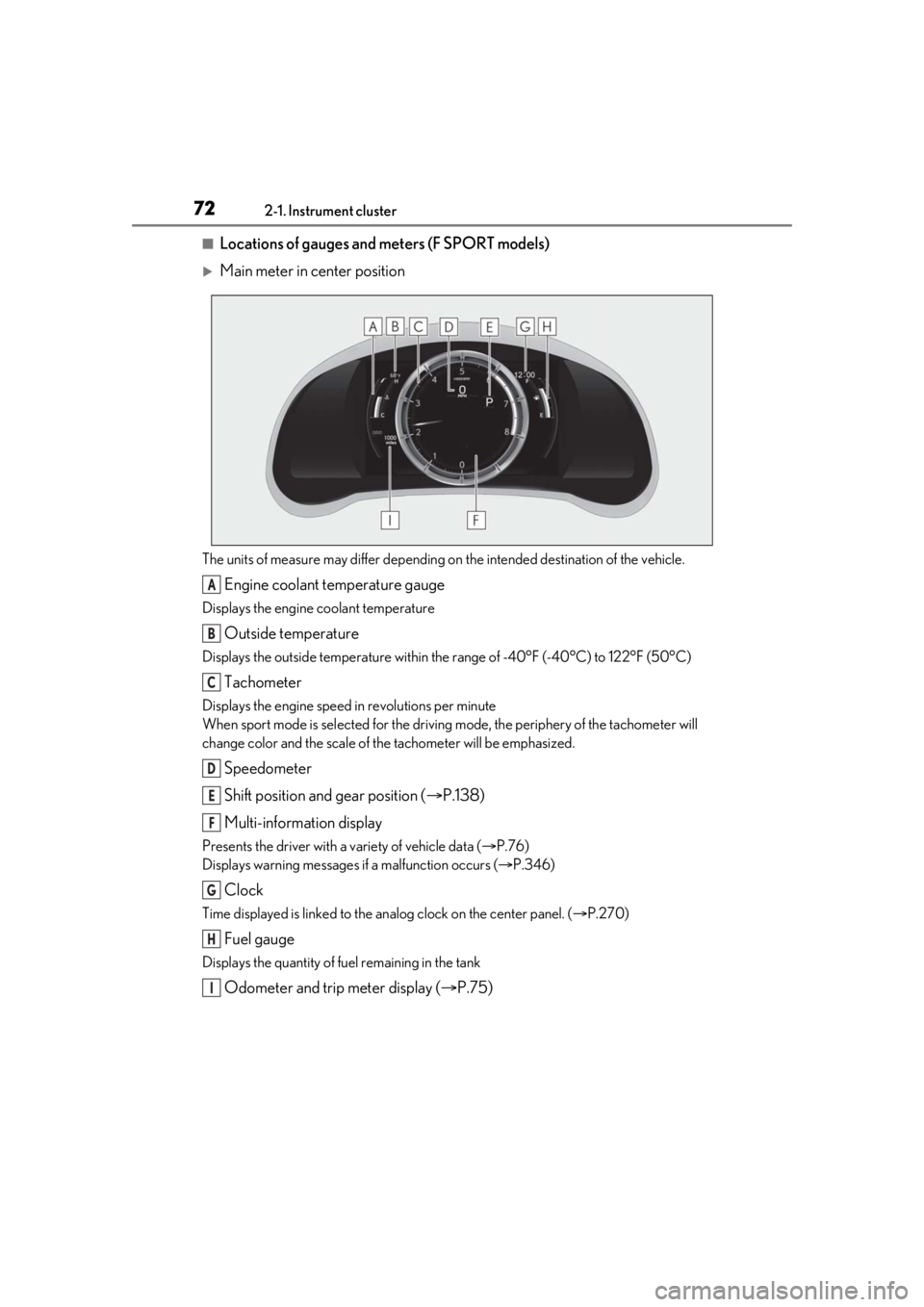
■Locations of gauges and meters (F SPORT models)
Main meter in center position
The units of measure may differ depending on the intended destination of the vehicle.
Engine coolant temperature gauge
Displays the engine coolant temperature
Outside temperature
Displays the outside temperature within the range of -40°F (-40°C) to 122°F (50°C)
Tachometer
Displays the engine speed in revolutions per minute
When sport mode is selected for the driving mode, the periphery of the tachometer will
change color and the scale of the tachometer will be emphasized.
Speedometer
Shift position and gear position ( P.138)
Multi-information display
Presents the driver with a variety of vehicle data ( P.76)
Displays warning messages if a malfunction occurs ( P.346)
Clock
Time displayed is linked to the analog clock on the center panel. (P.270)
Fuel gauge
Displays the quantity of fuel remaining in the tank
Odometer and trip meter display ( P.75)
A
B
C
D
E
F
G
H
I
Page 73 of 436
732-1. Instrument cluster
2
Vehicle status information and indicators
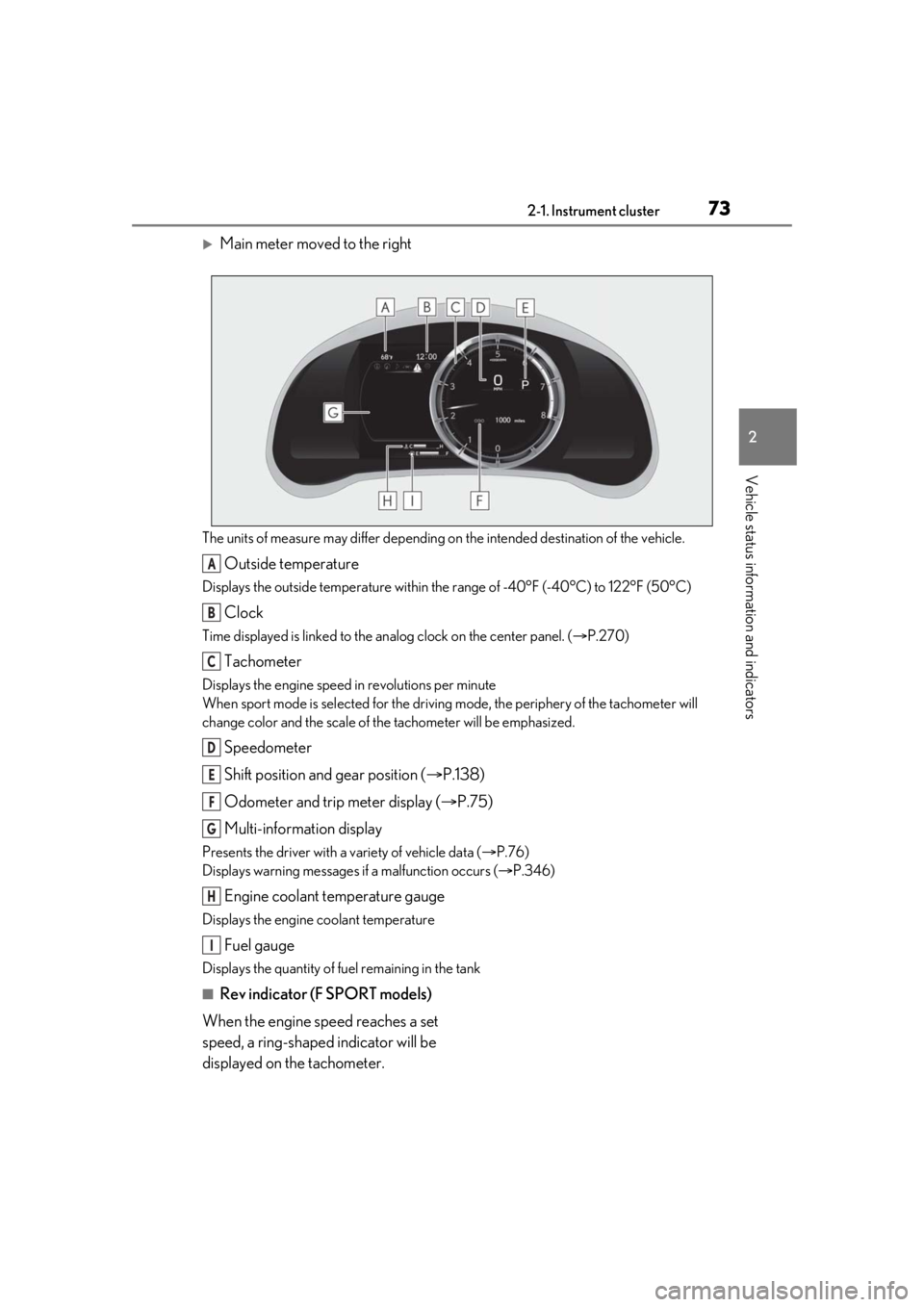
Main meter moved to the right
The units of measure may differ depending on the intended destination of the vehicle.
Outside temperature
Displays the outside temperature within the range of -40°F (-40°C) to 122°F (50°C)
Clock
Time displayed is linked to the analog clock on the center panel. (P.270)
Tachometer
Displays the engine speed in revolutions per minute
When sport mode is se lected for the driving mode, the periphery of the tachometer will
change color and the scale of the tachometer will be emphasized.
Speedometer
Shift position and gear position ( P.138)
Odometer and trip meter display ( P.75)
Multi-information display
Presents the driver with a variety of vehicle data ( P.76)
Displays warning messages if a malfunction occurs ( P.346)
Engine coolant temperature gauge
Displays the engine coolant temperature
Fuel gauge
Displays the quantity of fuel remaining in the tank
■Rev indicator (F SPORT models)
When the engine speed reaches a set
speed, a ring-shaped indicator will be
displayed on the tachometer.
A
B
C
D
E
F
G
H
I
Page 74 of 436
742-1. Instrument cluster
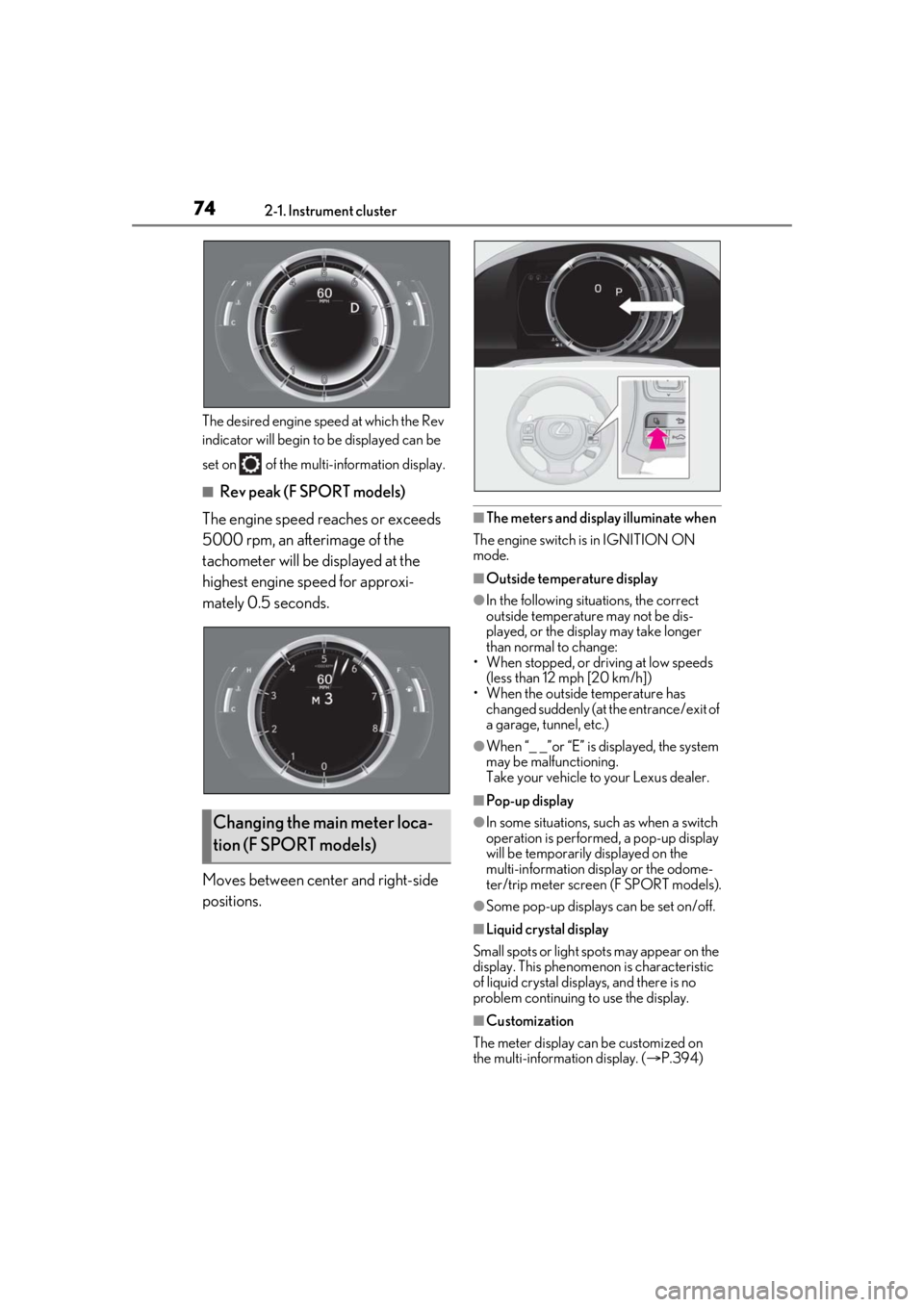
The desired engine speed at which the Rev
indicator will begin to be displayed can be
set on of the mult i-information display.
■Rev peak (F SPORT models)
The engine speed reaches or exceeds
5000 rpm, an afterimage of the
tachometer will be displayed at the
highest engine speed for approxi-
mately 0.5 seconds.
Moves between center and right-side
positions.
■The meters and display illuminate when
The engine switch is in IGNITION ON
mode.
■Outside temperature display
●In the following situations, the correct
outside temperature may not be dis-
played, or the display may take longer
than normal to change:
• When stopped, or driving at low speeds
(less than 12 mph [20 km/h])
• When the outside temperature has changed suddenly (at the entrance/exit of
a garage, tunnel, etc.)
●When “_ _”or “E” is displayed, the system
may be malfunctioning.
Take your vehicle to your Lexus dealer.
■Pop-up display
●In some situations, su ch as when a switch
operation is performed, a pop-up display
will be temporarily displayed on the
multi-information display or the odome-
ter/trip meter screen (F SPORT models).
●Some pop-up displays can be set on/off.
■Liquid crystal display
Small spots or light sp ots may appear on the
display. This phenomenon is characteristic
of liquid crystal disp lays, and there is no
problem continuing to use the display.
■Customization
The meter display can be customized on
the multi-information display. ( P.394)
Changing the main meter loca-
tion (F SPORT models)
Page 75 of 436

752-1. Instrument cluster
2
Vehicle status information and indicators
■Display items
Odometer
Displays the total distance the vehicle has
been driven.
Trip meter A/trip meter B
Displays the distance the vehicle has been
driven since the meter was last reset. Trip
meters A and B can be used to record and
display different distances independently.
Distance until next engine oil change
Displays the distance the vehicle can be
driven until an oil change is necessary.
■Changing the display
Each time the “ODO TRIP” switch is
pressed, the displayed item will be
changed. When the trip meter is dis-
played, pressing and holding the switch
will reset the trip meter.
■Pop-up display
Distance until the next engine oil
change will displayed when a warning
message indicating that oil mainte-
nance should be performed soon or is
required is displayed.
The brightness of the instrument panel
lights can be adjusted.
WARNING
■The information display at low tem-
peratures
Allow the interior of the vehicle to warm
up before using the liquid crystal infor-
mation display. At extremely low tem-
peratures, the in formation display
monitor may respond slowly, and display
changes may be delayed.
For example, there is a lag between the
driver’s shifting and the new gear number
appearing on the display. This lag could
cause the driver to downshift again,
causing rapid and excessive engine brak-
ing and possibly an accident resulting in
death or injury.
NOTICE
■To prevent damage to the engine and
its components
●Do not let the indicator needle of the
tachometer enter the red zone, which
indicates the maximum engine speed.
●The engine may be overheating if the
engine coolant temperature gauge is
in the red zone (H). In this case, imme-
diately stop the vehicle in a safe place,
and check the engine after it has
cooled completely. ( P.365)
Odometer and trip meter dis-
playChanging the instrument panel
light brightness
Page 79 of 436
792-1. Instrument cluster
2
Vehicle status information and indicators
Boost gauge/engine oil tempera-
ture gauge/engine oil pressure
gauge (if equipped)
G-force
Gear Position
Tire pressure ( P.305)
Display off
■Drive information 1/Drive infor-
mation 2/Drive information 3
Displays drive information such as the
following:
Use the displayed values as a reference
only.
Drive information 1
• Current fuel consumption
• Average fuel economy (after reset)
Drive information 2
• Distance (driving range)
• Average vehicle speed (after reset)
Drive information 3*
• Average fuel economy (after refuel)
• Elapsed time (after start)
*:Except F SPORT models
Displayed items (listed below) can be
changed on . ( P.82)
Current fuel consumption
Bar type: Displays instantaneous current
fuel consumption
Average fuel economy
After reset: Displays average fuel con-
sumption since the display was reset
*1
After start: Displays average fuel con-
sumption since engine start
After refuel: Displays average fuel con- sumption since refuel
Average vehicle speed
After reset: Displays average vehicle
speed since the display was reset
*1
After start: Displays average vehicle speed
since engine start
Elapsed time
After reset: Displays elapsed time since the
display was reset
*1
After start: Displays elapsed time since
engine start
Distance
Driving range: Displays driving range with
remaining fuel
*2, 3
After start: Displays the distance driven
since engine start
Other
Blank: No item
*1: To reset, display the desired item and
press and hold of the meter con-
trol switch.
*2: This distance is computed based on your average fuel consumption. As a
result, the actual distance that can be
driven may differ from that displayed.
*3: When only a small amount of fuel is added to the tank, the display may not
be updated.
When refueling, turn the engine switch
off. If the vehicle is refueled without
turning the engine switch off, the display
may not be updated.
Page 80 of 436
802-1. Instrument cluster
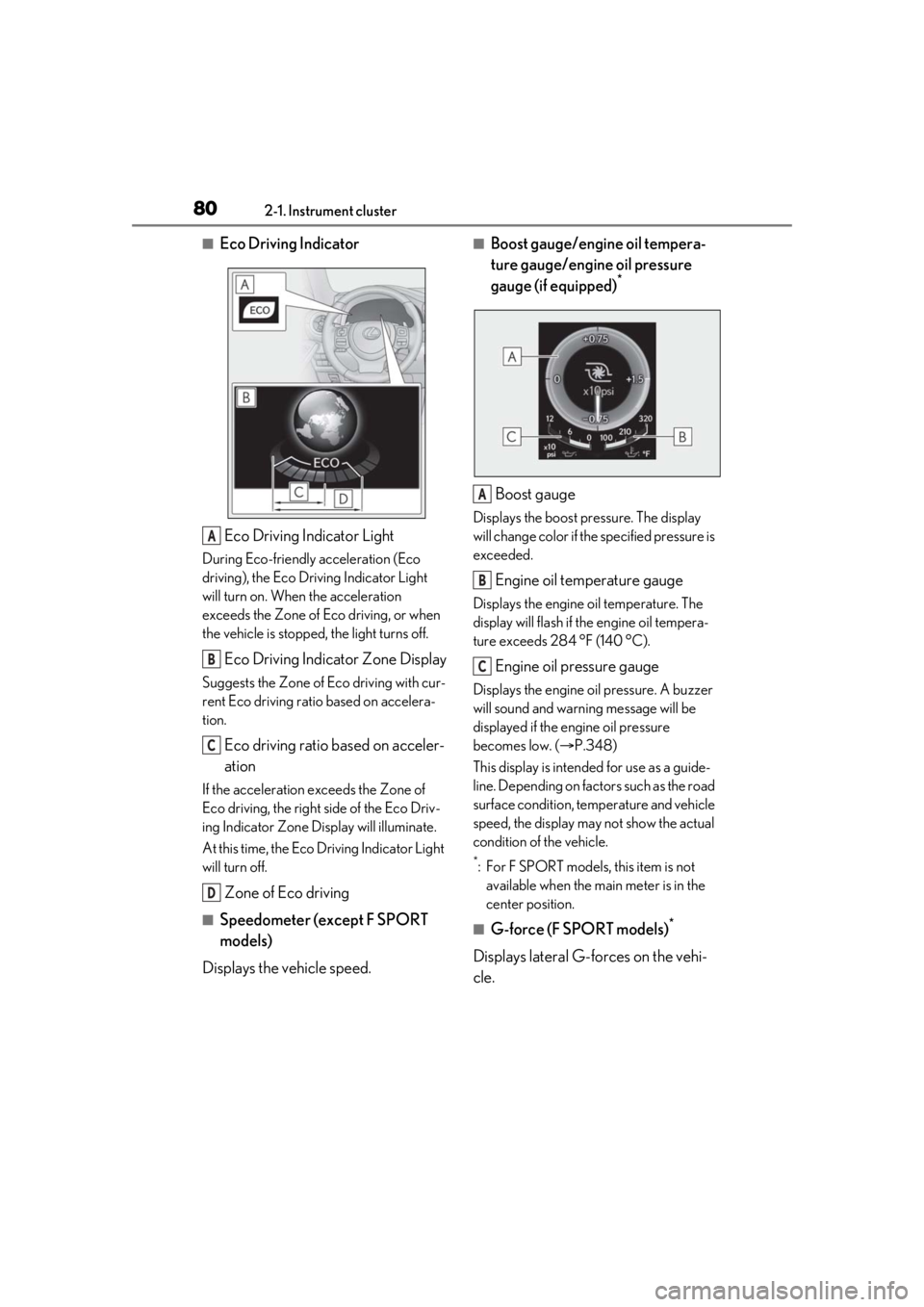
■Eco Driving IndicatorEco Driving Indicator Light
During Eco-friendly acceleration (Eco
driving), the Eco Driving Indicator Light
will turn on. When the acceleration
exceeds the Zone of Eco driving, or when
the vehicle is stopped, the light turns off.
Eco Driving Indicator Zone Display
Suggests the Zone of Eco driving with cur-
rent Eco driving ratio based on accelera-
tion.
Eco driving ratio based on acceler-
ation
If the acceleration exceeds the Zone of
Eco driving, the right side of the Eco Driv-
ing Indicator Zone Display will illuminate.
At this time, the Eco Driving Indicator Light
will turn off.
Zone of Eco driving
■Speedometer (except F SPORT
models)
Displays the vehicle speed.
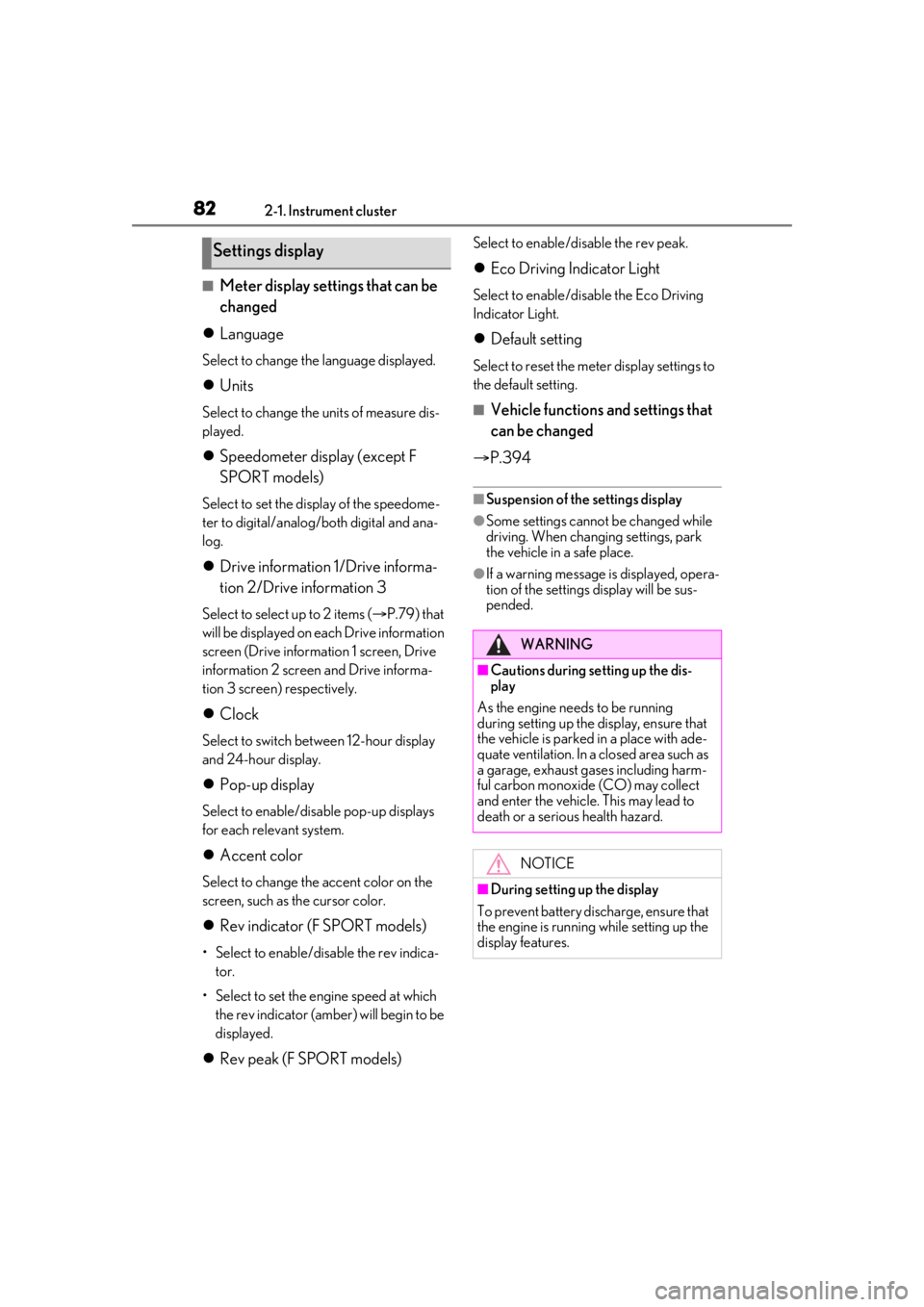
■Boost gauge/engine oil tempera-
ture gauge/engine oil pressure
gauge (if equipped)
*
Boost gauge
Displays the boost pressure. The display
will change color if th e specified pressure is
exceeded.
Engine oil temperature gauge
Displays the engine oil temperature. The
display will flash if the engine oil tempera-
ture exceeds 284 °F (140 °C).
Engine oil pressure gauge
Displays the engine oil pressure. A buzzer
will sound and warning message will be
displayed if the engine oil pressure
becomes low. ( P.348)
This display is intended for use as a guide-
line. Depending on fact ors such as the road
surface condition, temperature and vehicle
speed, the display may not show the actual
condition of the vehicle.
*: For F SPORT models, this item is not available when the main meter is in the
center position.
■G-force (F SPORT models)*
Displays lateral G-forces on the vehi-
cle.
A
B
C
D
A
B
C
Page 82 of 436
822-1. Instrument cluster
■Meter display settings that can be
changed
Language
Select to change th e language displayed.
Units
Select to change the units of measure dis-
played.
Speedometer display (except F
SPORT models)
Select to set the display of the speedome-
ter to digital/analog/both digital and ana-
log.
Drive information 1/Drive informa-
tion 2/Drive information 3
Select to select up to 2 items ( P.79) that
will be displayed on ea ch Drive information
screen (Drive information 1 screen, Drive
information 2 screen and Drive informa-
tion 3 screen) respectively.
Clock
Select to switch be tween 12-hour display
and 24-hour display.
Pop-up display
Select to enable/disable pop-up displays
for each relevant system.
Accent color
Select to change the accent color on the
screen, such as the cursor color.
Rev indicator (F SPORT models)
• Select to enable/disable the rev indica-
tor.
• Select to set the engine speed at which the rev indicator (amber) will begin to be
displayed.
Rev peak (F SPORT models)
Select to enable/disable the rev peak.
Eco Driving Indicator Light
Select to enable/disable the Eco Driving
Indicator Light.
Default setting
Select to reset the meter display settings to
the default setting.
■Vehicle functions and settings that
can be changed
P.394
■Suspension of the settings display
●Some settings cannot be changed while
driving. When changing settings, park
the vehicle in a safe place.
●If a warning message is displayed, opera-
tion of the settings display will be sus-
pended.
Settings display
WARNING
■Cautions during setting up the dis-
play
As the engine needs to be running
during setting up the display, en sure that
the vehicle is parked in a place with ade-
quate ventilation. In a closed area such as
a garage, exhaust gases including harm-
ful carbon monoxide (CO) may collect
and enter the vehicle. This may lead to
death or a serious health hazard.
NOTICE
■During setting up the display
To prevent battery discharge, ensure that
the engine is running while setting up the
display features.
Page 83 of 436
832-1. Instrument cluster
2
Vehicle status information and indicators
Center Display
“MENU” button
Touchpad
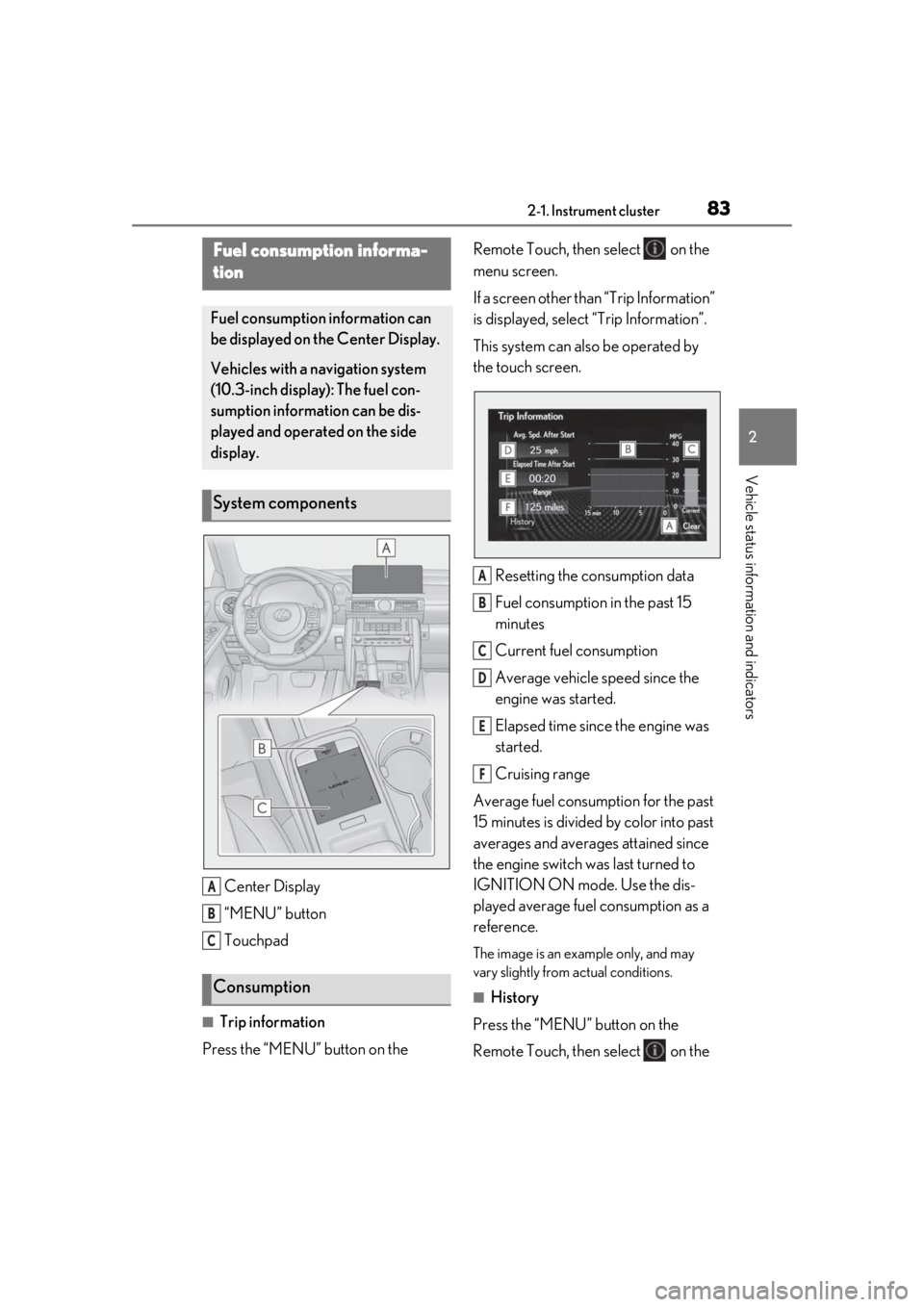
■Trip information
Press the “MENU” button on the Remote Touch, then select on the
menu screen.
If a screen other than “Trip Information”
is displayed, select
“Trip Information”.
This system can also be operated by
the touch screen.
Resetting the consumption data
Fuel consumption in the past 15
minutes
Current fuel consumption
Average vehicle speed since the
engine was started.
Elapsed time since the engine was
started.
Cruising range
Average fuel consumption for the past
15 minutes is divided by color into past
averages and averages attained since
the engine switch was last turned to
IGNITION ON mode. Use the dis-
played average fuel consumption as a
reference.
The image is an example only, and may
vary slightly from actual conditions.
■History
Press the “MENU” button on the
Remote Touch, then select on the
Fuel consumption informa-
tion
Fuel consumption information can
be displayed on the Center Display.
Vehicles with a navigation system
(10.3-inch display): The fuel con-
sumption information can be dis-
played and operated on the side
display.
System components
Consumption
A
B
C
A
B
C
D
E
F
Page 84 of 436
842-1. Instrument cluster
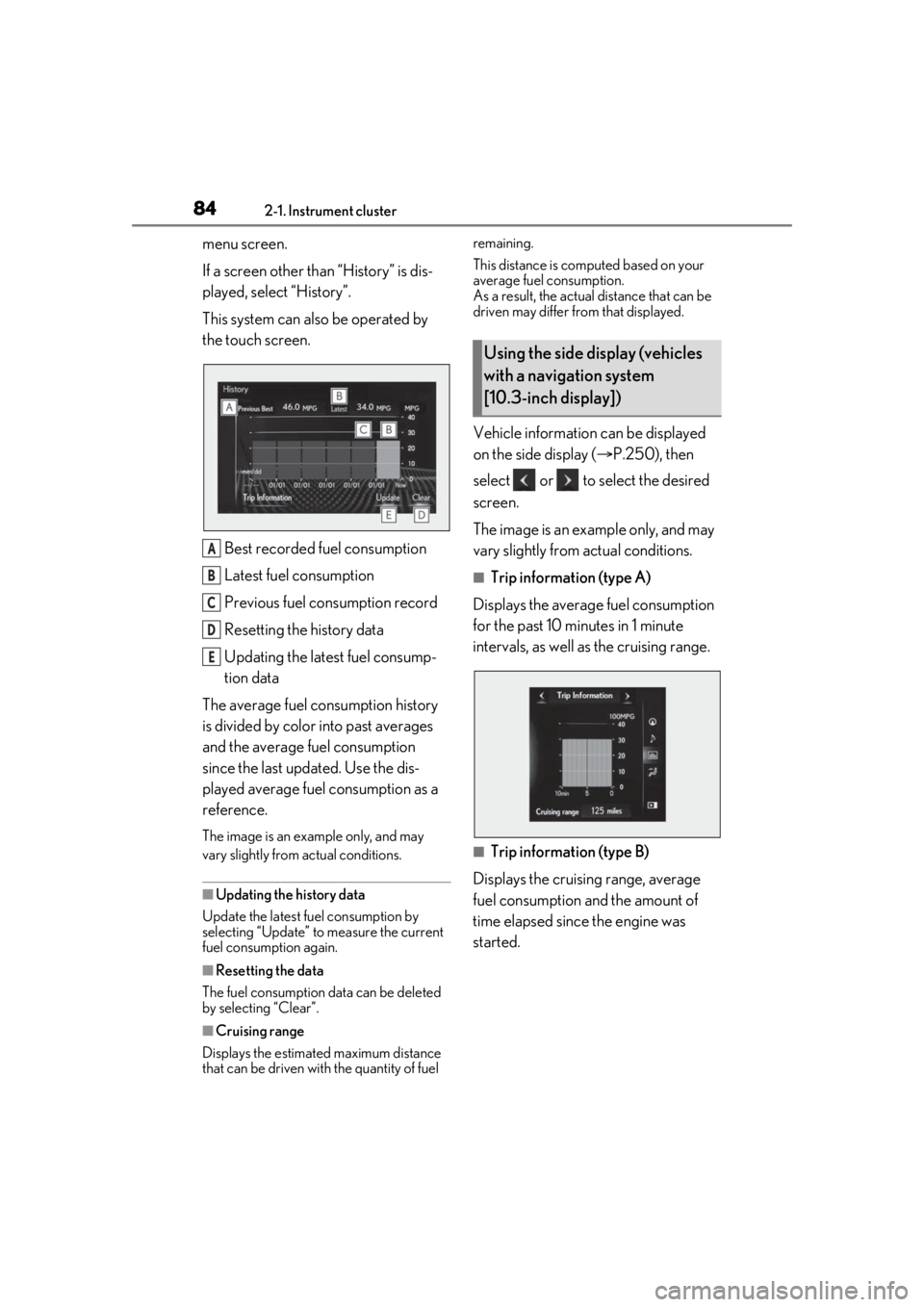
menu screen.
If a screen other than “History” is dis-
played, select “History”.
This system can also be operated by
the touch screen.Best recorded fuel consumption
Latest fuel consumption
Previous fuel consumption record
Resetting the history data
Updating the latest fuel consump-
tion data
The average fuel consumption history
is divided by color into past averages
and the average fuel consumption
since the last updated. Use the dis-
played average fuel consumption as a
reference.
The image is an example only, and may
vary slightly from actual conditions.
■Updating the history data
Update the latest fuel consumption by
selecting “Updat e” to measure the current
fuel consumption again.
■Resetting the data
The fuel consumption data can be deleted
by selecting “Clear”.
■Cruising range
Displays the estimated maximum distance
that can be driven with the quantity of fuel remaining.
This distance is computed based on your
average fuel consumption.
As a result, the actual distance that can be
driven may differ from that displayed.
Vehicle information can be displayed
on the side display (
P.250), then
select or to select the desired
screen.
The image is an example only, and may
vary slightly from actual conditions.
■Trip information (type A)
Displays the average fuel consumption
for the past 10 minutes in 1 minute
intervals, as well as the cruising range.
■Trip information (type B)
Displays the cruising range, average
fuel consumption and the amount of
time elapsed since the engine was
started.
A
B
C
D
E
Using the side display (vehicles
with a navigation system
[10.3-inch display])
Page 88 of 436
883-1. Key information
3-1.Key information
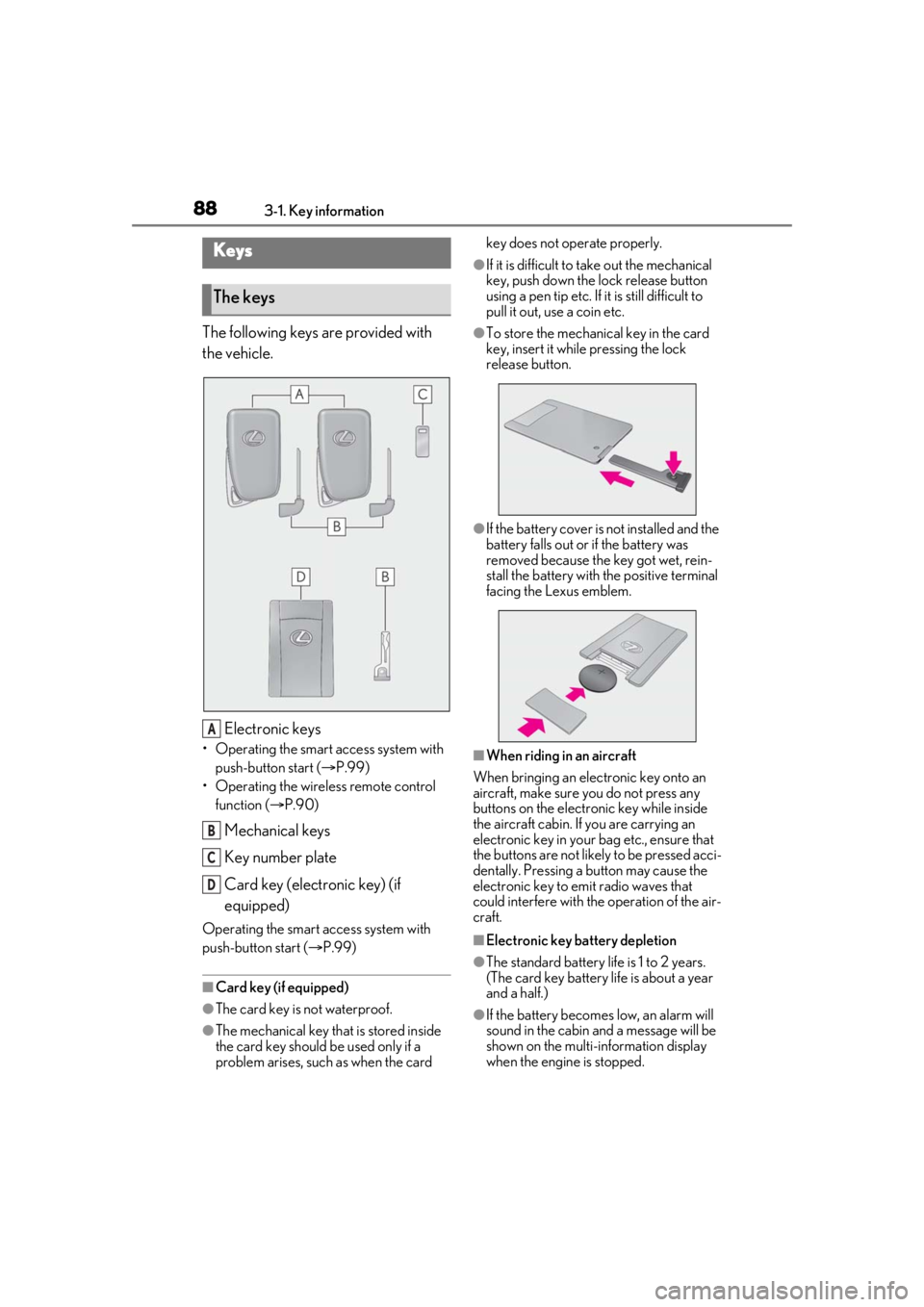
The following keys are provided with
the vehicle.
Electronic keys
• Operating the smart access system with push-button start ( P.99)
• Operating the wireless remote control function ( P.90)
Mechanical keys
Key number plate
Card key (electronic key) (if
equipped)
Operating the smart access system with
push-button start ( P.99)
■Card key (if equipped)
●The card key is not waterproof.
●The mechanical key that is stored inside
the card key should be used only if a
problem arises, such as when the card key does not operate properly.
●If it is difficult to take out the mechanical
key, push down the lock release button
using a pen tip etc. If it is still difficult to
pull it out, use a coin etc.
●To store the mechanical key in the card
key, insert it while pressing the lock
release button.
●If the battery cover is not installed and the
battery falls out or if the battery was
removed because the key got wet, rein-
stall the battery with the positive terminal
facing the Lexus emblem.
■When riding in an aircraft
When bringing an electronic key onto an
aircraft, make sure you do not press any
buttons on the electronic key while inside
the aircraft cabin. If you are carrying an
electronic key in your bag etc., ensure that
the buttons are not likely to be pressed acci-
dentally. Pressing a button may cause the
electronic key to emit radio waves that
could interfere with the operation of the air-
craft.
■Electronic key battery depletion
●The standard battery life is 1 to 2 years.
(The card key battery life is about a year
and a half.)
●If the battery becomes low, an alarm will
sound in the cabin and a message will be
shown on the multi-information display
when the engine is stopped.
Keys
The keys
A
B
C
D