seats LEXUS IS300 2021 Owner's Manual
[x] Cancel search | Manufacturer: LEXUS, Model Year: 2021, Model line: IS300, Model: LEXUS IS300 2021Pages: 436, PDF Size: 8.27 MB
Page 87 of 436
87
3
3
Before driving
Before driving
.3-1. Key informationKeys ................................................... 88
3-2. Opening, closing and locking the doors and trunk
Doors................................................. 92
Trunk.................................................. 96
Smart access system with push-button start ....................... 99
3-3. Adjusting the seats Front seats ..................................... 106
Rear seats ...................................... 107
Driving position memory ........ 108
Head restraints.............................. 111
3-4. Adjusting the steering wheel and mirrors
Steering wheel.............................. 113
Inside rear view mirror.............. 114
Outside rear view mirrors ....... 116
3-5. Opening, closing the windows and moon roof
Power windows............................ 118
Moon roof ..................................... 120
Page 94 of 436
943-2. Opening, closing and locking the doors and trunk
■Customization
Some functions can be customized.
( P.394)
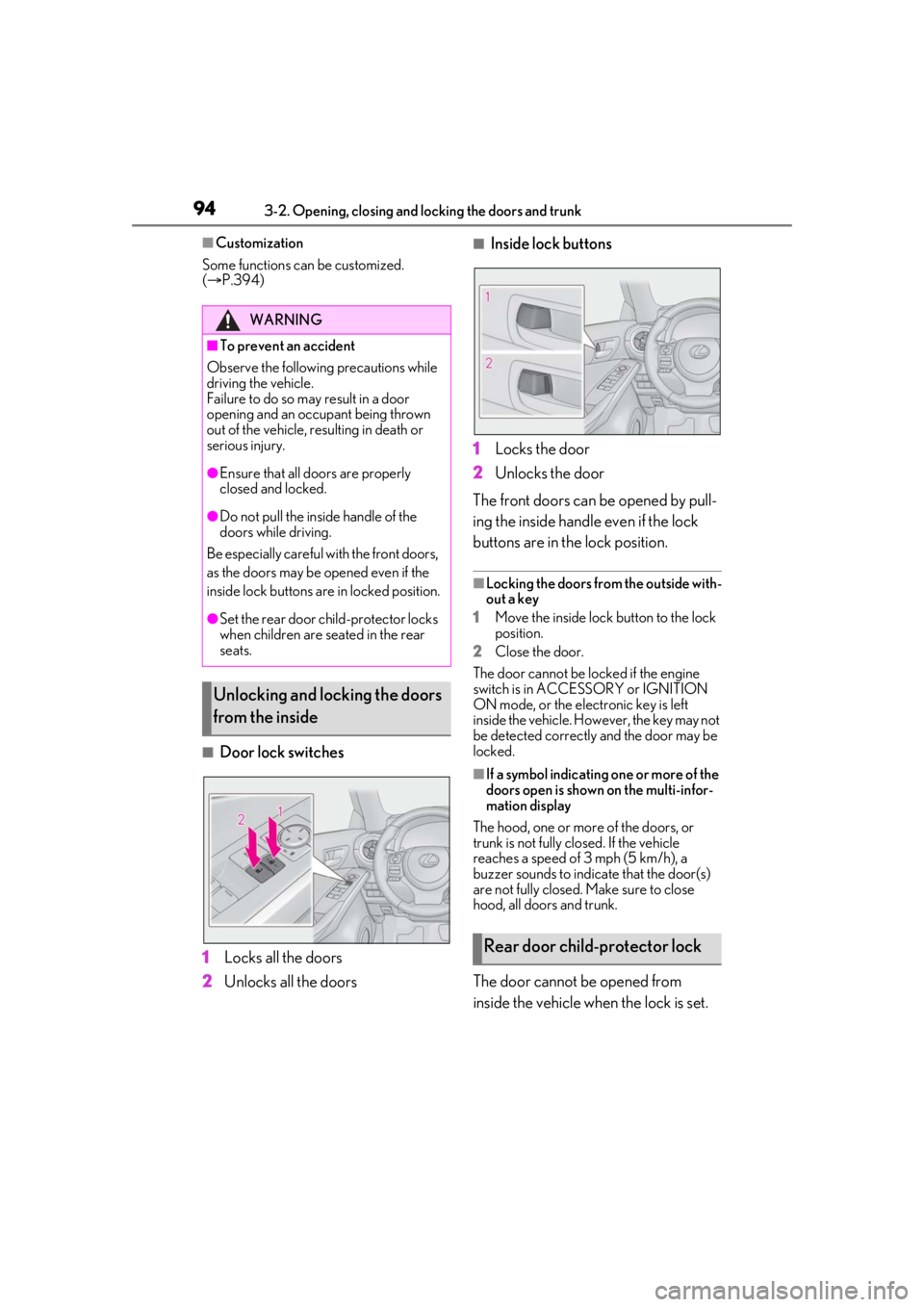
■Door lock switches
1 Locks all the doors
2 Unlocks all the doors
■Inside lock buttons
1 Locks the door
2 Unlocks the door
The front doors can be opened by pull-
ing the inside handle even if the lock
buttons are in the lock position.
■Locking the doors from the outside with-
out a key
1 Move the inside lock button to the lock
position.
2 Close the door.
The door cannot be locked if the engine
switch is in ACCESSORY or IGNITION
ON mode, or the electronic key is left
inside the vehicle. However, the key may not
be detected correctly and the door may be
locked.
■If a symbol indicating one or more of the
doors open is shown on the multi-infor-
mation display
The hood, one or more of the doors, or
trunk is not fully closed. If the vehicle
reaches a speed of 3 mph (5 km/h), a
buzzer sounds to indicate that the door(s)
are not fully closed. Make sure to close
hood, all doors and trunk.
The door cannot be opened from
inside the vehicle when the lock is set.
WARNING
■To prevent an accident
Observe the following precautions while
driving the vehicle.
Failure to do so may result in a door
opening and an occupant being thrown
out of the vehicle, re sulting in death or
serious injury.
●Ensure that all doors are properly
closed and locked.
●Do not pull the inside handle of the
doors while driving.
Be especially careful with the front doors,
as the doors may be opened even if the
inside lock buttons are in locked position.
●Set the rear door ch ild-protector locks
when children are seated in the rear
seats.
Unlocking and locking the doors
from the inside
Rear door child-protector lock
Page 106 of 436
1063-3. Adjusting the seats
3-3.Adjusting the seats
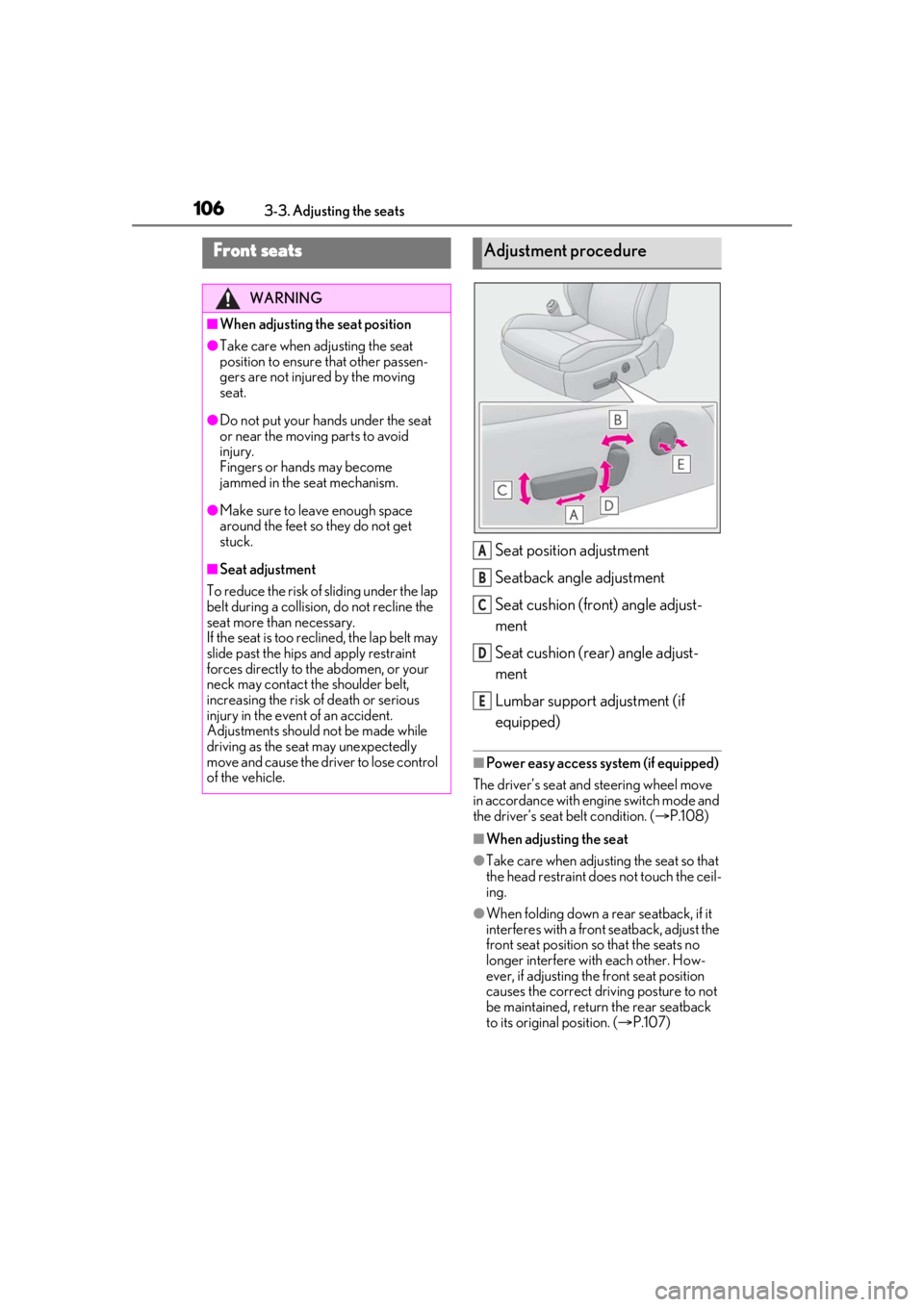
Seat position adjustment
Seatback angle adjustment
Seat cushion (front) angle adjust-
ment
Seat cushion (rear) angle adjust-
ment
Lumbar support adjustment (if
equipped)
■Power easy access system (if equipped)
The driver’s seat and steering wheel move
in accordance with engine switch mode and
the driver’s seat belt condition. ( P.108)
■When adjusting the seat
●Take care when adjusting the seat so that
the head restraint does not touch the ceil-
ing.
●When folding down a rear seatback, if it
interferes with a front seatback, adjust the
front seat position so that the seats no
longer interfere with each other. How-
ever, if adjusting the front seat position
causes the correct driving posture to not
be maintained, return the rear seatback
to its original position. ( P.107)
Front seats
WARNING
■When adjusting the seat position
●Take care when ad justing the seat
position to ensure that other passen-
gers are not injured by the moving
seat.
●Do not put your hands under the seat
or near the moving parts to avoid
injury.
Fingers or hands may become
jammed in the se at mechanism.
●Make sure to leave enough space
around the feet so they do not get
stuck.
■Seat adjustment
To reduce the risk of sliding under the lap
belt during a collision, do not recline the
seat more than necessary.
If the seat is too reclined, the lap belt may
slide past the hips and apply restraint
forces directly to the abdomen, or your
neck may contact the shoulder belt,
increasing the risk of death or serious
injury in the event of an accident.
Adjustments should not be made while
driving as the seat may unexpectedly
move and cause the driver to lose control
of the vehicle.
Adjustment procedure
A
B
C
D
E
Page 107 of 436
1073-3. Adjusting the seats
3
Before driving
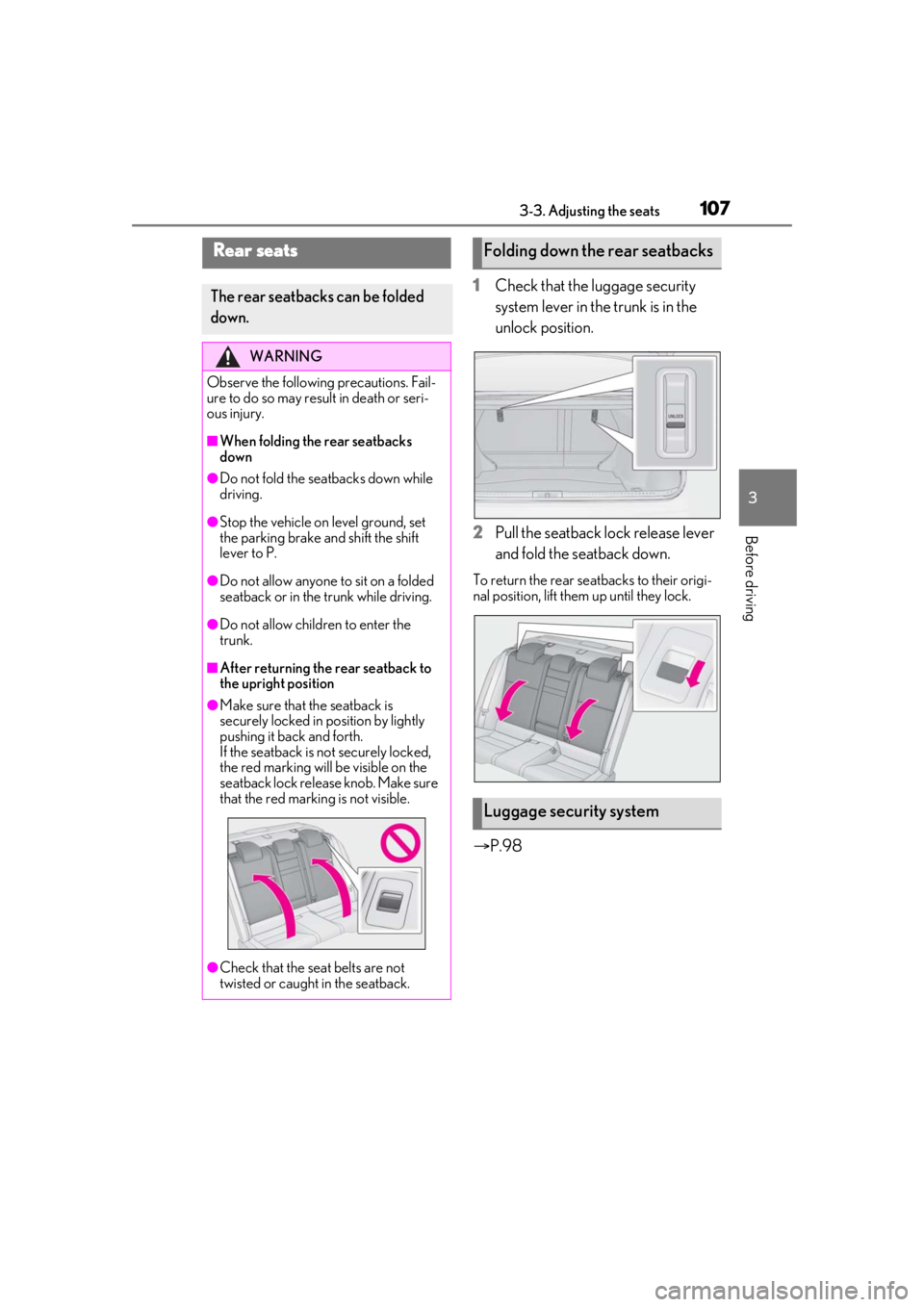
1Check that the luggage security
system lever in the trunk is in the
unlock position.
2 Pull the seatback lock release lever
and fold the seatback down.
To return the rear seatbacks to their origi-
nal position, lift them up until they lock.
P.98
Rear seats
The rear seatbacks can be folded
down.
WARNING
Observe the following precautions. Fail-
ure to do so may result in death or seri-
ous injury.
■When folding the rear seatbacks
down
●Do not fold the seatbacks down while
driving.
●Stop the vehicle on level ground, set
the parking brake and shift the shift
lever to P.
●Do not allow anyone to sit on a folded
seatback or in the trunk while driving.
●Do not allow children to enter the
trunk.
■After returning the rear seatback to
the upright position
●Make sure that the seatback is
securely locked in position by lightly
pushing it back and forth.
If the seatback is not securely locked,
the red marking will be visible on the
seatback lock release knob. Make sure
that the red marking is not visible.
●Check that the seat belts are not
twisted or caught in the seatback.
Folding down the rear seatbacks
Luggage security system
Page 108 of 436
1083-3. Adjusting the seats
*:If equipped
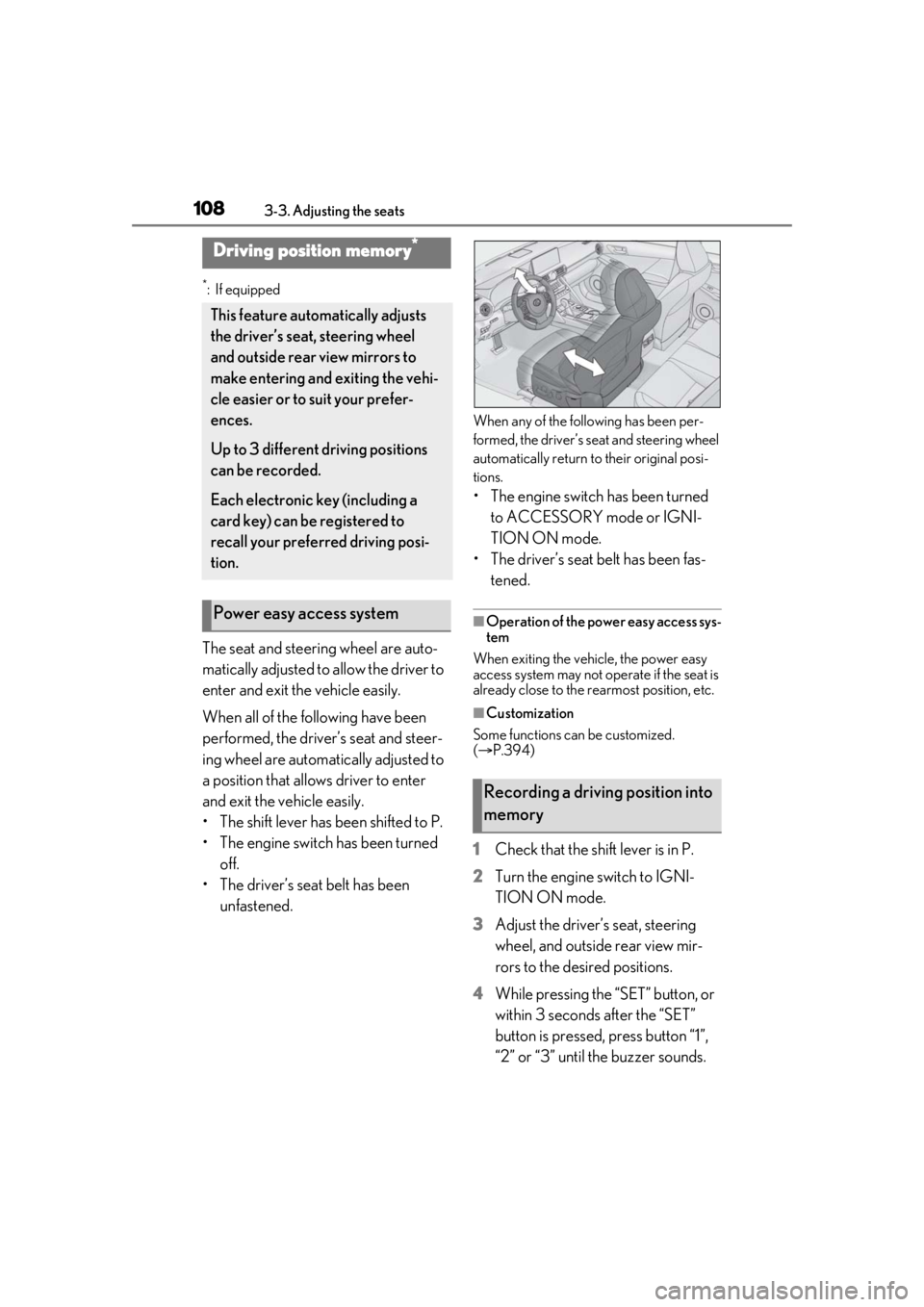
The seat and steering wheel are auto-
matically adjusted to allow the driver to
enter and exit the vehicle easily.
When all of the following have been
performed, the driver’s seat and steer-
ing wheel are automatically adjusted to
a position that allows driver to enter
and exit the vehicle easily.
• The shift lever has been shifted to P.
• The engine switch has been turned off.
• The driver’s seat belt has been unfastened.
When any of the following has been per-
formed, the driver’s seat and steering wheel
automatically return to their original posi-
tions.
• The engine switch has been turned to ACCESSORY mode or IGNI-
TION ON mode.
• The driver’s seat belt has been fas- tened.
■Operation of the power easy access sys-
tem
When exiting the vehicle, the power easy
access system may not op erate if the seat is
already close to the rearmost position, etc.
■Customization
Some functions can be customized.
( P.394)
1 Check that the shift lever is in P.
2 Turn the engine switch to IGNI-
TION ON mode.
3 Adjust the driver’s seat, steering
wheel, and outside rear view mir-
rors to the desired positions.
4 While pressing the “SET” button, or
within 3 seconds after the “SET”
button is pressed, press button “1”,
“2” or “3” until the buzzer sounds.
Driving position memory*
This feature auto matically adjusts
the driver’s seat, steering wheel
and outside rear view mirrors to
make entering and exiting the vehi-
cle easier or to suit your prefer-
ences.
Up to 3 different driving positions
can be recorded.
Each electronic key (including a
card key) can be registered to
recall your preferred driving posi-
tion.
Power easy access system
Recording a driving position into
memory
Page 109 of 436

1093-3. Adjusting the seats
3
Before driving
If the selected button has already been
preset, the previously recorded position
will be overwritten.
■Seat positions that can be memorized
( P.106)
The adjusted positions other than the posi-
tion adjusted by lumbar support switch can
be memorized.
■In order to correctly use the driving
position memory function
If a seat position is already in the furthest
possible position and the seat is operated in
the same direction, the recorded position
may be slightly differen t when it is recalled.
1Check that the shift lever is in P.
2 Turn the engine switch to IGNI-
TION ON mode. 3
Press one of the buttons for the
driving position you want to recall
until the buzzer sounds.
■To stop the position recall operation
part-way through
Perform any of the following operations:
●Press the “SET” button.
●Press button “1”, “2” or “3”.
●Operate any of the seat adjustment
switches (only cancels seat position
recall).
●Operate the tilt and telescopic steering
control switch (onl y cancels steering
wheel position recall).
■Operating the driving position memory
after turning the engine switch off
Recorded seat positions can be activated
up to 180 seconds after the driver’s door is
opened and another 60 seconds after it is
closed again. Recorded steering wheel
position can be activated by pressing the
engine switch.
■Registering procedure
Record your driving position to button
“1”, “2” or “3” before performing the
following:
Carry only the key yo u want to register,
WARNING
■Seat adjustment caution
Take care during seat adjustment so that
the seat does not strike the rear passen-
ger or squeeze your body against the
steering wheel.
Recalling a driving position
Registering/canceling/recall a
driving position to an electronic
key (including a card key) (mem-
ory recall function)
Page 110 of 436

1103-3. Adjusting the seats
and then close the driver’s door. If 2 or
more keys are in the vehicle, the driv-
ing position cannot be recorded prop-
erly.
1Check that the shift lever is in P.
2 Turn the engine switch to IGNI-
TION ON mode.
3 Recall the driving position that you
want to record.
4 While pressing the recalled button,
press and hold the door lock switch
(either lock or unlock) until the
buzzer sounds.
If the button could not be registered, the
buzzer sounds continuously for approxi-
mately 3 seconds.
■Cancelation procedure
Carry only the key you want to cancel
and then close the driver’s door. If 2 or
more keys are in the vehicle, the driv-
ing position cannot be canceled prop-
erly.
1 Turn the engine switch to IGNI-
TION ON mode.
2 While pressing the “SET” button,
press and hold the door lock switch
(either lock or unlock) until the
buzzer sounds twice.
If the button could not be canceled, the
buzzer sounds continuously for approxi- mately 3 seconds.
■Recall procedure
1 Make sure that the doors are
locked before recalling the driving
position. Carry the electronic key
that has been registered to the driv-
ing position, and then unlock and
open the driver’s door using the
smart access system with push-but-
ton start system or wireless remote
control.
The driving position will move to the
recorded position (not including the steer-
ing wheel). However, th e seat will move to
a position slightly behind the recorded
position in order to make entering the vehi-
cle easier.
If the driving position is in a position that
has already been recorded, the seat and
outside rear view mirrors will not move.
2 Turn the engine switch to ACCES-
SORY mode or IGNITION ON
mode, or fasten a seat belt.
The seat and steering wheel will move to
the recorded position.
■Recalling the driving position using the
memory recall function
●Different driving positions can be regis-
tered for each electronic key. Therefore,
the driving position that is recalled may
be different depending on the key being
carried.
●If a door other than the driver’s door is
unlocked with the smart access system
with push-button start system, the driving
position cannot be recalled. In this case,
press the driving position button which
has been set.
■Customization
Some functions can be customized.
( P.394)
Page 111 of 436
1113-3. Adjusting the seats
3
Before driving
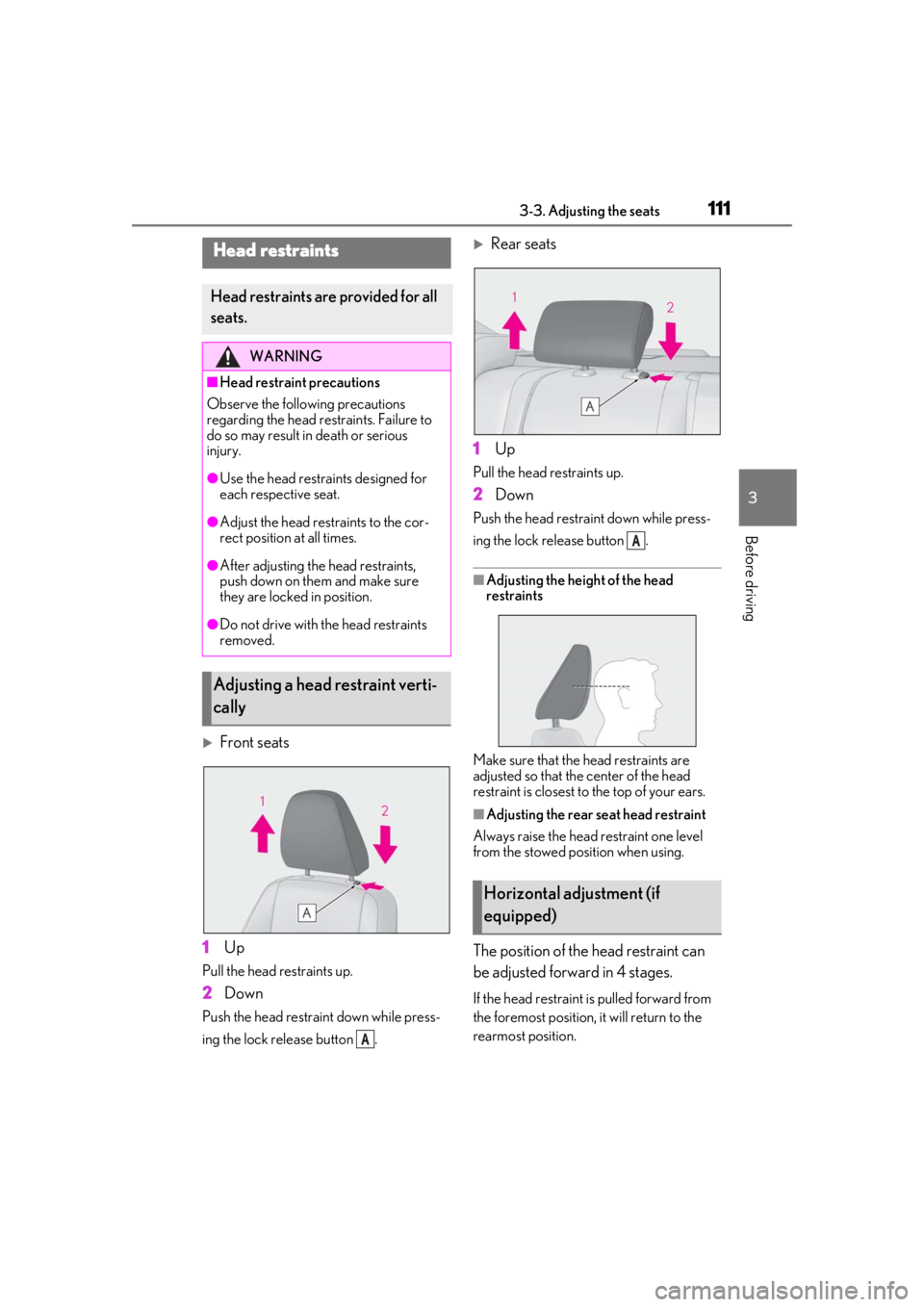
Front seats
1 Up
Pull the head restraints up.
2Down
Push the head restraint down while press-
ing the lock release button .
Rear seats
1 Up
Pull the head restraints up.
2Down
Push the head restra int down while press-
ing the lock release button .
■Adjusting the heig ht of the head
restraints
Make sure that the head restraints are
adjusted so that the center of the head
restraint is closest to the top of your ears.
■Adjusting the rear seat head restraint
Always raise the head restraint one level
from the stowed position when using.
The position of the head restraint can
be adjusted forward in 4 stages.
If the head restraint is pulled forward from
the foremost position, it will return to the
rearmost position.
Head restraints
Head restraints are provided for all
seats.
WARNING
■Head restraint precautions
Observe the following precautions
regarding the head re straints. Failure to
do so may result in death or serious
injury.
●Use the head restraints designed for
each respective seat.
●Adjust the head restraints to the cor-
rect position at all times.
●After adjusting the head restraints,
push down on them and make sure
they are locked in position.
●Do not drive with the head restraints
removed.
Adjusting a head restraint verti-
cally
A
Horizontal adjustment (if
equipped)
A
Page 112 of 436
1123-3. Adjusting the seats
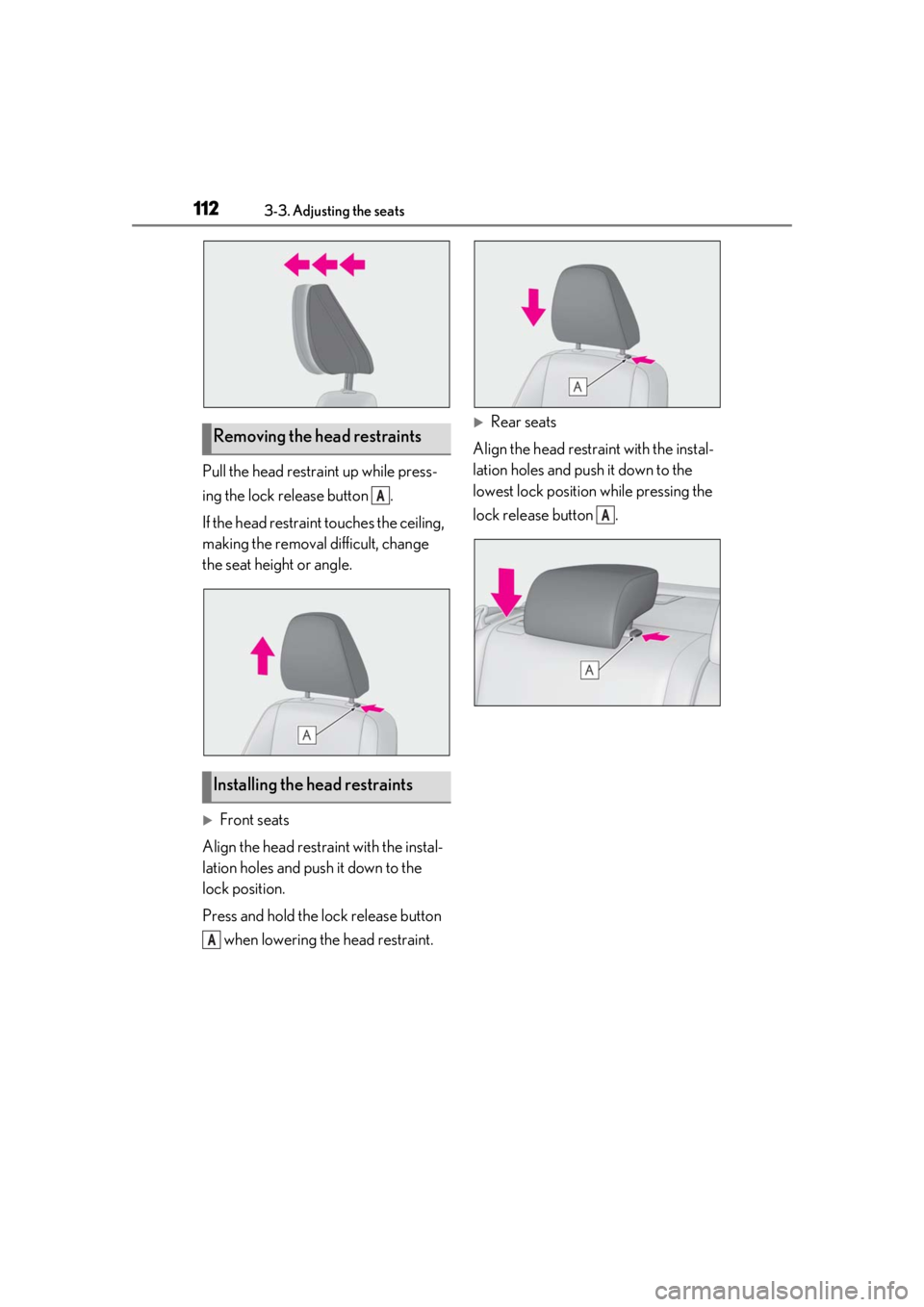
Pull the head restraint up while press-
ing the lock release button .
If the head restraint touches the ceiling,
making the removal difficult, change
the seat height or angle.
Front seats
Align the head restraint with the instal-
lation holes and push it down to the
lock position.
Press and hold the lock release button when lowering the head restraint.
Rear seats
Align the head restraint with the instal-
lation holes and push it down to the
lowest lock position while pressing the
lock release button .Removing the head restraints
Installing the head restraints
A
A
A
Page 131 of 436
1314-1. Before driving
4
Driving
*3: C =Available cargo and luggage load
In this condition, if 3 more passengers with
the combined weight of D lb. (kg) get on,
the available cargo and luggage load will
be reduced E lb. (kg) as follows:
C lb. (kg) - D*4 lb. (kg) = E*5 lb. (kg)
*4: D =Additional weight of people
*5: E =Available cargo and luggage load
As shown in the example above, if the
number of occupants increases, the
cargo and luggage load will be
reduced by an amount that equals the
increased weight due to the additional
occupants. In other words, if an
increase in the number of occupants
causes an excess of the total load
capacity (combined weight of occu-
pants plus cargo and luggage load),
you must reduce the cargo and lug-
gage on your vehicle.
WARNING
■Things that must not be carried in the
trunk
The following things may cause a fire if
loaded in the trunk:
●Receptacles containing gasoline
●Aerosol cans
■Storage precautions
Observe the following precautions.
Failure to do so may prevent the pedals
from being depressed properly, may
block the driver’s vision, or may result in
items hitting the driver or passengers,
possibly causing an accident.
●Stow cargo and luggage in the trunk
whenever possible.
●To prevent cargo and luggage from
sliding forward during braking, do not
stack anything in th e enlarged trunk.
Keep cargo and luggage low, as close
to the floor as possible.
●When you fold down the rear seats,
long items should not be placed
directly behind the front seats.
●Never allow anyone to ride in the
enlarged trunk. It is not designed for
passengers. They should ride in their
seats with thei r seat belts properly fas-
tened.
●Do not place cargo or luggage in or on
the following locations.
• At the feet of the driver
• On the front passenger or rear seats (when stacking items)
• On the package tray
• On the instrument panel
•On the dashboard
• In front of the Center Display
●Secure all items in the occupant com-
partment.
■Capacity and distribution
●Do not exceed the maximum axle
weight rating or the total vehicle
weight rating.
●Even if the total load of occupant’s
weight and the cargo load is less than
the total load capacity, do not apply the
load unevenly. Improper loading may
cause deterioration of steering or
braking control which may cause
death or serious injury.