ECO mode LEXUS IS300 2021 Workshop Manual
[x] Cancel search | Manufacturer: LEXUS, Model Year: 2021, Model line: IS300, Model: LEXUS IS300 2021Pages: 436, PDF Size: 8.27 MB
Page 257 of 436
2575-2. Using the air conditioning system and defogger
5
Interior features
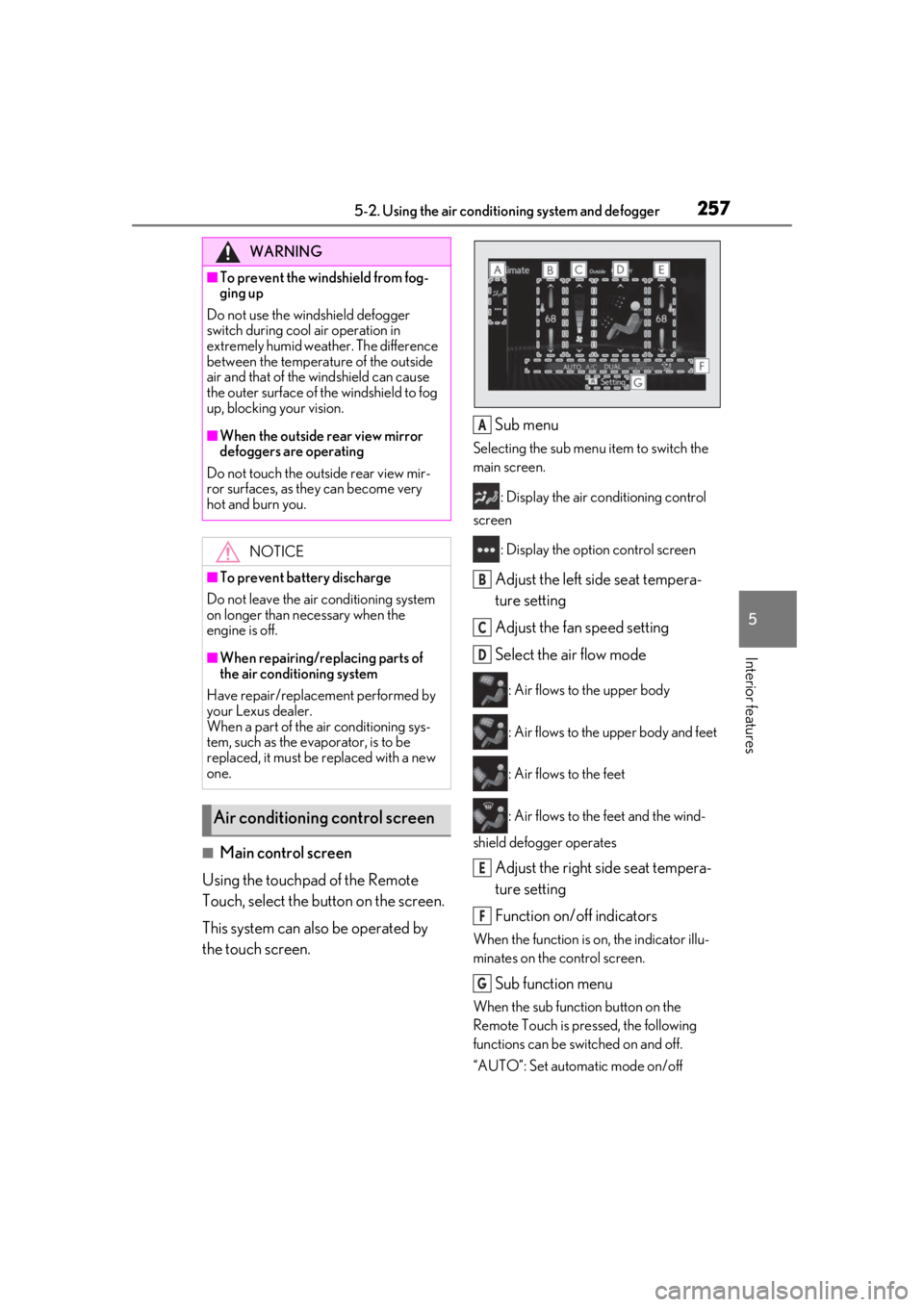
■Main control screen
Using the touchpad of the Remote
Touch, select the button on the screen.
This system can also be operated by
the touch screen. Sub menu
Selecting the sub menu item to switch the
main screen.
: Display the air co nditioning control
screen
: Display the option control screen
Adjust the left side seat tempera-
ture setting
Adjust the fan speed setting
Select the air flow mode
: Air flows to the upper body
: Air flows to the upper body and feet
: Air flows to the feet
: Air flows to the feet and the wind-
shield defogger operates
Adjust the right side seat tempera-
ture setting
Function on/off indicators
When the function is on, the indicator illu-
minates on the control screen.
Sub function menu
When the sub function button on the
Remote Touch is pressed, the following
functions can be switched on and off.
“AUTO”: Set automatic mode on/off
WARNING
■To prevent the windshield from fog-
ging up
Do not use the windshield defogger
switch during cool air operation in
extremely humid weather. The difference
between the temperature of the outside
air and that of the windshield can cause
the outer surface of the windshield to fog
up, blocking your vision.
■When the outside rear view mirror
defoggers are operating
Do not touch the outside rear view mir-
ror surfaces, as they can become very
hot and burn you.
NOTICE
■To prevent battery discharge
Do not leave the air conditioning system
on longer than necessary when the
engine is off.
■When repairing/replacing parts of
the air conditioning system
Have repair/replace ment performed by
your Lexus dealer.
When a part of the air conditioning sys-
tem, such as the evaporator, is to be
replaced, it must be replaced with a new
one.
Air conditioning control screen
A
B
C
D
E
F
G
Page 258 of 436
2585-2. Using the air conditioning system and defogger
( P.259)
“OFF”: Turn the fan off
“A/C”: Set cooling and dehumidification
function
If the “A/C” display is turned off, the system
will blow ambient temperature air or
heated air.
“DUAL”: Adjust the temperature for driver
and passenger seats separately (“DUAL”
mode) ( P.259)
: Set eco air conditioning mode
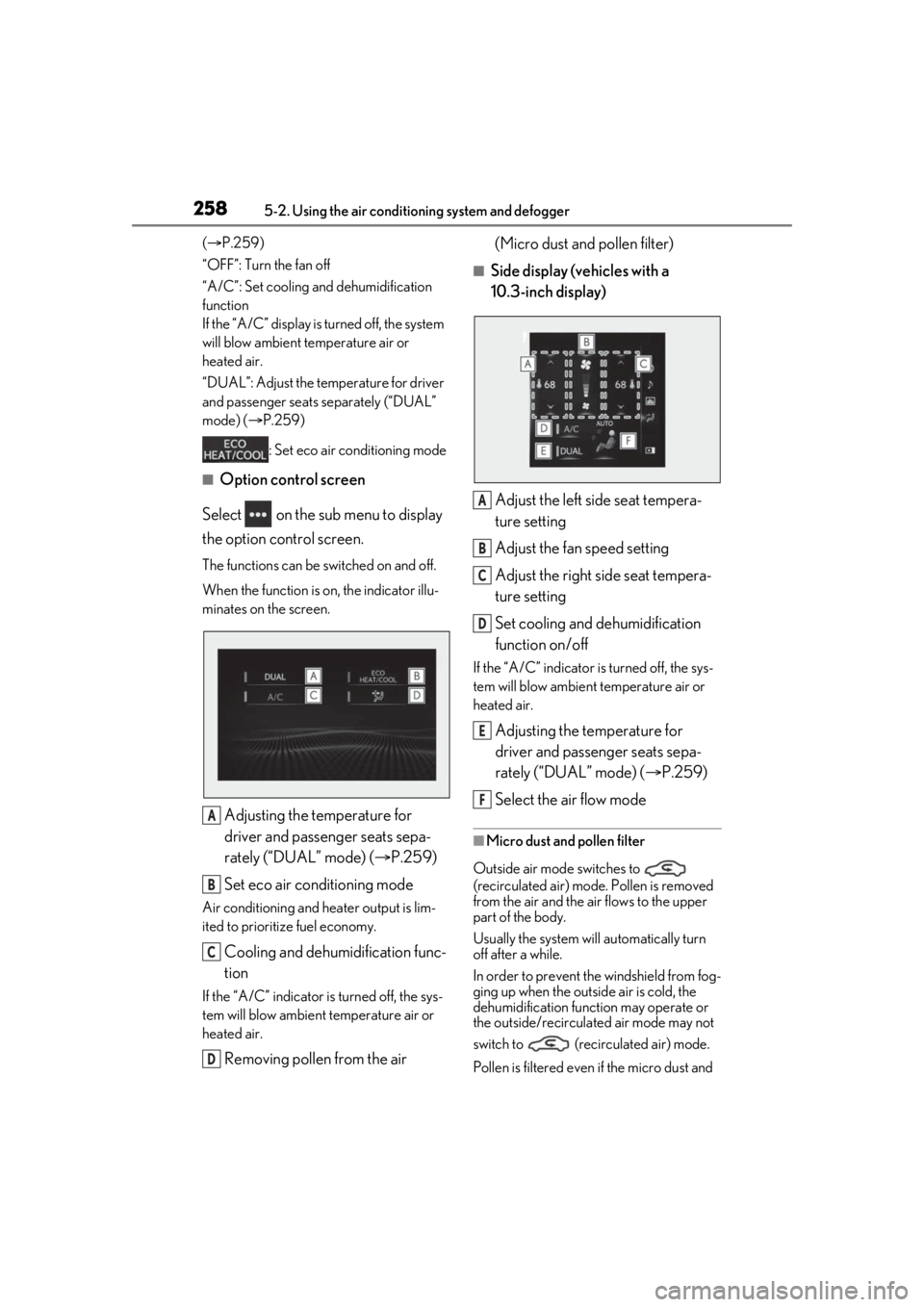
■Option control screen
Select on the sub menu to display
the option control screen.
The functions can be switched on and off.
When the function is on, the indicator illu-
minates on the screen.
Adjusting the temperature for
driver and passenger seats sepa-
rately (“DUAL” mode) ( P.259)
Set eco air conditioning mode
Air conditioning and heater output is lim-
ited to prioritize fuel economy.
Cooling and dehumidification func-
tion
If the “A/C” indicator is turned off, the sys-
tem will blow ambient temperature air or
heated air.
Removing pollen from the air (Micro dust and pollen filter)
■Side display (vehicles with a
10.3-inch display)
Adjust the left side seat tempera-
ture setting
Adjust the fan speed setting
Adjust the right side seat tempera-
ture setting
Set cooling and dehumidification
function on/off
If the “A/C” indicator is turned off, the sys-
tem will blow ambient temperature air or
heated air.
Adjusting the temperature for
driver and passenger seats sepa-
rately (“DUAL” mode) ( P.259)
Select the air flow mode
■Micro dust and pollen filter
Outside air mode switches to
(recirculated air) mode. Pollen is removed
from the air and the air flows to the upper
part of the body.
Usually the system will automatically turn
off after a while.
In order to prevent the windshield from fog-
ging up when the outside air is cold, the
dehumidification function may operate or
the outside/recirculated air mode may not
switch to (recirculated air) mode.
Pollen is filtered even if the micro dust and
A
B
C
D
A
B
C
D
E
F
Page 264 of 436
2645-3. Using the interior lights
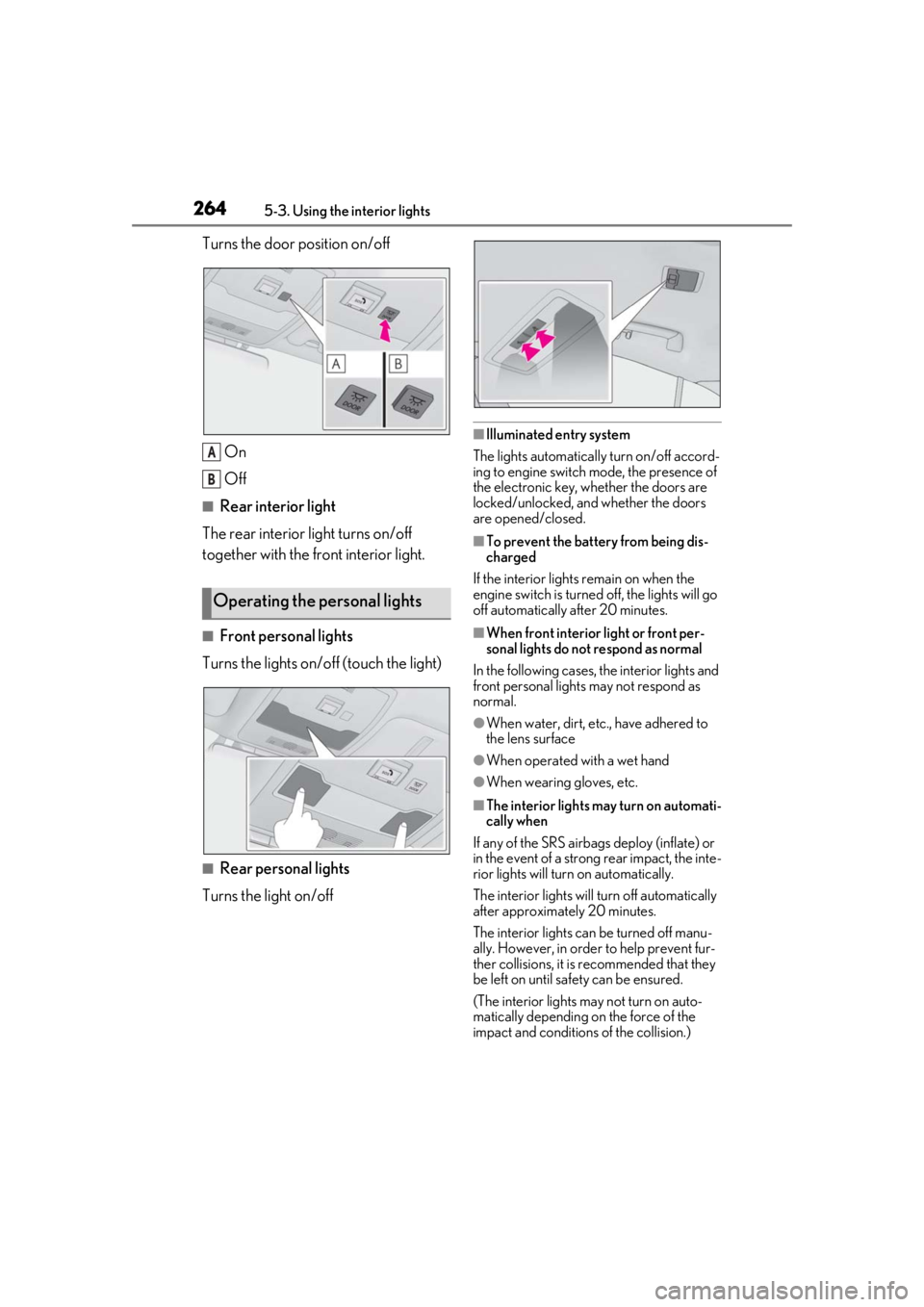
Turns the door position on/off
On
Off
■Rear interior light
The rear interior light turns on/off
together with the front interior light.
■Front personal lights
Turns the lights on/off (touch the light)
■Rear personal lights
Turns the light on/off
■Illuminated entry system
The lights automatically turn on/off accord-
ing to engine switch mode, the presence of
the electronic key, whether the doors are
locked/unlocked, and whether the doors
are opened/closed.
■To prevent the battery from being dis-
charged
If the interior lights remain on when the
engine switch is turned off, the lights will go
off automatically after 20 minutes.
■When front interior light or front per-
sonal lights do not respond as normal
In the following cases, the interior lights and
front personal lights may not respond as
normal.
●When water, dirt, etc., have adhered to
the lens surface
●When operated with a wet hand
●When wearing gloves, etc.
■The interior lights may turn on automati-
cally when
If any of the SRS airbag s deploy (inflate) or
in the event of a strong rear impact, the inte-
rior lights will turn on automatically.
The interior lights will turn off automatically
after approximately 20 minutes.
The interior lights can be turned off manu-
ally. However, in order to help prevent fur-
ther collisions, it is recommended that they
be left on until sa fety can be ensured.
(The interior lights may not turn on auto-
matically depending on the force of the
impact and conditions of the collision.)
Operating the personal lights
A
B
Page 280 of 436
2806-1. Maintenance and care
6-1.Maintenance and care
Working from top to bottom, liber-
ally apply water to the vehicle body,
wheel wells and underside of the
vehicle to remove any dirt and dust.
Wash the vehicle body using a
sponge or soft cloth, such as a
chamois.
For hard-to-remove marks, use car
wash soap and rinse thoroughly with
water.
Wipe away any water.
Wax the vehicle when the water-
proof coating deteriorates.
If water does not bead on a clean surface,
apply wax when the vehicle body is cool.
■Self-restoring coat
The vehicle body has a self-restoring coat-
ing that is resistant to small surface
scratches caused in a car wash etc.
●The coating lasts for 5 to 8 years from
when the vehicle is delivered from the
plant.
●The restoration time differs depending on
the depth of the scratch and outside tem-
perature.
The restoration time may become
shorter when the coating is warmed by
applying warm water.
●Deep scratches caused by keys, coins,
etc. cannot be restored.
●Do not use wax that contains abrasives.
■Automatic car washes
●Fold the mirrors befo re washing the vehi-
cle. Start washing from the front of the
vehicle. Make sure to extend the mirrors
before driving.
●Brushes used in automatic car washes
may scratch the vehicle surface, parts
(wheel, etc.) and damage the paint.
■High pressure car washes
As water may enter the cabin, do not bring
the nozzle tip near the gaps around the
doors or perimeter of the windows, or spray
these areas continuously.
■When using a car wash
If the door handle becomes wet while the
electronic key is within the effective range,
the door may lock and unlock repeatedly. In
that case, follow the following correction
procedures to wash the vehicle:
●Place the key in a position 6 ft. (2 m) or
more separate from the vehicle while the
vehicle is being wash ed. (Take care to
ensure that the key is not stolen.)
●Set the electronic key to battery-saving
mode to disable the smart access system
with push-button start. ( P.100)
■Wheels and wheel ornaments (vehicles
without matte black painted wheels)
●Remove any dirt immediately by using a
neutral detergent.
●Wash detergent off with water immedi-
ately after use.
●To protect the paint from damage, make
sure to observe the following precau-
tions.
• Do not use acidic, alkaline or abrasive
detergent
• Do not use hard brushes
• Do not use detergent on the wheels when they are hot, such as after driving or park-
ing in hot weather
■Wheels and wheel ornaments (vehicles
with matte black painted wheels)
As matte black painted wheels require dif-
ferent cleaning methods than conventional
aluminum wheels, be sure to observer the
following. For details, consult your Lexus
dealer.
Cleaning and protecting the
vehicle exterior
Perform the following to protect
the vehicle and maintain it in prime
condition:
Cleaning instructions
Page 281 of 436

2816-1. Maintenance and care
6
Maintenance and care
●Remove dirt using water. If the wheels are
excessively dirty, use a sponge or soft
cloth dampened with a diluted neutral
detergent to remove the dirt.
●When using detergent, make sure to
rinse it off with water immediately. Then
use a soft cloth to wipe off the water.
●To prevent the matte black paint from
being damaged, make sure to observe
the following precautions:
• Do not scrub or polish the wheels using a brush or dry cloth.
• Do not use any wheel coatings or
abra-sive detergents.
• When using an automatic car wash, dis-able/do not select the wheel brush
func-tion(if such an option is available).
• Do not use a high pressure pressure washer or steam cleaner.
• Do not use detergent on the wheels when they are hot, such as after driving or
park-ing in hot weather.
■Bumpers
Do not scrub with abrasive cleaners.
■Front side windows water-repellent
coating (if equipped)
●The following precautions can extend the
effectiveness of the water-repellent coat-
ing.
• Remove any dirt, etc. from the front side windows regularly.
• Do not allow dirt and dust to accumulate on the windows for a long period.
Clean the windows with a soft, damp
cloth as soon as possible.
• Do not use wax or glass cleaners that contain abrasives when cleaning the win-
dows.
• Do not use any metallic objects to remove condensation build up.
●When the water-repellent performance
has become insufficie nt, the coating can
be repaired. Contact your Lexus dealer.
■Plated portions
If dirt cannot be removed, clean the parts as
follows:
●Use a soft cloth dampened with an
approximately 5% solution of neutral
detergent and water to clean the dirt off.
●Wipe the surface with a dry, soft cloth to
remove any remaining moisture.
●To remove oily deposits, use alcohol wet
wipes or a similar product.
WARNING
■When washing the vehicle
Do not apply water to the inside of the
engine compartment. Doing so may
cause the electrical components, etc. to
catch fire.
■When cleaning the windshield (vehi-
cles with rain-sensing windshield wip-
ers)
Set the wipers to the intermittent wind-
shield wipers. (
P.154)
If AUTO mode is selected, the wipers
may operate unexpectedly in the follow-
ing situations, and may result in hands
being caught or other serious injuries
and cause damage to the wiper blades.
●When the upper part of the windshield
where the raindrop sensor is located is
touched by hand
●When a wet rag or similar is held close
to the raindrop sensor
●If something bumps against the wind-
shield
●If you directly touch the raindrop sen-
sor body or if something bumps into
the raindrop sensor
Page 292 of 436
2926-3. Do-it-yourself maintenance
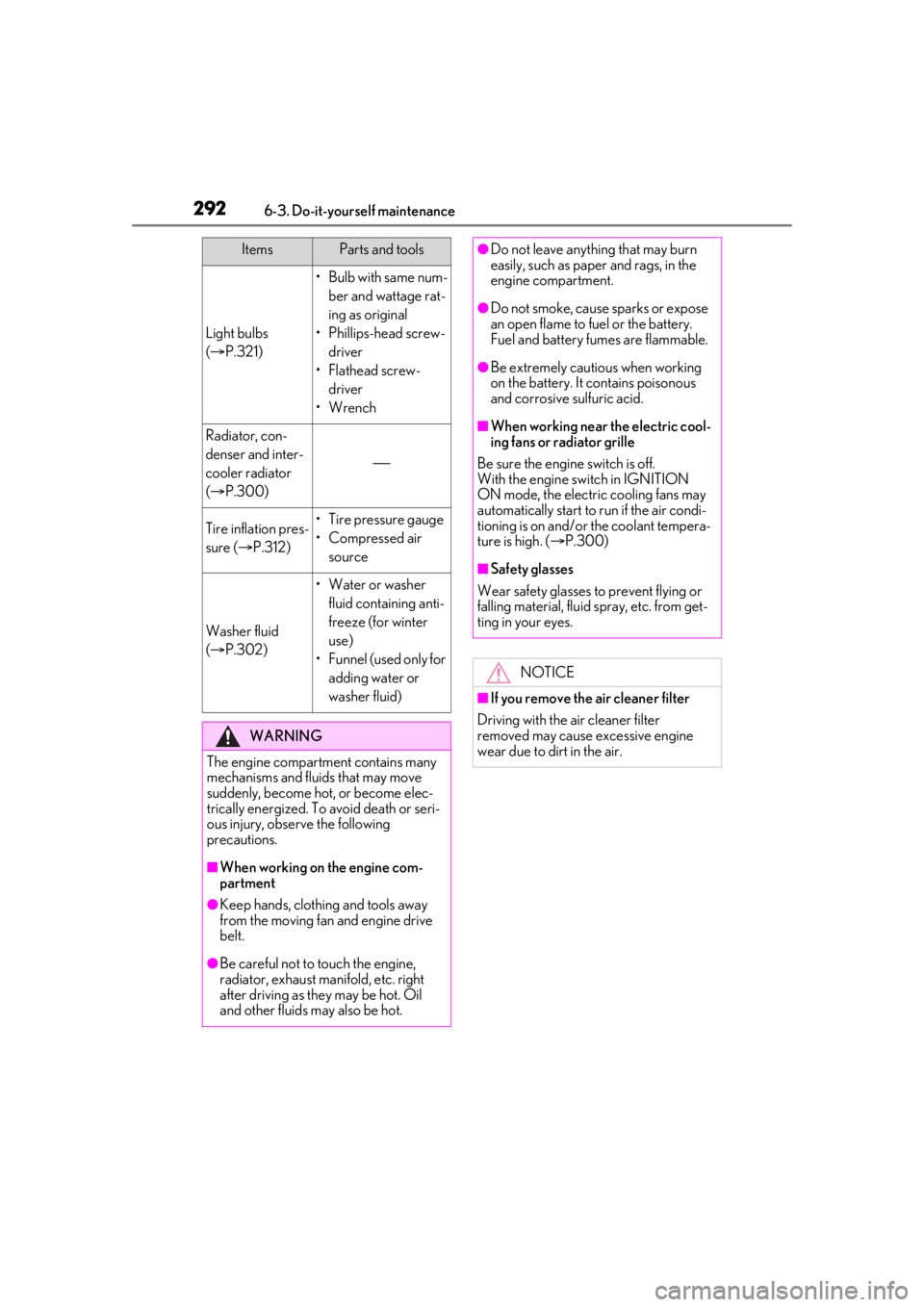
Light bulbs
( P.321)
•Bulb with same num-
ber and wattage rat-
ing as original
• Phillips-head screw- driver
•Flathead screw- driver
•Wrench
Radiator, con-
denser and inter-
cooler radiator
( P.300)
Tire inflation pres-
sure ( P.312)• Tire pressure gauge
•Compressed air
source
Washer fluid
( P.302)
• Water or washer
fluid containing anti-
freeze (for winter
use)
• Funnel (used only for adding water or
washer fluid)
WARNING
The engine compartment contains many
mechanisms and fluids that may move
suddenly, become hot, or become elec-
trically energized. To avoid death or seri-
ous injury, observe the following
precautions.
■When working on the engine com-
partment
●Keep hands, clothi ng and tools away
from the moving fan and engine drive
belt.
●Be careful not to touch the engine,
radiator, exhaust manifold, etc. right
after driving as they may be hot. Oil
and other fluids may also be hot.
ItemsParts and tools●Do not leave anything that may burn
easily, such as paper and rags, in the
engine compartment.
●Do not smoke, cause sparks or expose
an open flame to fuel or the battery.
Fuel and battery fumes are flammable.
●Be extremely cautious when working
on the battery. It contains poisonous
and corrosive sulfuric acid.
■When working near the electric cool-
ing fans or radiator grille
Be sure the engine switch is off.
With the engine switch in IGNITION
ON mode, the electric cooling fans may
automatically start to run if the air condi-
tioning is on and/or the coolant tempera-
ture is high. ( P.300)
■Safety glasses
Wear safety glasses to prevent flying or
falling material, fluid spray, etc. from get-
ting in your eyes.
NOTICE
■If you remove the air cleaner filter
Driving with the air cleaner filter
removed may cause excessive engine
wear due to dirt in the air.
Page 301 of 436
3016-3. Do-it-yourself maintenance
6
Maintenance and care
Check the battery as follows.
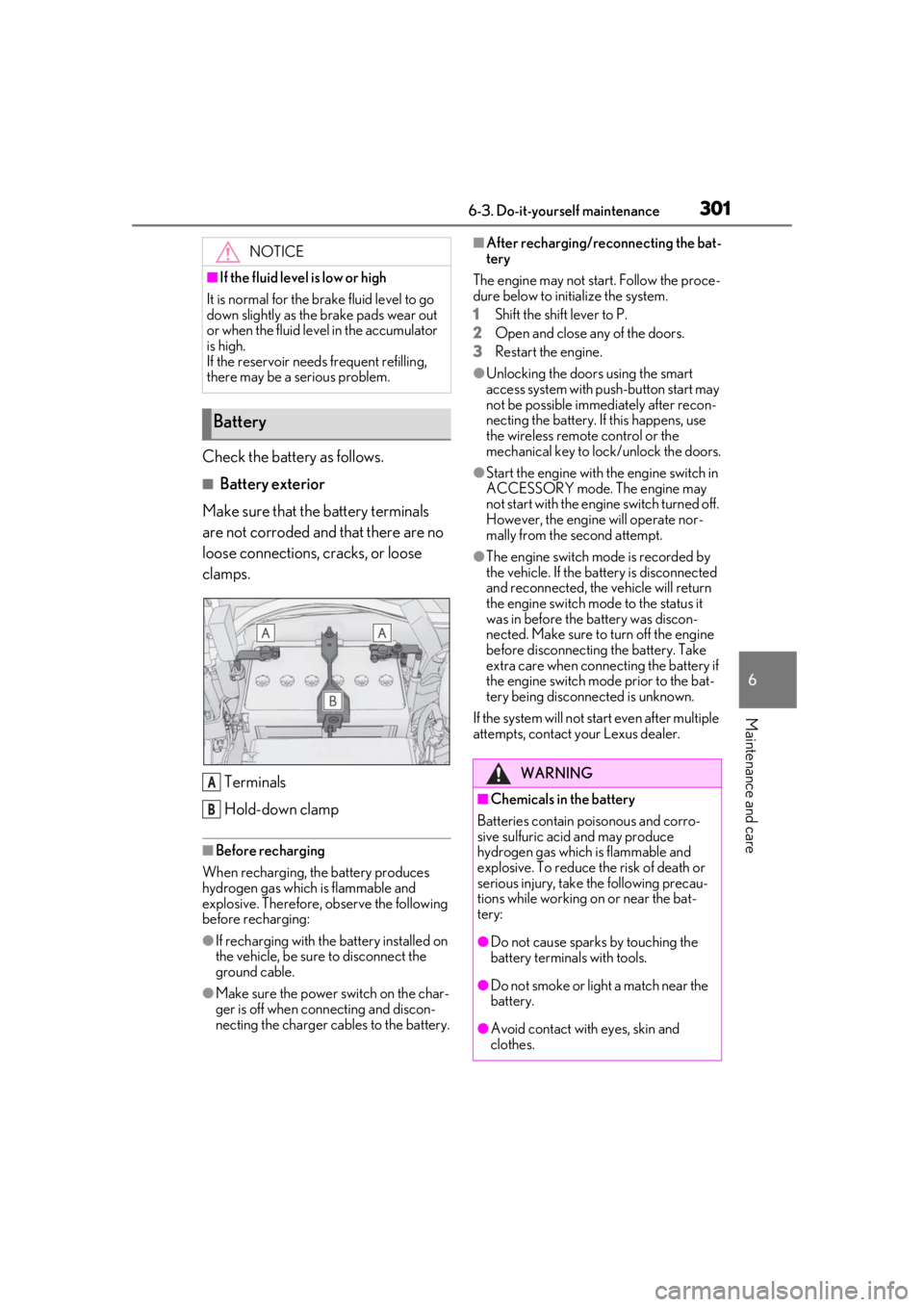
■Battery exterior
Make sure that the battery terminals
are not corroded and that there are no
loose connections, cracks, or loose
clamps.
Terminals
Hold-down clamp
■Before recharging
When recharging, the battery produces
hydrogen gas which is flammable and
explosive. Therefore, observe the following
before recharging:
●If recharging with the battery installed on
the vehicle, be sure to disconnect the
ground cable.
●Make sure the power switch on the char-
ger is off when connecting and discon-
necting the charger cables to the battery.
■After recharging/reconnecting the bat-
tery
The engine may not start. Follow the proce-
dure below to initialize the system.
1 Shift the shift lever to P.
2 Open and close any of the doors.
3 Restart the engine.
●Unlocking the doors using the smart
access system with pu sh-button start may
not be possible immediately after recon-
necting the battery. If this happens, use
the wireless remote control or the
mechanical key to lo ck/unlock the doors.
●Start the engine with the engine switch in
ACCESSORY mode. The engine may
not start with the engine switch turned off.
However, the engine will operate nor-
mally from the second attempt.
●The engine switch mode is recorded by
the vehicle. If the battery is disconnected
and reconnected, the vehicle will return
the engine switch mode to the status it
was in before the battery was discon-
nected. Make sure to turn off the engine
before disconnecting the battery. Take
extra care when connecting the battery if
the engine switch mode prior to the bat-
tery being disconnected is unknown.
If the system will not start even after multiple
attempts, contact your Lexus dealer.
NOTICE
■If the fluid level is low or high
It is normal for the brake fluid level to go
down slightly as the brake pads wear out
or when the fluid level in the accumulator
is high.
If the reservoir need s frequent refilling,
there may be a serious problem.
Battery
A
B
WARNING
■Chemicals in the battery
Batteries contain poisonous and corro-
sive sulfuric acid and may produce
hydrogen gas which is flammable and
explosive. To reduce the risk of death or
serious injury, take the following precau-
tions while working on or near the bat-
tery:
●Do not cause sparks by touching the
battery terminals with tools.
●Do not smoke or light a match near the
battery.
●Avoid contact with eyes, skin and
clothes.
Page 304 of 436
3046-3. Do-it-yourself maintenance
roads, the use of snow tires is recom-
mended. When installing snow tires, be
sure to replace all four tires.
●All season tires
All season tires are designed to provide
better traction in snow and to be adequate
for driving in most winter conditions as well
as for use year-round. All season tires,
however, do not have adequate traction
performance compared with snow tires in
heavy or loose snow. Also, all season tires
fall short in acceleration and handling per-
formance compared with summer tires in
highway driving.
●Snow tires
For driving on snow-covered roads or icy
roads, we recommend using snow tires. If
you need snow tires, select tires of the
same size, construction and load capacity
as the originally insta lled tires. Since your
vehicle has radial tires as original equip-
ment, make sure your snow tires also have
radial construction. Do not install studded
tires without first checking local regula-
tions for possible restrictions. Snow tires
should be installed on all wheels.
( P.243)
■Low profile tires
Generally, low profile tires will wear more
rapidly and tire grip performance will be
reduced on snowy and/or icy roads when
compared to standard ti res. Be sure to use
snow tires or tire chains* on snowy and/or
icy roads and drive carefully at a speed
appropriate for road and weather condi-
tions.
*: Vehicles with front and rear tires of dif-
fering sizes: Tire chains cannot be
mounted. Snow tires should be used
instead.
■If the tread on snow tires wears down
below 0.16 in. (4 mm)
The effectiveness of the tires as snow tires is
lost.
WARNING
■When inspecting or replacing tires
Observe the following precautions to
prevent accidents.
Failure to do so may cause damage to
parts of the drive train as well as danger-
ous handling characteristics, which may
lead to an accident resulting in death or
serious injury.
●Do not mix tires of different makes,
models or tread patterns.
Also, do not mix tires of remarkably
different treadwear.
●Do not use tire sizes other than those
recommended by Lexus.
●Do not mix differently constructed
tires (radial, bias-belted or bias-ply
tires).
●Do not mix summer, all season and
snow tires.
●Do not use tires that have been used
on another vehicle.
Do not use tires if you do not know
how they were used previously.
●Do not tow if your vehicle has a com-
pact spare tire installed.
NOTICE
■Driving on rough roads
Take particular care when driving on
roads with loose surfaces or potholes.
These conditions may cause losses in tire
inflation pressure, reducing the cushion-
ing ability of the tires. In addition, driving
on rough roads may cause damage to
the tires themselves, as well as the vehi-
cle’s wheels and body.
■Low profile tires
Low profile tires may cause greater dam-
age than usual to the tire wheel when
sustaining impact from the road surface.
Therefore, pay attention to the following:
Page 305 of 436
3056-3. Do-it-yourself maintenance
6
Maintenance and care
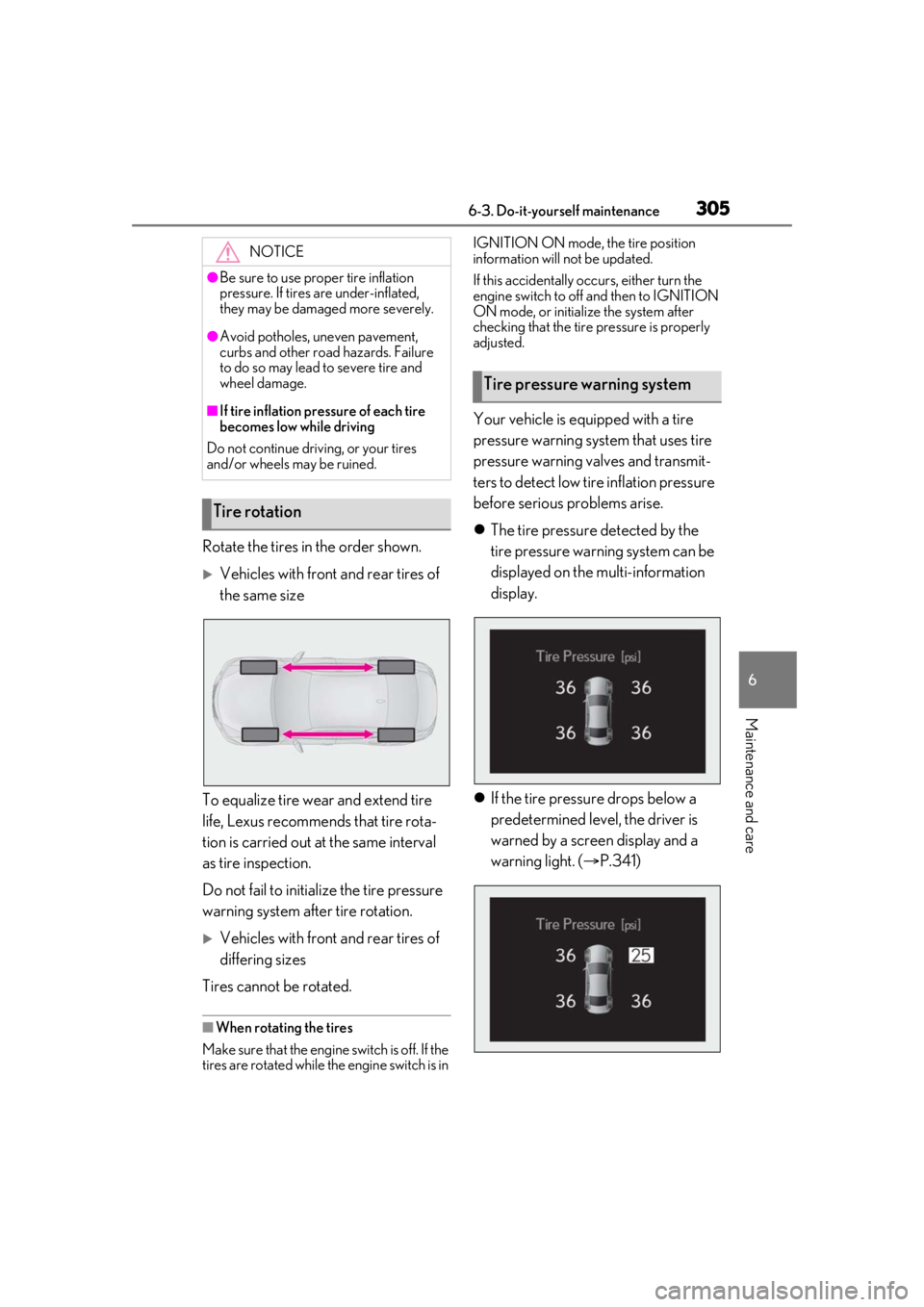
Rotate the tires in the order shown.
Vehicles with front and rear tires of
the same size
To equalize tire wear and extend tire
life, Lexus recommends that tire rota-
tion is carried out at the same interval
as tire inspection.
Do not fail to initialize the tire pressure
warning system after tire rotation.
Vehicles with front and rear tires of
differing sizes
Tires cannot be rotated.
■When rotating the tires
Make sure that the engine switch is off. If the
tires are rotated while the engine switch is in IGNITION ON mode, the tire position
information will not be updated.
If this accidentally occurs, either turn the
engine switch to off and then to IGNITION
ON mode, or initialize the system after
checking that the tire pressure is properly
adjusted.
Your vehicle is equipped with a tire
pressure warning system that uses tire
pressure warning valves and transmit-
ters to detect low ti
re inflation pressure
before serious problems arise.
The tire pressure detected by the
tire pressure warning system can be
displayed on the multi-information
display.
If the tire pressure drops below a
predetermined level, the driver is
warned by a screen display and a
warning light. ( P.341)
NOTICE
●Be sure to use proper tire inflation
pressure. If tires are under-inflated,
they may be damaged more severely.
●Avoid potholes, uneven pavement,
curbs and other road hazards. Failure
to do so may lead to severe tire and
wheel damage.
■If tire inflation pres sure of each tire
becomes low while driving
Do not continue driving, or your tires
and/or wheels may be ruined.
Tire rotation
Tire pressure warning system
Page 309 of 436
3096-3. Do-it-yourself maintenance
6
Maintenance and care
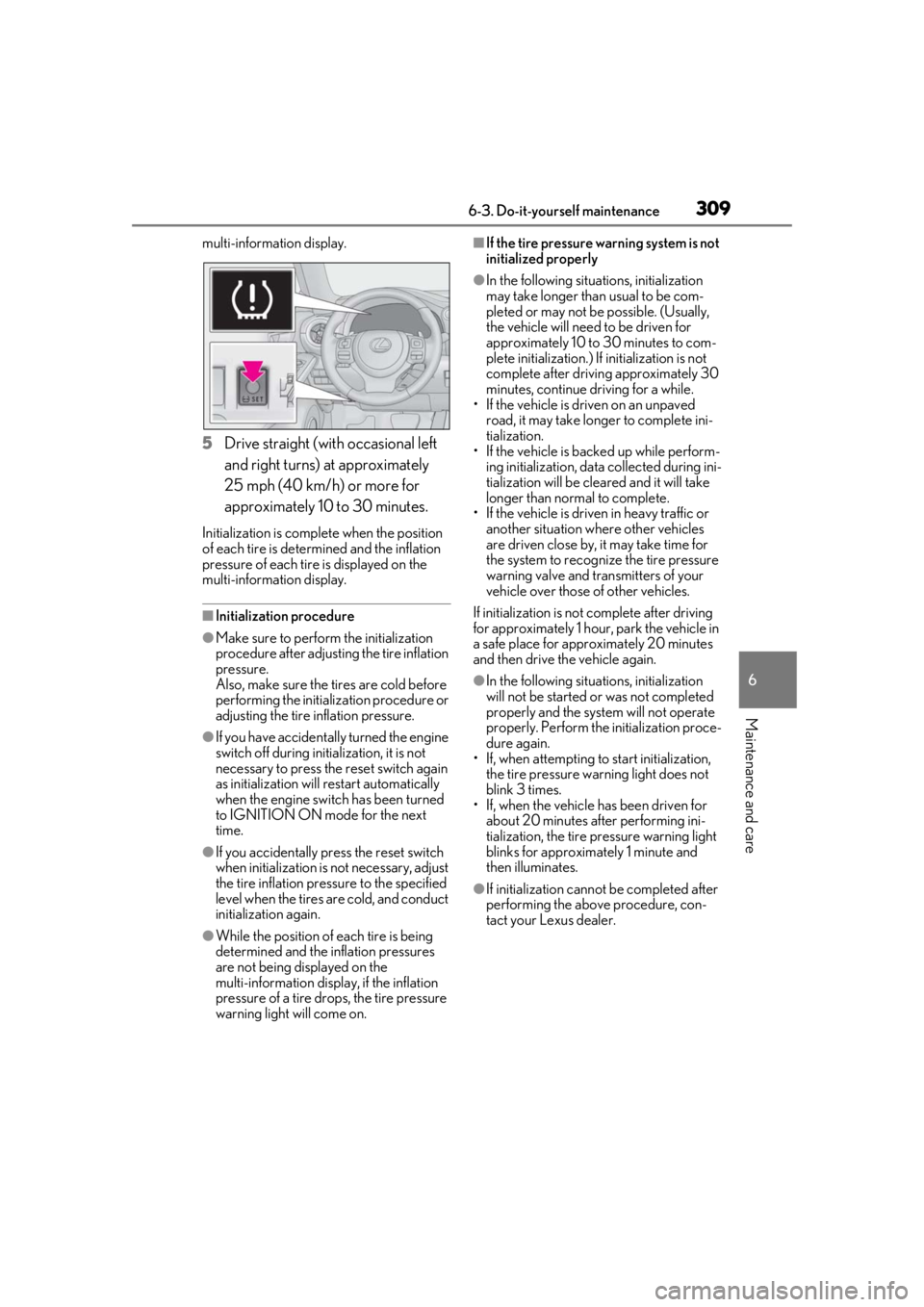
multi-information display.
5Drive straight (with occasional left
and right turns) at approximately
25 mph (40 km/h) or more for
approximately 10 to 30 minutes.
Initialization is complete when the position
of each tire is determined and the inflation
pressure of each tire is displayed on the
multi-information display.
■Initialization procedure
●Make sure to perform the initialization
procedure after adjusting the tire inflation
pressure.
Also, make sure the tires are cold before
performing the initialization procedure or
adjusting the tire inflation pressure.
●If you have accidentally turned the engine
switch off during initialization, it is not
necessary to press the reset switch again
as initialization will restart automatically
when the engine switch has been turned
to IGNITION ON mode for the next
time.
●If you accidentally pr ess the reset switch
when initialization is not necessary, adjust
the tire inflation pres sure to the specified
level when the tires are cold, and conduct
initialization again.
●While the position of each tire is being
determined and the inflation pressures
are not being displayed on the
multi-information display, if the inflation
pressure of a tire drops, the tire pressure
warning light will come on.
■If the tire pressure warning system is not
initialized properly
●In the following situations, initialization
may take longer than usual to be com-
pleted or may not be possible. (Usually,
the vehicle will need to be driven for
approximately 10 to 30 minutes to com-
plete initialization.) If initialization is not
complete after drivin g approximately 30
minutes, continue driving for a while.
• If the vehicle is driven on an unpaved
road, it may take longer to complete ini-
tialization.
• If the vehicle is backed up while perform-
ing initialization, data collected during ini-
tialization will be cleared and it will take
longer than normal to complete.
• If the vehicle is driven in heavy traffic or another situation where other vehicles
are driven close by, it may take time for
the system to recognize the tire pressure
warning valve and transmitters of your
vehicle over those of other vehicles.
If initialization is not complete after driving
for approximately 1 hour, park the vehicle in
a safe place for approximately 20 minutes
and then drive the vehicle again.
●In the following situations, initialization
will not be started or was not completed
properly and the system will not operate
properly. Perform the initialization proce-
dure again.
• If, when attempting to start initialization,
the tire pressure warning light does not
blink 3 times.
• If, when the vehicle has been driven for
about 20 minutes after performing ini-
tialization, the tire pressure warning light
blinks for approximately 1 minute and
then illuminates.
●If initialization canno t be completed after
performing the above procedure, con-
tact your Lexus dealer.