lock LEXUS IS300 2021 Workshop Manual
[x] Cancel search | Manufacturer: LEXUS, Model Year: 2021, Model line: IS300, Model: LEXUS IS300 2021Pages: 436, PDF Size: 8.27 MB
Page 131 of 436
1314-1. Before driving
4
Driving
*3: C =Available cargo and luggage load
In this condition, if 3 more passengers with
the combined weight of D lb. (kg) get on,
the available cargo and luggage load will
be reduced E lb. (kg) as follows:
C lb. (kg) - D*4 lb. (kg) = E*5 lb. (kg)
*4: D =Additional weight of people
*5: E =Available cargo and luggage load
As shown in the example above, if the
number of occupants increases, the
cargo and luggage load will be
reduced by an amount that equals the
increased weight due to the additional
occupants. In other words, if an
increase in the number of occupants
causes an excess of the total load
capacity (combined weight of occu-
pants plus cargo and luggage load),
you must reduce the cargo and lug-
gage on your vehicle.
WARNING
■Things that must not be carried in the
trunk
The following things may cause a fire if
loaded in the trunk:
●Receptacles containing gasoline
●Aerosol cans
■Storage precautions
Observe the following precautions.
Failure to do so may prevent the pedals
from being depressed properly, may
block the driver’s vision, or may result in
items hitting the driver or passengers,
possibly causing an accident.
●Stow cargo and luggage in the trunk
whenever possible.
●To prevent cargo and luggage from
sliding forward during braking, do not
stack anything in th e enlarged trunk.
Keep cargo and luggage low, as close
to the floor as possible.
●When you fold down the rear seats,
long items should not be placed
directly behind the front seats.
●Never allow anyone to ride in the
enlarged trunk. It is not designed for
passengers. They should ride in their
seats with thei r seat belts properly fas-
tened.
●Do not place cargo or luggage in or on
the following locations.
• At the feet of the driver
• On the front passenger or rear seats (when stacking items)
• On the package tray
• On the instrument panel
•On the dashboard
• In front of the Center Display
●Secure all items in the occupant com-
partment.
■Capacity and distribution
●Do not exceed the maximum axle
weight rating or the total vehicle
weight rating.
●Even if the total load of occupant’s
weight and the cargo load is less than
the total load capacity, do not apply the
load unevenly. Improper loading may
cause deterioration of steering or
braking control which may cause
death or serious injury.
Page 134 of 436
1344-2. Driving procedures
4-2.Driving procedures
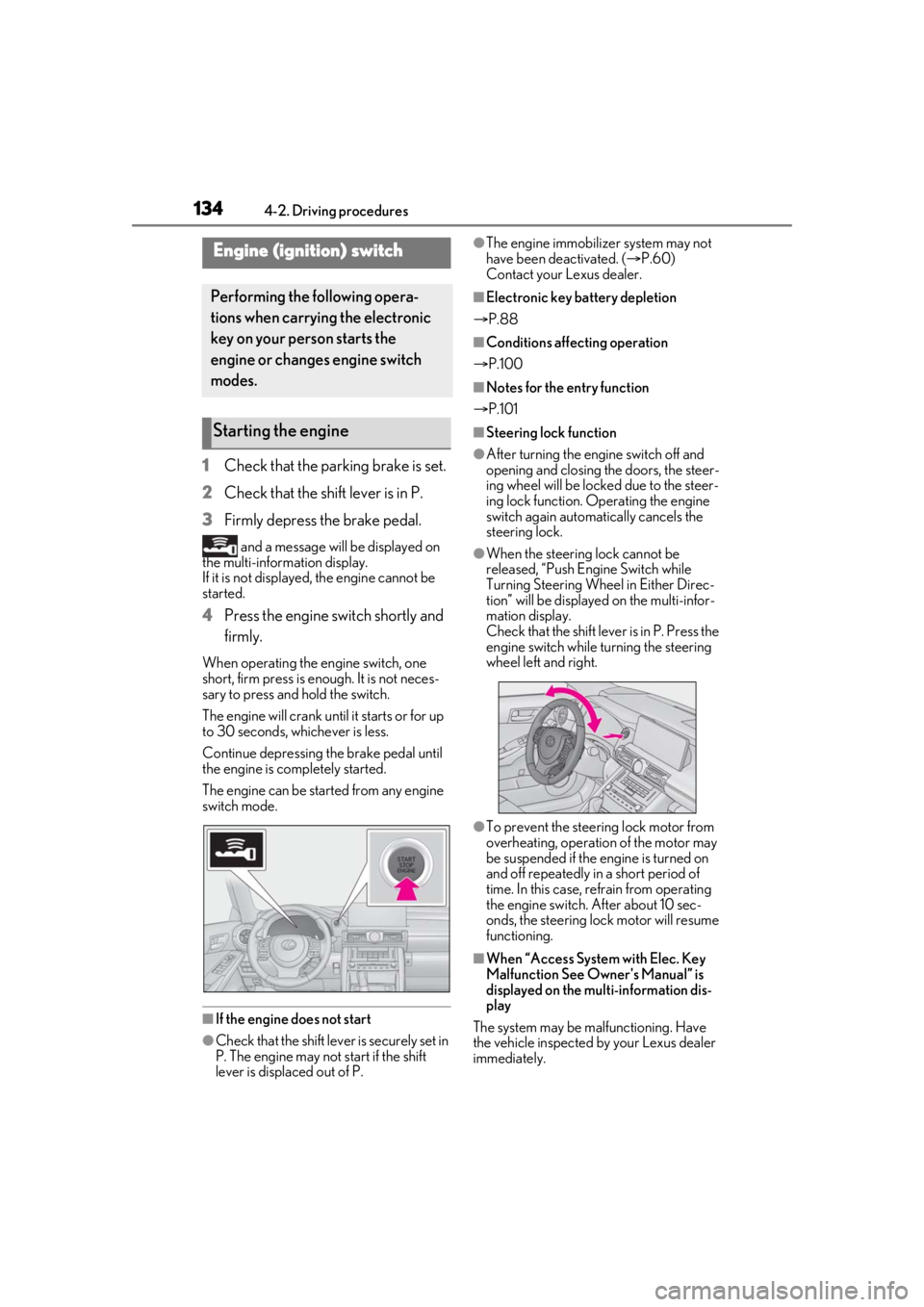
1Check that the parking brake is set.
2 Check that the shift lever is in P.
3 Firmly depress the brake pedal.
and a message will be displayed on
the multi-information display.
If it is not displayed, the engine cannot be
started.
4 Press the engine switch shortly and
firmly.
When operating the engine switch, one
short, firm press is enough. It is not neces-
sary to press and hold the switch.
The engine will crank until it starts or for up
to 30 seconds, whichever is less.
Continue depressing the brake pedal until
the engine is completely started.
The engine can be started from any engine
switch mode.
■If the engine does not start
●Check that the shift leve r is securely set in
P. The engine may not start if the shift
lever is displaced out of P.
●The engine immobilizer system may not
have been deactivated. ( P.60)
Contact your Lexus dealer.
■Electronic key battery depletion
P.88
■Conditions affecting operation
P.100
■Notes for the entry function
P.101
■Steering lock function
●After turning the engine switch off and
opening and closing the doors, the steer-
ing wheel will be lock ed due to the steer-
ing lock function. Operating the engine
switch again automatically cancels the
steering lock.
●When the steering lock cannot be
released, “Push Engine Switch while
Turning Steering Whee l in Either Direc-
tion” will be displayed on the multi-infor-
mation display.
Check that the shift lever is in P. Press the
engine switch while turning the steering
wheel left and right.
●To prevent the steering lock motor from
overheating, operation of the motor may
be suspended if the engine is turned on
and off repeatedly in a short period of
time. In this case, refrain from operating
the engine switch. After about 10 sec-
onds, the steering lock motor will resume
functioning.
■When “Access System with Elec. Key
Malfunction See Owner's Manual” is
displayed on the multi-information dis-
play
The system may be ma lfunctioning. Have
the vehicle inspected by your Lexus dealer
immediately.
Engine (ignition) switch
Performing the following opera-
tions when carryin g the electronic
key on your person starts the
engine or changes engine switch
modes.
Starting the engine
Page 135 of 436

1354-2. Driving procedures
4
Driving
■If the electronic key battery is depleted
P.316
■Operation of the engine switch
●If the switch is not pressed shortly and
firmly, the engine switch mode may not
change or the engine may not start.
●If attempting to restart the engine imme-
diately after turning the engine switch off,
the engine may not start in some cases.
After turning the engine switch off, please
wait a few seconds before restarting the
engine.
■If the smart access system with
push-button start has been deactivated
by a customized setting
P.359
1 Stop the vehicle.
2 Set the parking brake ( P.143),
and shift the shift lever to P.
3 Press the engine switch.
4 Release the brake pedal and check
that the display on the meters is off.
■Automatic engine shut off feature
●The vehicle is equipped with a feature
that automatically shuts off the engine
when the shift lever is in P with the engine
running for an extended period.
●The engine will automatically shut off
after approximately 1 hour if it has been
left running while the shift lever is in P.
●The timer for the automatic engine shut
off feature will reset if the brake pedal is
depressed or if the shift lever is in a posi-
tion other than P.
●After the vehicle is parked, if the door is
locked with the door lock switch ( P.94)
from the inside or the mechanical key
from the outside, the automatic engine
shut off feature will be disabled. The timer
for the automatic engine shut off feature
will be re-enabled if the driver’s door is
opened.
WARNING
■When starting the engine
Always start the engine while sitting in
the driver’s seat. Do not depress the
accelerator pedal while starting the
engine under any circumstances.
Doing so may cause an accident result-
ing in death or serious injury.
■Caution while driving
If engine failure occurs while the vehicle
is moving, do not lock or open the doors
until the vehicle reaches a safe and com-
plete stop. Activation of the steering lock
in this circumstance may lead to an acci-
dent, resulting in death or serious injury.
NOTICE
■When starting the engine
●Do not race a cold engine.
●If the engine becomes difficult to start
or stalls frequently, have your vehicle
checked by your Lexus dealer immedi-
ately.
■Symptoms indicating a malfunction
with the engine switch
If the engine switch seems to be operat-
ing somewhat differently than usual, such
as the switch sticking slightly, there may
be a malfunction. Contact your Lexus
dealer immediately.
Stopping the engine
Page 139 of 436

1394-2. Driving procedures
4
Driving
While the engine switch is in IGNI-
TION ON mode, move the shift lever
with the brake pedal depressed.
When shifting the shift lever between P
and D, make sure that the vehicle is com-
pletely stopped.
■Shift lock system
The shift lock system is a system to prevent
accidental operation of the shift lever in
starting.
The shift lever can be shifted from P only
when the engine switch is in IGNITION
ON mode and the brake pedal is being
depressed.
■If the shift lever cannot be shifted from P
First, check whether the brake pedal is
being depressed.
If the shift lever cannot be shifted with your
foot on the brake pedal, there may be a
problem with the shift lock system. Have the
vehicle inspected by your Lexus dealer
immediately.
The following steps may be used as an emergency measure to ensure that the shift
lever can be shifted.
Releasing the shift lock:
1
Set the parking brake. ( P.145)
2 Turn the engine switch to off.
3 Depress the brake pedal.
4 Pry the cover up with a flathead screw-
driver or equivalent tool.
To prevent damage to the cover, cover the
tip of the screwdriver with a rag.
5 Press the shift lock override button.
The shift lever can be shifted while the but-
ton is pressed.
Shifting the shift lever
WARNING
■To prevent an accident when releas-
ing the shift lock
Before pressing the shift lock override
button, make sure to set the parking
brake and depress the brake pedal.
If the accelerator pe dal is accidentally
depressed instead of the brake pedal
when the shift lock override button is
pressed and the shift lever is shifted out
of P, the vehicle may suddenly start, pos-
sibly leading to an accident resulting in
death or serious injury.
Page 144 of 436
1444-2. Driving procedures
on.
Press and hold the parking brake switch if
an emergency occurs and it is necessary to
operate the parking brake while driving.
2Pull the switch to release the park-
ing brake
• Operate the parking brake switch while
depressing the brake pedal.
• Using the parking brake automatic release function, the parking brake can
be released by depressing the accelera-
tor pedal. When using this function,
slowly depress the accelerator pedal.
Make sure that the pa rking brake indicator
light turn off.
If the parking brake indicator light
flashes, operate the switch again.
( P.343)
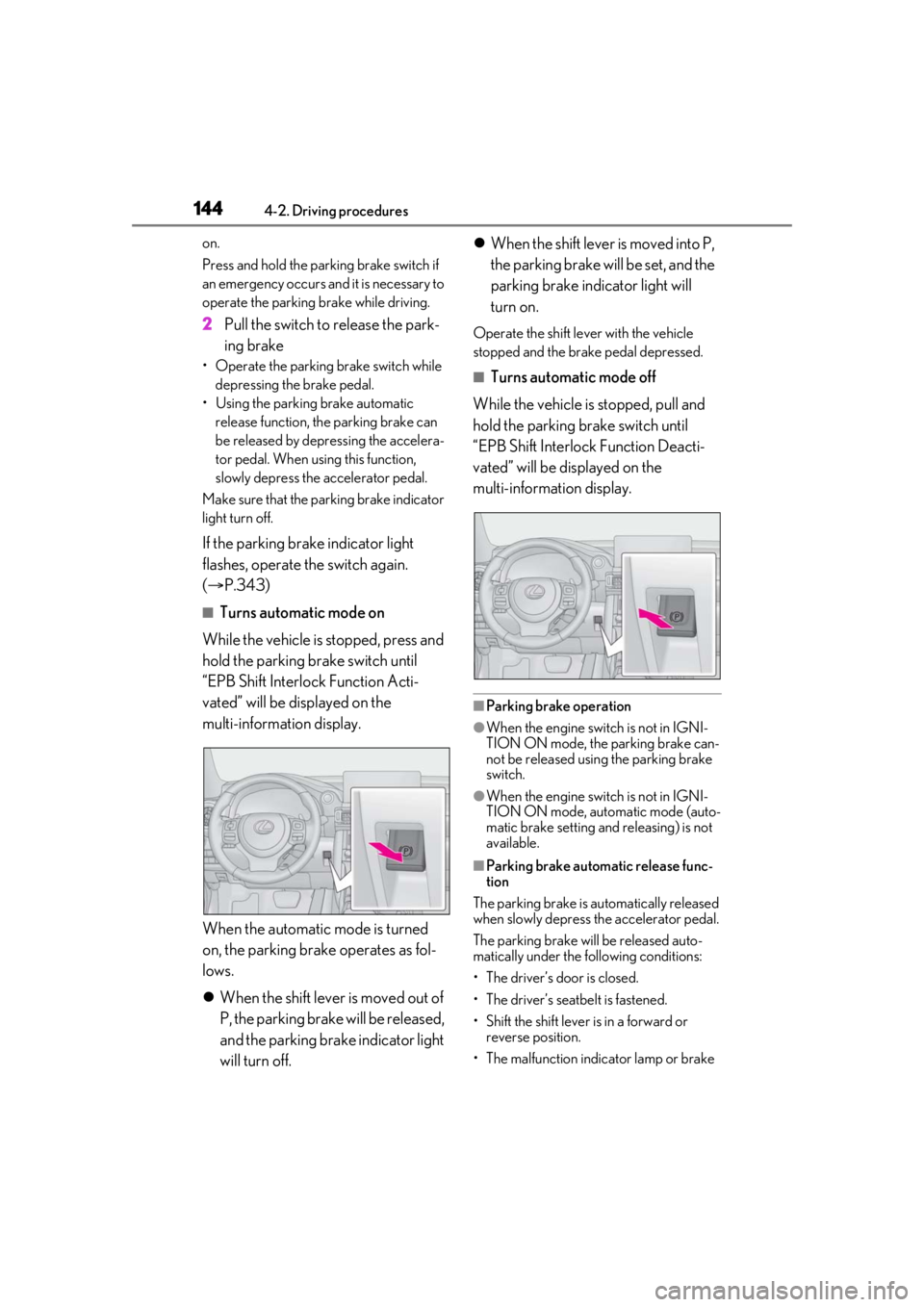
■Turns automatic mode on
While the vehicle is stopped, press and
hold the parking brake switch until
“EPB Shift Interlock Function Acti-
vated” will be displayed on the
multi-information display.
When the automatic mode is turned
on, the parking brake operates as fol-
lows.
When the shift lever is moved out of
P, the parking brake will be released,
and the parking brake indicator light
will turn off.
When the shift lever is moved into P,
the parking brake will be set, and the
parking brake indicator light will
turn on.
Operate the shift lever with the vehicle
stopped and the brake pedal depressed.
■Turns automatic mode off
While the vehicle is stopped, pull and
hold the parking brake switch until
“EPB Shift Interlock Function Deacti-
vated” will be displayed on the
multi-information display.
■Parking brake operation
●When the engine switch is not in IGNI-
TION ON mode, the parking brake can-
not be released using the parking brake
switch.
●When the engine switch is not in IGNI-
TION ON mode, auto matic mode (auto-
matic brake setting an d releasing) is not
available.
■Parking brake automatic release func-
tion
The parking brake is automatically released
when slowly depress the accelerator pedal.
The parking brake will be released auto-
matically under the following conditions:
• The driver’s door is closed.
• The driver’s seatbelt is fastened.
• Shift the shift lever is in a forward or reverse position.
• The malfunction indicator lamp or brake
Page 149 of 436

1494-3. Operating the lights and wipers
4
Driving
4-3.Operating the lights and wipers
Operating the switch turns on
the lights as follows:U.S.A.
Canada
1 The side marker, parking, tail,
license plate, instrument panel
lights, and daytime running lights
( P.149) turn on.
2 The headlights and all lights
listed above (except daytime run-
ning lights) turn on.
3 The headlights, parking lights,
daytime running lights ( P.149) and all the lights listed above turn
on and off automatically. (When the
engine switch is in IGNITION ON
mode.)
4 (U.S.A.) Off
■Daytime running light system
●The daytime running lights illuminate
using the same lights as the parking lights
and illuminate brighter than the parking
lights.
●To make your vehicle more visible to
other drivers during daytime driving, the
daytime running lights turn on automati-
cally when all of the following conditions
are met. (The daytime running lights are
not designed for use at night.)
• The engine is running
• The parking brake is released
• The headlight switch is in the or
* position
*: When the surroundings are bright
The daytime running lights remain on after
they illuminate, even if the parking brake is
set again.
●For the U.S.A.: Daytime running lights
can be turned off by operating the switch.
●Compared to turning on the headlights,
the daytime running light system offers
greater durability and consumes less
electricity, so it can help improve fuel
economy.
■Headlight control sensor
The sensor may not function properly if an
object is placed on the sensor, or anything
that blocks the sensor is affixed to the wind-
shield.
Headlight switch
The headlights can be operated
manually or automatically.
Operating instructions
A
B
Page 160 of 436

1604-3. Operating the lights and wipers
●If the wiper is turned to AUTO mode
while the engine switch is in IGNITION
ON mode, the wipers will operate once
to show that AUTO mode is activated.
●If the temperature of the raindrop sensor
is 185°F (85°C) or higher, or -22°F
(-30°C) or lower, automatic operation
may not occur. In this case, operate the
wipers in any mode other than AUTO
mode.
■When the windshield wipers are in tem-
porary operation (vehicles with
rain-sensing windshield wipers)
AUTO mode cannot be activated even if is
pressed.
■If no windshield washer fluid sprays
Check that the washer nozzles are not
blocked if there is wash er fluid in the wind-
shield washer fluid reservoir.
WARNING
■Caution regarding the use of wind-
shield wipers in AUTO mode
The windshield wipers may operate
unexpectedly if the sensor is touched or
the windshield is subject to vibration in
AUTO mode. Take care that your fingers
or anything else do not become caught
in the windshield wipers.
■Caution regarding the use of washer
fluid
When it is cold, do not use the washer
fluid until the windshield becomes warm.
The fluid may freeze on the windshield
and cause low visibility. This may lead to
an accident, resulting in death or serious
injury.
NOTICE
■When there is no washer fluid spray
from the nozzle
Damage to the washer fluid pump may
be caused if the lever is pulled toward
you and held continually.
■When a nozzle becomes blocked
In this case, contact your Lexus dealer.
Do not try to clear it with a pin or other
object. The nozzle will be damaged.
Page 162 of 436
1624-4. Refueling
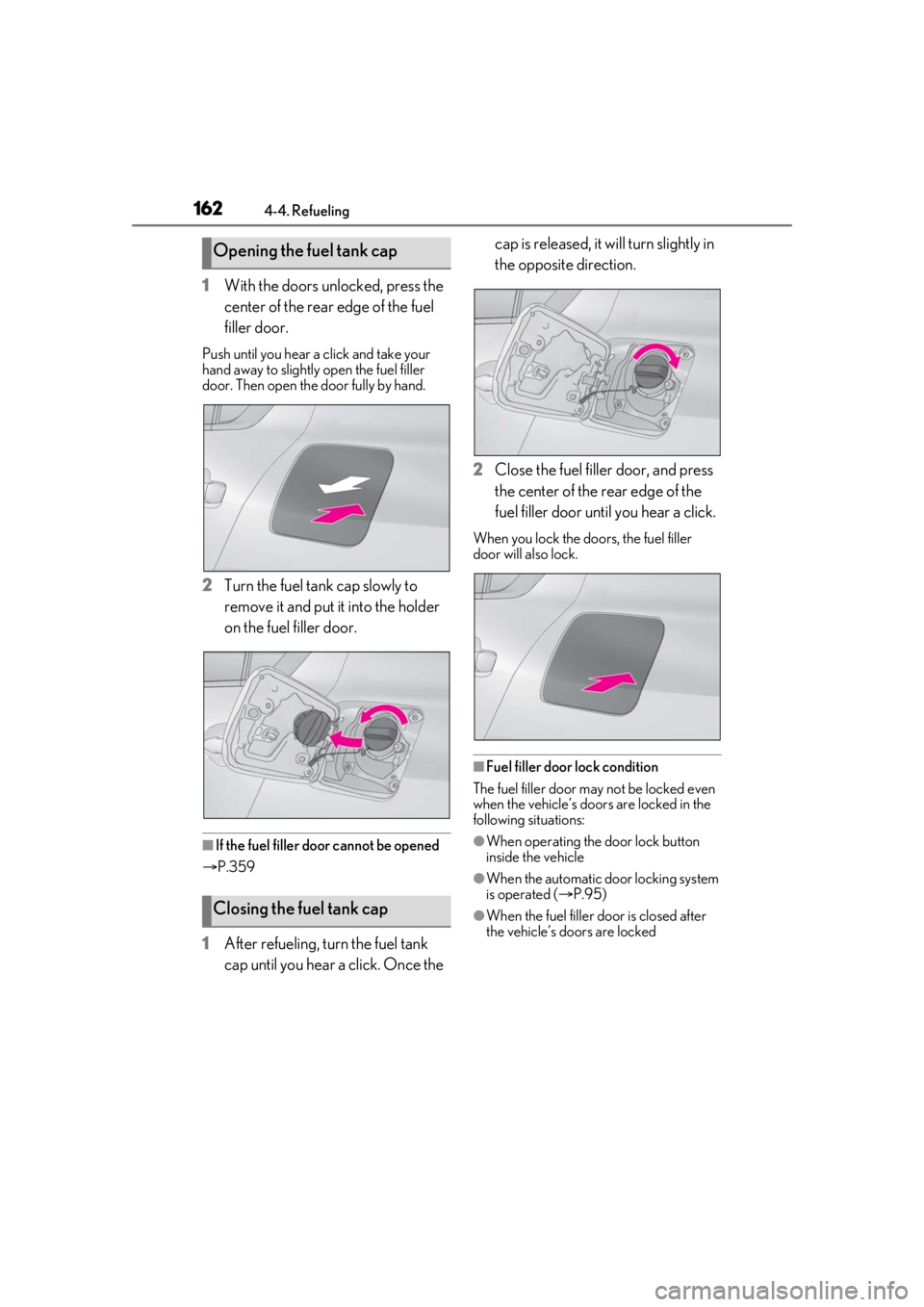
1With the doors unlocked, press the
center of the rear edge of the fuel
filler door.
Push until you hear a click and take your
hand away to slightly open the fuel filler
door. Then open the door fully by hand.
2Turn the fuel tank cap slowly to
remove it and put it into the holder
on the fuel filler door.
■If the fuel filler door cannot be opened
P.359
1 After refueling, turn the fuel tank
cap until you hear a click. Once the cap is released, it will turn slightly in
the opposite direction.
2 Close the fuel filler door, and press
the center of the rear edge of the
fuel filler door until you hear a click.
When you lock the doors, the fuel filler
door will also lock.
■Fuel filler door lock condition
The fuel filler door may not be locked even
when the vehicle’s doors are locked in the
following situations:
●When operating the door lock button
inside the vehicle
●When the automatic door locking system
is operated ( P.95)
●When the fuel filler door is closed after
the vehicle’s doors are locked
Opening the fuel tank cap
Closing the fuel tank cap
Page 179 of 436

1794-5. Using the driving support systems
4
Driving
as heavy rain, fog, snow or a sandstorm
• When driving through steam or smoke
• When the surrounding area is dim, such as at dawn or dusk, or while at night or in
a tunnel, making a detectable object
appear to be nearly the same color as its
surroundings
• When driving in a place where the sur- rounding brightness changes suddenly,
such as at the entrance or exit of a tunnel
• After the engine has started the vehicle has not been driven for a certain amount
of time
• While making a left/right turn and for a few seconds after makin g a left/right turn
• While driving on a curve and for a few seconds after driving on a curve
• If your vehicle is skidding
• If the front of the vehicle is raised or low-
ered
• If the wheels are misaligned
• If a wiper blade is blocking the front cam- era
• The vehicle is being driven at extremely high speeds
• When driving on a hill
• If the radar sensor or front camera is mis-
aligned
• When driving in a tr affic lane separated
by more than one lane where oncoming
vehicles are driving while making a
right/left turn
• When largely out of place with the oppo- site facing targeted oncoming vehicle
during a right/left turn • While making a right/left turn, when a
pedestrian approaches from behind or
side of your vehicle
●In addition to the above, in some situa-
tions, such as the following, the emer-
gency steering assist may not operate.
• When the white (yellow) lane lines are difficult to see, such as when they are
faint, diverging/merging, or a shadow is
cast upon them
•When the lane is wi der or narrower than
normal
• When there is a light and dark pattern on the road surface, such as due to road
repairs
• When the target is too close
• When there is insuffic ient safe or unob-
structed space for the vehicle to be
steered into
• If oncoming vehicle is present
• If VSC function is operating
●In some situations su ch as the following,
sufficient braking forc e or steering force
may not be obtained, preventing the sys-
tem from performing properly:
• If the braking functions cannot operate to their full extent, such as when the brake
parts are extremely cold, extremely hot,
or wet
• If the vehicle is not properly maintained (brakes or tires are excessively worn,
improper tire inflation pressure, etc.)
• When the vehicle is being driven on a gravel road or other slippery surface
• When the road surface has deep wheel tracks
• When driving on a hill road
• When driving on a road that has inclines
to the left or right
■If VSC is disabled
●If VSC is disabled ( P.239), the
pre-collision brake assist and pre-colli-
sion braking functions are also disabled.
Page 238 of 436

2384-5. Using the driving support systems
■ABS (Anti-lock Brake System)
Helps to prevent wheel lock when the
brakes are applied suddenly, or if the
brakes are applied while driving on a
slippery road surface
■Brake assist
Generates an increased level of brak-
ing force after the brake pedal is
depressed when the system detects a
panic stop situation
■VSC (Vehicle Stability Control)
Helps the driver to control skidding
when swerving sudden ly or turning on
slippery road surfaces.
■Enhanced VSC (Enhanced Vehi-
cle Stability Control)
Provides cooperative control of the
ABS, TRAC, VSC and EPS.
Helps to maintain directional stability
when swerving on slippery road sur-
faces by controlling steering perfor-
mance.
■TRAC (Traction Control)
Helps to maintain drive power and pre-
vent the drive wheels from spinning
when starting the vehicle or accelerat-
ing on slippery roads
■Active Cornering Assist (ACA)
Helps to prevent the vehicle from drift-
ing to the outer side by performing
inner wheel brake control when
attempting to accele rate while turning
■Hill-start assist control
Helps to reduce the backward move-
ment of the vehicle when starting on an
uphill
■EPS (Electric Power Steering)
Employs an electric motor to reduce
the amount of effort needed to turn the
steering wheel.
■Adaptive Variable Suspension sys-
tem (if equipped)
Controls the damping force of the
shock absorber of each wheel accord-
ing to the road and driving conditions,
helping achieve a comfortable ride,
excellent driveability and a high level of
stability.
If SPORT S+ mode is selected using
the driving mode select switch, the
damping force will become more suit-
able for sporty driving. ( P.236)
■VDIM (Vehicle Dynamics Inte-
grated Management)
Provides integrated control of the
ABS, brake assist, TRAC, VSC,
hill-start assist control and EPS systems
Helps to maintain vehicle stability when
swerving on slippery road surfaces by
Driving assist systems
To keep driving safety and perfor-
mance, the following systems oper-
ate automatically in response to
various driving situations. Be aware,
however, that these systems are
supplementary and should not be
relied upon too heavily when oper-
ating the vehicle.
Summary of the driving assist
systems