lane LEXUS IS300 2021 Owners Manual
[x] Cancel search | Manufacturer: LEXUS, Model Year: 2021, Model line: IS300, Model: LEXUS IS300 2021Pages: 436, PDF Size: 8.27 MB
Page 3 of 436
3TABLE OF CONTENTS
1
2
3
4
5
6
7
8
9
Automatic transmission..............138
Turn signal lever............................. 142
Parking brake ................................. 143
Brake Hold....................................... 146
ASC (Active Sound Control) .. 147
4-3. Operating the lights and wipers Headlight switch ............................ 149
AHB (Automatic High Beam) ............................................................. 151
Windshield wipers and washer ............................................................ 154
4-4. Refueling Opening the fuel tank cap.......... 161
4-5. Using the driving support systems Lexus Safety System + 2.5 ........ 164
PCS (Pre-Collision System)..... 170
LTA (Lane Tracing Assist)......... 180
RSA (Road Sign Assist) .............. 189
Dynamic radar crui se control with
full-speed range.......................... 192
BSM (Blind Spot Monitor) ....... 202
PKSA (Parking Support Alert) ........................................................... 208
Intuitive parking assist ................. 210
RCTA (Rear Cross Traffic Alert) function ........................................... 216
PKSB (Parking Support Brake) ............................................................ 221
Parking Support Brake function (static objects) ............................ 226
Parking Support Brake function (rear-crossing vehicles).......... 232
Driving mode select switch...... 236
Driving assist systems ................. 238
4-6. Driving tips Winter driving tips ....................... 2435-1. Remote Touch/Display
Remote Touch............................... 248
Center Display.............................. 250
5-2. Using the air conditioning system and defogger
Automatic air conditioning system.......................................................... 253
Heated steering wheel/seat heat- ers/seat ventilators..................... 261
5-3. Using the interior lights Interior lights list ........................... 263
5-4. Using the storage features List of storage features .............. 266
Trunk features ............................... 268
5-5. Using the other interior features Other interior features .............. 270
Garage door opener ................. 273
6-1. Maintenance and care Cleaning and protecting the vehi-cle exterior................................... 280
Cleaning and protecting the vehi- cle interior .................................... 283
6-2. Maintenance Maintenance re quirements .....286
General maintenance................ 287
Emission inspection and mainte- nance (I/M) program s
............290
6-3. Do-it-yourself maintenance Do-it-yourself service precautions............................................................ 291
Hood ................................................. 293
5Interior features
6Maintenance and care
Page 16 of 436
16Pictorial index
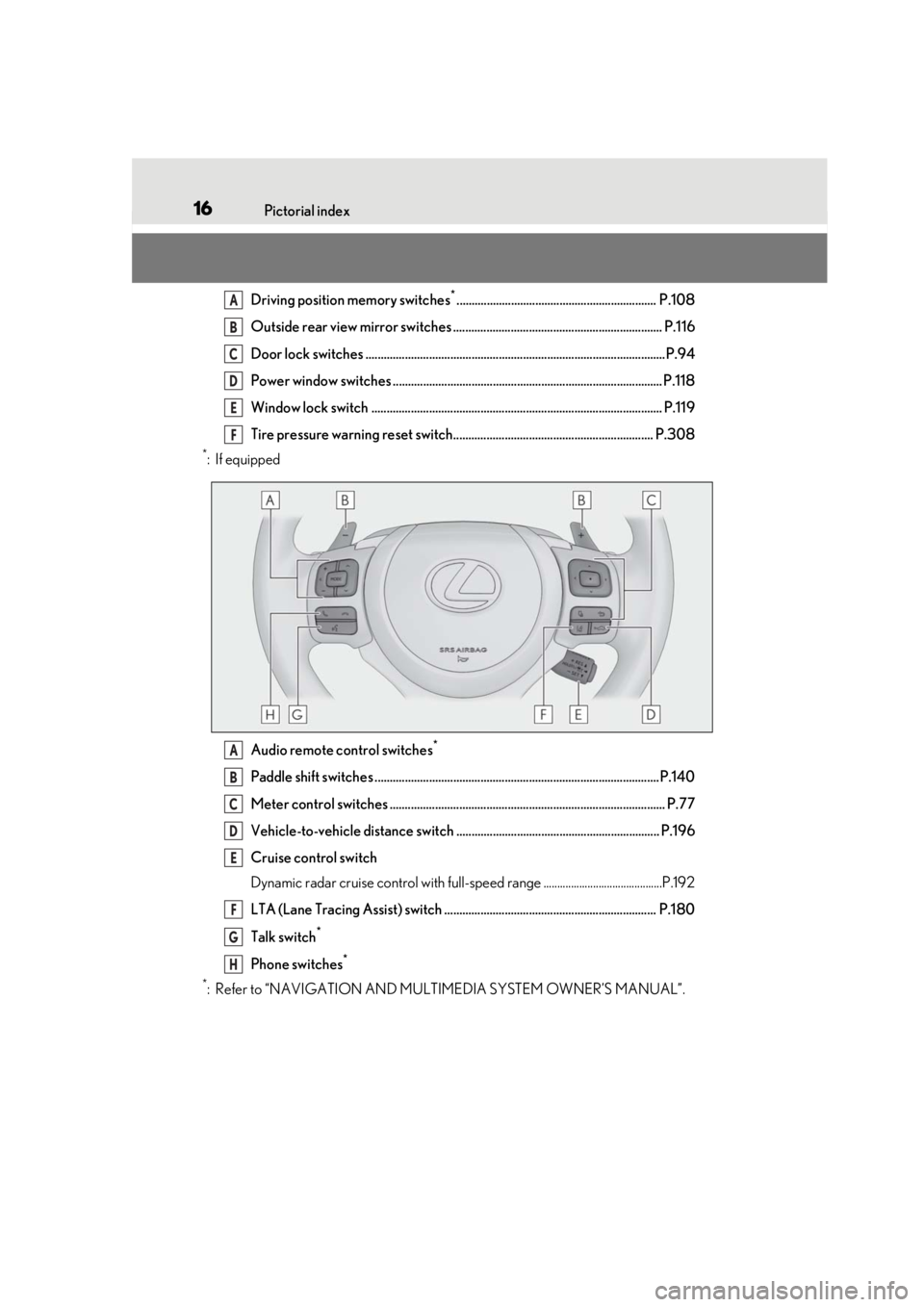
Driving position memory switches*.................................................................. P.108
Outside rear view mirror switches ..................................................................... P.116
Door lock switches ...................................................................................................P.94
Power window switches ......................................................................................... P.118
Window lock switch ................................................................................................ P.119
Tire pressure warning reset switch.................................................................. P.308
*:If equipped
Audio remote control switches
*
Paddle shift switches ..............................................................................................P.140
Meter control switches ........................................................................................... P.77
Vehicle-to-vehicle distance switch ................................................................... P.196
Cruise control switch
Dynamic radar cruise control with full-spee d range ...........................................P.192
LTA (Lane Tracing Assist) switch ...................................................................... P.180
Talk switch
*
Phone switches*
*
: Refer to “NAVIGATION AND MULTIMEDIA SYSTEM OWNER’S MANUAL”.
A
B
C
D
E
F
A
B
C
D
E
F
G
H
Page 81 of 436
812-1. Instrument cluster
2
Vehicle status information and indicators
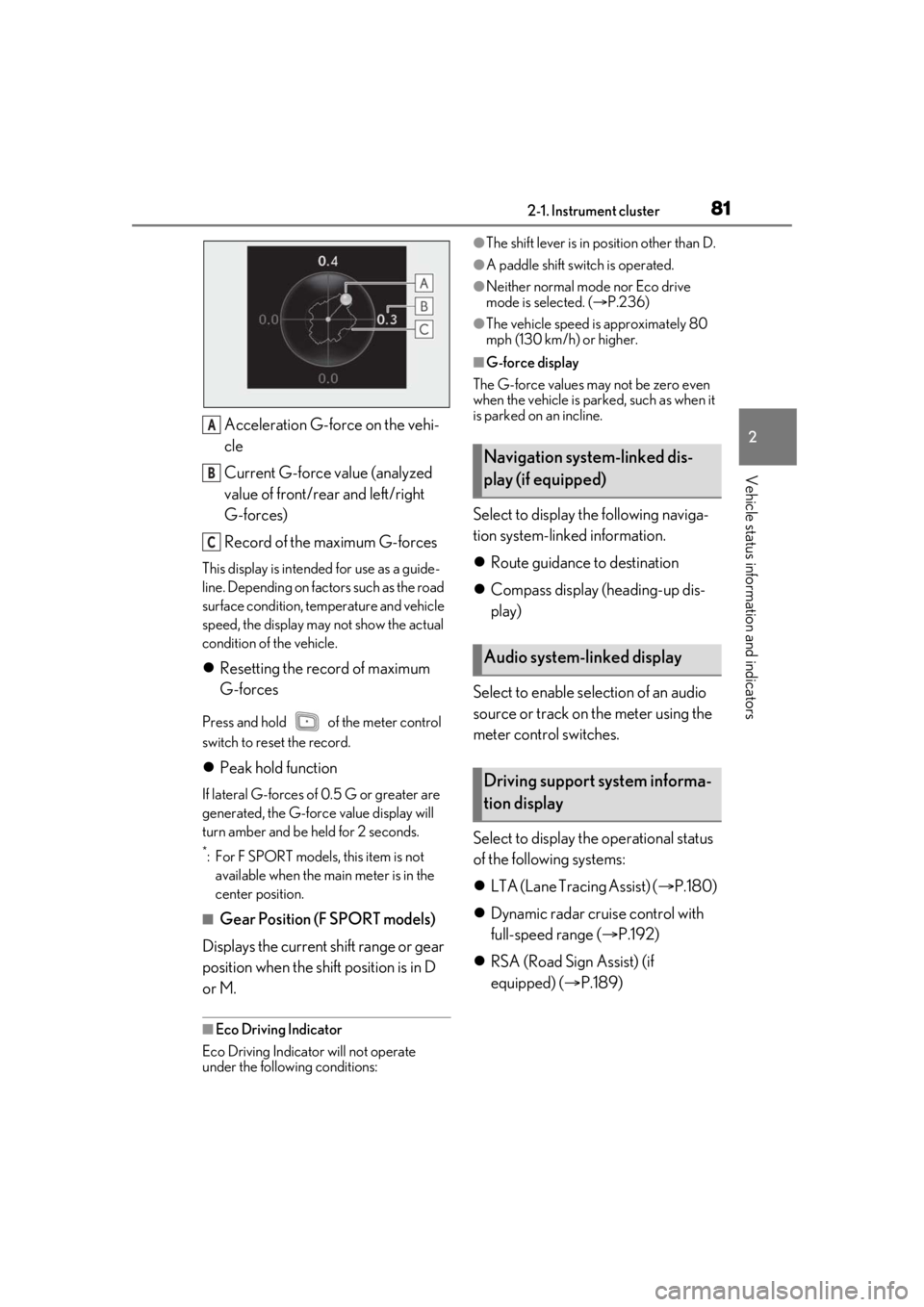
Acceleration G-force on the vehi-
cle
Current G-force value (analyzed
value of front/rear and left/right
G-forces)
Record of the maximum G-forces
This display is intended for use as a guide-
line. Depending on factors such as the road
surface condition, temperature and vehicle
speed, the display may not show the actual
condition of the vehicle.
Resetting the record of maximum
G-forces
Press and hold of the meter control
switch to reset the record.
Peak hold function
If lateral G-forces of 0.5 G or greater are
generated, the G-forc e value display will
turn amber and be held for 2 seconds.
*: For F SPORT models, this item is not available when the ma in meter is in the
center position.
■Gear Position (F SPORT models)
Displays the current shift range or gear
position when the shift position is in D
or M.
■Eco Driving Indicator
Eco Driving Indicator will not operate
under the following conditions:
●The shift lever is in position other than D.
●A paddle shift switch is operated.
●Neither normal mode nor Eco drive
mode is selected. ( P.236)
●The vehicle speed is approximately 80
mph (130 km/h) or higher.
■G-force display
The G-force values may not be zero even
when the vehicle is parked, such as when it
is parked on an incline.
Select to display the following naviga-
tion system-linked information.
Route guidance to destination
Compass display (heading-up dis-
play)
Select to enable se lection of an audio
source or track on the meter using the
meter control switches.
Select to display the operational status
of the following systems:
LTA (Lane Tracing Assist) ( P.180)
Dynamic radar cruise control with
full-speed range ( P.192)
RSA (Road Sign Assist) (if
equipped) ( P.189)
A
B
C
Navigation system-linked dis-
play (if equipped)
Audio system-linked display
Driving support system informa-
tion display
Page 123 of 436
123
4
4
Driving
Driving
.4-1. Before drivingDriving the vehicle ..................... 124
Cargo and luggage ................... 130
Vehicle load limits ...................... 132
Trailer towing ............................... 132
Dinghy towing ............................. 133
4-2. Driving procedures Engine (ignition) switch ........... 134
Automatic transmission........... 138
Turn signal lever.......................... 142
Parking brake .............................. 143
Brake Hold.................................... 146
ASC (Active Sound Control) ......................................................... 147
4-3. Operating the lights and wipers Headlight switch ......................... 149
AHB (Automatic High Beam) .......................................................... 151
Windshield wipers and washer ......................................................... 154
4-4. Refueling Opening the fuel tank cap....... 161
4-5. Using the driving support sys- tems
Lexus Safety System + 2.5 ..... 164
PCS (Pre-Collision System) ......................................................... 170
LTA (Lane Tracing Assist)...... 180
RSA (Road Sign Assist) ........... 189Dynamic radar cruise control with
full-speed range....................... 192
BSM (Blind Spot Monitor) .... 202
PKSA (Parking Support Alert) ....................................................... 208
Intuitive parking assist .............. 210
RCTA (Rear Cross Traffic Alert) function........................................ 216
PKSB (Parking Support Brake) ......................................................... 221
Parking Support Brake function (static objects) ......................... 226
Parking Support Brake function (rear-crossing vehicles) ...... 232
Driving mode select switch .. 236
Driving assist systems.............. 238
4-6. Driving tips Winter driving tips .................... 243
Page 142 of 436
1424-2. Driving procedures
is low.
When automatic transmission fluid
temperature is high.
When the needle of the tachometer
is in the red zone (the range which
exceeds the allowable revs of the
engine).
In the following situations, the gear will
not shift even if the shift lever or paddle
shift switches are operated.
“Slippery Road Cannot Shift to
Lower Gear” is displayed on the
multi-information display.
The vehicle speed is low (upshift
only).
■Downshifting restriction warning
buzzer
To help ensure safety and driving perfor-
mance, downshifting operation may some-
times be restricted. In some circumstances,
downshifting may not be possible even
when the shift lever or paddle shift switch is
operated. (A buzzer will sound twice.)
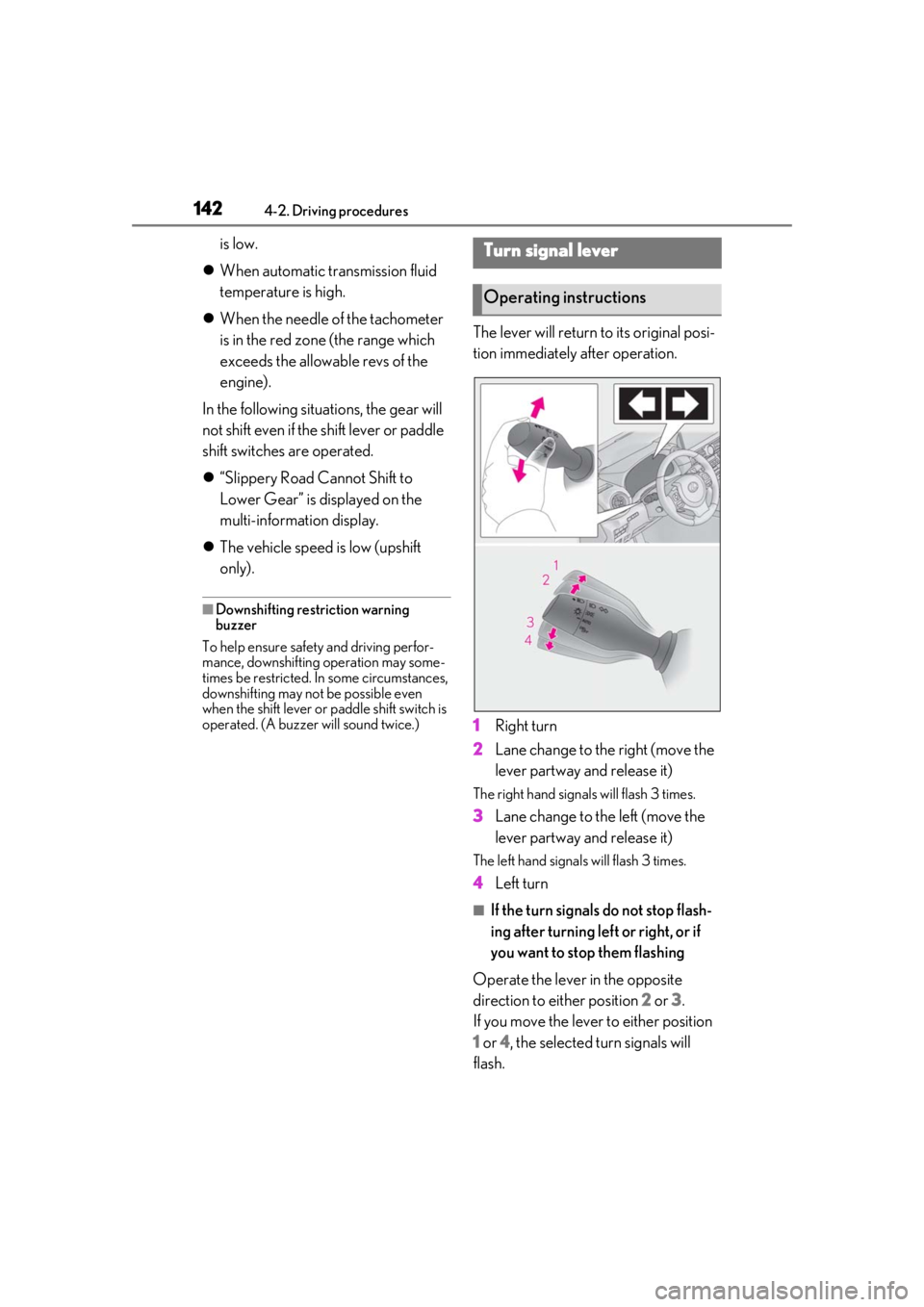
The lever will return to its original posi-
tion immediately after operation.
1 Right turn
2 Lane change to the right (move the
lever partway and release it)
The right hand signals will flash 3 times.
3Lane change to the left (move the
lever partway and release it)
The left hand signals will flash 3 times.
4Left turn
■If the turn signals do not stop flash-
ing after turning left or right, or if
you want to stop them flashing
Operate the lever in the opposite
direction to either position 2 or 3.
If you move the lever to either position
1 or 4, the selected turn signals will
flash.
Turn signal lever
Operating instructions
Page 143 of 436
1434-2. Driving procedures
4
Driving
■Turn signals can be operated when
The engine switch is in IGNITION ON
mode.
■If the indicator flashes faster than usual
Check that a light bulb in the front or rear
turn signal lights has not burned out.
■If the turn signals stop flashing before a
lane change has been performed
Operate the lever again.
■Customization
Some functions can be customized.
( P.394)
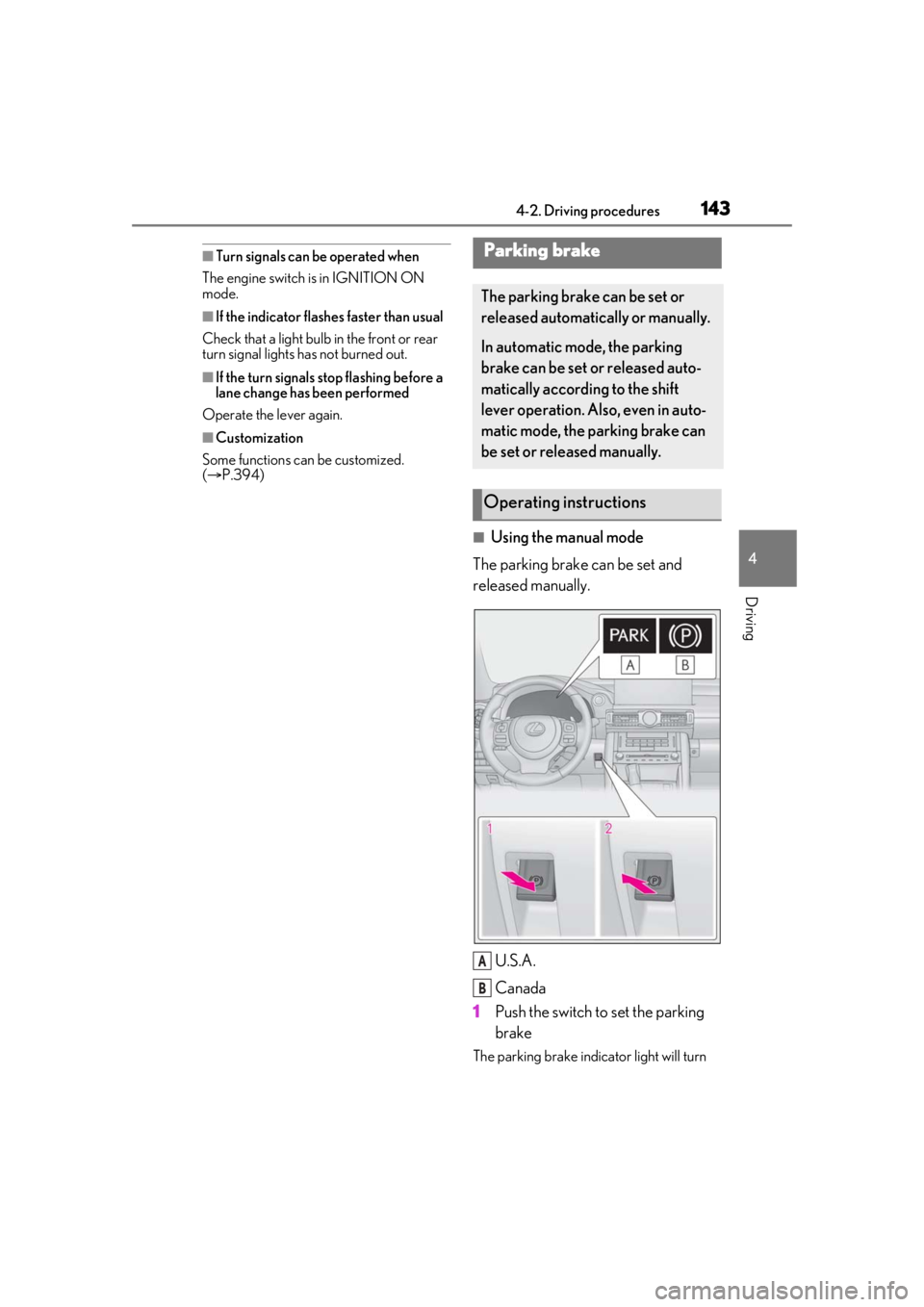
■Using the manual mode
The parking brake can be set and
released manually.
U.S.A.
Canada
1 Push the switch to set the parking
brake
The parking brake indi cator light will turn
Parking brake
The parking brake can be set or
released automatically or manually.
In automatic mode, the parking
brake can be set or released auto-
matically according to the shift
lever operation. Also, even in auto-
matic mode, the parking brake can
be set or released manually.
Operating instructions
A
B
Page 151 of 436

1514-3. Operating the lights and wipers
4
Driving
1Press the Automatic High Beam
switch.
2 Turn the headlight switch to the
or position.
When the headlight swit ch lever is in the original position, the Automatic High
Beam system will be enabled and the
Automatic High Beam indicator will illumi-
nate.
■Conditions to turn the high beams on/off
automatically
●When all of the follo
wing conditions are
met, the high beams will be turned on
automatically (after approximately 1 sec-
ond):
• The vehicle speed is approximately 21 mph (34 km/h) or more.
• The area ahead of the vehicle is dark.
• There are no vehicles ahead with head- lights or tail lights turned on.
• There are few streetlights on the road ahead.
●If any of the following conditions is met,
the high beams will turn off automatically:
• The vehicle speed is below approxi-
mately 17 mph (27 km/h).
• The area ahead of the vehicle is not dark.
• Vehicles ahead have their headlights or
tail lights turned on.
• There are many streetlights on the road ahead.
■Camera sensor dete ction information
●The high beams may not be automatically
turned off in the following situations:
• When a vehicle suddenly appears from around a curve
• When the vehicle is cut in front of by another vehicle
• When vehicles ahead cannot be detected due to repeated curves, road
dividers or roadside trees
• When vehicles ahead appear in a far- away lane on a wide road
• When the lights of vehicles ahead are not
on
AHB (Automatic High
Beam)
The Automatic High Beam uses a
camera sensor located behind the
upper portion of the windshield to
assess the brightness of the lights of
vehicles ahead, streetlights, etc.,
and automatically turns the high
beams on or off as necessary.
WARNING
■Limitations of the Automatic High
Beam
Do not overly rely on the Automatic High
Beam. Always drive sa fely, taking care to
observe your surroundings and turning
the high beams on or off manually if nec-
essary.
■To prevent incorrect operation of the
Automatic High Beam system
Do not overload the vehicle.
Activating the Automatic High
Beam
Page 164 of 436

1644-5. Using the driving support systems
4-5.Using the driving support systems
■PCS (Pre-Collision System)
P.170
■LTA (Lane Tracing Assist)
P.180
■AHB (Automatic High Beam)
P.151
■RSA (Road Sign Assist)*
P.189
*:If equipped
■Dynamic radar cruise control with
full-speed range
P.192 Two types of sensors, located behind
the front grille and windshield, detect
information necessary to operate the
drive assist systems.
Radar sensor
Front camera
Lexus Safety System + 2.5
The Lexus Safety System + 2.5 con-
sists of the following drive assist sys-
tems and contributes to a safe and
comfortable driving experience:
Driving assist system
WARNING
■Lexus Safety System + 2.5
The Lexus Safety System + 2.5 is
designed to operate under the assump-
tion that the driver wi ll drive safely, and is
designed to help reduce the impact to
the occupants and the vehicle in the case
of a collision or assist the driver in normal
driving conditions.
As there is a limit to the degree of recog-
nition accuracy and control performance
that this system can provide, do not
overly rely on this system. The driver is
always responsible for paying attention
to the vehicle’s surro undings and driving
safely.
Sensors
WARNING
■To avoid malfunction of the radar sen-
sor
Observe the following precautions.
Otherwise, the radar sensor may not
operate properly, possibly leading to an
accident resulting in death or serious
injury.
A
B
Page 170 of 436

1704-5. Using the driving support systems
The system can detect the following
(The detectable objects differs
depending on the function.):
Vehicles
Bicyclists
Pedestrians
■Pre-collision warning
When the system determines that the
possibility of a frontal collision is high, a
buzzer will sound and a warning mes- sage will be displayed on the
multi-information display to urge the
driver to take evasive action.
■Pre-collision brake assist
When the system determines that the
possibility of a frontal collision is high,
the system applies greater braking
force in relation to how strongly the
brake pedal is depressed.
■Pre-collision braking
If the system determines that the possi-
bility of a frontal collision is extremely
high, the brakes are automatically
applied to help avoid the collision or
reduce the impact of the collision.
■Emergency steering assist
If the system determines that the possi-
bility of a frontal collision is high and
that there is sufficient space for the
vehicle to be steered into within its
lane, and the driver has begun evasive
maneuver or steering, emergency
steering assist will assist the steering
movements to help enhance the vehi-
cle stability and for lane departure pre-
vention. During operation, the
indicator will illuminate in green.
PCS (Pre-Collision System)
The pre-collision system uses a
radar sensor and front camera to
detect objects ( P.170) in front of
the vehicle. When the system
determines that the possibility of a
frontal collision with an object is
high, a warning operates to urge
the driver to take evasive action
and the potential brake pressure is
increased to help the driver avoid
the collision. If the system deter-
mines that the possibility of a frontal
collision with an object is extremely
high, the brakes are automatically
applied to help avoid the collision or
help reduce the impact of the colli-
sion.
The pre-collision system can be dis-
abled/enabled and the warning tim-
ing can be changed. ( P.173)
Detectable objects
System functions
Page 172 of 436
1724-5. Using the driving support systems
WARNING
• Conditions under which the system may not operate properly:
P.177
●Do not attempt to test the operation of
the pre-collision system yourself.
Depending on the objects used for
testing (dummies, cardboard objects
imitating detectable objects, etc.), the
system may not operate properly, pos-
sibly leading to an accident.
■Pre-collision braking
●When the pre-collision braking func-
tion is operating, a large amount of
braking force will be applied.
●If the vehicle is stopped by the opera-
tion of the pre-collision braking func-
tion, the pre-collision braking function
operation will be canceled after
approximately 2 seco nds. Depress the
brake pedal as necessary.
●The pre-collision braking function may
not operate if certain operations are
performed by the driver. If the acceler-
ator pedal is being depressed strongly
or the steering wheel is being turned,
the system may determine that the
driver is taking evasive action and pos-
sibly prevent the pre-collision braking
function from operating.
●In some situations, while the pre-colli-
sion braking function is operating,
operation of the function may be can-
celed if the accelerator pedal is
depressed strongly or the steering
wheel is turned and the system deter-
mines that the driver is taking evasive
action.
●If the brake pedal is being depressed,
the system may determine that the
driver is taking evasive action and pos-
sibly delay the operation timing of the
pre-collision braking function.
■Emergency steering assist
●As emergency steering assist opera-
tion will be canceled when the system
determines that lane departure pre-
vention function ha s been completed.
●Emergency steering assist may not
operate or may be canceled in the fol-
lowing cases as the system may deter-
mine the driver is taking actions.
• If the accelerator pedal is being depressed strongly, the steering wheel
is being operated sharply, the brake
pedal is being depressed or the turn
signal lever is being operated. In this
case, the system may determine that
the driver is taking evasive action and
the emergency steering assist may not
operate.
• In some situations, while the emer- gency steering assist is operating,
operation of the function may be can-
celed if the accelerator pedal is
depressed strongly, the steering wheel
is operated sharply or the brake pedal
is being depressed and the system
determines that the driver is taking
evasive action.
• When the emergency steering assist is operating, if the stee ring wheel is held
firmly or is operated in the opposite
direction to that which the system is
generating torque, the function may be
canceled.
■When to disable the pre-collision sys-
tem
In the following situations, disable the
system, as it may not operate properly,
possibly leading to an accident resulting
in death or serious injury:
●When the vehicle is being towed
●When your vehicle is towing another
vehicle
●When transporting the vehicle via
truck, boat, train or similar means of
transportation