shade LEXUS IS300 2021 Owners Manual
[x] Cancel search | Manufacturer: LEXUS, Model Year: 2021, Model line: IS300, Model: LEXUS IS300 2021Pages: 436, PDF Size: 8.27 MB
Page 15 of 436
15Pictorial index
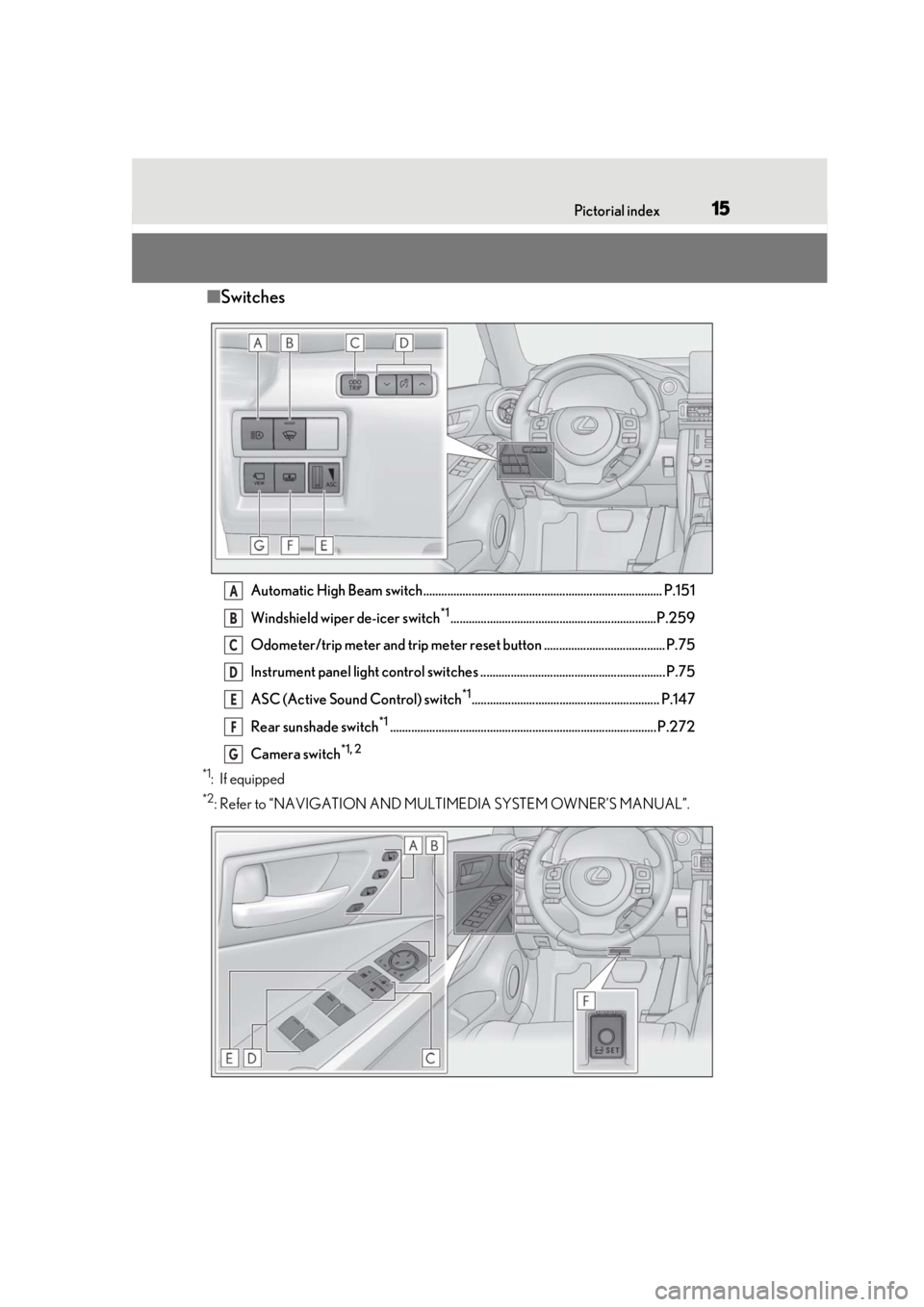
■Switches
Automatic High Beam switch............................................................................... P.151
Windshield wiper de-icer switch
*1....................................................................P.259
Odometer/trip meter and trip meter reset button ........................................ P.75
Instrument panel light control switches ............................................................. P.75
ASC (Active Sound Control) switch
*1.............................................................. P.147
Rear sunshade switch
*1........................................................................................ P.272
Camera switch
*1, 2
*1
: If equipped
*2: Refer to “NAVIGATION AND MULTIMEDIA SYSTEM OWNER’S MANUAL”.
A
B
C
D
E
F
G
Page 121 of 436
1213-5. Opening, closing the windows and moon roof
3
Before driving
*: Lightly press either way of the moon roof
switch to stop the moon roof partway.
■The moon roof can be operated when
The engine switch is in IGNITION ON
mode.
■Operating the moon roof after turning
the engine off
The moon roof can be operated for approx-
imately 45 seconds after the engine switch
is turned to ACCESSORY mode or turned
off. It cannot, however, be operated once
either front door is opened.
■Jam protection function
If an object is detected between the moon
roof and the frame while the moon roof is
closing or tilting down, travel is stopped and
the moon roof opens slightly.
■Sunshade
The sunshade can be opened and closed
manually. However, the sunshade will open
automatically when the moon roof is
opened.
■Door lock linked moon roof operation
●The moon roof can be opened and
closed using the mechanical key.*
( P.360)
●The moon roof can be opened using the
wireless remote control.* ( P.92)
*: These settings must be customized at
your Lexus dealer.
■When the moon roof does not close nor-
mally
Perform the following procedure:
●If the moon roof closes but then re-opens
slightly
1 Stop the vehicle.
2 Press and hold the “CLOSE” switch.
*1
The moon roof will close, reopen and pause
for approximately 10 seconds.*2 Then it will
close again, tilt up and pause for approxi-
mately 1 second. Finally, it will tilt down,
open and close. 3
Check to make sure that the moon roof
is completely closed and then release
the switch.
●If the moon roof tilts down but then tilts
back up
1 Stop the vehicle.
2 Press and hold the “UP” switch
*1 until
the moon roof moves into the tilt up
position and stops.
3 Release the “UP” switch once and then
press and hold the “UP” switch again.
*1
The moon roof will pause for approximately
10 seconds in the tilt up position.*2 Then it
will adjust slightly and pause for approxi-
mately 1 second. Finally, it will tilt down,
open and close.
4 Check to make sure that the moon roof
is completely closed and then release
the switch.
*1: If the switch is rele ased at the incorrect
time, the procedure will have to be per-
formed again from the beginning.
*2: If the switch is released after the above mentioned 10 second pause, automatic
operation will be disabled. In that case,
press and hold the “CLOSE” or “UP”
switch, and the moon roof will tilt up and
pause for approximately 1 second. Then
it will tilt down, open and close. Check
to make sure that the moon roof is com-
pletely closed and then release the
switch.
If the moon roof does not fully close even
after performing the above procedure cor-
rectly, have the vehicle inspected by your
Lexus dealer.
■Moon roof open warning buzzer
A buzzer sounds and a message is shown
on the multi-informat ion display in the
instrument cluster when the engine switch
is turned off and the driver’s door is opened
with the moon roof open.
■Customization
Some functions can be customized.
( P.394)
Page 165 of 436

1654-5. Using the driving support systems
4
Driving
WARNING
●Keep the radar sensor and the radar
sensor cover clean at all times.
Radar sensor
Radar sensor cover
If the front of the rada r sensor or the front
or back of the radar sensor cover is dirty
or covered with water droplets, snow,
etc., clean it.
Clean the radar sensor and radar sensor
cover with a soft cloth to avoid damaging
them.
●Do not attach accessories, stickers
(including transpar ent stickers) or
other items to the radar sensor, radar
sensor cover or surrounding area.
●Do not subject the radar sensor or its
surrounding area to a strong impact.
If the radar sensor, front grille, or front
bumper has been subjected to a
strong impact, have the vehicle
inspected by your Lexus dealer.
●Do not disassemble the radar sensor.
●Do not modify or paint the radar sen-
sor or radar sensor cover.
●In the following cases, the radar sensor
must be recalibrated. Contact your
Lexus dealer for details.
• When the radar sensor or front grille are removed and installed, or replaced
• When the front bumper is replaced
A
B
■To avoid malfunction of the front cam-
era
Observe the following precautions.
Otherwise, the front camera may not
operate properly, possibly leading to an
accident resulting in death or serious
injury.
●Keep the windshield clean at all times.
• If the windshield is dirty or covered with an oily film, water droplets, snow,
etc., clean the windshield.
• If a glass coating agent is applied to the windshield, it will still be necessary to
use the windshield wipers to remove
water droplets, etc. from the area of
the windshield in front of the front
camera.
• If the inner side of the windshield where the front camera is installed is
dirty, contact your Lexus dealer.
●Do not attach objects, such as stickers,
transparent stickers, etc., to the outer
side of the windshield in front of the
front camera (shaded area in the illus-
tration).
From the top of the windshield to
approximately 0.4 in. (1 cm) below
the bottom of the front camera
Approximately 7.9 in. (20 cm)
(Approximately 4.0 in. [10 cm] to the
right and left from the center of the
front camera)
A
B
Page 168 of 436
1684-5. Using the driving support systems
■If a warning message is displayed on the multi-information display
A system may be temporarily unavailable or there may be a malfunction in the system.
●In the following situations, perform the actions specified in the table. When the normal
operating conditions are detected, the message will disappear and the system will
become operational.
If the message does not disappea r, contact your Lexus dealer.
SituationActions
When the area around a camera is covered
with dirt, moisture (fogged up, covered with
condensation, ice, etc.), or other foreign
matterUsing the wiper and A/C function, remove
the dirt and other attached matter.
( P.255)
When the temperature around the front
camera is outside of the operational range,
such as when the vehicle is in the sun or in an
extremely cold environment
If the front camera is hot, such as after the
vehicle had been parked in the sun, use the
air conditioning system to decrease the tem-
perature around the front camera.
If a sunshade was used when the vehicle
was parked, depending on its type, the sun-
light reflected from the surface of the sun-
shade may cause the temperature of the
front camera to become excessively high.
If the front camera is cold, such after the
vehicle is parked in an extremely cold envi-
ronment, use the air conditioning system to
increase the temperature around the front
camera.
Page 178 of 436
1784-5. Using the driving support systems
radar sensor and front camera, prevent-
ing the system from operating properly:
• When a detectable object is approaching
your vehicle
• When your vehicle or a detectable object
is wobbling
• If a detectable object makes an abrupt maneuver (such as sudden swerving,
acceleration or deceleration)
• When your vehicle approaches a detect- able object rapidly
• When a detectable object is not directly
in front of your vehicle
• When a detectable object is near a wall, fence, guardrail, manhole cover, vehicle,
steel plate on the road, etc.
• When a detectable object is under a
structure
•When part of a detect able object is hid-
den by an object, such as large baggage,
an umbrella, or guardrail
• When there are many things which can reflect the radio waves of the radar in the
vicinity (tunnels, truss bridges, gravel
roads, snow covered road that have
tracks, etc.)
• When there is an effect on the radio waves to the radar that is installed on
another vehicle
• When multiple dete ctable objects are
close together
• If the sun or other light is shining directly
on a detectable object
• When a detectable object is a shade of white and looks extremely bright
• When a detectable object appears to be nearly the same color or brightness as its
surroundings
• If a detectable object cuts or suddenly
emerges in front of your vehicle
• When the front of your vehicle is hit by water, snow, dust, etc.
• When a very bright light ahead, such as the sun or the headlights of oncoming traffic, shines direct
ly into the front cam-
era
• When approaching the side or front of a
vehicle ahead
• If a vehicle ahead is a motorcycle
• If a vehicle ahead is narrow, such as a per- sonal mobility vehicle
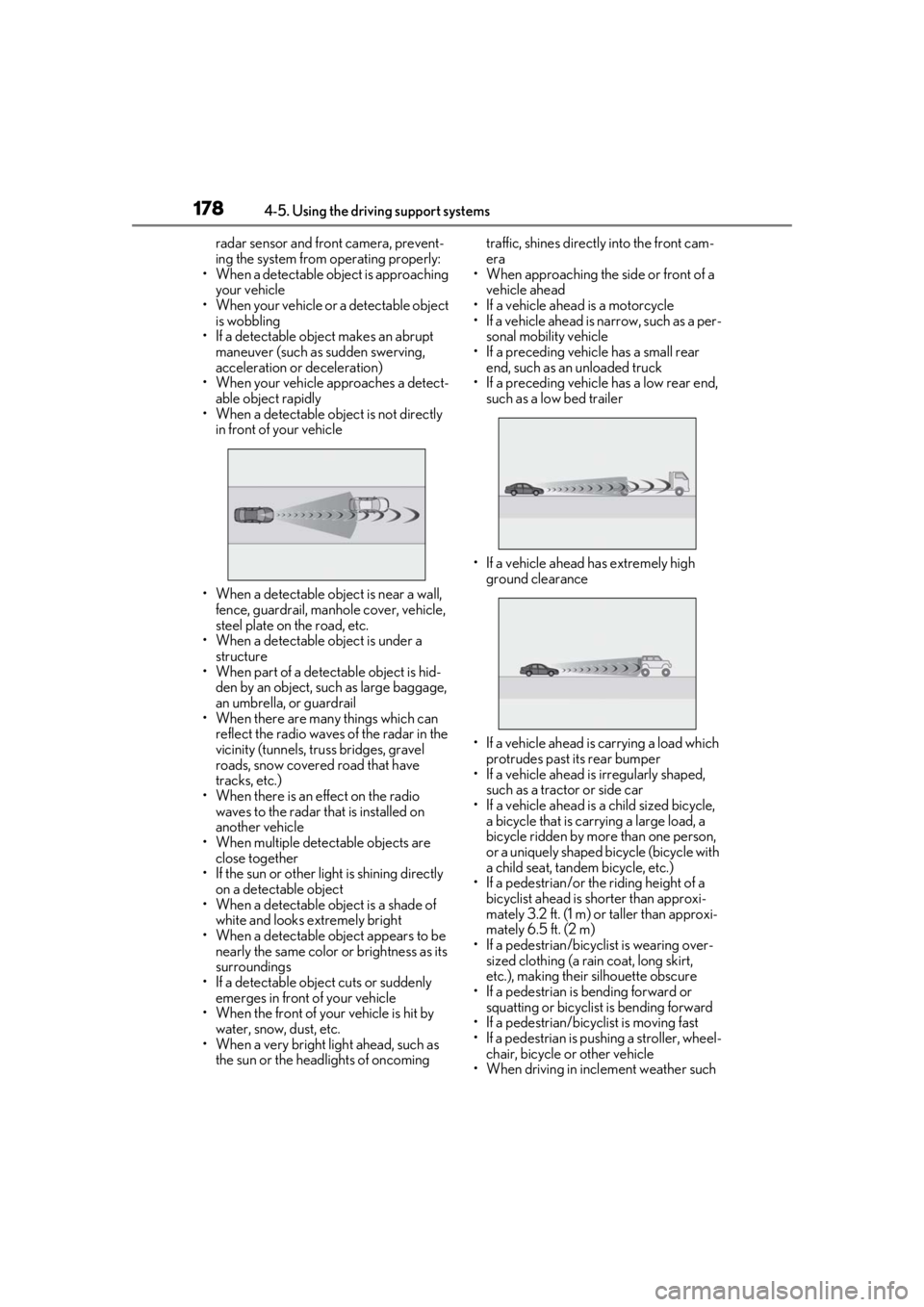
• If a preceding vehicle has a small rear end, such as an unloaded truck
• If a preceding vehicle has a low rear end, such as a low bed trailer
• If a vehicle ahead has extremely high ground clearance
• If a vehicle ahead is carrying a load which protrudes past its rear bumper
• If a vehicle ahead is irregularly shaped,
such as a tractor or side car
• If a vehicle ahead is a child sized bicycle, a bicycle that is carrying a large load, a
bicycle ridden by more than one person,
or a uniquely shaped bicycle (bicycle with
a child seat, tandem bicycle, etc.)
• If a pedestrian/or the riding height of a bicyclist ahead is shorter than approxi-
mately 3.2 ft. (1 m) or taller than approxi-
mately 6.5 ft. (2 m)
• If a pedestrian/bicyclist is wearing over- sized clothing (a rain coat, long skirt,
etc.), making their silhouette obscure
• If a pedestrian is bending forward or squatting or bicyclist is bending forward
• If a pedestrian/bicyclist is moving fast
• If a pedestrian is pushing a stroller, wheel-
chair, bicycle or other vehicle
• When driving in incl ement weather such
Page 272 of 436
2725-5. Using the other interior features
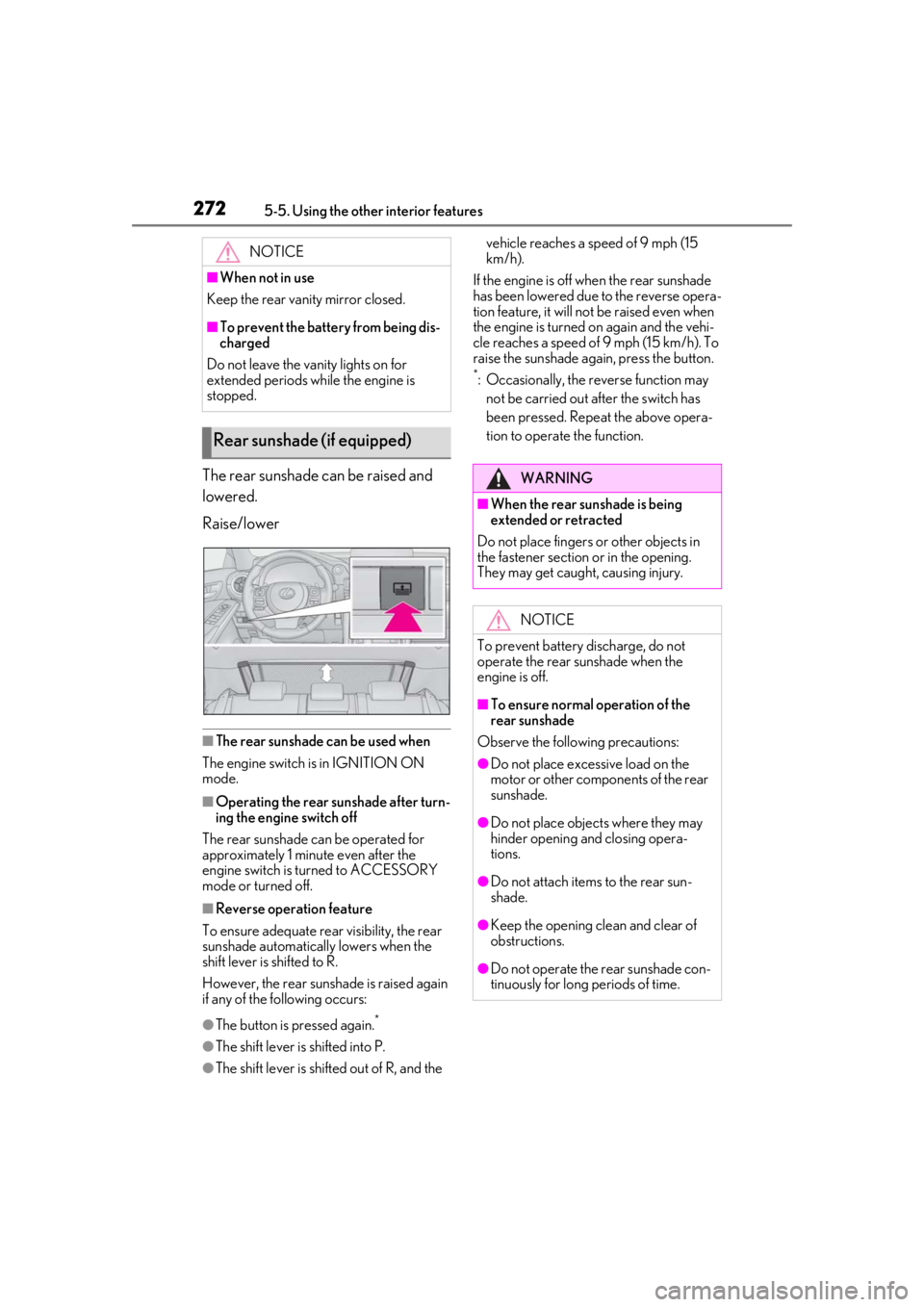
The rear sunshade can be raised and
lowered.
Raise/lower
■The rear sunshade can be used when
The engine switch is in IGNITION ON
mode.
■Operating the rear sunshade after turn-
ing the engine switch off
The rear sunshade can be operated for
approximately 1 minute even after the
engine switch is turned to ACCESSORY
mode or turned off.
■Reverse operation feature
To ensure adequate rear visibility, the rear
sunshade automatically lowers when the
shift lever is shifted to R.
However, the rear suns hade is raised again
if any of the following occurs:
●The button is pressed again.*
●The shift lever is shifted into P.
●The shift lever is shifted out of R, and the vehicle reaches a speed of 9 mph (15
km/h).
If the engine is off when the rear sunshade
has been lowered due to the reverse opera-
tion feature, it will not be raised even when
the engine is turned on again and the vehi-
cle reaches a speed of 9 mph (15 km/h). To
raise the sunshade again, press the button.
*: Occasionally, the reverse function may not be carried out after the switch has
been pressed. Repeat the above opera-
tion to operate the function.
NOTICE
■When not in use
Keep the rear vani ty mirror closed.
■To prevent the battery from being dis-
charged
Do not leave the vanity lights on for
extended periods while the engine is
stopped.
Rear sunshade (if equipped)
WARNING
■When the rear sunshade is being
extended or retracted
Do not place fingers or other objects in
the fastener section or in the opening.
They may get caught, causing injury.
NOTICE
To prevent battery discharge, do not
operate the rear sunshade when the
engine is off.
■To ensure normal operation of the
rear sunshade
Observe the following precautions:
●Do not place excessive load on the
motor or other components of the rear
sunshade.
●Do not place objects where they may
hinder opening and closing opera-
tions.
●Do not attach items to the rear sun-
shade.
●Keep the opening clean and clear of
obstructions.
●Do not operate the rear sunshade con-
tinuously for long periods of time.
Page 284 of 436
2846-1. Maintenance and care
WARNING
■Water in the vehicle
●Do not splash or spill liquid in the vehi-
cle.
Doing so may cause electrical compo-
nents, etc. to malfunction or catch fire.
●Do not get any of the SRS components
or wiring in the vehicle interior wet.
( P.28)
An electrical malfunction may cause
the airbags to deploy or not function
properly, resulting in death or serious
injury.
■Cleaning the interior (especially
instrument panel)
Do not use polish wax or polish cleaner.
The instrument panel may reflect off the
windshield, obstructing the driver’s view
and leading to an accident, resulting in
death or serious injury.
NOTICE
■Cleaning detergents
●Do not use the following liquids, as
they may discolor the vehicle interior
or cause streaks or damage to painted
surfaces:
• Audio system screen: Organic sub- stances such as benzine or gasoline,
alkaline solutions, and alcohol
• Seats: Alkaline solutions, organic sub- stances such as thinner or benzine,
and alcohol
• Other parts: Organic substances such as benzine or gasoline, alkaline or
acidic solutions, dye, and bleach
●Do not use polish wax or polish
cleaner. The instrument panel’s or
other interior part’s painted surface
may be damaged.
■Preventing damage to leather sur-
faces
Observe the following precautions to
avoid damage to and deterioration of
leather surfaces:
●Remove any dust or dirt from leather
surfaces immediately.
●Do not expose the vehicle to direct
sunlight for extended periods of time.
Park the vehicle in the shade, espe-
cially during summer.
●Do not place items made of vinyl, plas-
tic, or containing wax on the uphol-
stery, as they may stick to the leather
surface if the vehicle interior heats up
significantly.
■Water on the floor
Do not wash the vehicle floor with water.
Vehicle systems such as the audio system
may be damaged if water comes into
contact with electrical components such
as the audio system above or under the
floor of the vehicle. Water may also
cause the body to rust.
■When cleaning the inside of the wind-
shield
Do not allow glass cleaner to contact the
lens. Also, do not touch the lens.
(
P.164)
■Cleaning the inside of the rear win-
dow
●Do not use glass cleaner to clean the
rear window, as this may cause dam-
age to the rear window defogger
heater wires or antenna. Use a cloth
dampened with lukewarm water to
gently wipe the window clean. Wipe
the window in strokes running parallel
to the heater wires or antenna.
●Be careful not to scratch or damage
the heater wires or antenna.
Page 285 of 436
2856-1. Maintenance and care
6
Maintenance and care
Remove dirt using a soft cloth or
synthetic chamois dampened in a
baking soda (sodium bicarbonate)
solution.
Use a solution of approximately 9% baking
soda dissolved in water.
Wipe the surface with a dry, soft
cloth to remove any remaining
moisture.
Remove dirt and dust using a vac-
uum cleaner.
Wipe off any excess dirt and dust
with a soft cloth dampened with
diluted detergent.
Use a diluted water so lution of approxi-
mately 5% neutral wool detergent.
Wring out any excess water from
the cloth and thoroughly wipe off all
remaining traces of detergent.
Wipe the surface with a dry, soft
cloth to remove any remaining
moisture. Allow the leather to dry in
a shaded and ventilated area.
■Caring for leather areas
Lexus recommends cleaning the interior of the vehicle at least twice a year to maintain
the quality of the vehicle’s interior.
Remove dirt and dust using a vac-
uum cleaner.
Wipe it off with a soft cloth damp-
ened with neutral detergent diluted
to approximately 1%.
Wring out any excess water from
the cloth and thoroughly wipe off
remaining traces of detergent and
water.
NOTICE
■Cleaning the front side windows
Do not use any compound or abrasive
product (e.g., glass cleaner, detergent,
wax) to clean the wi ndows. It may dam-
age the coating.
Cleaning the areas with satin-fin-
ish metal accents
Cleaning the leather areas
Cleaning the synthetic leather
areas
Page 428 of 436

428Alphabetical Index
Parking Support Brake function (for rear-crossing vehicles) .......................... 232Function .......................................................... 232
Parking Support Brake function (static objects) ......................................................... 226Function .......................................................... 226
PCS (Pre-Collision System) Function ............................................................170
PCS OFF switch .......................................... 173
Warning light ............................................... 342
Personal lights............................................... 263
PKSA (Parking Support Alert) ..............208
PKSB (Parking Support Brake)............... 221 Warning message..................................... 225
Power easy access system ....................... 108
Power outlets .................................................. 271
Power steering (Elect ric power steering
system).......................................................... 238 Warning light ...............................................340
Power window switch lights .................... 263
Power windows Door lock linked window operation... 119
Jam protection function............................. 118
Operation......................................................... 118
Window lock switch ................................... 119
Pre-Collision System (PCS) Function ............................................................170
PCS OFF switch .......................................... 173
Warning light ............................................... 342
R
Radar cruise control (dynamic radar cruise control with full-speed range)...............192
Radiator ...........................................................300
RCTA Function ............................................................ 216
Warning message....................................... 217
RCTA (Rear Cross Traffic Alert) .........208
RCTA function ............................................... 217
Rear Cross Traffic Alert (RCTA) ........... 216
Rear seats .........................................................107 Head restraints ................................................ 111 Rear side marker lights
Light switch .................................................... 149
Rear sunshades .............................................272
Rear turn signal lights Replacing light bulbs .................... 322, 323
Turn signal lever ...........................................142
Wattage ........................................................... 381
Rear view mirror Inside rear view mirror ............................... 114
Outside rear view mirrors........................ 116
Rear window defogger ............................. 255
Refueling Capacity ......................................................... 374
Fuel types ....................................................... 374
If the fuel filler do or cannot be opened
......................................................................... 359
Opening the fuel tank cap ....................... 161
Remote Touch .............................................. 248
Replacing Electronic key battery ............................... 316
Fuses.................................................................. 318
Light bulbs .......................................................321
Tires ..................................................................349
Resetting the message indicating mainte- nance is required ...................................... 286
Rev indicator .....................................................73
Rev peak..............................................................74
Road Sign Assist ........................................... 189
RSA (Road Sign Assist) ............................. 189
S
Seat belt reminder light............................. 340
Seat belts............................................................ 24 Automatic Locking Retractor................. 26
Child restraint system installation ......... 42
Cleaning and maintaining the seat belt..........................................................................283
Emergency Locking Retractor .............. 26
How to wear your seat belt ..................... 25
How your child should wear the seat belt ............................................................................. 25
Page 430 of 436

430Alphabetical Index
SunshadeRoof ......................................................................121
Switch ASC (Active Sound Control) dial ...... 147
Switches Activating the Automatic High Beam 151
Automatic High Beam system............... 151
Brake Hold switch ......................................146
Door lock switches ...................................... 94
Driving mode select switch .................. 236
Driving position memory switches .... 108
Dynamic radar cruise control with full-speed range switch ......................... 192
Emergency flashers switch ................... 328
Engine switch................................................. 134
Garage door opener switches .......... 273
Heated steering wheel switch...............261
Ignition switch................................................134
Instrument panel light control switches ............................................................................ 75
Intuitive parking assist switch...................211
Light switches ................................................149
LTA (Lane Tracing Assist) switch...... 185
Meter control switches ............................... 77
Moon roof switches ...................................120
“ODO TRIP” switch .................................... 75
Outside rear view mirror switches ...... 116
Paddle shift switches ......................... 140, 141
Parking brake switch ................................. 143
PCS OFF switch .......................................... 173
PKSB (Parking Support Brake) switch ........................................................................... 221
Power door lock switch ............................ 94
Power window switches ........................... 118
RCTA switch..................................................216
Rear sunshades switch ............................272
Rear window and outside rear view mir- ror defoggers switch ............................ 253
Seat heater switches .................................. 261
Seat ventilator switches ............................ 261
Snow mode switch .................................... 140
“SOS” button .................................................. 54 Tilt and telescopic steering control switch
............................................................................. 113
Tire pressure warning reset switch.. 308
Trunk opener main switch........................98
Trunk opener switch ................................... 97
Vehicle-to-vehicle di stance switch.....192
VSC OFF switch .......................................239
Window lock switch.................................... 119
Windshield wiper and washer switch154
Windshield wiper de-icer......................259
T
Tachometer................................................. 71, 72 Rev indicator ................................................... 73
Rev peak............................................................ 74
Tail lights Light switch .................................................... 149
Replacing light bulbs ................................ 322
The Secondary Collision Brake ............ 239
Theft deterrent system Alarm................................................................... 62
Engine immobilizer system......................60
Theft prevention labels ............................... 63
Tire inflation pressure Maintenance data ...................................... 379
Tire inflation pressure display function......................................................................... 305
Warning light .................................................341
Tire information ............................................ 384 Glossary ........................................................ 388
Size ................................................................... 386
Tire identification number..................... 385
Uniform Tire Quality Grading ............387
Tire pressure display ... ...............................305
Tire pressure warning system Function ......................................................... 305
Initializing....................................................... 308
Installing tire pres sure warning valves
and transmitters.......................................307
Registering ID codes ................................ 310
Warning light .................................................341