fog light LEXUS IS300 2022 Owners Manual
[x] Cancel search | Manufacturer: LEXUS, Model Year: 2022, Model line: IS300, Model: LEXUS IS300 2022Pages: 440, PDF Size: 22.72 MB
Page 5 of 440
3TABLE OF CONTENTS
1
2
3
4
5
6
7
8
9
Automatic transmission..............134
Turn signal lever............................. 138
Parking brake ................................. 139
Brake Hold....................................... 142
ASC (Active Sound Control) .. 144
4-3. Operating the lights and wipers Headlight switch ............................ 145
AHB (Automatic High Beam) ............................................................ 147
Windshield wipers and washer ............................................................ 150
4-4. Refueling Opening the fuel tank cap......... 157
4-5. Using the driving support systems Lexus Safety System + 2.5 ........ 160
PCS (Pre-Collision System)..... 165
LTA (Lane Tracing Assist)......... 175
RSA (Road Sign Assist) .............. 184
Dynamic radar crui se control with
full-speed range .......................... 187
BSM (Blind Spot Monitor) ........ 197
PKSA (Parking Support Alert) ............................................................ 201
Intuitive parking assist ................ 203
RCTA (Rear Cross Traffic Alert) function ........................................... 210
PKSB (Parking Support Brake) ............................................................ 216
Parking Support Brake function (static objects) ............................ 222
Parking Support Brake function (rear-crossing vehicles).......... 225
Driving mode select switch...... 227
Driving assist systems................. 229
4-6. Driving tips Winter driving tips ....................... 2345-1. Remote Touch/Display
Remote Touch............................... 238
Center Display.............................. 240
5-2. Using the air conditioning system and defogger
Automatic air conditioning system.......................................................... 243
Heated steering wheel/seat heat- ers/seat ventilators..................... 251
5-3. Using the interior lights Interior lights list ........................... 253
5-4. Using the storage features List of storag e features .............. 256
Trunk features ............................... 258
5-5. Using the other interior features Other interior features .............. 260
Garage door opener ................. 263
6-1. Maintenance and care Cleaning and protecting the vehi-cle exterior................................... 270
Cleaning and protecting the vehi- cle interior .....................................274
6-2. Maintenance Maintenance re quirements .....278
General maintenance................ 279
Emission inspection and mainte- nance (I/M) programs ............ 282
6-3. Do-it-yourself maintenance Do-it-yourself service precautions.......................................................... 283
Hood ................................................. 2855Interior features
6Maintenance and care
Page 13 of 440
11Pictorial index
Pictorial index
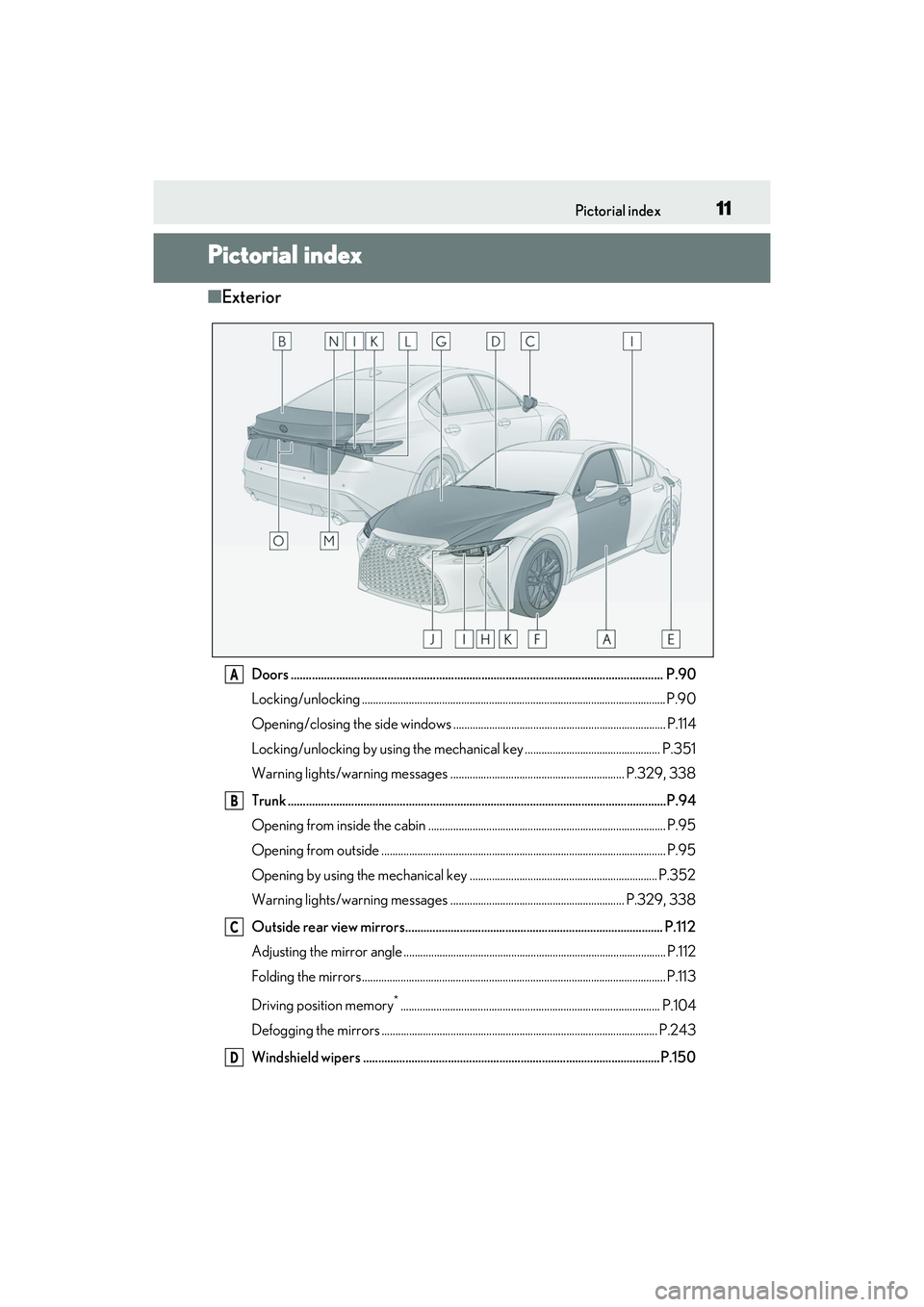
■Exterior
Doors .......................................................................................................................... .P.90
Locking/unlocking .............................................................................................................. P.90
Opening/closing the side windows ............................................................................. P.114
Locking/unlocking by using the mechanical key ................................................. P.351
Warning lights/warning messages ............................................................... P.329, 338
Trunk .......................................................................................................................... ...P.94
Opening from inside the cabin ...................................................................................... P.95
Opening from outside ....................................................................................................... P.95
Opening by using the mechanical key .................................................................... P.352
Warning lights/warning messages ............................................................... P.329, 338
Outside rear view mirrors..................................................................................... P.112
Adjusting the mirror angle ............................................................................................... P.112
Folding the mirrors ............................................................................................................ .. P.113
Driving position memory
*.............................................................................................. P.104
Defogging the mirrors .................................................................................................... P.243
Windshield wipers ..................................................................................................P.150
A
B
C
D
Page 16 of 440
14Pictorial index
Parking brake switch ............................................................................................. P.139
Applying/releasing ........................................................................................................... P.139
Precautions for winter season ......................... ............................................................ P.235
Warning buzzer/messages..........................................................................................P.338
Turn signal lever ......................................................................................................P.138
Headlight switch...................................................................................................... P.145
Headlights/parking lights/tail lights/daytime running lights ........................... P.145
Windshield wiper and washer switch ................................................................P.150
Usage.......................................................................................................................... ............ P.150
Adding washer fluid ......................................................................................................... P.2 96
Warning messages ..........................................................................................................P.338
Emergency flasher switch .................................................................................. P.320
Trunk opener ..............................................................................................................P.95
Hood lock release lever ...................................................................................... P.285
Tilt and telescopic steering control switch
*1...................................................P.109
Adjustment ..................................................................................................................... ...... P.109
Driving position memory
*1............................................................................................. P.104
Tilt and telescopic stee ring lock release lever
*1............................................P.109
Adjustment ..................................................................................................................... ...... P.109
Air conditioning system .......................................................................................P.243
Usage.......................................................................................................................... ........... P.243
Rear window defogger................................................................................................... P.243
Audio system
*2
Trunk opener main switch ...................................................................................... P.96
*1: If equipped
*2: Refer to “NAVIGATION AND MULT IMEDIA SYSTEM OWNER’S MANUAL”.
E
F
G
H
I
J
K
L
M
N
O
Page 114 of 440

1123-4. Adjusting the steering wheel and mirrors
1To select a mirror to adjust, press
the switch.
The indicator comes on.
Left
Right
Pressing the same switch again will put the
switch in neutral.
2To adjust the mirror, press the
switch.
Up
Right
Down
Left
■Mirror angle can be adjusted when
The engine switch is in ACCESSORY or
IGNITION ON mode.
■Defogging the mirrors
The outside rear view mirrors can be
cleared using the mirror defoggers. Turn on
the rear window defogger to turn on the
outside rear view mirror defoggers.
( P.243)
■Automatic adjustment of the mirror
angle (if equipped)
A desired mirror face angle can be entered
to memory and recalled automatically by
the driving position memory. ( P.104)
■Auto anti-glare function (if equipped)
When the anti-glare inside rear view mirror
is set to automatic mode, the outside rear
view mirrors will activate in conjunction with
the anti-glare inside rear view mirror to
reduce reflec ted light. (P.110)
■Linked mirror function when reversing
(if equipped)
When either “L” or “R ” of the mirror select
switch is selected, the outside rear view mir-
rors will automatically angle downwards
when the vehicle is reversing in order to
give a better view of the ground.
Outside rear view mirrors
The rear view mirror’s position can
be adjusted to enable sufficient
confirmation of the rear view.
WARNING
■Important points while driving
Observe the following precautions while
driving.
Failure to do so may result in loss of con-
trol of the vehicle and cause an accident,
resulting in death or serious injury.
●Do not adjust the mirrors while driving.
●Do not drive with the mirrors folded.
●Both the driver and passenger side
mirrors must be extended and prop-
erly adjusted before driving.
Adjustment procedure
A
B
A
B
C
D
Page 150 of 440

1484-3. Operating the lights and wipers
●The high beams may be turned off if a
vehicle ahead that is using fog lights with-
out its headlights turned on is detected.
●House lights, street lights, traffic signals,
and illuminated billboards or signs and
other reflective objects may cause the
high beams to change to the low beams,
or the low beams to remain on.
●The following factors may affect the
amount of time taken for the high beams
to turn on or off:
• The brightness of the headlights, fog lights, and tail lights of vehicles ahead
• The movement and direction of vehicles ahead
• When a vehicle ahead only has opera-
tional lights on one side
• When a vehicle ahead is a two-wheeled vehicle
• The condition of the road (gradient, curve, condition of th e road surface, etc.)
• The number of passengers and amount of
luggage in the vehicle
●The high beams may turn on or off unex-
pectedly.
●Bicycles or similar vehicles may not be
detected.
●In the following situations the system may
not be able to correctly detect the sur-
rounding brightness level. This may cause
the low beams to remain on or the high
beams to flash or dazzle pedestrians or
vehicles ahead. In such a case, it is neces-
sary to manually switch between the high
and low beams.
• When driving in inclement weather (heavy rain, snow, fo g, sandstorms, etc.)
• When the windshield is obscured by fog, mist, ice, dirt, etc.
• When the windshield is cracked or dam-
aged
• When the camera sensor is deformed or dirty
• When the temperature of the camera sensor is extremely high
• When the surrounding brightness level is equal to that of head lights, tail lights or
fog lights
• When headlights or tail lights of vehicles ahead are turned off, dirty, changing
color, or not aimed properly
• When the vehicle is hit by water, snow, dust, etc. from a preceding vehicle
• When driving through an area of inter- mittently changing brightness and dark-
ness
• When frequently and repeatedly driving
ascending/descending roads, or roads
with rough, bumpy or uneven surfaces
(such as stone-paved roads, gravel roads,
etc.)
• When frequently and repeatedly taking curves or driving on a winding road
• When there is a highly reflective object
ahead of the vehicle, such as a sign or
mirror
• When the back of a preceding vehicle is
highly reflective, such as a container on a
truck
• When the vehicle’s headlights are dam-
aged or dirty, or are not aimed properly
• When the vehicle is listing or titling due to a flat tire, a trailer being towed, etc.
• When the headlights are changed between the high beams and low beams
repeatedly in an abnormal manner
• When the driver believes that the high beams may be flashing or dazzling
pedestrians or other drivers
■Temporarily lowering sensor sensitivity
The sensitivity of the sensor can be tempo-
rarily lowered.
1 Turn the engine switch off while the fol-
lowing conditions are met.
●The headlight switch is in or .
●The headlight switch lever is in the origi-
nal position.
●Automatic High Beam switch is on.
2 Turn the engine switch to IGNITION
ON mode.
3 Within 60 seconds after step 2, repeat
pushing the headlight switch lever to the
high beam position then pulling it to the
original position quickly 10 times, then
leave the lever in the original position.
4 If the sensitivity is changed, the Auto-
matic High Beam indicator is turn on
and off 3 times.
Page 164 of 440

1624-5. Using the driving support systems
WARNING
●If the part of the windshield in front of
the front camera is fogged up or cov-
ered with condensation or ice, use the
windshield defogger to remove the
fog, condensation or ice. ( P.245)
●If water droplets cannot be properly
removed from the area of the wind-
shield in front of the front camera by
the windshield wipers, replace the
wiper insert or wiper blade.
●Do not attach window tint to the wind-
shield.
●Replace the windshield if it is damaged
or cracked.
After replacing the windshield, the
front camera must be recalibrated.
Contact your Lexus dealer for details.
●Do not allow liquids to contact the
front camera.
●Do not allow bright lights to shine into
the front camera.
●Do not dirty or damage the front cam-
era.
When cleaning the inside of the wind-
shield, do not allow glass cleaner to
contact the lens of the front camera.
Also, do not touch the lens.
If the lens is dirty or damaged, contact
your Lexus dealer.
●Do not subject the front camera to a
strong impact.
●Do not change the installation position
or direction of the front camera or
remove it.
●Do not disassemble the front camera.
●Do not modify any components of the
vehicle around the front camera
(inside rear view mirror, etc.) or ceiling.
●Do not attach any accessories to the
hood, front grille or front bumper that
may obstruct the front camera. Con-
tact your Lexus dealer for details.
●If a surfboard or other long object is to
be mounted on the roof, make sure
that it will not obstruct the front cam-
era.
●Do not modify the headlights or other
lights.
Page 165 of 440

1634-5. Using the driving support systems
4
Driving
■If a warning message is displayed on the multi-information display
A system may be temporarily unavailable or there may be a malfunction in the system.
●In the following situations, perform the actions specified in the table. When the normal
operating conditions are detected, the message will disappear and the system will
become operational.
If the message does not disappear, contact your Lexus dealer.
●In the following situations, if the situation ha s changed (or the vehicle has been driven for
some time) and the normal operating conditio ns are detected, the message will disappear
and the system will become operational.
If the message does not disappear, contact your Lexus dealer.
• When the temperature around the radar sensor is outside of the operational range, such as when the vehicle is in the sun or in an extremely cold environment
• When the front camera cannot detect objects in front of the vehicle, such as when driving
in the dark, snow, or fog, or when brig ht lights are shining into the front camera
• Depending on the conditions in the vicinity of the vehicle, the radar may judge the sur-
rounding environment can not be properly re cognized. In that case, “Pre-Collision Sys-
SituationActions
When the area around a camera is covered
with dirt, moisture (fogged up, covered with
condensation, ice, etc. ), or other foreign
matterUsing the wiper and A/C function, remove
the dirt and other attached matter.
( P.245)
When the temperature around the front
camera is outside of the operational range,
such as when the vehicle is in the sun or in an
extremely cold environment
If the front camera is hot, such as after the
vehicle had been parked in the sun, use the
air conditioning system to decrease the tem-
perature around the front camera.
If a sunshade was used when the vehicle
was parked, depending on its type, the sun-
light reflected from the surface of the sun-
shade may cause the temperature of the
front camera to become excessively high.
If the front camera is cold, such after the
vehicle is parked in an extremely cold envi-
ronment, use the air conditioning system to
increase the temperature around the front
camera.
The area in front of the front camera is
obstructed, such as when the hood is open
or a sticker is attached to the part of the
windshield in front of the front camera.
Close the hood, remove the sticker, etc. to
clear the obstruction.
When “Pre-Collision Sy stem Radar In Self
Calibration Unavailable See Owner’s Man-
ual” is displayed.Check whether there is attached materials
on the radar sensor and radar sensor cover,
and if there is, remove it.
Page 176 of 440

1744-5. Using the driving support systems
as heavy rain, fog, snow or a sandstorm
• When driving through steam or smoke
• When the surrounding area is dim, such as at dawn or dusk, or while at night or in
a tunnel, making a detectable object
appear to be nearly the same color as its
surroundings
• When driving in a place where the sur- rounding brightness changes suddenly,
such as at the entrance or exit of a tunnel
• After the engine has started the vehicle has not been driven for a certain amount
of time
• While making a left/right turn and for a few seconds after making a left/right turn
• While driving on a curve and for a few seconds after driving on a curve
• If your vehicle is skidding
• If the front of the vehicle is raised or low-
ered
• If the wheels are misaligned
• If a wiper blade is blocking the front cam- era
• The vehicle is being driven at extremely high speeds
• When driving on a hill
• If the radar sensor or front camera is mis-
aligned
• When driving in a traffic lane separated
by more than one lane where oncoming
vehicles are driving while making a
right/left turn
• When largely out of place with the oppo- site facing targeted oncoming vehicle
during a right/left turn • While making a right/left turn, when a
pedestrian approaches from behind or
side of your vehicle
●In addition to the above, in some situa-
tions, such as the following, the emer-
gency steering assist may not operate.
• When the white (yellow) lane lines are difficult to see, such as when they are
faint, diverging/merging, or a shadow is
cast upon them
• When the lane is wider or narrower than
normal
• When there is a light and dark pattern on the road surface, such as due to road
repairs
• When the target is too close
• When there is insufficient safe or unob- structed space for the vehicle to be
steered into
• If oncoming vehicle is present
• If VSC function is operating
●In some situations su ch as the following,
sufficient braking forc e or steering force
may not be obtained, preventing the sys-
tem from performing properly:
• If the braking functions cannot operate to their full extent, such as when the brake
parts are extremely cold, extremely hot,
or wet
• If the vehicle is not properly maintained (brakes or tires are excessively worn,
improper tire inflation pressure, etc.)
• When the vehicle is being driven on a gravel road or other slippery surface
• When the road surface has deep wheel tracks
• When driving on a hill road
• When driving on a road that has inclines
to the left or right
■If VSC is disabled
●If VSC is disabled ( P.230), the
pre-collision brake assist and pre-colli-
sion braking functions are also disabled.
Page 178 of 440
1764-5. Using the driving support systems
WARNING
■Before using LTA system
●Do not rely solely upon the LTA sys-
tem. The LTA system does not auto-
matically drive the vehicle or reduce
the amount of attention that must be
paid to the area in front of the vehicle.
The driver must always assume full
responsibility for driving safely by pay-
ing careful attention to the surround-
ing conditions and operating the
steering wheel to correct the path of
the vehicle. Also, the driver must take
adequate breaks when fatigued, such
as from driving for a long period of
time.
●Failure to perform appropriate driving
operations and pay careful attention
may lead to an accident, resulting in
death or serious injury.
■Situations unsuitable for LTA system
In the following situations, use the LTA
switch to turn the system off. Failure to do
so may lead to an accident, resulting in
death or serious injury.
●Vehicle is driven on a road surface
which is slippery due to rainy weather,
fallen snow, freezing, etc.
●Vehicle is driven on a snow-covered
road.
●White (yellow) lines are difficult to see
due to rain, snow, fog, dust, etc.
●Vehicle is driven in a temporary lane or
restricted lane due to construction
work.
●Vehicle is driven in a construction
zone.
●A spare tire, tire chains, etc. are
equipped.
●When the tires have been excessively
worn, or when the tire inflation pres-
sure is low.
●During emergency towing.
■Preventing LTA system malfunctions
and operations performed by mistake
●Do not modify the headlights or place
stickers, etc. on the surface of the
lights.
●Do not modify the suspension etc. If
the suspension etc. needs to be
replaced, contact your Lexus dealer.
●Do not install or place anything on the
hood or grille. Also, do not install a
grille guard (bull bars, kangaroo bar,
etc.).
●If your windshield needs repairs, con-
tact your Lexus dealer.
■Conditions in which functions may
not operate properly
In the following situations, the functions
may not operate properly and the vehicle
may depart from its la ne. Drive safely by
always paying careful attention to your
surroundings and operate the steering
wheel to correct the path of the vehicle
without relying solely on the functions.
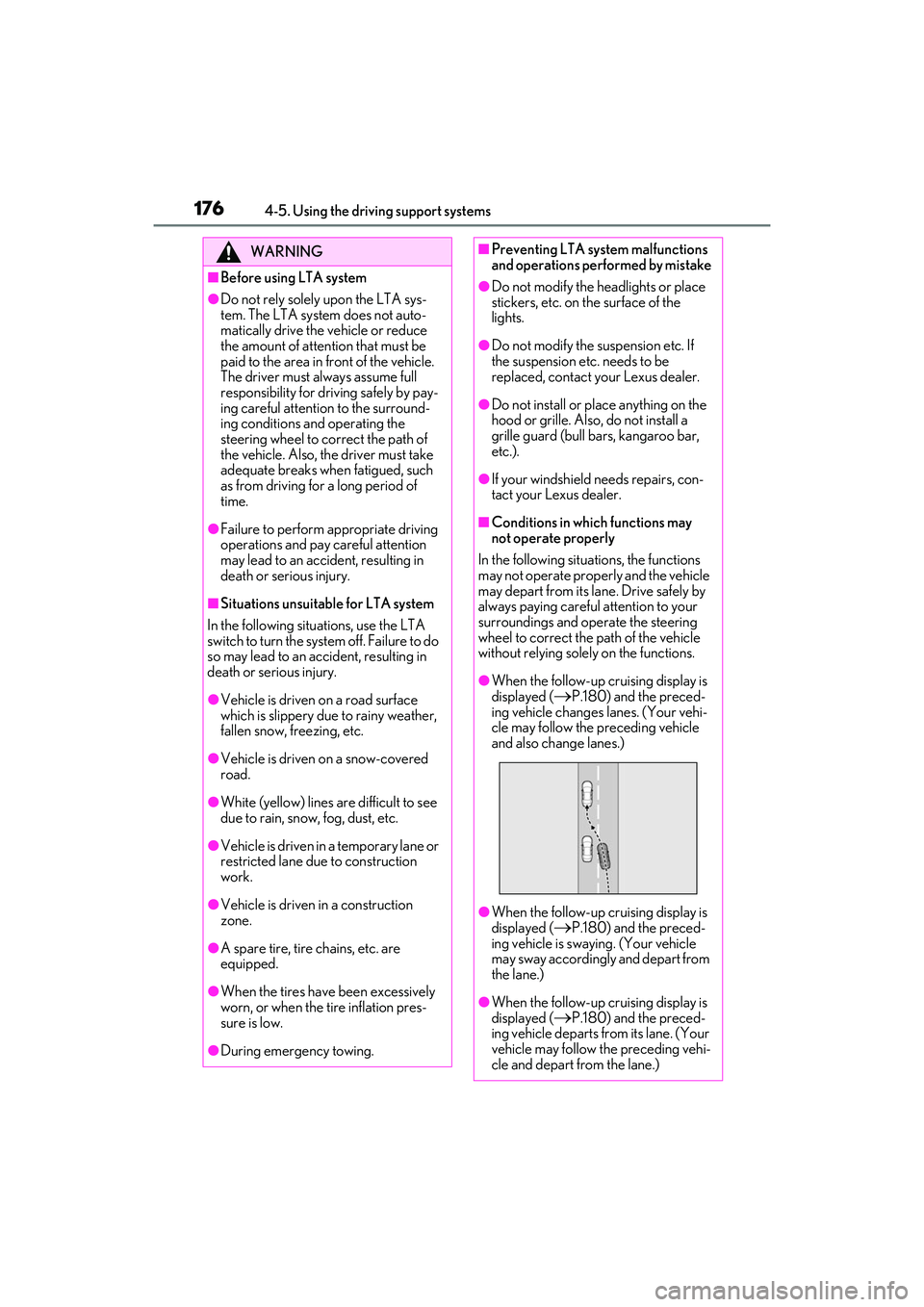
●When the follow-up cruising display is
displayed (
P.180) and the preced-
ing vehicle changes lanes. (Your vehi-
cle may follow the preceding vehicle
and also change lanes.)
●When the follow-up cruising display is
displayed (
P.180) and the preced-
ing vehicle is swaying. (Your vehicle
may sway accordingly and depart from
the lane.)
●When the follow-up cruising display is
displayed (
P.180) and the preced-
ing vehicle departs from its lane. (Your
vehicle may follow the preceding vehi-
cle and depart from the lane.)
Page 188 of 440

1864-5. Using the driving support systems
■Setting procedure
1 Press or of the meter control
switches and select .
2 Press or of the meter control
switches and select , then press
.
3 Press or of the meter control
switches and select “RSA”, then press
.
■Automatic turn-off of RSA sign display
In the following situations, a displayed
speed limit sign and/or do not enter sign will
stop being displayed automatically:
●No sign has been recognized for a cer-
tain distance.
●The road changes due to a left or right
turn, etc.
In the following situations, stop and yield
signs will stop being displayed automati-
cally:
●The system determines that your vehicle
has passed the sign.
●The road changes due to a left or right
turn, etc.
■Conditions in which the function may
not operate or detect correctly
In the following situations, RSA does not
operate normally and may not recognize
signs, display the incorrect sign, etc. How-
ever, this does not indicate a malfunction.
●The front camera is misaligned due to a
strong impact being applied to the sen-
sor, etc.
●Dirt, snow, stickers, etc. are on the wind-
shield near the front camera.
●In inclement weather such as heavy rain,
fog, snow or sand storms.
●Light from an oncoming vehicle, the sun,
etc. enters the front camera.
●The sign is dirty, faded, tilted or bent.
●The contrast of electronic sign is low.
●All or part of the sign is hidden by the leaves of a tree, a pole, etc.
●The sign is only visible to the front camera
for a short amount of time.
●The driving scene (turning, lane change,
etc.) is judged incorrectly.
●If a sign not appropriate for the currently
traveled lane, but the sign exists directly
after a freeway branches, or in an adja-
cent lane just before merging.
●Stickers are attached
to the rear of the
preceding vehicle.
●A sign resembling a system compatible
sign is recognized.
●Side road speed signs may be detected
and displayed (if positioned in sight of the
front camera) while the vehicle is
traveling on the main road.
●Roundabout exit road speed signs may
be detected and displayed (if positioned
in sight of the fr ont camera) while
traveling on a roundabout.
●The front of the vehicle is raised or low-
ered due to the carried load.
●The surrounding brightness is not suffi-
cient or changes suddenly.
●When a sign intended for trucks, etc. is
recognized.
●The navigation system map data is out-
dated.
●The navigation system is not operating.
●The speed information displayed on the
meter and on the navigation system may
be different due to the navigation system
using map data.
■Speed limit sign display
If the engine switch was last turned off while
a speed limit sign was displayed on the
multi-information displa y, the same sign dis-
plays again when the engine switch is
turned to IGNITION ON mode.
■Customization
Some functions can be customized.
(Customizable features: P.388)