light LEXUS IS300 2023 User Guide
[x] Cancel search | Manufacturer: LEXUS, Model Year: 2023, Model line: IS300, Model: LEXUS IS300 2023Pages: 96, PDF Size: 5.32 MB
Page 31 of 96
30
IS500_IS350_IS300_QG_U
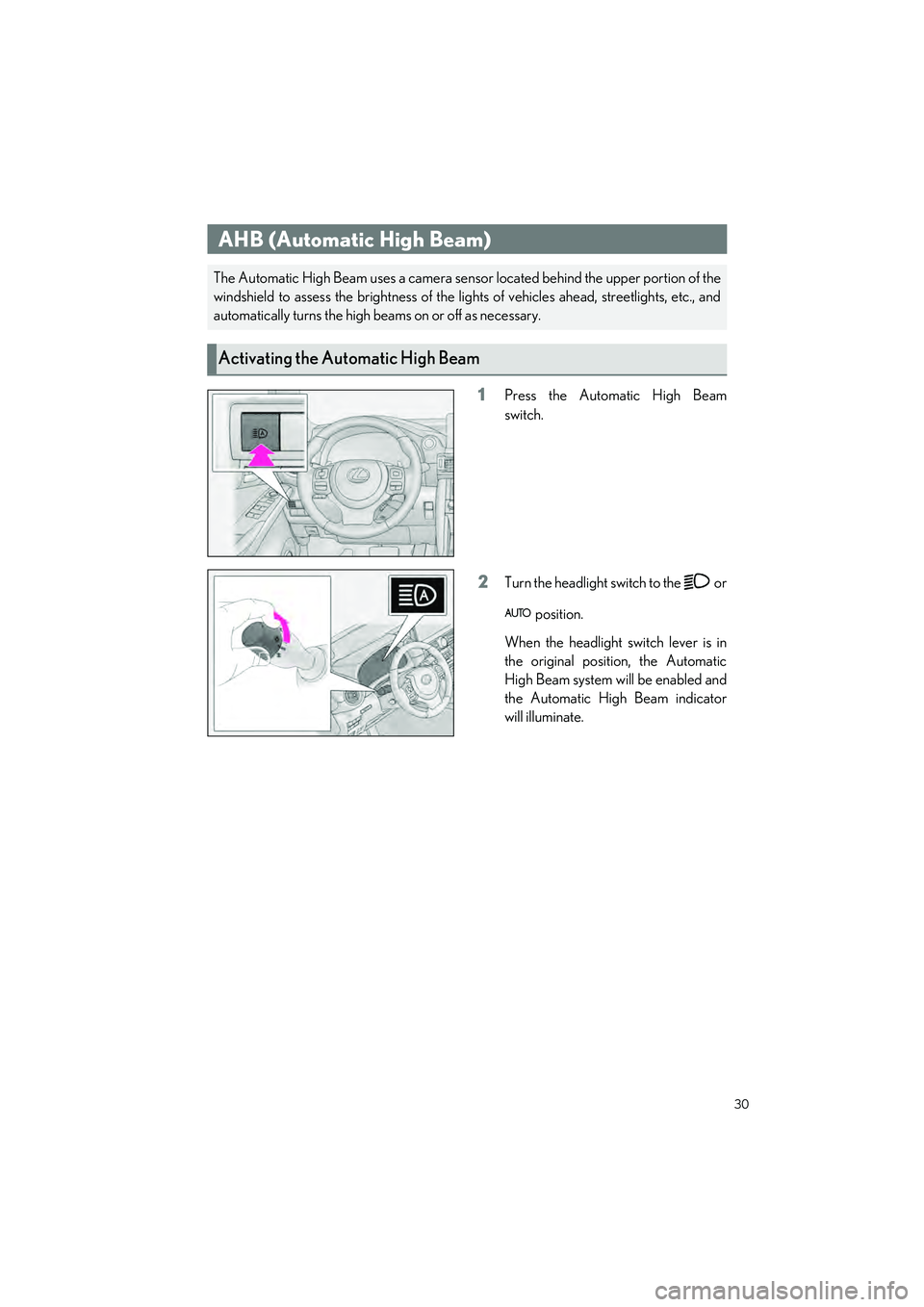
1Press the Automatic High Beam
switch.
2Turn the headlight switch to the or position.
When the headlight switch lever is in
the original position, the Automatic
High Beam system will be enabled and
the Automatic High Beam indicator
will illuminate.
AHB (Automatic High Beam)
The Automatic High Beam uses a camera sensor located behind the upper portion of the
windshield to assess the brightness of the lights of vehicles ahead, streetlights, etc., and
automatically turns the high beams on or off as necessary.
Activating the Automatic High Beam
Page 35 of 96
34
IS500_IS350_IS300_QG_U
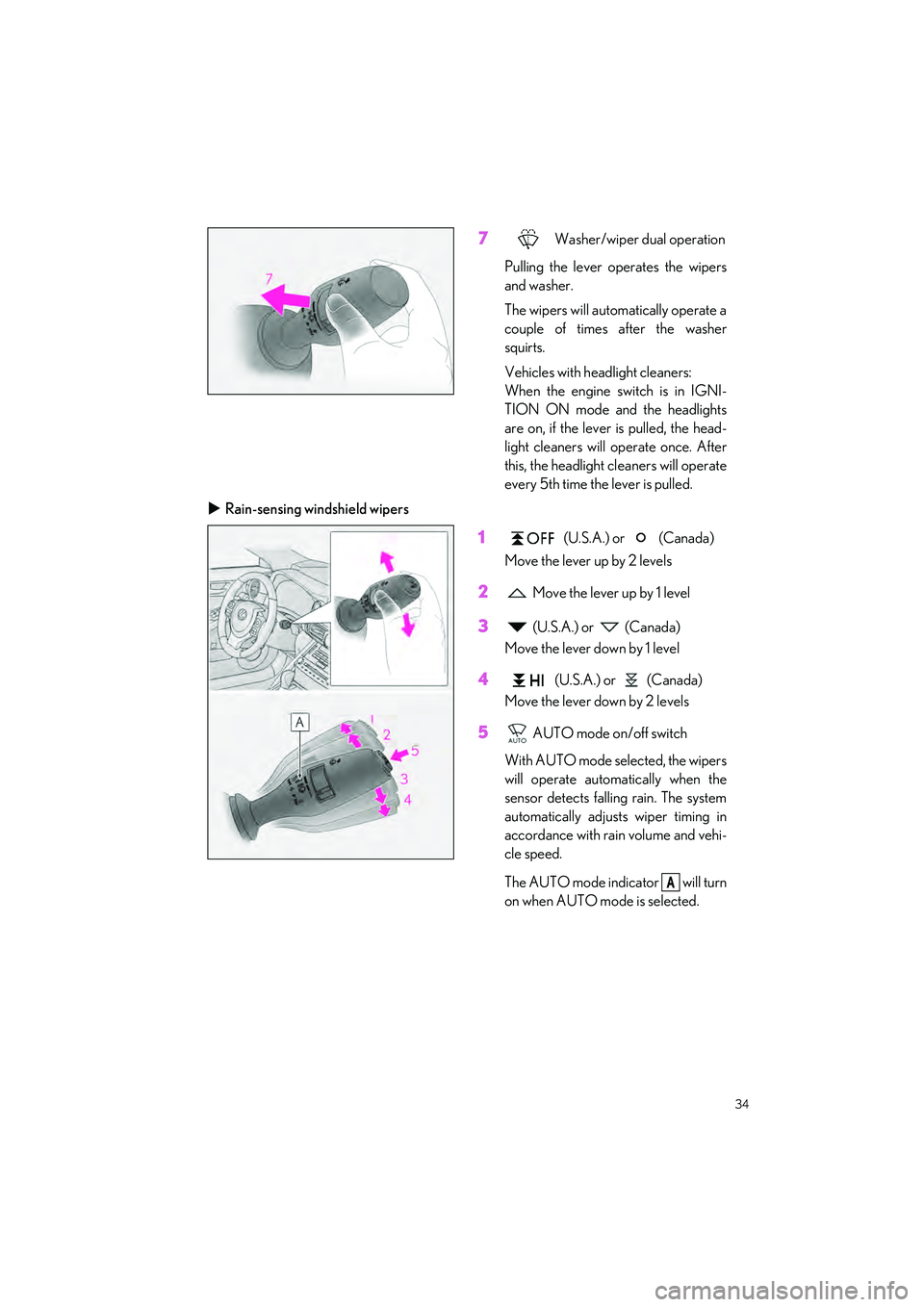
7 Washer/wiper dual operation
Pulling the lever operates the wipers
and washer.
The wipers will automatically operate a
couple of times after the washer
squirts.
Vehicles with headlight cleaners:
When the engine switch is in IGNI-
TION ON mode and the headlights
are on, if the lever is pulled, the head-
light cleaners will operate once. After
this, the headlight cl eaners will operate
every 5th time the lever is pulled.
Rain-sensing windshield wipers
1 (U.S.A.) or (Canada)
Move the lever up by 2 levels
2 Move the lever up by 1 level
3 (U.S.A.) or (Canada)
Move the lever down by 1 level
4 (U.S.A.) or (Canada)
Move the lever down by 2 levels
5 AUTO mode on/off switch
With AUTO mode selected, the wipers
will operate automatically when the
sensor detects falling rain. The system
automatically adjusts wiper timing in
accordance with rain volume and vehi-
cle speed.
The AUTO mode indicator will turn
on when AUTO mode is selected.
A
Page 38 of 96
37
IS500_IS350_IS300_QG_U
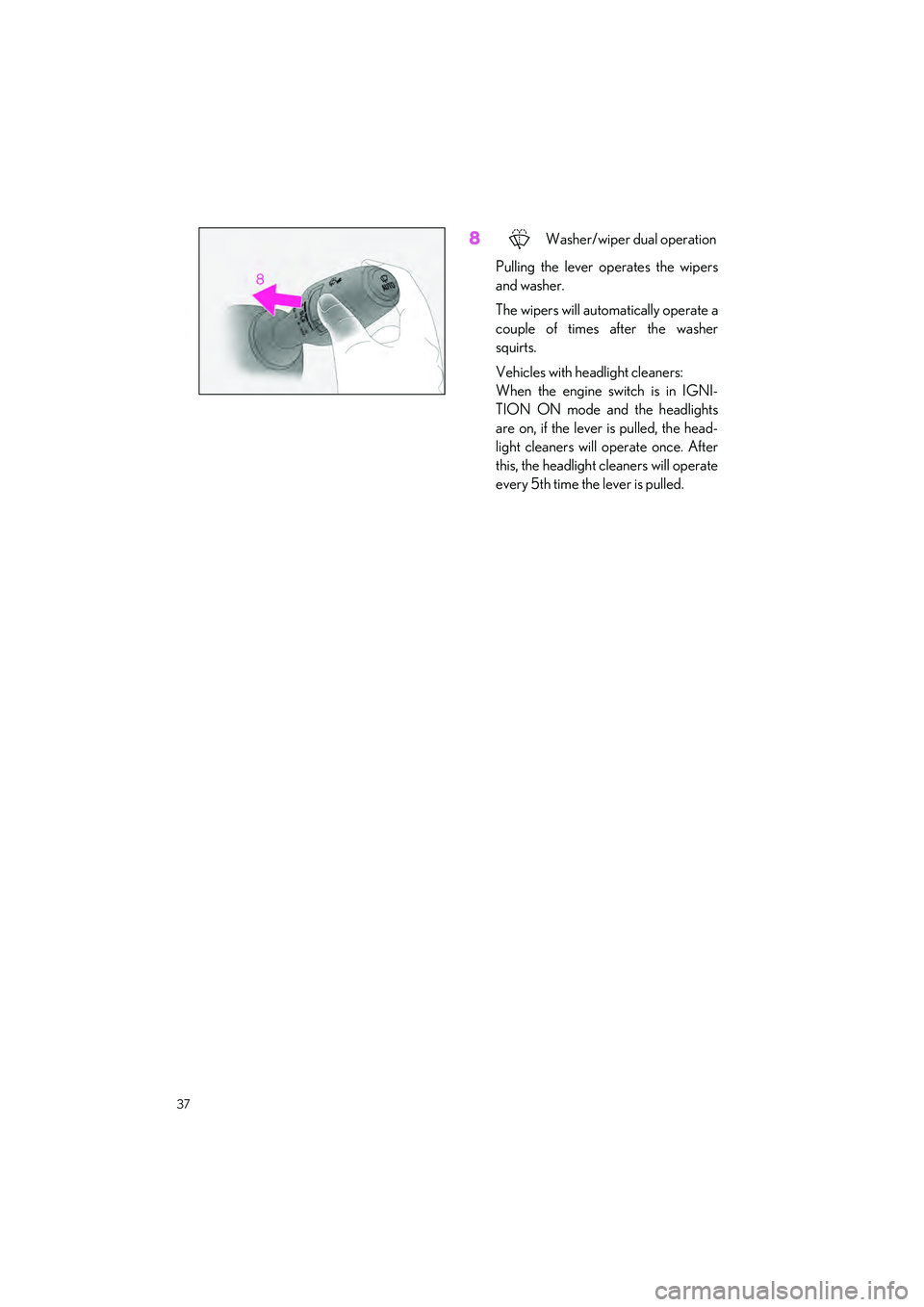
8 Washer/wiper dual operation
Pulling the lever op erates the wipers
and washer.
The wipers will automatically operate a
couple of times after the washer
squirts.
Vehicles with headlight cleaners:
When the engine switch is in IGNI-
TION ON mode and the headlights
are on, if the lever is pulled, the head-
light cleaners will operate once. After
this, the headlight cl eaners will operate
every 5th time the lever is pulled.
Page 73 of 96
72
IS500_IS350_IS300_QG_U
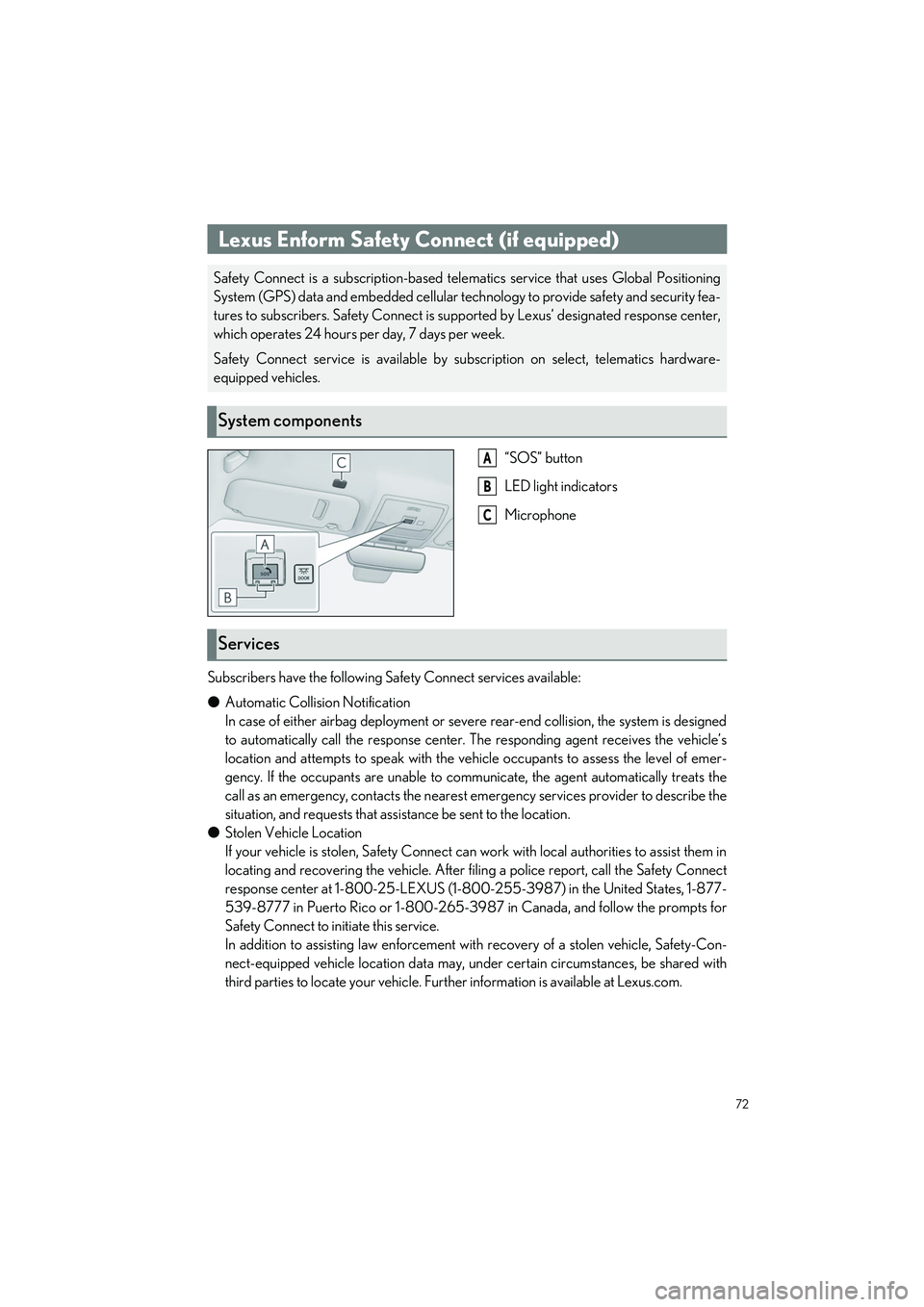
“SOS” button
LED light indicators
Microphone
Subscribers have the following Safety Connect services available:
● Automatic Collision Notification
In case of either airbag deployment or severe rear-end collision, the system is designed
to automatically call the resp onse center. The responding agent receives the vehicle’s
location and attempts to speak with the vehicle occupants to assess the level of emer-
gency. If the occupants are unable to communicate, the agent automatically treats the
call as an emergency, contacts the nearest emergency services provider to describe the
situation, and requests that assi stance be sent to the location.
● Stolen Vehicle Location
If your vehicle is stolen, Safety Connect can work with local authorities to assist them in
locating and recovering the vehicle. After fi ling a police report, call the Safety Connect
response center at 1-800-25-LEXUS (1-800-255-3987) in the United States, 1-877-
539-8777 in Puerto Rico or 1-800-265-3987 in Canada, and follow the prompts for
Safety Connect to initiate this service.
In addition to assisting law enforcement with recovery of a stolen vehicle, Safety-Con-
nect-equipped vehicle location data may, un der certain circumstances, be shared with
third parties to locate your vehicle. Furth er information is available at Lexus.com.
Lexus Enform Safety Connect (if equipped)
Safety Connect is a subscription-based telematics service that uses Global Positioning
System (GPS) data and embedded cellular technology to provide safety and security fea-
tures to subscribers. Safety Connect is supp orted by Lexus’ designated response center,
which operates 24 hours per day, 7 days per week.
Safety Connect service is available by subscription on select, telematics hardware-
equipped vehicles.
System components
A
B
C
Services
Page 80 of 96

79
IS500_IS350_IS300_QG_U
■Opening and closing1
Opens the moon roof*
The moon roof stops slightly before the
fully open position to reduce wind
noise.
Press the switch again to fully open the
moon roof.
2Closes the moon roof*
*
: Lightly press either way of the moon roof switch to stop the moon roof partway.
■Tilting up and down
1
Tilts the moon roof up*
2Tilts the moon roof down*
*
: Lightly press either way of the moon roof switch to stop the moon roof partway.
Moon Roof (if equipped)
Operating the moon roof
Page 81 of 96
80
IS500_IS350_IS300_QG_U
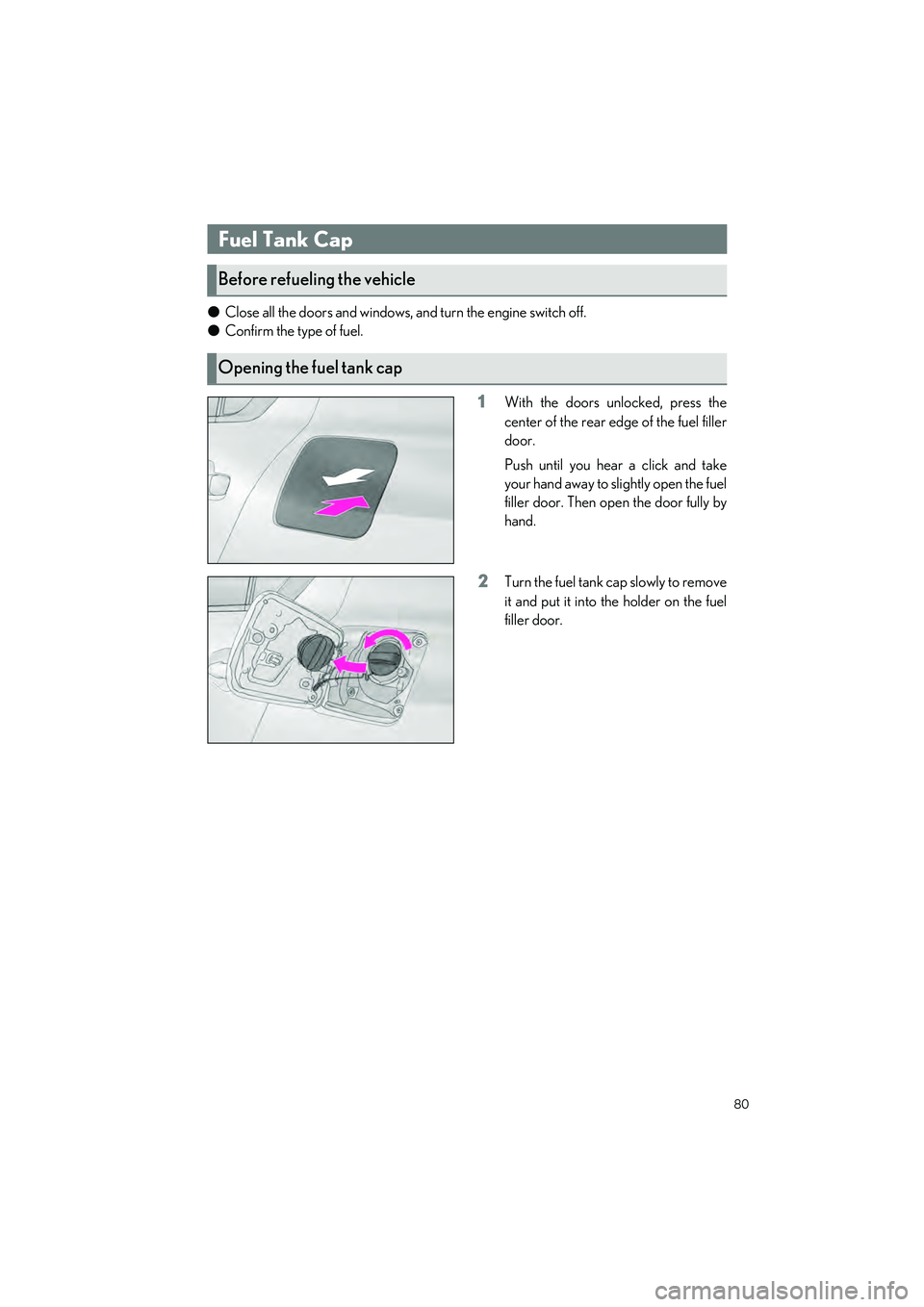
●Close all the doors and windows, and turn the engine switch off.
● Confirm the type of fuel.
1With the doors unlocked, press the
center of the rear edge of the fuel filler
door.
Push until you hear a click and take
your hand away to slightly open the fuel
filler door. Then open the door fully by
hand.
2Turn the fuel tank cap slowly to remove
it and put it into the holder on the fuel
filler door.
Fuel Tank Cap
Before refueling the vehicle
Opening the fuel tank cap
Page 83 of 96
82
IS500_IS350_IS300_QG_U
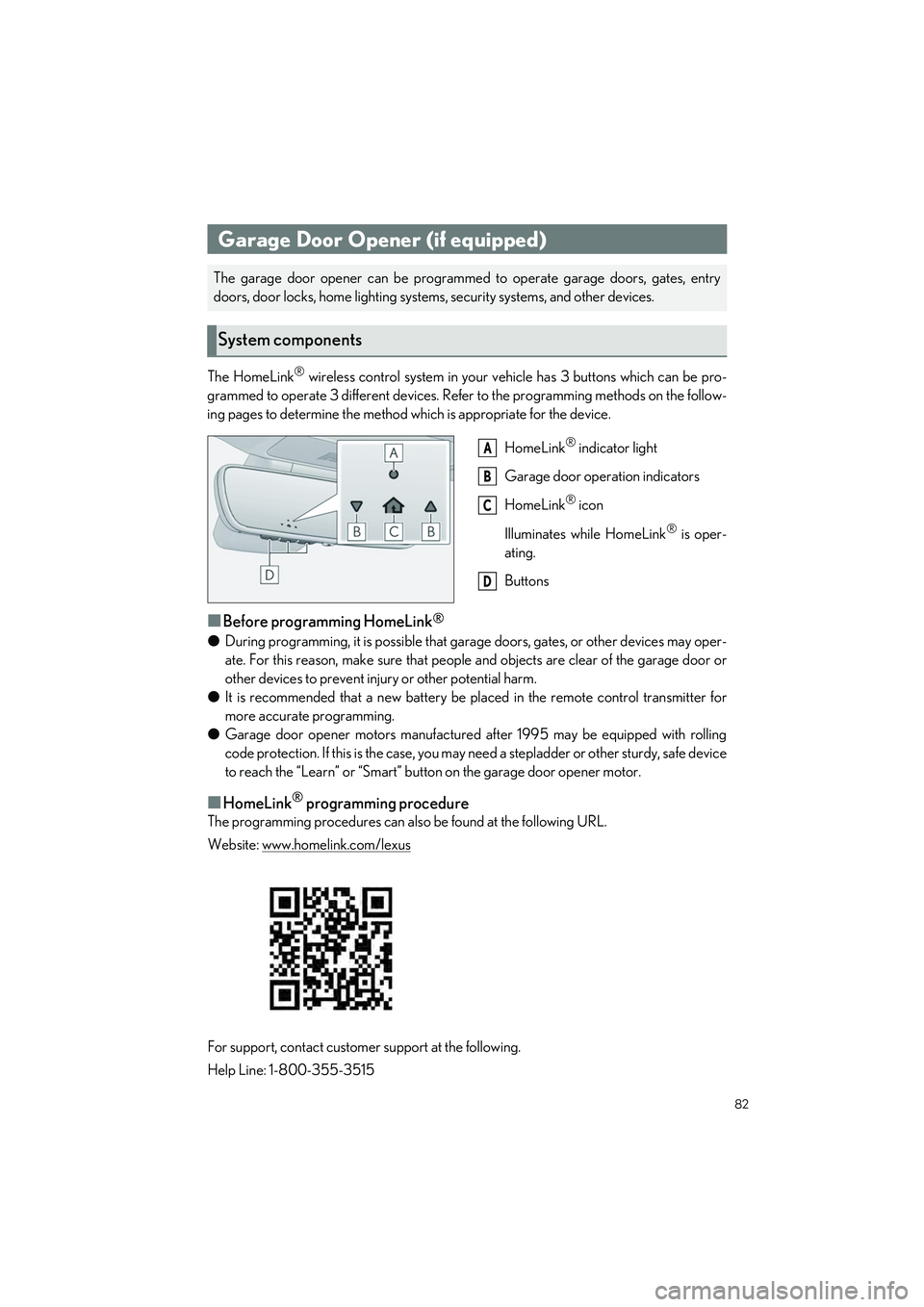
The HomeLink® wireless control system in your vehicle has 3 buttons which can be pro-
grammed to operate 3 different devices. Refe r to the programming methods on the follow-
ing pages to determine the method wh ich is appropriate for the device.
HomeLink
® indicator light
Garage door operation indicators
HomeLink
® icon
Illuminates while HomeLink
® is oper-
ating.
Buttons
■Before programming HomeLink®
● During programming, it is possible that gara ge doors, gates, or other devices may oper-
ate. For this reason, make su re that people and objects ar e clear of the garage door or
other devices to prevent injury or other potential harm.
● It is recommended that a new battery be placed in the remote control transmitter for
more accurate programming.
● Garage door opener motors manufactured after 1995 may be equipped with rolling
code protection. If this is the case, you may need a stepladder or other sturdy, safe device
to reach the “Learn” or “Smart” button on the garage door opener motor.
■HomeLink® programming procedure
The programming procedures can also be found at the following URL.
Website: www.homelink.com/lexus
For support, contact customer support at the following.
Help Line: 1-800-355-3515
Garage Door Opener (if equipped)
The garage door opener can be programmed to operate garage doors, gates, entry
doors, door locks, home lighting system s, security systems, and other devices.
System components
A
B
C
D
Page 84 of 96
83
IS500_IS350_IS300_QG_U
■Programming HomeLink®
Steps 1 through 3 must be performed within 60 seconds, otherwise the indicator light will
stop flashing and programming w ill not be able to be completed.
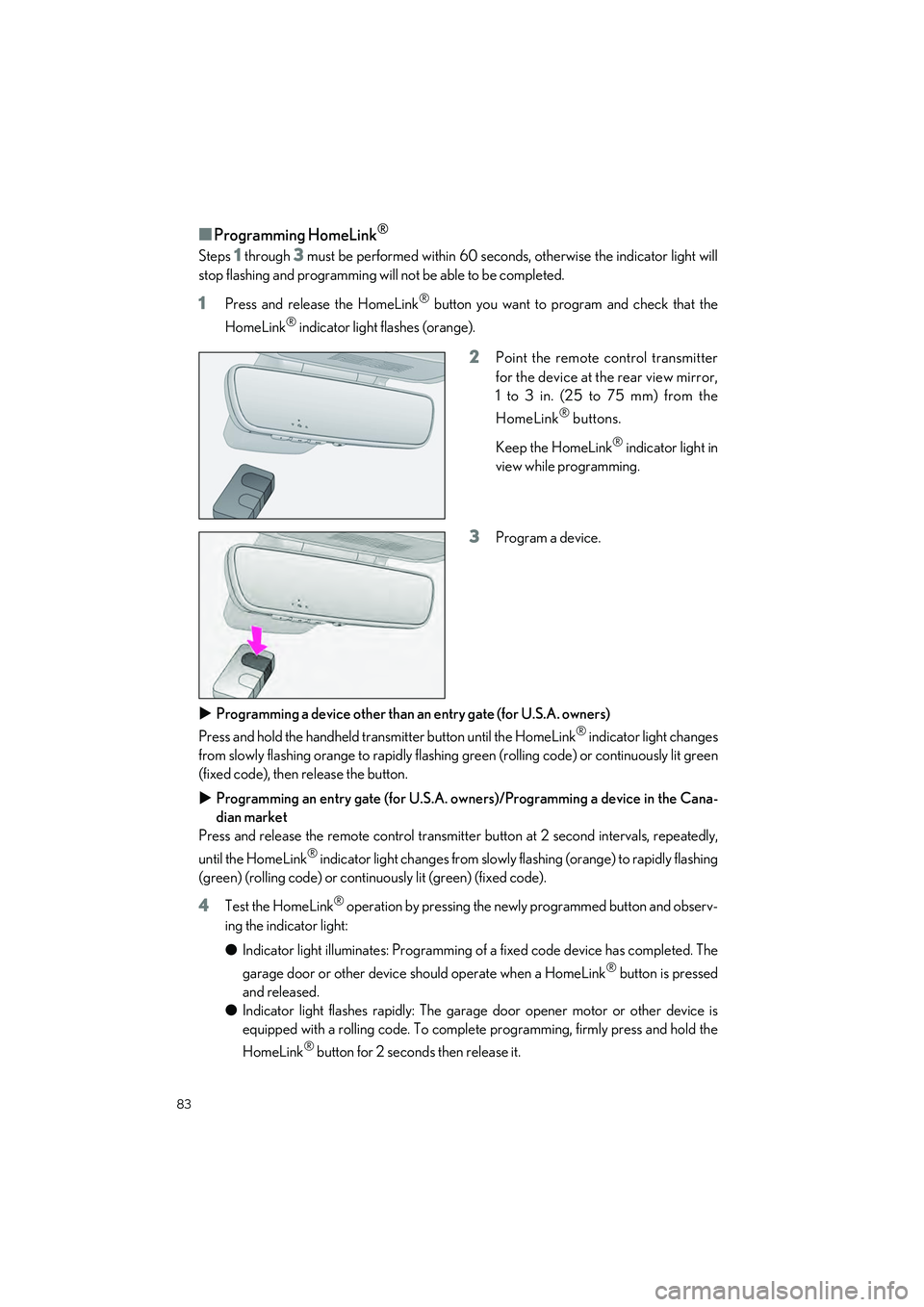
1Press and release the HomeLink® button you want to program and check that the
HomeLink
® indicator light flashes (orange).
2Point the remote control transmitter
for the device at the rear view mirror,
1 to 3 in. (25 to 75 mm) from the
HomeLink
® buttons.
Keep the HomeLink
® indicator light in
view while programming.
3Program a device.
Programming a device other than an entry gate (for U.S.A. owners)
Press and hold the handheld transmitter button until the HomeLink
® indicator light changes
from slowly flashing orange to rapidly flashing green (rolling code) or continuously lit green
(fixed code), then release the button.
Programming an entry gate (for U.S.A. owners)/Programming a device in the Cana-
dian market
Press and release the remote control transmitte r button at 2 second intervals, repeatedly,
until the HomeLink
® indicator light changes from slowly flashing (orange) to rapidly flashing
(green) (rolling code) or continuously lit (green) (fixed code).
4Test the HomeLink® operation by pressing the newly programmed button and observ-
ing the indicator light:
● Indicator light illuminates: Programming of a fixed code device has completed. The
garage door or other device should operate when a HomeLink
® button is pressed
and released.
● Indicator light flashes rapidly: The garage door opener motor or other device is
equipped with a rolling code. To complete programming, firmly press and hold the
HomeLink
® button for 2 second s then release it.
Page 86 of 96
85
IS500_IS350_IS300_QG_U
■Enabling 2-way communication with a garage door (only available for compat-
ible devices)
When enabled, 2-way communication allows yo u to check the status of the opening and
closing of a garage door throug h indicators in your vehicle.
2-way communication is only av ailable if the garage door opener motor used is a compati-
ble device. (To check device compatibility, refer to www.homelink.com.)
1Within 5 seconds afte r programming the garage door opener has been completed, if
the garage door opener motor is trained to HomeLink
®, both garage door operation
indicators will flash rapidly (green) and the light on the garage door opener motor will
blink twice, indicating that 2-way communication is enabled.
If the indicators do not flash, perform
2 and 3 within the first 10 presses of the HomeLink®
button after programming has been completed.
2Press a programmed HomeLink® button to operate a garage door.
3Within 1 minute of pressing the HomeLink® button, after the garage door operation
has stopped, press th e “Learn” or “Smart” button on the garage door opener motor.
Within 5 seconds of the establishment of 2-way communication with the garage door
opener, both garage door operation indicators in the vehicle will flash rapidly (green)
and the light on the garage door opener motor will blink twice, indicating that 2-way
communication is enabled.
■Reprogramming a single HomeLink® button
When the following procedure is performed, buttons which already have devices registered
to them can be overwritten:
1With one hand, press and hold the desired HomeLink® button.
2When the HomeLink® indicator starts flashing (orange), continue to hold the
HomeLink
® button and perform “Programming HomeLink®” 1 (it takes 20 seconds
for the HomeLink
® indicator to start flashing).
Press the appropriate HomeLink
® button. The HomeLink® indicator light should turn on.
Operating HomeLink®
Page 87 of 96
86
What to do if...
IS500_IS350_IS300_QG_U
What to do if...
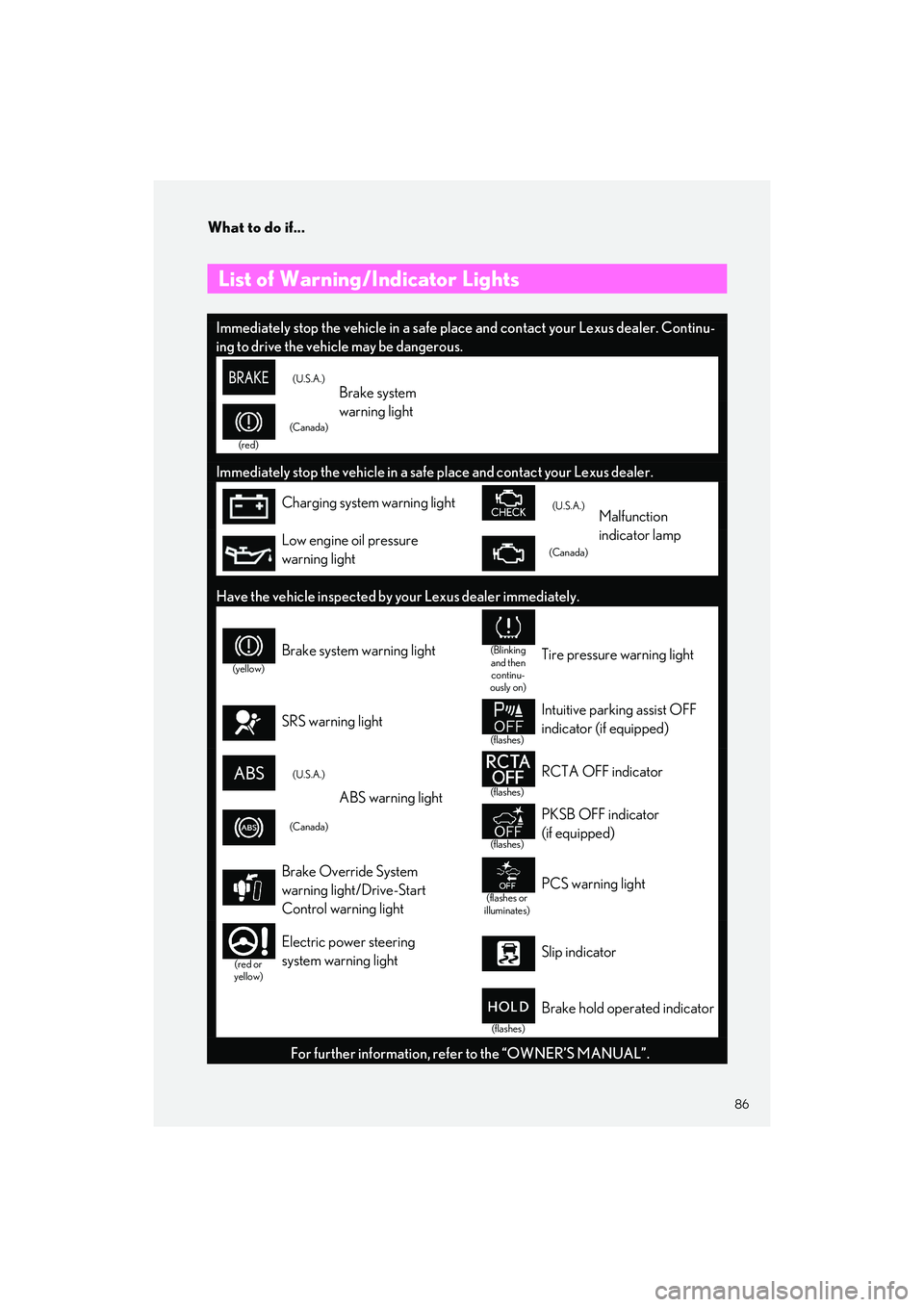
List of Warning/Indicator Lights
Immediately stop the vehicle in a safe place and contact your Lexus dealer. Continu-
ing to drive the vehicle may be dangerous.
(U.S.A.)Brake system
warning light
(red)
(Canada)
Immediately stop the vehicle in a safe place and contact your Lexus dealer.
Charging system warning light(U.S.A.)Malfunction
indicator lamp
Low engine oil pressure
warning light(Canada)
Have the vehicle inspected by your Lexus dealer immediately.
(yellow)
Brake system warning light(Blinking
and then continu-
ously on)Tire pressure warning light
SRS warning light
(flashes)
Intuitive parking assist OFF
indicator (if equipped)
(U.S.A.)
ABS warning light(flashes)
RCTA OFF indicator
(Canada)
(flashes)
PKSB OFF indicator
(if equipped)
Brake Override System
warning light/Drive-Start
Control warning light
(flashes or
illuminates)PCS warning light
(red or
yellow)
Electric power steering
system warning lightSlip indicator
(flashes)
Brake hold operated indicator
For further information, refe r to the “OWNER’S MANUAL”.