air LEXUS IS300 2023 Owners Manual
[x] Cancel search | Manufacturer: LEXUS, Model Year: 2023, Model line: IS300, Model: LEXUS IS300 2023Pages: 96, PDF Size: 5.32 MB
Page 3 of 96
2
IS500_IS350_IS300_QG_U
Driving ComfortRemote Touch ................................................................................................................... ..............42
Center Display ................................................................................................................. .............. 43
Fuel Consumption Information ............................. .................................................................. 46
Navigation System
*..................................................................................................................... 48
Hands-free System For Cellular Phone
*.............................................................................51
Audio System
*............................................................................................................................... 55
Automatic Air Conditioning System
*.................................................................................... 61
Voice Command System
*........................................................................................................ 64
USB/AUX Ports .................................................................................................................. ........... 71
Lexus Enform Safety Connect..................................................................................................72
Lexus Enform Remote ............................................................................................................ .....74
Lexus Enform Service Connect...............................................................................................75
SiriusXM Satellite Radio ....................................................................................................... ......76
Opening and Closing
Door Locks ..................................................................................................................... .................. 77
Power Windows .................................................................................................................. .......... 78
Moon Roof ...................................................................................................................... ..................79
Fuel Tank Cap ................................................................................................................................ 80
Trunk.......................................................................................................................... ...........................81
Garage Door Opener ............................................................................................................. ... 82
What to do if... List of Warning/Indicator Lights............................................................................................. 86
If the electronic key does not operate proper ly ............................................................... 90
If the engine doesn’t start ...... ..................................................................................................... 92
*: This feature may be operated by Voice command (See P.64)
Page 5 of 96
4
IS500_IS350_IS300_QG_U
Parking brake switch ............................................................................................... P.22
Applying/releasing..............................................................................................................P.22
Precautions for winter season
*1
Warning buzzer/messages*1
Turn signal lever ......................................................................................................... P.21
Headlight switch ....................................................................................................... P.29
Headlights/parking lights/tai l lights/daytime running lights .............................P.29
Windshield wiper and washer switch ................................................................. P.32
Usage .......................................................................................................................... ..............P.32
Adding washer fluid
*1
Warning messages*1
Emergency flasher switch*1
Trunk opener .............................................................................................................. P.81
Hood lock release lever
*1
Tilt and telescopic steering control switch*1, 2
Adjustment*1
Driving position memory*1, 2
Tilt and telescopic steering lock release lever*1, 2
Adjustment*1
Air conditioning system ........................................................................................... P.61
Usage .......................................................................................................................... ............... P.61
Rear window defogger ....................................................................................................... P.61
Audio system.............................................................................................................. P.55
Trunk opener main switch....................................................................................... P.81
*1: Refer to the “Owner’s Manual”.
*2:If equipped
E
F
G
H
I
J
K
L
M
N
O
Page 10 of 96
9
IS500_IS350_IS300_QG_U
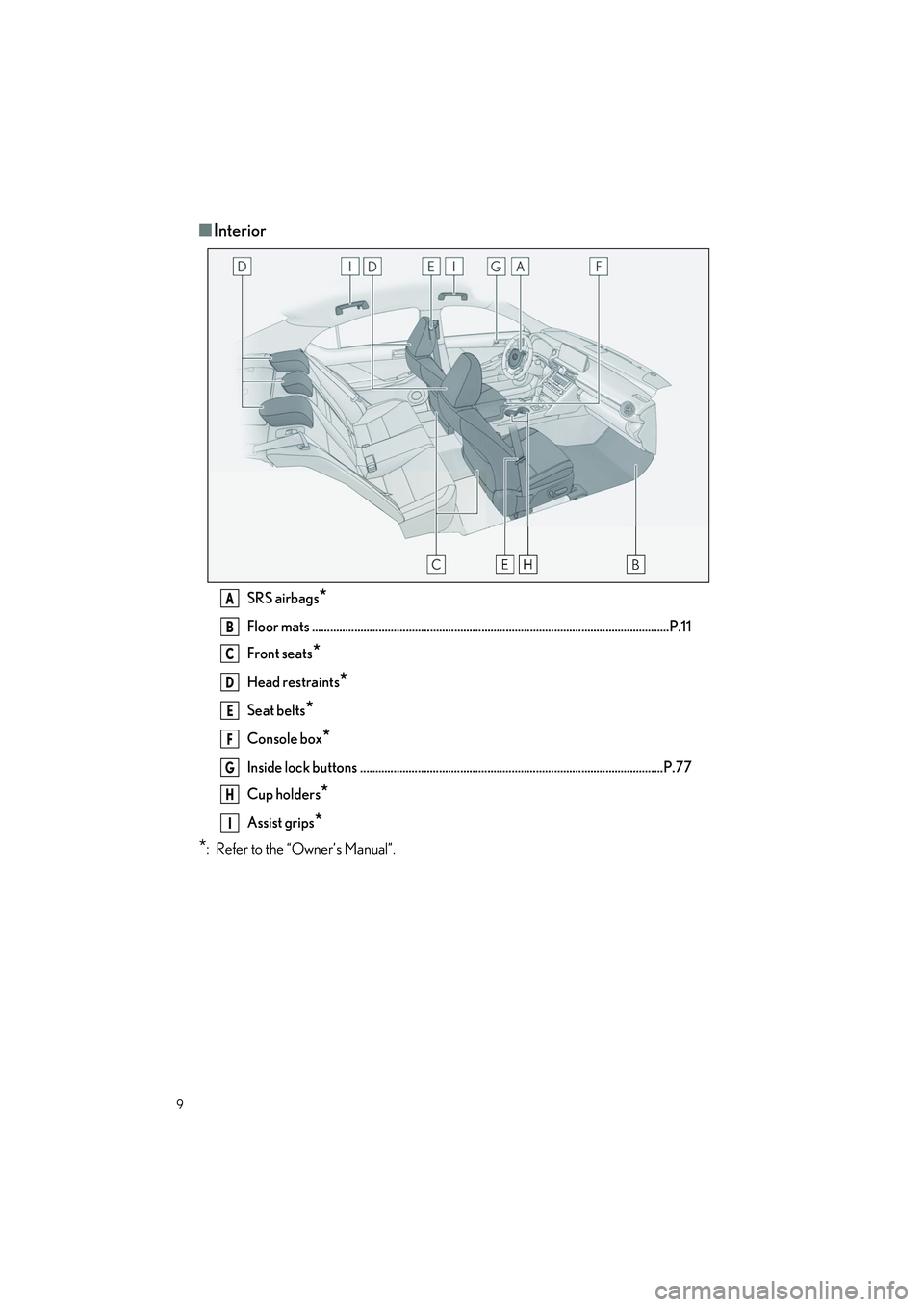
■Interior
SRS airbags*
Floor mats ..................................................................................................................... .P.11
Front seats
*
Head restraints*
Seat belts*
Console box*
Inside lock buttons ....................................................................................................P.77
Cup holders
*
Assist grips*
*
: Refer to the “Owner’s Manual”.
A
B
C
D
E
F
G
H
I
Page 40 of 96
39
IS500_IS350_IS300_QG_U
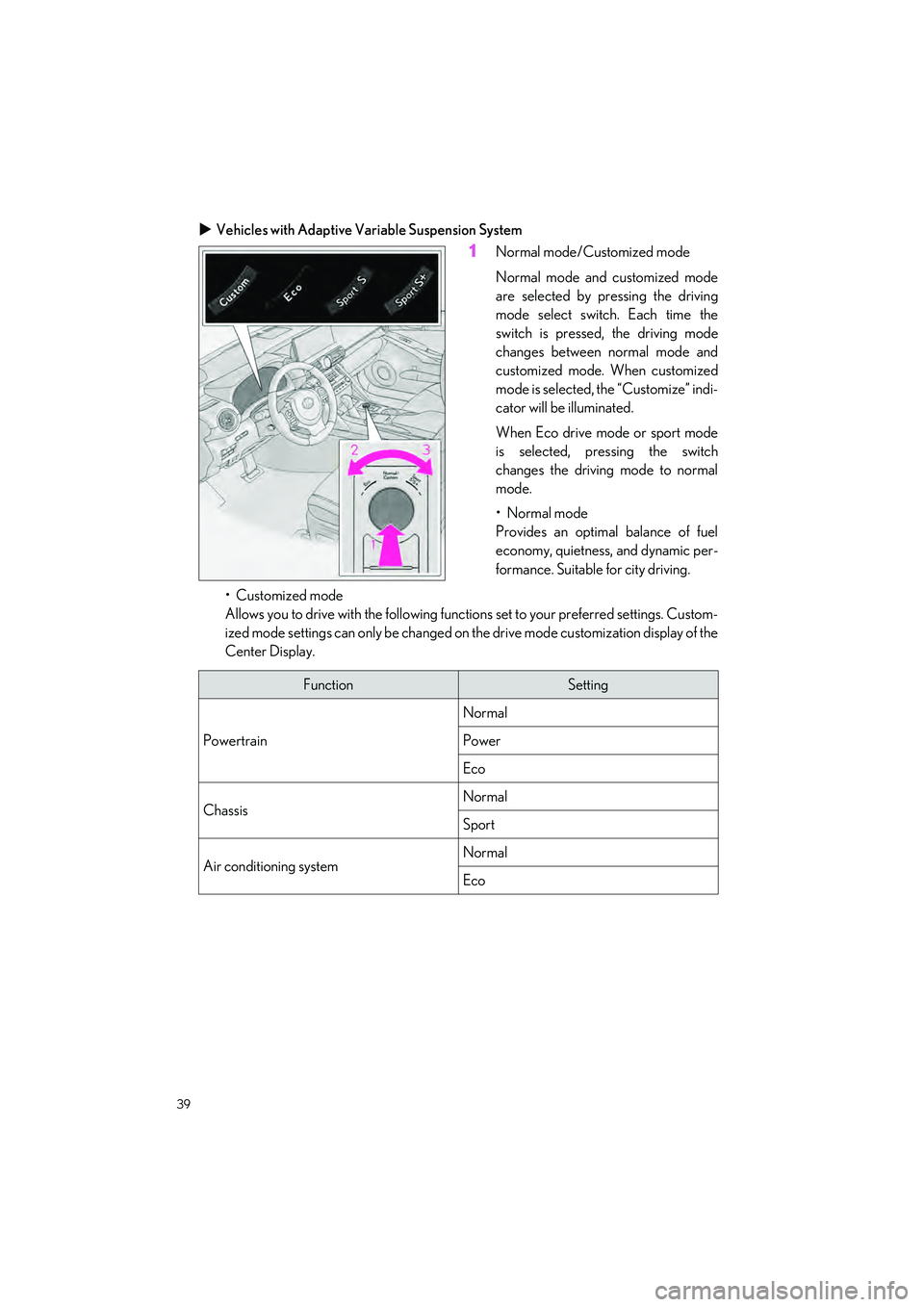
Vehicles with Adaptive Variable Suspension System
1Normal mode/Customized mode
Normal mode and customized mode
are selected by pressing the driving
mode select switch . Each time the
switch is pressed, the driving mode
changes between normal mode and
customized mode. When customized
mode is selected, the “Customize” indi-
cator will be illuminated.
When Eco drive mode or sport mode
is selected, pressing the switch
changes the driving mode to normal
mode.
•Normal mode
Provides an optimal balance of fuel
economy, quietness, and dynamic per-
formance. Suitable for city driving.
• Customized mode
Allows you to drive with the following functions set to your preferred settings. Custom-
ized mode settings can only be changed on the drive mode customization display of the
Center Display.
FunctionSetting
Powertrain
Normal
Power
Eco
ChassisNormal
Sport
Air conditioning systemNormal
Eco
Page 41 of 96
40
IS500_IS350_IS300_QG_U
2Eco drive mode
Helps the driver accelerate in an eco-friendly ma nner and improve fuel economy
through moderate throttle characteristics an d by controlling the operation of the air
conditioning system (heating/cooling).
When not in Eco drive mode, if the driving mode select switch is turned to the left, the
Eco drive mode indi cator will come on.
3Sport mode
• SPORT S mode
Controls the transmission and engine to provide quick, powerful acceleration. This
mode is suitable for when agile driving resp onse is desired, such as when driving on
roads with many curves.
When not in SPORT S mode, if the driving mode select switch is turned to the right, the
“SPORT S” indicator will come on.
• Sport S+ mode
Helps to ensure steering pe rformance and driving stability by simultaneously con-
trolling the steering and susp ension in addition to the transmission and engine. Suitable
for sportier driving.
When in SPORT S mode, if the driving mode se lect switch is turned to the right, the
“SPORT S+” indicator will come on.
Page 44 of 96
43
IS500_IS350_IS300_QG_U
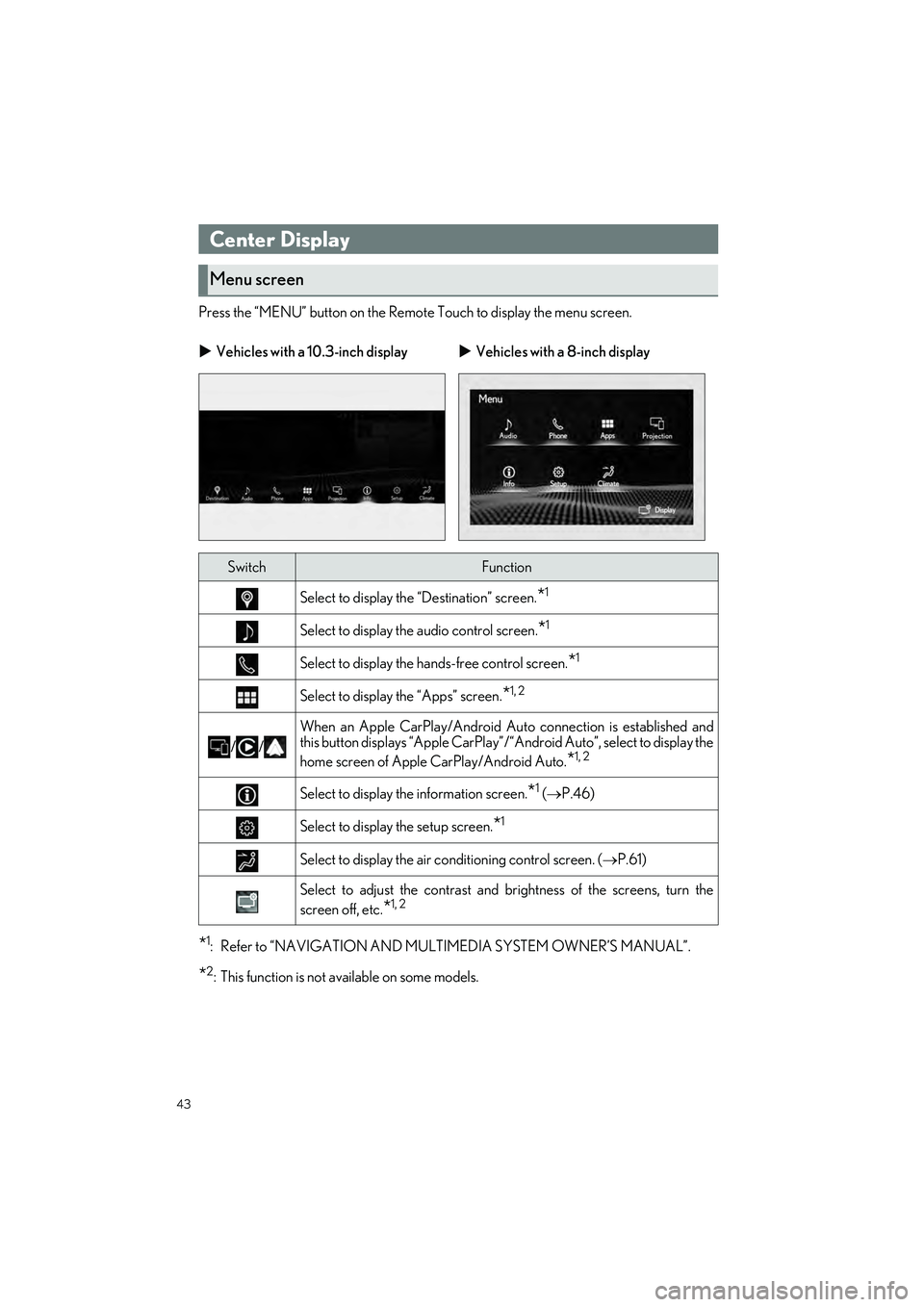
Press the “MENU” button on the Remote Touch to display the menu screen.
*1: Refer to “NAVIGATION AND MULTIMEDIA SYSTEM OWNER’S MANUAL”.
*2: This function is not available on some models.
Center Display
Menu screen
Vehicles with a 10.3-inch display Vehicles with a 8-inch display
SwitchFunction
Select to display the “Destination” screen.*1
Select to display the audio control screen.*1
Select to display the ha nds-free control screen.*1
Select to display the “Apps” screen.*1, 2
//
When an Apple CarPlay/Android Au to connection is established and
this button displays “Apple CarPlay”/“Android Auto”, select to display the
home screen of Apple CarPlay/Android Auto.
*1, 2
Select to display the information screen.*1 ( P.46)
Select to display the setup screen.*1
Select to display the air co nditioning control screen. ( P.61)
Select to adjust the contrast and brightness of the screens, turn the
screen off, etc.
*1, 2
Page 45 of 96
44
IS500_IS350_IS300_QG_U
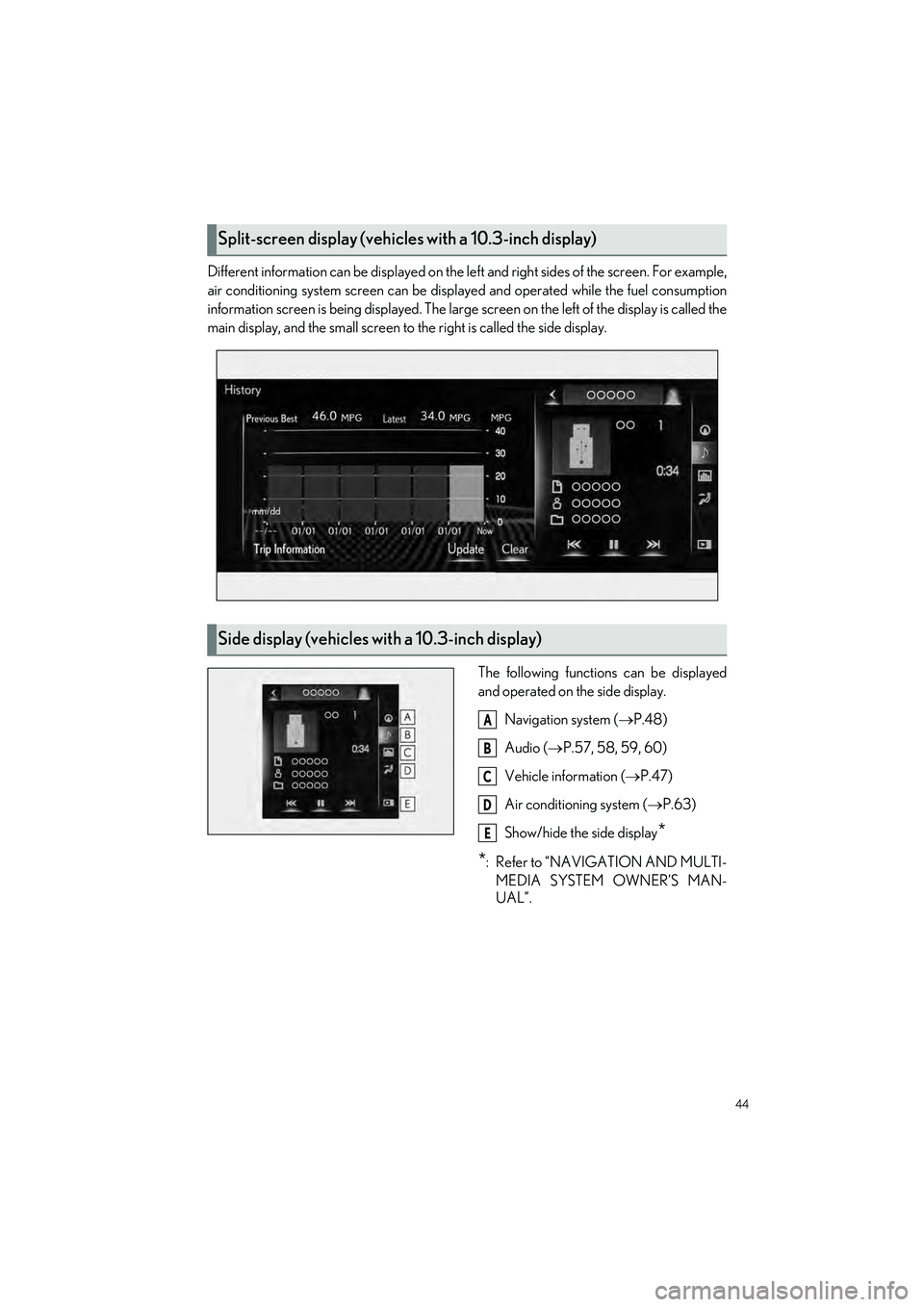
Different information can be displayed on the left and right sides of the screen. For example,
air conditioning system screen can be displa yed and operated while the fuel consumption
information screen is being displa yed. The large screen on the left of the display is called the
main display, and the small screen to the right is called the side display.
The following function s can be displayed
and operated on the side display.
Navigation system ( P.48)
Audio ( P.57, 58, 59, 60)
Vehicle information (P.47)
Air conditioning system ( P.63)
Show/hide the side display
*
*
: Refer to “NAVIGATION AND MULTI- MEDIA SYSTEM OWNER’S MAN-
UAL”.
Split-screen display (vehicles with a 10.3-inch display)
Side display (vehicles with a 10.3-inch display)
A
B
C
D
E
Page 52 of 96
51
IS500_IS350_IS300_QG_U
To use the hands-free system, it is necessary to register a Bluetooth® phone with the system.
Please refer to the cellular phone manufacturer ’s user guide for pairing procedures, or go to
http://www.lexus.com/MobileLink
to find approved Bluetooth® phones for this system.
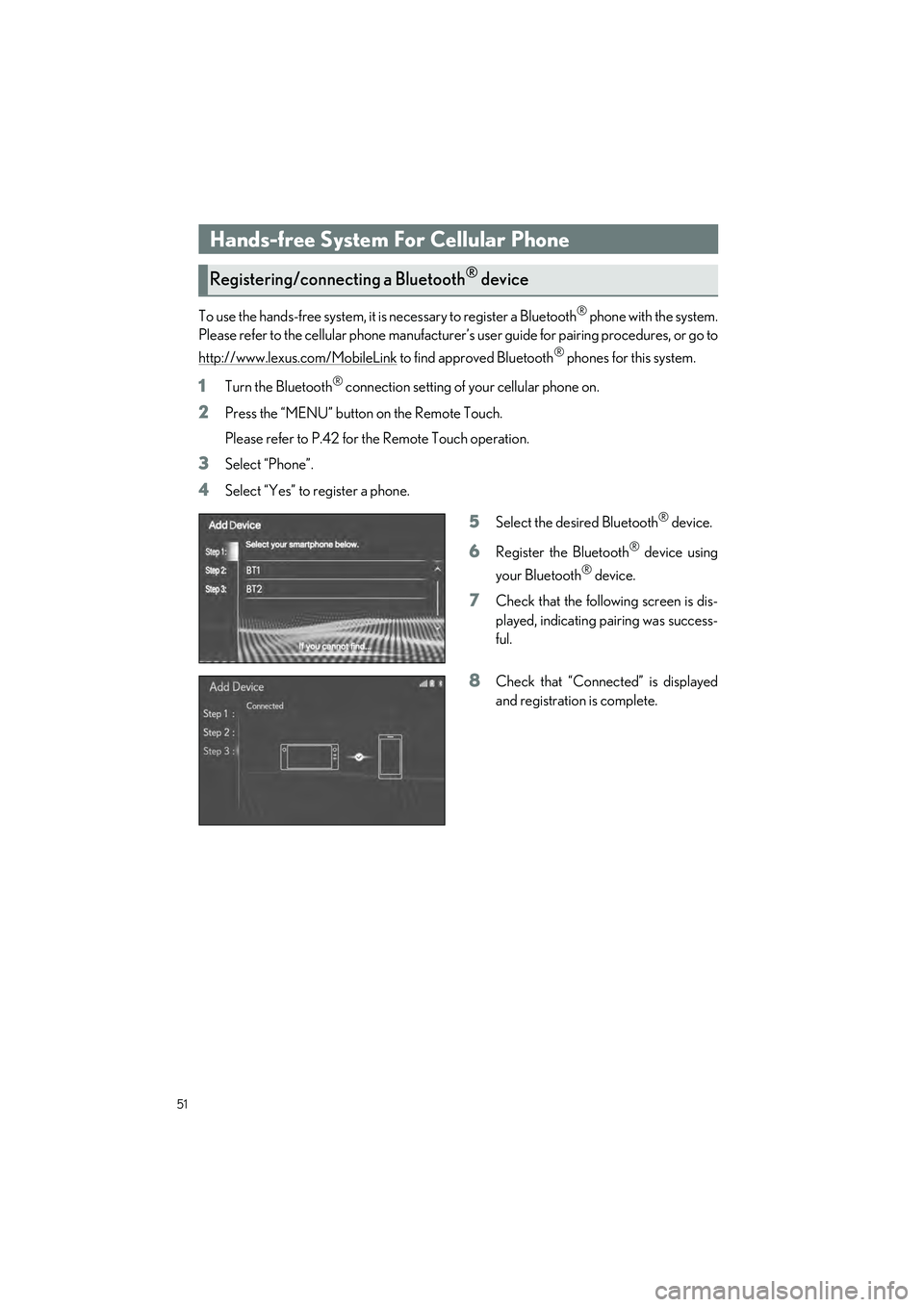
1Turn the Bluetooth® connection setting of your cellular phone on.
2Press the “MENU” button on the Remote Touch.
Please refer to P.42 for the Remote Touch operation.
3Select “Phone”.
4Select “Yes” to register a phone.
5Select the desired Bluetooth® device.
6Register the Bluetooth® device using
your Bluetooth
® device.
7Check that the following screen is dis-
played, indicating pairing was success-
ful.
8Check that “Connect ed” is displayed
and registration is complete.
Hands-free System For Cellular Phone
Registering/connecting a Bluetooth® device
Page 62 of 96
61
IS500_IS350_IS300_QG_U
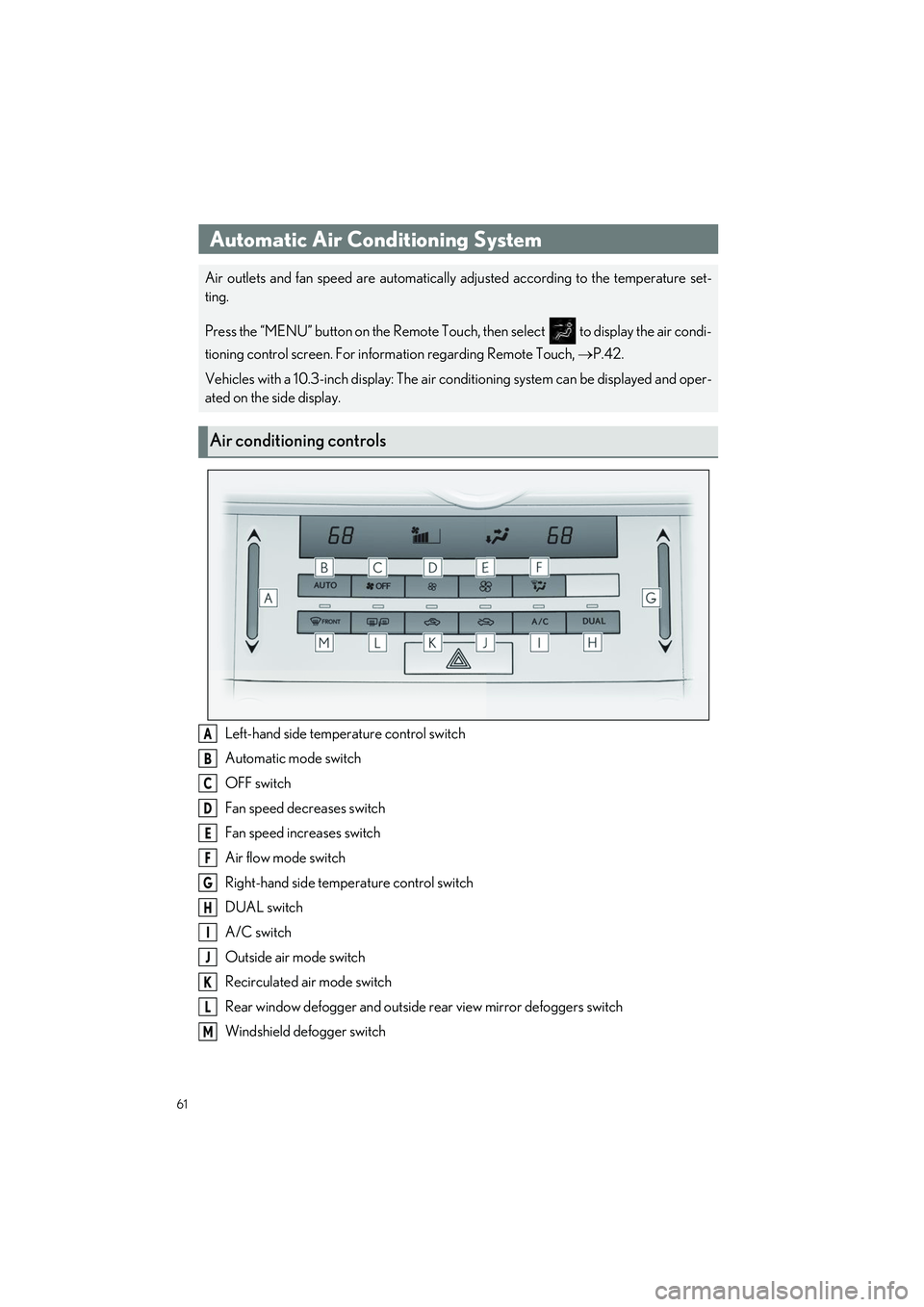
Left-hand side temperature control switch
Automatic mode switch
OFF switch
Fan speed decreases switch
Fan speed increases switch
Air flow mode switch
Right-hand side temperature control switch
DUAL switch
A/C switch
Outside air mode switch
Recirculated air mode switch
Rear window defogger and outside rear view mirror defoggers switch
Windshield defogger switch
Automatic Air Conditioning System
Air outlets and fan speed are automatically adjusted according to the temperature set-
ting.
Press the “MENU” button on the Remote Touch, then select to display the air condi-
tioning control screen. For information regarding Remote Touch, P.42.
Vehicles with a 10.3-inch display: The air co nditioning system can be displayed and oper-
ated on the side display.
Air conditioning controls
A
B
C
D
E
F
G
H
I
J
K
L
M
Page 63 of 96
62
IS500_IS350_IS300_QG_U
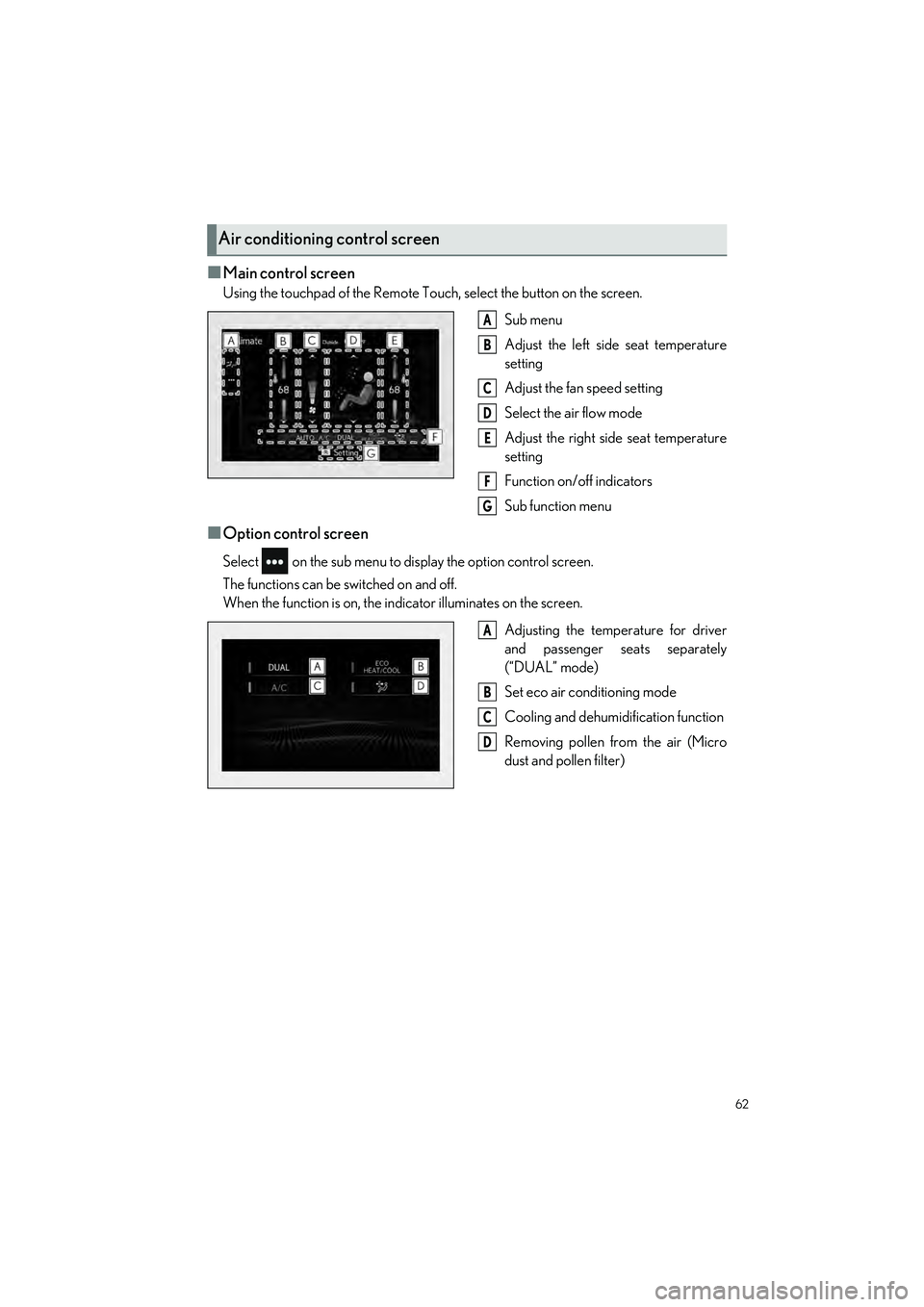
■Main control screen
Using the touchpad of the Remote Touch, select the button on the screen.Sub menu
Adjust the left side seat temperature
setting
Adjust the fan speed setting
Select the air flow mode
Adjust the right side seat temperature
setting
Function on/off indicators
Sub function menu
■Option control screen
Select on the sub menu to di splay the option control screen.
The functions can be switched on and off.
When the function is on, the in dicator illuminates on the screen.
Adjusting the temperature for driver
and passenger seats separately
(“DUAL” mode)
Set eco air conditioning mode
Cooling and dehumidification function
Removing pollen from the air (Micro
dust and pollen filter)
Air conditioning control screen
A
B
C
D
E
F
G
A
B
C
D