rear LEXUS IS300 2023 Owners Manual
[x] Cancel search | Manufacturer: LEXUS, Model Year: 2023, Model line: IS300, Model: LEXUS IS300 2023Pages: 96, PDF Size: 5.32 MB
Page 5 of 96
4
IS500_IS350_IS300_QG_U
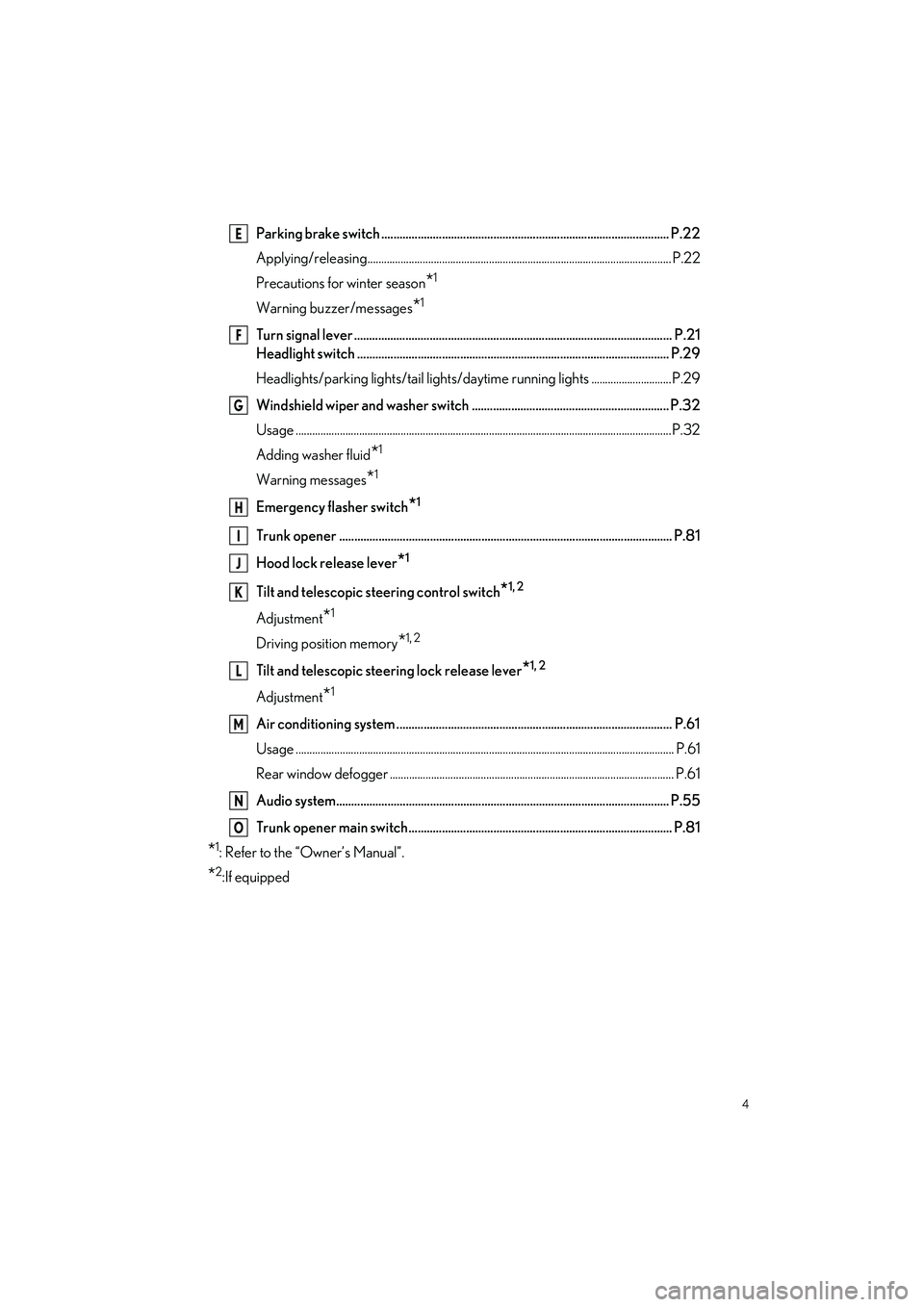
Parking brake switch ............................................................................................... P.22
Applying/releasing..............................................................................................................P.22
Precautions for winter season
*1
Warning buzzer/messages*1
Turn signal lever ......................................................................................................... P.21
Headlight switch ....................................................................................................... P.29
Headlights/parking lights/tai l lights/daytime running lights .............................P.29
Windshield wiper and washer switch ................................................................. P.32
Usage .......................................................................................................................... ..............P.32
Adding washer fluid
*1
Warning messages*1
Emergency flasher switch*1
Trunk opener .............................................................................................................. P.81
Hood lock release lever
*1
Tilt and telescopic steering control switch*1, 2
Adjustment*1
Driving position memory*1, 2
Tilt and telescopic steering lock release lever*1, 2
Adjustment*1
Air conditioning system ........................................................................................... P.61
Usage .......................................................................................................................... ............... P.61
Rear window defogger ....................................................................................................... P.61
Audio system.............................................................................................................. P.55
Trunk opener main switch....................................................................................... P.81
*1: Refer to the “Owner’s Manual”.
*2:If equipped
E
F
G
H
I
J
K
L
M
N
O
Page 6 of 96
5
IS500_IS350_IS300_QG_U
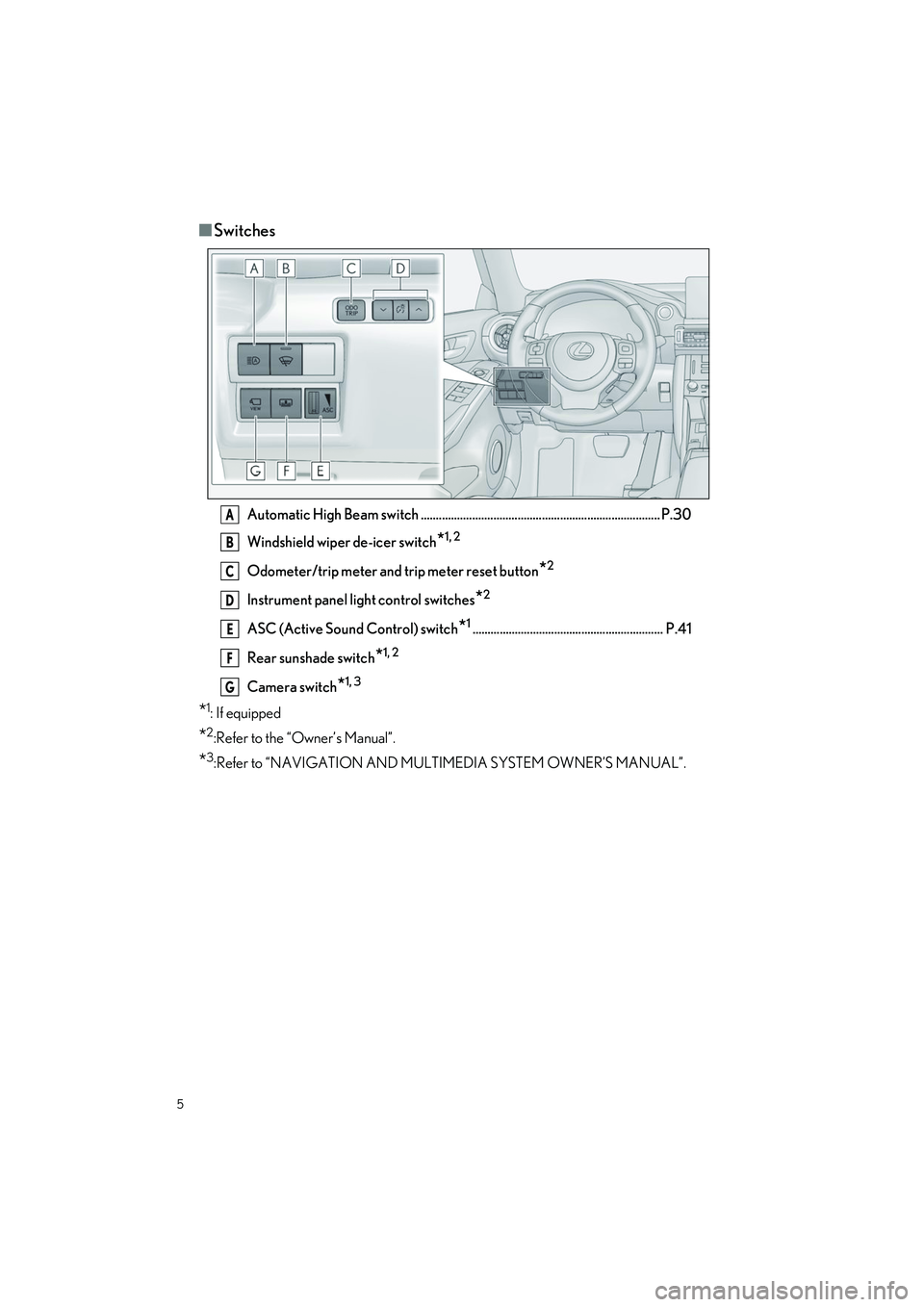
■Switches
Automatic High Beam switch ............................................................................... P.30
Windshield wiper de-icer switch
*1, 2
Odometer/trip meter and trip meter reset button*2
Instrument panel light control switches*2
ASC (Active Sound Control) switch*1............................................................... P.41
Rear sunshade switch
*1, 2
Camera switch*1, 3
*1:If equipped
*2:Refer to the “Owner’s Manual”.
*3:Refer to “NAVIGATION AND MULTIMEDIA SYSTEM OWNER’S MANUAL”.
A
B
C
D
E
F
G
Page 7 of 96
6
IS500_IS350_IS300_QG_U
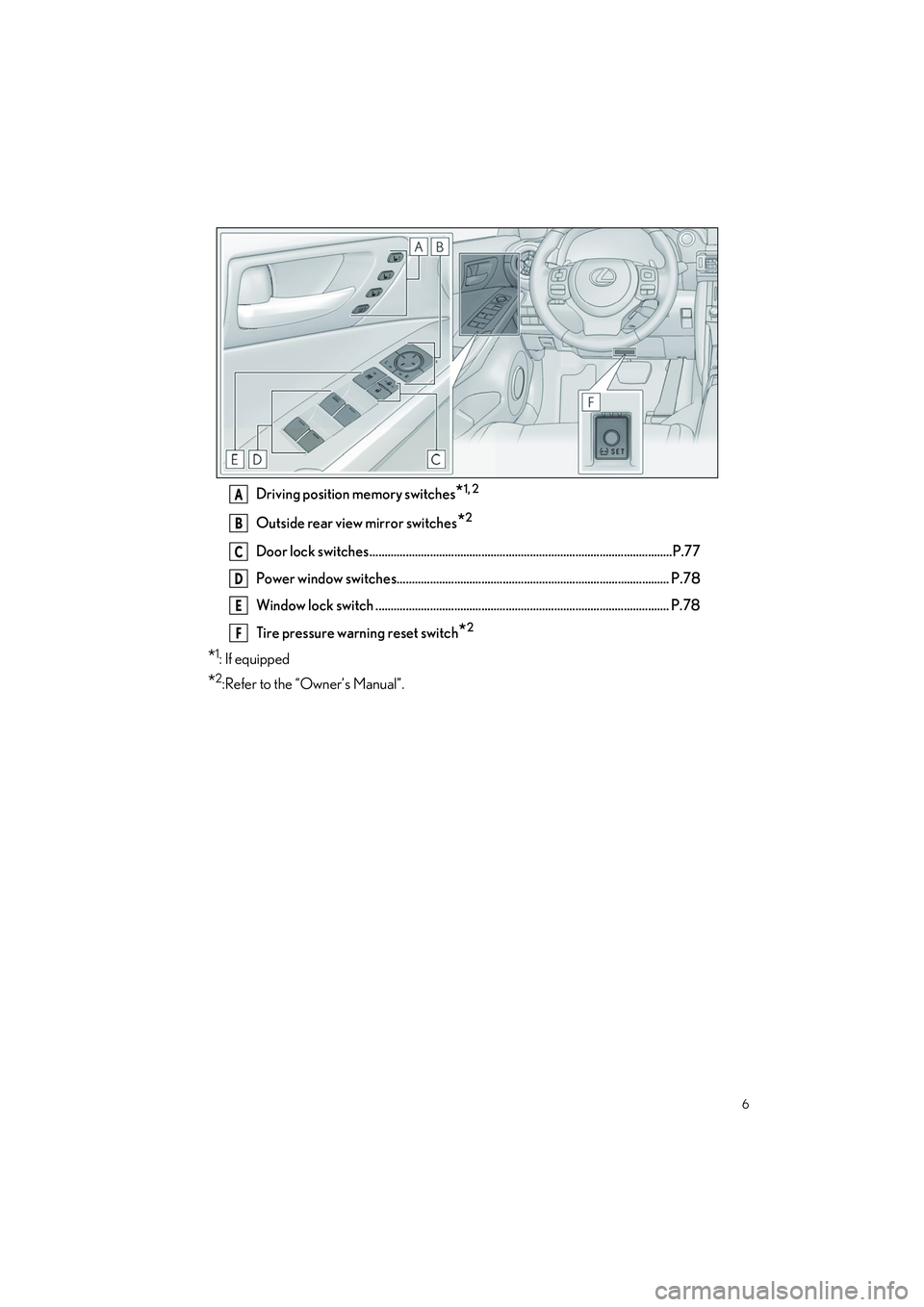
Driving position memory switches*1, 2
Outside rear view mirror switches*2
Door lock switches ....................................................................................................P.77
Power window switches.......................................................................................... P.78
Window lock switch ................................................................................................. P.78
Tire pressure warning reset switch
*2
*1:If equipped
*2:Refer to the “Owner’s Manual”.
A
B
C
D
E
F
Page 11 of 96
10
IS500_IS350_IS300_QG_U
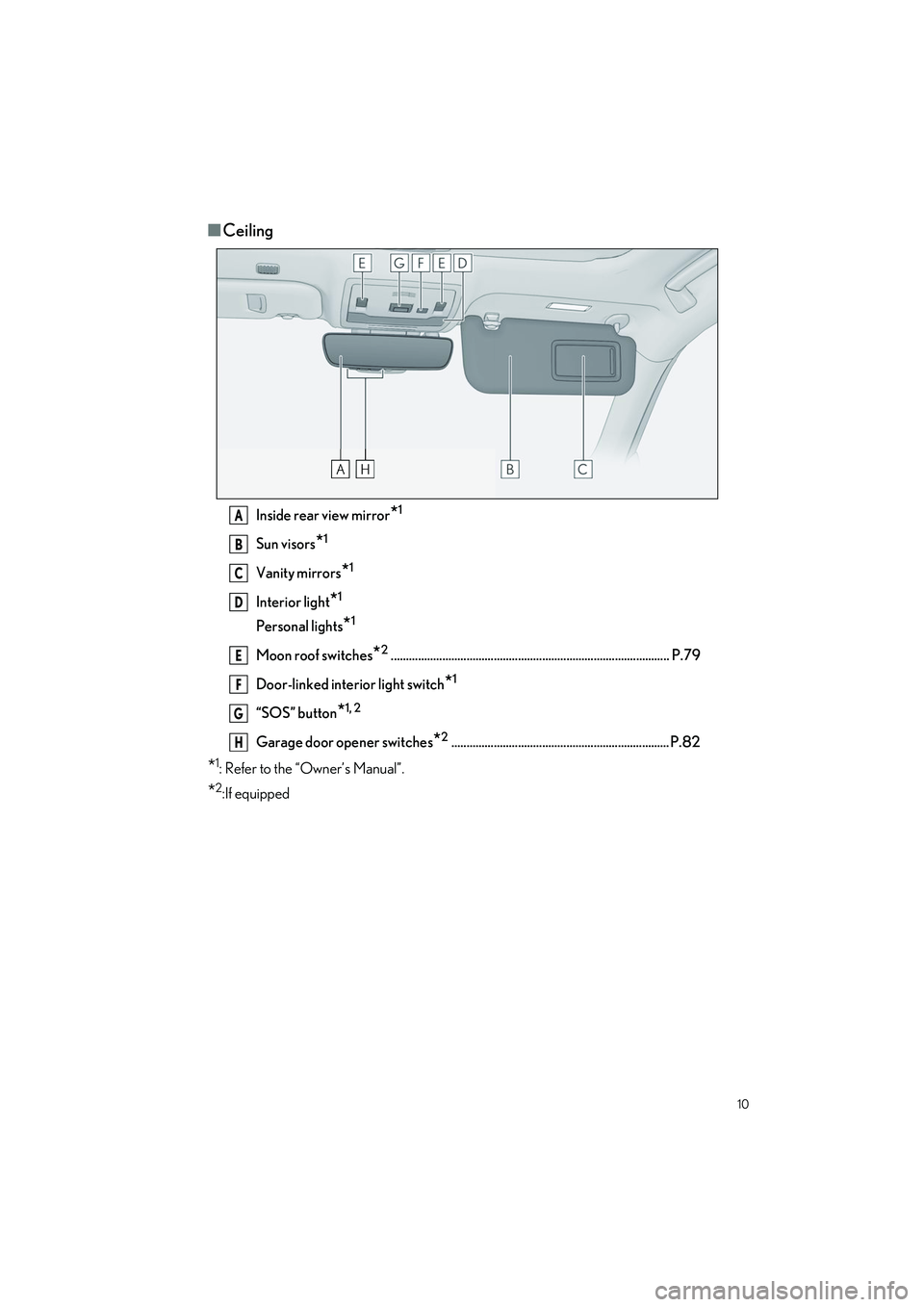
■Ceiling
Inside rear view mirror*1
Sun visors*1
Vanity mirrors*1
Interior light*1
Personal lights*1
Moon roof switches*2............................................................................................ P.79
Door-linked interior light switch
*1
“SOS” button*1, 2
Garage door opener switches*2........................................................................ P.82
*1: Refer to the “Owner’s Manual”.
*2:If equipped
A
B
C
D
E
F
G
H
Page 62 of 96
61
IS500_IS350_IS300_QG_U
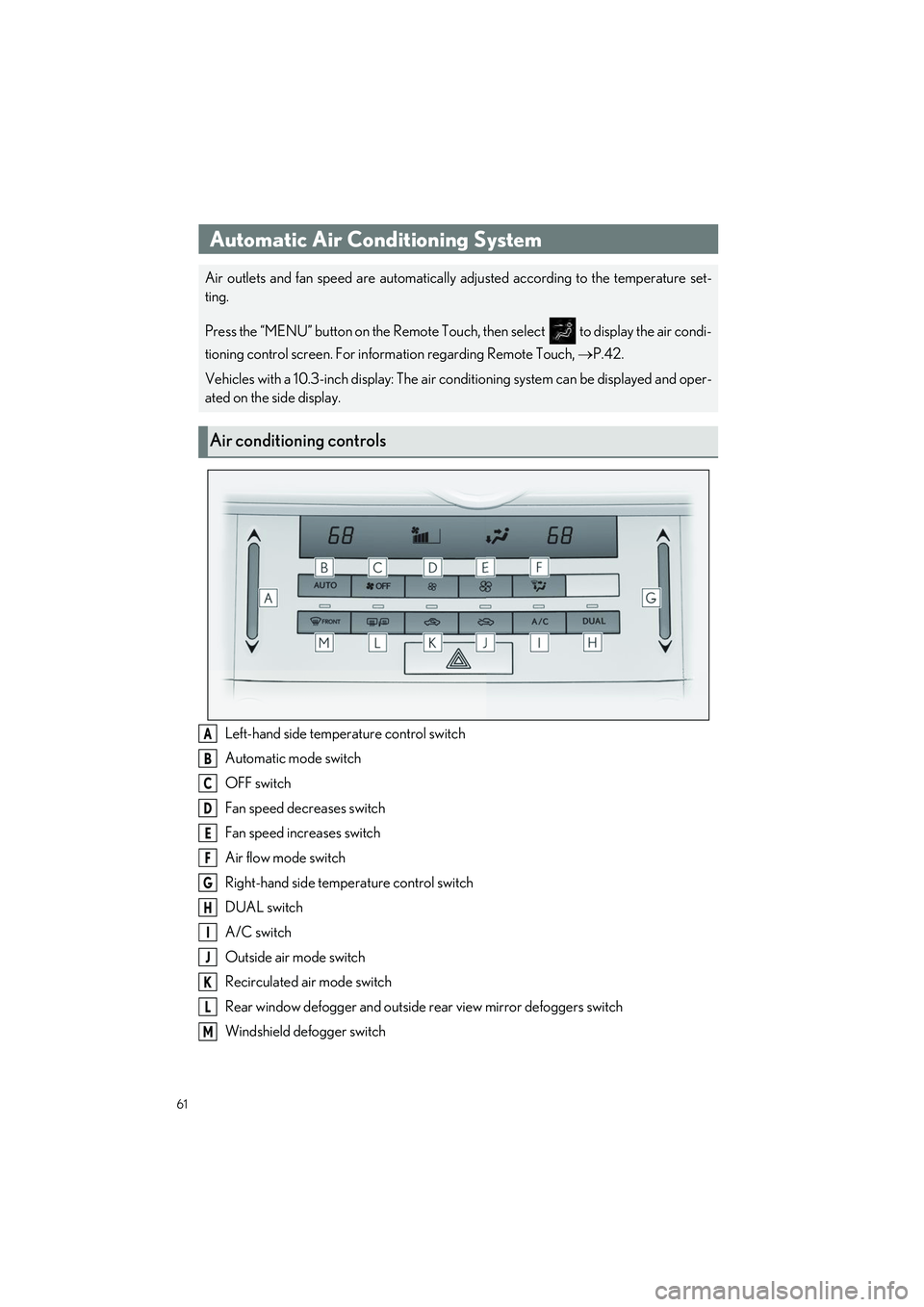
Left-hand side temperature control switch
Automatic mode switch
OFF switch
Fan speed decreases switch
Fan speed increases switch
Air flow mode switch
Right-hand side temperature control switch
DUAL switch
A/C switch
Outside air mode switch
Recirculated air mode switch
Rear window defogger and outside rear view mirror defoggers switch
Windshield defogger switch
Automatic Air Conditioning System
Air outlets and fan speed are automatically adjusted according to the temperature set-
ting.
Press the “MENU” button on the Remote Touch, then select to display the air condi-
tioning control screen. For information regarding Remote Touch, P.42.
Vehicles with a 10.3-inch display: The air co nditioning system can be displayed and oper-
ated on the side display.
Air conditioning controls
A
B
C
D
E
F
G
H
I
J
K
L
M
Page 73 of 96
72
IS500_IS350_IS300_QG_U
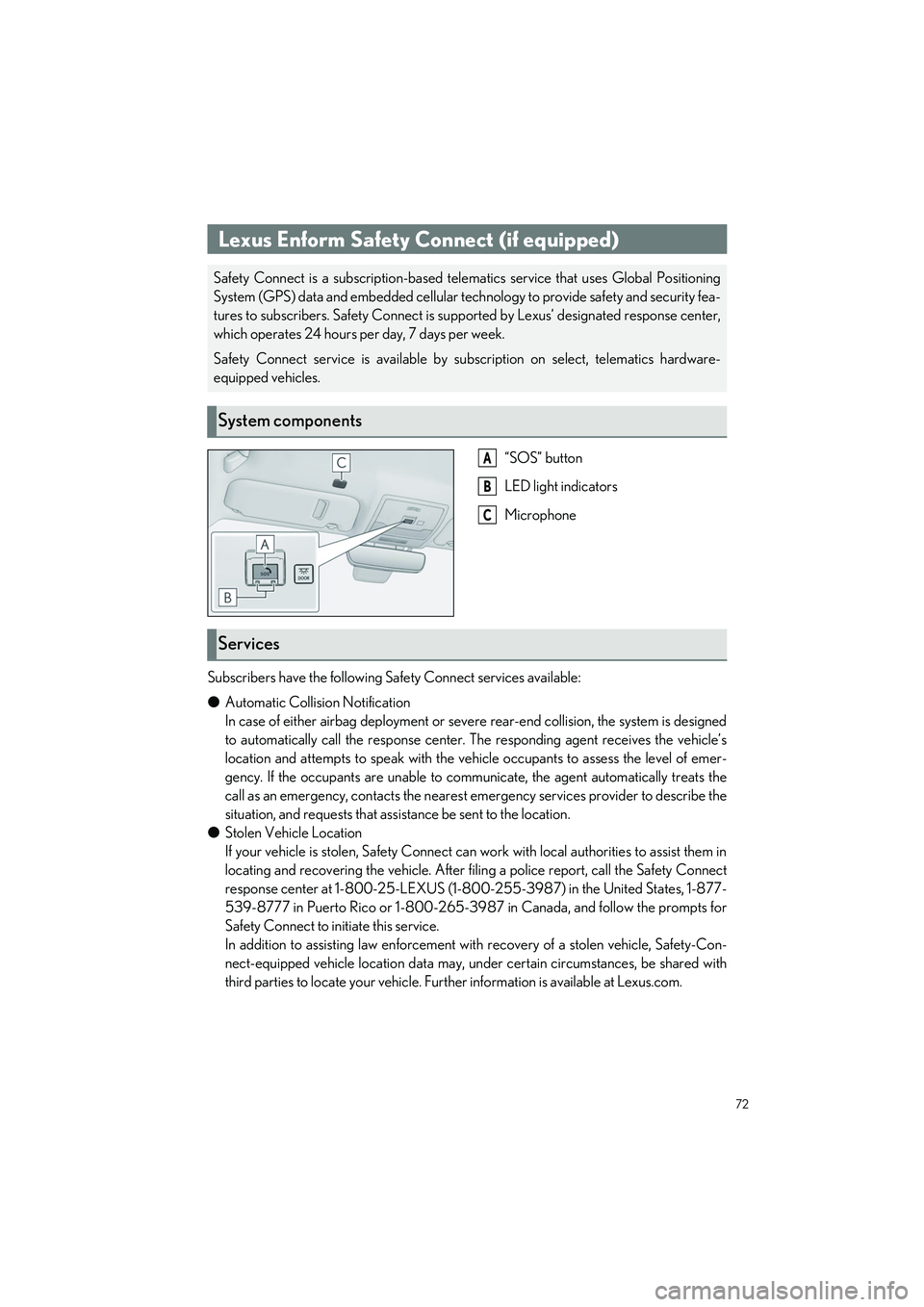
“SOS” button
LED light indicators
Microphone
Subscribers have the following Safety Connect services available:
● Automatic Collision Notification
In case of either airbag deployment or severe rear-end collision, the system is designed
to automatically call the resp onse center. The responding agent receives the vehicle’s
location and attempts to speak with the vehicle occupants to assess the level of emer-
gency. If the occupants are unable to communicate, the agent automatically treats the
call as an emergency, contacts the nearest emergency services provider to describe the
situation, and requests that assi stance be sent to the location.
● Stolen Vehicle Location
If your vehicle is stolen, Safety Connect can work with local authorities to assist them in
locating and recovering the vehicle. After fi ling a police report, call the Safety Connect
response center at 1-800-25-LEXUS (1-800-255-3987) in the United States, 1-877-
539-8777 in Puerto Rico or 1-800-265-3987 in Canada, and follow the prompts for
Safety Connect to initiate this service.
In addition to assisting law enforcement with recovery of a stolen vehicle, Safety-Con-
nect-equipped vehicle location data may, un der certain circumstances, be shared with
third parties to locate your vehicle. Furth er information is available at Lexus.com.
Lexus Enform Safety Connect (if equipped)
Safety Connect is a subscription-based telematics service that uses Global Positioning
System (GPS) data and embedded cellular technology to provide safety and security fea-
tures to subscribers. Safety Connect is supp orted by Lexus’ designated response center,
which operates 24 hours per day, 7 days per week.
Safety Connect service is available by subscription on select, telematics hardware-
equipped vehicles.
System components
A
B
C
Services
Page 78 of 96
77
IS500_IS350_IS300_QG_U
Opening and Closing
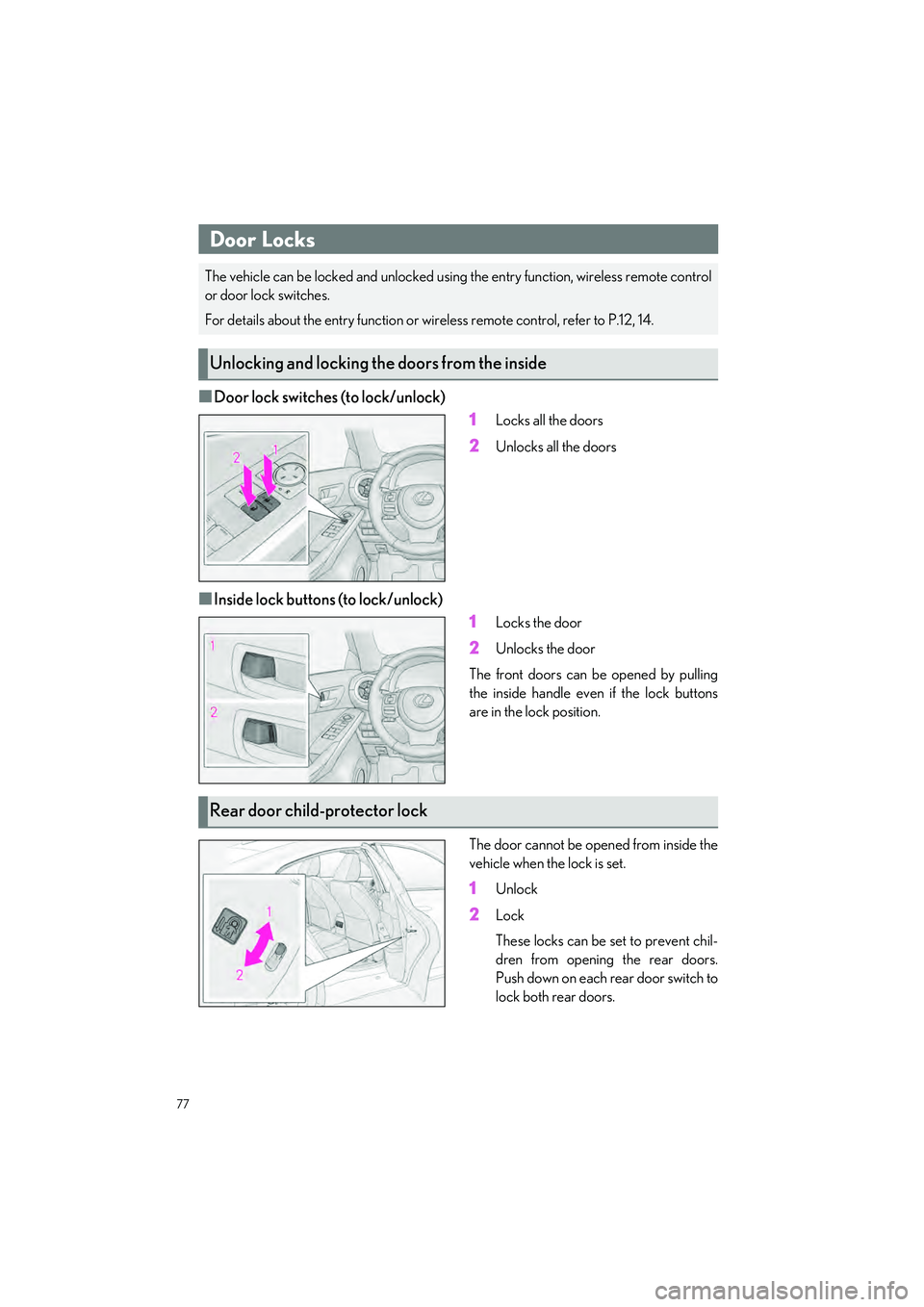
■Door lock switches (to lock/unlock)1
Locks all the doors
2Unlocks all the doors
■Inside lock buttons (to lock/unlock)1
Locks the door
2Unlocks the door
The front doors can be opened by pulling
the inside handle even if the lock buttons
are in the lock position.
The door cannot be open ed from inside the
vehicle when the lock is set.
1Unlock
2Lock
These locks can be set to prevent chil-
dren from opening the rear doors.
Push down on each rear door switch to
lock both rear doors.
Door Locks
The vehicle can be locked and unlocked usin g the entry function, wireless remote control
or door lock switches.
For details about the entry function or wire less remote control, refer to P.12, 14.
Unlocking and locking the doors from the inside
Rear door child-protector lock
Page 81 of 96
80
IS500_IS350_IS300_QG_U
●Close all the doors and windows, and turn the engine switch off.
● Confirm the type of fuel.
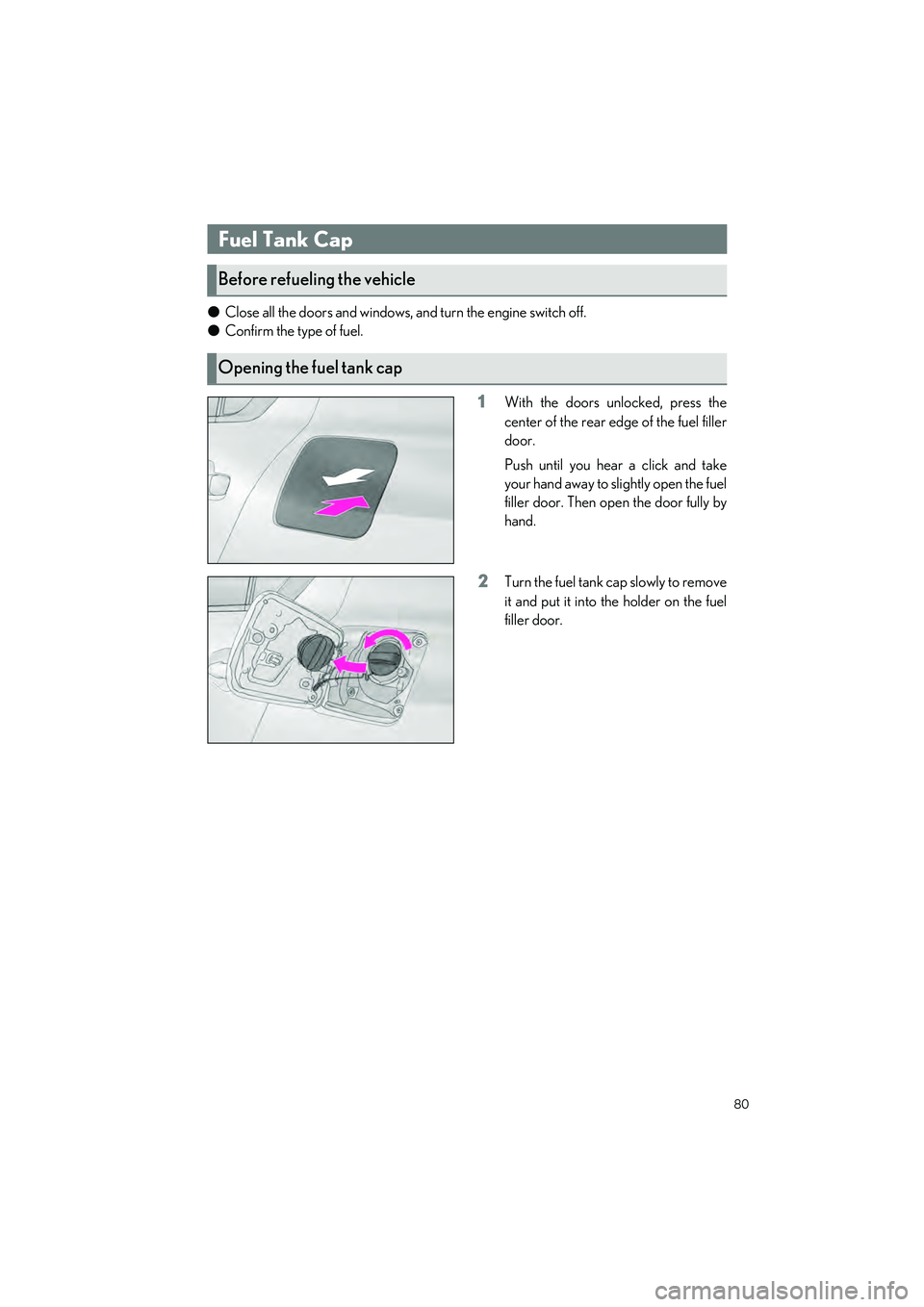
1With the doors unlocked, press the
center of the rear edge of the fuel filler
door.
Push until you hear a click and take
your hand away to slightly open the fuel
filler door. Then open the door fully by
hand.
2Turn the fuel tank cap slowly to remove
it and put it into the holder on the fuel
filler door.
Fuel Tank Cap
Before refueling the vehicle
Opening the fuel tank cap
Page 84 of 96
83
IS500_IS350_IS300_QG_U
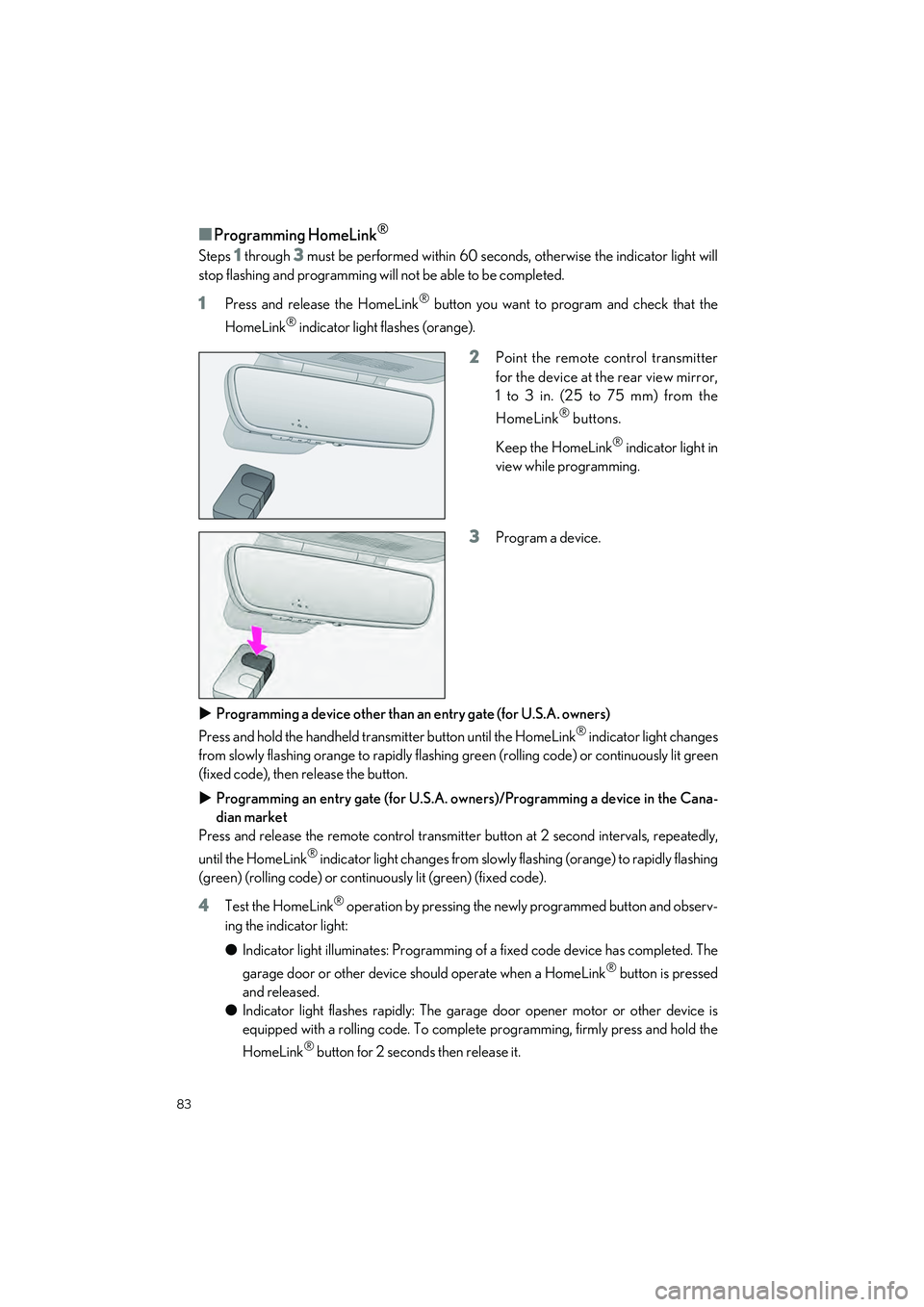
■Programming HomeLink®
Steps 1 through 3 must be performed within 60 seconds, otherwise the indicator light will
stop flashing and programming w ill not be able to be completed.
1Press and release the HomeLink® button you want to program and check that the
HomeLink
® indicator light flashes (orange).
2Point the remote control transmitter
for the device at the rear view mirror,
1 to 3 in. (25 to 75 mm) from the
HomeLink
® buttons.
Keep the HomeLink
® indicator light in
view while programming.
3Program a device.
Programming a device other than an entry gate (for U.S.A. owners)
Press and hold the handheld transmitter button until the HomeLink
® indicator light changes
from slowly flashing orange to rapidly flashing green (rolling code) or continuously lit green
(fixed code), then release the button.
Programming an entry gate (for U.S.A. owners)/Programming a device in the Cana-
dian market
Press and release the remote control transmitte r button at 2 second intervals, repeatedly,
until the HomeLink
® indicator light changes from slowly flashing (orange) to rapidly flashing
(green) (rolling code) or continuously lit (green) (fixed code).
4Test the HomeLink® operation by pressing the newly programmed button and observ-
ing the indicator light:
● Indicator light illuminates: Programming of a fixed code device has completed. The
garage door or other device should operate when a HomeLink
® button is pressed
and released.
● Indicator light flashes rapidly: The garage door opener motor or other device is
equipped with a rolling code. To complete programming, firmly press and hold the
HomeLink
® button for 2 second s then release it.
Page 88 of 96
What to do if...
87
IS500_IS350_IS300_QG_U
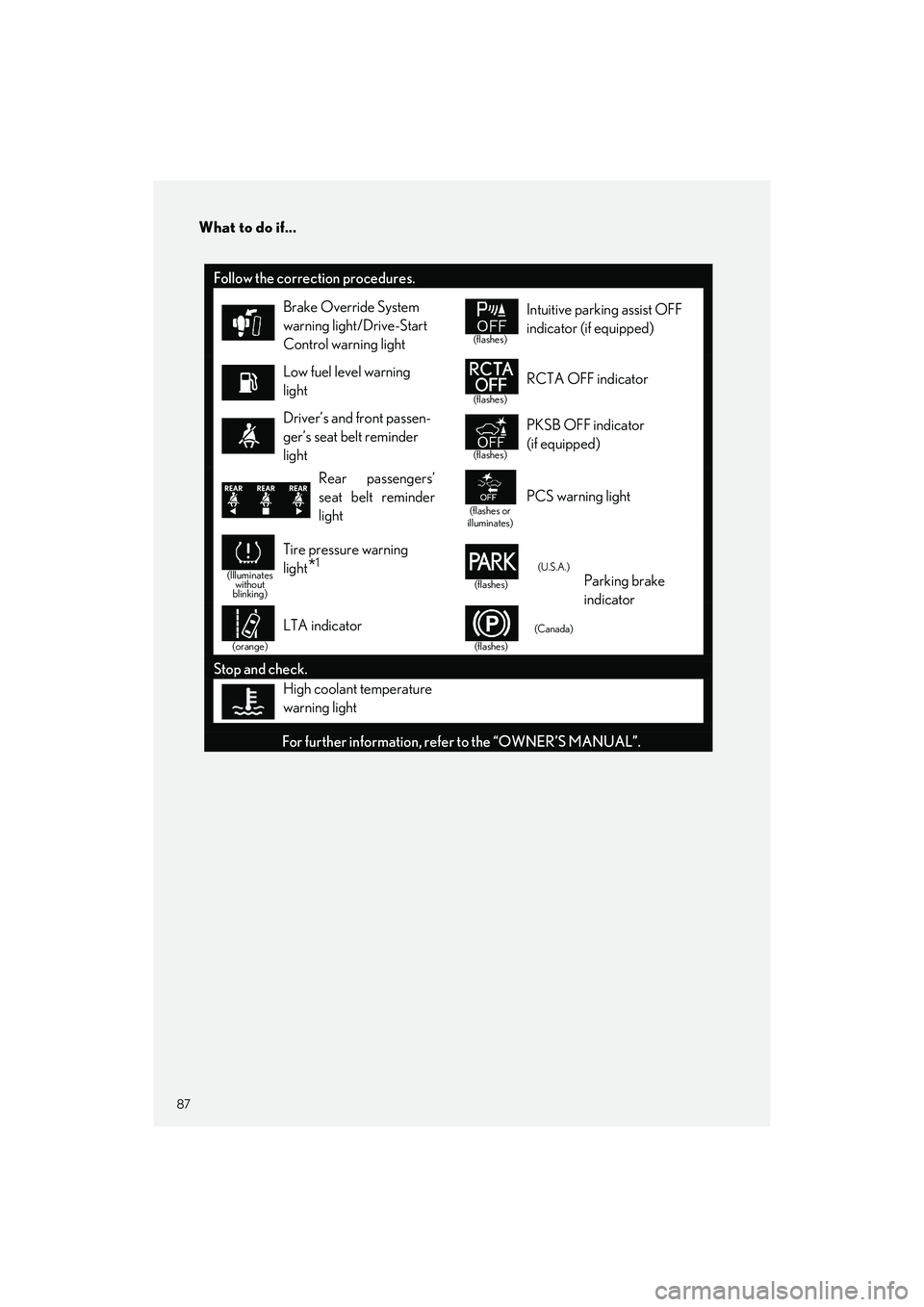
Follow the correction procedures.
Brake Override System
warning light/Drive-Start
Control warning light
(flashes)
Intuitive parking assist OFF
indicator (if equipped)
Low fuel level warning
light
(flashes)
RCTA OFF indicator
Driver’s and front passen-
ger’s seat belt reminder
light
(flashes)
PKSB OFF indicator
(if equipped)
Rear passengers’
seat belt reminder
light
(flashes or
illuminates)PCS warning light
(Illuminates without
blinking)
Tire pressure warning
light
*1
(flashes)
(U.S.A.)Parking brake
indicator
(orange)
LTA indicator
(flashes)
(Canada)
Stop and check.
High coolant temperature
warning light
For further information, refe r to the “OWNER’S MANUAL”.