set LEXUS IS300 2023 Owners Manual
[x] Cancel search | Manufacturer: LEXUS, Model Year: 2023, Model line: IS300, Model: LEXUS IS300 2023Pages: 96, PDF Size: 5.32 MB
Page 6 of 96
5
IS500_IS350_IS300_QG_U
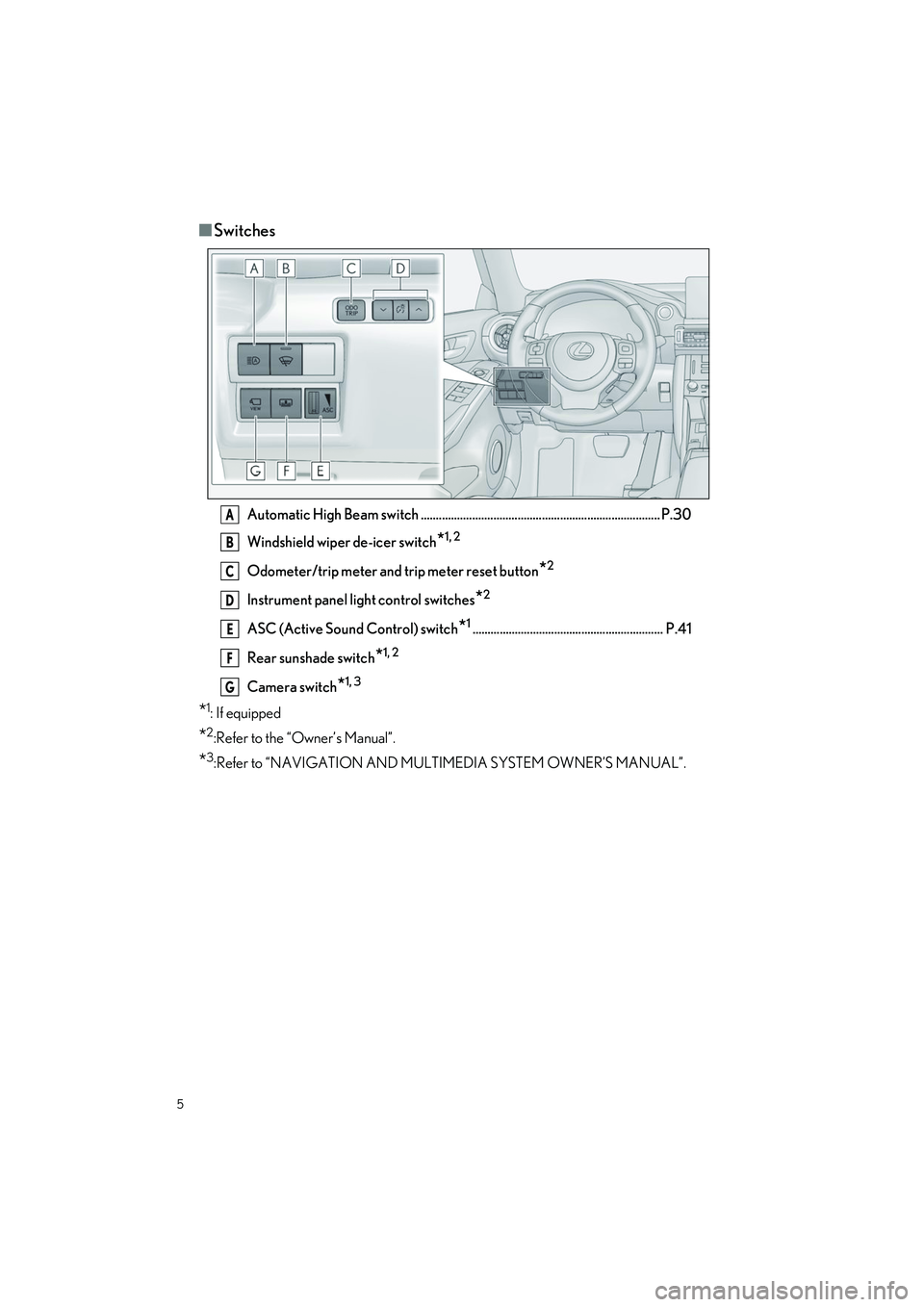
■Switches
Automatic High Beam switch ............................................................................... P.30
Windshield wiper de-icer switch
*1, 2
Odometer/trip meter and trip meter reset button*2
Instrument panel light control switches*2
ASC (Active Sound Control) switch*1............................................................... P.41
Rear sunshade switch
*1, 2
Camera switch*1, 3
*1:If equipped
*2:Refer to the “Owner’s Manual”.
*3:Refer to “NAVIGATION AND MULTIMEDIA SYSTEM OWNER’S MANUAL”.
A
B
C
D
E
F
G
Page 7 of 96
6
IS500_IS350_IS300_QG_U
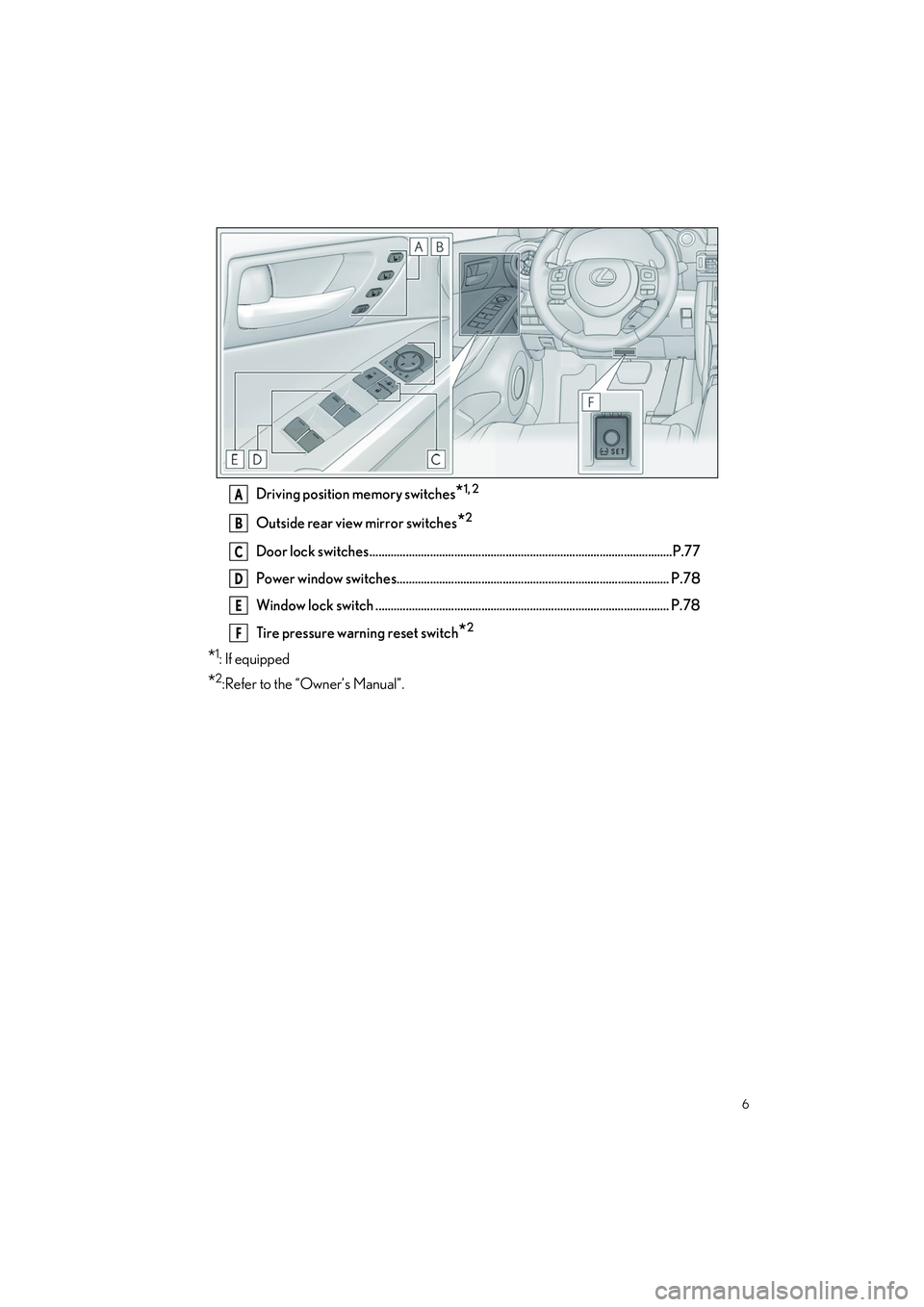
Driving position memory switches*1, 2
Outside rear view mirror switches*2
Door lock switches ....................................................................................................P.77
Power window switches.......................................................................................... P.78
Window lock switch ................................................................................................. P.78
Tire pressure warning reset switch
*2
*1:If equipped
*2:Refer to the “Owner’s Manual”.
A
B
C
D
E
F
Page 13 of 96
12
IS500_IS350_IS300_QG_U
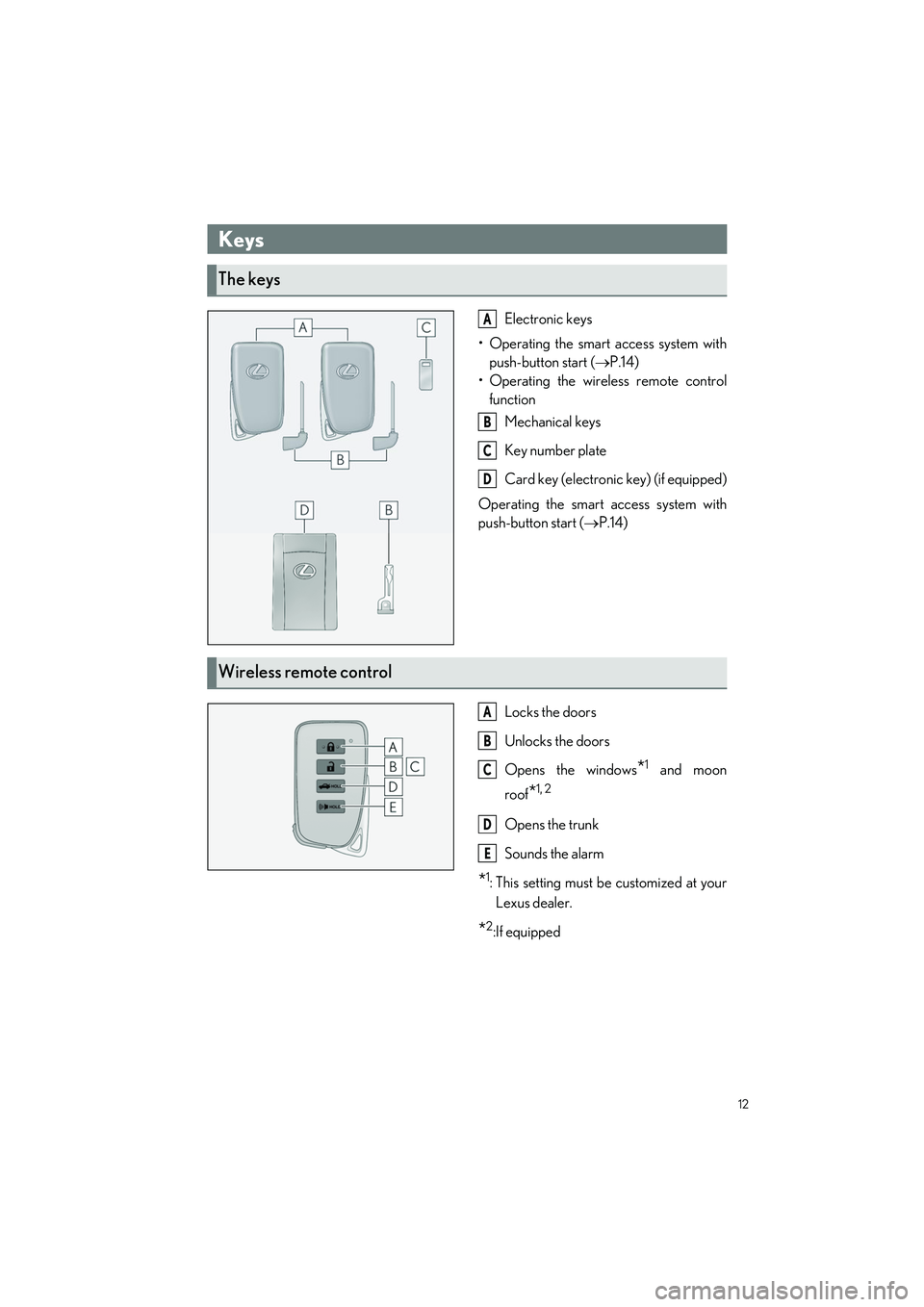
Electronic keys
• Operating the smart access system with push-button start ( P.14)
• Operating the wireless remote control function
Mechanical keys
Key number plate
Card key (electroni c key) (if equipped)
Operating the smart access system with
push-button start ( P.14)
Locks the doors
Unlocks the doors
Opens the windows
*1 and moon
roof
*1, 2
Opens the trunk
Sounds the alarm
*1: This setting must be customized at your
Lexus dealer.
*2:If equipped
Keys
The keys
A
B
C
D
Wireless remote control
A
B
C
D
E
Page 15 of 96
14
IS500_IS350_IS300_QG_U
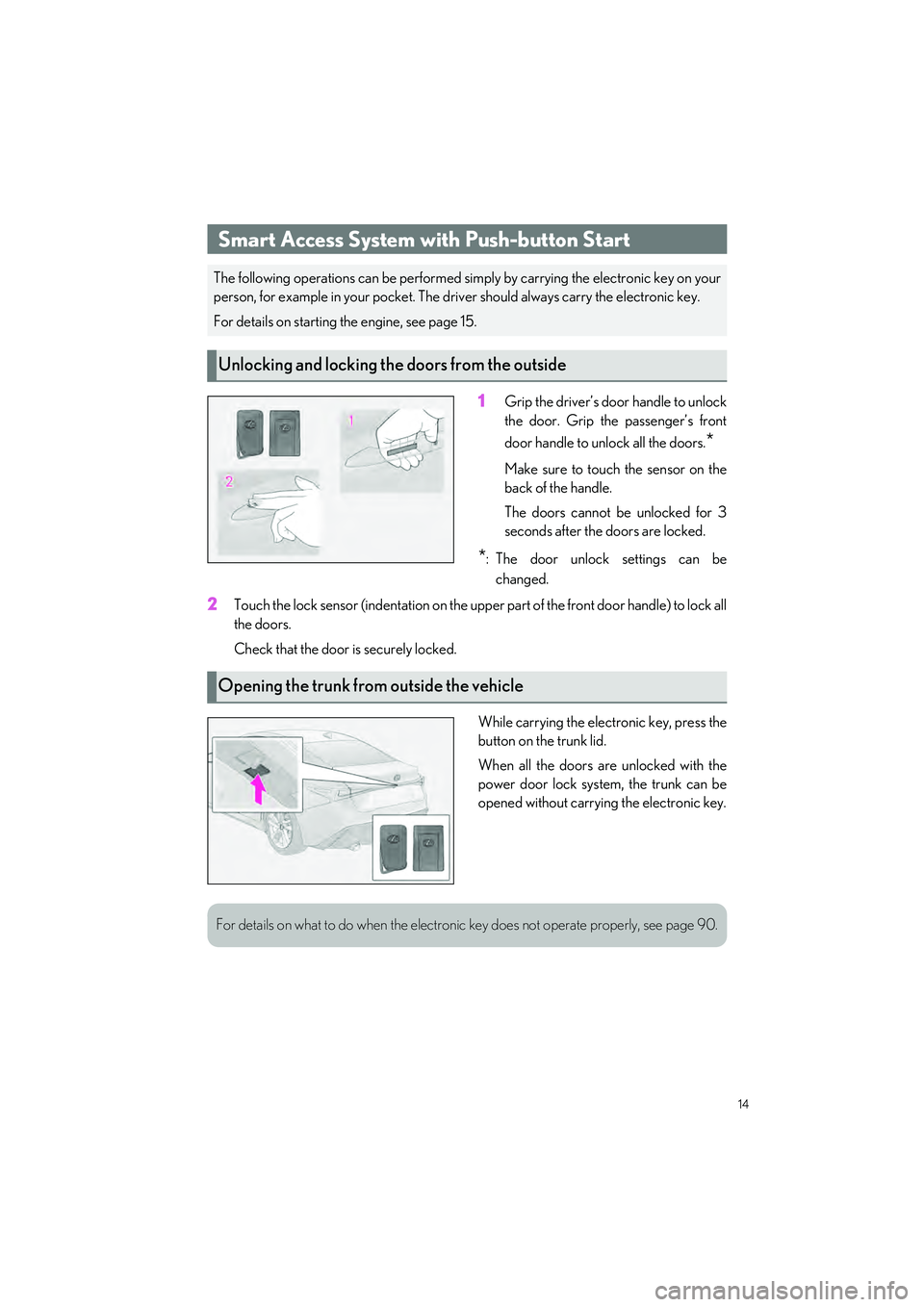
1Grip the driver’s door handle to unlock
the door. Grip the passenger’s front
door handle to unlock all the doors.
*
Make sure to touch the sensor on the
back of the handle.
The doors cannot be unlocked for 3
seconds after the doors are locked.
*: The door unlock settings can bechanged.
2Touch the lock sensor (indentation on the upper part of the front door handle) to lock all
the doors.
Check that the door is securely locked.
While carrying the electronic key, press the
button on the trunk lid.
When all the doors are unlocked with the
power door lock system, the trunk can be
opened without carrying the electronic key.
Smart Access System with Push-button Start
The following operations can be performed si mply by carrying the electronic key on your
person, for example in your pocket. The driv er should always carry the electronic key.
For details on starting the engine, see page 15.
Unlocking and locking the doors from the outside
Opening the trunk from outside the vehicle
For details on what to do when the electronic key does not operate properly, see page 90.
Page 16 of 96
15
IS500_IS350_IS300_QG_U
When Driving
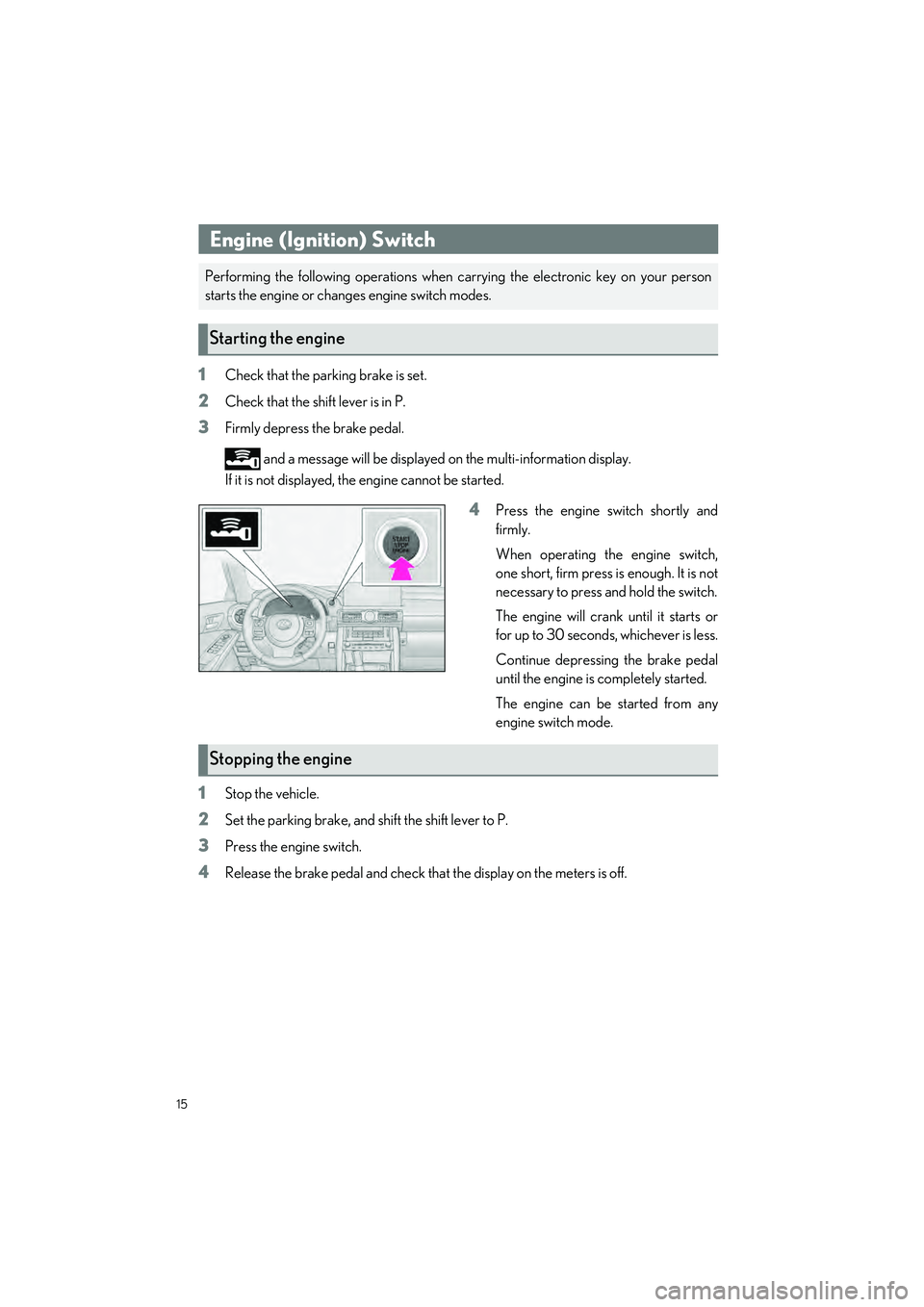
1Check that the parking brake is set.
2Check that the shift lever is in P.
3Firmly depress the brake pedal.
and a message will be displayed on the multi-information display.
If it is not displayed, th e engine cannot be started.
4Press the engine switch shortly and
firmly.
When operating the engine switch,
one short, firm press is enough. It is not
necessary to press and hold the switch.
The engine will crank until it starts or
for up to 30 seconds, whichever is less.
Continue depressing the brake pedal
until the engine is completely started.
The engine can be started from any
engine switch mode.
1Stop the vehicle.
2Set the parking brake, and shift the shift lever to P.
3Press the engine switch.
4Release the brake pedal and check that the display on the meters is off.
Engine (Ignition) Switch
Performing the following operations when ca rrying the electronic key on your person
starts the engine or changes engine switch modes.
Starting the engine
Stopping the engine
Page 20 of 96
19
IS500_IS350_IS300_QG_U
■Driving mode
P.38
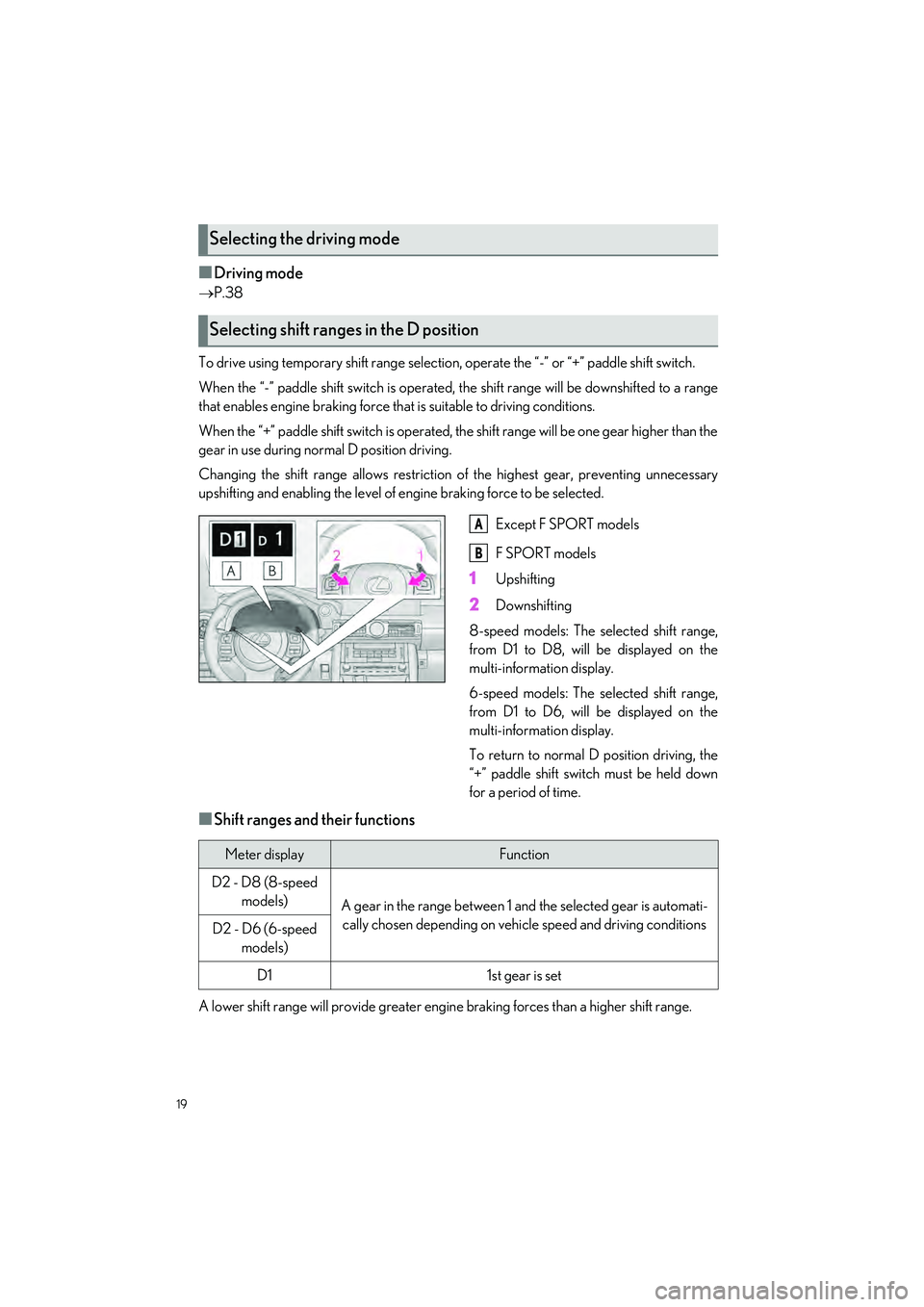
To drive using temporary shift range selection, operate the “- ” or “+” paddle shift switch.
When the “-” paddle shift switch is operated, the shift range will be downshifted to a range
that enables engine braking force that is suitable to driving conditions.
When the “+” paddle shift switch is operated, the shift range will be one gear higher than the
gear in use during normal D position driving.
Changing the shift range allo ws restriction of the highest gear, preventing unnecessary
upshifting and enabling the level of engine braking force to be selected.
Except F SPORT models
F SPORT models
1Upshifting
2Downshifting
8-speed models: The selected shift range,
from D1 to D8, will be displayed on the
multi-information display.
6-speed models: The selected shift range,
from D1 to D6, will be displayed on the
multi-information display.
To return to normal D position driving, the
“+” paddle shift switch must be held down
for a period of time.
■Shift ranges and their functions
A lower shift range will provid e greater engine braking forces than a higher shift range.
Selecting the driving mode
Selecting shift ranges in the D position
A
B
Meter displayFunction
D2 - D8 (8-speed
models)
A gear in the range between 1 and the selected gear is automati-
cally chosen depending on vehi cle speed and driving conditions
D2 - D6 (6-speed
models)
D11st gear is set
Page 23 of 96
22
IS500_IS350_IS300_QG_U
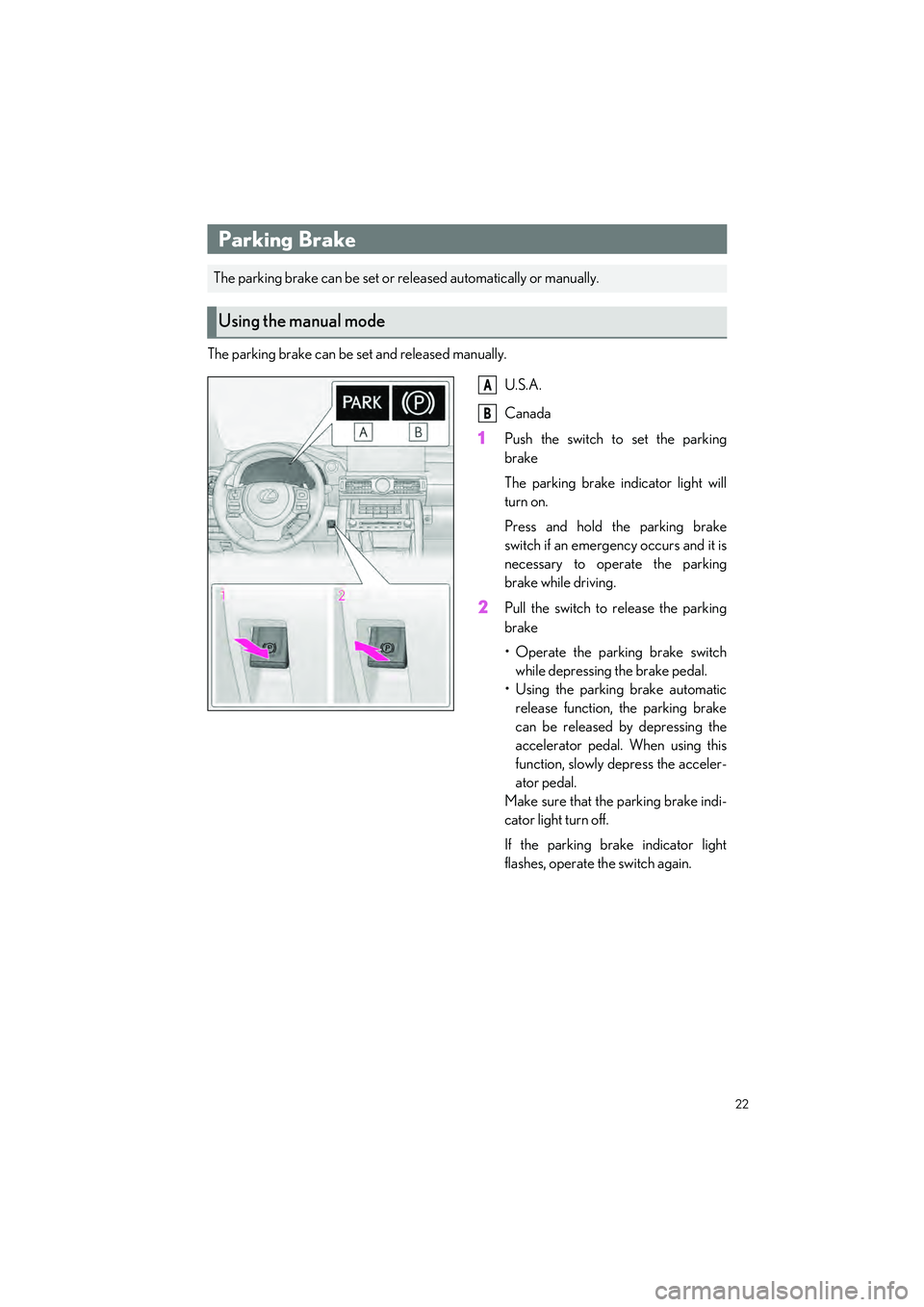
The parking brake can be set and released manually.U.S.A.
Canada
1Push the switch to set the parking
brake
The parking brake indicator light will
turn on.
Press and hold the parking brake
switch if an emerge ncy occurs and it is
necessary to operate the parking
brake while driving.
2Pull the switch to release the parking
brake
• Operate the parking brake switch while depressing the brake pedal.
• Using the parking brake automatic release function, the parking brake
can be released by depressing the
accelerator pedal. When using this
function, slowly depress the acceler-
ator pedal.
Make sure that the parking brake indi-
cator light turn off.
If the parking brake indicator light
flashes, operate the switch again.
Parking Brake
The parking brake can be set or re leased automatically or manually.
Using the manual mode
A
B
Page 24 of 96
23
IS500_IS350_IS300_QG_U
In automatic mode, the parking brake can be set or released automatically according to the
shift lever operation. Also, even in automatic mode, the parkin g brake can be set or released
manually.
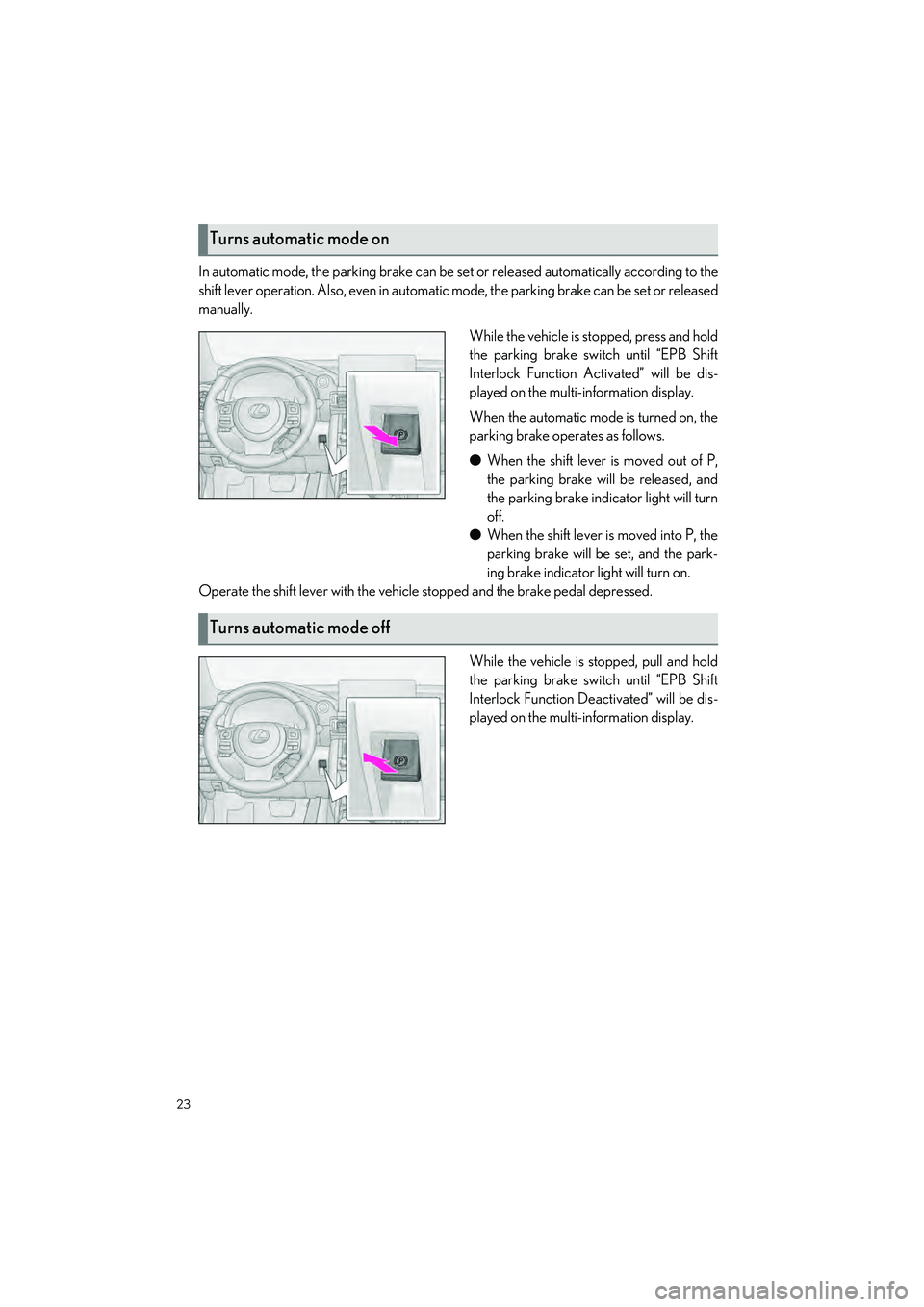
While the vehicle is stopped, press and hold
the parking brake switch until “EPB Shift
Interlock Function Activated” will be dis-
played on the multi-information display.
When the automatic mode is turned on, the
parking brake operates as follows.
● When the shift lever is moved out of P,
the parking brake will be released, and
the parking brake indicator light will turn
off.
● When the shift lever is moved into P, the
parking brake will be set, and the park-
ing brake indicator light will turn on.
Operate the shift lever with the vehicle stopped and the brake pedal depressed.
While the vehicle is stopped, pull and hold
the parking brake switch until “EPB Shift
Interlock Function Deactivated” will be dis-
played on the multi-information display.
Turns automatic mode on
Turns automatic mode off
Page 26 of 96
25
IS500_IS350_IS300_QG_U
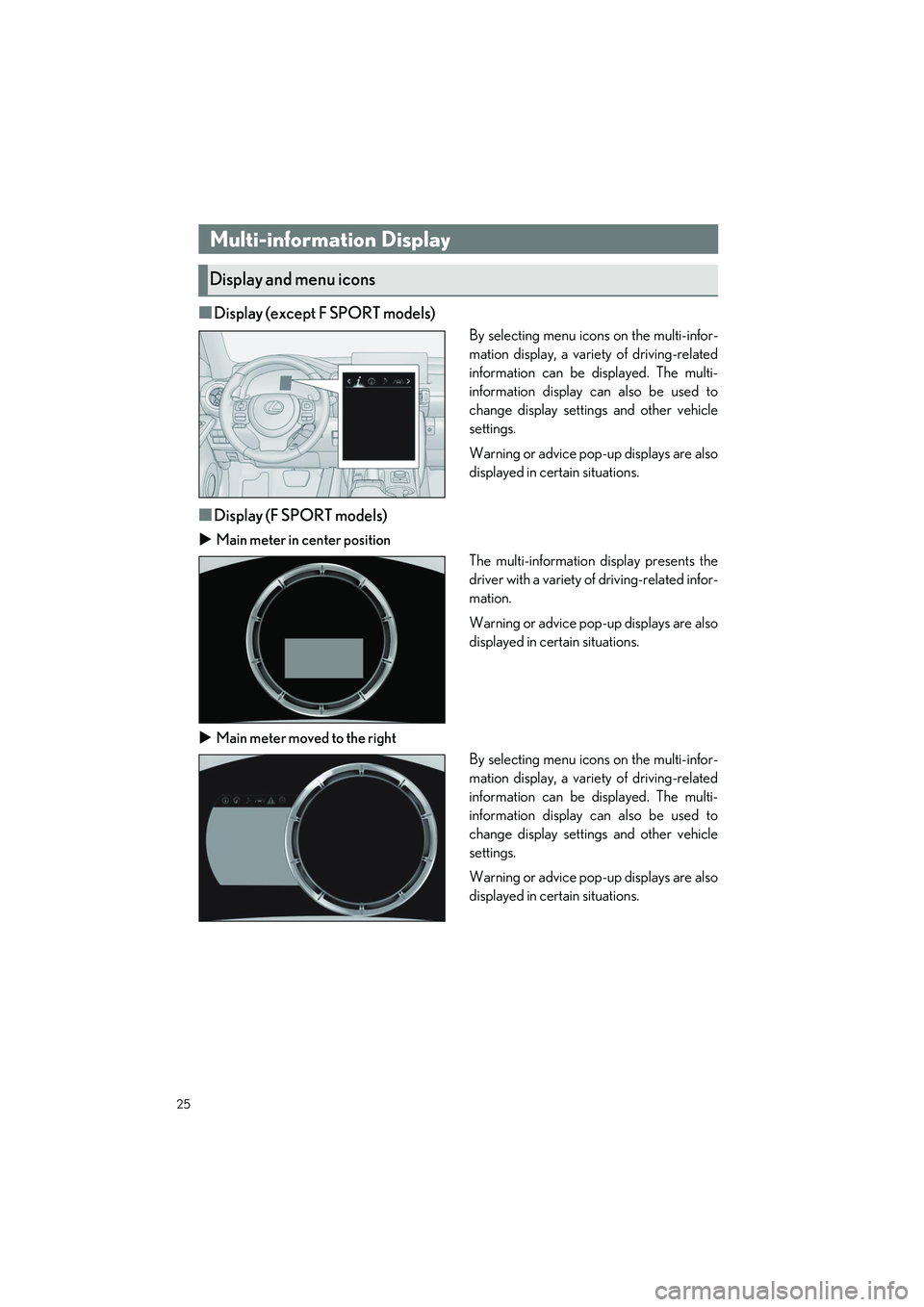
■Display (except F SPORT models)
By selecting menu icons on the multi-infor-
mation display, a variety of driving-related
information can be displayed. The multi-
information display can also be used to
change display settin gs and other vehicle
settings.
Warning or advice pop-up displays are also
displayed in certain situations.
■Display (F SPORT models)
Main meter in center position
The multi-information display presents the
driver with a variety of driving-related infor-
mation.
Warning or advice pop-up displays are also
displayed in certain situations.
Main meter moved to the right
By selecting menu icons on the multi-infor-
mation display, a variety of driving-related
information can be displayed. The multi-
information display can also be used to
change display settin gs and other vehicle
settings.
Warning or advice pop-up displays are also
displayed in certain situations.
Multi-information Display
Display and menu icons
Page 27 of 96
26
IS500_IS350_IS300_QG_U
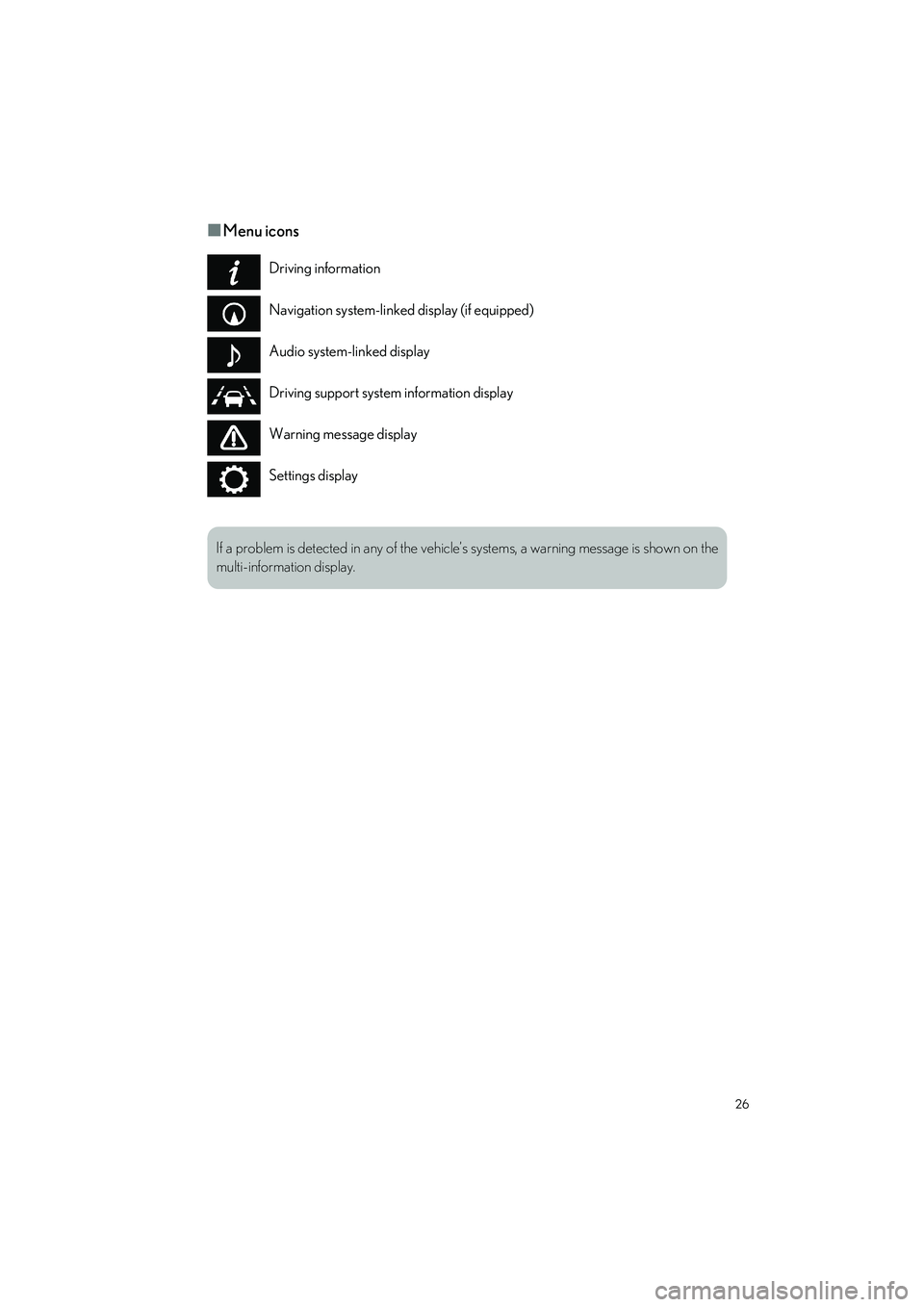
■Menu icons
Driving information
Navigation system-linked display (if equipped)
Audio system-linked display
Driving support system information display
Warning message display
Settings display
If a problem is detected in any of the vehicle’s systems, a warning message is shown on the
multi-information display.