lock Lexus IS300h 2013 Owners Manual
[x] Cancel search | Manufacturer: LEXUS, Model Year: 2013, Model line: IS300h, Model: Lexus IS300h 2013Pages: 628, PDF Size: 20.23 MB
Page 421 of 628

4076-1. Using the air conditioning system
6
Interior features
IS300h_EE(OM53B95E)
Registering air conditioning settings to electronic keys (vehicles with driving
position memory)
Unlocking the vehicle using an electronic key and turning the power switch to
ON mode will recall that key’s registered air conditioning settings.
When the power switch is turned off, the current air conditioning settings will
automatically be registered to the electronic key that was used to unlock the
vehicle.
The system may not operate correctly if more than one electronic key is in the
vicinity or if the smart entry & start system is used to unlock a passenger door.
The doors that can recall the air conditioning setting when unlocked using the
smart entry & start system can be changed.* For details, contact any authorized
Lexus dealer or repairer, or another duly qualified and equipped professional.
*: The doors that can recall the driving position memory are changed at the same
time.
Using automatic mode
Fan speed is adjusted automatically according to the temperature setting and the
ambient conditions.
Therefore, the fan may stop for a while until warm or cool air is ready to flow
immediately after is pressed or “AUTO” is selected.
Fogging up of the windows
The windows will easily fog up when the humidity in the vehicle is high. Turning
(“A/C”) on will dehumidify the air from the outlets and defog the wind-
shield effectively.
If you turn (“A/C”) off, the windows may fog up more easily.
The windows may fog up if the recirculated air mode is used.
Outside/recirculated air mode
When driving on dusty roads such as tunnels or in heavy traffic, set the outside/
recirculated air mode button to the recirculated air mode. This is effective in
preventing outside air from entering the vehicle interior. During cooling opera-
tion, setting the recirculated air mode will also cool the vehicle interior effec-
tively.
Outside/recirculated air mode may automatically switch depending on the tem-
perature setting or the inside temperature.
Operation of the air conditioning system in Eco drive mode
In Eco drive mode, the air conditioning system is controlled as follows to priori-
tize fuel efficiency:
Engine speed and compressor operation controlled to restrict heating/cooling
capacity
Fan speed restricted when automatic mode is selected
To improve air conditioning performance, perform the following operations:
Adjust the fan speed
Turn off Eco drive mode
Page 422 of 628
4086-1. Using the air conditioning system
IS300h_EE(OM53B95E)
Air conditioning odors
During use, various odors from inside and outside the vehicle may enter into
and accumulate in the air conditioning system. This may then cause odor to be
emitted from the vents.
To reduce potential odors from occurring:
• It is recommended that the air conditioning system be set to outside air mode
prior to turning the vehicle off.
• The start timing of the blower may be delayed for a short period of time
immediately after the air conditioning system is started in automatic mode.
Air conditioning filter
P. 470
Customization
Settings (e.g. A/C Auto switch operation) can be changed.
(Customizable features P. 582)
CAUTION
To prevent the windshield from fogging up
Do not use during cool air operation in extremely humid weather. The
difference between the temperature of the outside air and that of the wind-
shield can cause the outer surface of the windshield to fog up, blocking your
vision.
To prevent burns
Do not touch the rear view mirror surfaces when the outside rear view mirror
defoggers are on.
Do not touch the glass at lower part of the windshield or to the side of the
front pillars when the windshield wiper de-icer is on.
NOTICE
To prevent 12-volt battery discharge
Do not leave the air conditioning system on longer than necessary when the
hybrid system is off.
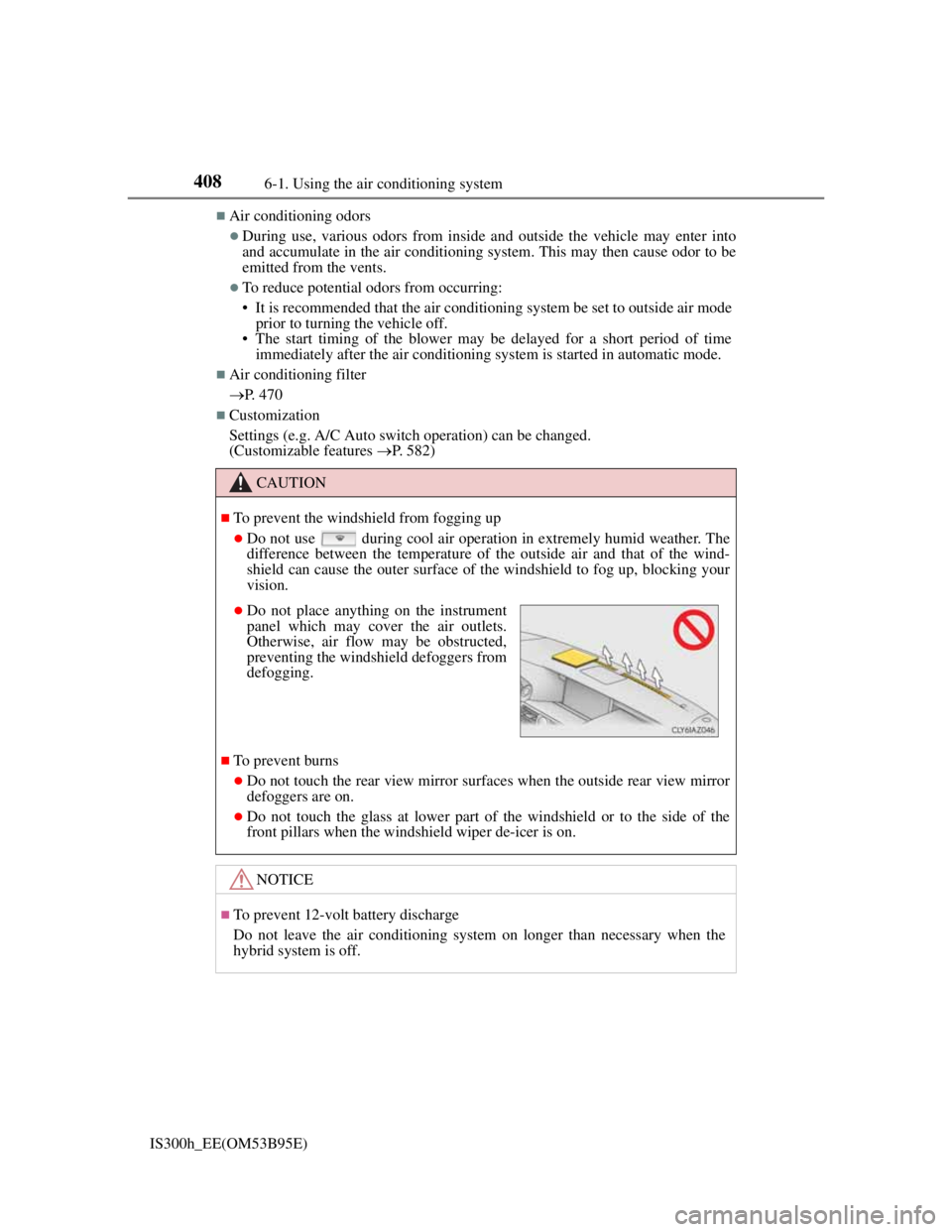
Do not place anything on the instrument
panel which may cover the air outlets.
Otherwise, air flow may be obstructed,
preventing the windshield defoggers from
defogging.
Page 426 of 628
4126-2. Using the interior lights
IS300h_EE(OM53B95E)
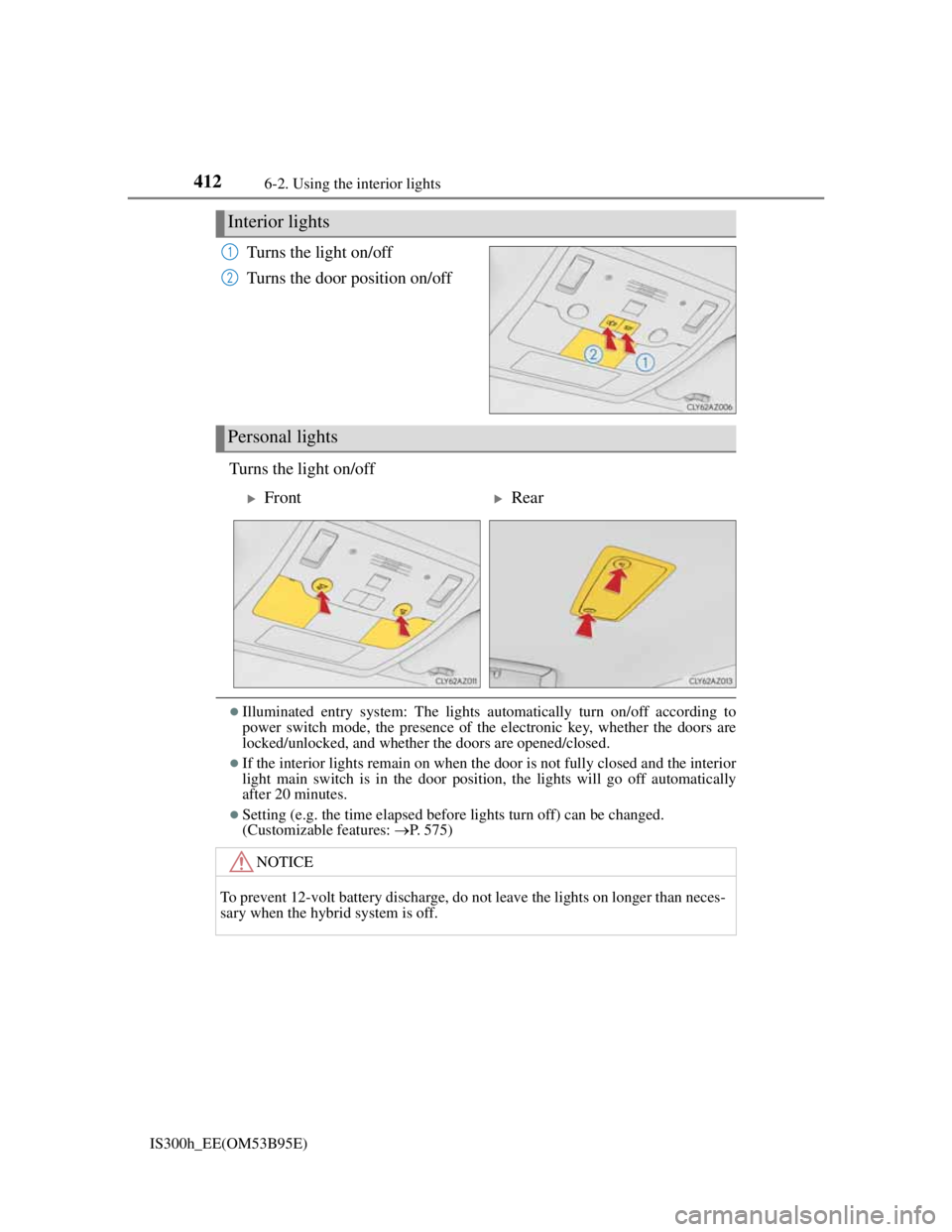
Turns the light on/off
Turns the door position on/off
Turns the light on/off
Illuminated entry system: The lights automatically turn on/off according to
power switch mode, the presence of the electronic key, whether the doors are
locked/unlocked, and whether the doors are opened/closed.
If the interior lights remain on when the door is not fully closed and the interior
light main switch is in the door position, the lights will go off automatically
after 20 minutes.
Setting (e.g. the time elapsed before lights turn off) can be changed.
(Customizable features: P. 575)
Interior lights
1
2
Personal lights
FrontRear
NOTICE
To prevent 12-volt battery discharge, do not leave the lights on longer than neces-
sary when the hybrid system is off.
Page 428 of 628
4146-3. Using the storage features
IS300h_EE(OM53B95E)
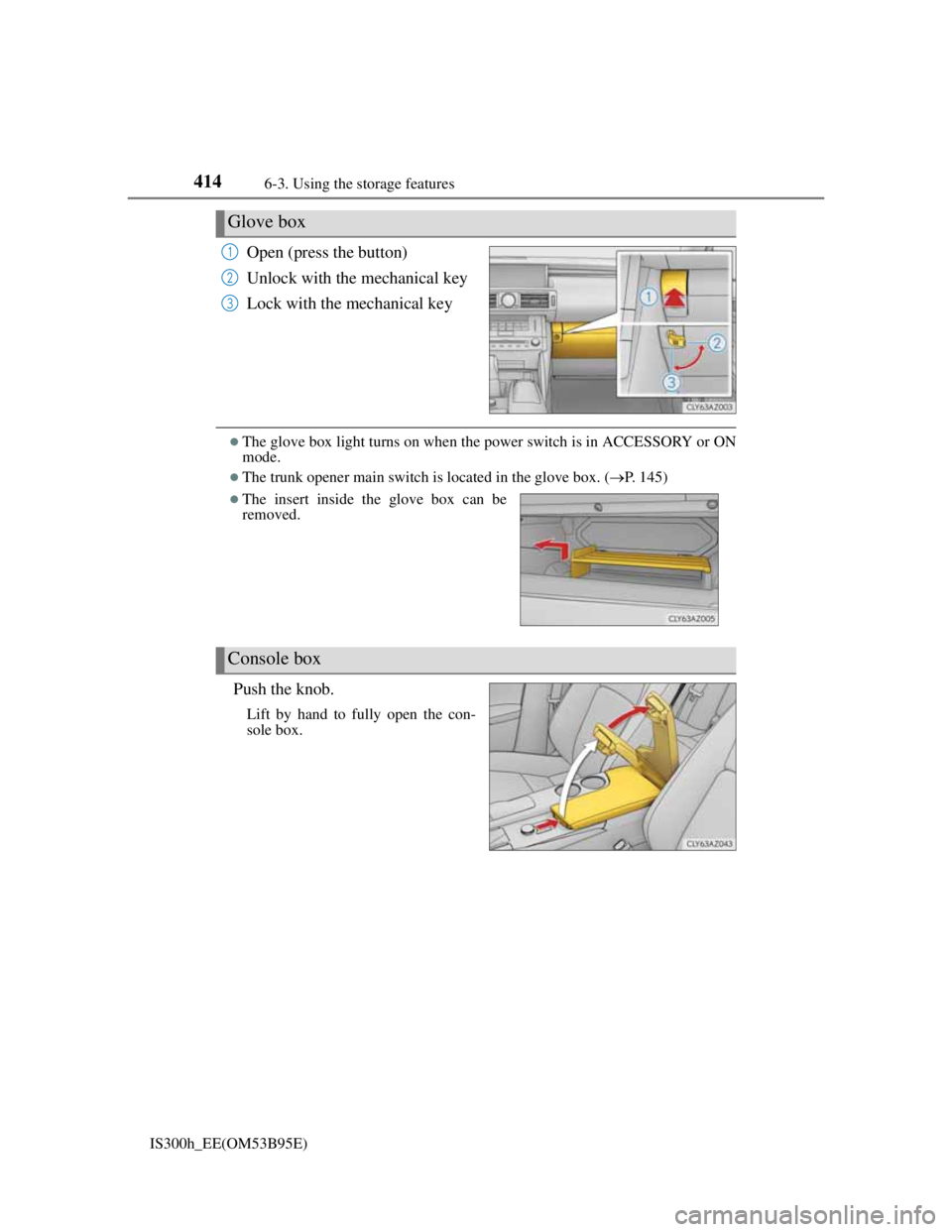
Open (press the button)
Unlock with the mechanical key
Lock with the mechanical key
The glove box light turns on when the power switch is in ACCESSORY or ON
mode.
The trunk opener main switch is located in the glove box. (P. 145)
Push the knob.
Lift by hand to fully open the con-
sole box.
Glove box
1
2
3
The insert inside the glove box can be
removed.
Console box
Page 434 of 628
420
IS300h_EE(OM53B95E)6-4. Using the other interior features
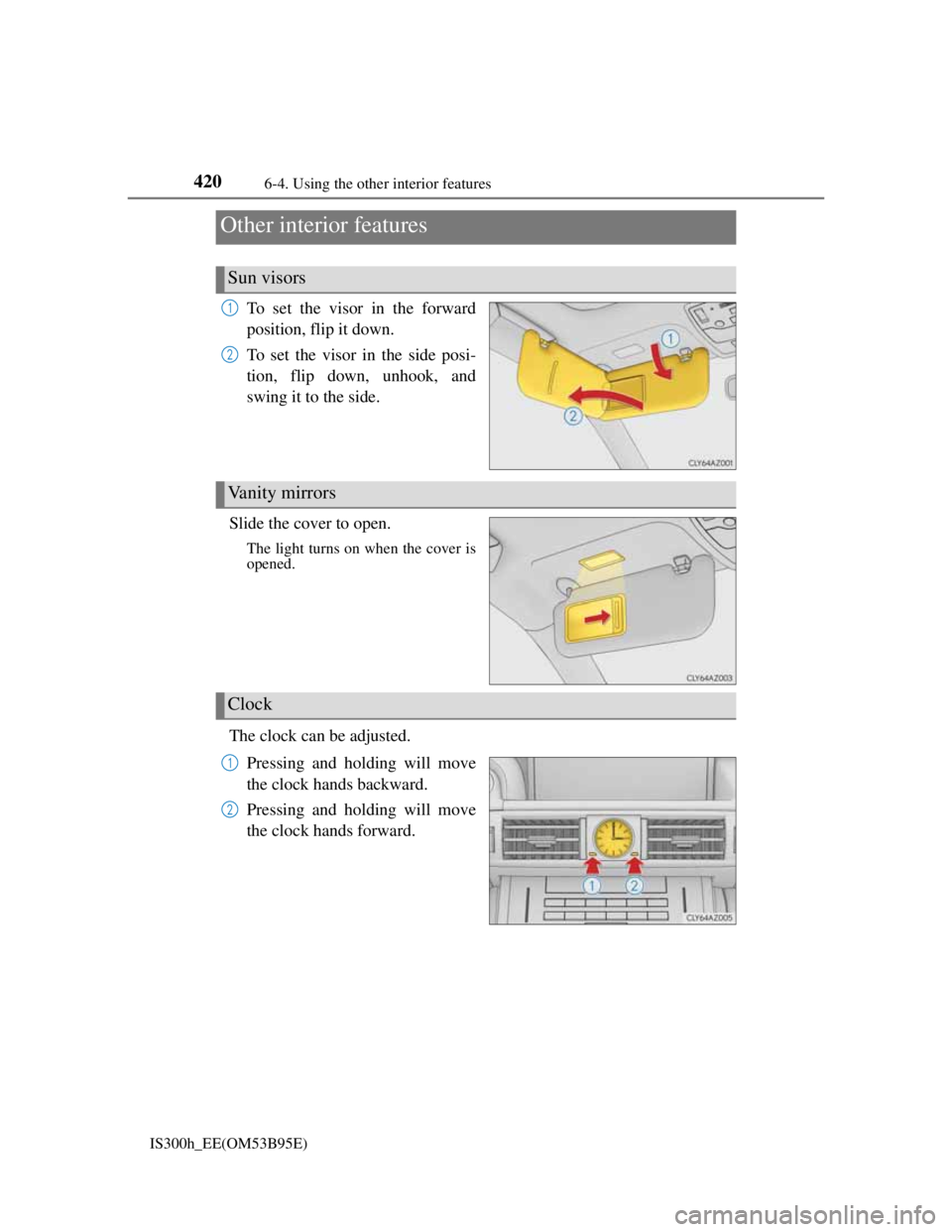
To set the visor in the forward
position, flip it down.
To set the visor in the side posi-
tion, flip down, unhook, and
swing it to the side.
Slide the cover to open.
The light turns on when the cover is
opened.
The clock can be adjusted.
Pressing and holding will move
the clock hands backward.
Pressing and holding will move
the clock hands forward.
Other interior features
Sun visors
1
2
Vanity mirrors
Clock
1
2
Page 440 of 628

426
IS300h_EE(OM53B95E)7-1. Maintenance and care
Working from top to bottom, liberally apply water to the vehicle body,
wheel wells and underside of the vehicle to remove any dirt and dust.
Wash the vehicle body using a sponge or soft cloth, such as a chamois.
For hard-to-remove marks, use car wash soap and rinse thoroughly
with water.
Wipe away any water.
Wax the vehicle when the waterproof coating deteriorates.
If water does not bead on a clean surface, apply wax when the vehicle body is
cool.
Automatic car washes
Fold the mirrors before washing the vehicle. Start washing from the front of the
vehicle. Make sure to extend the mirrors before driving.
Brushes used in automatic car washes may scratch the vehicle surface and harm
your vehicle’s paint.
High pressure car washes
Do not allow the nozzles of the car wash to come within close proximity of the
windows.
Before using the car wash, check that the fuel filler door on your vehicle is
closed properly.
When using a car wash (vehicles with entry function)
If the door handle becomes wet while the electronic key is within the effective
range, the door may lock and unlock repeatedly. In that case, follow the follow-
ing correction procedures to wash the vehicle:
Place the key in a position 2 m (6 ft.) or more separate from the vehicle while
the vehicle is being washed. (Take care to ensure that the key is not stolen.)
Set the electronic key to battery-saving mode to disable the smart entry & start
system. (P. 150)
Cleaning and protecting the vehicle exterior
Perform the following to protect the vehicle and maintain it in prime con-
dition:
Page 451 of 628
4377-3. Do-it-yourself maintenance
7
Maintenance and care
IS300h_EE(OM53B95E)
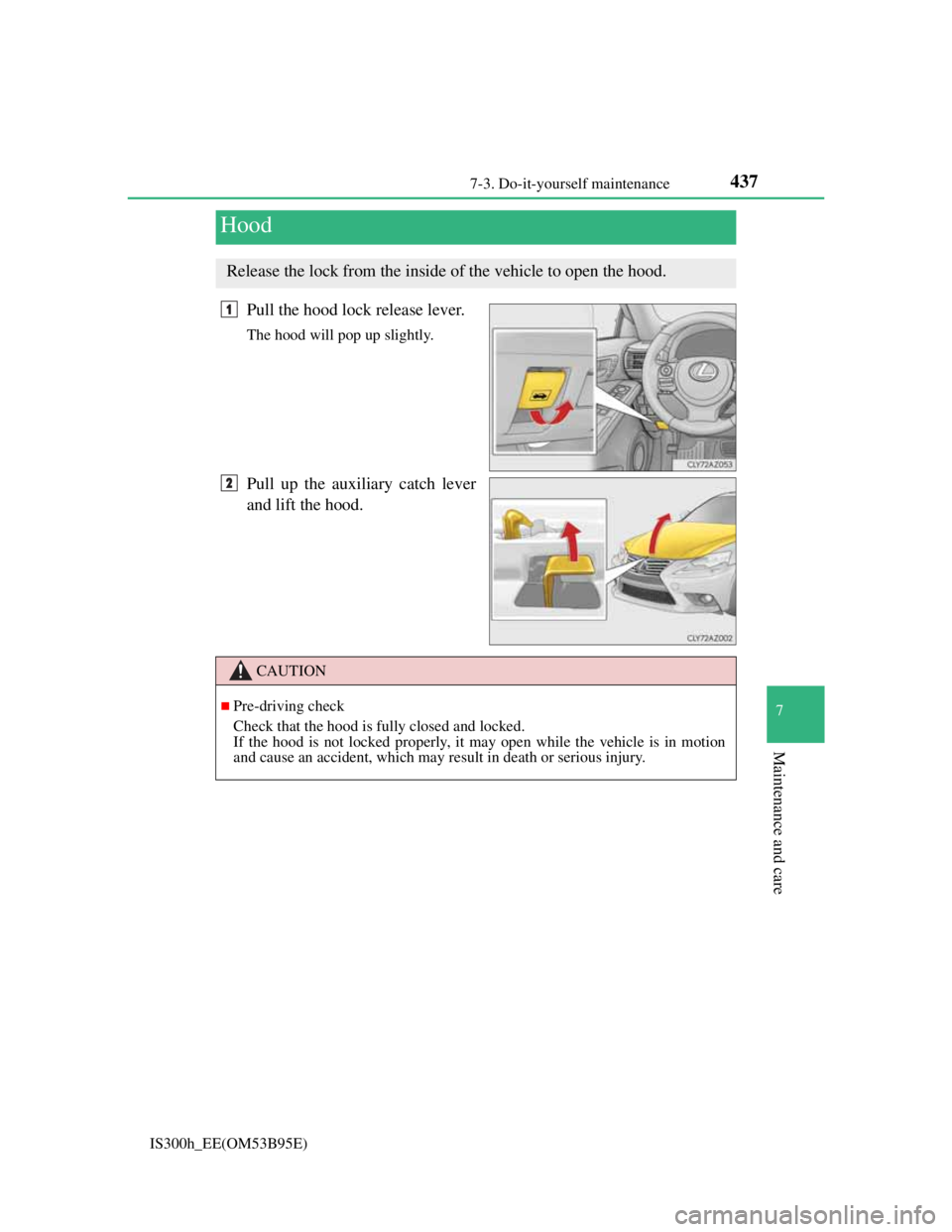
Pull the hood lock release lever.
The hood will pop up slightly.
Pull up the auxiliary catch lever
and lift the hood.
Hood
Release the lock from the inside of the vehicle to open the hood.
1
2
CAUTION
Pre-driving check
Check that the hood is fully closed and locked.
If the hood is not locked properly, it may open while the vehicle is in motion
and cause an accident, which may result in death or serious injury.
Page 455 of 628
4417-3. Do-it-yourself maintenance
7
Maintenance and care
IS300h_EE(OM53B95E)
Adding engine oil
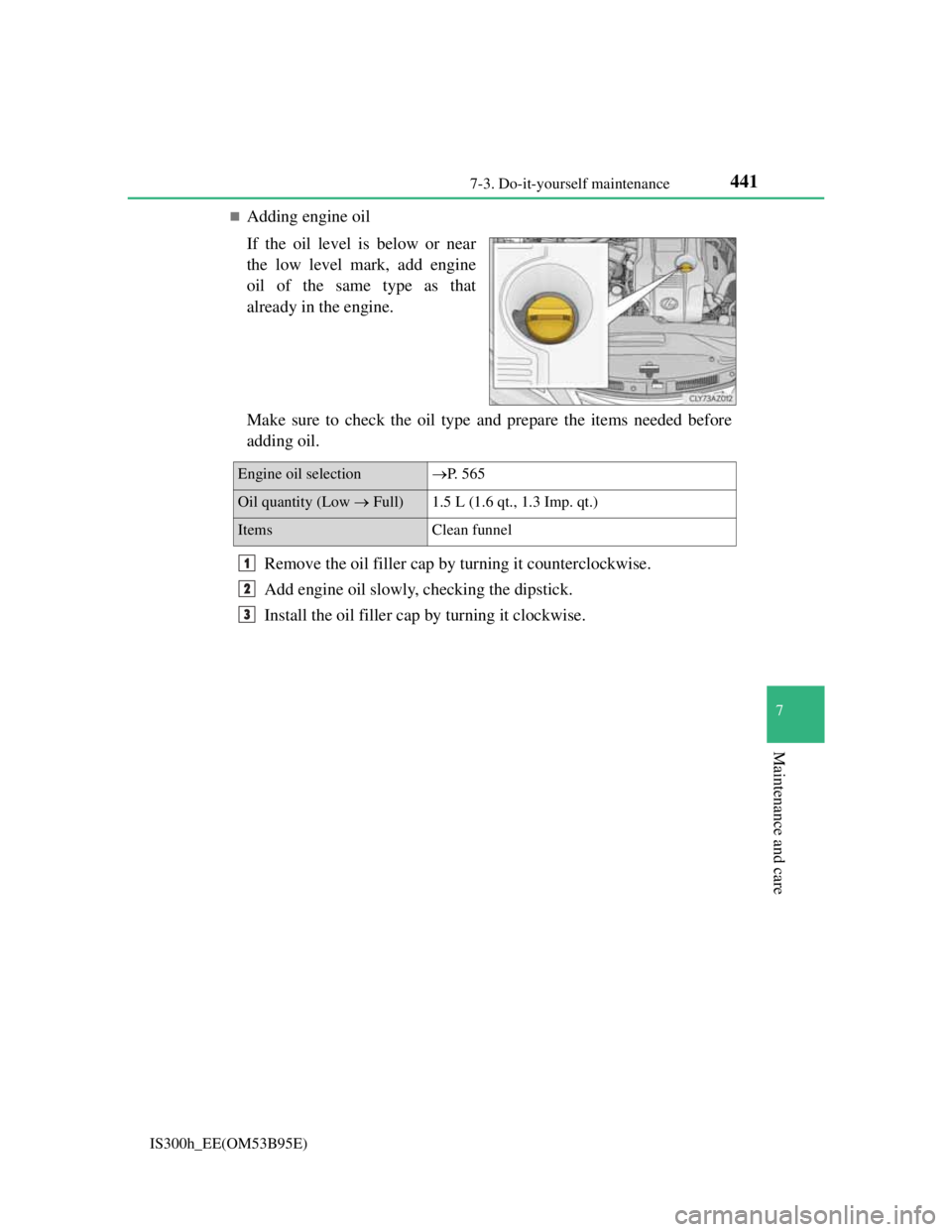
If the oil level is below or near
the low level mark, add engine
oil of the same type as that
already in the engine.
Make sure to check the oil type and prepare the items needed before
adding oil.
Remove the oil filler cap by turning it counterclockwise.
Add engine oil slowly, checking the dipstick.
Install the oil filler cap by turning it clockwise.
Engine oil selectionP. 5 6 5
Oil quantity (Low Full) 1.5 L (1.6 qt., 1.3 Imp. qt.)
Items Clean funnel
1
2
3
Page 462 of 628
4487-3. Do-it-yourself maintenance
IS300h_EE(OM53B95E)
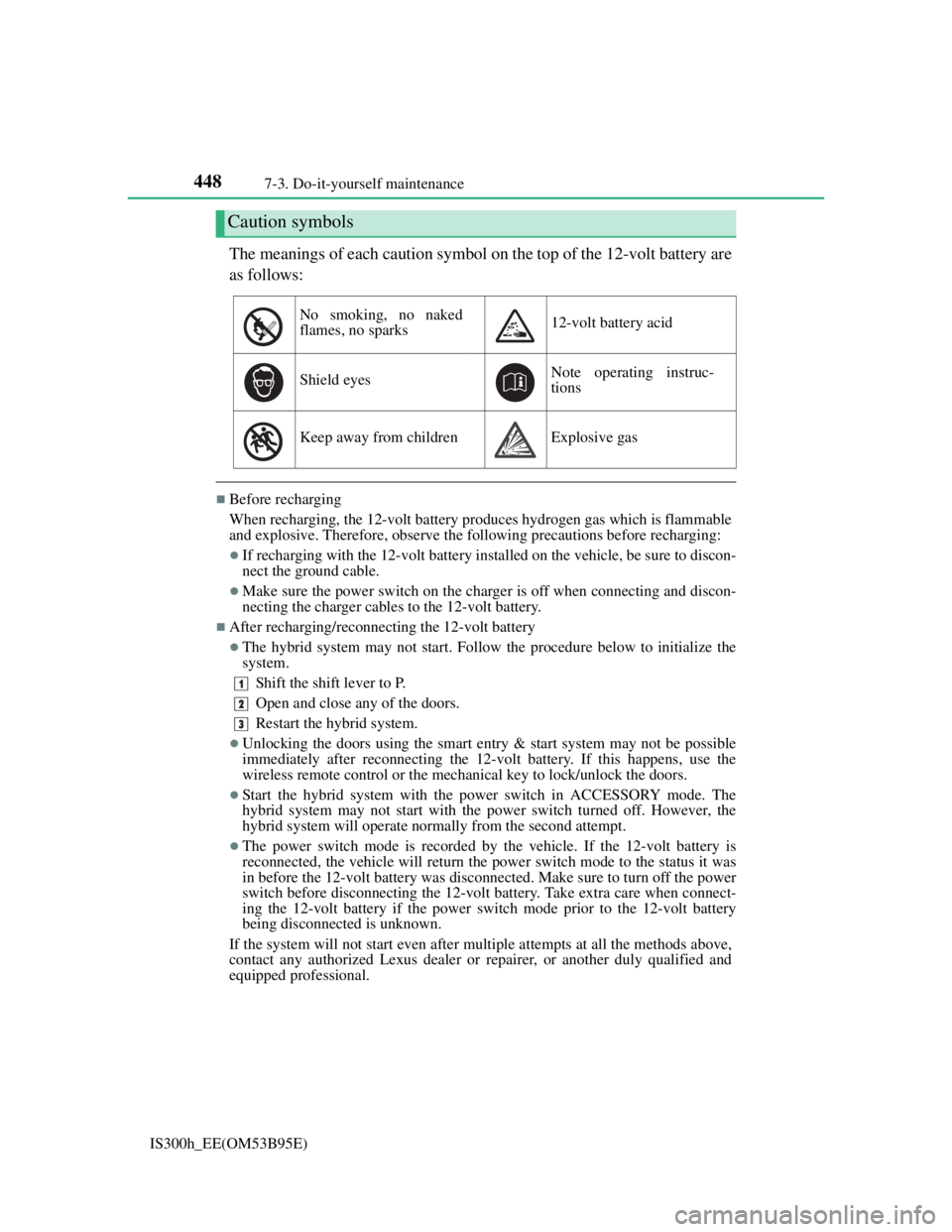
The meanings of each caution symbol on the top of the 12-volt battery are
as follows:
Before recharging
When recharging, the 12-volt battery produces hydrogen gas which is flammable
and explosive. Therefore, observe the following precautions before recharging:
If recharging with the 12-volt battery installed on the vehicle, be sure to discon-
nect the ground cable.
Make sure the power switch on the charger is off when connecting and discon-
necting the charger cables to the 12-volt battery.
After recharging/reconnecting the 12-volt battery
The hybrid system may not start. Follow the procedure below to initialize the
system.
Shift the shift lever to P.
Open and close any of the doors.
Restart the hybrid system.
Unlocking the doors using the smart entry & start system may not be possible
immediately after reconnecting the 12-volt battery. If this happens, use the
wireless remote control or the mechanical key to lock/unlock the doors.
Start the hybrid system with the power switch in ACCESSORY mode. The
hybrid system may not start with the power switch turned off. However, the
hybrid system will operate normally from the second attempt.
The power switch mode is recorded by the vehicle. If the 12-volt battery is
reconnected, the vehicle will return the power switch mode to the status it was
in before the 12-volt battery was disconnected. Make sure to turn off the power
switch before disconnecting the 12-volt battery. Take extra care when connect-
ing the 12-volt battery if the power switch mode prior to the 12-volt battery
being disconnected is unknown.
If the system will not start even after multiple attempts at all the methods above,
contact any authorized Lexus dealer or repairer, or another duly qualified and
equipped professional.
Caution symbols
No smoking, no naked
flames, no sparks12-volt battery acid
Shield eyesNote operating instruc-
tions
Keep away from childrenExplosive gas
1
2
3
Page 468 of 628

4547-3. Do-it-yourself maintenance
IS300h_EE(OM53B95E)
Situations in which the tire pressure warning system may not operate properly
In the following cases, the tire pressure warning system may not operate prop-
erly.
• If non-genuine Lexus wheels are used.
• A tire has been replaced with a tire that is not an OE (Original Equipment)
tire.
• A tire has been replaced with a tire that is not of the specified size.
• Tire chains etc. are equipped.
• Lock nuts are equipped.
• An auxiliary-supported run-flat tire is equipped.
• If a window tint that affects the radio wave signals is installed.
• If there is a lot of snow or ice on the vehicle, particularly around the wheels
or wheel housings.
• If the tire inflation pressure is extremely higher than the specified level.
• If tires not equipped with tire pressure warning valves and transmitters are
used.
• If the ID code on the tire pressure warning valves and transmitters is not reg-
istered in the tire pressure warning computer.
Performance may be affected in the following situations.
• Near a TV tower, electric power plant, gas station, radio station, large dis-
play, airport or other facility that generates strong radio waves or electrical
noise
• When carrying a portable radio, cellular phone, cordless phone or other
wireless communication device
When the vehicle is parked, the time taken for the warning to start or go off
could be extended.
When tire inflation pressure declines rapidly for example when a tire has burst,
the warning may not function.
The initialization operation
Make sure to carry out initialization after adjusting the tire inflation pressure.
Also, make sure the tires are cold before carrying out initialization or tire infla-
tion pressure adjustment.
If you have accidentally turned the power switch off during initialization, it is
not necessary to press the reset switch again as initialization will restart auto-
matically when the power switch has been turned to ON mode for the next time.
If you accidentally press the reset switch when initialization is not necessary,
adjust the tire inflation pressure to the specified level when the tires are cold,
and conduct initialization again.
Warning performance of the tire pressure warning system
The warning of the tire pressure warning system will change in accordance with
the conditions under which it was initialized. For this reason, the system may
give a warning even if the tire pressure does not reach a low enough level, or if
the pressure is higher than the pressure that was adjusted to when the system was
initialized.