air condition Lexus IS300h 2013 User Guide
[x] Cancel search | Manufacturer: LEXUS, Model Year: 2013, Model line: IS300h, Model: Lexus IS300h 2013Pages: 628, PDF Size: 20.23 MB
Page 86 of 628

851-2. Hybrid system
1
For safety and security
IS300h_EE(OM53B95E)
If a warning light comes on, a warning message is displayed, or the 12-volt bat-
tery is disconnected
The hybrid system may not start. In this case, try to start the system again. If the
“READY” indicator does not come on, contact any authorized Lexus dealer or
repairer, or another duly qualified and equipped professional.
Running out of fuel
When the vehicle has run out of fuel and the hybrid system cannot be started,
refuel the vehicle with at least enough gasoline to make the low fuel level warn-
ing light (P. 509) go off. If there is only a small amount of fuel, the hybrid sys-
tem may not be able to start. (The minimum amount of fuel to add to make the
low fuel level warning light go out is about 10 L [2.7 gal., 2.2 Imp. gal.], when
the vehicle is on a level surface. This value may vary when the vehicle is on a
slope.)
Electromagnetic waves
High voltage parts and cables on hybrid vehicles incorporate electromagnetic
shielding, and therefore emit approximately the same amount of electromag-
netic waves as conventional gasoline powered vehicles or home electronic
appliances.
Your vehicle may cause sound interference in some third party-produced radio
parts.
Hybrid battery (traction battery)
The hybrid battery (traction battery) has a limited service life. The lifespan of the
hybrid battery (traction battery) can change in accordance with driving style and
driving conditions.
Declaration of conformity
This model conforms to hydrogen emissions according to regulation ECE100
(Battery electric vehicle safety).
Page 153 of 628

1513-2. Opening, closing and locking the doors and trunk
3
Operation of each component
IS300h_EE(OM53B95E)
Conditions affecting operation
The smart entry & start system uses weak radio waves. In the following situa-
tions, the communication between the electronic key and the vehicle may be
affected, preventing the smart entry & start system, wireless remote control and
immobilizer system from operating properly. (Ways of coping: P. 548)
When the electronic key battery is depleted
Near a TV tower, electric power plant, gas station, radio station, large display,
airport or other facility that generates strong radio waves or electrical noise
When carrying a portable radio, cellular phone, cordless phone or other wire-
less communication device
When the electronic key is in contact with, or is covered by the following
metallic objects
• Cards to which aluminum foil is attached
• Cigarette boxes that have aluminum foil inside
• Metallic wallets or bags
•Coins
• Hand warmers made of metal
• Media such as CDs and DVDs
When other wireless keys (that emit radio waves) are being used nearby
When carrying the electronic key together with the following devices that emit
radio waves
• Another vehicle’s electronic key or a wireless key that emits radio waves
• Personal computers or personal digital assistants (PDAs)
• Digital audio players
• Portable game systems
If window tint with a metallic content or metallic objects are attached to the rear
window
Page 195 of 628

1934-1. Before driving
4
Driving
IS300h_EE(OM53B95E)
When starting off on an uphill
The hill-start assist control will activate. (P. 286)
Driving in the rain
Drive carefully when it is raining, because visibility will be reduced, the win-
dows may become fogged-up, and the road will be slippery.
Drive carefully when it starts to rain, because the road surface will be especially
slippery.
Refrain from high speeds when driving on an expressway in the rain, because
there may be a layer of water between the tires and the road surface, preventing
the steering and brakes from operating properly.
Engine speed while driving
In the following conditions, the engine speed may become high while driving.
This is due to automatic up-shifting control or down-shifting implementation to
meet driving conditions. It does not indicate sudden acceleration.
The vehicle is judged to be driving uphill or downhill
When the accelerator pedal is released
When the brake pedal is depressed while sport mode is selected
Breaking in your new Lexus
To extend the life of the vehicle, observing the following precautions is recom-
mended:
For the first 300 km (186 miles):
Avoid sudden stops.
For the first 800 km (500 miles):
Do not tow a trailer.
For the first 1000 km (621 miles):
• Do not drive at extremely high speeds.
• Avoid sudden acceleration.
• Do not drive continuously in low gears.
• Do not drive at a constant speed for extended periods.
Drum-in-disc type parking brake system
Your vehicle has a drum-in-disc type parking brake system. This type of brake
system needs bedding-down of the brake shoes periodically or whenever the
parking brake shoes and/or drum are replaced. Have any authorized Lexus dealer
or repairer, or another duly qualified and equipped professional, perform the bed-
ding down operation.
Operating your vehicle in a foreign country
Comply with the relevant vehicle registration laws and confirm the availability
of the correct fuel. (P. 564)
Page 201 of 628

1994-1. Before driving
4
Driving
IS300h_EE(OM53B95E)
NOTICE
When driving the vehicle
Do not depress the accelerator and brake pedals at the same time during driv-
ing, as this may restrain driving torque.
Do not use the accelerator pedal or depress the accelerator and brake pedals at
the same time to hold the vehicle on a hill.
When parking the vehicle
Always shift the shift lever to P. Failure to do so may cause the vehicle to move
or the vehicle may accelerate suddenly if the accelerator pedal is accidentally
depressed.
Avoiding damage to vehicle parts
Do not turn the steering wheel fully in either direction and hold it there for an
extended period of time.
Doing so may damage the power steering motor.
When driving over bumps in the road, drive as slowly as possible to avoid
damaging the wheels, underside of the vehicle, etc.
If you get a flat tire while driving
A flat or damaged tire may cause the following situations. Hold the steering
wheel firmly and gradually depress the brake pedal to slow down the vehicle.
It may be difficult to control your vehicle.
The vehicle will make abnormal sounds or vibrations.
The vehicle will lean abnormally.
Information on what to do in case of a flat tire (P. 530, 544)
When encountering flooded roads
Do not drive on a road that has flooded after heavy rain etc. Doing so may
cause the following serious damage to the vehicle:
Engine stalling
Short in electrical components
Engine damage caused by water immersion
In the event that you drive on a flooded road and the vehicle is flooded, be sure
to have any authorized Lexus dealer or repairer, or another duly qualified and
equipped professional check the following:
Brake function
Changes in quantity and quality of oil and fluid used for the engine, hybrid
transmission, differential, etc.
Lubricant condition for the propeller shaft, bearings and suspension joints
(where possible), and the function of all joints, bearings, etc.
Page 209 of 628

2074-1. Before driving
4
Driving
IS300h_EE(OM53B95E)
Important points regarding stability
Vehicle movement resulting from uneven road surfaces and strong
crosswinds will affect handling. The vehicle may also be rocked by
passing buses or large trucks. Frequently check behind when moving
alongside such vehicles. As soon as such vehicle movement occurs,
immediately start to decelerate smoothly by slowly applying the
brakes. Always steer the vehicle straight ahead while braking.
Passing other vehicles
Consider the total combined length of your vehicle and trailer and
ensure that the vehicle-to-vehicle distance is sufficient before execut-
ing lane changes.
Transmission information
To maintain engine braking efficiency, when using engine braking
when driving on a long steep downward grade, do not use the transmis-
sion in D. The vehicle must be driven in gear shift position “4” in S
mode. (P. 219)
If the engine overheats
Towing a loaded trailer up a long, steep incline in temperatures exceed-
ing 30C (85F) may result in the engine overheating. If the engine
coolant temperature gauge indicates that the engine is overheating, turn
the air conditioning off immediately, leave the road and stop the vehi-
cle in a safe place.
(P. 555)
When parking the vehicle
Always place wheel chocks under the wheels of both the vehicle and
trailer. Firmly set the parking brake and shift the shift lever to P.
Page 213 of 628

2114-2. Driving procedures
4
Driving
IS300h_EE(OM53B95E)
If the hybrid system is stopped with the shift lever in a position other than
P, the power switch will not be turned off but instead be turned to
ACCESSORY mode. Perform the following procedure to turn the switch
off:
Check that the parking brake is set.
Shift the shift lever to P.
Check that “Turn Power OFF” is displayed on the multi-information
display and then press the power switch once.
Check that “Turn Power OFF” on the multi-information display is off.
Auto power off function
If the vehicle is left in ACCESSORY mode for more than 20 minutes or ON
mode (the hybrid system is not operating) for more than an hour with the shift
lever in P, the power switch will automatically turn off. However, this function
cannot entirely prevent 12-volt battery discharge. Do not leave the vehicle with
the power switch in ACCESSORY or ON mode for long periods of time when
the hybrid system is not operating.
Sounds and vibrations specific to a hybrid vehicle
P. 8 2
Electronic key battery depletion
P. 133
When the ambient temperature is low, such as during winter driving conditions
It may take time before the “READY” indicator comes on.
Conditions affecting operation
P. 151
Notes for the entry function
P. 152
If the hybrid system does not start
Check that the shift lever is securely set in P. The hybrid system may not start if
the shift lever is displaced out of P.
The immobilizer system may not have been deactivated. (P. 90)
Contact any authorized Lexus dealer or repairer, or another duly qualified and
equipped professional.
When stopping the hybrid system with the shift lever in a position
other than P
1
2
3
4
Page 265 of 628

2634-5. Using the driving support systems
4
Driving
IS300h_EE(OM53B95E)
CAUTION
When the sensor may not be correctly detecting the vehicle ahead
Apply the brakes as necessary when any of the following types of vehicles are
in front of you.
As the sensor may not be able to correctly detect these types of vehicles, the
approach warning (P. 254) will not be activated, and a fatal or serious acci-
dent may result.
Vehicles that cut in suddenly
Vehicles traveling at low speeds
Vehicles that are not moving
Vehicles with small rear ends (trailers with no load on board etc.)
Motorcycles traveling in the same lane
Conditions under which the vehicle-to-vehicle distance control may not func-
tion correctly
Apply the brakes as necessary in the following conditions as the radar sensor
may not be able to correctly detect vehicles ahead, and a fatal or serious acci-
dent may result:
When water or snow thrown up by a the surrounding vehicles hinders the
functioning of the sensor
When your vehicle is pointing upwards (caused by a heavy load in the trunk
etc.)
When the road curves or when the lanes are narrow
When steering wheel operation or your position in the lane is unstable
When the vehicle ahead of you decelerates suddenly
Handling the radar sensor
Observe the following to ensure the cruise control system can function effec-
tively.
Otherwise, the system may not function correctly and could result in an acci-
dent.
Keep the sensor and grille cover clean at all times.
Clean the sensor and grille cover with a soft cloth so you do not mark or dam-
age them.
Do not subject the sensor or surrounding area to a strong impact.
If the sensor moves even slightly off position, the system may malfunction. If
the sensor or surrounding area is subject to a strong impact, always have the
area inspected and adjusted by any authorized Lexus dealer or repairer, or
another duly qualified and equipped professional.
Do not disassemble the sensor.
Do not attach accessories or stickers to the sensor, grille cover or surrounding
area.
Do not modify or paint the sensor and grille cover.
Do not replace them with non-genuine parts.
Page 269 of 628

2674-5. Using the driving support systems
4
Driving
IS300h_EE(OM53B95E)
Temporary cancelation of the LDA system functions
If any of the following occurs, the LDA system functions will be temporarily
canceled. The functions will resume after the necessary operating conditions
have returned.
The turn signal lever is operated.
The vehicle speed deviates from the operating range of the LDA system func-
tions.
When the lane lines cannot be recognized while driving.
When the lane departure warning sounds.
The lane departure warning function will not operate again for a several sec-
onds after it has been activated, even if the vehicle leaves the lane again.
The lane departure warning
Depending on the audio system sound level or air conditioning fan noise while
the audio system or air conditioning system is in use, it may be difficult to hear
the warning sound.
After the vehicle has been parked in the sun
The LDA system may not be available and a warning message (P. 518) will be
displayed for a while after driving has started. When the temperature in the cabin
decreases and the temperature around the camera sensor (P. 264) becomes suit-
able for its operation, the functions will begin to operate.
If there are lane markers on only one side of the vehicle
The lane departure warning will not operate for the side on which lane markers
could not be recognized.
Conditions in which the function may not operate correctly
In the following situations, the camera sensor may be unable to recognize lane
markers causing the lane departure warning function to operate incorrectly. How-
ever, this does not indicate a malfunction.
When driving through an area with no lane markers, such as a tollbooth, a
crossing or before a ticket checkpoint
When driving on a sharp curve
When lane markers are extremely narrow or extremely wide
When the vehicle leans to one side an unusual amount due to a heavy load or
improper tire inflation pressure
When the following distance between your vehicle and the vehicle ahead is
extremely short
When the lane markers are yellow (These may be more difficult for the system
to recognize compared to white markers.)
When the lane markers are broken, Botts’ dots (raised pavement markers) or
stones
When the lane markers are on a curb etc.
When lane markers are obscured or partially obscured by sand, dirt, etc.
When there are shadows on the road running parallel with lane markers, or if a
shadow covers the lane markers
When driving on a particularly bright road surface, such as concrete
Page 278 of 628

2764-5. Using the driving support systems
IS300h_EE(OM53B95E)
Sensor detection information
The sensor’s detection areas are limited to the areas around the vehicle’s front
corner and rear bumpers.
Certain vehicle conditions and the surrounding environment may affect the
ability of the sensor to correctly detect obstacles. Particular instances where this
may occur are listed below.
• There is dirt, snow or ice on the sensor. (Wiping the sensors will resolve this
problem.)
• The sensor is frozen. (Thawing the area will resolve this problem.)
In especially cold weather, if a sensor is frozen the screen may show an
abnormal display, or obstacles may not be detected.
• The sensor is covered in any way.
• The vehicle is leaning considerably to one side.
• On an extremely bumpy road, on an incline, on gravel, or on grass.
• The vicinity of the vehicle is noisy due to vehicle horns, motorcycle engines,
air brakes of large vehicles, or other loud noises producing ultrasonic waves.
• There is another vehicle equipped with parking assist sensors in the vicinity.
• The sensor is coated with a sheet of spray or heavy rain.
• The vehicle is equipped with a fender pole or wireless antenna.
• Towing eyelets are installed.
• The bumper or sensor receives a strong impact.
• The vehicle is approaching a tall or curved curb.
• In harsh sunlight or intense cold weather.
• The area directly under the bumpers is not detected.
• If obstacles draw too close to the sensor.
• A non-genuine Lexus suspension (lowered suspension etc.) is installed.
• People may not be detected if they are wearing certain types of clothing.
In addition to the examples above, there are instances in which, because of their
shape, signs and other objects may be judged by the sensor to be closer than they
are.
The shape of the obstacle may prevent the sensor from detecting it. Pay particu-
lar attention to the following obstacles:
• Wires, fences, ropes, etc.
• Cotton, snow and other materials that absorb sound waves
• Sharply-angled objects
• Low obstacles
• Tall obstacles with upper sections projecting outwards in the direction of
your vehicle
The following situations may occur during use.
• Depending on the shape of the obstacle and other factors, the detection dis-
tance may shorten, or detection may be impossible.
• Obstacles may not be detected if they are too close to the sensor.
• There will be a short delay between obstacle detection and display. Even at
slow speeds, there is a possibility that the obstacle will come within the sen-
sor’s detection areas before the display is shown and the warning beep
sounds.
• Thin posts or objects lower than the sensor may not be detected when
approached, even if they have been detected once.
• It might be difficult to hear beeps due to the volume of the audio system or
air flow noise of the air conditioning system.
Page 288 of 628
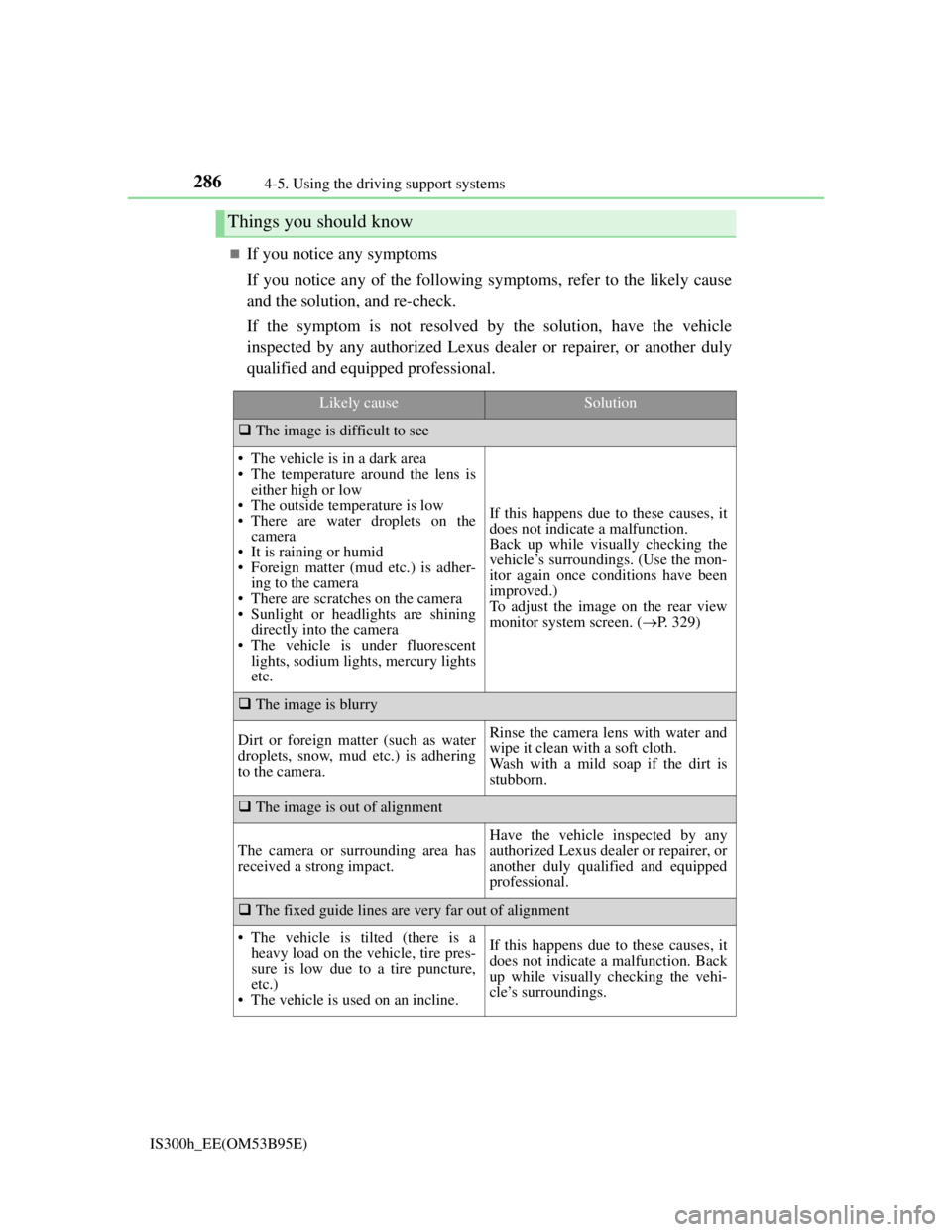
2864-5. Using the driving support systems
IS300h_EE(OM53B95E)
If you notice any symptoms
If you notice any of the following symptoms, refer to the likely cause
and the solution, and re-check.
If the symptom is not resolved by the solution, have the vehicle
inspected by any authorized Lexus dealer or repairer, or another duly
qualified and equipped professional.
Things you should know
Likely causeSolution
The image is difficult to see
• The vehicle is in a dark area
• The temperature around the lens is
either high or low
• The outside temperature is low
• There are water droplets on the
camera
• It is raining or humid
• Foreign matter (mud etc.) is adher-
ing to the camera
• There are scratches on the camera
• Sunlight or headlights are shining
directly into the camera
• The vehicle is under fluorescent
lights, sodium lights, mercury lights
etc.
If this happens due to these causes, it
does not indicate a malfunction.
Back up while visually checking the
vehicle’s surroundings. (Use the mon-
itor again once conditions have been
improved.)
To adjust the image on the rear view
monitor system screen. (P. 329)
The image is blurry
Dirt or foreign matter (such as water
droplets, snow, mud etc.) is adhering
to the camera.Rinse the camera lens with water and
wipe it clean with a soft cloth.
Wash with a mild soap if the dirt is
stubborn.
The image is out of alignment
The camera or surrounding area has
received a strong impact.
Have the vehicle inspected by any
authorized Lexus dealer or repairer, or
another duly qualified and equipped
professional.
The fixed guide lines are very far out of alignment
• The vehicle is tilted (there is a
heavy load on the vehicle, tire pres-
sure is low due to a tire puncture,
etc.)
• The vehicle is used on an incline.If this happens due to these causes, it
does not indicate a malfunction. Back
up while visually checking the vehi-
cle’s surroundings.