headlights Lexus IS300h 2013 User Guide
[x] Cancel search | Manufacturer: LEXUS, Model Year: 2013, Model line: IS300h, Model: Lexus IS300h 2013Pages: 628, PDF Size: 20.23 MB
Page 232 of 628
2304-3. Operating the lights and wipers
IS300h_EE(OM53B95E)
When all of the following conditions are met, the high beam will be auto-
matically turned on (after approximately 1 second):
Vehicle speed is above approximately 40 km/h (25 mph).
The area ahead of the vehicle is dark.
There are no oncoming or preceding vehicles with headlights or tail
lights turned on.
There are few streetlights on the road ahead.
If any of the following conditions are met, the high beam will be automat-
ically turned off:
Vehicle speed drops below approximately 30 km/h (19 mph).
The area ahead of the vehicle is not dark.
Oncoming or preceding vehicles have headlights or tail lights turned
on.
There are many streetlights on the road ahead.
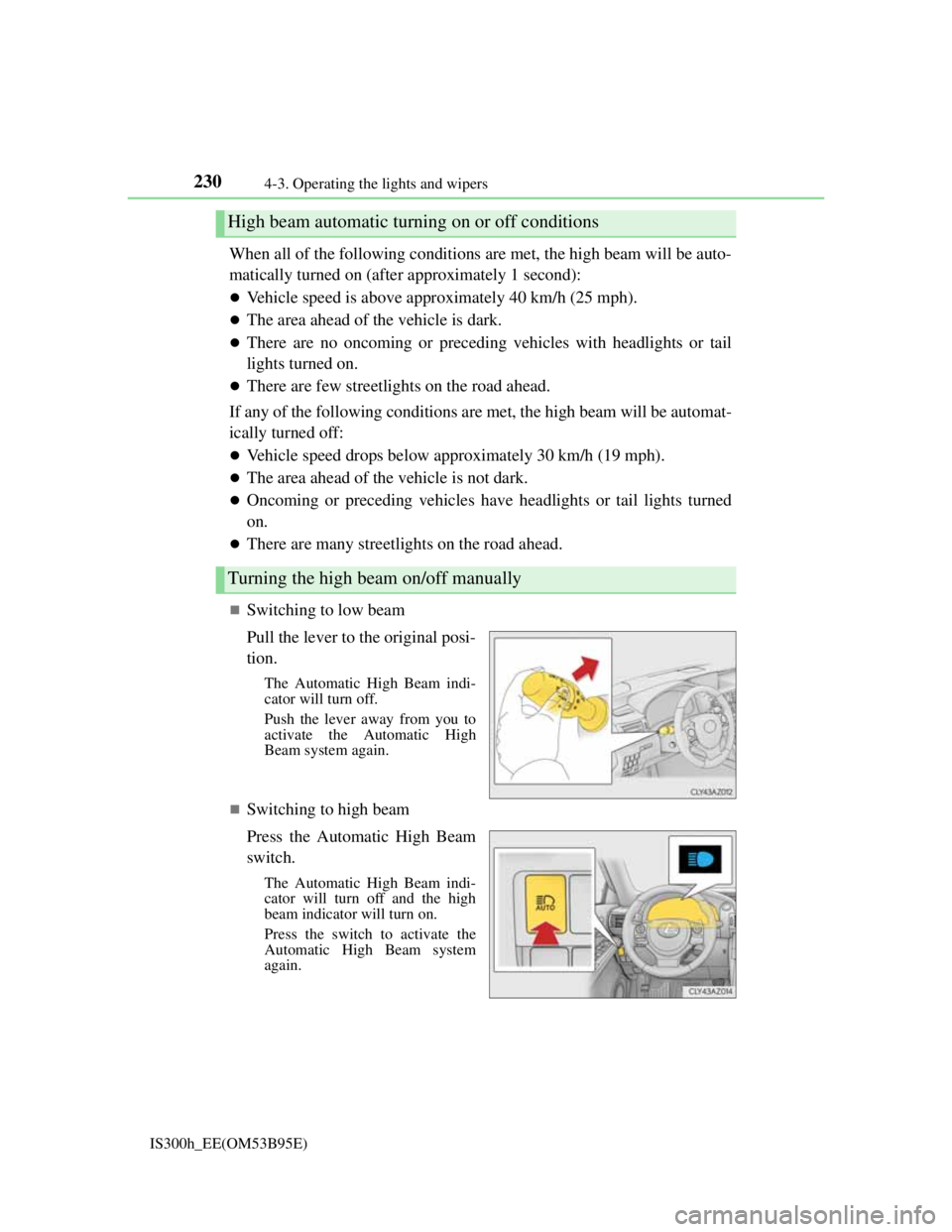
Switching to low beam
Pull the lever to the original posi-
tion.
The Automatic High Beam indi-
cator will turn off.
Push the lever away from you to
activate the Automatic High
Beam system again.
Switching to high beam
Press the Automatic High Beam
switch.
The Automatic High Beam indi-
cator will turn off and the high
beam indicator will turn on.
Press the switch to activate the
Automatic High Beam system
again.
High beam automatic turning on or off conditions
Turning the high beam on/off manually
Page 233 of 628

2314-3. Operating the lights and wipers
4
Driving
IS300h_EE(OM53B95E)
The Automatic High Beam can be operated when
The power switch is in ON mode.
Camera sensor detection information
High beam may not be automatically turned off in the following situations:
• When oncoming vehicles suddenly appear from a curve
• When the vehicle is cut in front of by another vehicle
• When oncoming or preceding vehicles are hidden from sight due to repeated
curves, road dividers or roadside trees
High beam may be turned off if an oncoming vehicle that is using fog lights
without using the headlights is detected.
House lights, street lights, red traffic signals, and illuminated billboards or signs
may cause the high beam to turn off.
The following factors may affect the amount of time taken to turn high beam on
or off:
• The brightness of headlights, fog lights, and tail lights of oncoming and pre-
ceding vehicles
• The movement and direction of oncoming and preceding vehicles
• When an oncoming or preceding vehicle only has operational lights on one
side
• When an oncoming or preceding vehicle is a two-wheeled vehicle
• The condition of the road (gradient, curve, condition of the road surface etc.)
• The number of passengers and amount of luggage
High beam may be turned on or off when unexpected by the driver.
Small vehicles, such as bicycles, may not be detected.
In the situations below, the system may not be able to correctly detect the sur-
rounding brightness levels, and may flash or expose nearby pedestrians to the
high beam. Therefore, you should consider turning the high beams on or off
manually rather than relying on the Automatic High Beam system.
• In bad weather (rain, snow, fog, sandstorms etc.)
• The windshield is obscured by fog, mist, ice, dirt etc.
• The windshield is cracked or damaged.
• The camera sensor is deformed or dirty.
• Surrounding brightness levels are equal to those of headlights, tail lights or
fog lights.
• Vehicles ahead have headlights or tail lights that are either switched off,
dirty, changing color, or have improperly adjusted aim.
• When driving through an area of intermittently changing brightness and
darkness.
• When frequently and repeatedly driving ascending/descending roads, or
roads with rough, bumpy or uneven surfaces (such as stone-paved roads,
gravel tracks etc.).
• When frequently and repeatedly taking curves or driving on a winding road.
• There is a highly reflective object ahead of the vehicle, such as a sign or a
mirror.
• The vehicle’s headlights are damaged or dirty.
• The vehicle is listing or titling, due to a flat tire, a trailer being towed etc.
• The driver believes that the high beam may be causing problems or distress
to other drivers or pedestrians nearby.
Page 236 of 628

2344-3. Operating the lights and wipers
IS300h_EE(OM53B95E)
Fog lights can be used when
Vehicles with a front and rear fog light switch
Front fog lights: The headlights or the front position lights are turned on.
Rear fog light: The front fog lights are turned on.
Vehicles with a rear fog light switch
The headlights or the front position lights are turned on.
Operation guide display (vehicles with rain-sensing windshield wipers only)
When the fog light switch is operated, the current status is displayed on the
meters for a few seconds. (P. 1 1 9 )
Page 238 of 628
2364-3. Operating the lights and wipers
IS300h_EE(OM53B95E)
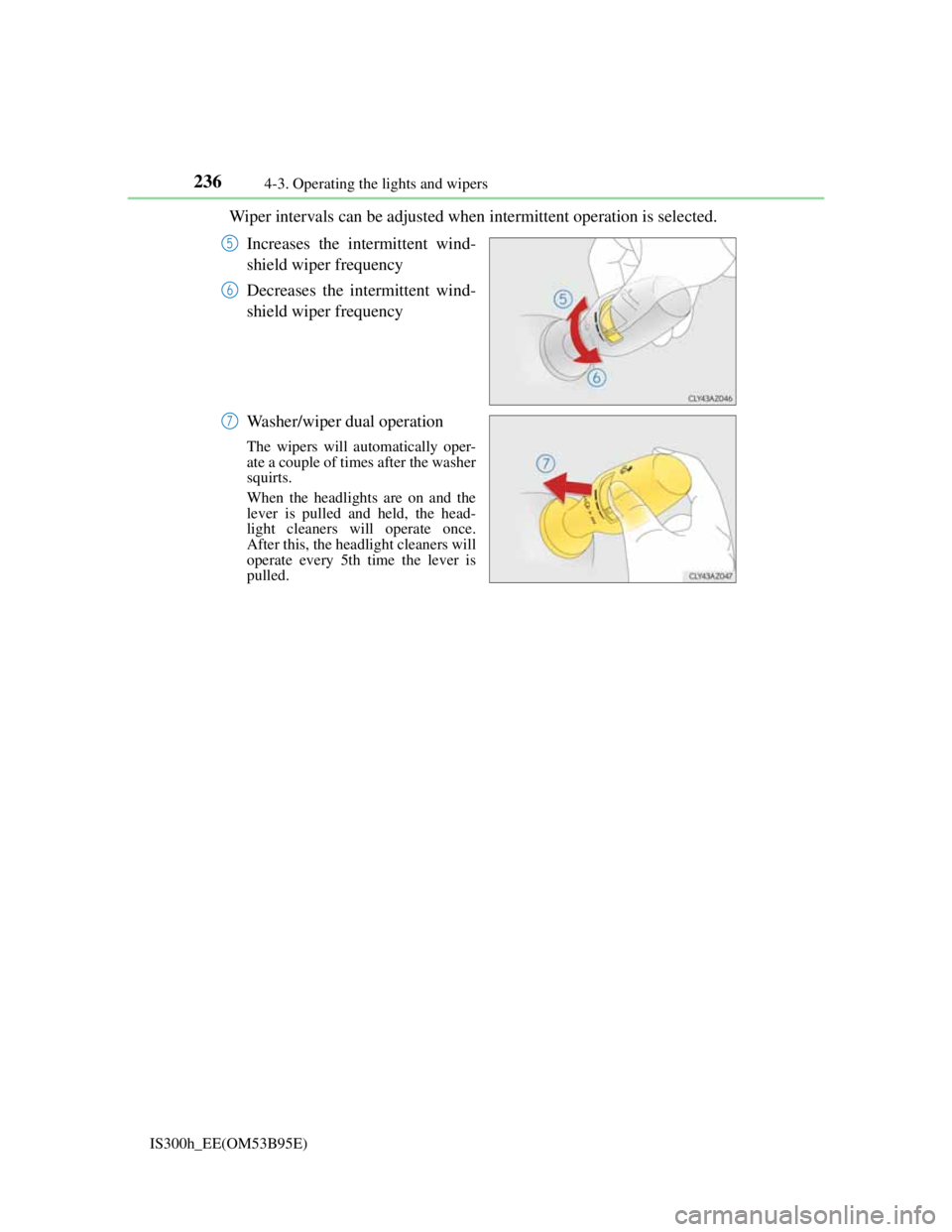
Wiper intervals can be adjusted when intermittent operation is selected.
Increases the intermittent wind-
shield wiper frequency
Decreases the intermittent wind-
shield wiper frequency
Washer/wiper dual operation
The wipers will automatically oper-
ate a couple of times after the washer
squirts.
When the headlights are on and the
lever is pulled and held, the head-
light cleaners will operate once.
After this, the headlight cleaners will
operate every 5th time the lever is
pulled.
5
6
7
Page 240 of 628
2384-3. Operating the lights and wipers
IS300h_EE(OM53B95E)
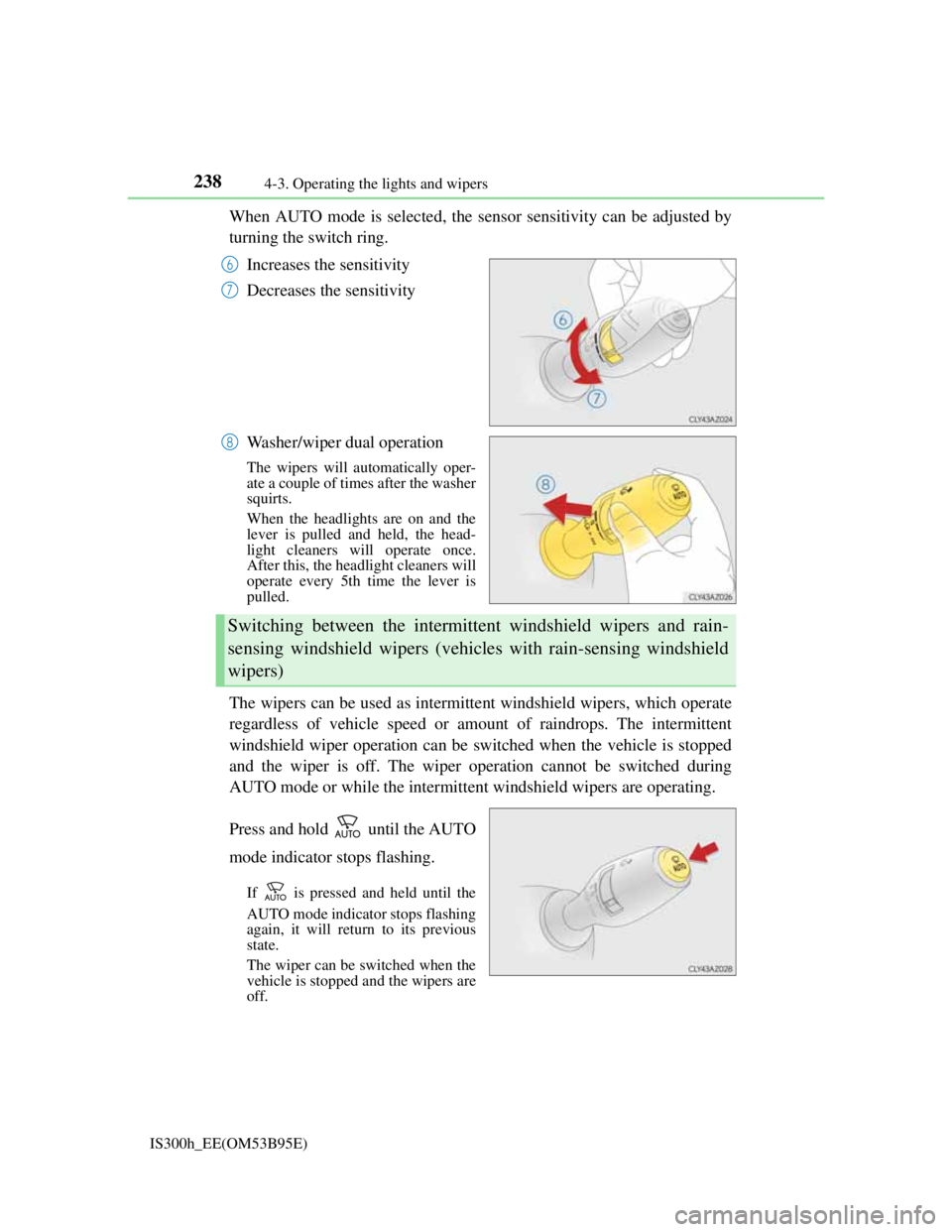
When AUTO mode is selected, the sensor sensitivity can be adjusted by
turning the switch ring.
Increases the sensitivity
Decreases the sensitivity
Washer/wiper dual operation
The wipers will automatically oper-
ate a couple of times after the washer
squirts.
When the headlights are on and the
lever is pulled and held, the head-
light cleaners will operate once.
After this, the headlight cleaners will
operate every 5th time the lever is
pulled.
The wipers can be used as intermittent windshield wipers, which operate
regardless of vehicle speed or amount of raindrops. The intermittent
windshield wiper operation can be switched when the vehicle is stopped
and the wiper is off. The wiper operation cannot be switched during
AUTO mode or while the intermittent windshield wipers are operating.
Press and hold until the AUTO
mode indicator stops flashing.
If is pressed and held until the
AUTO mode indicator stops flashing
again, it will return to its previous
state.
The wiper can be switched when the
vehicle is stopped and the wipers are
off.
6
7
8
Switching between the intermittent windshield wipers and rain-
sensing windshield wipers (vehicles with rain-sensing windshield
wipers)
Page 270 of 628

2684-5. Using the driving support systems
IS300h_EE(OM53B95E)
When driving on a road surface that is bright due to reflected light
When driving in a location where the light level changes rapidly, such as the
entrance to or exit from a tunnel
When sunlight or the headlights of oncoming vehicles are shining directly into
the camera lens
When driving on roads that are branching or merging
When driving on a road surface that is wet due to rain, previous rainfall, stand-
ing water, etc.
When the vehicle experiences strong up-and-down motion such as when driv-
ing on an extremely rough road or on a seam in the pavement
When headlight brightness at nighttime is reduced due to dirt on the lenses, or
when the headlights are misaligned
When driving on winding roads or roads that are uneven
When driving on rough or unpaved roads
When changing the tires
Depending on the tires used, sufficient performance may not be maintainable.
Warning messages for the LDA system
Warning messages are used to indicate a system malfunction or to inform the
driver of the need for caution while driving. (P. 518)
Page 272 of 628
2704-5. Using the driving support systems
IS300h_EE(OM53B95E)
NOTICE
To prevent damage to or incorrect operation of the LDA system
Do not modify the headlights or attach stickers to the surface of the lights.
Do not modify the suspension or replace it with non-genuine parts.
Do not install or place anything on the hood or the grille. Also, do not install a
grille guard (bull bars, kangaroo bar etc.).
If your windshield needs repairs, contact any authorized Lexus dealer or
repairer, or another duly qualified and equipped professional.
Camera sensor
Observe the following to ensure that the LDA system functions correctly.
Keep the windshield clean at all times.
Performance could be affected if the windshield is dirty, or if raindrops, con-
densation or ice are adhering to the windshield.
Do not spill liquid onto the camera sensor
Do not attach window tinting to the windshield.
Do not install an antenna in front of the camera lens.
If the windshield is fogged up, use the windshield defogger to remove fog
from the windshield.
When it is cold, using the heater with air blowing to the feet may allow the
upper part of the windshield to fog up. This will have a negative effect on the
images.
Do not scratch the camera lens, or let it get dirty.
When cleaning the inside of the windshield, be careful not to get any glass
cleaner etc. on the lens. Also, do not touch the lens.
For lens repair, contact any authorized Lexus dealer or repairer, or another
duly qualified and equipped professional.
Do not change the installation position or direction of the camera sensor or
remove it. The direction of the camera sensor is precisely adjusted.
Do not subject the camera sensor to strong impact or force, and do not disas-
semble the camera sensor.
Do not replace windshield with non-genuine windshield.
Contact any authorized Lexus dealer or repairer, or another duly qualified and
equipped professional.
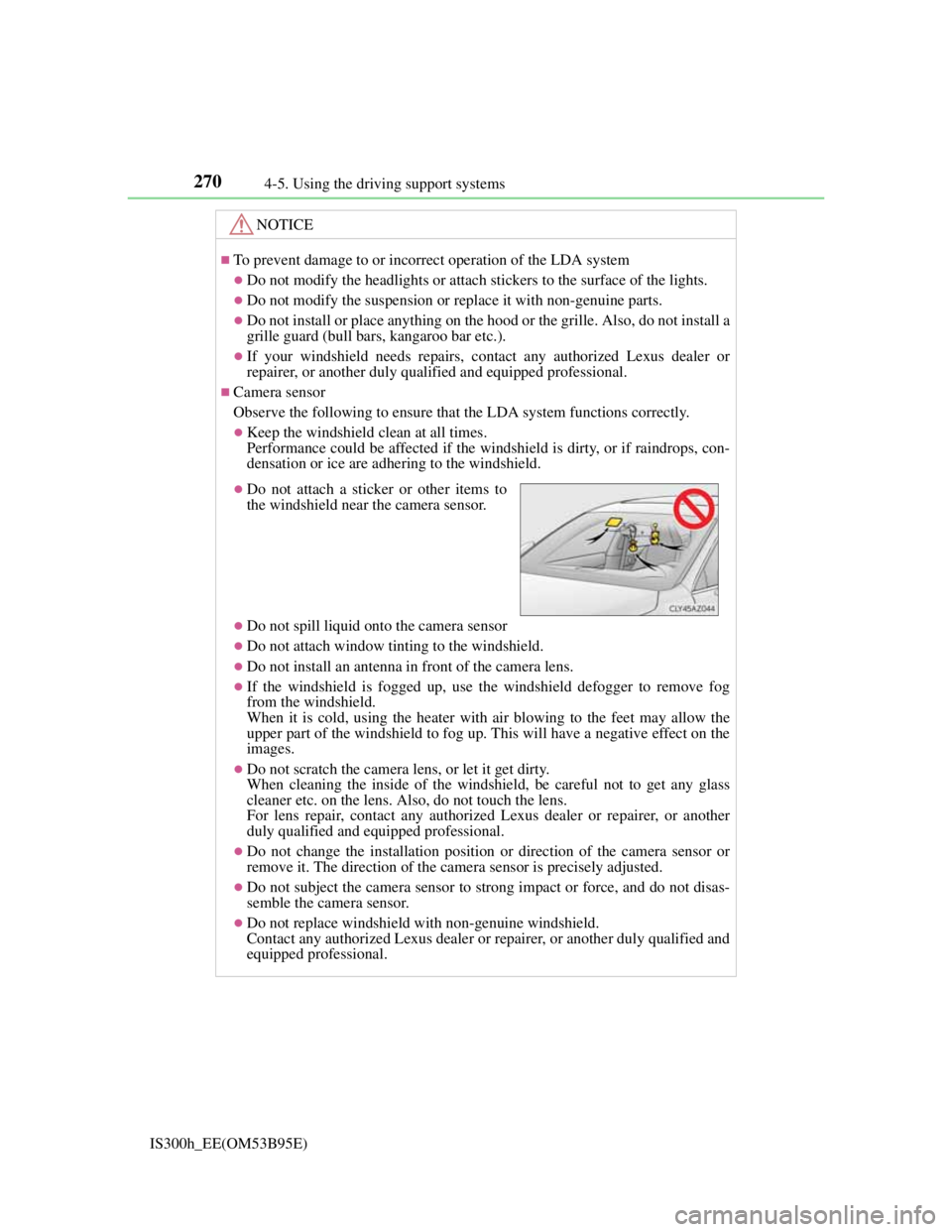
Do not attach a sticker or other items to
the windshield near the camera sensor.
Page 288 of 628
2864-5. Using the driving support systems
IS300h_EE(OM53B95E)
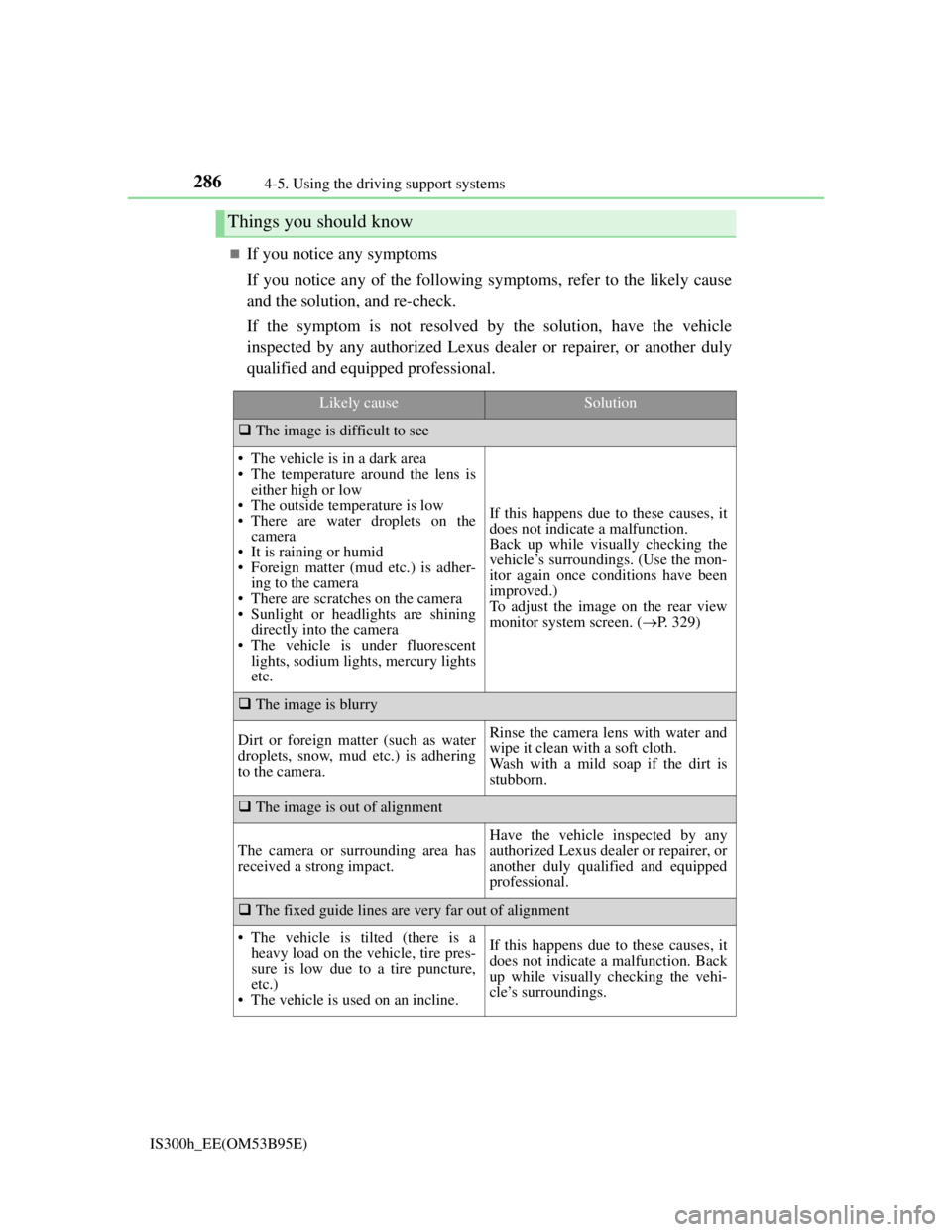
If you notice any symptoms
If you notice any of the following symptoms, refer to the likely cause
and the solution, and re-check.
If the symptom is not resolved by the solution, have the vehicle
inspected by any authorized Lexus dealer or repairer, or another duly
qualified and equipped professional.
Things you should know
Likely causeSolution
The image is difficult to see
• The vehicle is in a dark area
• The temperature around the lens is
either high or low
• The outside temperature is low
• There are water droplets on the
camera
• It is raining or humid
• Foreign matter (mud etc.) is adher-
ing to the camera
• There are scratches on the camera
• Sunlight or headlights are shining
directly into the camera
• The vehicle is under fluorescent
lights, sodium lights, mercury lights
etc.
If this happens due to these causes, it
does not indicate a malfunction.
Back up while visually checking the
vehicle’s surroundings. (Use the mon-
itor again once conditions have been
improved.)
To adjust the image on the rear view
monitor system screen. (P. 329)
The image is blurry
Dirt or foreign matter (such as water
droplets, snow, mud etc.) is adhering
to the camera.Rinse the camera lens with water and
wipe it clean with a soft cloth.
Wash with a mild soap if the dirt is
stubborn.
The image is out of alignment
The camera or surrounding area has
received a strong impact.
Have the vehicle inspected by any
authorized Lexus dealer or repairer, or
another duly qualified and equipped
professional.
The fixed guide lines are very far out of alignment
• The vehicle is tilted (there is a
heavy load on the vehicle, tire pres-
sure is low due to a tire puncture,
etc.)
• The vehicle is used on an incline.If this happens due to these causes, it
does not indicate a malfunction. Back
up while visually checking the vehi-
cle’s surroundings.
Page 342 of 628
3295-2. Setup
5
Lexus Display Audio system
IS300h_EE(OM53B95E)
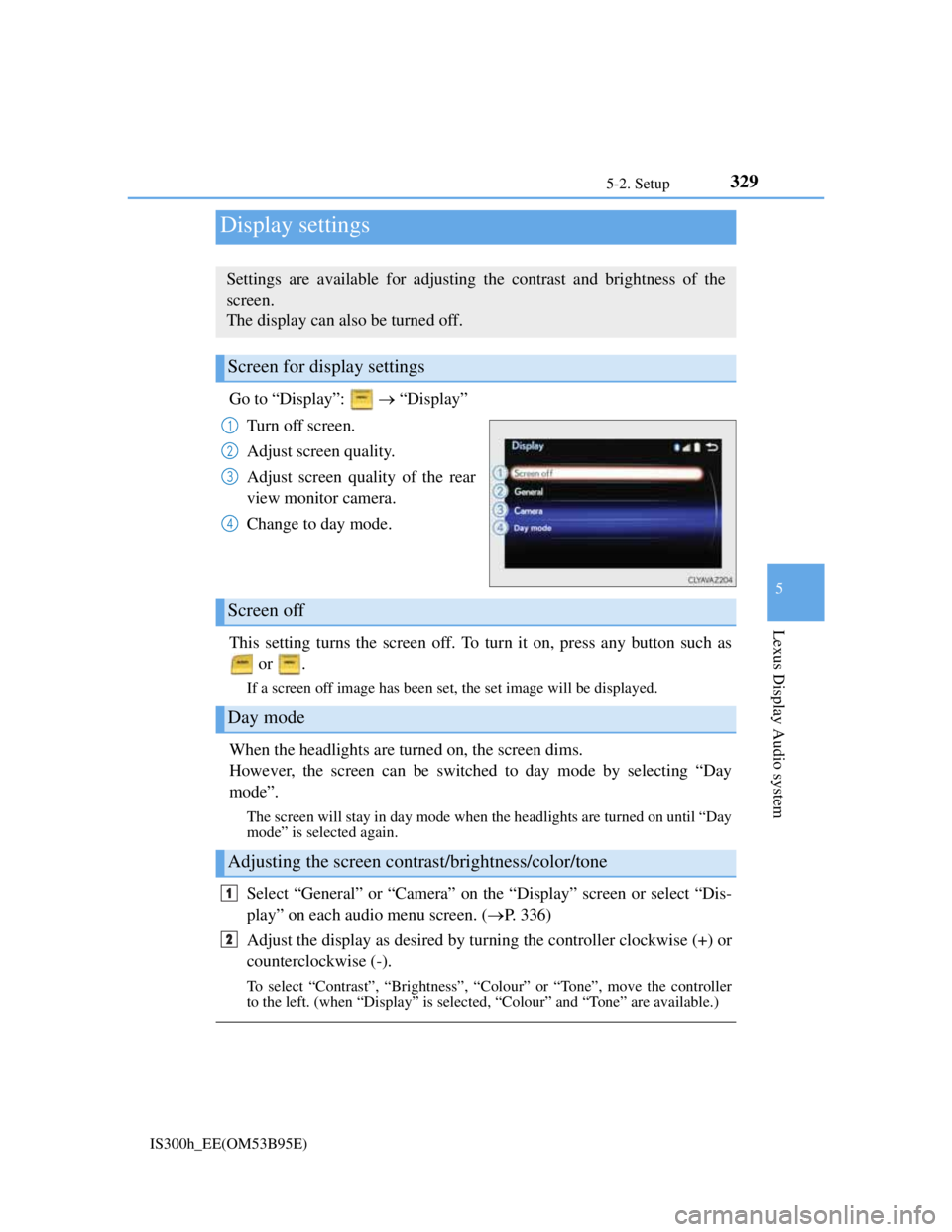
Go to “Display”: “Display”
Turn off screen.
Adjust screen quality.
Adjust screen quality of the rear
view monitor camera.
Change to day mode.
This setting turns the screen off. To turn it on, press any button such as
or .
If a screen off image has been set, the set image will be displayed.
When the headlights are turned on, the screen dims.
However, the screen can be switched to day mode by selecting “Day
mode”.
The screen will stay in day mode when the headlights are turned on until “Day
mode” is selected again.
Select “General” or “Camera” on the “Display” screen or select “Dis-
play” on each audio menu screen. (P. 336)
Adjust the display as desired by turning the controller clockwise (+) or
counterclockwise (-).
To select “Contrast”, “Brightness”, “Colour” or “Tone”, move the controller
to the left. (when “Display” is selected, “Colour” and “Tone” are available.)
Display settings
Settings are available for adjusting the contrast and brightness of the
screen.
The display can also be turned off.
Screen for display settings
1
2
3
4
Screen off
Day mode
Adjusting the screen contrast/brightness/color/tone
1
2
Page 493 of 628
4797-3. Do-it-yourself maintenance
7
Maintenance and care
IS300h_EE(OM53B95E)
Check the wattage of the light bulb to be replaced. (P. 572)
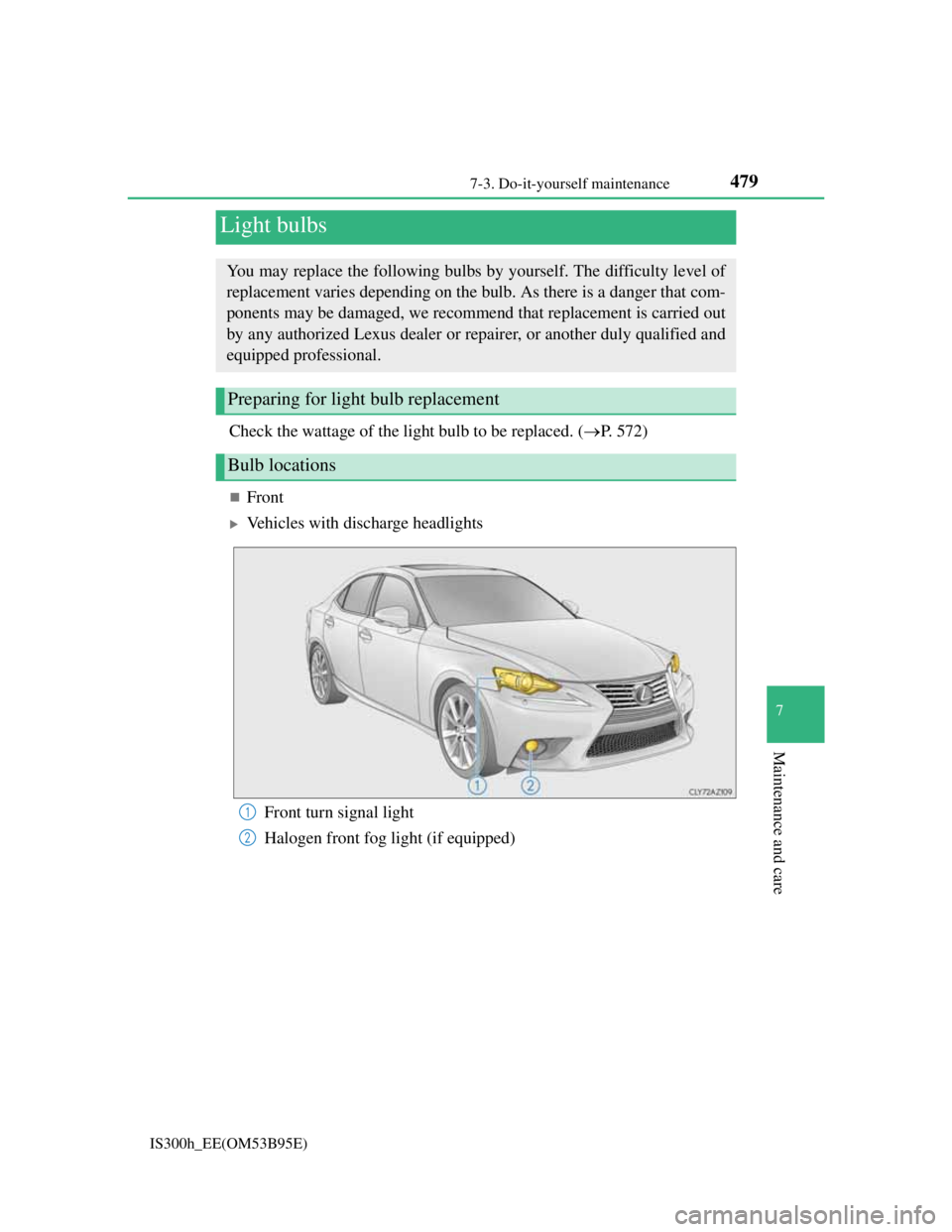
Front
Vehicles with discharge headlights
Light bulbs
You may replace the following bulbs by yourself. The difficulty level of
replacement varies depending on the bulb. As there is a danger that com-
ponents may be damaged, we recommend that replacement is carried out
by any authorized Lexus dealer or repairer, or another duly qualified and
equipped professional.
Preparing for light bulb replacement
Bulb locations
Front turn signal light
Halogen front fog light (if equipped)1
2