reset Lexus IS300h 2013 User Guide
[x] Cancel search | Manufacturer: LEXUS, Model Year: 2013, Model line: IS300h, Model: Lexus IS300h 2013Pages: 628, PDF Size: 20.23 MB
Page 128 of 628
1272. Instrument cluster
2
Instrument cluster
IS300h_EE(OM53B95E)
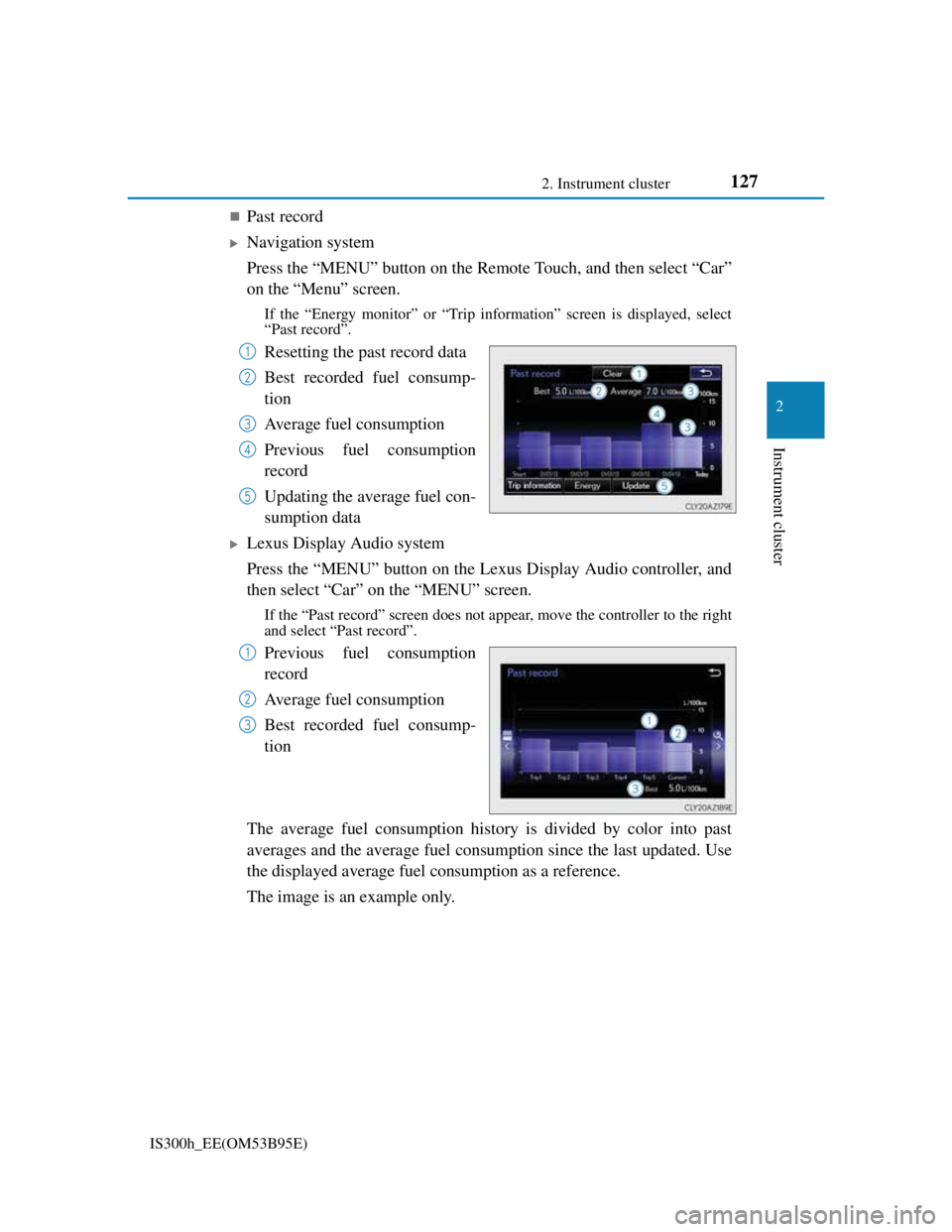
Past record
Navigation system
Press the “MENU” button on the Remote Touch, and then select “Car”
on the “Menu” screen.
If the “Energy monitor” or “Trip information” screen is displayed, select
“Past record”.
Resetting the past record data
Best recorded fuel consump-
tion
Average fuel consumption
Previous fuel consumption
record
Updating the average fuel con-
sumption data
Lexus Display Audio system
Press the “MENU” button on the Lexus Display Audio controller, and
then select “Car” on the “MENU” screen.
If the “Past record” screen does not appear, move the controller to the right
and select “Past record”.
Previous fuel consumption
record
Average fuel consumption
Best recorded fuel consump-
tion
The average fuel consumption history is divided by color into past
averages and the average fuel consumption since the last updated. Use
the displayed average fuel consumption as a reference.
The image is an example only.
1
2
3
4
5
1
2
3
Page 129 of 628

1282. Instrument cluster
IS300h_EE(OM53B95E)
Updating the past record data
Navigation system
Update the average fuel consumption by selecting “Update” to measure the cur-
rent fuel consumption again.
Lexus Display Audio system
Update the average fuel consumption by moving the controller to the left and
select “Update” to measure the current fuel consumption again.
Resetting the data
Navigation system
The fuel consumption data can be deleted by selecting “Clear”.
Lexus Display Audio system
The fuel consumption data can be deleted by moving the controller to the left and
select “Clear”.
Cruising range
Displays the estimated maximum distance that can be driven with the quantity of
fuel remaining.
This distance is computed based on your average fuel consumption.
As a result, the actual distance that can be driven may differ from that displayed.
Page 170 of 628
1683-3. Adjusting the seats
IS300h_EE(OM53B95E)
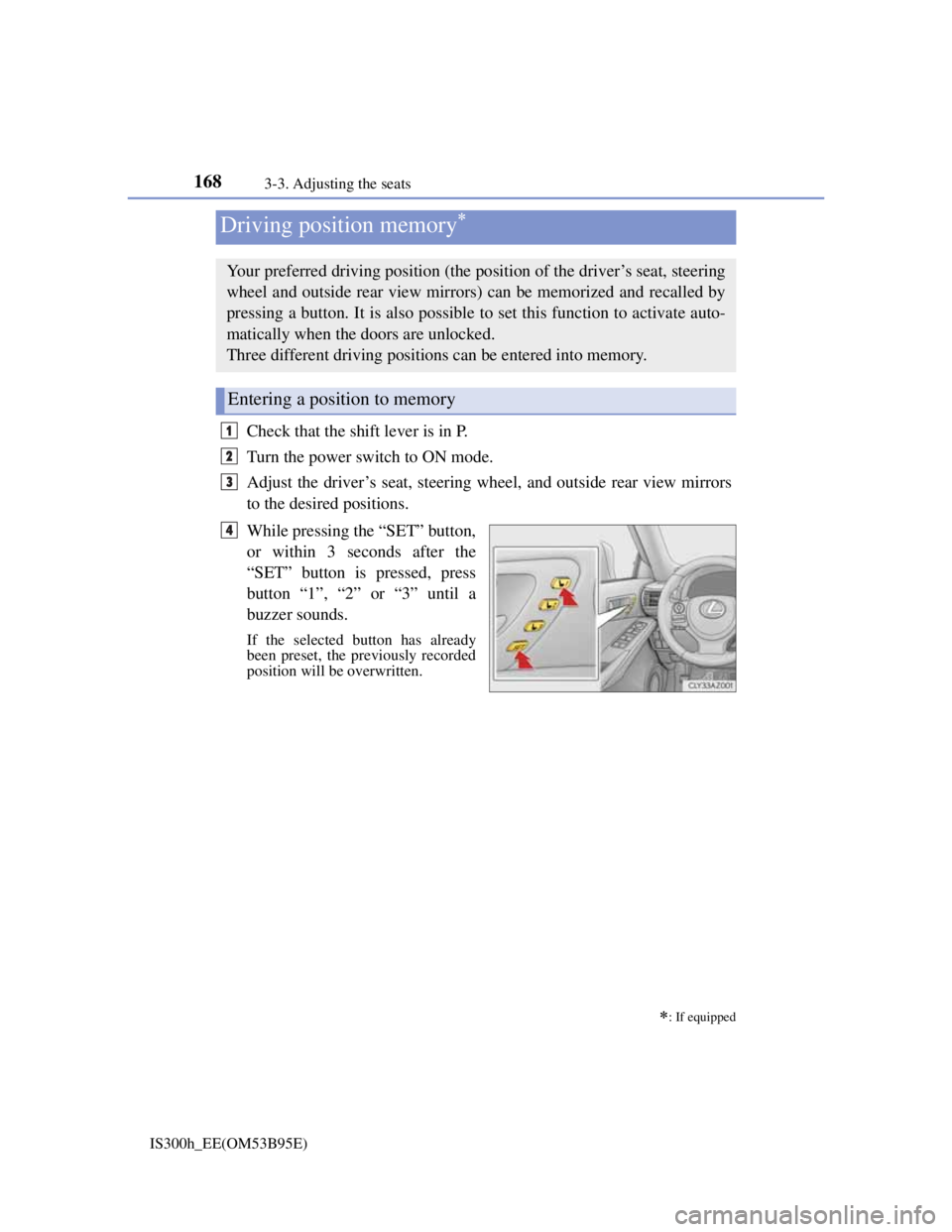
Check that the shift lever is in P.
Turn the power switch to ON mode.
Adjust the driver’s seat, steering wheel, and outside rear view mirrors
to the desired positions.
While pressing the “SET” button,
or within 3 seconds after the
“SET” button is pressed, press
button “1”, “2” or “3” until a
buzzer sounds.
If the selected button has already
been preset, the previously recorded
position will be overwritten.
Driving position memory
: If equipped
Your preferred driving position (the position of the driver’s seat, steering
wheel and outside rear view mirrors) can be memorized and recalled by
pressing a button. It is also possible to set this function to activate auto-
matically when the doors are unlocked.
Three different driving positions can be entered into memory.
Entering a position to memory
1
2
3
4
Page 249 of 628

2474-5. Using the driving support systems
4
Driving
IS300h_EE(OM53B95E)
Cruise control can be set when
The shift lever is in D or range 4 or higher of S has been selected.
Range 4 or higher of D has been selected by using the paddle shift.
Vehicle speed is above approximately 40 km/h (25 mph).
Accelerating after setting the vehicle speed
The vehicle can be accelerated normally. After acceleration, the set speed
resumes.
Even without canceling the cruise control, the set speed can be increased by
first accelerating the vehicle to the desired speed and then pushing the lever
down to set the new speed.
Automatic cruise control cancelation
Cruise control will stop maintaining the vehicle speed in any of the following sit-
uations.
Actual vehicle speed falls more than approximately 16 km/h (10 mph) below
the preset vehicle speed.
At this time, the memorized set speed is not retained.
Actual vehicle speed is below approximately 40 km/h (25 mph).
VSC is activated.
TRC is activated for a period of time.
When the VSC or TRC system is turned off by pressing the VSC OFF switch.
If the warning message for the cruise control is shown on the multi-information
display
Press the “ON/OFF” button once to deactivate the system, and then press the but-
ton again to reactivate the system.
If the cruise control speed cannot be set or if the cruise control cancels immedi-
ately after being activated, there may be a malfunction in the cruise control sys-
tem. Have the vehicle inspected by any authorized Lexus dealer or repairer, or
another duly qualified and equipped professional.
Page 340 of 628
3275-2. Setup
5
Lexus Display Audio system
IS300h_EE(OM53B95E)
“Setup” “General” “Delete personal data”
Select “Delete”.
Check carefully beforehand, as data cannot be retrieved once deleted.
The following personal data will be deleted or changed to its default
settings.
• Phonebook data
• Voice tag
• Call history data
• Favorite data
•Bluetooth
® devices data
• Phone sound settings
• Detailed Bluetooth
® settings
• Audio/video setting
• Preset switch data
• Last used radio station
• Customized image data
• FM info setting
• iPod tagging information
• Software update history
• Software update detail information
• Phone display setting
• Contact/call history setting
• Messaging setting
NOTICE
If the console box lid cannot be fully closed
P. 3 5 5
To prevent damage to the USB memory device or its terminals
P. 3 5 5
Deleting personal data
1
2
Page 347 of 628
3335-3. Using the audio system
5
Lexus Display Audio system
IS300h_EE(OM53B95E)
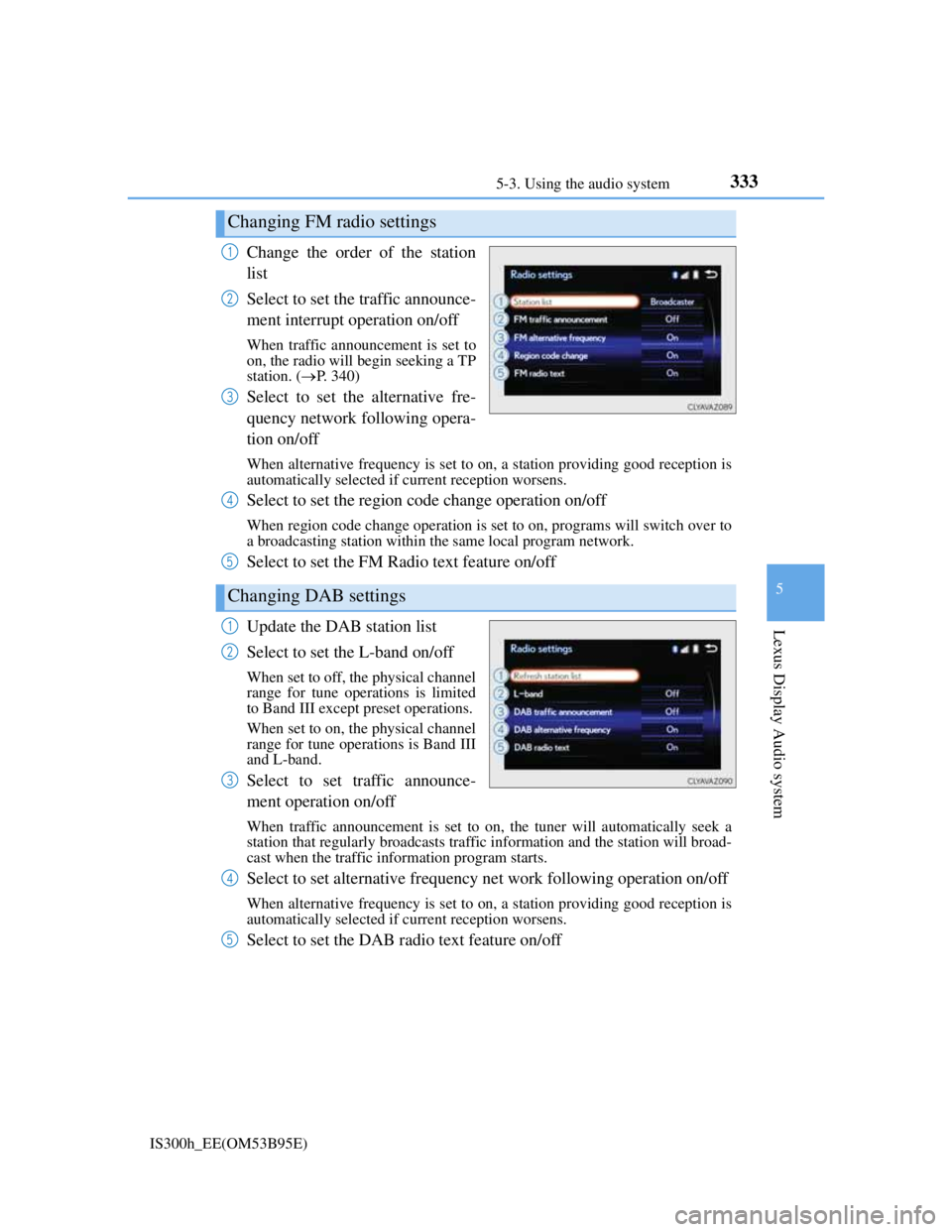
Change the order of the station
list
Select to set the traffic announce-
ment interrupt operation on/off
When traffic announcement is set to
on, the radio will begin seeking a TP
station. (P. 340)
Select to set the alternative fre-
quency network following opera-
tion on/off
When alternative frequency is set to on, a station providing good reception is
automatically selected if current reception worsens.
Select to set the region code change operation on/off
When region code change operation is set to on, programs will switch over to
a broadcasting station within the same local program network.
Select to set the FM Radio text feature on/off
Update the DAB station list
Select to set the L-band on/off
When set to off, the physical channel
range for tune operations is limited
to Band III except preset operations.
When set to on, the physical channel
range for tune operations is Band III
and L-band.
Select to set traffic announce-
ment operation on/off
When traffic announcement is set to on, the tuner will automatically seek a
station that regularly broadcasts traffic information and the station will broad-
cast when the traffic information program starts.
Select to set alternative frequency net work following operation on/off
When alternative frequency is set to on, a station providing good reception is
automatically selected if current reception worsens.
Select to set the DAB radio text feature on/off
Changing FM radio settings
1
2
3
Changing DAB settings
4
5
1
2
3
4
5
Page 353 of 628
339
5
Lexus Display Audio system
IS300h_EE(OM53B95E)5-4. Using the radio
Pressing the “RADIO” button displays the radio top screen from any
screen of the selected source.
Menu screen
P. 3 3 6
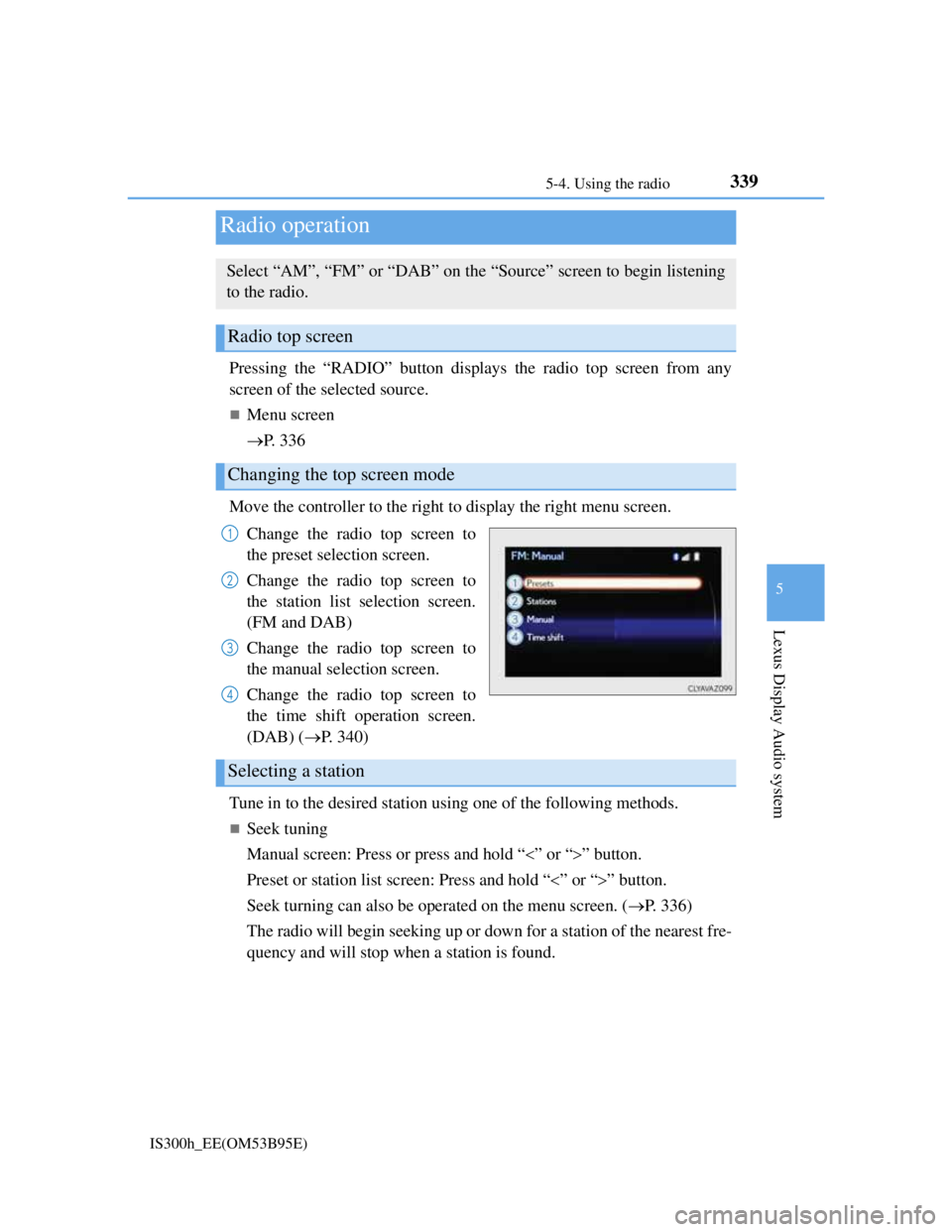
Move the controller to the right to display the right menu screen.
Change the radio top screen to
the preset selection screen.
Change the radio top screen to
the station list selection screen.
(FM and DAB)
Change the radio top screen to
the manual selection screen.
Change the radio top screen to
the time shift operation screen.
(DAB) (P. 340)
Tune in to the desired station using one of the following methods.
Seek tuning
Manual screen: Press or press and hold “” or “” button.
Preset or station list screen: Press and hold “” or “” button.
Seek turning can also be operated on the menu screen. (P. 336)
The radio will begin seeking up or down for a station of the nearest fre-
quency and will stop when a station is found.
Radio operation
Select “AM”, “FM” or “DAB” on the “Source” screen to begin listening
to the radio.
Radio top screen
Changing the top screen mode
1
2
3
4
Selecting a station
Page 354 of 628
3405-4. Using the radio
IS300h_EE(OM53B95E)
Manual tuning (manual screen)
Turn the right side knob (left-hand drive vehicle) or left side knob
(right-hand drive vehicle) on the audio panel or turn the controller.
Station list (preset or station list screen)
Select the desired station by pressing “<” or “>”, turn the right side
knob (left-hand drive vehicle) or left side knob (right-hand drive vehi-
cle) on the audio panel or controller.
Radio stations can be preset.
Search for desired stations.
Turn the controller to select one of the preset stations and then press
the controller until you hear a beep while on the preset selection
screen.
The broadcast you are currently listening to can be re-listened to at any
time.
Move the controller to the right and then select “Time shift”.
Turn the right side knob (left-hand drive vehicle) or left side knob
(right-hand drive vehicle) on the audio panel to set the desired offset.
An offset playback time can also be set on the menu screen. (P. 3 3 6 )
To cancel the time shift operation while in time shift mode, move the control-
ler to the left and select “Time shift off”. If the time shift display is left show-
ing “-0' 00”” for 6 seconds without any operation, the time shift operation will
be canceled.
Reception sensitivity
Maintaining perfect radio reception at all times is difficult due to the continu-
ally changing position of the antenna, differences in signal strength and sur-
rounding objects, such as trains, transmitters, etc.
The radio antenna is mounted inside the rear window. To maintain clear radio
reception, do not attach metallic window tinting or other metallic objects to the
antenna wire mounted inside the rear window.
Traffic announcement operation
When traffic announcement is set to on, “TP” will appear on the screen and the
radio will begin seeking a TP station. If the radio seeks out a TP station, the pro-
gram name will appear on the screen. If a traffic announcement station is
received, the radio will be switched to the traffic information program automati-
cally. When the program ends, the initial operation will resume.
Setting station presets (preset screen)
Time shift operation (DAB)
1
2
1
2
Page 364 of 628
3505-6. Using an external device
IS300h_EE(OM53B95E)
iPod problems
To resolve most problems encountered when using your iPod, disconnect your
iPod from the vehicle iPod connection and reset it. For instructions on how to
reset your iPod, refer to your iPod Owner's Manual.
Compatible models
The following iPod®, iPod nano®, iPod classic®, iPod touch® and iPhone®
devices can be used with this system.
Made for
• iPod touch (5th generation)
• iPod touch (4th generation)
• iPod touch (3rd generation)
• iPod touch (2nd generation)
• iPod touch (1st generation)
• iPod classic
• iPod with video
• iPod nano (7th generation)
• iPod nano (6th generation)
• iPod nano (5th generation)
• iPod nano (4th generation)
• iPod nano (3rd generation)
• iPod nano (2nd generation)
• iPod nano (1st generation)
• iPhone 5
• iPhone 4S
• iPhone 4
• iPhone 3GS
• iPhone 3G
• iPhone
Depending on differences between models or software versions etc., some mod-
els might be incompatible with this system.
To use the video mode
To operate the video functions such as iPod video, a 4-pole AUX cable is neces-
sary. However, depending on the cable specifications, the video function may not
work properly. For more information consult any authorized Lexus dealer or
repairer, or another duly qualified and equipped professional.
NOTICE
If the console box lid cannot be fully closed
Depending on the size and shape of the iPod that is connected to the system, the
auxiliary box lid may not close fully. In this case, do not forcibly close the lid
as this may damage the iPod or the terminals, etc.
To prevent damage to the iPod or its terminals
Do not leave the iPod in the vehicle. The temperature inside the vehicle may
become high, resulting in damage to the iPod.
Do not push down on or apply unnecessary pressure to the iPod while it is
connected.
Do not insert foreign objects into the port.
Page 456 of 628
4427-3. Do-it-yourself maintenance
IS300h_EE(OM53B95E)
Engine oil consumption
A certain amount of engine oil will be consumed while driving. In the following
situations, oil consumption may increase, and engine oil may need to be refilled
in between oil maintenance intervals.
When the engine is new, for example directly after purchasing the vehicle or
after replacing the engine
If low quality oil or oil of an inappropriate viscosity is used
When driving at high engine speeds or with a heavy load, when towing, or
when driving while accelerating or decelerating frequently
When leaving the engine idling for a long time, or when driving frequently
through heavy traffic
After changing the engine oil (if equipped)
The engine oil maintenance data should be reset. Perform the following proce-
dures:
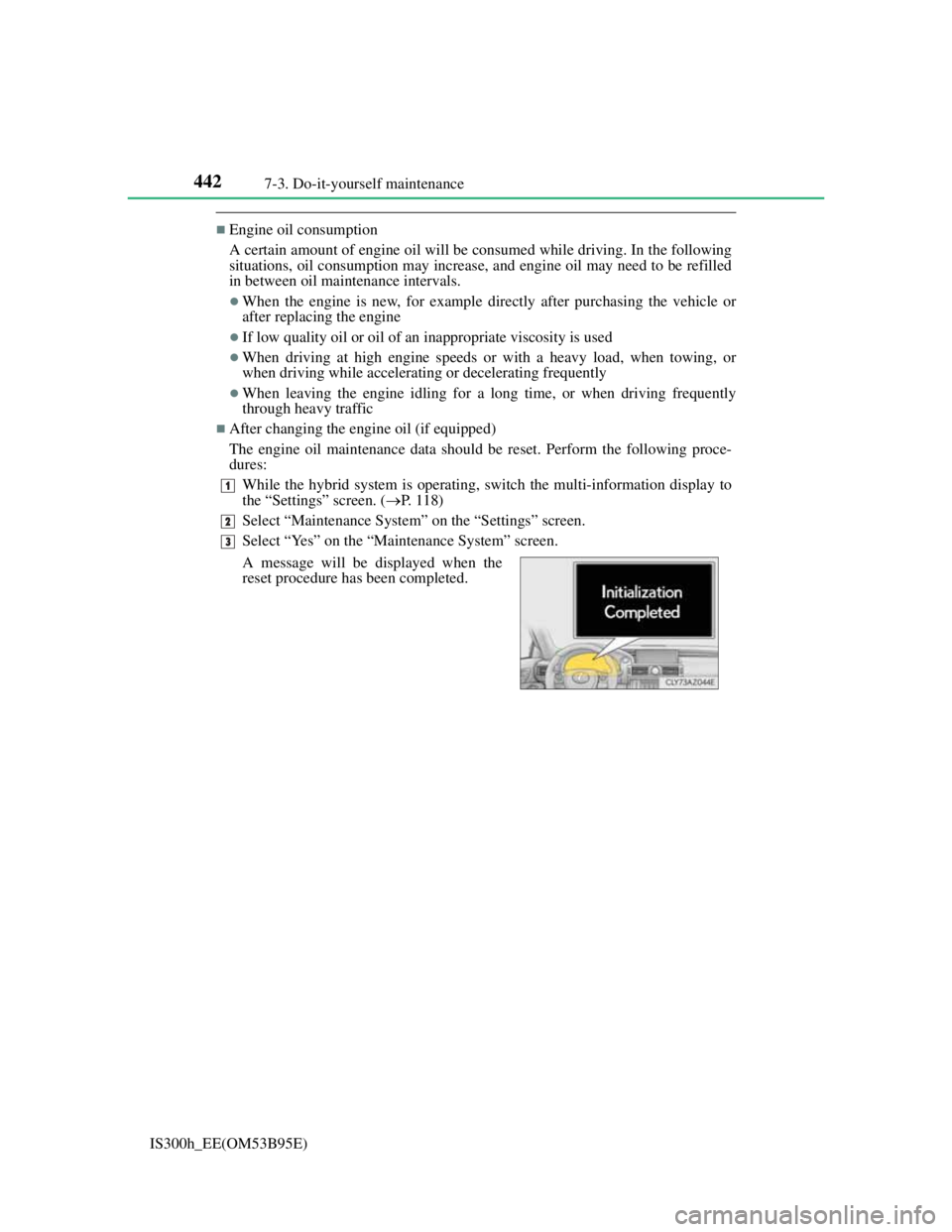
While the hybrid system is operating, switch the multi-information display to
the “Settings” screen. (P. 118)
Select “Maintenance System” on the “Settings” screen.
Select “Yes” on the “Maintenance System” screen.
A message will be displayed when the
reset procedure has been completed.
1
2
3