EV mode Lexus IS300h 2013 Owner's Guide
[x] Cancel search | Manufacturer: LEXUS, Model Year: 2013, Model line: IS300h, Model: Lexus IS300h 2013Pages: 628, PDF Size: 20.23 MB
Page 116 of 628
1152. Instrument cluster
2
Instrument cluster
IS300h_EE(OM53B95E)
Tachometer
Hybrid System Indicator switches to the tachometer when driving mode is in
sport mode.
The settings of the tachometer display can be changed on the multi-information
display. (P. 1 1 9 )
Engine speed
On hybrid vehicles, engine speed is precisely controlled in order to help improve
fuel efficiency and reduce exhaust emissions etc.
There are times when the engine speed that is displayed may differ even when
vehicle operation and driving conditions are the same.
Outside temperature display
In the following situations, the correct outside temperature may not be displayed,
or the display may take longer than normal to change.
When stopped, or driving at low speeds (less than 20 km/h [12 mph])
When the outside temperature has changed suddenly (at the entrance/exit of a
garage, tunnel, etc.)
Pop-up display
In some situations, such as when a switch operation is performed, a pop-up dis-
play, such as the operating methods of the headlight switch, will be temporarily
displayed on the multi-information display or the odometer/trip meter screen (F
SPORT models only).
The pop-up display function can be set on/off. (P. 119)
Liquid crystal display
Small spots or light spots may appear on the display. This phenomenon is charac-
teristic of liquid crystal displays, and there is no problem continuing to use the
display.
Customization
The meter display can be customized on the multi-information display. (P.
116)
NOTICE
To prevent damage to the engine and its components
Do not let the indicator needle of the tachometer enter the red zone, which
indicates the maximum engine speed.
The engine may be overheating if the engine coolant temperature gauge is in
the red zone (H). In this case, immediately stop the vehicle in a safe place, and
check the engine after it has cooled completely. (P. 555)
Page 117 of 628
1162. Instrument cluster
IS300h_EE(OM53B95E)
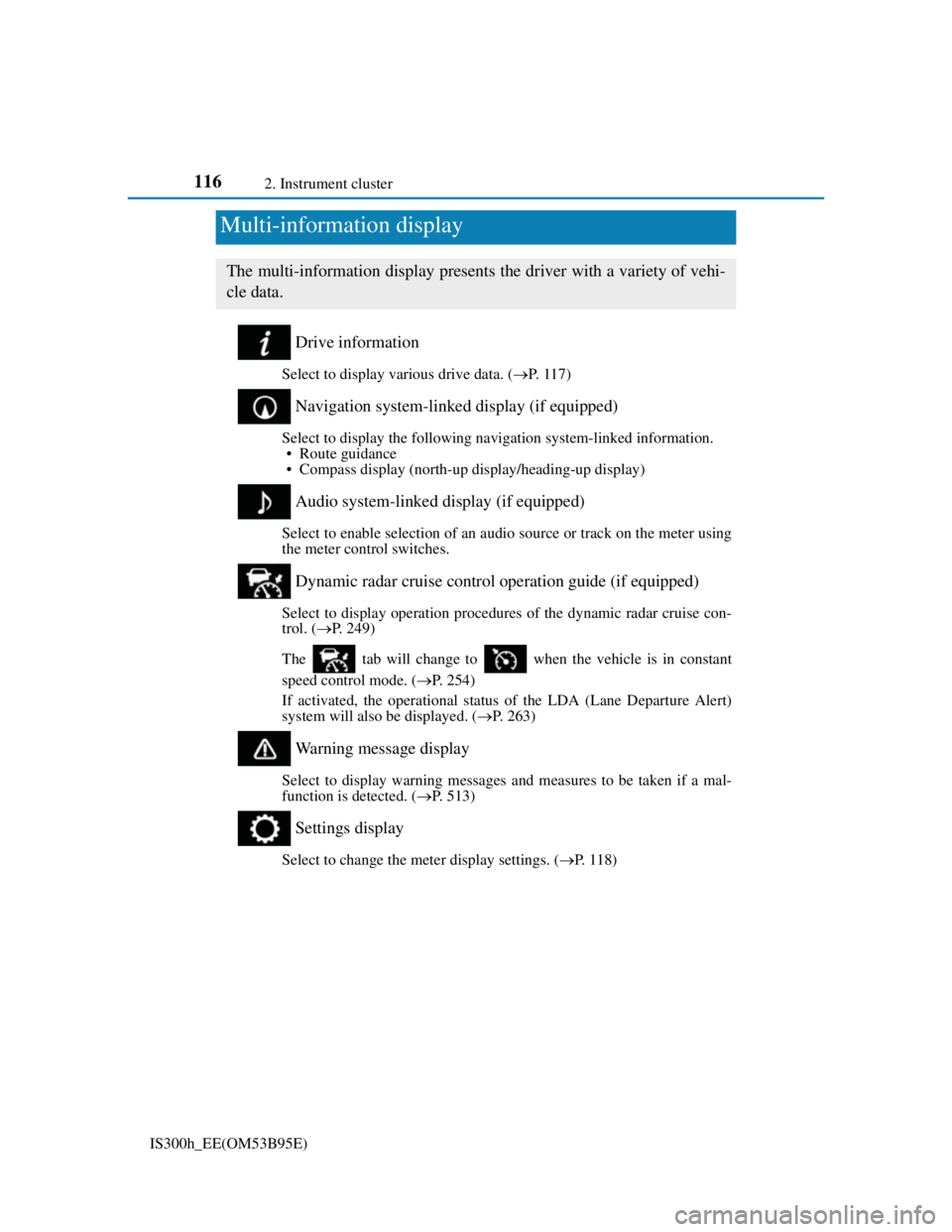
Drive information
Select to display various drive data. (P. 1 1 7 )
Navigation system-linked display (if equipped)
Select to display the following navigation system-linked information.
• Route guidance
• Compass display (north-up display/heading-up display)
Audio system-linked display (if equipped)
Select to enable selection of an audio source or track on the meter using
the meter control switches.
Dynamic radar cruise control operation guide (if equipped)
Select to display operation procedures of the dynamic radar cruise con-
trol. (P. 249)
The tab will change to when the vehicle is in constant
speed control mode. (P. 254)
If activated, the operational status of the LDA (Lane Departure Alert)
system will also be displayed. (P. 263)
Warning message display
Select to display warning messages and measures to be taken if a mal-
function is detected. (P. 513)
Settings display
Select to change the meter display settings. (P. 1 1 8 )
Multi-information display
The multi-information display presents the driver with a variety of vehi-
cle data.
Page 118 of 628
1172. Instrument cluster
2
Instrument cluster
IS300h_EE(OM53B95E)
Operating the meter control switches
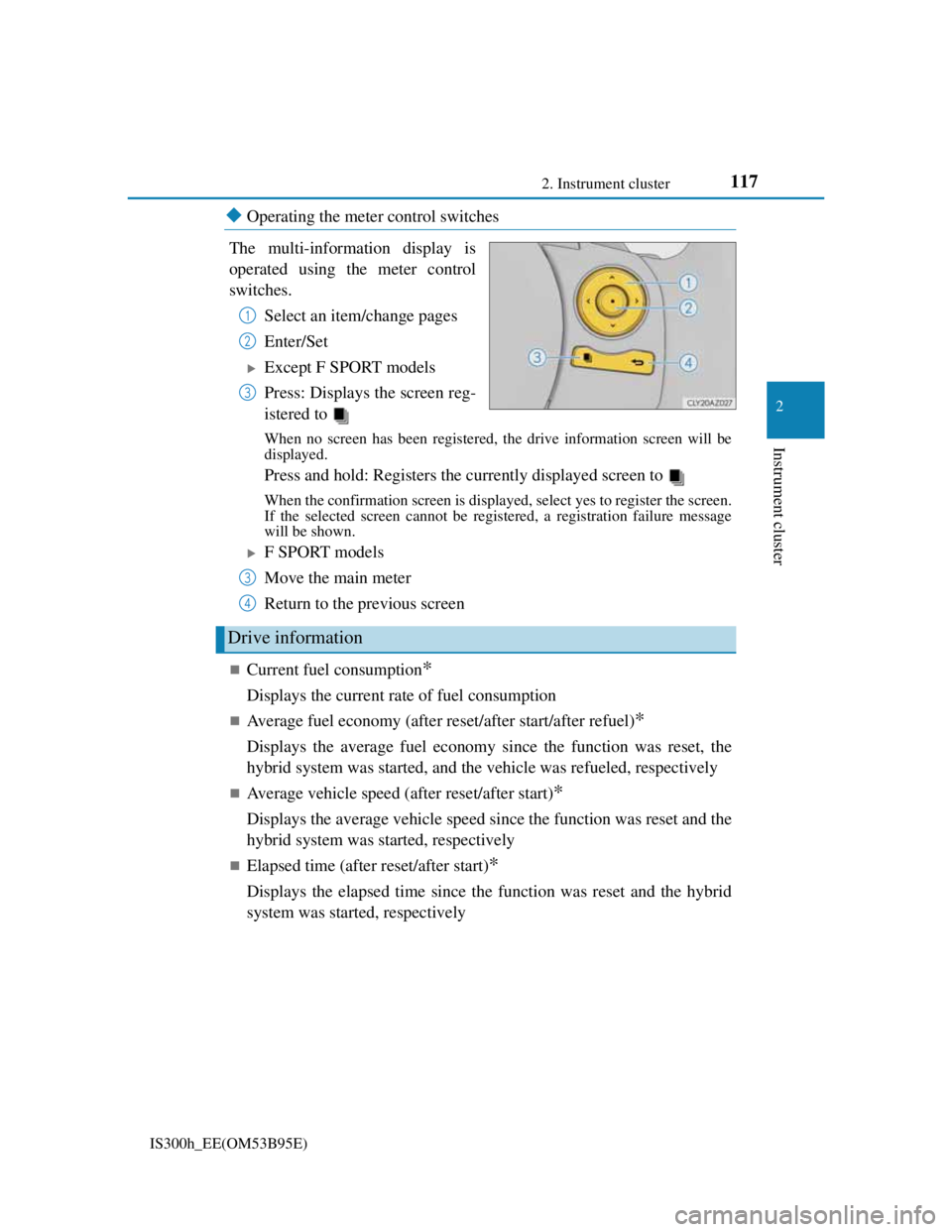
The multi-information display is
operated using the meter control
switches.
Select an item/change pages
Enter/Set
Except F SPORT models
Press: Displays the screen reg-
istered to
When no screen has been registered, the drive information screen will be
displayed.
Press and hold: Registers the currently displayed screen to
When the confirmation screen is displayed, select yes to register the screen.
If the selected screen cannot be registered, a registration failure message
will be shown.
F SPORT models
Move the main meter
Return to the previous screen
Current fuel consumption*
Displays the current rate of fuel consumption
Average fuel economy (after reset/after start/after refuel)*
Displays the average fuel economy since the function was reset, the
hybrid system was started, and the vehicle was refueled, respectively
Average vehicle speed (after reset/after start)*
Displays the average vehicle speed since the function was reset and the
hybrid system was started, respectively
Elapsed time (after reset/after start)*
Displays the elapsed time since the function was reset and the hybrid
system was started, respectively
1
2
3
Drive information
3
4
Page 119 of 628
1182. Instrument cluster
IS300h_EE(OM53B95E)
Distance (driving range/after start)*
Displays the estimated maximum distance that can be driven with the
quantity of fuel remaining and the distance driven after the hybrid sys-
tem was started respectively.
• This distance is computed based on your average fuel consumption. As a
result, the actual distance that can be driven may differ from that displayed.
• When only a small amount of fuel is added to the tank, the display may not
be updated.
When refueling, turn the power switch off. If the vehicle is refueled with-
out turning the power switch off, the display may not be updated.
Energy monitor
P. 1 2 2
*: Displayed when the item is set in “Drive Info 1” or “Drive Info 2”. Use these
values as a reference.
Language
Select to change the language on the display.
Units
Select to change the unit of measure for fuel consumption.
Maintenance system
Select to reset the maintenance data after the required maintenance is
performed. (P. 442)
EV indicator
Select to set the EV indicator on/off.
switch settings (except F SPORT models)
Displays a procedure to register a desired screen to .
You can register 1 screen as a shortcut, which can be displayed by
pressing . (P. 1 1 7 )
Drive information 1/Drive information 2
Select to select up to 2 items that will be displayed on the “Drive Info
1” screen and “Drive Info 2” screen respectively. (P. 117)
Settings display
Page 120 of 628
1192. Instrument cluster
2
Instrument cluster
IS300h_EE(OM53B95E)
Pop-up display
Select to set the following pop-up displays, which may appear in some
situations, on/off.
• Route guidance display of the navigation system-linked system
(if equipped)
• Incoming call display of the hands-free phone system (if equipped)
• Windshield wiper switch operation display (if equipped)
• Headlight switch operation display (if equipped)
• Dynamic radar cruise control operation display (if equipped)
• Instrument panel brightness adjustment display
• Main meter switch operation display (F SPORT models)
Accent color (except F SPORT models)
Select to change the accent colors on the screen, such as the cursor
color.
Tachometer settings
Select to set the display of the tachometer or Hybrid System Indicator
to automatically change according to the driving mode or static.
Needle (F SPORT models)
Select to change the needle color for the tachometer.
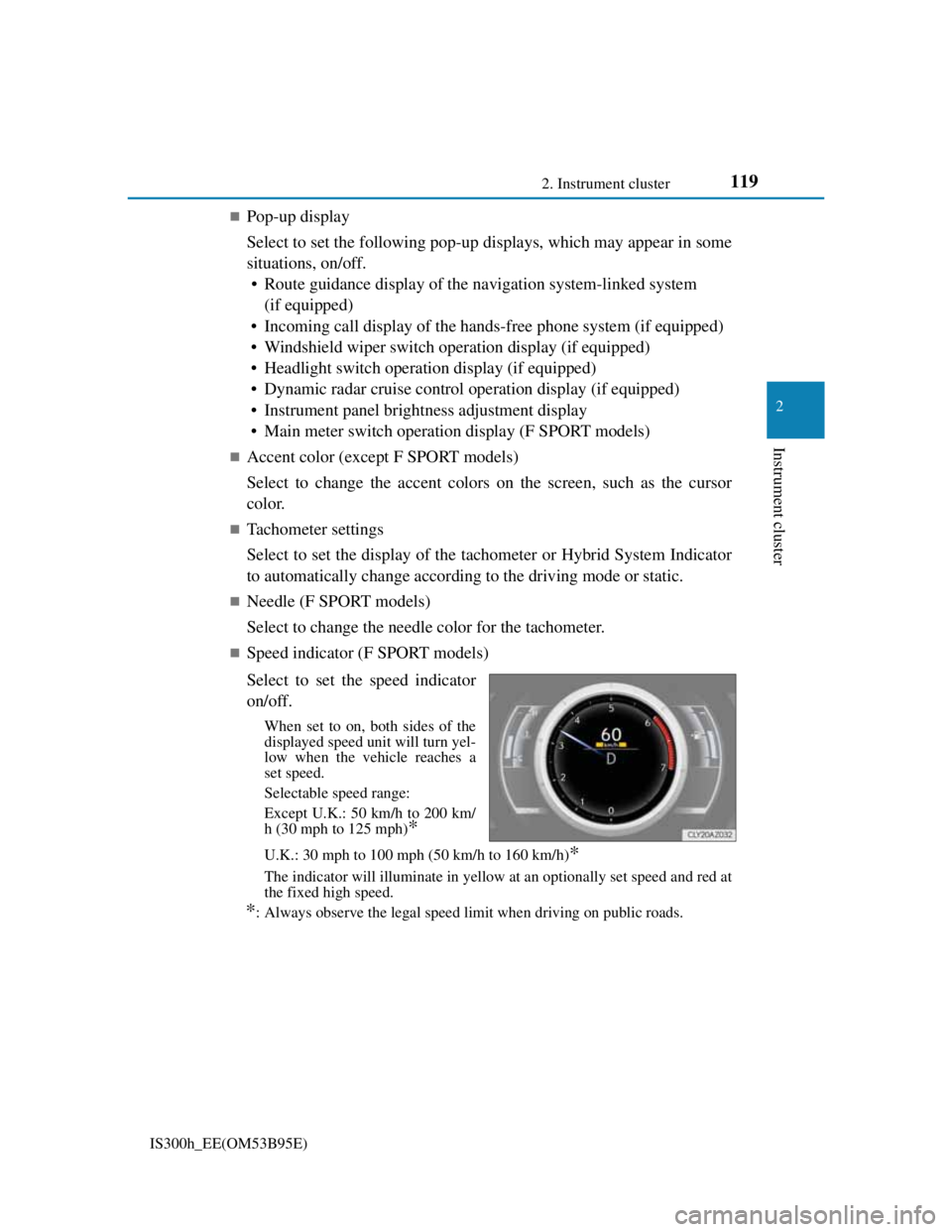
Speed indicator (F SPORT models)
Select to set the speed indicator
on/off.
When set to on, both sides of the
displayed speed unit will turn yel-
low when the vehicle reaches a
set speed.
Selectable speed range:
Except U.K.: 50 km/h to 200 km/
h (30 mph to 125 mph)
*
U.K.: 30 mph to 100 mph (50 km/h to 160 km/h)*
The indicator will illuminate in yellow at an optionally set speed and red at
the fixed high speed.
*: Always observe the legal speed limit when driving on public roads.
Page 121 of 628
1202. Instrument cluster
IS300h_EE(OM53B95E)
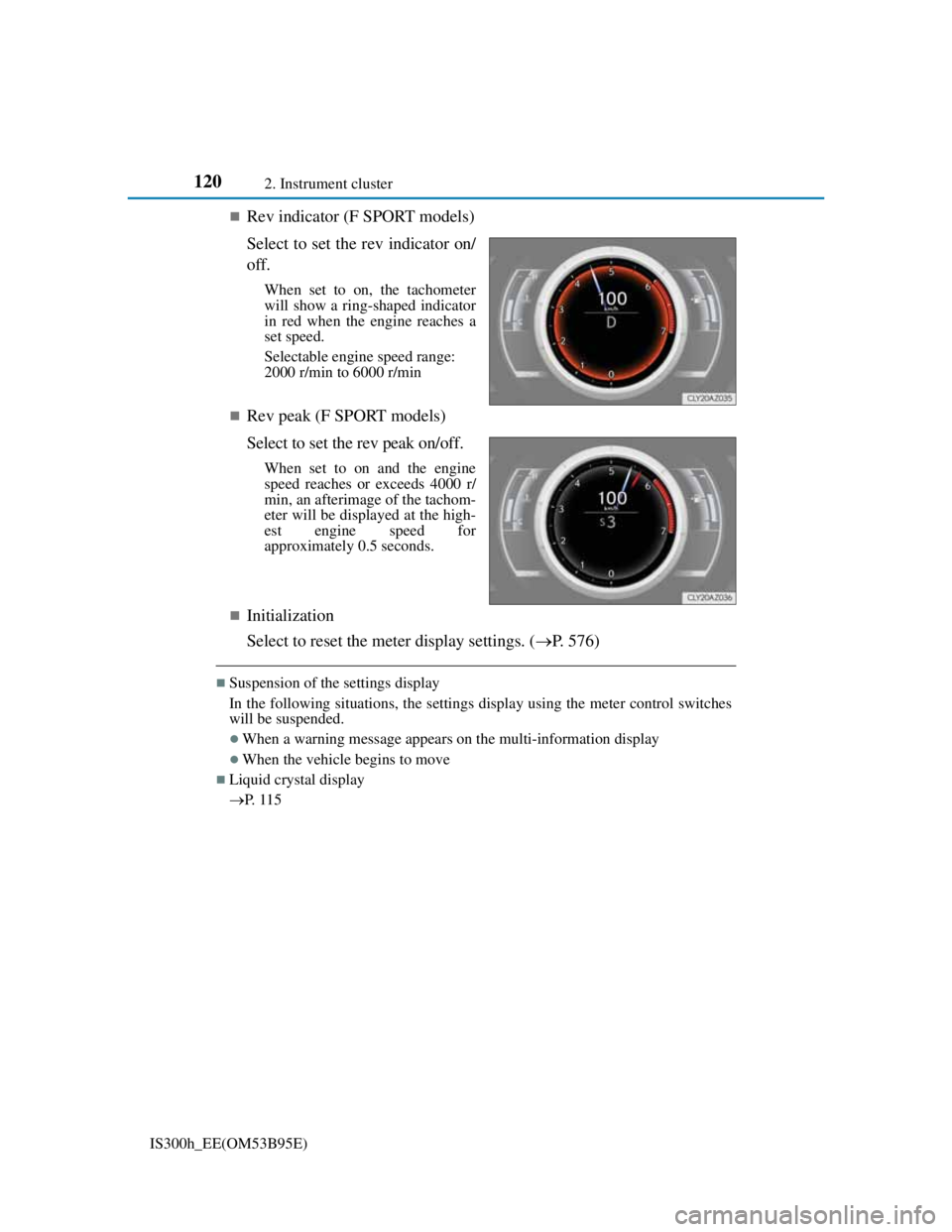
Rev indicator (F SPORT models)
Select to set the rev indicator on/
off.
When set to on, the tachometer
will show a ring-shaped indicator
in red when the engine reaches a
set speed.
Selectable engine speed range:
2000 r/min to 6000 r/min
Rev peak (F SPORT models)
Select to set the rev peak on/off.
When set to on and the engine
speed reaches or exceeds 4000 r/
min, an afterimage of the tachom-
eter will be displayed at the high-
est engine speed for
approximately 0.5 seconds.
Initialization
Select to reset the meter display settings. (P. 576)
Suspension of the settings display
In the following situations, the settings display using the meter control switches
will be suspended.
When a warning message appears on the multi-information display
When the vehicle begins to move
Liquid crystal display
P. 1 1 5
Page 127 of 628
1262. Instrument cluster
IS300h_EE(OM53B95E)
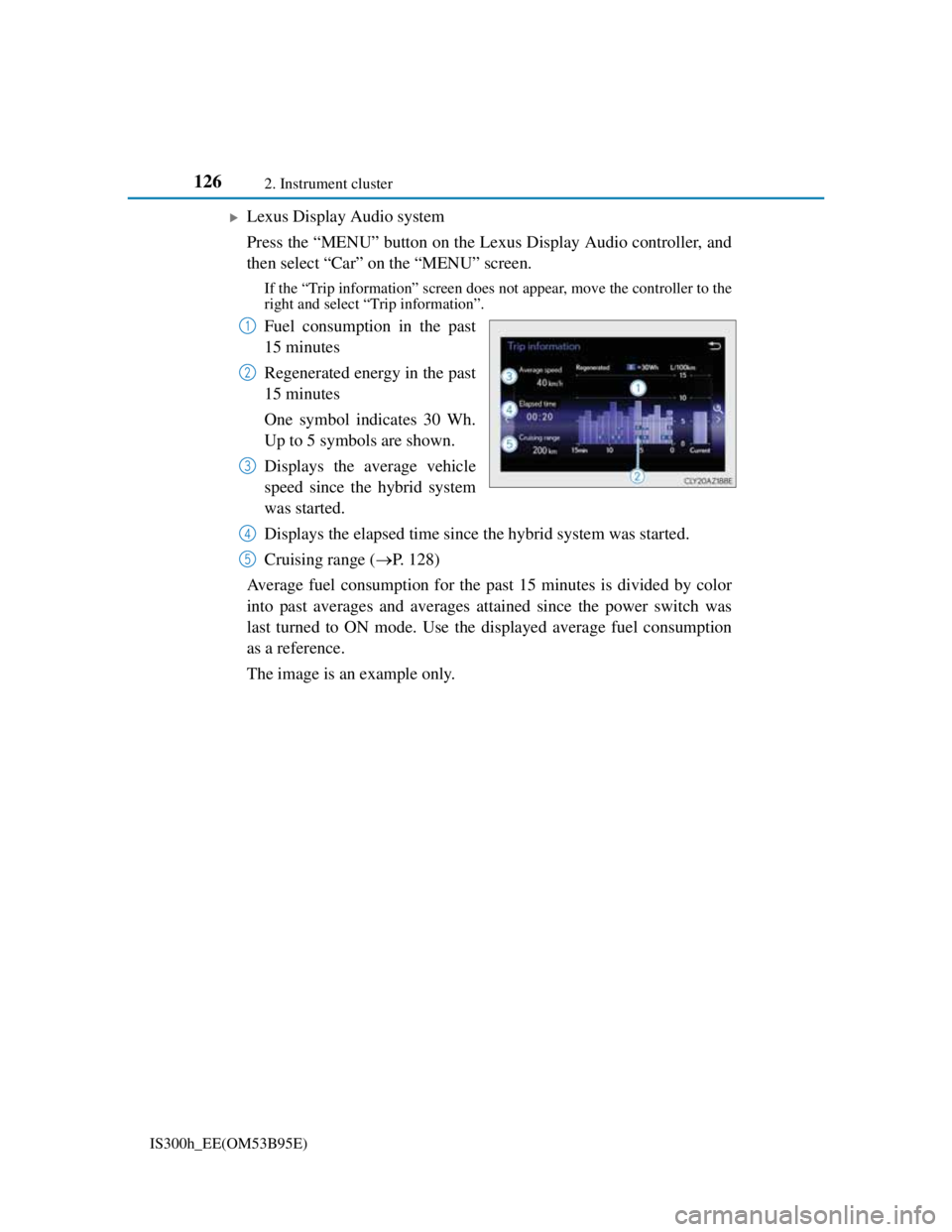
Lexus Display Audio system
Press the “MENU” button on the Lexus Display Audio controller, and
then select “Car” on the “MENU” screen.
If the “Trip information” screen does not appear, move the controller to the
right and select “Trip information”.
Fuel consumption in the past
15 minutes
Regenerated energy in the past
15 minutes
One symbol indicates 30 Wh.
Up to 5 symbols are shown.
Displays the average vehicle
speed since the hybrid system
was started.
Displays the elapsed time since the hybrid system was started.
Cruising range (P. 128)
Average fuel consumption for the past 15 minutes is divided by color
into past averages and averages attained since the power switch was
last turned to ON mode. Use the displayed average fuel consumption
as a reference.
The image is an example only.1
2
3
4
5
Page 141 of 628
1393-2. Opening, closing and locking the doors and trunk
3
Operation of each component
IS300h_EE(OM53B95E)
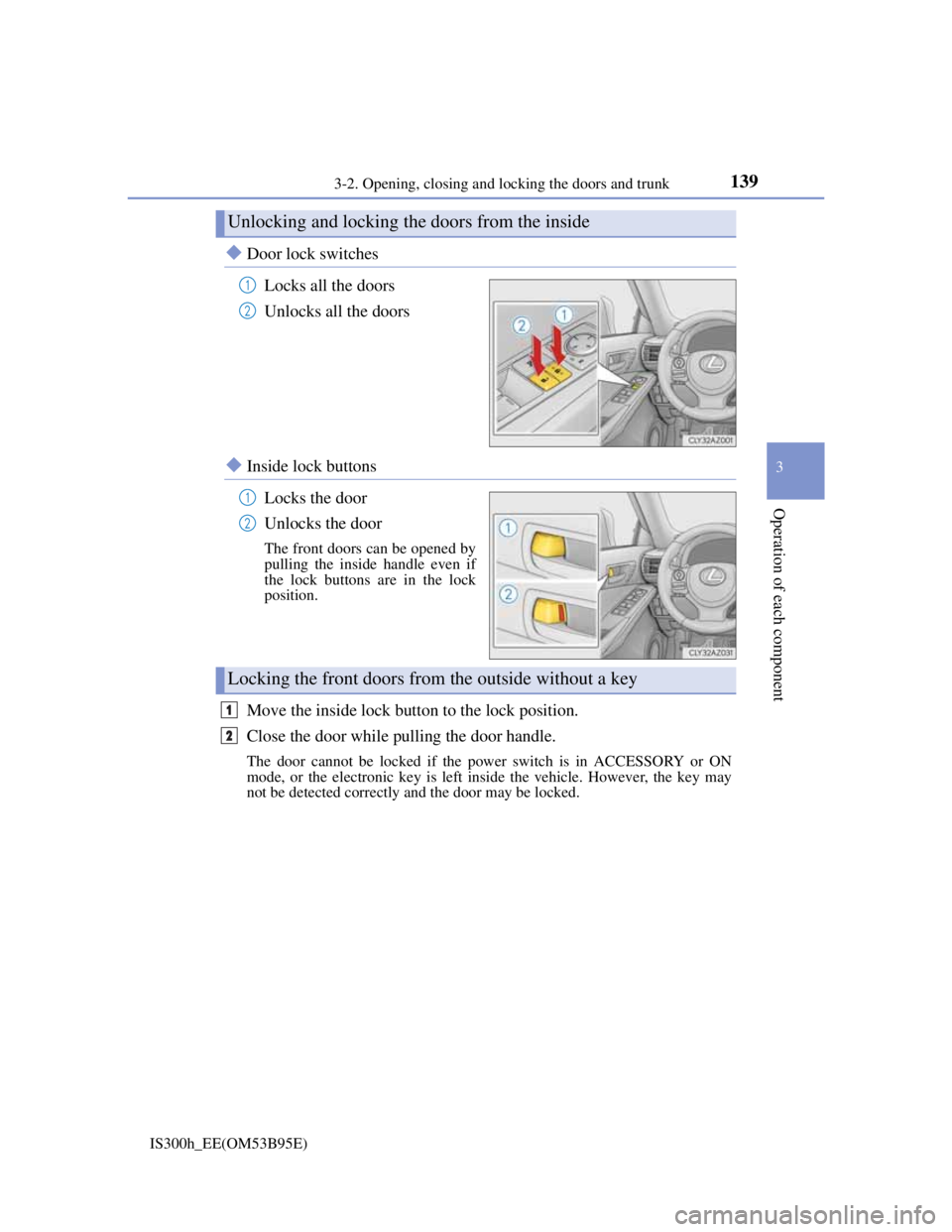
Door lock switches
Locks all the doors
Unlocks all the doors
Inside lock buttons
Locks the door
Unlocks the door
The front doors can be opened by
pulling the inside handle even if
the lock buttons are in the lock
position.
Move the inside lock button to the lock position.
Close the door while pulling the door handle.
The door cannot be locked if the power switch is in ACCESSORY or ON
mode, or the electronic key is left inside the vehicle. However, the key may
not be detected correctly and the door may be locked.
Unlocking and locking the doors from the inside
1
2
1
2
Locking the front doors from the outside without a key
1
2
Page 151 of 628
1493-2. Opening, closing and locking the doors and trunk
3
Operation of each component
IS300h_EE(OM53B95E)
Locks and unlocks the doors (vehicles with entry function) (P. 136)
Opens the trunk (vehicles with entry function) (P. 143)
Starts the hybrid system (P. 209)
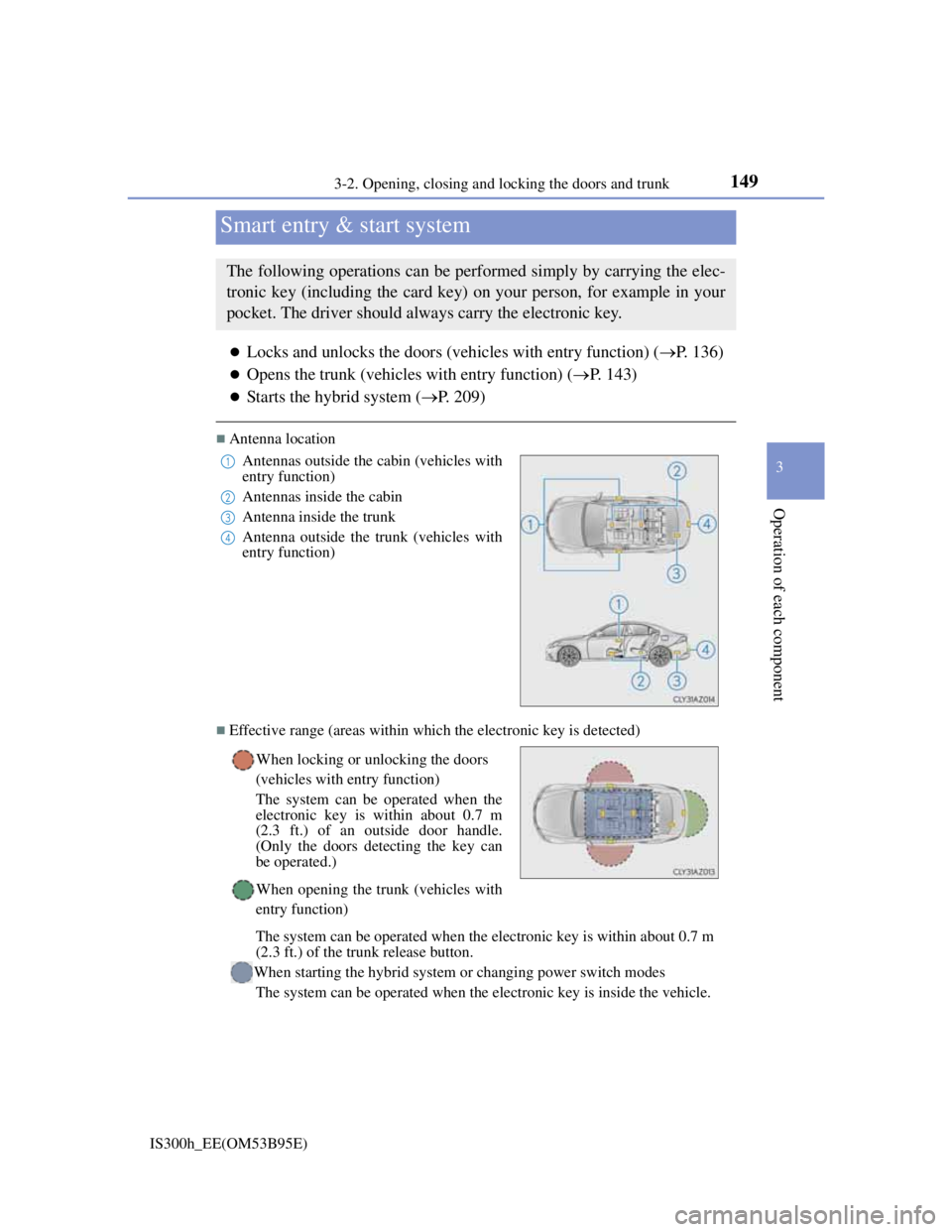
Antenna location
Effective range (areas within which the electronic key is detected)
Smart entry & start system
The following operations can be performed simply by carrying the elec-
tronic key (including the card key) on your person, for example in your
pocket. The driver should always carry the electronic key.
Antennas outside the cabin (vehicles with
entry function)
Antennas inside the cabin
Antenna inside the trunk
Antenna outside the trunk (vehicles with
entry function)
When locking or unlocking the doors
(vehicles with entry function)
The system can be operated when the
electronic key is within about 0.7 m
(2.3 ft.) of an outside door handle.
(Only the doors detecting the key can
be operated.)
When opening the trunk (vehicles with
entry function)
The system can be operated when the electronic key is within about 0.7 m
(2.3 ft.) of the trunk release button.
When starting the hybrid system or changing power switch modes
The system can be operated when the electronic key is inside the vehicle.1
2
3
4
Page 152 of 628
1503-2. Opening, closing and locking the doors and trunk
IS300h_EE(OM53B95E)
Battery-saving function (vehicles with entry function)
The battery-saving function will be activated in order to prevent the electronic
key battery and the 12-volt battery from being discharged while the vehicle is not
in operation for a long time.
In the following situations, the smart entry & start system may take some time
to unlock the doors.
• The electronic key has been left within approximately 2 m (6 ft.) of the out-
side of the vehicle for 10 minutes or longer.
• The smart entry & start system has not been used for 5 days or longer.
If the smart entry & start system has not been used for 14 days or longer, the
doors cannot be unlocked at any door except the driver’s door. In this case, hold
the driver’s door handle, or use the wireless remote control or mechanical key,
to unlock the doors.
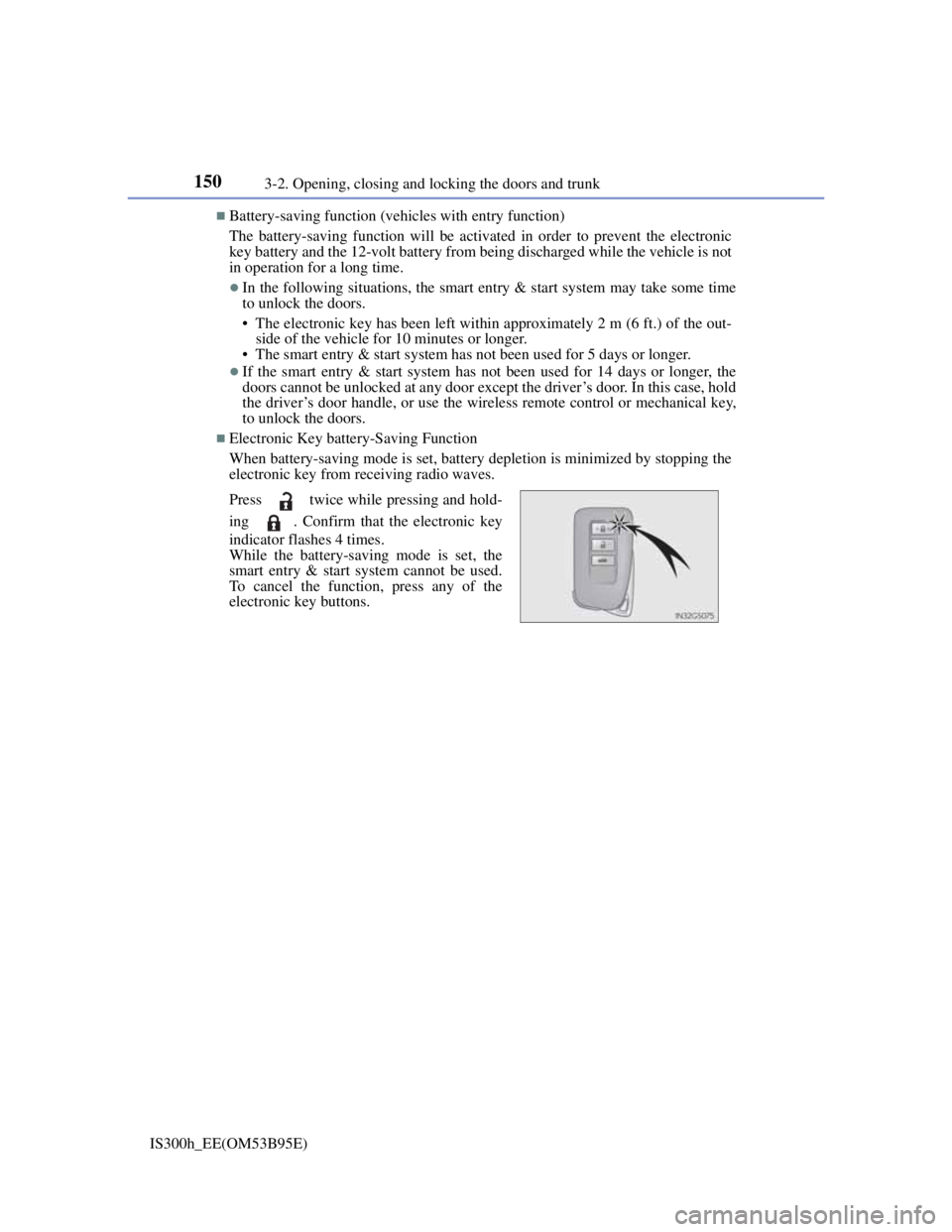
Electronic Key battery-Saving Function
When battery-saving mode is set, battery depletion is minimized by stopping the
electronic key from receiving radio waves.
Press twice while pressing and hold-
ing . Confirm that the electronic key
indicator flashes 4 times.
While the battery-saving mode is set, the
smart entry & start system cannot be used.
To cancel the function, press any of the
electronic key buttons.