audio Lexus IS300h 2013 Owner's Guide
[x] Cancel search | Manufacturer: LEXUS, Model Year: 2013, Model line: IS300h, Model: Lexus IS300h 2013Pages: 628, PDF Size: 20.23 MB
Page 328 of 628

315
5
Lexus Display
Audio system
IS300h_EE(OM53B95E)
5-5. Playing an audio CD and
MP3/WMA/AAC discs
CD player operation .......... 341
5-6. Using an external device
Listening to an iPod .......... 348
Using USB memory
device .............................. 351
Using the AUX port .......... 356
5-7. Connecting Bluetooth
®
Steps for using
Bluetooth® devices ......... 357
Registering a Bluetooth
®
device .............................. 359
Selecting a Bluetooth
®
device .............................. 360
Connecting a Bluetooth
®
audio player .................... 361
Connecting a Bluetooth
®
phone............................... 362
Displaying a Bluetooth
®
device details .................. 363
Detailed Bluetooth
®
settings ............................ 3645-8. Bluetooth
® Audio
Listening to Bluetooth
®
Audio .............................. 365
5-9. Bluetooth
® Phone
Using a Bluetooth
®
Phone .............................. 367
Making a call .................... 369
Receiving a call ................ 372
Speaking on the phone...... 373
Using a Bluetooth
®
phone messages .............. 375
Using the steering wheel
switches .......................... 378
Bluetooth
® phone
settings ............................ 379
5-10. Phonebook
Contact settings................. 381
Messaging setting ............. 384
5-11. Bluetooth
®
Bluetooth®....................... 385
5-12. Other function
“Information” screen ........ 390
MirrorLink..................... 391
USB photo ........................ 393
Speech command system .. 395
Page 329 of 628
316
IS300h_EE(OM53B95E)5-1. Basic Operations
Lexus Display Audio System
: If equipped
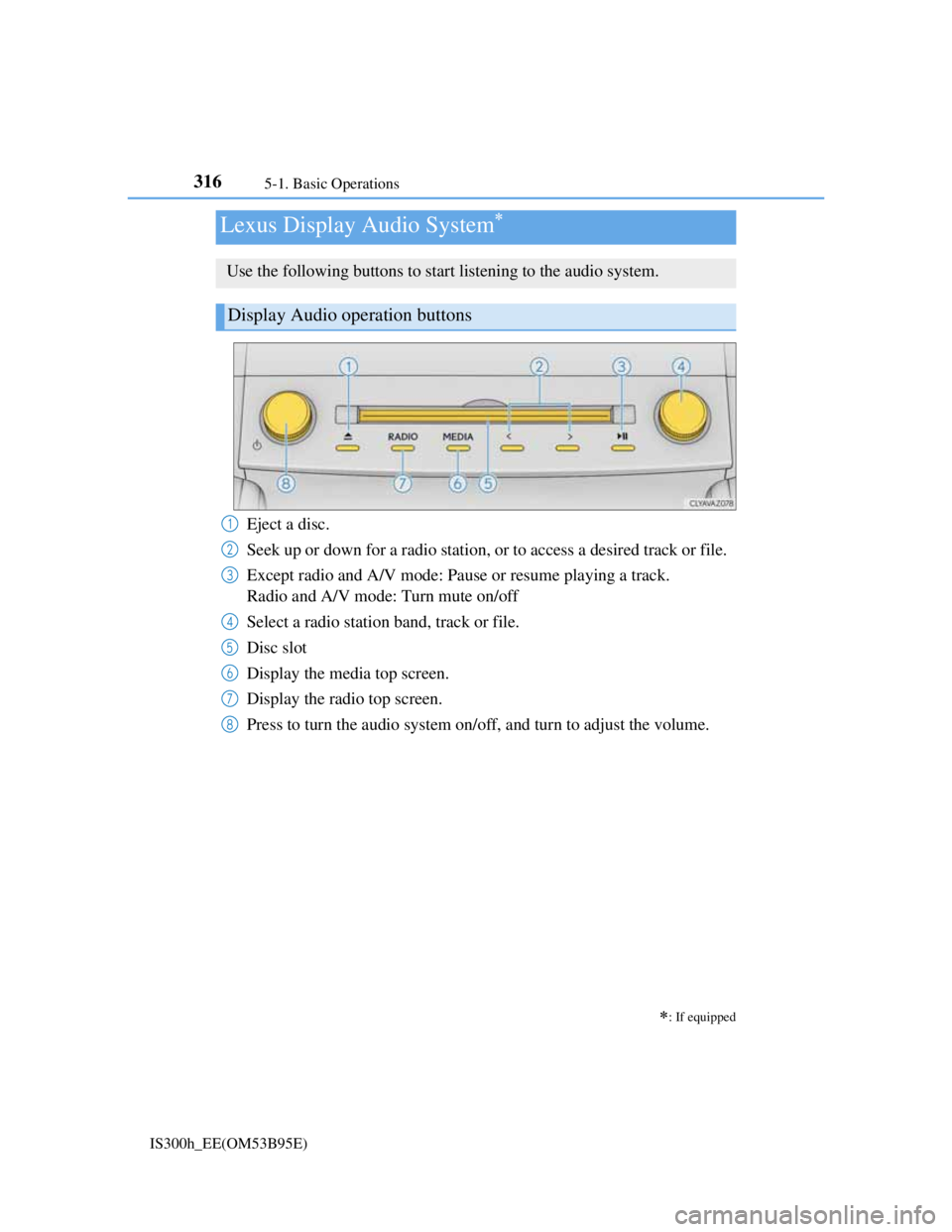
Use the following buttons to start listening to the audio system.
Display Audio operation buttons
Eject a disc.
Seek up or down for a radio station, or to access a desired track or file.
Except radio and A/V mode: Pause or resume playing a track.
Radio and A/V mode: Turn mute on/off
Select a radio station band, track or file.
Disc slot
Display the media top screen.
Display the radio top screen.
Press to turn the audio system on/off, and turn to adjust the volume.1
2
3
4
5
6
7
8
Page 330 of 628
3175-1. Basic Operations
5
Lexus Display Audio system
IS300h_EE(OM53B95E)
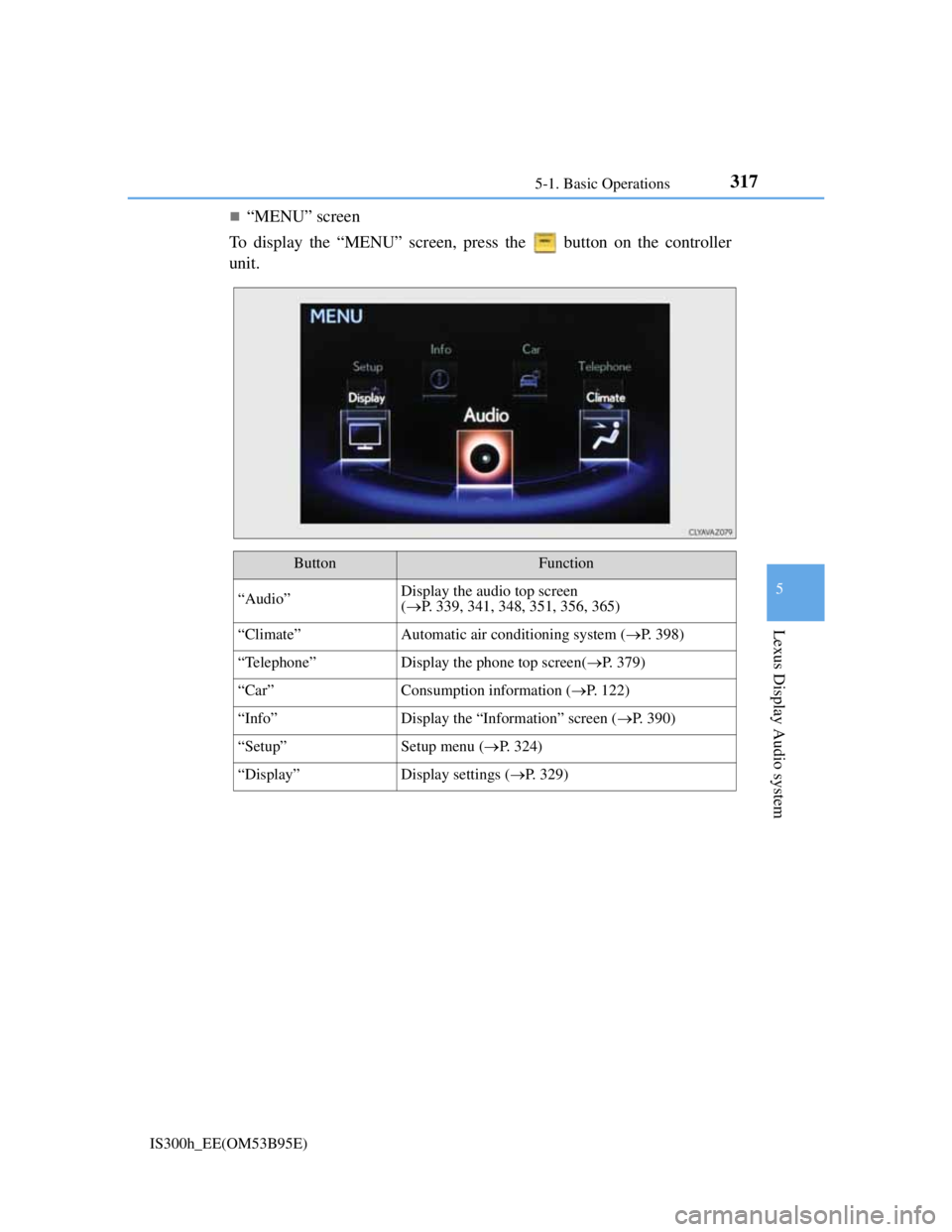
“MENU” screen
To display the “MENU” screen, press the button on the controller
unit.
ButtonFunction
“Audio”Display the audio top screen
(P. 339, 341, 348, 351, 356, 365)
“Climate”Automatic air conditioning system (P. 398)
“Telephone”Display the phone top screen(P. 379)
“Car” Consumption information (P. 122)
“Info”Display the “Information” screen (P. 390)
“Setup”Setup menu (P. 324)
“Display”Display settings (P. 329)
Page 331 of 628
3185-1. Basic Operations
IS300h_EE(OM53B95E)
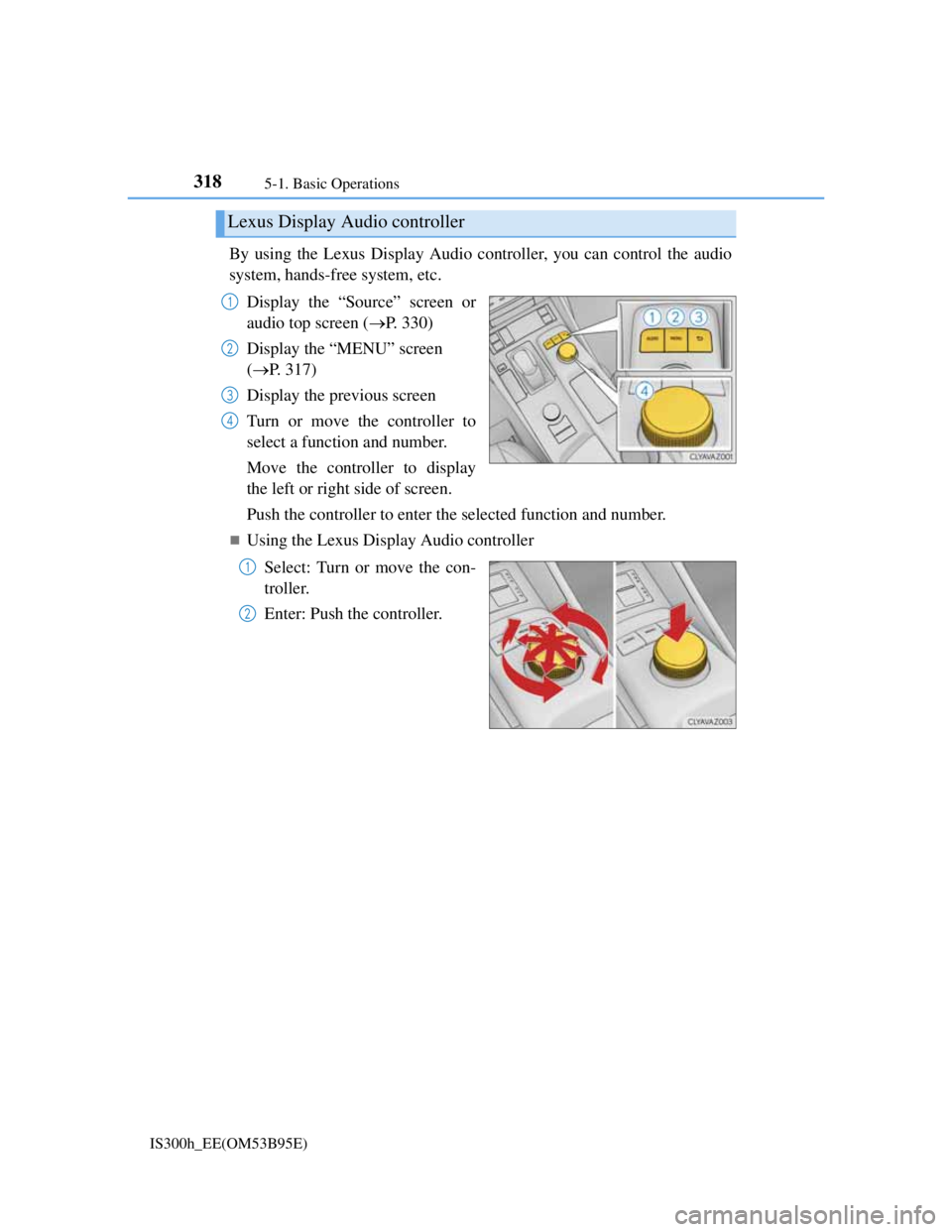
By using the Lexus Display Audio controller, you can control the audio
system, hands-free system, etc.
Display the “Source” screen or
audio top screen (P. 330)
Display the “MENU” screen
(P. 317)
Display the previous screen
Turn or move the controller to
select a function and number.
Move the controller to display
the left or right side of screen.
Push the controller to enter the selected function and number.
Using the Lexus Display Audio controller
Select: Turn or move the con-
troller.
Enter: Push the controller.
Lexus Display Audio controller
1
2
3
4
1
2
Page 332 of 628
3195-1. Basic Operations
5
Lexus Display Audio system
IS300h_EE(OM53B95E)
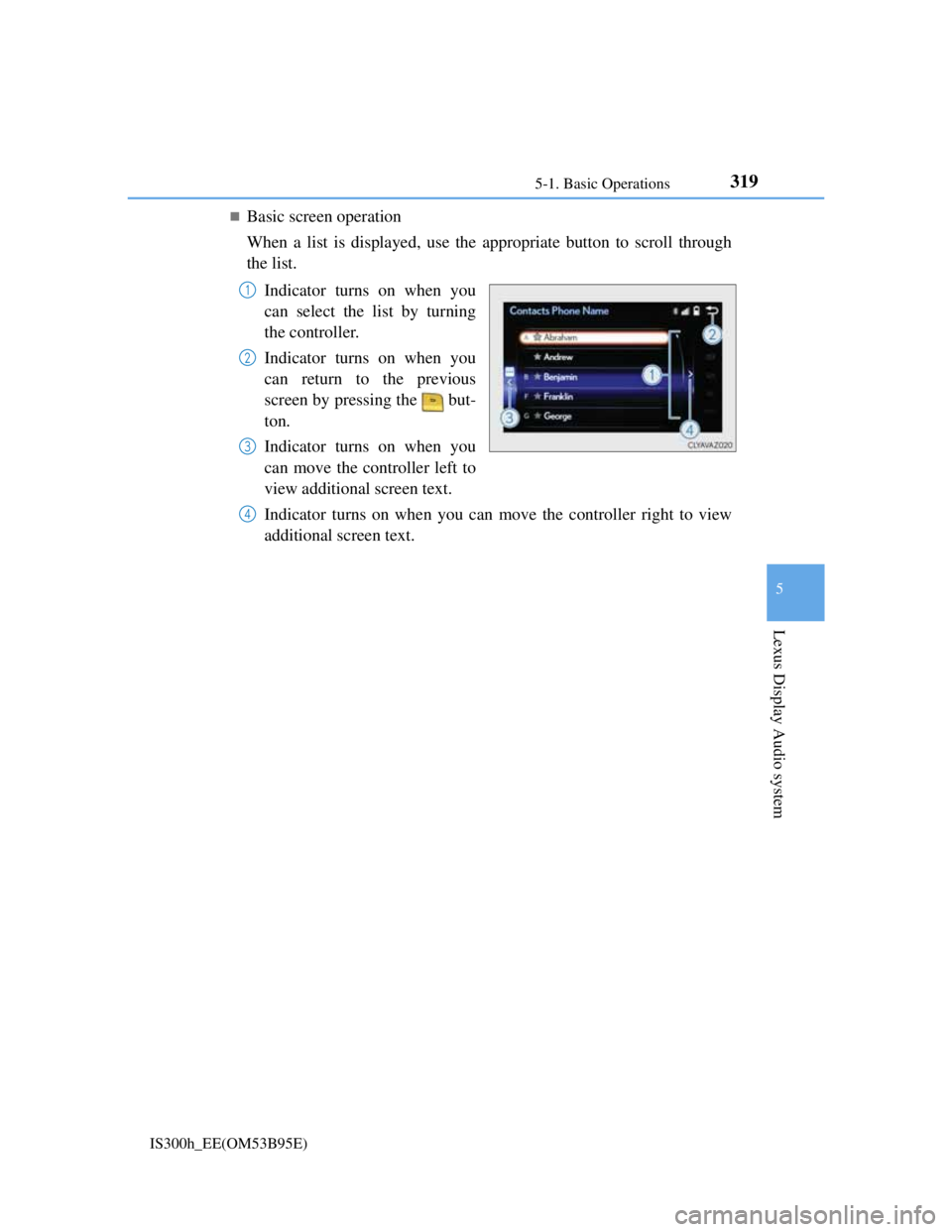
Basic screen operation
When a list is displayed, use the appropriate button to scroll through
the list.
Indicator turns on when you
can select the list by turning
the controller.
Indicator turns on when you
can return to the previous
screen by pressing the but-
ton.
Indicator turns on when you
can move the controller left to
view additional screen text.
Indicator turns on when you can move the controller right to view
additional screen text.
1
2
3
4
Page 334 of 628
3215-1. Basic Operations
5
Lexus Display Audio system
IS300h_EE(OM53B95E)
When using the screen
Under extremely cold conditions, the Lexus Display Audio controller may react
slowly.
If the screen is cold, the display may be dark, or the system may seem to be
operating slightly slower than normal.
The screen may seem dark and hard to see when viewed through sunglasses.
Change your angle of viewing, adjust the display on the “Display” screen (P.
329) or remove your sunglasses.
Using cellular phones
Interference may be heard through the audio system's speakers if a cellular phone
is being used inside or close to the vehicle while the audio system is operating.
CAUTION
Using the Lexus Display Audio controller
Be careful when touching the Lexus Display Audio controller in extreme tem-
peratures as it may become very hot or cold due to the temperature inside the
vehicle.
Laser product
This product is a class 1 laser product.
Do not open the cover of the player or attempt to repair the unit yourself. Refer
servicing to qualified personnel.
NOTICE
To prevent Lexus Display Audio controller malfunction
Do not allow the Lexus Display Audio controller to come into contact with
food, liquid, stickers or lit cigarettes as doing so may cause it to change color,
emit a strange odor or stop functioning.
Do not subject the Lexus Display Audio controller to excessive pressure or
strong impact as the controller may bend or break off.
To prevent 12-volt battery discharge
Do not leave the audio system on longer than necessary when the hybrid sys-
tem is off.
To avoid damaging the audio system
Take care not to spill drinks or other fluids on the audio system.
Page 335 of 628
3225-1. Basic Operations
IS300h_EE(OM53B95E)
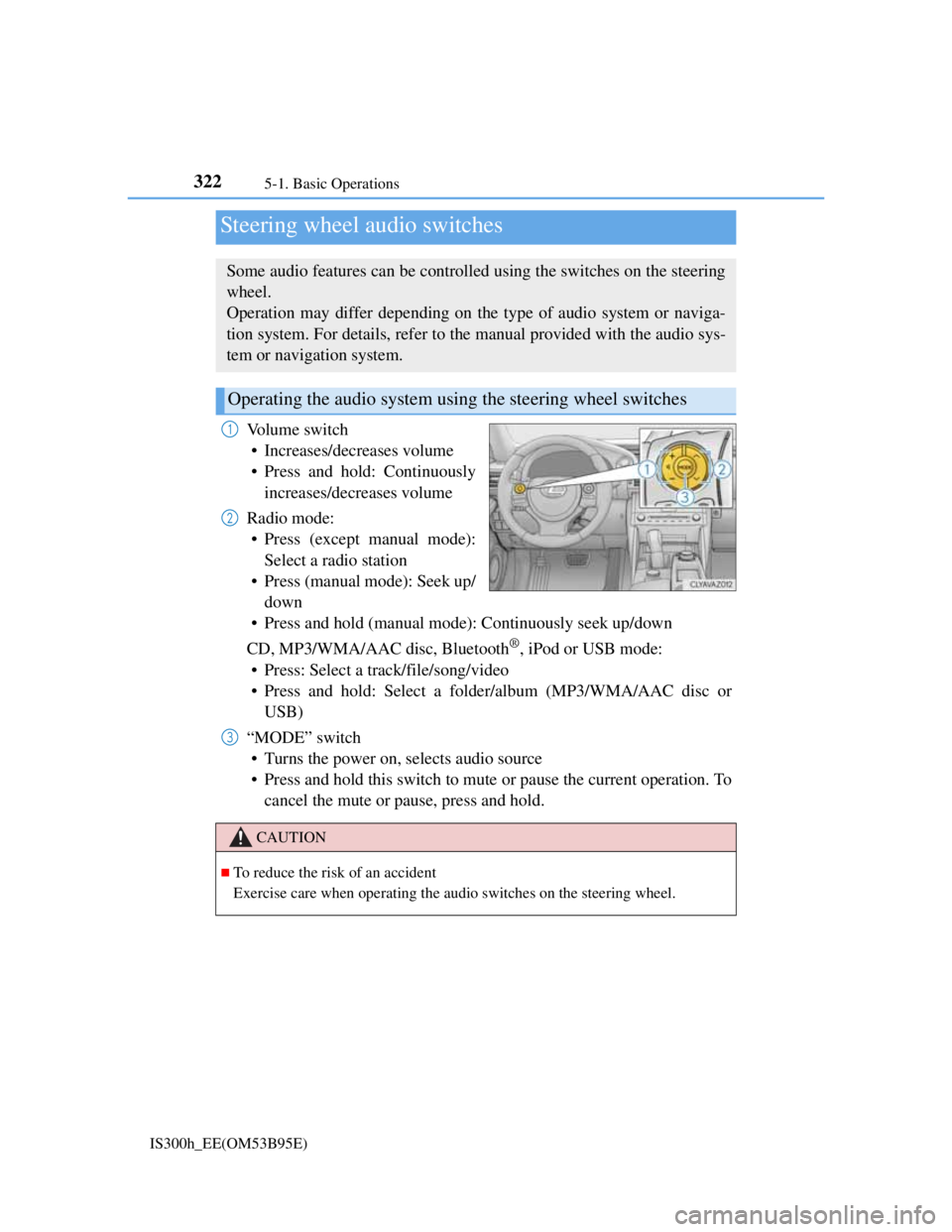
Volume switch
• Increases/decreases volume
• Press and hold: Continuously
increases/decreases volume
Radio mode:
• Press (except manual mode):
Select a radio station
• Press (manual mode): Seek up/
down
• Press and hold (manual mode): Continuously seek up/down
CD, MP3/WMA/AAC disc, Bluetooth
®, iPod or USB mode:
• Press: Select a track/file/song/video
• Press and hold: Select a folder/album (MP3/WMA/AAC disc or
USB)
“MODE” switch
• Turns the power on, selects audio source
• Press and hold this switch to mute or pause the current operation. To
cancel the mute or pause, press and hold.
Steering wheel audio switches
Some audio features can be controlled using the switches on the steering
wheel.
Operation may differ depending on the type of audio system or naviga-
tion system. For details, refer to the manual provided with the audio sys-
tem or navigation system.
Operating the audio system using the steering wheel switches
1
2
CAUTION
To reduce the risk of an accident
Exercise care when operating the audio switches on the steering wheel.
3
Page 336 of 628
3235-1. Basic Operations
5
Lexus Display Audio system
IS300h_EE(OM53B95E)
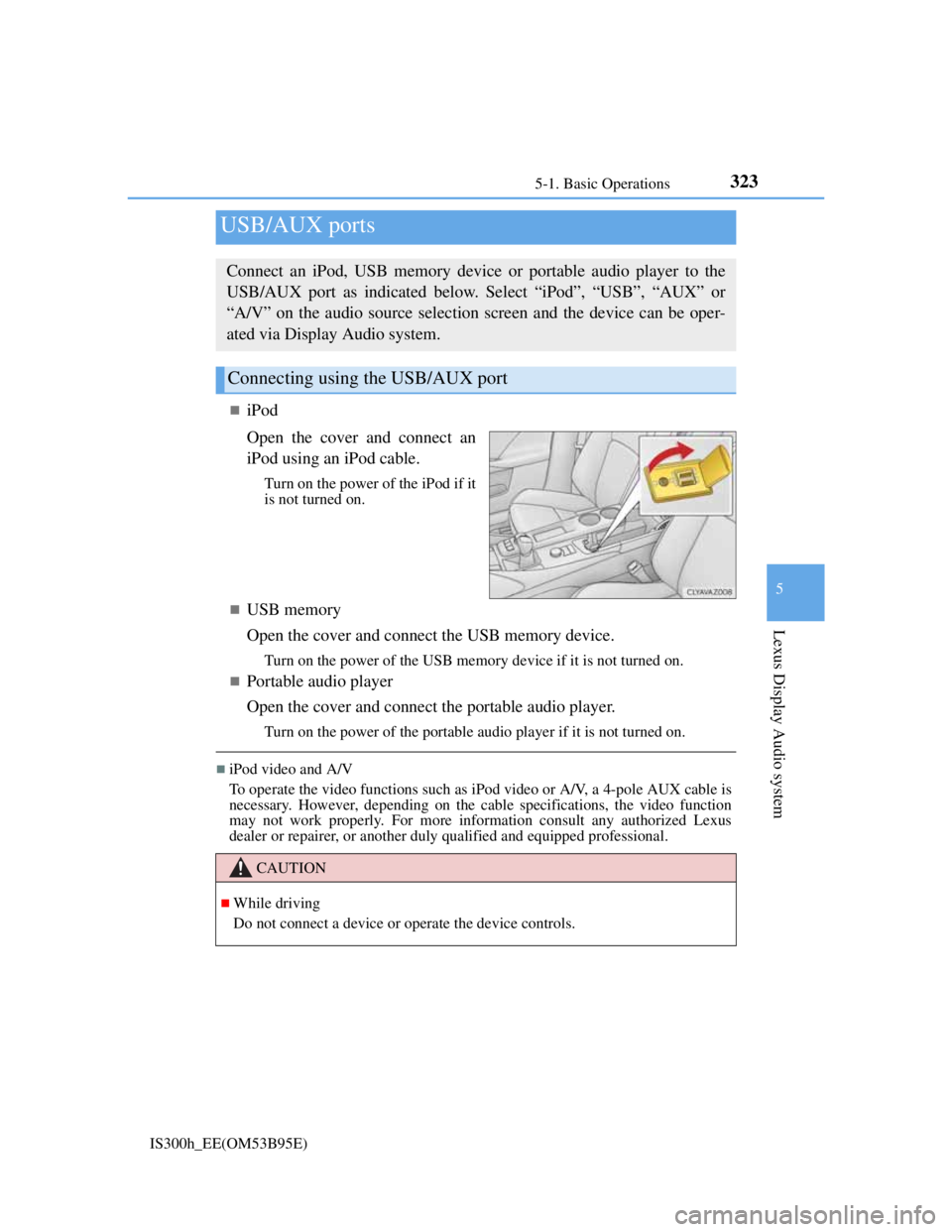
iPod
Open the cover and connect an
iPod using an iPod cable.
Turn on the power of the iPod if it
is not turned on.
USB memory
Open the cover and connect the USB memory device.
Turn on the power of the USB memory device if it is not turned on.
Portable audio player
Open the cover and connect the portable audio player.
Turn on the power of the portable audio player if it is not turned on.
iPod video and A/V
To operate the video functions such as iPod video or A/V, a 4-pole AUX cable is
necessary. However, depending on the cable specifications, the video function
may not work properly. For more information consult any authorized Lexus
dealer or repairer, or another duly qualified and equipped professional.
USB/AUX ports
Connect an iPod, USB memory device or portable audio player to the
USB/AUX port as indicated below. Select “iPod”, “USB”, “AUX” or
“A/V” on the audio source selection screen and the device can be oper-
ated via Display Audio system.
Connecting using the USB/AUX port
CAUTION
While driving
Do not connect a device or operate the device controls.
Page 337 of 628
324
IS300h_EE(OM53B95E)5-2. Setup
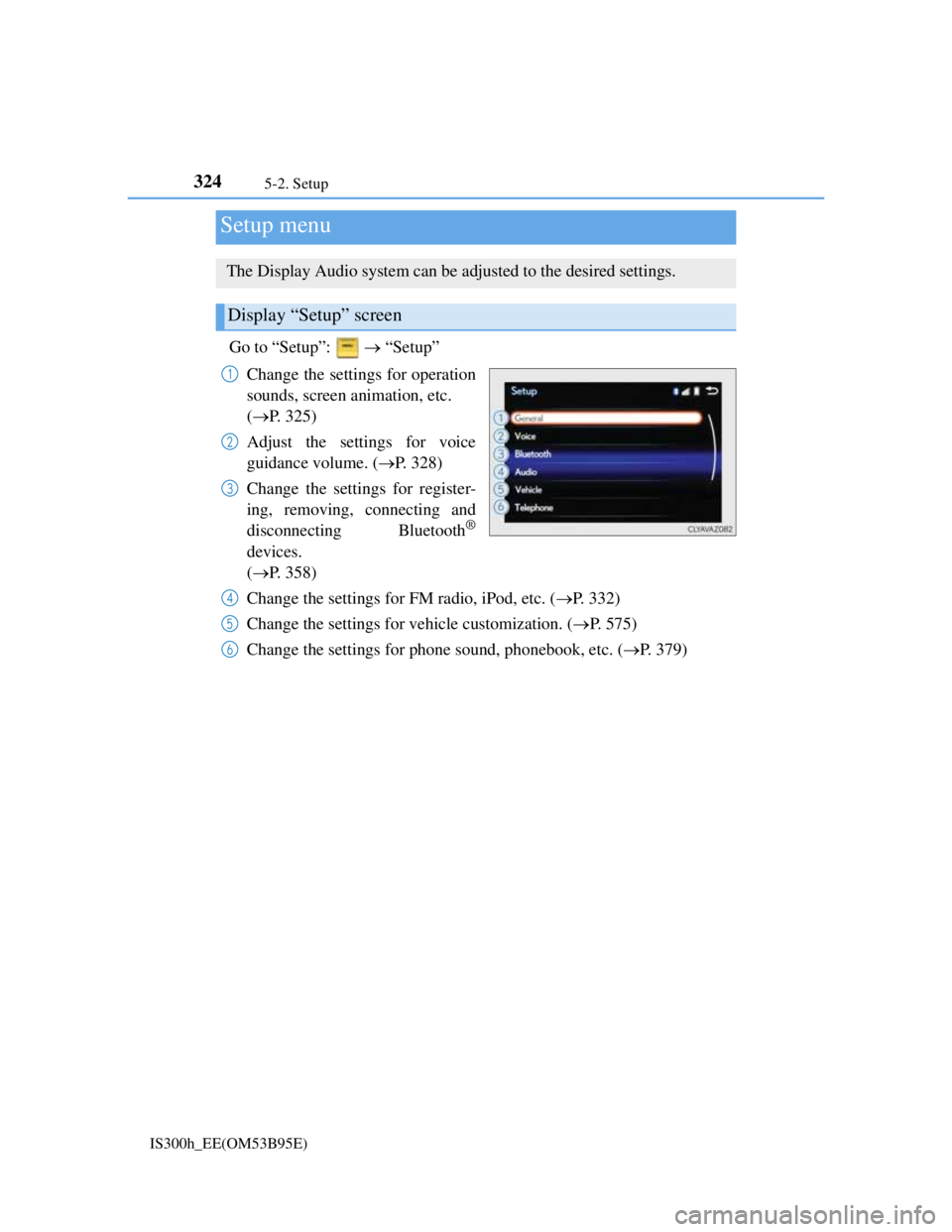
Go to “Setup”: “Setup”
Change the settings for operation
sounds, screen animation, etc.
(P. 325)
Adjust the settings for voice
guidance volume. (P. 328)
Change the settings for register-
ing, removing, connecting and
disconnecting Bluetooth
®
devices.
(P. 358)
Change the settings for FM radio, iPod, etc. (P. 332)
Change the settings for vehicle customization. (P. 575)
Change the settings for phone sound, phonebook, etc. (P. 379)
Setup menu
The Display Audio system can be adjusted to the desired settings.
Display “Setup” screen
1
2
3
4
5
6
Page 338 of 628
3255-2. Setup
5
Lexus Display Audio system
IS300h_EE(OM53B95E)
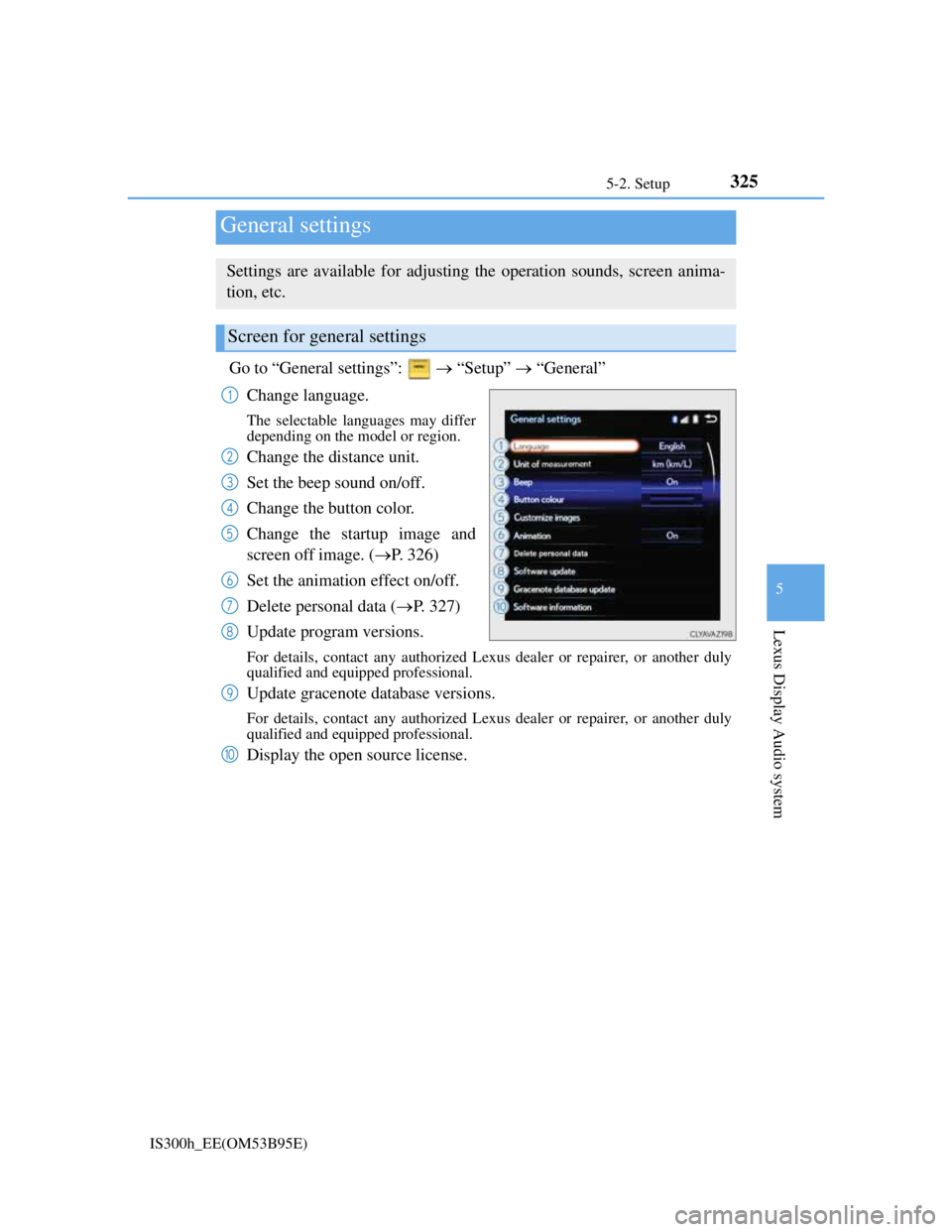
Go to “General settings”: “Setup” “General”
Change language.
The selectable languages may differ
depending on the model or region.
Change the distance unit.
Set the beep sound on/off.
Change the button color.
Change the startup image and
screen off image. (P. 326)
Set the animation effect on/off.
Delete personal data (P. 327)
Update program versions.
For details, contact any authorized Lexus dealer or repairer, or another duly
qualified and equipped professional.
Update gracenote database versions.
For details, contact any authorized Lexus dealer or repairer, or another duly
qualified and equipped professional.
Display the open source license.
General settings
Settings are available for adjusting the operation sounds, screen anima-
tion, etc.
Screen for general settings
1
2
3
4
5
6
7
8
9
10