AUX Lexus IS300h 2013 Owner's Manual
[x] Cancel search | Manufacturer: LEXUS, Model Year: 2013, Model line: IS300h, Model: Lexus IS300h 2013Pages: 628, PDF Size: 20.23 MB
Page 4 of 628

TABLE OF CONTENTS4
IS300h_EE(OM53B95E)
5-1. Basic Operations
Lexus Display Audio
System ............................. 316
Steering wheel audio
switches ........................... 322
USB/AUX ports ................ 323
5-2. Setup
Setup menu........................ 324
General settings ................. 325
Voice settings .................... 328
Display settings ................. 329
5-3. Using the audio system
Selecting the audio
source .............................. 330
Optimal use of the audio
system ............................. 331
Audio settings................... 332
Audio menu screen
operation ......................... 336
5-4. Using the radio
Radio operation ................. 3395-5. Playing an audio CD and
MP3/WMA/AAC discs
CD player operation .......... 341
5-6. Using an external device
Listening to an iPod .......... 348
Using USB memory
device .............................. 351
Using the AUX port .......... 356
5-7. Connecting Bluetooth
®
Steps for using Bluetooth®
devices............................. 357
Registering a Bluetooth
®
device .............................. 359
Selecting a Bluetooth
®
device .............................. 360
Connecting a Bluetooth
®
audio player..................... 361
Connecting a Bluetooth
®
phone ............................... 362
Displaying a Bluetooth
®
device details................... 363
Detailed Bluetooth
®
settings ............................ 364
5Lexus Display Audio sys-
tem
Page 327 of 628

314
IS300h_EE(OM53B95E)
5-1. Basic Operations
Lexus Display Audio
System ............................ 316
Steering wheel audio
switches .......................... 322
USB/AUX ports................ 323
5-2. Setup
Setup menu ....................... 324
General settings ................ 325
Voice settings .................... 328
Display settings................. 329
5-3. Using the audio system
Selecting the audio
source.............................. 330
Optimal use of the
audio system ................... 331
Audio settings ................... 332
Audio menu screen
operation ......................... 336
5-4. Using the radio
Radio operation................. 339
Page 328 of 628

315
5
Lexus Display
Audio system
IS300h_EE(OM53B95E)
5-5. Playing an audio CD and
MP3/WMA/AAC discs
CD player operation .......... 341
5-6. Using an external device
Listening to an iPod .......... 348
Using USB memory
device .............................. 351
Using the AUX port .......... 356
5-7. Connecting Bluetooth
®
Steps for using
Bluetooth® devices ......... 357
Registering a Bluetooth
®
device .............................. 359
Selecting a Bluetooth
®
device .............................. 360
Connecting a Bluetooth
®
audio player .................... 361
Connecting a Bluetooth
®
phone............................... 362
Displaying a Bluetooth
®
device details .................. 363
Detailed Bluetooth
®
settings ............................ 3645-8. Bluetooth
® Audio
Listening to Bluetooth
®
Audio .............................. 365
5-9. Bluetooth
® Phone
Using a Bluetooth
®
Phone .............................. 367
Making a call .................... 369
Receiving a call ................ 372
Speaking on the phone...... 373
Using a Bluetooth
®
phone messages .............. 375
Using the steering wheel
switches .......................... 378
Bluetooth
® phone
settings ............................ 379
5-10. Phonebook
Contact settings................. 381
Messaging setting ............. 384
5-11. Bluetooth
®
Bluetooth®....................... 385
5-12. Other function
“Information” screen ........ 390
MirrorLink..................... 391
USB photo ........................ 393
Speech command system .. 395
Page 336 of 628
3235-1. Basic Operations
5
Lexus Display Audio system
IS300h_EE(OM53B95E)
iPod
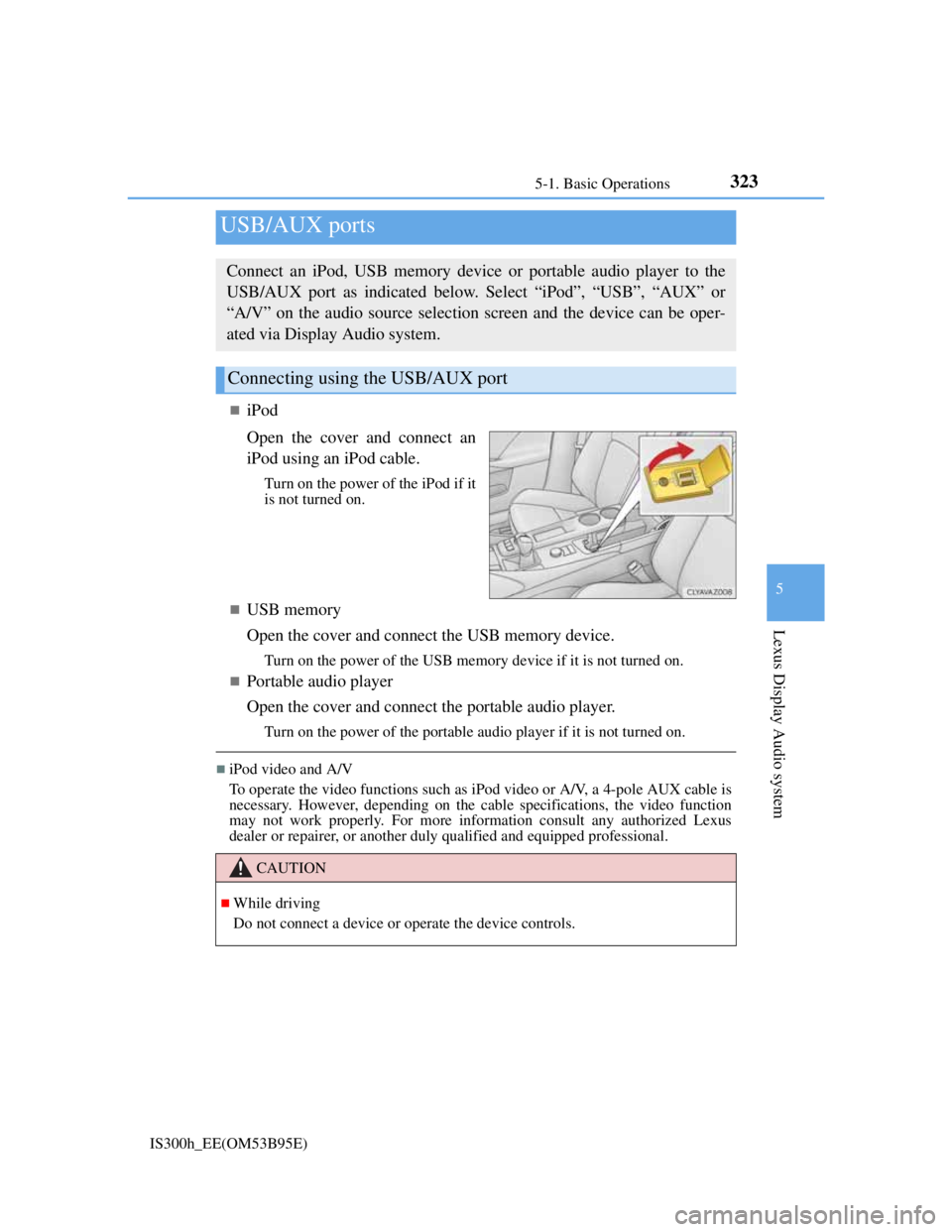
Open the cover and connect an
iPod using an iPod cable.
Turn on the power of the iPod if it
is not turned on.
USB memory
Open the cover and connect the USB memory device.
Turn on the power of the USB memory device if it is not turned on.
Portable audio player
Open the cover and connect the portable audio player.
Turn on the power of the portable audio player if it is not turned on.
iPod video and A/V
To operate the video functions such as iPod video or A/V, a 4-pole AUX cable is
necessary. However, depending on the cable specifications, the video function
may not work properly. For more information consult any authorized Lexus
dealer or repairer, or another duly qualified and equipped professional.
USB/AUX ports
Connect an iPod, USB memory device or portable audio player to the
USB/AUX port as indicated below. Select “iPod”, “USB”, “AUX” or
“A/V” on the audio source selection screen and the device can be oper-
ated via Display Audio system.
Connecting using the USB/AUX port
CAUTION
While driving
Do not connect a device or operate the device controls.
Page 351 of 628
3375-3. Using the audio system
5
Lexus Display Audio system
IS300h_EE(OM53B95E)
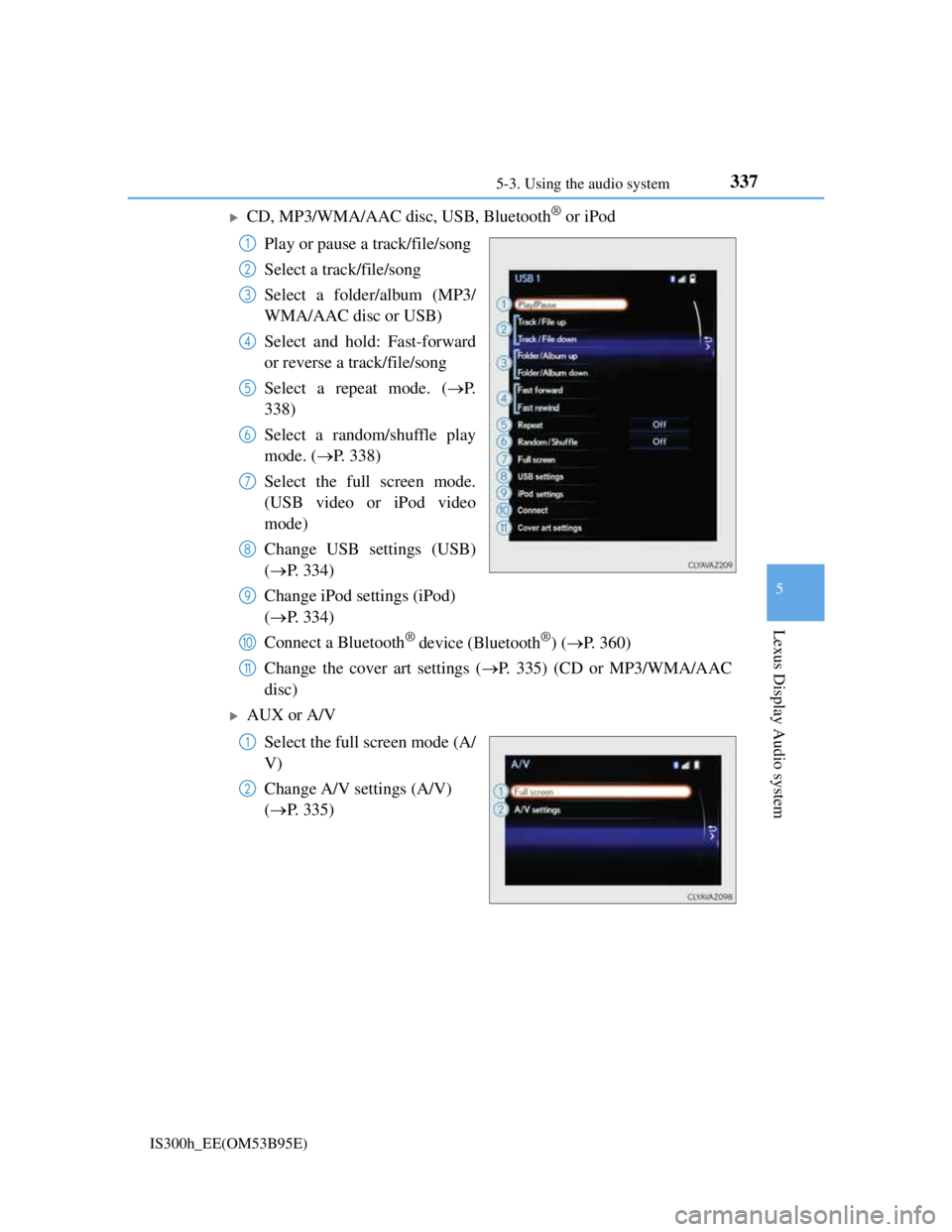
CD, MP3/WMA/AAC disc, USB, Bluetooth® or iPod
Play or pause a track/file/song
Select a track/file/song
Select a folder/album (MP3/
WMA/AAC disc or USB)
Select and hold: Fast-forward
or reverse a track/file/song
Select a repeat mode. (P.
338)
Select a random/shuffle play
mode. (P. 338)
Select the full screen mode.
(USB video or iPod video
mode)
Change USB settings (USB)
(P. 334)
Change iPod settings (iPod)
(P. 334)
Connect a Bluetooth
® device (Bluetooth®) (P. 360)
Change the cover art settings (P. 335) (CD or MP3/WMA/AAC
disc)
AUX or A/V
Select the full screen mode (A/
V)
Change A/V settings (A/V)
(P. 335)
1
2
3
4
5
6
7
8
9
10
11
1
2
Page 364 of 628

3505-6. Using an external device
IS300h_EE(OM53B95E)
iPod problems
To resolve most problems encountered when using your iPod, disconnect your
iPod from the vehicle iPod connection and reset it. For instructions on how to
reset your iPod, refer to your iPod Owner's Manual.
Compatible models
The following iPod®, iPod nano®, iPod classic®, iPod touch® and iPhone®
devices can be used with this system.
Made for
• iPod touch (5th generation)
• iPod touch (4th generation)
• iPod touch (3rd generation)
• iPod touch (2nd generation)
• iPod touch (1st generation)
• iPod classic
• iPod with video
• iPod nano (7th generation)
• iPod nano (6th generation)
• iPod nano (5th generation)
• iPod nano (4th generation)
• iPod nano (3rd generation)
• iPod nano (2nd generation)
• iPod nano (1st generation)
• iPhone 5
• iPhone 4S
• iPhone 4
• iPhone 3GS
• iPhone 3G
• iPhone
Depending on differences between models or software versions etc., some mod-
els might be incompatible with this system.
To use the video mode
To operate the video functions such as iPod video, a 4-pole AUX cable is neces-
sary. However, depending on the cable specifications, the video function may not
work properly. For more information consult any authorized Lexus dealer or
repairer, or another duly qualified and equipped professional.
NOTICE
If the console box lid cannot be fully closed
Depending on the size and shape of the iPod that is connected to the system, the
auxiliary box lid may not close fully. In this case, do not forcibly close the lid
as this may damage the iPod or the terminals, etc.
To prevent damage to the iPod or its terminals
Do not leave the iPod in the vehicle. The temperature inside the vehicle may
become high, resulting in damage to the iPod.
Do not push down on or apply unnecessary pressure to the iPod while it is
connected.
Do not insert foreign objects into the port.
Page 369 of 628

3555-6. Using an external device
5
Lexus Display Audio system
IS300h_EE(OM53B95E)
NOTICE
If the console box lid cannot be fully closed
Depending on the size and shape of the USB memory device that is connected
to the system, the auxiliary box lid may not close fully. In this case, do not forc-
ibly close the lid as this may damage the USB memory device or the terminals,
etc.
To prevent damage to the USB memory device or its terminals
Do not leave the USB memory device in the vehicle. The temperature inside
the vehicle may become high, resulting in damage to the USB memory
device.
Do not push down on or apply unnecessary pressure to the USB memory
device while it is connected.
Do not insert foreign objects into the port.
Page 370 of 628
3565-6. Using an external device
IS300h_EE(OM53B95E)
P. 3 2 3
Pressing the “MEDIA” button displays the top screen from any screen of
the selected source.
Menu screen
P. 3 3 6
Operating portable players connected to the audio system
Volume can be adjusted using the vehicle's audio controls. All other adjustments
must be made on the portable player itself.
When using a portable player connected to the power outlet
Noise may occur during playback. Use the power source of the portable player.
To use the A/V function
To operate the video functions such as A/V, a 4-pole AUX cable is necessary.
However, depending on the cable specifications, the video function may not
work properly. For more information consult any authorized Lexus dealer or
repairer, or another duly qualified and equipped professional.
Using the AUX port
To use the AUX port, connect a portable player, press the “MEDIA” but-
ton or select “AUX” or “A/V” on the “Source” screen.
Connecting a portable player
Top screen
NOTICE
If the console box lid cannot be fully closed
Depending on the size and shape of the portable player that is connected to the
system, the auxiliary box lid may not close fully. In this case, do not forcibly
close the lid as this may damage the portable audio player or the terminals, etc.
Page 451 of 628
4377-3. Do-it-yourself maintenance
7
Maintenance and care
IS300h_EE(OM53B95E)
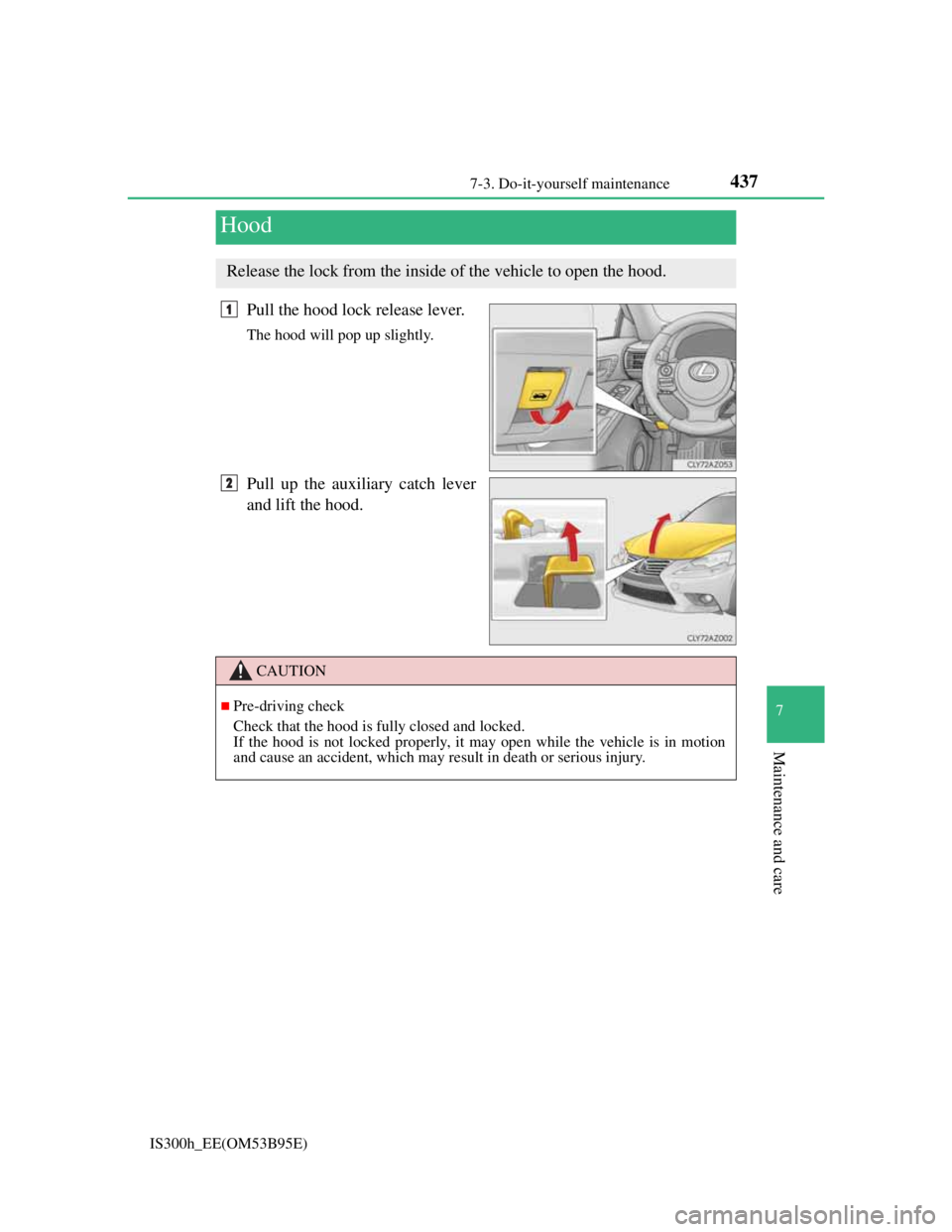
Pull the hood lock release lever.
The hood will pop up slightly.
Pull up the auxiliary catch lever
and lift the hood.
Hood
Release the lock from the inside of the vehicle to open the hood.
1
2
CAUTION
Pre-driving check
Check that the hood is fully closed and locked.
If the hood is not locked properly, it may open while the vehicle is in motion
and cause an accident, which may result in death or serious injury.
Page 468 of 628

4547-3. Do-it-yourself maintenance
IS300h_EE(OM53B95E)
Situations in which the tire pressure warning system may not operate properly
In the following cases, the tire pressure warning system may not operate prop-
erly.
• If non-genuine Lexus wheels are used.
• A tire has been replaced with a tire that is not an OE (Original Equipment)
tire.
• A tire has been replaced with a tire that is not of the specified size.
• Tire chains etc. are equipped.
• Lock nuts are equipped.
• An auxiliary-supported run-flat tire is equipped.
• If a window tint that affects the radio wave signals is installed.
• If there is a lot of snow or ice on the vehicle, particularly around the wheels
or wheel housings.
• If the tire inflation pressure is extremely higher than the specified level.
• If tires not equipped with tire pressure warning valves and transmitters are
used.
• If the ID code on the tire pressure warning valves and transmitters is not reg-
istered in the tire pressure warning computer.
Performance may be affected in the following situations.
• Near a TV tower, electric power plant, gas station, radio station, large dis-
play, airport or other facility that generates strong radio waves or electrical
noise
• When carrying a portable radio, cellular phone, cordless phone or other
wireless communication device
When the vehicle is parked, the time taken for the warning to start or go off
could be extended.
When tire inflation pressure declines rapidly for example when a tire has burst,
the warning may not function.
The initialization operation
Make sure to carry out initialization after adjusting the tire inflation pressure.
Also, make sure the tires are cold before carrying out initialization or tire infla-
tion pressure adjustment.
If you have accidentally turned the power switch off during initialization, it is
not necessary to press the reset switch again as initialization will restart auto-
matically when the power switch has been turned to ON mode for the next time.
If you accidentally press the reset switch when initialization is not necessary,
adjust the tire inflation pressure to the specified level when the tires are cold,
and conduct initialization again.
Warning performance of the tire pressure warning system
The warning of the tire pressure warning system will change in accordance with
the conditions under which it was initialized. For this reason, the system may
give a warning even if the tire pressure does not reach a low enough level, or if
the pressure is higher than the pressure that was adjusted to when the system was
initialized.