brakes Lexus IS300h 2013 Owner's Manual
[x] Cancel search | Manufacturer: LEXUS, Model Year: 2013, Model line: IS300h, Model: Lexus IS300h 2013Pages: 628, PDF Size: 20.23 MB
Page 195 of 628

1934-1. Before driving
4
Driving
IS300h_EE(OM53B95E)
When starting off on an uphill
The hill-start assist control will activate. (P. 286)
Driving in the rain
Drive carefully when it is raining, because visibility will be reduced, the win-
dows may become fogged-up, and the road will be slippery.
Drive carefully when it starts to rain, because the road surface will be especially
slippery.
Refrain from high speeds when driving on an expressway in the rain, because
there may be a layer of water between the tires and the road surface, preventing
the steering and brakes from operating properly.
Engine speed while driving
In the following conditions, the engine speed may become high while driving.
This is due to automatic up-shifting control or down-shifting implementation to
meet driving conditions. It does not indicate sudden acceleration.
The vehicle is judged to be driving uphill or downhill
When the accelerator pedal is released
When the brake pedal is depressed while sport mode is selected
Breaking in your new Lexus
To extend the life of the vehicle, observing the following precautions is recom-
mended:
For the first 300 km (186 miles):
Avoid sudden stops.
For the first 800 km (500 miles):
Do not tow a trailer.
For the first 1000 km (621 miles):
• Do not drive at extremely high speeds.
• Avoid sudden acceleration.
• Do not drive continuously in low gears.
• Do not drive at a constant speed for extended periods.
Drum-in-disc type parking brake system
Your vehicle has a drum-in-disc type parking brake system. This type of brake
system needs bedding-down of the brake shoes periodically or whenever the
parking brake shoes and/or drum are replaced. Have any authorized Lexus dealer
or repairer, or another duly qualified and equipped professional, perform the bed-
ding down operation.
Operating your vehicle in a foreign country
Comply with the relevant vehicle registration laws and confirm the availability
of the correct fuel. (P. 564)
Page 197 of 628
1954-1. Before driving
4
Driving
IS300h_EE(OM53B95E)
CAUTION
Observe the following precautions.
Failure to do so may result in death or serious injury.
When starting the vehicle
Always keep your foot on the brake pedal while stopped with the hybrid system
operating. This prevents the vehicle from creeping.
When driving the vehicle
Do not drive if you are unfamiliar with the location of the brake and accelera-
tor pedals to avoid depressing the wrong pedal.
• Accidentally depressing the accelerator pedal instead of the brake pedal
will result in sudden acceleration that may lead to an accident.
• When backing up, you may twist your body around, leading to a difficulty
in operating the pedals. Make sure to operate the pedals properly.
• Make sure to keep a correct driving posture even when moving the vehicle
only slightly. This allows you to depress the brake and accelerator pedals
properly.
• Depress the brake pedal using your right foot. Depressing the brake pedal
using your left foot may delay response in an emergency, resulting in an
accident.
The driver should pay extra attention to pedestrians when the vehicle is pow-
ered only by the electric motor (traction motor). As there is no engine noise,
the pedestrians may misjudge the vehicle’s movement.
Do not drive the vehicle over or stop the vehicle near flammable materials.
The exhaust system and exhaust gases can be extremely hot. These hot parts
may cause a fire if there is any flammable material nearby.
During normal driving, do not turn off the hybrid system. Turning the hybrid
system off while driving will not cause loss of steering or braking control, but
the power assist to these systems will be lost. This will make it more difficult
to steer and brake, so you should pull over and stop the vehicle as soon as it is
safe to do so.
However, in the event of an emergency, such as if it becomes impossible to
stop the vehicle in the normal way: P. 499
Use engine braking (downshift) to maintain a safe speed when driving down a
steep hill.
Using the brakes continuously may cause the brakes to overheat and lose
effectiveness. (P. 216)
Do not adjust the positions of the steering wheel, the seat, or the inside or out-
side rear view mirrors while driving.
Doing so may result in a loss of vehicle control.
Always check that all passengers’ arms, heads or other parts of their body are
not outside the vehicle.
Page 198 of 628
1964-1. Before driving
IS300h_EE(OM53B95E)
CAUTION
Observe the following precautions.
Failure to do so may result in death or serious injury.
When driving on slippery road surfaces
Sudden braking, acceleration and steering may cause tire slippage and reduce
your ability to control the vehicle.
Sudden acceleration, engine braking due to shift changing, or changes in
engine speed could cause the vehicle to skid.
After driving through a puddle, depress the brake pedal to make sure that the
brakes are functioning properly. Wet brake pads may prevent the brakes from
functioning properly. If the brakes on only one side are wet and not function-
ing properly, steering control may be affected.
When shifting the shift lever
Do not let the vehicle roll backward while the shift lever is in D or S, or roll
forward while the shift lever is in R.
Doing so may result in an accident or damage to the vehicle.
Do not shift the shift lever to P while the vehicle is moving.
Doing so can damage the transmission and may result in a loss of vehicle con-
trol.
Do not shift the shift lever to R while the vehicle is moving forward.
Doing so can damage the transmission and may result in a loss of vehicle con-
trol.
Do not shift the shift lever to D while the vehicle is moving backward.
Doing so can damage the transmission and may result in a loss of vehicle con-
trol.
Shifting the shift lever to N while the vehicle is moving will disengage the
hybrid system. Engine braking is not available when N is selected.
Be careful not to shift the shift lever with the accelerator pedal depressed.
Shifting the shift lever to a gear other than P or N may lead to unexpected
rapid acceleration of the vehicle that may cause an accident and result in
death or serious injury.
If you hear a squealing or scraping noise (brake pad wear indicators)
Have the brake pads checked and replaced by any authorized Lexus dealer or
repairer, or another duly qualified and equipped professional as soon as possi-
ble.
Rotor damage may result if the pads are not replaced when needed.
Moderate levels of brake pad and disc wear allow enhanced braking power. As
a result, the discs may wear more quickly than conventional brake discs. There-
fore, when replacing the brake pads, Lexus recommends that you also have the
thickness of the discs measured.
It is dangerous to drive the vehicle when the wear limits of the brake pads and/
or those of the brake discs are exceeded.
Page 200 of 628

1984-1. Before driving
IS300h_EE(OM53B95E)
CAUTION
Observe the following precautions.
Failure to do so may result in death or serious injury.
When taking a nap in the vehicle
Always turn the hybrid system off. Otherwise, if you accidentally move the
shift lever or depress the accelerator pedal, this could cause an accident or fire
due to hybrid system overheating. Additionally, if the vehicle is parked in a
poorly ventilated area, exhaust gases may collect and enter the vehicle, leading
to death or a serious health hazard.
When braking
When the brakes are wet, drive more cautiously.
Braking distance increases when the brakes are wet, and this may cause one
side of the vehicle to brake differently than the other side. Also, the parking
brake may not securely hold the vehicle.
If the electronically controlled brake system does not operate, do not follow
other vehicles closely and avoid hills or sharp turns that require braking.
In this case, braking is still possible, but the brake pedal should be depressed
more firmly than usual. Also, the braking distance will increase. Have your
brakes fixed immediately.
The brake system consists of 2 or more individual hydraulic systems; if one of
the systems fails, the other(s) will still operate. In this case, the brake pedal
should be depressed more firmly than usual and the braking distance will
increase. Have your brakes fixed immediately.
Page 209 of 628

2074-1. Before driving
4
Driving
IS300h_EE(OM53B95E)
Important points regarding stability
Vehicle movement resulting from uneven road surfaces and strong
crosswinds will affect handling. The vehicle may also be rocked by
passing buses or large trucks. Frequently check behind when moving
alongside such vehicles. As soon as such vehicle movement occurs,
immediately start to decelerate smoothly by slowly applying the
brakes. Always steer the vehicle straight ahead while braking.
Passing other vehicles
Consider the total combined length of your vehicle and trailer and
ensure that the vehicle-to-vehicle distance is sufficient before execut-
ing lane changes.
Transmission information
To maintain engine braking efficiency, when using engine braking
when driving on a long steep downward grade, do not use the transmis-
sion in D. The vehicle must be driven in gear shift position “4” in S
mode. (P. 219)
If the engine overheats
Towing a loaded trailer up a long, steep incline in temperatures exceed-
ing 30C (85F) may result in the engine overheating. If the engine
coolant temperature gauge indicates that the engine is overheating, turn
the air conditioning off immediately, leave the road and stop the vehi-
cle in a safe place.
(P. 555)
When parking the vehicle
Always place wheel chocks under the wheels of both the vehicle and
trailer. Firmly set the parking brake and shift the shift lever to P.
Page 248 of 628
2464-5. Using the driving support systems
IS300h_EE(OM53B95E)
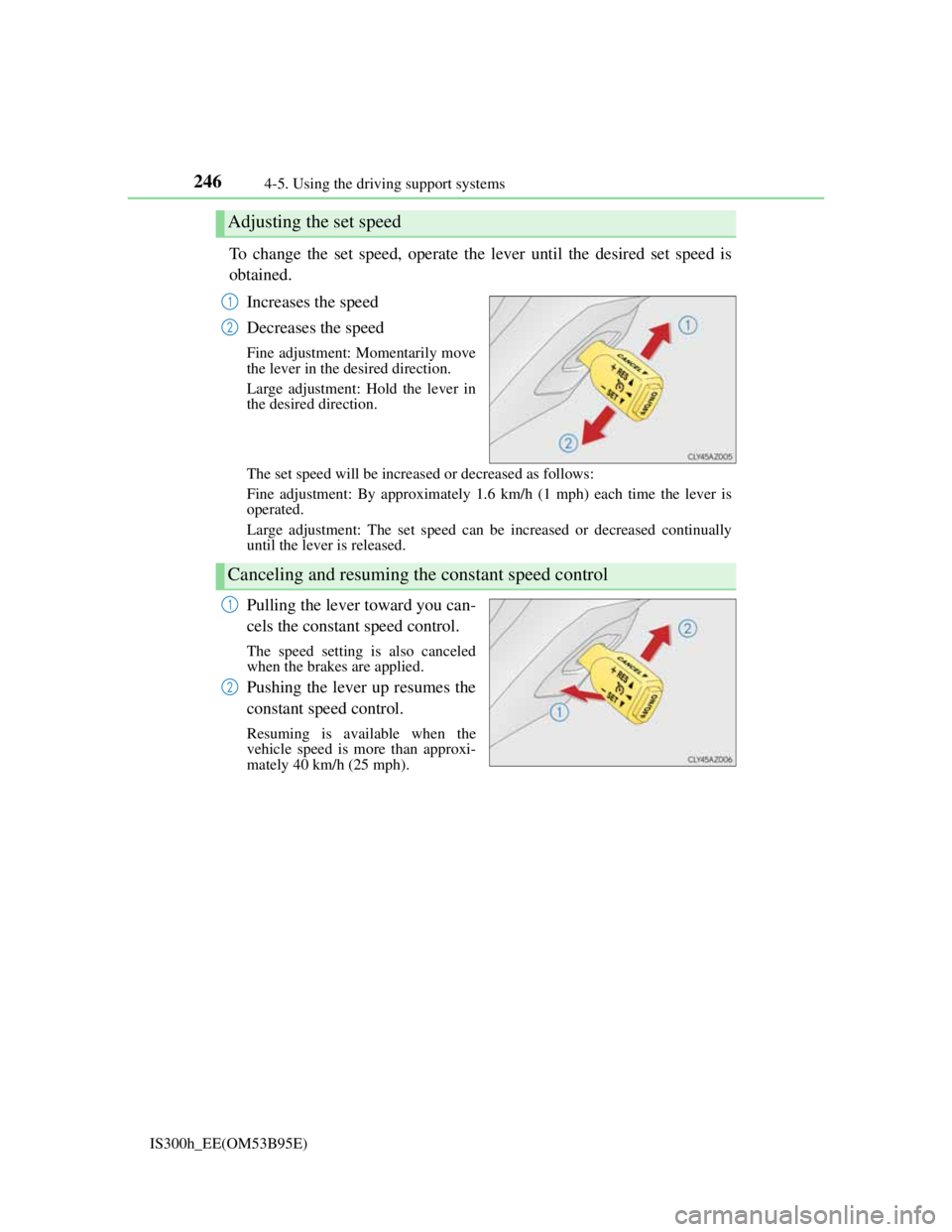
To change the set speed, operate the lever until the desired set speed is
obtained.
Increases the speed
Decreases the speed
Fine adjustment: Momentarily move
the lever in the desired direction.
Large adjustment: Hold the lever in
the desired direction.
The set speed will be increased or decreased as follows:
Fine adjustment: By approximately 1.6 km/h (1 mph) each time the lever is
operated.
Large adjustment: The set speed can be increased or decreased continually
until the lever is released.
Pulling the lever toward you can-
cels the constant speed control.
The speed setting is also canceled
when the brakes are applied.
Pushing the lever up resumes the
constant speed control.
Resuming is available when the
vehicle speed is more than approxi-
mately 40 km/h (25 mph).
Adjusting the set speed
1
2
Canceling and resuming the constant speed control
1
2
Page 254 of 628
2524-5. Using the driving support systems
IS300h_EE(OM53B95E)
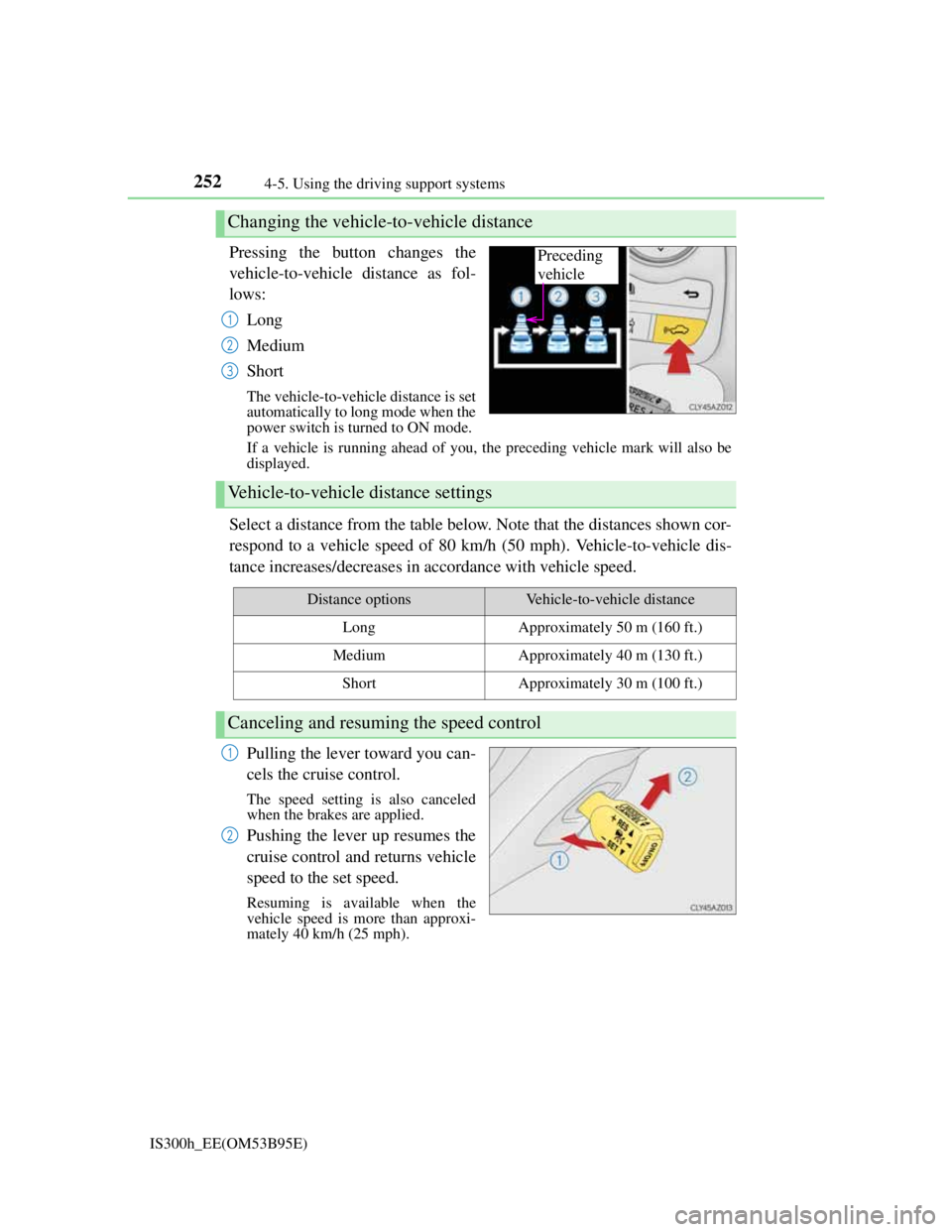
Pressing the button changes the
vehicle-to-vehicle distance as fol-
lows:
Long
Medium
Short
The vehicle-to-vehicle distance is set
automatically to long mode when the
power switch is turned to ON mode.
If a vehicle is running ahead of you, the preceding vehicle mark will also be
displayed.
Select a distance from the table below. Note that the distances shown cor-
respond to a vehicle speed of 80 km/h (50 mph). Vehicle-to-vehicle dis-
tance increases/decreases in accordance with vehicle speed.
Pulling the lever toward you can-
cels the cruise control.
The speed setting is also canceled
when the brakes are applied.
Pushing the lever up resumes the
cruise control and returns vehicle
speed to the set speed.
Resuming is available when the
vehicle speed is more than approxi-
mately 40 km/h (25 mph).
Changing the vehicle-to-vehicle distance
Preceding
vehicle
1
2
3
Vehicle-to-vehicle distance settings
Distance optionsVehicle-to-vehicle distance
LongApproximately 50 m (160 ft.)
MediumApproximately 40 m (130 ft.)
ShortApproximately 30 m (100 ft.)
Canceling and resuming the speed control
1
2
Page 255 of 628
2534-5. Using the driving support systems
4
Driving
IS300h_EE(OM53B95E)
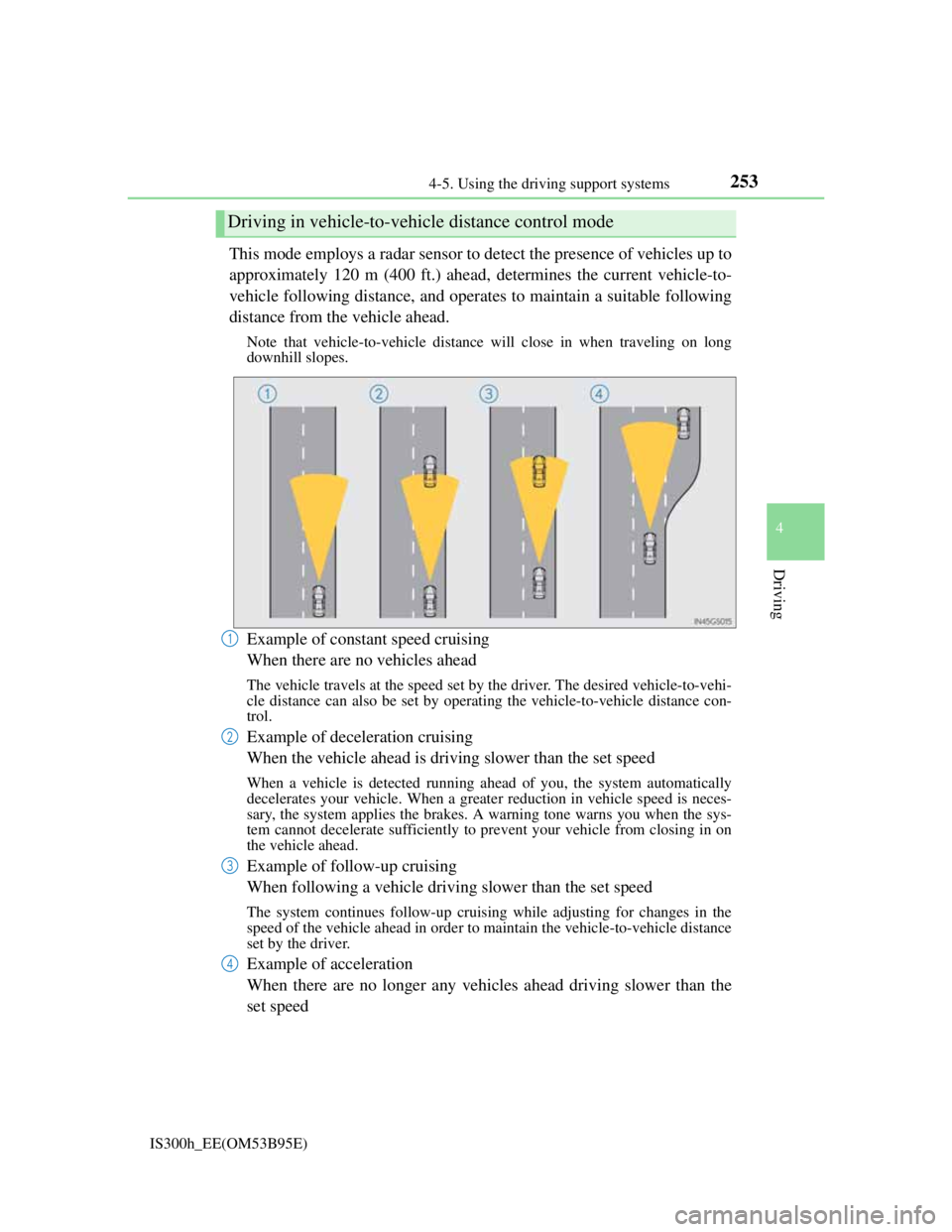
This mode employs a radar sensor to detect the presence of vehicles up to
approximately 120 m (400 ft.) ahead, determines the current vehicle-to-
vehicle following distance, and operates to maintain a suitable following
distance from the vehicle ahead.
Note that vehicle-to-vehicle distance will close in when traveling on long
downhill slopes.
Example of constant speed cruising
When there are no vehicles ahead
The vehicle travels at the speed set by the driver. The desired vehicle-to-vehi-
cle distance can also be set by operating the vehicle-to-vehicle distance con-
trol.
Example of deceleration cruising
When the vehicle ahead is driving slower than the set speed
When a vehicle is detected running ahead of you, the system automatically
decelerates your vehicle. When a greater reduction in vehicle speed is neces-
sary, the system applies the brakes. A warning tone warns you when the sys-
tem cannot decelerate sufficiently to prevent your vehicle from closing in on
the vehicle ahead.
Example of follow-up cruising
When following a vehicle driving slower than the set speed
The system continues follow-up cruising while adjusting for changes in the
speed of the vehicle ahead in order to maintain the vehicle-to-vehicle distance
set by the driver.
Example of acceleration
When there are no longer any vehicles ahead driving slower than the
set speed
Driving in vehicle-to-vehicle distance control mode
1
2
3
4
Page 256 of 628
2544-5. Using the driving support systems
IS300h_EE(OM53B95E)The system accelerates until the set speed is reached. The system then returns
to constant speed cruising.
When your vehicle is too close to a vehicle ahead, and sufficient auto-
matic deceleration via the cruise control is not possible, the display will
flash and the buzzer will sound to alert the driver. An example of this
would be if another driver cuts in front of you while you are following a
vehicle. Apply the brakes to ensure an appropriate vehicle-to-vehicle dis-
tance.
Warnings may not occur when
In the following instances, there is a possibility that the warnings will
not occur:
When the speed of the vehicle ahead matches or exceeds your vehi-
cle speed
When the vehicle ahead is traveling at an extremely slow speed
Immediately after the cruise control speed was set
At the instant the accelerator is applied
When constant speed control mode is selected, your vehicle will maintain
a set speed without controlling the vehicle-to-vehicle distance. Select this
mode only when vehicle-to-vehicle distance control mode does not func-
tion correctly due to dirt etc.
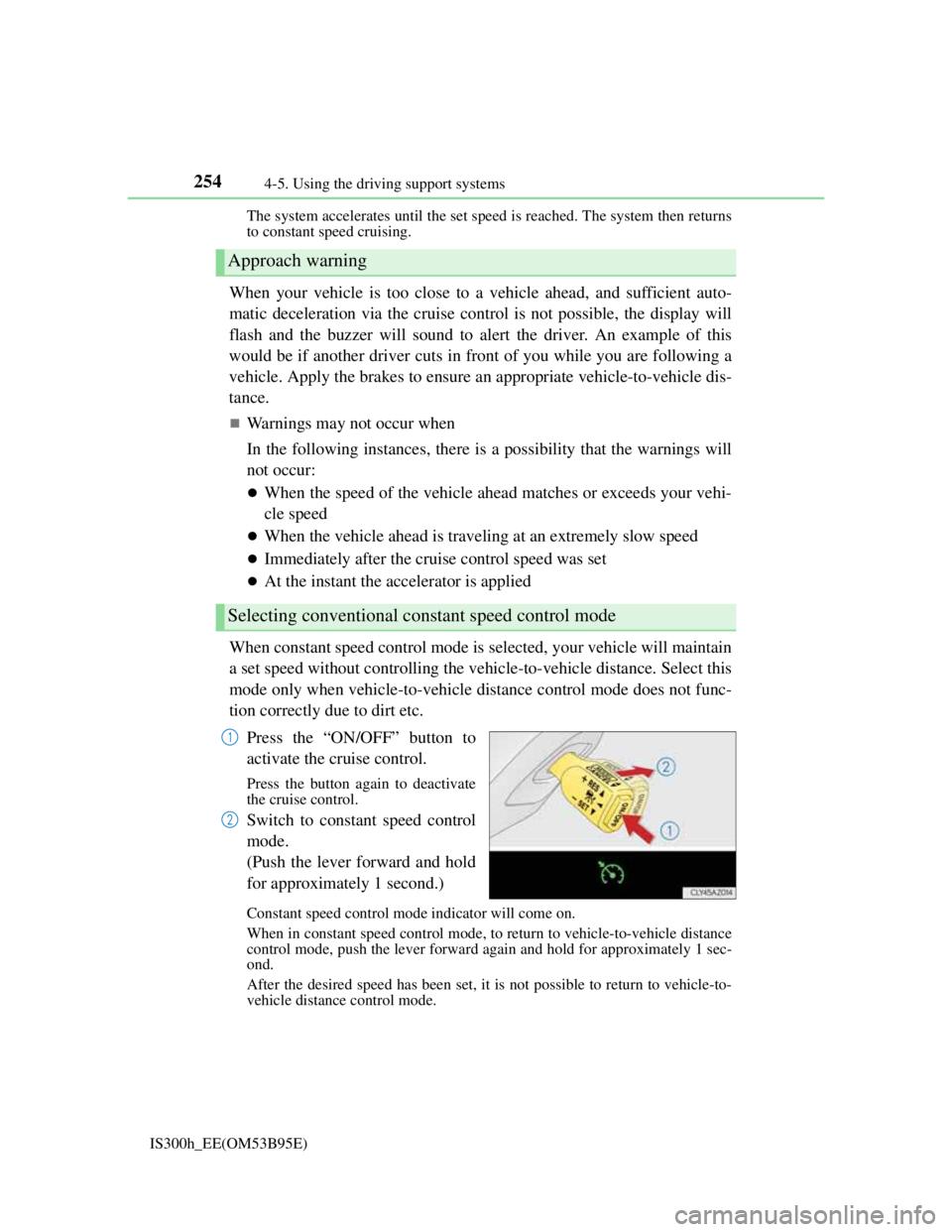
Press the “ON/OFF” button to
activate the cruise control.
Press the button again to deactivate
the cruise control.
Switch to constant speed control
mode.
(Push the lever forward and hold
for approximately 1 second.)
Constant speed control mode indicator will come on.
When in constant speed control mode, to return to vehicle-to-vehicle distance
control mode, push the lever forward again and hold for approximately 1 sec-
ond.
After the desired speed has been set, it is not possible to return to vehicle-to-
vehicle distance control mode.
Approach warning
Selecting conventional constant speed control mode
1
2
Page 264 of 628

2624-5. Using the driving support systems
IS300h_EE(OM53B95E)
Before using dynamic radar cruise control
Do not overly rely on vehicle-to-vehicle distance control.
Be aware of the set speed. If automatic deceleration/acceleration is not appro-
priate, adjust the vehicle speed, as well as the distance between your vehicle
and vehicles ahead by applying the brakes etc.
Cautions regarding the driving assist systems
Observe the following precautions.
Failure to do so may cause an accident resulting in death or serious injury.
Assisting the driver to measure following distance
The dynamic radar cruise control is only intended to help the driver in deter-
mining the following distance between the driver’s own vehicle and a desig-
nated vehicle traveling ahead. It is not a mechanism that allows careless or
inattentive driving, and it is not a system that can assist the driver in low-visi-
bility conditions. It is still necessary for driver to pay close attention to the
vehicle’s surroundings.
Assisting the driver to judge proper following distance
The dynamic radar cruise control determines whether the following distance
between the driver’s own vehicle and a designated vehicle traveling ahead is
appropriate or not. It is not capable of making any other type of judgement.
Therefore, it is absolutely necessary for the driver to remain vigilant and to
determine whether or not there is a possibility of danger in any given situa-
tion.
Assisting the driver to operate the vehicle
The dynamic radar cruise control has no capability to prevent or avoid a colli-
sion with a vehicle traveling ahead. Therefore, if there is ever any danger, the
driver must take immediate and direct control of the vehicle and act appropri-
ately in order to ensure the safety of all involved.
To avoid inadvertent cruise control activation
Switch the cruise control off using the “ON/OFF” button when not in use.
Situations unsuitable for dynamic radar cruise control
Do not use dynamic radar cruise control in any of the following situations.
Doing so may result in inappropriate speed control and could cause an accident
resulting in death or serious injury.
In heavy traffic
On roads with sharp bends
On winding roads
On slippery roads, such as those covered with rain, ice or snow
On steep downhills, or where there are sudden changes between sharp up and
down gradients
Vehicle speed may exceed the set speed when driving down a steep hill.
At entrances to expressways
When weather conditions are bad enough that they may prevent the sensors
from functioning correctly (fog, snow, sandstorm, heavy rain, etc.)
When an approach warning buzzer is heard often
When your vehicle is towing a trailer or during emergency towing