power door lock Lexus IS300h 2013 Owner's Manual
[x] Cancel search | Manufacturer: LEXUS, Model Year: 2013, Model line: IS300h, Model: Lexus IS300h 2013Pages: 628, PDF Size: 20.23 MB
Page 19 of 628
19Pictorial index
IS300h_EE(OM53B95E)
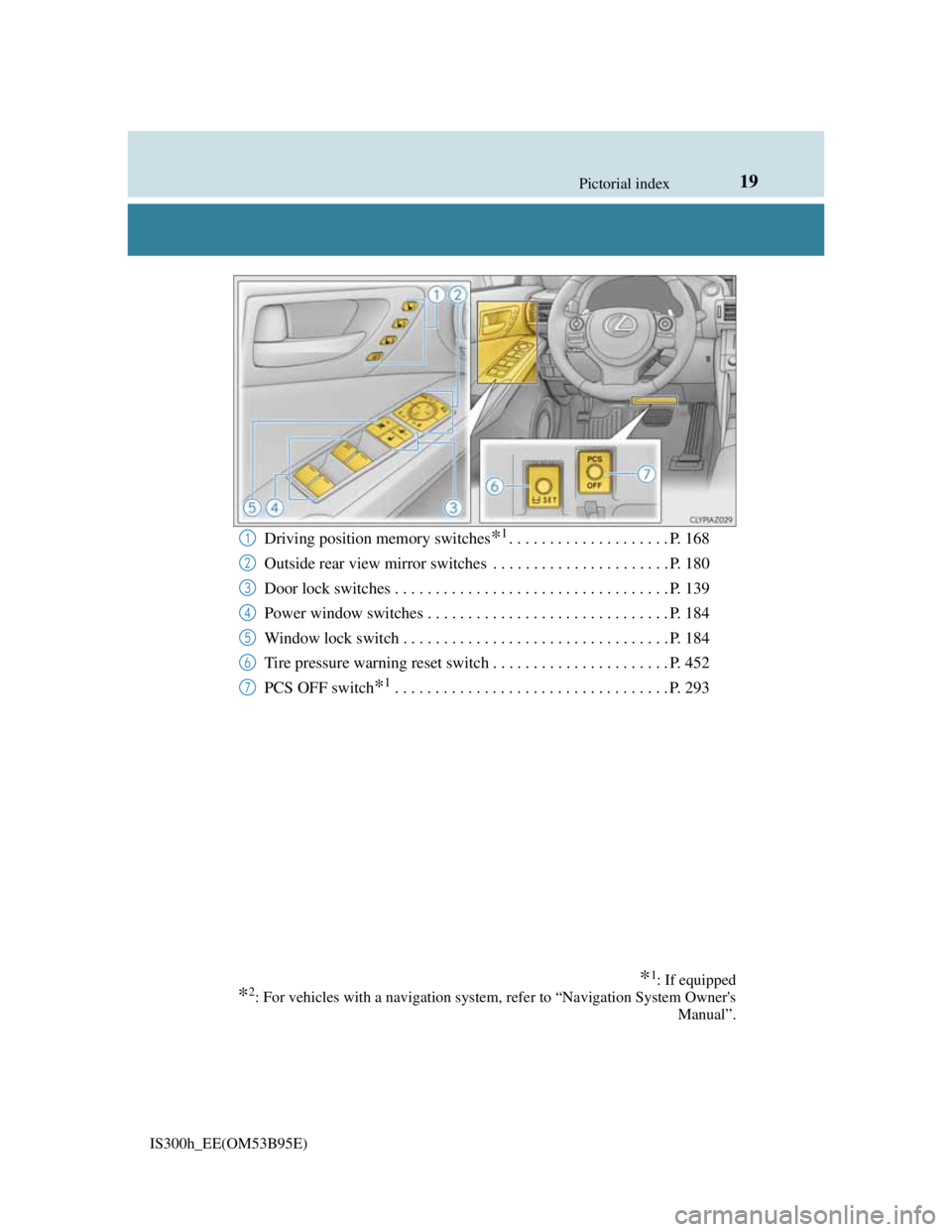
Driving position memory switches*1. . . . . . . . . . . . . . . . . . . . P. 168
Outside rear view mirror switches . . . . . . . . . . . . . . . . . . . . . . P. 180
Door lock switches . . . . . . . . . . . . . . . . . . . . . . . . . . . . . . . . . . P. 139
Power window switches . . . . . . . . . . . . . . . . . . . . . . . . . . . . . . P. 184
Window lock switch . . . . . . . . . . . . . . . . . . . . . . . . . . . . . . . . . P. 184
Tire pressure warning reset switch . . . . . . . . . . . . . . . . . . . . . . P. 452
PCS OFF switch
*1. . . . . . . . . . . . . . . . . . . . . . . . . . . . . . . . . . P. 293
1
2
3
4
5
6
7
*1: If equipped
*2: For vehicles with a navigation system, refer to “Navigation System Owner's
Manual”.
Page 27 of 628
27Pictorial index
IS300h_EE(OM53B95E)
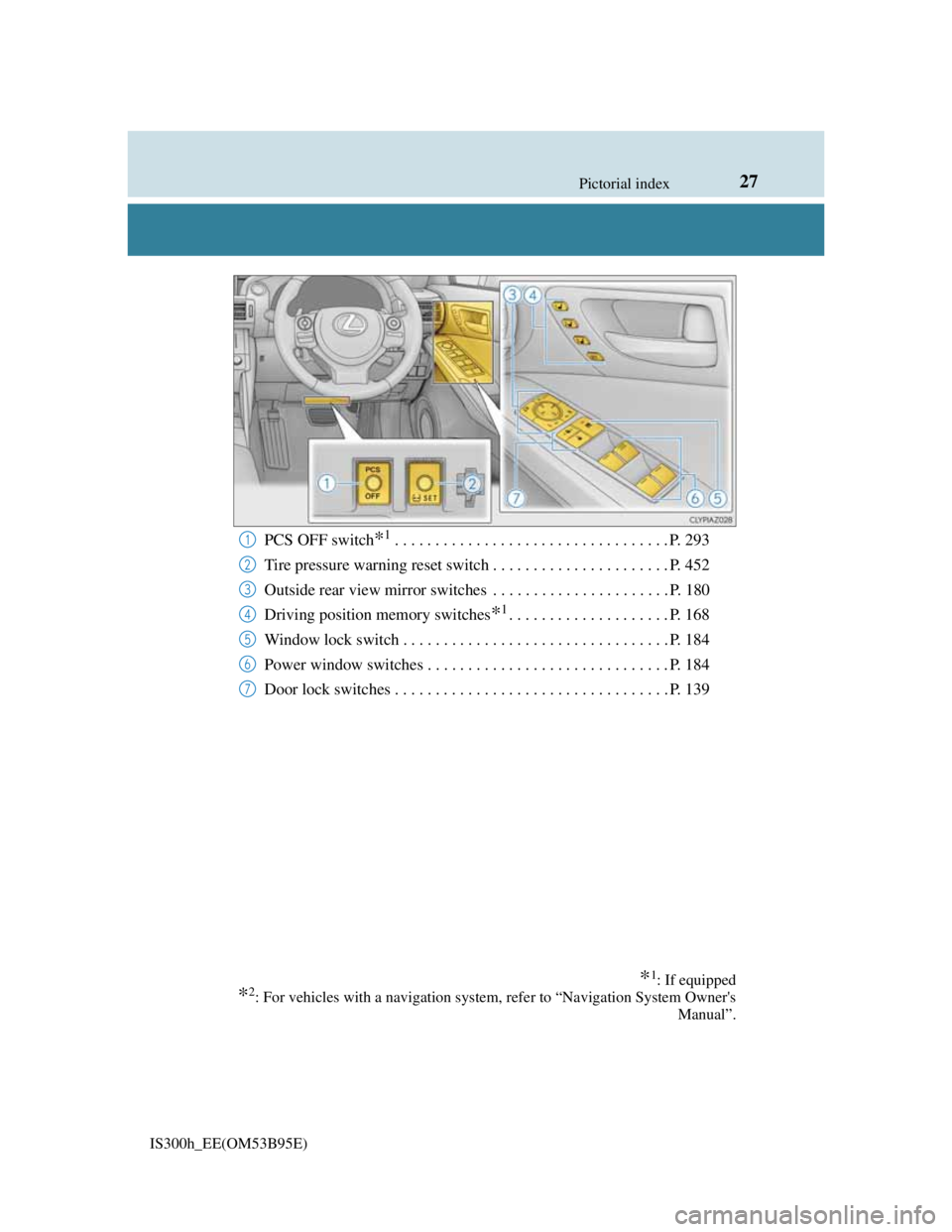
PCS OFF switch*1. . . . . . . . . . . . . . . . . . . . . . . . . . . . . . . . . . P. 293
Tire pressure warning reset switch . . . . . . . . . . . . . . . . . . . . . . P. 452
Outside rear view mirror switches . . . . . . . . . . . . . . . . . . . . . . P. 180
Driving position memory switches
*1. . . . . . . . . . . . . . . . . . . . P. 168
Window lock switch . . . . . . . . . . . . . . . . . . . . . . . . . . . . . . . . . P. 184
Power window switches . . . . . . . . . . . . . . . . . . . . . . . . . . . . . . P. 184
Door lock switches . . . . . . . . . . . . . . . . . . . . . . . . . . . . . . . . . . P. 139
*1: If equipped
*2: For vehicles with a navigation system, refer to “Navigation System Owner's
Manual”.
1
2
3
4
5
6
7
Page 60 of 628
601-1. For safe use
IS300h_EE(OM53B95E)
It is recommended that children sit in the rear seats to avoid accidental
contact with the shift lever, wiper switch etc.
Use the rear door child-protector lock or the window lock switch to
avoid children opening the door while driving or operating the power
window accidentally.
Do not let small children operate equipment which may catch or pinch
body parts, such as the power window, hood, trunk, seats etc.
Safety information for children
Observe the following precautions when children are in the vehicle.
Use a child restraint system appropriate for the child, until the child
becomes large enough to properly wear the vehicle’s seat belt.
CAUTION
Never leave children unattended in the vehicle, and never allow children to
have or use the key.
Children may be able to start the vehicle or shift the vehicle into neutral. There
is also a danger that children may injure themselves by playing with the win-
dows, the moon roof or other features of the vehicle. In addition, heat build-up
or extremely cold temperatures inside the vehicle can be fatal to children.
Page 96 of 628
951-3. Theft deterrent system
1
For safety and security
IS300h_EE(OM53B95E)
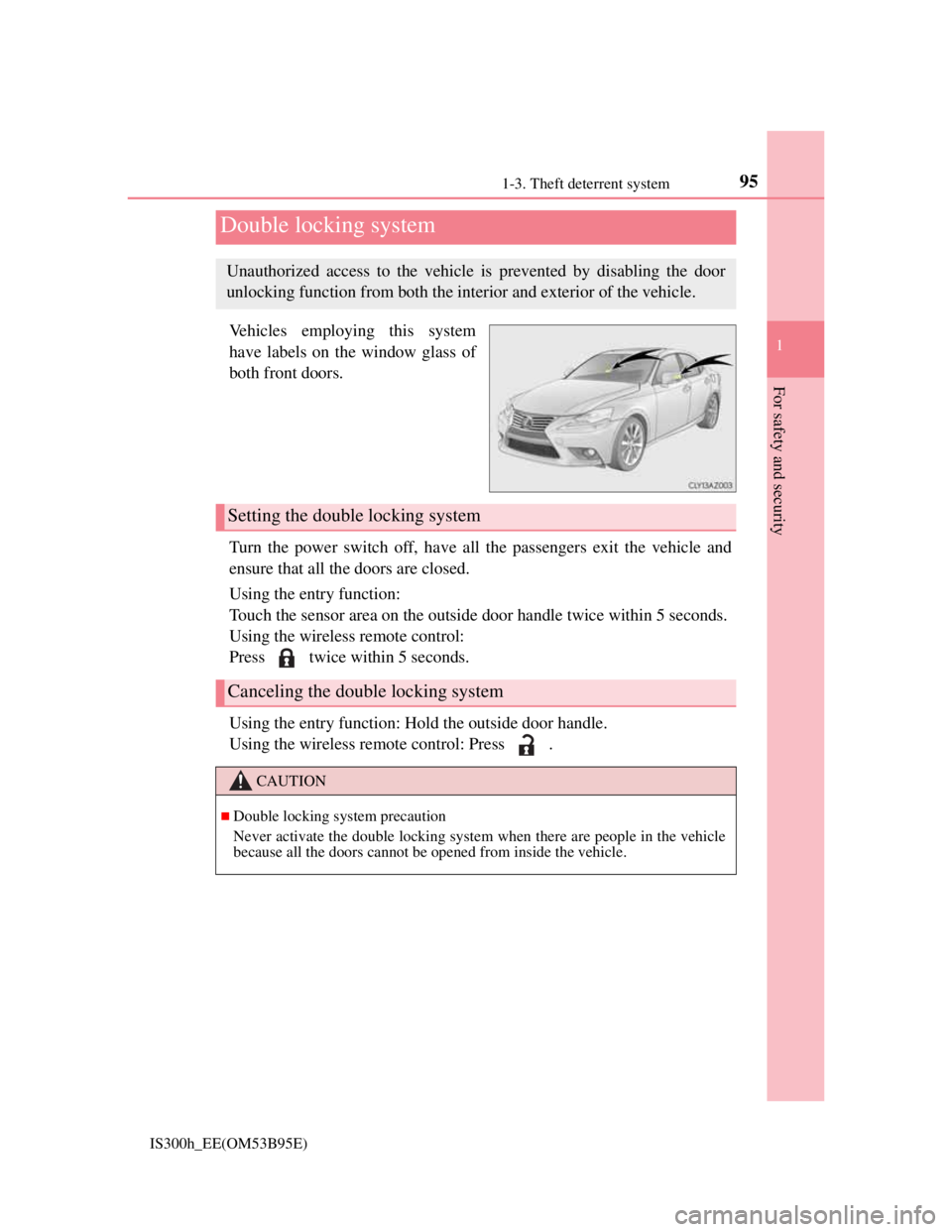
Vehicles employing this system
have labels on the window glass of
both front doors.
Turn the power switch off, have all the passengers exit the vehicle and
ensure that all the doors are closed.
Using the entry function:
Touch the sensor area on the outside door handle twice within 5 seconds.
Using the wireless remote control:
Press twice within 5 seconds.
Using the entry function: Hold the outside door handle.
Using the wireless remote control: Press .
Double locking system
Unauthorized access to the vehicle is prevented by disabling the door
unlocking function from both the interior and exterior of the vehicle.
Setting the double locking system
Canceling the double locking system
CAUTION
Double locking system precaution
Never activate the double locking system when there are people in the vehicle
because all the doors cannot be opened from inside the vehicle.
Page 101 of 628
1001-3. Theft deterrent system
IS300h_EE(OM53B95E)
Canceling and automatic re-enabling of the intrusion sensor and tilt sensor
The alarm will still be set even when the intrusion sensor and tilt sensor are can-
celed.
After the intrusion sensor and tilt sensor are canceled, pressing the power
switch or unlocking the doors using the entry function or wireless remote con-
trol will re-enable the intrusion sensor and tilt sensor.
The intrusion sensor and tilt sensor will automatically be re-enabled when the
alarm system is deactivated.
Intrusion sensor detection considerations
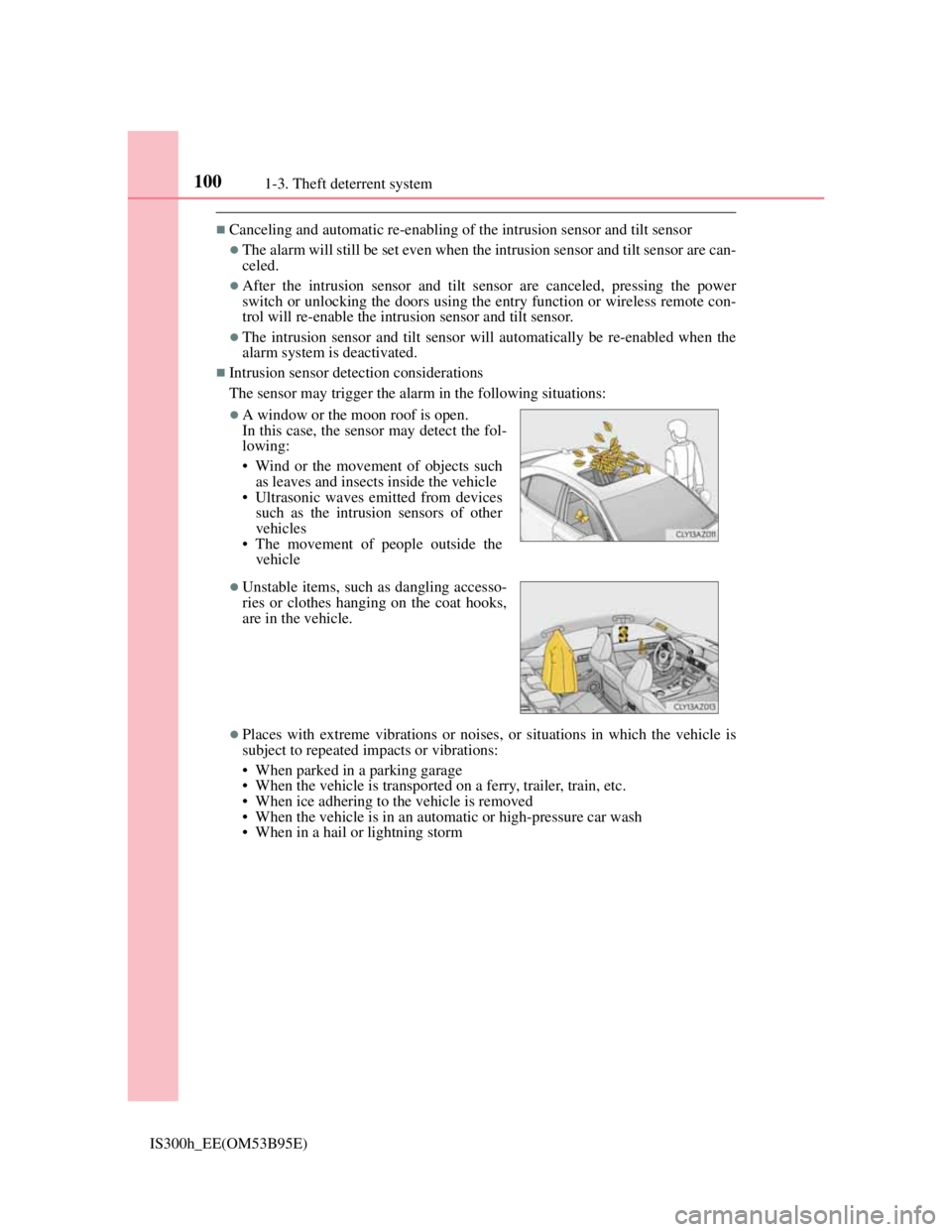
The sensor may trigger the alarm in the following situations:
Places with extreme vibrations or noises, or situations in which the vehicle is
subject to repeated impacts or vibrations:
• When parked in a parking garage
• When the vehicle is transported on a ferry, trailer, train, etc.
• When ice adhering to the vehicle is removed
• When the vehicle is in an automatic or high-pressure car wash
• When in a hail or lightning storm
A window or the moon roof is open.
In this case, the sensor may detect the fol-
lowing:
• Wind or the movement of objects such
as leaves and insects inside the vehicle
• Ultrasonic waves emitted from devices
such as the intrusion sensors of other
vehicles
• The movement of people outside the
vehicle
Unstable items, such as dangling accesso-
ries or clothes hanging on the coat hooks,
are in the vehicle.
Page 131 of 628
129
3
Operation of
each component
IS300h_EE(OM53B95E)
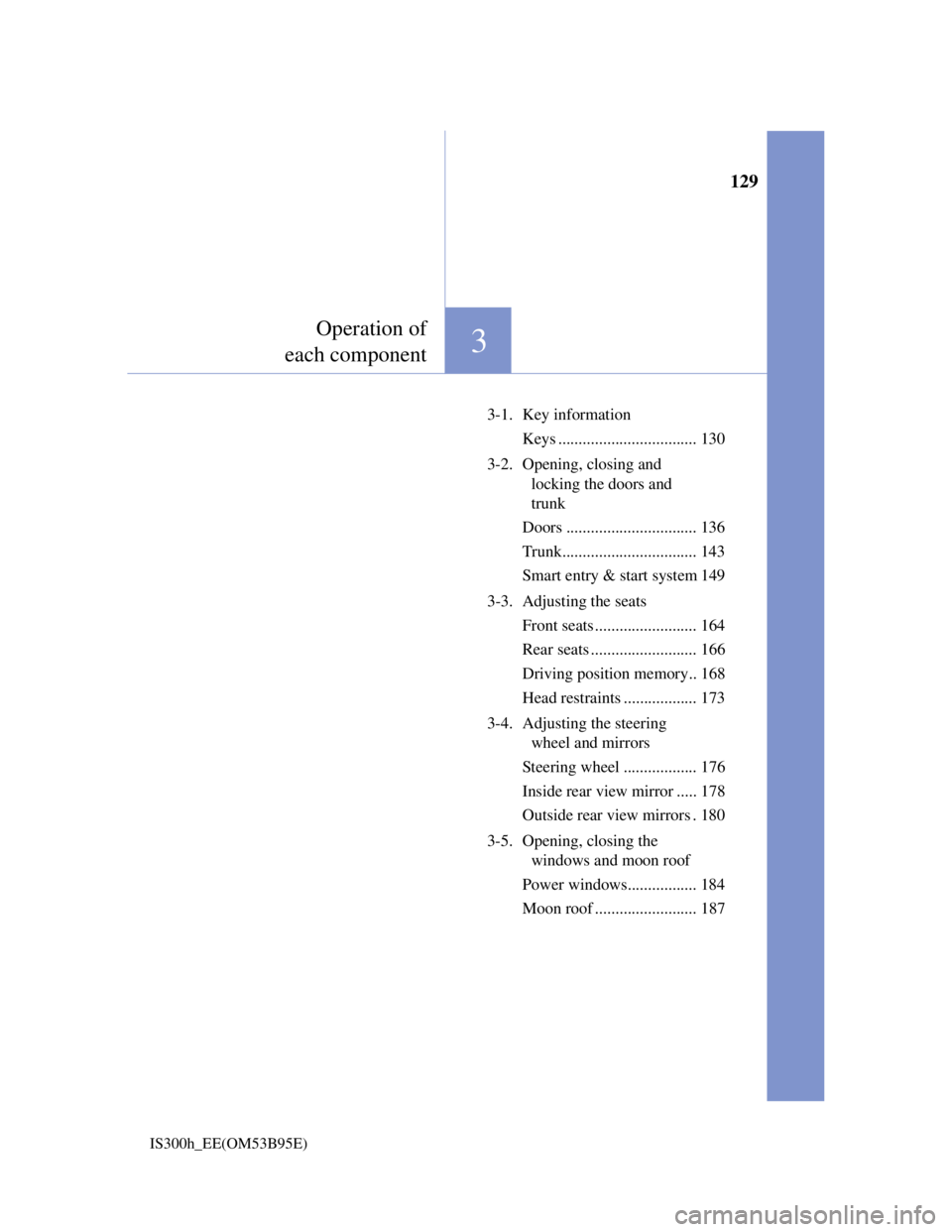
3-1. Key information
Keys .................................. 130
3-2. Opening, closing and
locking the doors and
trunk
Doors ................................ 136
Trunk................................. 143
Smart entry & start system 149
3-3. Adjusting the seats
Front seats ......................... 164
Rear seats .......................... 166
Driving position memory.. 168
Head restraints .................. 173
3-4. Adjusting the steering
wheel and mirrors
Steering wheel .................. 176
Inside rear view mirror ..... 178
Outside rear view mirrors . 180
3-5. Opening, closing the
windows and moon roof
Power windows................. 184
Moon roof ......................... 187
Page 140 of 628

1383-2. Opening, closing and locking the doors and trunk
IS300h_EE(OM53B95E)
CAUTION
When closing the windows or moon roof using wireless remote control
Observe the following precautions.
Failing to do so may result in death or serious injury.
Check to make sure that all passengers do not have any part of their body in a
position where it could be caught when a window or moon roof is being oper-
ated.
To prevent inadvertent power windows and moon roof operation, never let a
small child have and use the wireless remote control.
Jam protection function
Never try jamming any part of your body to activate the jam protection func-
tion intentionally.
The jam protection function may not work if something gets caught just
before the window or moon roof fully closes.
Page 141 of 628
1393-2. Opening, closing and locking the doors and trunk
3
Operation of each component
IS300h_EE(OM53B95E)
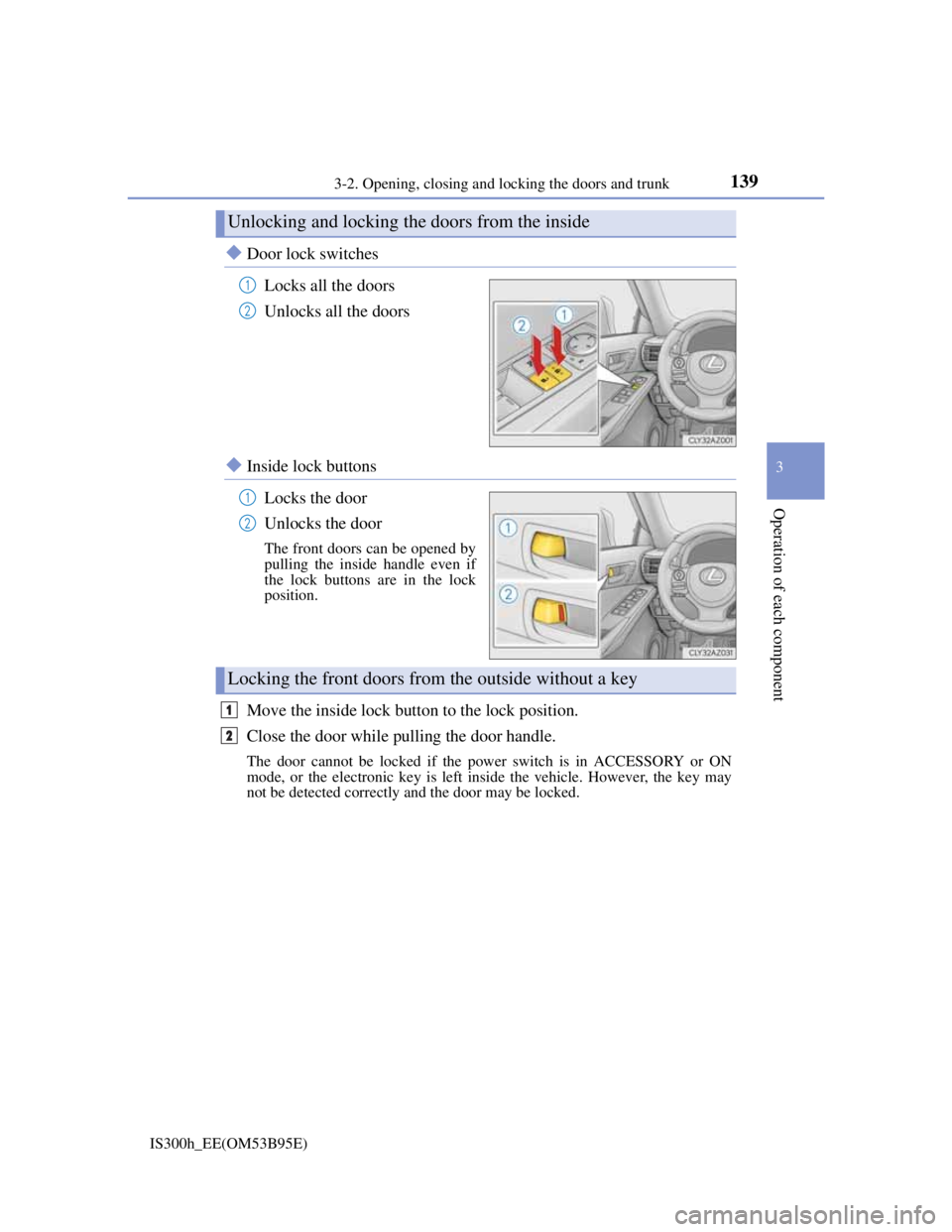
Door lock switches
Locks all the doors
Unlocks all the doors
Inside lock buttons
Locks the door
Unlocks the door
The front doors can be opened by
pulling the inside handle even if
the lock buttons are in the lock
position.
Move the inside lock button to the lock position.
Close the door while pulling the door handle.
The door cannot be locked if the power switch is in ACCESSORY or ON
mode, or the electronic key is left inside the vehicle. However, the key may
not be detected correctly and the door may be locked.
Unlocking and locking the doors from the inside
1
2
1
2
Locking the front doors from the outside without a key
1
2
Page 143 of 628
1413-2. Opening, closing and locking the doors and trunk
3
Operation of each component
IS300h_EE(OM53B95E)
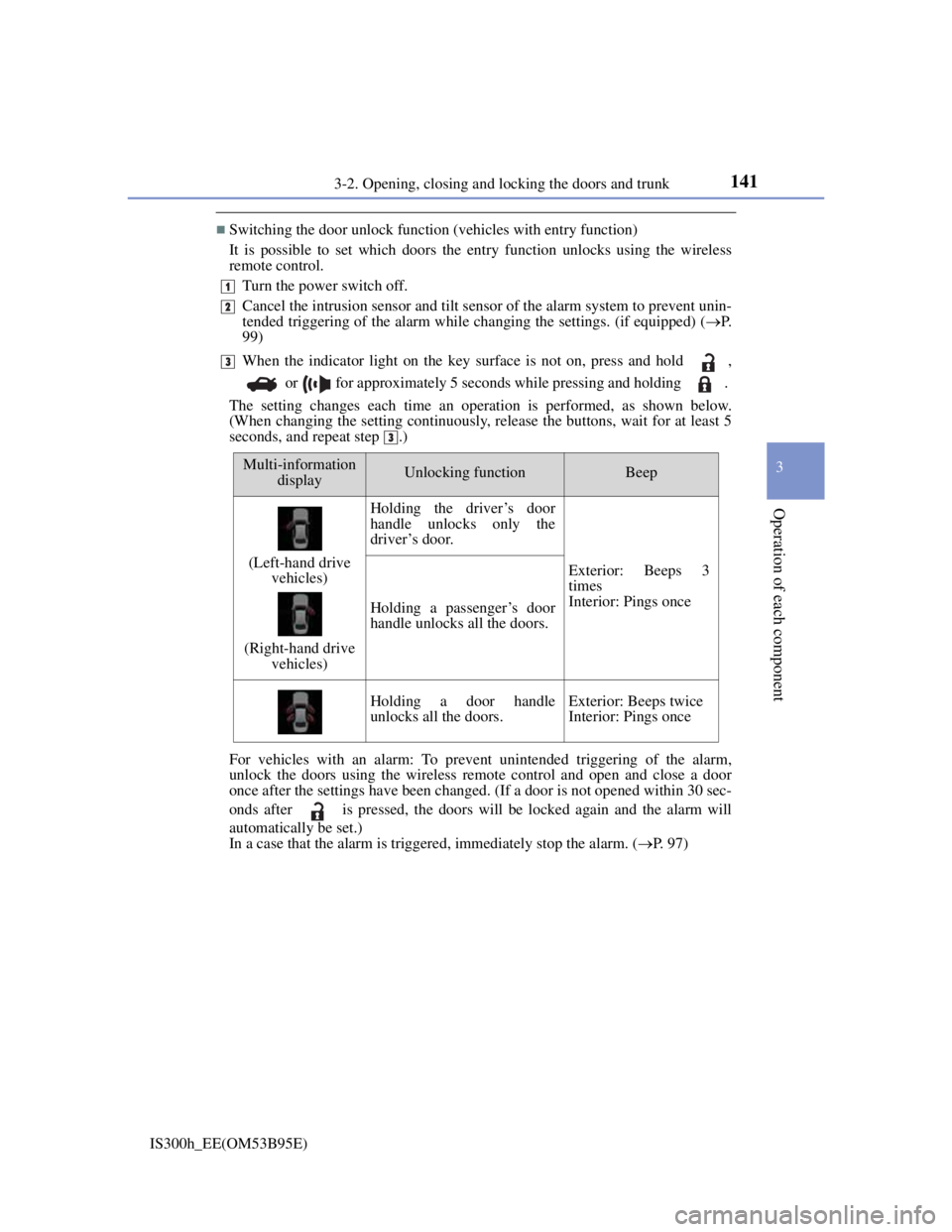
Switching the door unlock function (vehicles with entry function)
It is possible to set which doors the entry function unlocks using the wireless
remote control.
Turn the power switch off.
Cancel the intrusion sensor and tilt sensor of the alarm system to prevent unin-
tended triggering of the alarm while changing the settings. (if equipped) (P.
99)
When the indicator light on the key surface is not on, press and hold ,
or for approximately 5 seconds while pressing and holding .
The setting changes each time an operation is performed, as shown below.
(When changing the setting continuously, release the buttons, wait for at least 5
seconds, and repeat step .)
For vehicles with an alarm: To prevent unintended triggering of the alarm,
unlock the doors using the wireless remote control and open and close a door
once after the settings have been changed. (If a door is not opened within 30 sec-
onds after is pressed, the doors will be locked again and the alarm will
automatically be set.)
In a case that the alarm is triggered, immediately stop the alarm. (P. 97)
1
2
3
3
Multi-information
displayUnlocking functionBeep
(Left-hand drive
vehicles)
(Right-hand drive
vehicles)
Holding the driver’s door
handle unlocks only the
driver’s door.
Exterior: Beeps 3
times
Interior: Pings once
Holding a passenger’s door
handle unlocks all the doors.
Holding a door handle
unlocks all the doors.Exterior: Beeps twice
Interior: Pings once
Page 145 of 628
1433-2. Opening, closing and locking the doors and trunk
3
Operation of each component
IS300h_EE(OM53B95E)
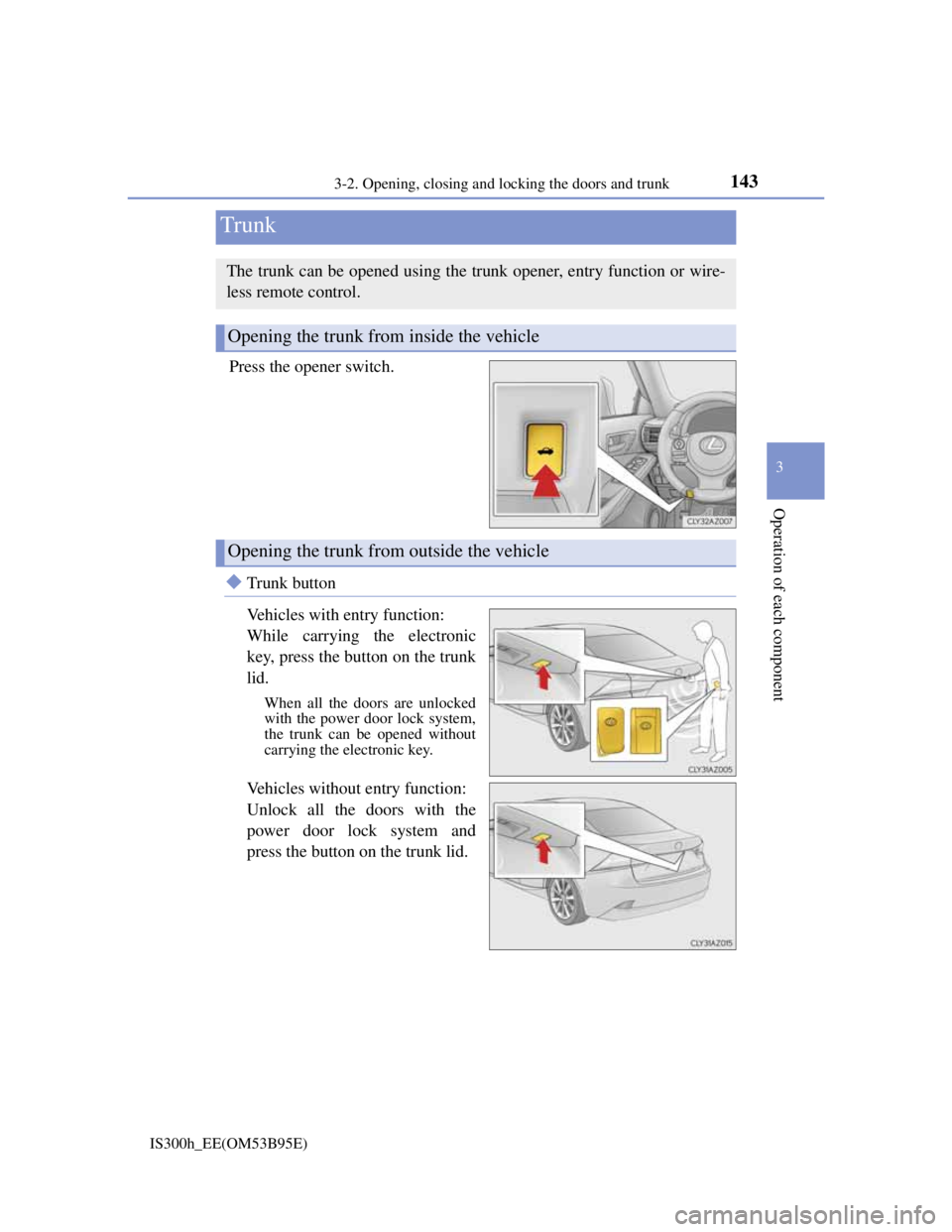
Press the opener switch.
Trunk button
Vehicles with entry function:
While carrying the electronic
key, press the button on the trunk
lid.
When all the doors are unlocked
with the power door lock system,
the trunk can be opened without
carrying the electronic key.
Vehicles without entry function:
Unlock all the doors with the
power door lock system and
press the button on the trunk lid.
Trunk
The trunk can be opened using the trunk opener, entry function or wire-
less remote control.
Opening the trunk from inside the vehicle
Opening the trunk from outside the vehicle