light Lexus IS300h 2014 Owner's Manual
[x] Cancel search | Manufacturer: LEXUS, Model Year: 2014, Model line: IS300h, Model: Lexus IS300h 2014Pages: 612, PDF Size: 111.33 MB
Page 409 of 612
4096-1. Using the air conditioning system
6
Interior features
IS300h_EE(OM53C61E)
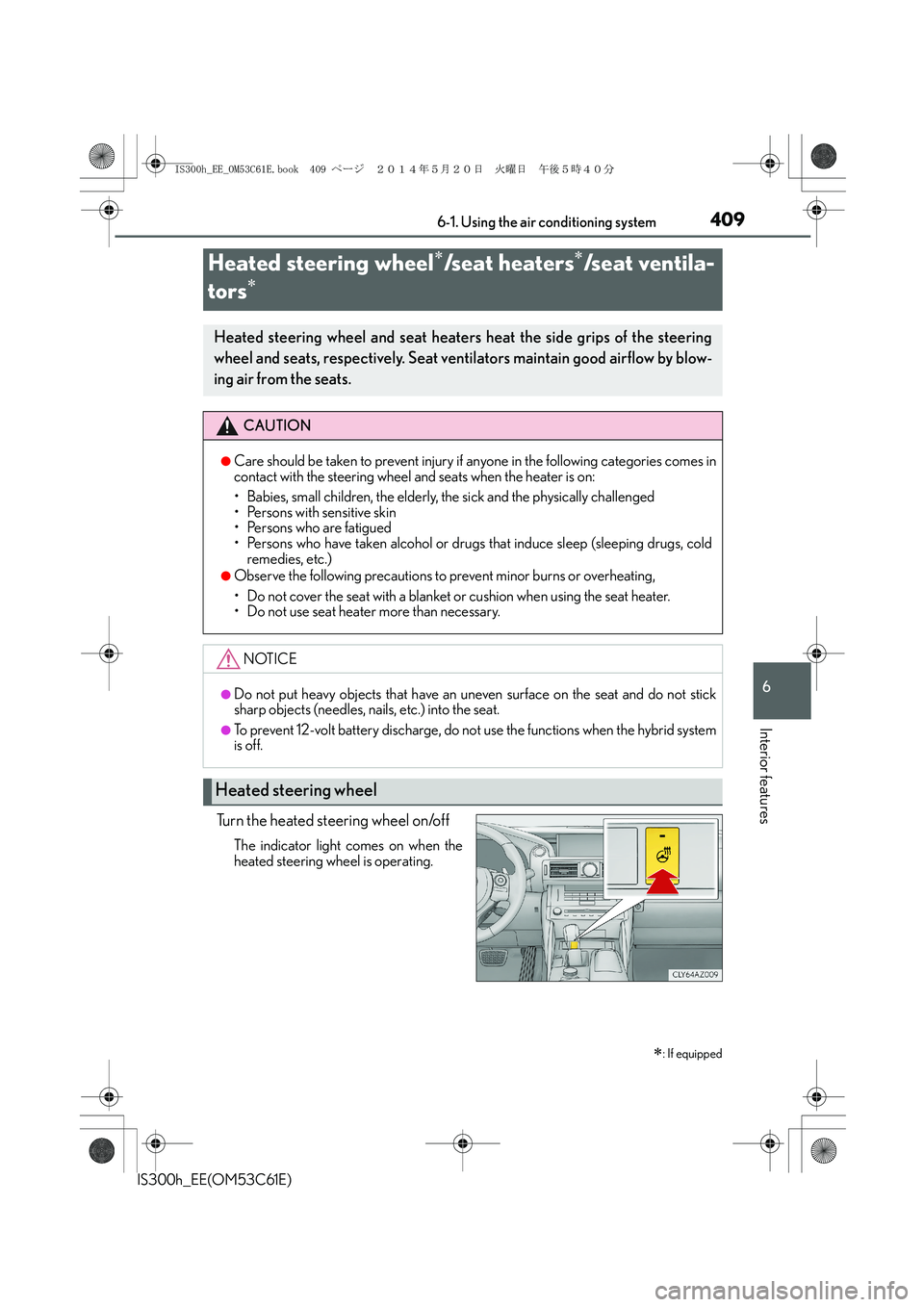
Turn the heated steering wheel on/off
The indicator light comes on when the
heated steering wheel is operating.
Heated steering wheel∗/seat heaters∗/seat ventila-
tors
∗
∗
: If equipped
Heated steering wheel and seat heaters heat the side grips of the steering
wheel and seats, respectively. Seat ventilators maintain good airflow by blow-
ing air from the seats.
CAUTION
●Care should be taken to prevent injury if anyone in the following categories comes in
contact with the steering wheel and seats when the heater is on:
• Babies, small children, the elderly, the sick and the physically challenged
• Persons with sensitive skin
• Persons who are fatigued
• Persons who have taken alcohol or drugs that induce sleep (sleeping drugs, cold
remedies, etc.)
●Observe the following precautions to prevent minor burns or overheating,
• Do not cover the seat with a blanket or cushion when using the seat heater.
• Do not use seat heater more than necessary.
NOTICE
●Do not put heavy objects that have an uneven surface on the seat and do not stick
sharp objects (needles, nails, etc.) into the seat.
●To prevent 12-volt battery discharge, do not use the functions when the hybrid system
is off.
Heated steering wheel
IS300h_EE_OM53C61E.book 409 ページ 2014年5月20日 火曜日 午後5時40分
Page 410 of 612
4106-1. Using the air conditioning system
IS300h_EE(OM53C61E)
●The heated steering wheel can be used when the power switch is in ON mode.
●The heated steering wheel will automatically turn off after about 30 minutes.
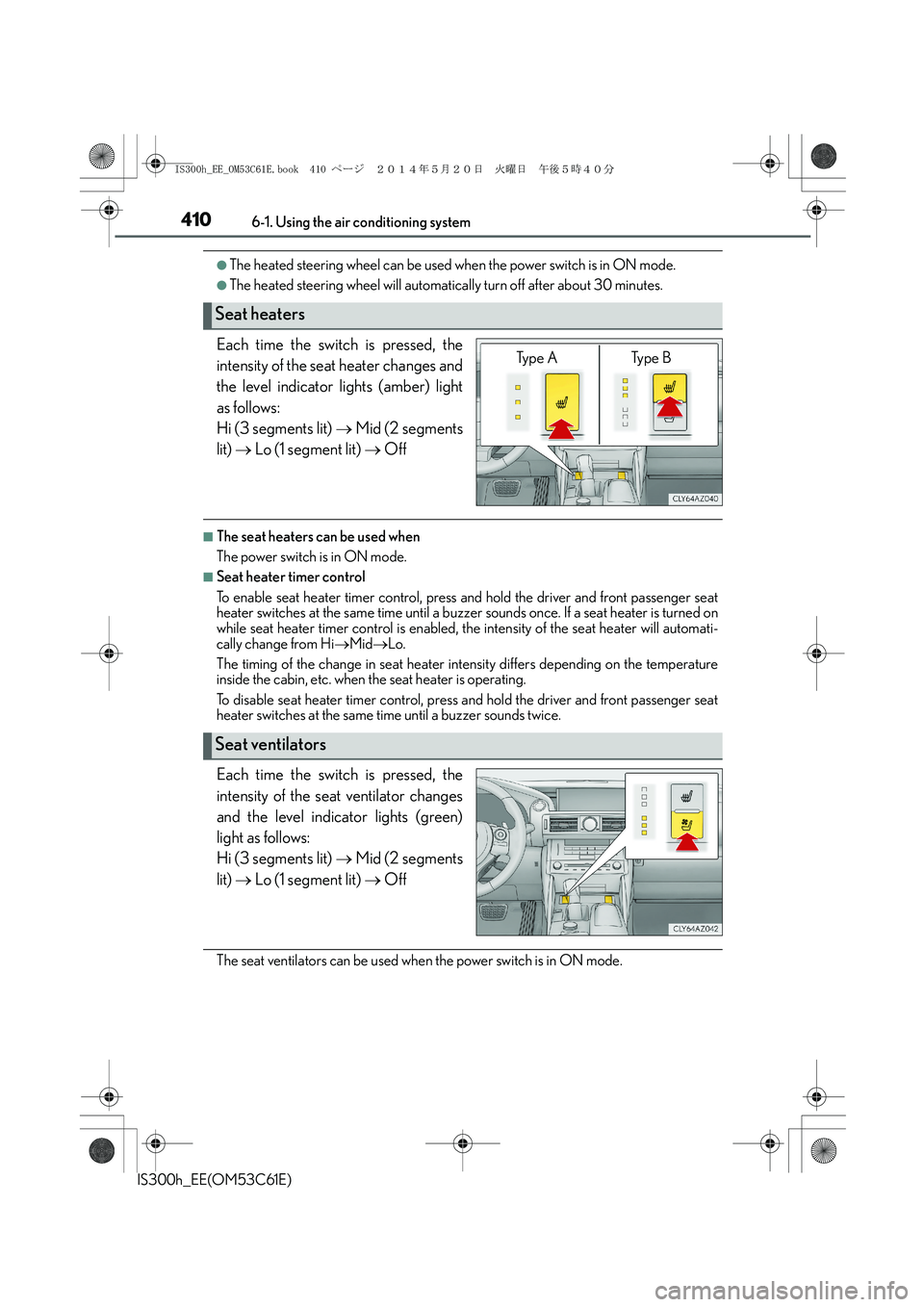
Each time the switch is pressed, the
intensity of the seat heater changes and
the level indicator lights (amber) light
as follows:
Hi (3 segments lit) → Mid (2 segments
lit) → Lo (1 segment lit) → Off
■The seat heaters can be used when
The power switch is in ON mode.
■Seat heater timer control
To enable seat heater timer control, press and hold the driver and front passenger seat
heater switches at the same time until a buzzer sounds once. If a seat heater is turned on
while seat heater timer control is enabled, the intensity of the seat heater will automati-
cally change from Hi→Mid→Lo.
The timing of the change in seat heater intensity differs depending on the temperature
inside the cabin, etc. when the seat heater is operating.
To disable seat heater timer control, press and hold the driver and front passenger seat
heater switches at the same time until a buzzer sounds twice.
Each time the switch is pressed, the
intensity of the seat ventilator changes
and the level indicator lights (green)
light as follows:
Hi (3 segments lit) → Mid (2 segments
lit) → Lo (1 segment lit) → Off
The seat ventilators can be used when the power switch is in ON mode.
Seat heaters
Ty p e A Ty p e B
Seat ventilators
IS300h_EE_OM53C61E.book 410 ページ 2014年5月20日 火曜日 午後5時40分
Page 411 of 612
411
IS300h_EE(OM53C61E)
6
Interior features
6-2. Using the interior lights
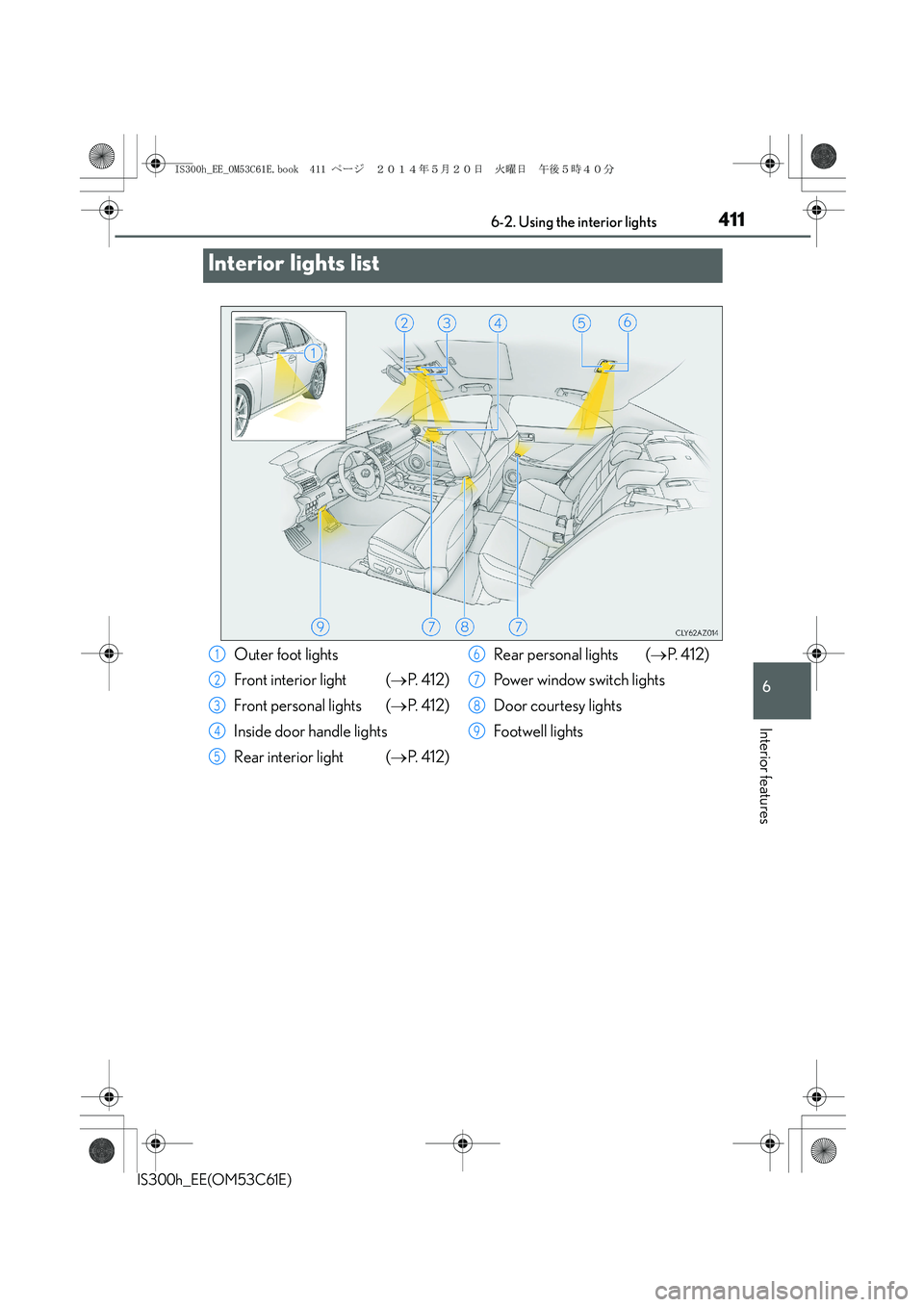
Interior lights list
Outer foot lights
Front interior light (→P. 4 1 2 )
Front personal lights (→P. 4 1 2 )
Inside door handle lights
Rear interior light (→P. 4 1 2 )Rear personal lights (→P. 4 1 2 )
Power window switch lights
Door courtesy lights
Footwell lights1
2
3
4
5
6
7
8
9
IS300h_EE_OM53C61E.book 411 ページ 2014年5月20日 火曜日 午後5時40分
Page 412 of 612
4126-2. Using the interior lights
IS300h_EE(OM53C61E)
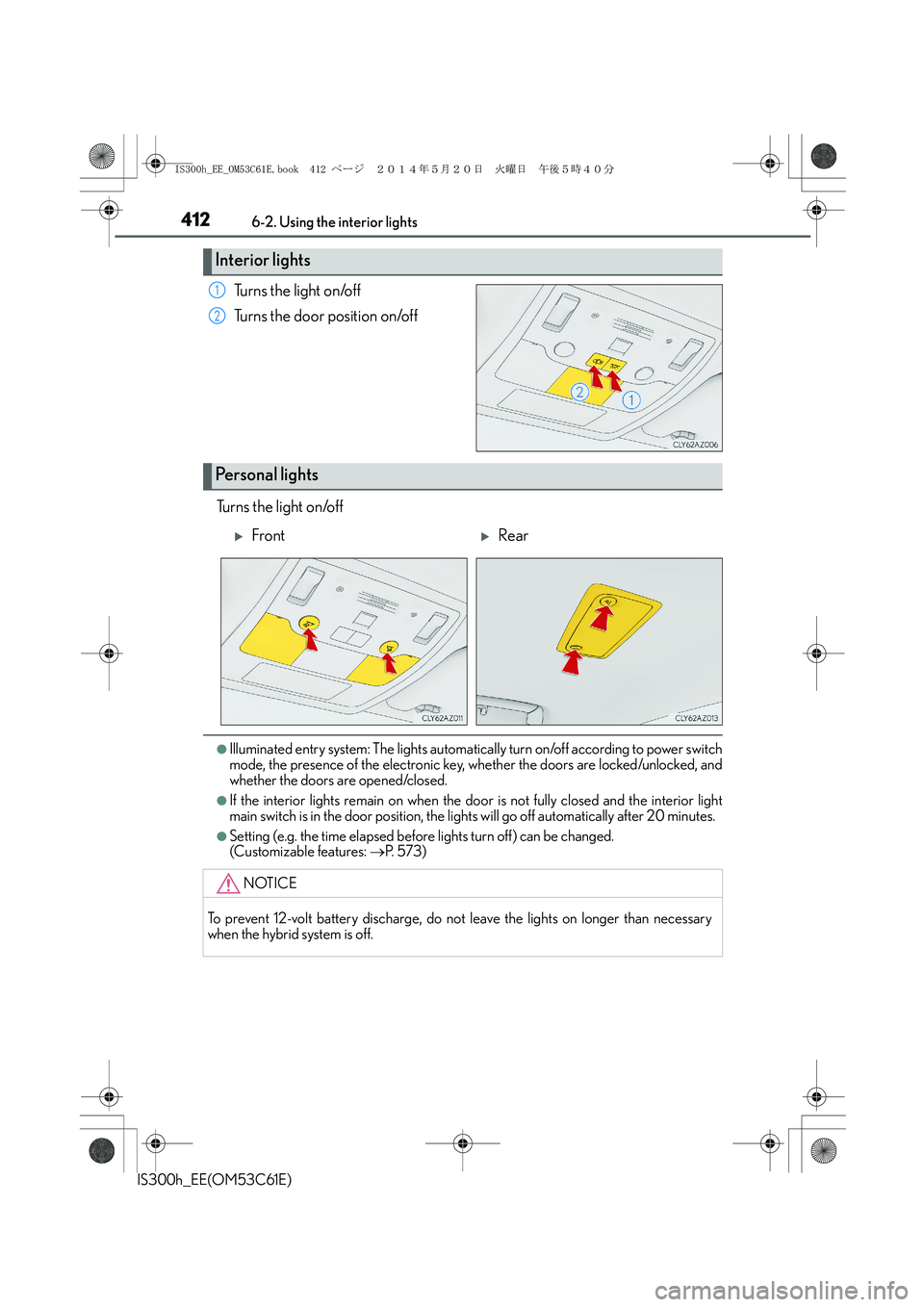
Turns the light on/off
Turns the door position on/off
Turns the light on/off
●Illuminated entry system: The lights automatically turn on/off according to power switch
mode, the presence of the electronic key, whether the doors are locked/unlocked, and
whether the doors are opened/closed.
●If the interior lights remain on when the door is not fully closed and the interior light
main switch is in the door position, the lights will go off automatically after 20 minutes.
●Setting (e.g. the time elapsed before lights turn off) can be changed.
(Customizable features: →P. 5 7 3 )
Interior lights
1
2
Personal lights
XFrontXRear
NOTICE
To prevent 12-volt battery discharge, do not leave the lights on longer than necessary
when the hybrid system is off.
IS300h_EE_OM53C61E.book 412 ページ 2014年5月20日 火曜日 午後5時40分
Page 413 of 612
413
IS300h_EE(OM53C61E)
6
Interior features
6-3. Using the storage features
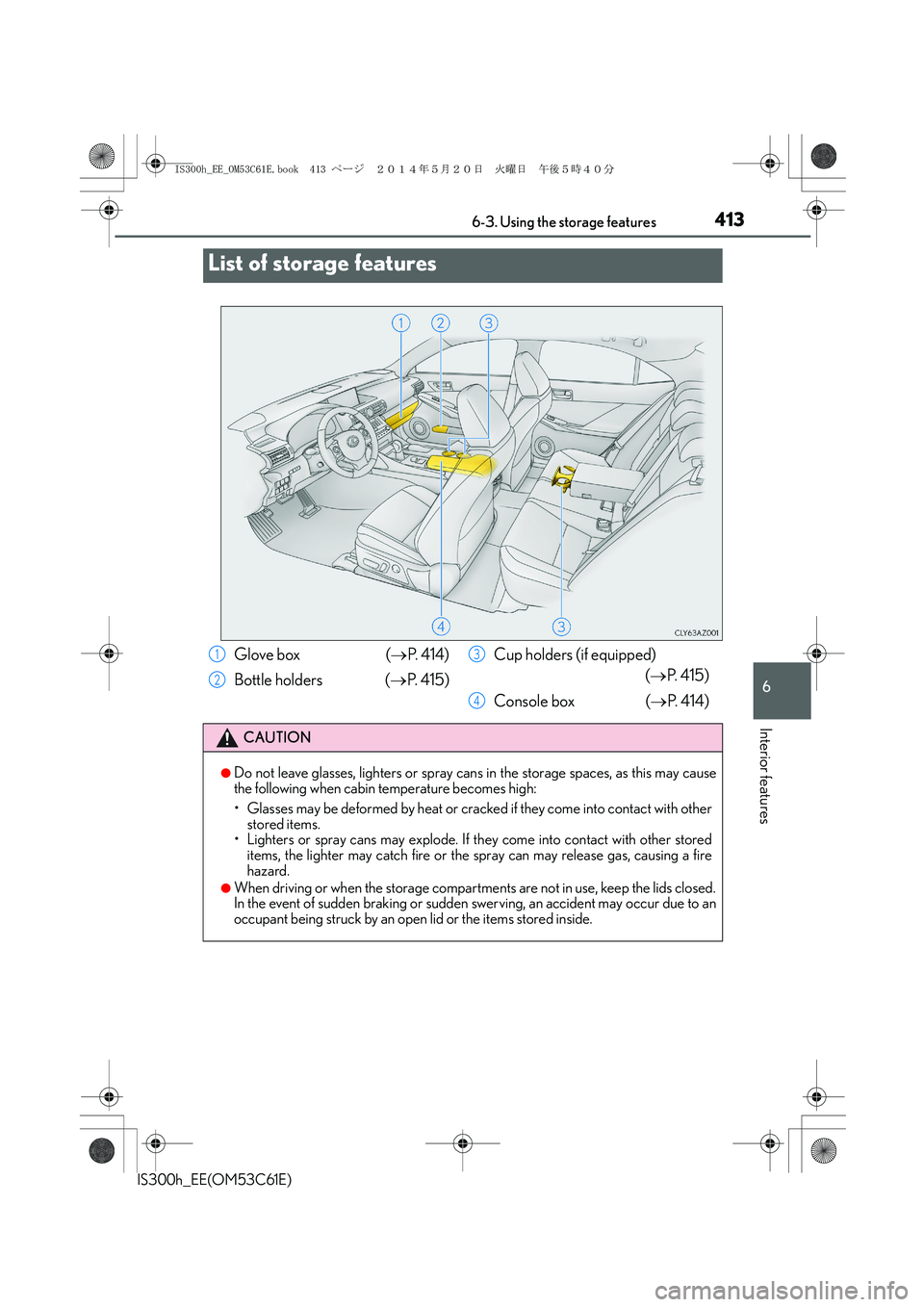
List of storage features
Glove box (→P. 414)
Bottle holders (→P. 4 1 5 )Cup holders (if equipped)
(→P. 4 1 5 )
Console box (→P. 4 1 4 )
CAUTION
●Do not leave glasses, lighters or spray cans in the storage spaces, as this may cause
the following when cabin temperature becomes high:
• Glasses may be deformed by heat or cracked if they come into contact with other
stored items.
• Lighters or spray cans may explode. If they come into contact with other stored
items, the lighter may catch fire or the spray can may release gas, causing a fire
hazard.
●When driving or when the storage compartments are not in use, keep the lids closed.
In the event of sudden braking or sudden swerving, an accident may occur due to an
occupant being struck by an open lid or the items stored inside.
1
2
3
4
IS300h_EE_OM53C61E.book 413 ページ 2014年5月20日 火曜日 午後5時40分
Page 414 of 612
4146-3. Using the storage features
IS300h_EE(OM53C61E)
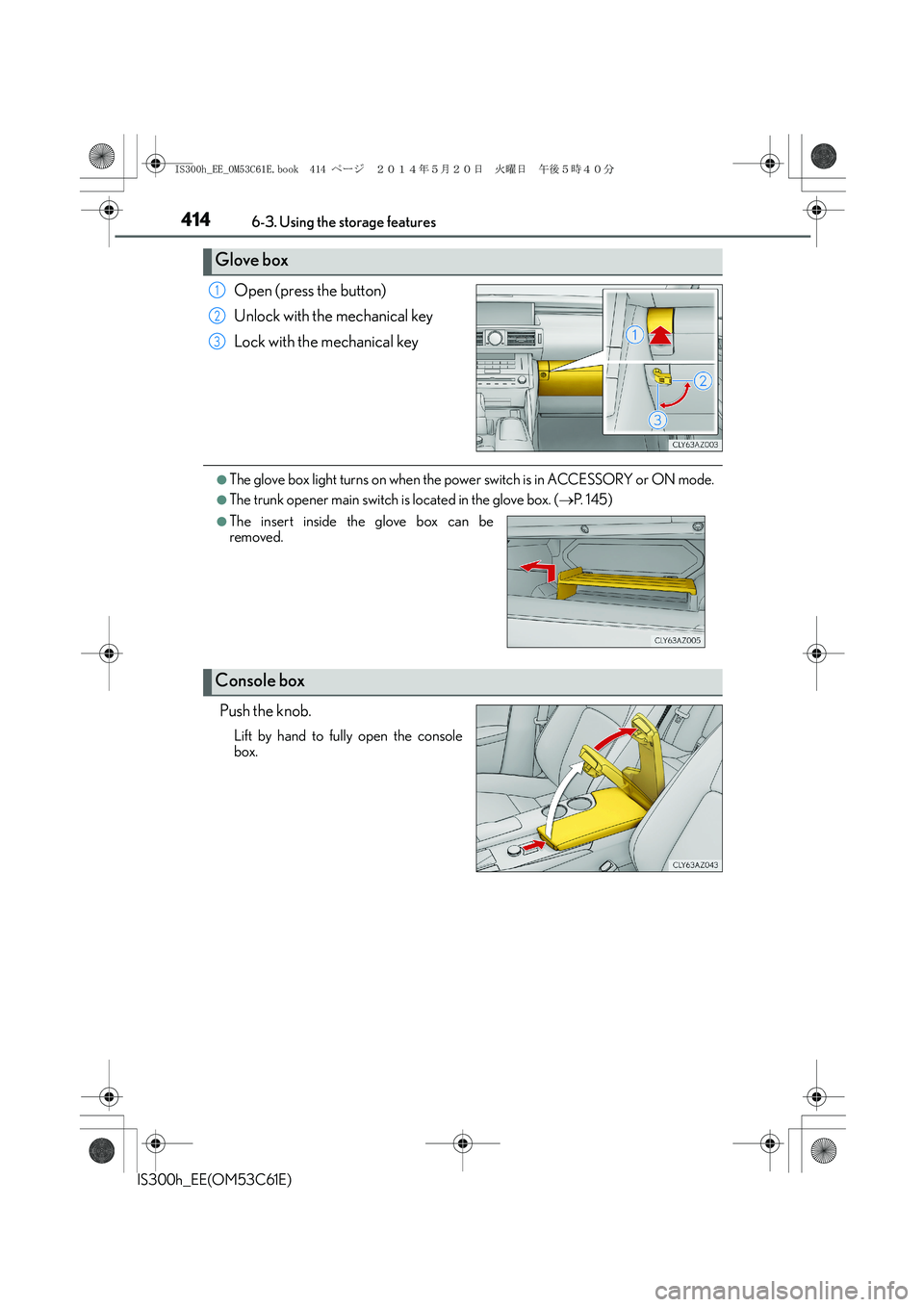
Open (press the button)
Unlock with the mechanical key
Lock with the mechanical key
●The glove box light turns on when the power switch is in ACCESSORY or ON mode.
●The trunk opener main switch is located in the glove box. (→P. 1 4 5 )
Push the knob.
Lift by hand to fully open the console
box.
Glove box
1
2
3
●The insert inside the glove box can be
removed.
Console box
IS300h_EE_OM53C61E.book 414 ページ 2014年5月20日 火曜日 午後5時40分
Page 420 of 612
420
IS300h_EE(OM53C61E)6-4. Using the other interior features
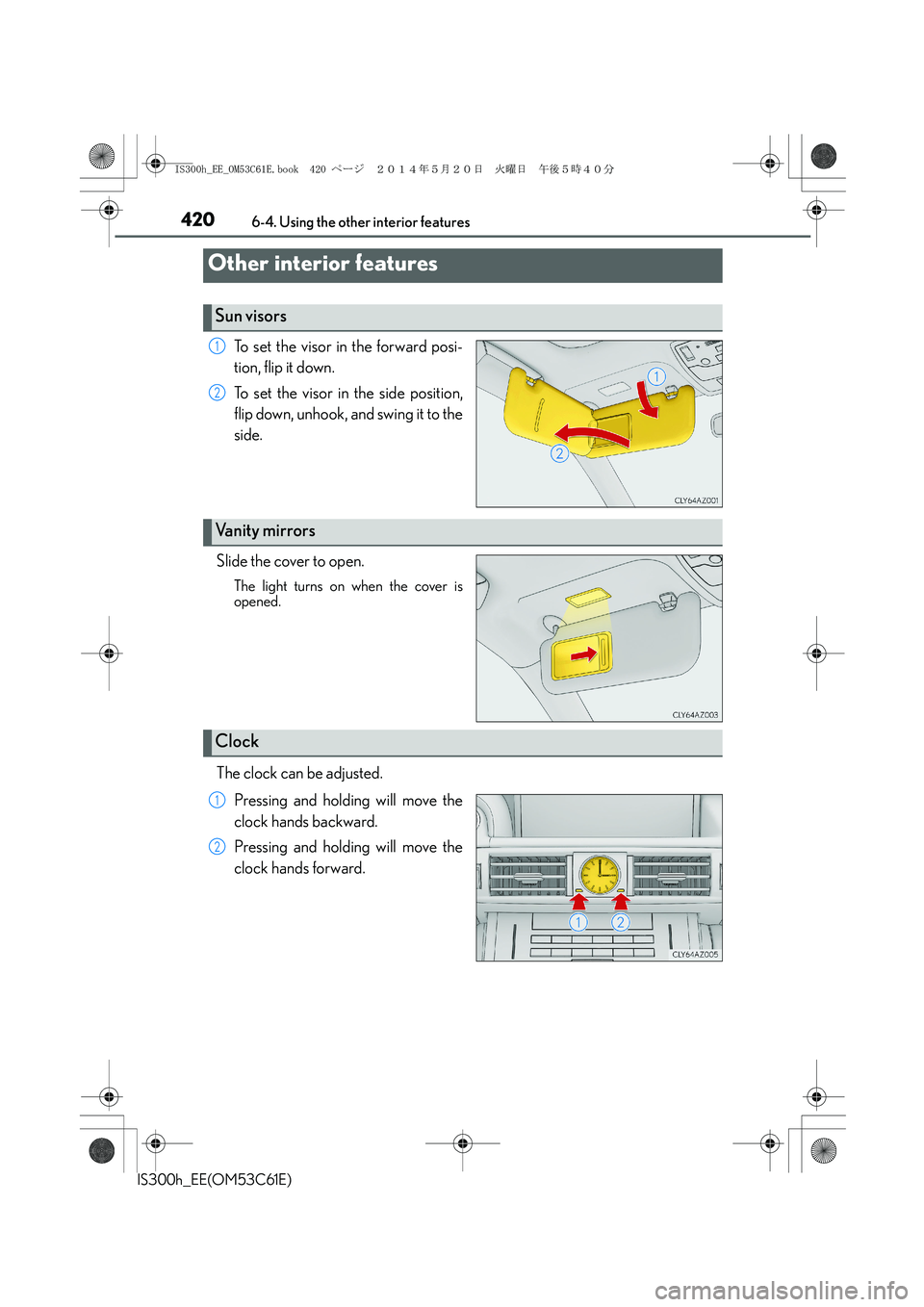
To set the visor in the forward posi-
tion, flip it down.
To set the visor in the side position,
flip down, unhook, and swing it to the
side.
Slide the cover to open.
The light turns on when the cover is
opened.
The clock can be adjusted.
Pressing and holding will move the
clock hands backward.
Pressing and holding will move the
clock hands forward.
Other interior features
Sun visors
1
2
Vanity mirrors
Clock
1
2
IS300h_EE_OM53C61E.book 420 ページ 2014年5月20日 火曜日 午後5時40分
Page 425 of 612

425
7Maintenance and care
IS300h_EE(OM53C61E)
7-1. Maintenance and care
Cleaning and protecting
the vehicle exterior................. 426
Cleaning and protecting
the vehicle interior..................430
7-2. Maintenance
Maintenance
requirements............................. 433
7-3. Do-it-yourself maintenance
Do-it-yourself service
precautions................................ 435
Hood ............................................... 437
Positioning a floor jack .............438
Engine compartment ............... 439
12-volt battery ..............................447
Tires.................................................. 450
Replacing the tire ....................... 459
Tire inflation pressure ............... 465
Wheels ............................................467
Air conditioning filter ............... 469
Electronic key battery ................ 471
Checking and replacing
fuses............................................... 474
Light bulbs..................................... 478
IS300h_EE_OM53C61E.book 425 ページ 2014年5月20日 火曜日 午後5時40分
Page 429 of 612
4297-1. Maintenance and care
7
Maintenance and care
IS300h_EE(OM53C61E)
NOTICE
■To prevent paint deterioration and corrosion on the body and components (aluminum
wheels etc.)
●Wash the vehicle immediately in the following cases:
• After driving near the sea coast
• After driving on salted roads
• If coal tar or tree sap is present on the paint surface
• If dead insects, insect droppings or bird droppings are present on the paint surface
• After driving in an area contaminated with soot, oily smoke, mine dust, iron pow-
der or chemical substances
• If the vehicle becomes heavily soiled with dust or mud
• If liquids such as benzene and gasoline are spilled on the paint surface
●If the paint is chipped or scratched, have it repaired immediately.
●To prevent the wheels from corroding, remove any dirt and store in a place with low
humidity when storing the wheels.
■Cleaning the exterior lights
●Wash carefully. Do not use organic substances or scrub with a hard brush.
This may damage the surfaces of the lights.
●Do not apply wax to the surfaces of the lights.
Wax may cause damage to the lenses.
■When using an automatic car wash (vehicles with rain-sensing windshield wipers)
Set the wipers to the intermittent windshield wipers. (→P. 2 3 8 )
If AUTO mode is selected, the wipers may operate and the wiper blades may be dam-
aged.
IS300h_EE_OM53C61E.book 429 ページ 2014年5月20日 火曜日 午後5時40分
Page 432 of 612
4327-1. Maintenance and care
IS300h_EE(OM53C61E)
NOTICE
■Cleaning detergents
●Do not use the following types of detergent, as they may discolor the vehicle interior
or cause streaks or damage to painted surfaces:
• Non-seat portions: Organic substances such as benzene or gasoline, alkaline or
acidic solutions, dye, and bleach
• Seats: Alkaline or acidic solutions, such as thinner, benzene, and alcohol
●Do not use polish wax or polish cleaner. The instrument panel’s or other interior part’s
painted surface may be damaged.
■Preventing damage to leather surfaces
Observe the following precautions to avoid damage to and deterioration of leather
surfaces:
●Remove any dust or dirt from leather surfaces immediately.
●Do not expose the vehicle to direct sunlight for extended periods of time. Park the
vehicle in the shade, especially during summer.
●Do not place items made of vinyl, plastic, or containing wax on the upholstery, as they
may stick to the leather surface if the vehicle interior heats up significantly.
■Water on the floor
Do not wash the vehicle floor with water.
Vehicle systems such as the audio system may be damaged if water comes into contact
with electrical components such as the audio system above or under the floor of the
vehicle. Water may also cause the body to rust.
■When cleaning the inside of the windshield (vehicles with LDA [Lane Departure
Alert])
Be careful not to touch the camera sensor (→P. 2 6 1 ) .
If the camera is accidentally scratched or hit, LDA may not operate properly or may
cause a malfunction.
■Cleaning the inside of the rear window
●Do not use glass cleaner to clean the rear window, as this may cause damage to the
rear window defogger heater wires or antenna. Use a cloth dampened with luke-
warm water to gently wipe the window clean. Wipe the window in strokes running
parallel to the heater wires or antenna.
●Be careful not to scratch or damage the heater wires or antenna.
IS300h_EE_OM53C61E.book 432 ページ 2014年5月20日 火曜日 午後5時40分