radio Lexus IS300h 2014 User Guide
[x] Cancel search | Manufacturer: LEXUS, Model Year: 2014, Model line: IS300h, Model: Lexus IS300h 2014Pages: 612, PDF Size: 111.33 MB
Page 153 of 612

1533-2. Opening, closing and locking the doors and trunk
3
Operation of each component
IS300h_EE(OM53C61E)
■Note for the push-start function
●Even when the electronic key is within the effective range (detection areas), the system
may not operate properly when the electronic key is on the instrument panel, rear
package tray or floor, or in the door pockets or glove box when the hybrid system is
started or power switch modes are changed.
●Even if the electronic key is not inside the vehicle, it may be possible to start the hybrid
system if the electronic key is near the window.
■When the vehicle is not driven for extended periods
●Vehicles with entry function: To prevent theft of the vehicle, do not leave the electronic
key within 2 m (6 ft.) of the vehicle.
●The smart entry & start system can be deactivated in advance. (→P. 5 7 3 )
■To operate the system properly
●Make sure to carry the electronic key when operating the system. Do not get the elec-
tronic key too close to the vehicle when operating the system from the outside of the
vehicle.
Depending on the position and holding condition of the electronic key, the key may not
be detected correctly and the system may not operate properly. (The alarm may go off
accidentally, or the door lock prevention function may not operate.)
●Do not leave the electronic key inside the luggage compartment.
The key confinement prevention function may not operate, depending on the location
of the key (close to a spare tire [if equipped], the inside edge of the luggage compart-
ment), conditions (inside a metal bag, close to metallic objects) and the radio waves in
the surrounding area. (→P. 1 4 6 )
■If the smart entry & start system does not operate properly
●Locking and unlocking the doors and opening the trunk: Use the mechanical key.
(→P. 544)
●Starting the hybrid system: →P. 5 4 5
■Customization
Settings (e. g. smart entry & start system) can be changed.
(Customizable features: →P. 5 7 3 )
■If the smart entry & start system has been deactivated in a customized setting
●Locking and unlocking the doors and opening the trunk:
Use the wireless remote control or mechanical key. (→P. 136, 144, 544)
●Starting the hybrid system and changing power switch modes: →P. 5 4 5
●Stopping the hybrid system: →P. 2 1 0
IS300h_EE_OM53C61E.book 153 ページ 2014年5月20日 火曜日 午後5時40分
Page 163 of 612
1633-2. Opening, closing and locking the doors and trunk
3
Operation of each component
IS300h_EE(OM53C61E)
CAUTION
■Caution regarding interference with electronic devices
●People with implantable cardiac pacemakers, cardiac resynchronization therapy-
pacemakers or implantable cardioverter defibrillators should maintain a reasonable
distance between themselves and the smart entry & start system antennas.
(→P. 1 4 9 )
The radio waves may affect the operation of such devices. If necessary, the entry
function can be disabled. Ask any authorized Lexus dealer or repairer, or another
duly qualified and equipped professional for details, such as the frequency of radio
waves and timing of the emitted radio waves. Then, consult your doctor to see if you
should disable the entry function.
●Users of any electrical medical device other than implantable cardiac pacemakers,
cardiac resynchronization therapy-pacemakers or implantable cardioverter defibril-
lators should consult the manufacturer of the device for information about its opera-
tion under the influence of radio waves.
Radio waves could have unexpected effects on the operation of such medical
devices.
Ask any authorized Lexus dealer or repairer, or another duly qualified and equipped
professional for details on disabling the entry function.
IS300h_EE_OM53C61E.book 163 ページ 2014年5月20日 火曜日 午後5時40分
Page 314 of 612
314
IS300h_EE(OM53C61E)
5-1. Basic Operations
Lexus Display Audio
System .......................................... 316
Steering wheel audio
switches....................................... 322
USB/AUX ports ......................... 323
5-2. Setup
Setup menu .................................. 324
General settings......................... 325
Voice settings .............................. 328
Display settings ........................... 329
5-3. Using the audio system
Selecting the audio
source ..........................................330
Optimal use of the audio
system ........................................... 331
Audio settings ............................. 332
Audio menu screen
operation .................................... 336
5-4. Using the radio
Radio operation .......................... 339
5-5. Playing an audio CD and
MP3/WMA/AAC discs
CD player operation ................. 341
IS300h_EE_OM53C61E.book 314 ページ 2014年5月20日 火曜日 午後5時40分
Page 316 of 612
316
IS300h_EE(OM53C61E)5-1. Basic Operations
Lexus Display Audio System∗
∗
: If equipped
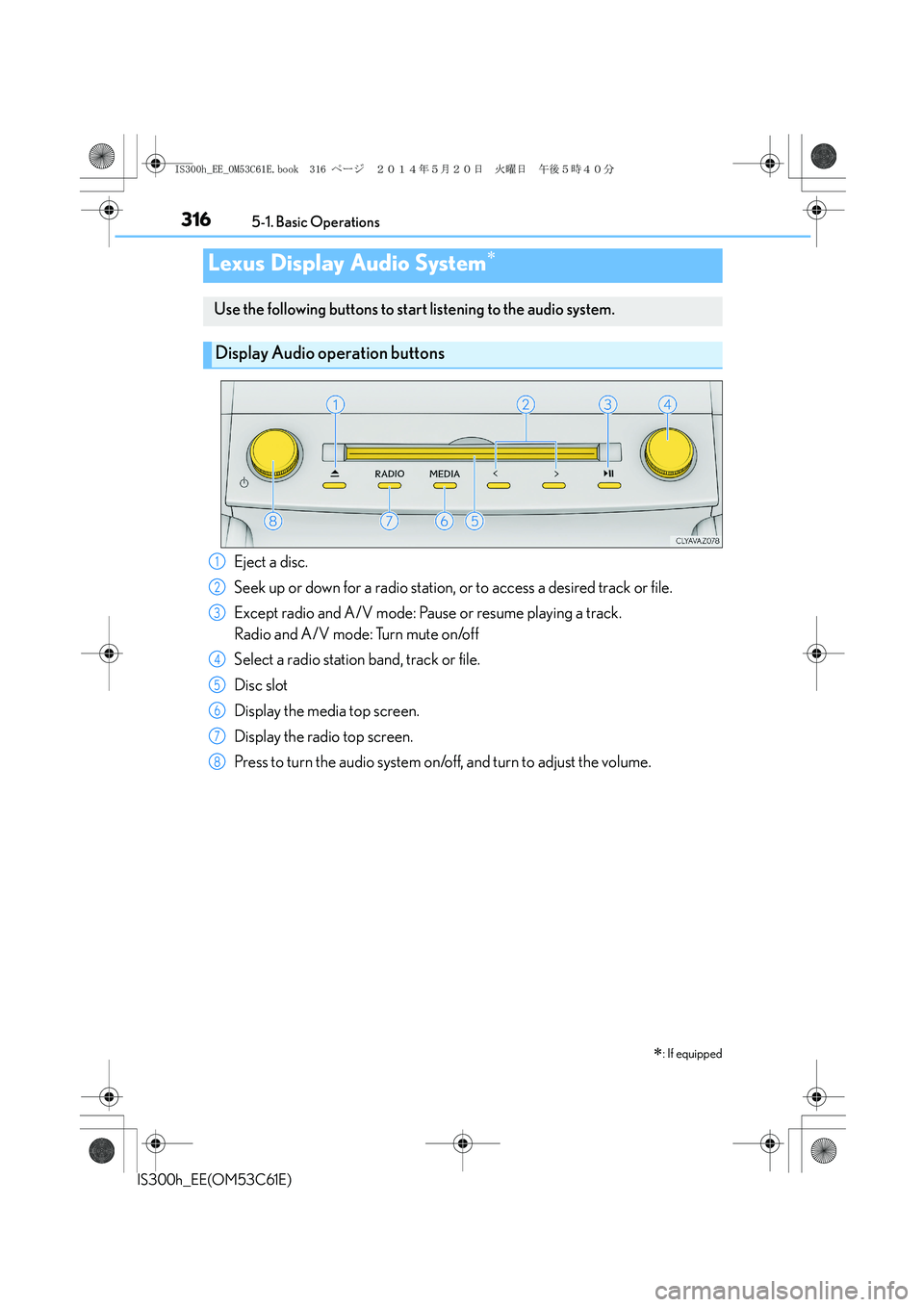
Use the following buttons to start listening to the audio system.
Display Audio operation buttons
Eject a disc.
Seek up or down for a radio station, or to access a desired track or file.
Except radio and A/V mode: Pause or resume playing a track.
Radio and A/V mode: Turn mute on/off
Select a radio station band, track or file.
Disc slot
Display the media top screen.
Display the radio top screen.
Press to turn the audio system on/off, and turn to adjust the volume.1
2
3
4
5
6
7
8
IS300h_EE_OM53C61E.book 316 ページ 2014年5月20日 火曜日 午後5時40分
Page 322 of 612
3225-1. Basic Operations
IS300h_EE(OM53C61E)
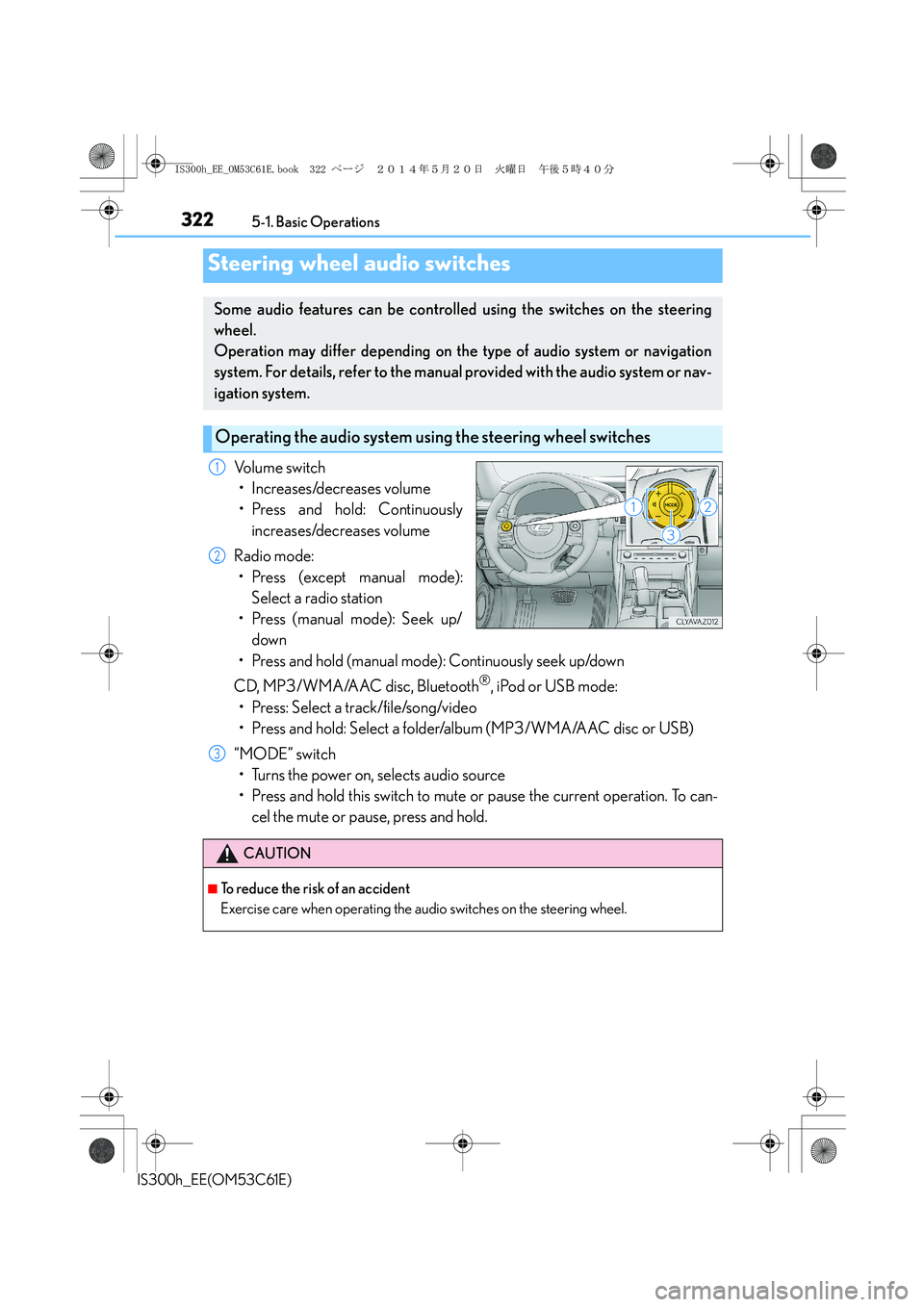
Volume switch
• Increases/decreases volume
• Press and hold: Continuously
increases/decreases volume
Radio mode:
• Press (except manual mode):
Select a radio station
• Press (manual mode): Seek up/
down
• Press and hold (manual mode): Continuously seek up/down
CD, MP3/WMA/AAC disc, Bluetooth
®, iPod or USB mode:
• Press: Select a track/file/song/video
• Press and hold: Select a folder/album (MP3/WMA/AAC disc or USB)
“MODE” switch
• Turns the power on, selects audio source
• Press and hold this switch to mute or pause the current operation. To can-
cel the mute or pause, press and hold.
Steering wheel audio switches
Some audio features can be controlled using the switches on the steering
wheel.
Operation may differ depending on the type of audio system or navigation
system. For details, refer to the manual provided with the audio system or nav-
igation system.
Operating the audio system using the steering wheel switches
1
2
CAUTION
■To reduce the risk of an accident
Exercise care when operating the audio switches on the steering wheel.
3
IS300h_EE_OM53C61E.book 322 ページ 2014年5月20日 火曜日 午後5時40分
Page 324 of 612

324
IS300h_EE(OM53C61E)5-2. Setup
Go to “Setup”: → “Setup”
Change the settings for operation
sounds, screen animation, etc.
(→P. 3 2 5 )
Adjust the settings for voice guid-
ance volume. (→P. 3 2 8 )
Change the settings for registering,
removing, connecting and discon-
necting Bluetooth
® devices.
(→P. 3 5 8 )
Change the settings for FM radio, iPod, etc. (→P. 3 3 2 )
Change the settings for vehicle customization. (→P. 5 7 3 )
Change the settings for phone sound, phonebook, etc. (→P. 3 7 9 )
Setup menu
The Display Audio system can be adjusted to the desired settings.
Display “Setup” screen
1
2
3
4
5
6
IS300h_EE_OM53C61E.book 324 ページ 2014年5月20日 火曜日 午後5時40分
Page 327 of 612

3275-2. Setup
5
Lexus Display Audio system
IS300h_EE(OM53C61E)
→ “Setup” → “General” → “Delete personal data”
Select “Delete”.
Check carefully beforehand, as data cannot be retrieved once deleted.
The following personal data will be deleted or changed to its default settings.
•Phonebook data
•Voice tag
• Call history data
•Favorite data
• Bluetooth
® devices data
• Phone sound settings
• Detailed Bluetooth
® settings
• Audio/video setting
• Preset switch data
• Last used radio station
• Customized image data
•FM info setting
• iPod tagging information
• Software update history
• Software update detail information
• Phone display setting
• Contact/call history setting
• Messaging setting
NOTICE
■If the console box lid cannot be fully closed
→P. 3 5 5
■To prevent damage to the USB memory device or its terminals
→P. 3 5 5
Deleting personal data
1
2
IS300h_EE_OM53C61E.book 327 ページ 2014年5月20日 火曜日 午後5時40分
Page 330 of 612
330
IS300h_EE(OM53C61E)5-3. Using the audio system
Press the button to display the “Source” screen.
If the “Source” screen is not displayed, press the button again.
Select the desired audio source.
The audio source can be selected by pressing the “RADIO” or “MEDIA” button.
Press the “MODE” switch when the audio system is turned on. The audio source
changes each time the “MODE” switch is pressed.
■Rearranging the list
The listing order of the source list can be rearranged.
Move the controller to the left while on the “Source” screen.
Select “Audio source select”.
Select an item you wish to move and then select where to move the item to.
Selecting the audio source
Switching between audio sources such as radio and CD are explained in this
section.
Changing audio source
Using the steering wheel switches to change audio sources
1
2
1
2
3
IS300h_EE_OM53C61E.book 330 ページ 2014年5月20日 火曜日 午後5時40分
Page 332 of 612
3325-3. Using the audio system
IS300h_EE(OM53C61E)
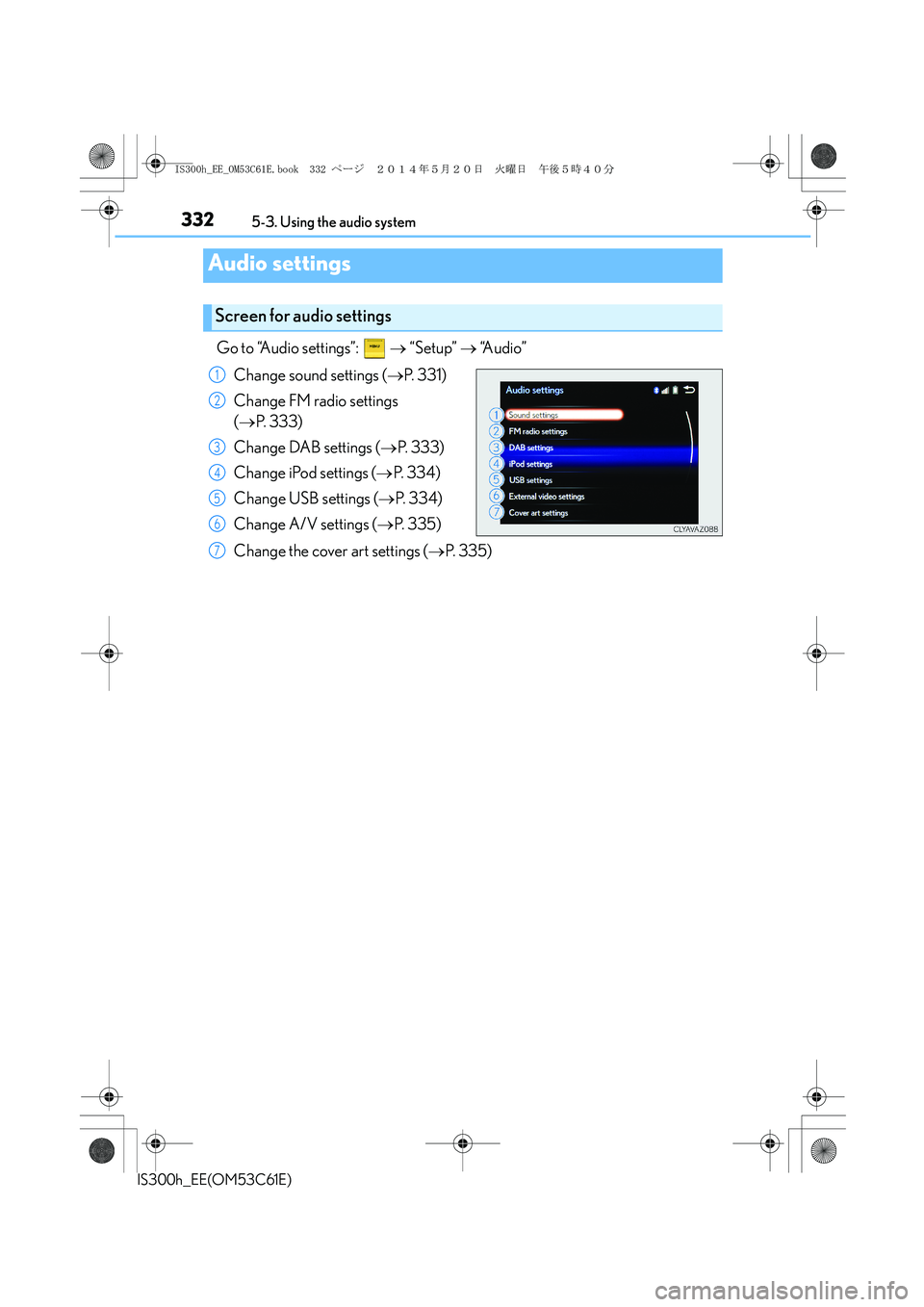
Go to “Audio settings”: → “Setup” → “Audio”
Change sound settings (→P. 3 3 1 )
Change FM radio settings
(→P. 3 3 3 )
Change DAB settings (→P. 333)
Change iPod settings (→P. 3 3 4 )
Change USB settings (→P. 3 3 4 )
Change A/V settings (→P. 335)
Change the cover art settings (→P. 3 3 5 )
Audio settings
Screen for audio settings
1
2
3
4
5
6
7
IS300h_EE_OM53C61E.book 332 ページ 2014年5月20日 火曜日 午後5時40分
Page 333 of 612
3335-3. Using the audio system
5
Lexus Display Audio system
IS300h_EE(OM53C61E)
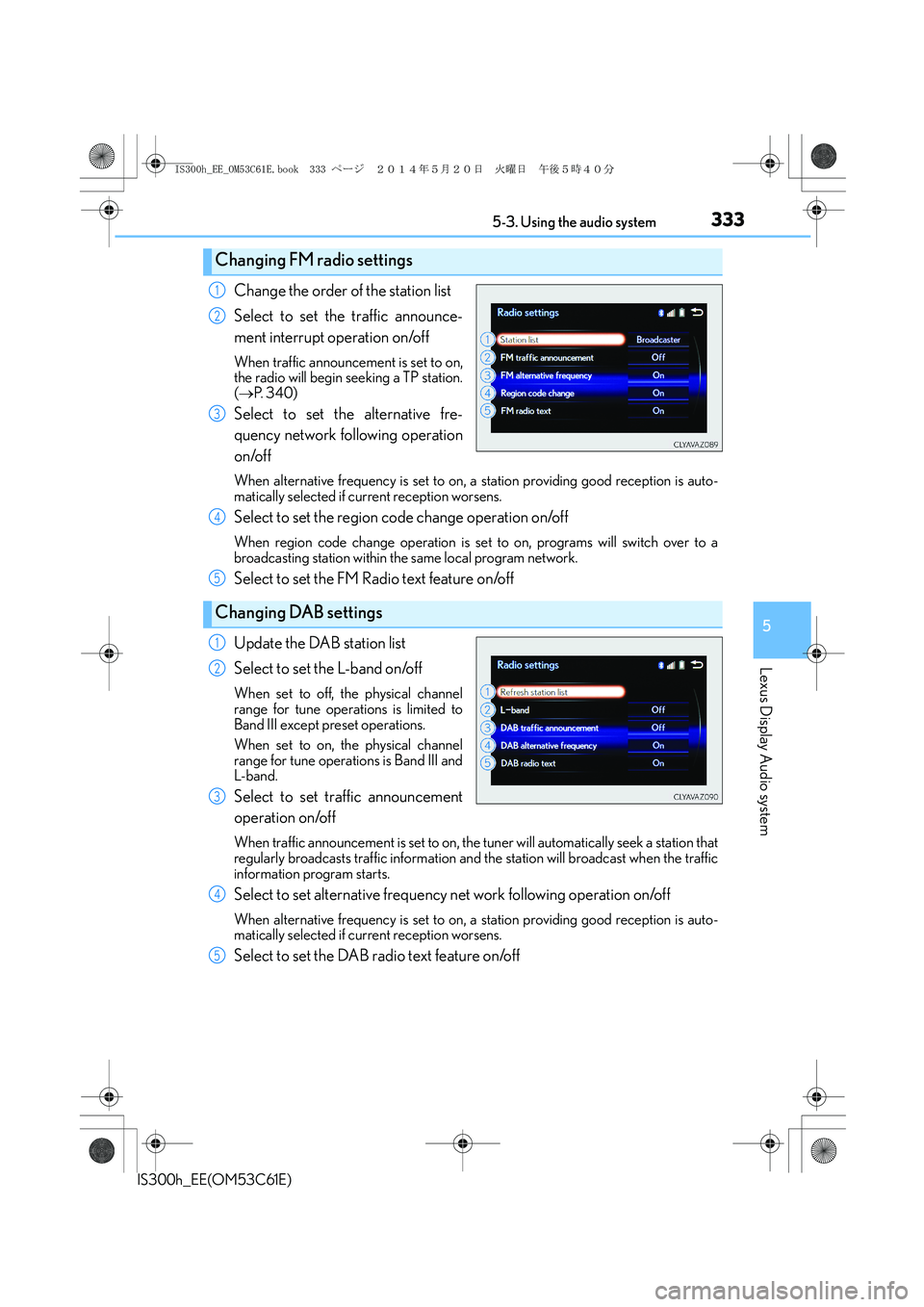
Change the order of the station list
Select to set the traffic announce-
ment interrupt operation on/off
When traffic announcement is set to on,
the radio will begin seeking a TP station.
(→P. 3 4 0 )
Select to set the alternative fre-
quency network following operation
on/off
When alternative frequency is set to on, a station providing good reception is auto-
matically selected if current reception worsens.
Select to set the region code change operation on/off
When region code change operation is set to on, programs will switch over to a
broadcasting station within the same local program network.
Select to set the FM Radio text feature on/off
Update the DAB station list
Select to set the L-band on/off
When set to off, the physical channel
range for tune operations is limited to
Band III except preset operations.
When set to on, the physical channel
range for tune operations is Band III and
L-band.
Select to set traffic announcement
operation on/off
When traffic announcement is set to on, the tuner will automatically seek a station that
regularly broadcasts traffic information and the station will broadcast when the traffic
information program starts.
Select to set alternative frequency net work following operation on/off
When alternative frequency is set to on, a station providing good reception is auto-
matically selected if current reception worsens.
Select to set the DAB radio text feature on/off
Changing FM radio settings
1
2
3
Changing DAB settings
4
5
1
2
3
4
5
IS300h_EE_OM53C61E.book 333 ページ 2014年5月20日 火曜日 午後5時40分