Ac unit Lexus IS300h 2014 Owner's Guide
[x] Cancel search | Manufacturer: LEXUS, Model Year: 2014, Model line: IS300h, Model: Lexus IS300h 2014Pages: 612, PDF Size: 111.33 MB
Page 485 of 612
4857-3. Do-it-yourself maintenance
7
Maintenance and care
IS300h_EE(OM53C61E)
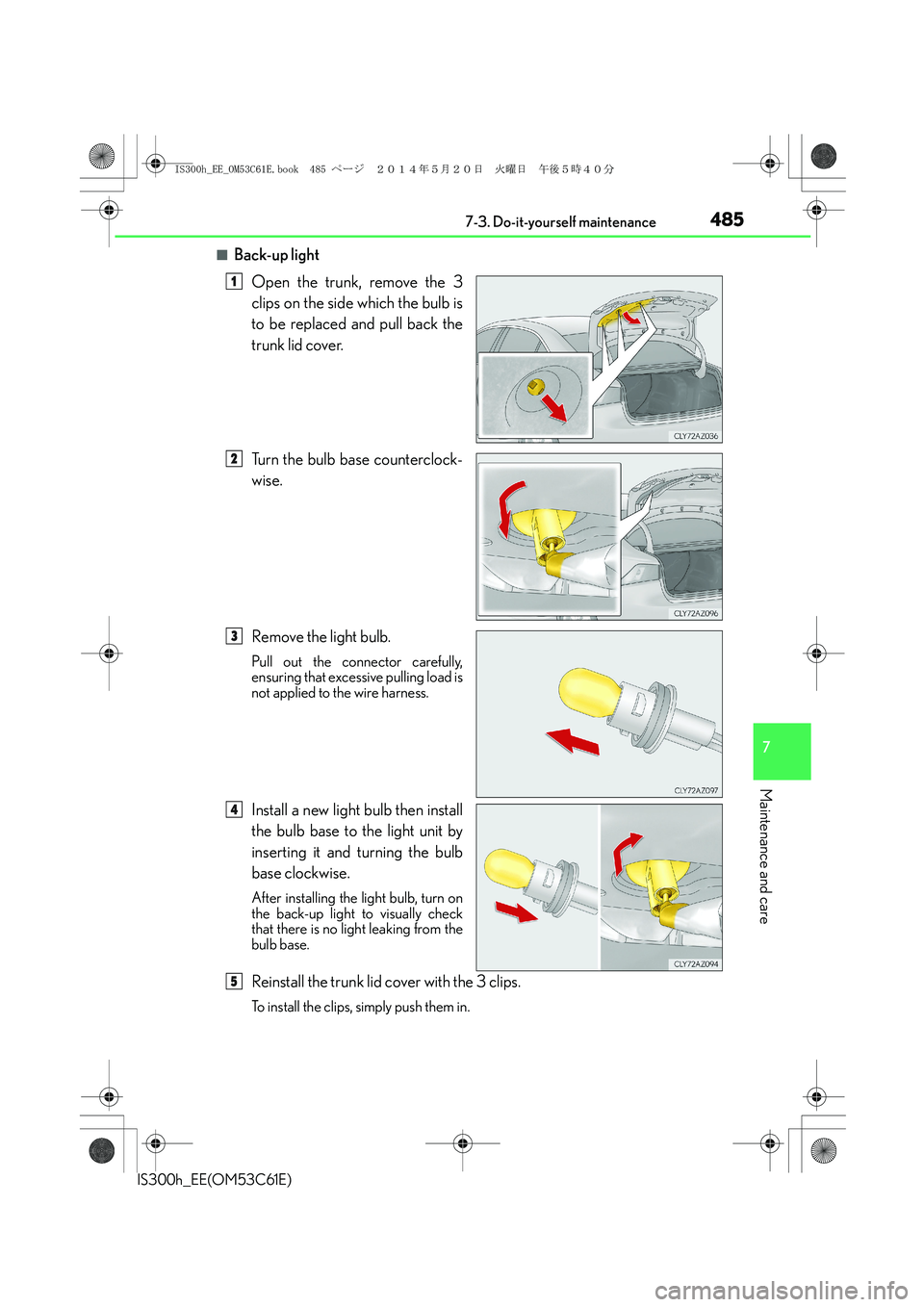
■Back-up light
Open the trunk, remove the 3
clips on the side which the bulb is
to be replaced and pull back the
trunk lid cover.
Turn the bulb base counterclock-
wise.
Remove the light bulb.
Pull out the connector carefully,
ensuring that excessive pulling load is
not applied to the wire harness.
Install a new light bulb then install
the bulb base to the light unit by
inserting it and turning the bulb
base clockwise.
After installing the light bulb, turn on
the back-up light to visually check
that there is no light leaking from the
bulb base.
Reinstall the trunk lid cover with the 3 clips.
To install the clips, simply push them in.
1
2
3
4
5
IS300h_EE_OM53C61E.book 485 ページ 2014年5月20日 火曜日 午後5時40分
Page 487 of 612
4877-3. Do-it-yourself maintenance
7
Maintenance and care
IS300h_EE(OM53C61E)
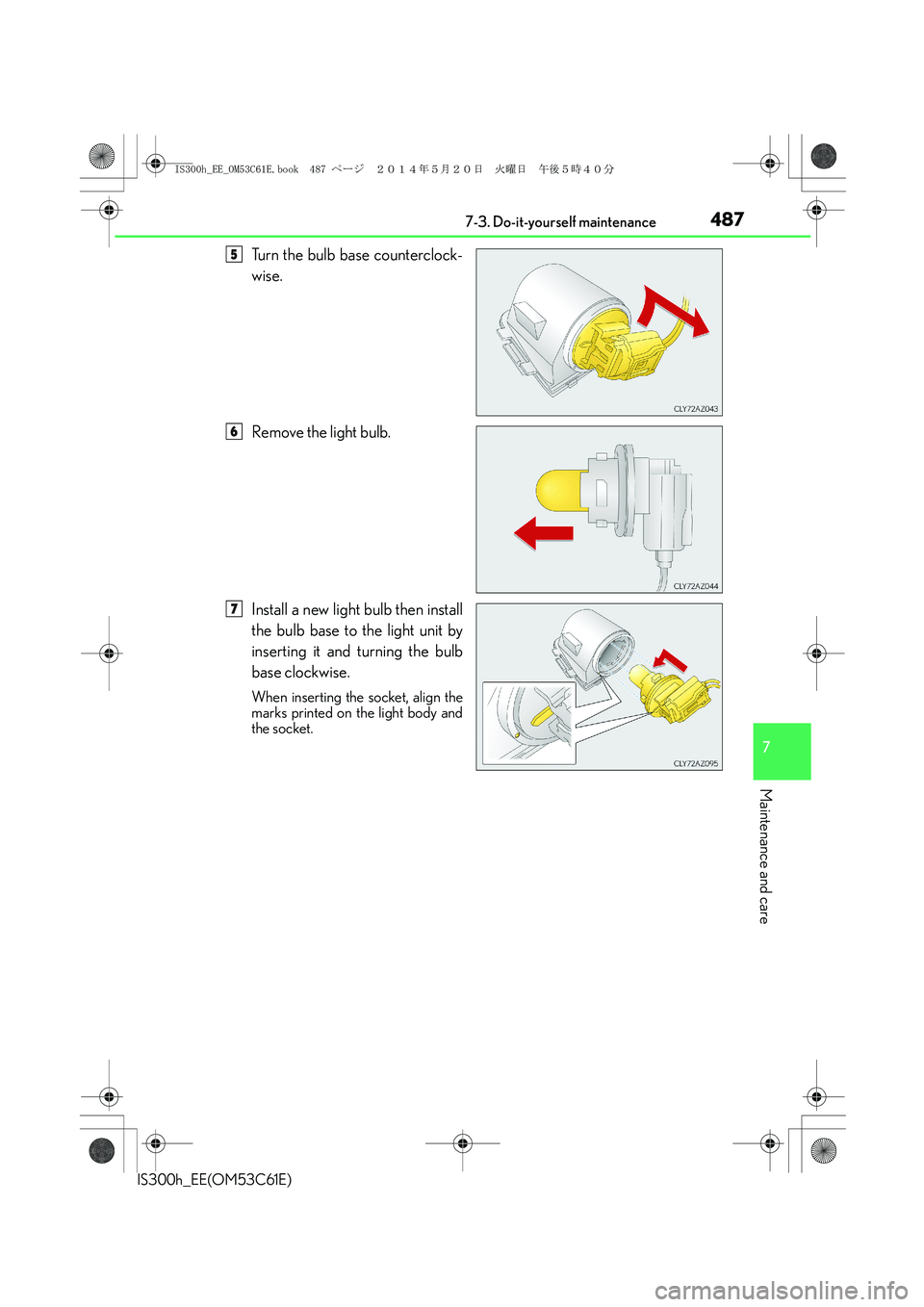
Turn the bulb base counterclock-
wise.
Remove the light bulb.
Install a new light bulb then install
the bulb base to the light unit by
inserting it and turning the bulb
base clockwise.
When inserting the socket, align the
marks printed on the light body and
the socket.
5
6
7
IS300h_EE_OM53C61E.book 487 ページ 2014年5月20日 火曜日 午後5時40分
Page 488 of 612
4887-3. Do-it-yourself maintenance
IS300h_EE(OM53C61E)
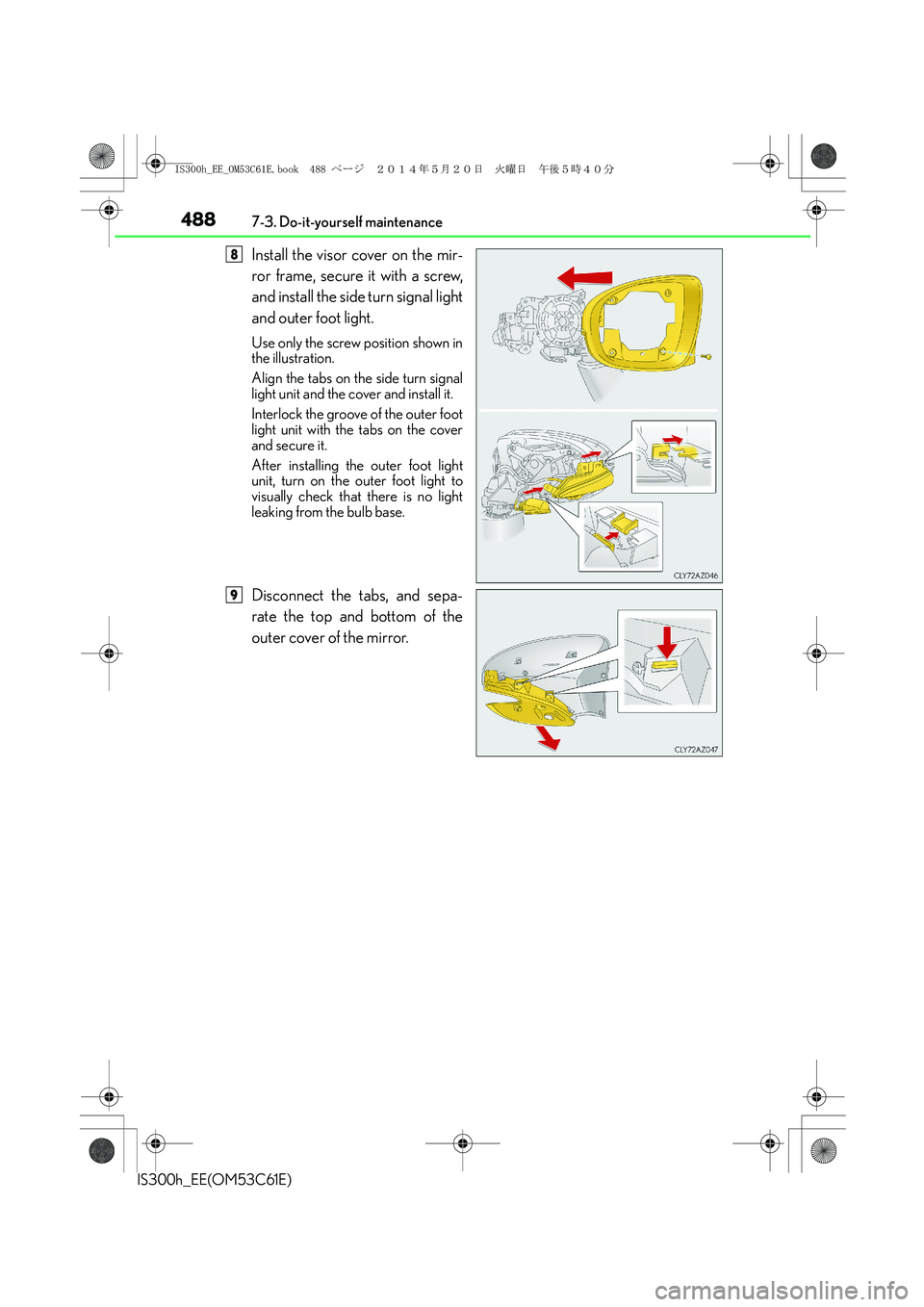
Install the visor cover on the mir-
ror frame, secure it with a screw,
and install the side turn signal light
and outer foot light.
Use only the screw position shown in
the illustration.
Align the tabs on the side turn signal
light unit and the cover and install it.
Interlock the groove of the outer foot
light unit with the tabs on the cover
and secure it.
After installing the outer foot light
unit, turn on the outer foot light to
visually check that there is no light
leaking from the bulb base.
Disconnect the tabs, and sepa-
rate the top and bottom of the
outer cover of the mirror.
8
9
IS300h_EE_OM53C61E.book 488 ページ 2014年5月20日 火曜日 午後5時40分
Page 491 of 612
4917-3. Do-it-yourself maintenance
7
Maintenance and care
IS300h_EE(OM53C61E)
CAUTION
■Replacing light bulbs
●Turn off the lights. Do not attempt to replace the bulb immediately after turning off the
lights.
The bulbs become very hot and may cause burns.
●Do not touch the glass portion of the light bulb with bare hands. When it is unavoid-
able to hold the glass portion, use and hold with a clean dry cloth to avoid getting
moisture and oils on the bulb.
Also, if the bulb is scratched or dropped, it may blow out or crack.
●Fully install light bulbs and any parts used to secure them. Failure to do so may result
in heat damage, fire, or water entering the headlight unit. This may damage the head-
lights or cause condensation to build up on the lens.
■Discharge headlights (if equipped)
●Contact any authorized Lexus dealer or repairer, or another duly qualified and
equipped professional before replacing the discharge headlights (including light
bulbs).
●Do not touch the discharge headlight’s high voltage socket when the headlights are
turned on.
An extremely high voltage of 30000 V will be discharged and could result in death
or serious injury by electric shock.
●Do not attempt to take apart or repair the headlight bulbs, connectors, power supply
circuits, or related components.
Doing so could result in electric shock and death or serious injury.
■To prevent damage or fire
●Make sure bulbs are fully seated and locked.
●Check the wattage of the bulb before installing to prevent heat damage.
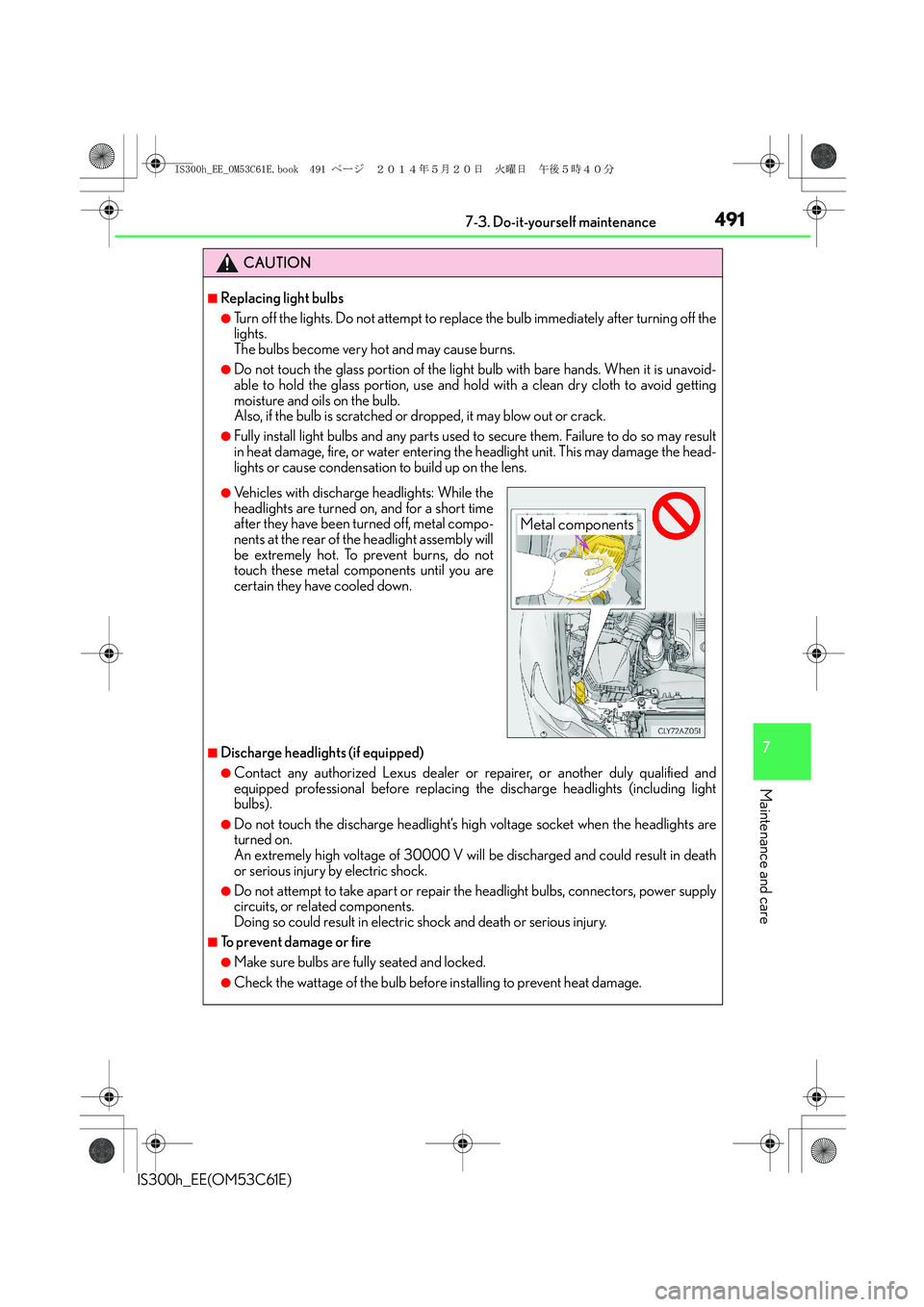
●Vehicles with discharge headlights: While the
headlights are turned on, and for a short time
after they have been turned off, metal compo-
nents at the rear of the headlight assembly will
be extremely hot. To prevent burns, do not
touch these metal components until you are
certain they have cooled down.
Metal components
IS300h_EE_OM53C61E.book 491 ページ 2014年5月20日 火曜日 午後5時40分
Page 555 of 612
5558-2. Steps to take in an emergency
8
When trouble arises
IS300h_EE(OM53C61E)
CAUTION
■When inspecting under the hood of your vehicle
Observe the following precautions.
Failure to do so may result in serious injury such as burns.
●If steam is seen coming from under the hood, do not open the hood until the steam
has subsided. The engine compartment may be very hot.
●After the hybrid system has been turned off, check that the “READY” indicator is off.
When the hybrid system operating, the gasoline engine may automatically start, or
the cooling fan may suddenly operate even if the gasoline engine stops. Do not touch
or approach rotating parts such as the belt and fan, which may lead to fingers or
clothing (especially a tie, a scarf or a muffler) getting caught, resulting in serious
injury.
NOTICE
■When adding engine/power control unit coolant
Add coolant slowly after the hybrid system has cooled down sufficiently. Adding cool
coolant to a hot hybrid system too quickly can cause damage to the hybrid system.
■To prevent damage to the cooling system
Observe the following precautions:
●Avoid contaminating the coolant with foreign matter (such as sand or dust etc.).
●Do not use any coolant additive.
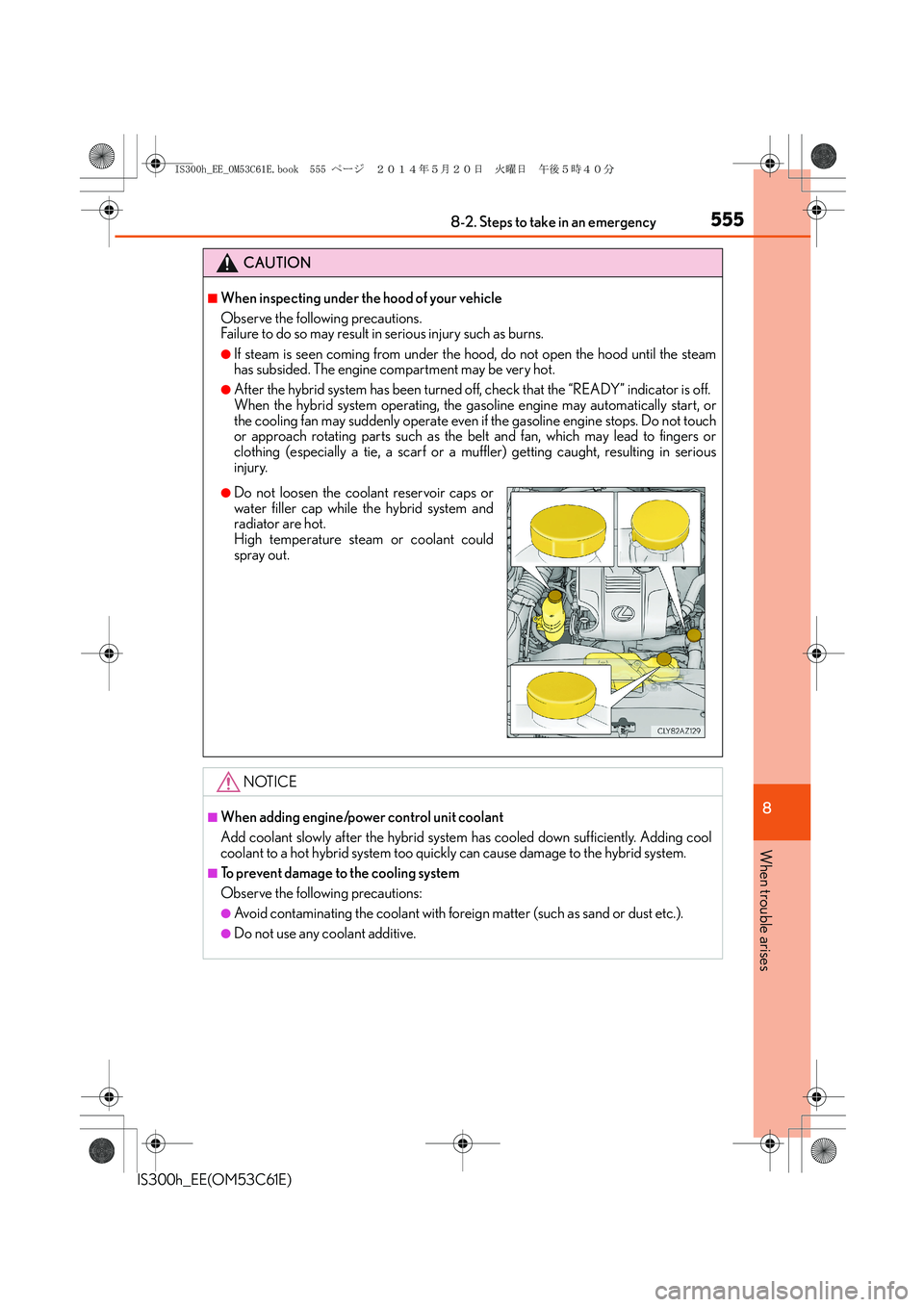
●Do not loosen the coolant reservoir caps or
water filler cap while the hybrid system and
radiator are hot.
High temperature steam or coolant could
spray out.
IS300h_EE_OM53C61E.book 555 ページ 2014年5月20日 火曜日 午後5時40分
Page 574 of 612
5749-2. Customization
IS300h_EE(OM53C61E)
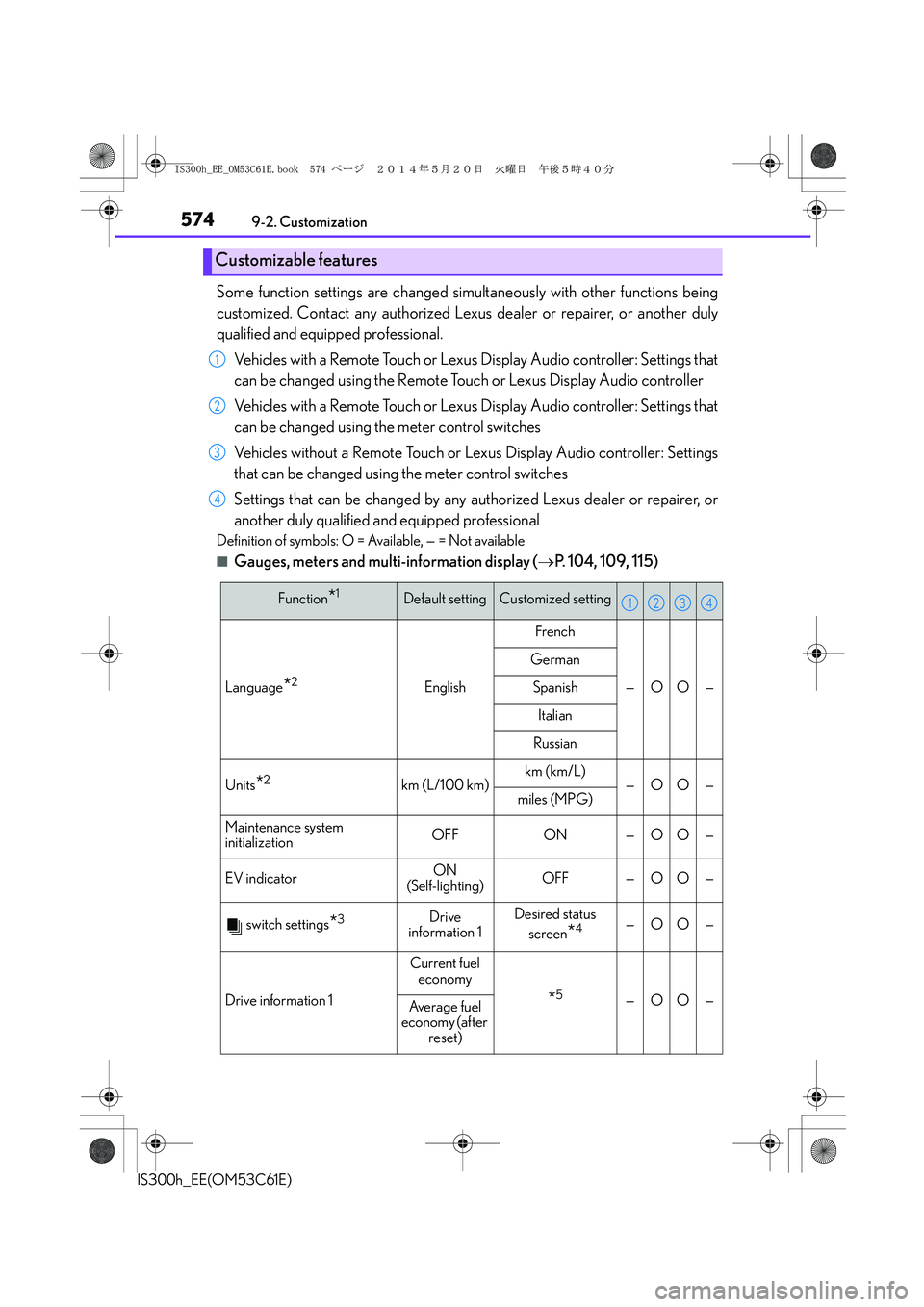
Some function settings are changed simultaneously with other functions being
customized. Contact any authorized Lexus dealer or repairer, or another duly
qualified and equipped professional.
Vehicles with a Remote Touch or Lexus Display Audio controller: Settings that
can be changed using the Remote Touch or Lexus Display Audio controller
Vehicles with a Remote Touch or Lexus Display Audio controller: Settings that
can be changed using the meter control switches
Vehicles without a Remote Touch or Lexus Display Audio controller: Settings
that can be changed using the meter control switches
Settings that can be changed by any authorized Lexus dealer or repairer, or
another duly qualified and equipped professional
Definition of symbols: O = Available, — = Not available
■Gauges, meters and multi-information display (→P. 104, 109, 115)
Customizable features
1
2
3
4
Function*1Default settingCustomized setting
Language*2English
French
—OO—
German
Spanish
Italian
Russian
Units*2km (L/100 km)km (km/L)—OO—miles (MPG)
Maintenance system
initializationOFFON—OO—
EV indicatorON
(Self-lighting)OFF—OO—
switch settings*3Drive
information 1Desired status
screen
*4—OO—
Drive information 1
Current fuel
economy
*5—OO—Average fuel
economy (after
reset)
1234
IS300h_EE_OM53C61E.book 574 ページ 2014年5月20日 火曜日 午後5時40分
Page 602 of 612
602Alphabetical index
IS300h_EE(OM53C61E)
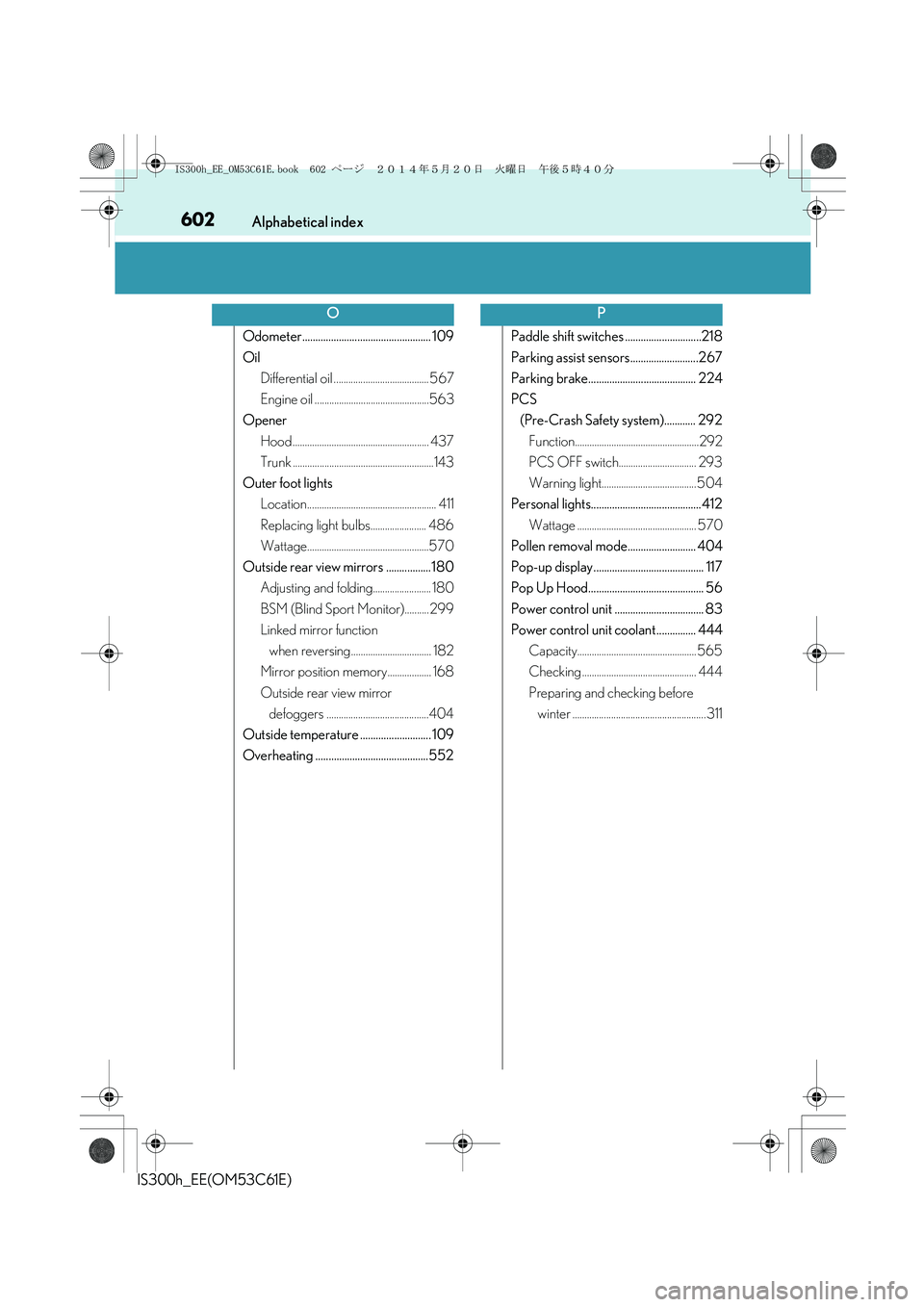
Odometer................................................. 109
Oil
Differential oil ....................................... 567
Engine oil ...............................................563
Opener
Hood ........................................................ 437
Trunk ..........................................................143
Outer foot lights
Location..................................................... 411
Replacing light bulbs....................... 486
Wattage..................................................570
Outside rear view mirrors .................180
Adjusting and folding........................ 180
BSM (Blind Sport Monitor)..........299
Linked mirror function
when reversing................................. 182
Mirror position memory.................. 168
Outside rear view mirror
defoggers ..........................................404
Outside temperature ........................... 109
Overheating ...........................................552Paddle shift switches .............................218
Parking assist sensors..........................267
Parking brake......................................... 224
PCS
(Pre-Crash Safety system)............ 292
Function...................................................292
PCS OFF switch................................ 293
Warning light....................................... 504
Personal lights.......................................... 412
Wattage ................................................. 570
Pollen removal mode.......................... 404
Pop-up display.......................................... 117
Pop Up Hood............................................ 56
Power control unit .................................. 83
Power control unit coolant ............... 444
Capacity................................................. 565
Checking ............................................... 444
Preparing and checking before
winter ....................................................... 311
OP
IS300h_EE_OM53C61E.book 602 ページ 2014年5月20日 火曜日 午後5時40分
Page 610 of 612
610Alphabetical index
IS300h_EE(OM53C61E)
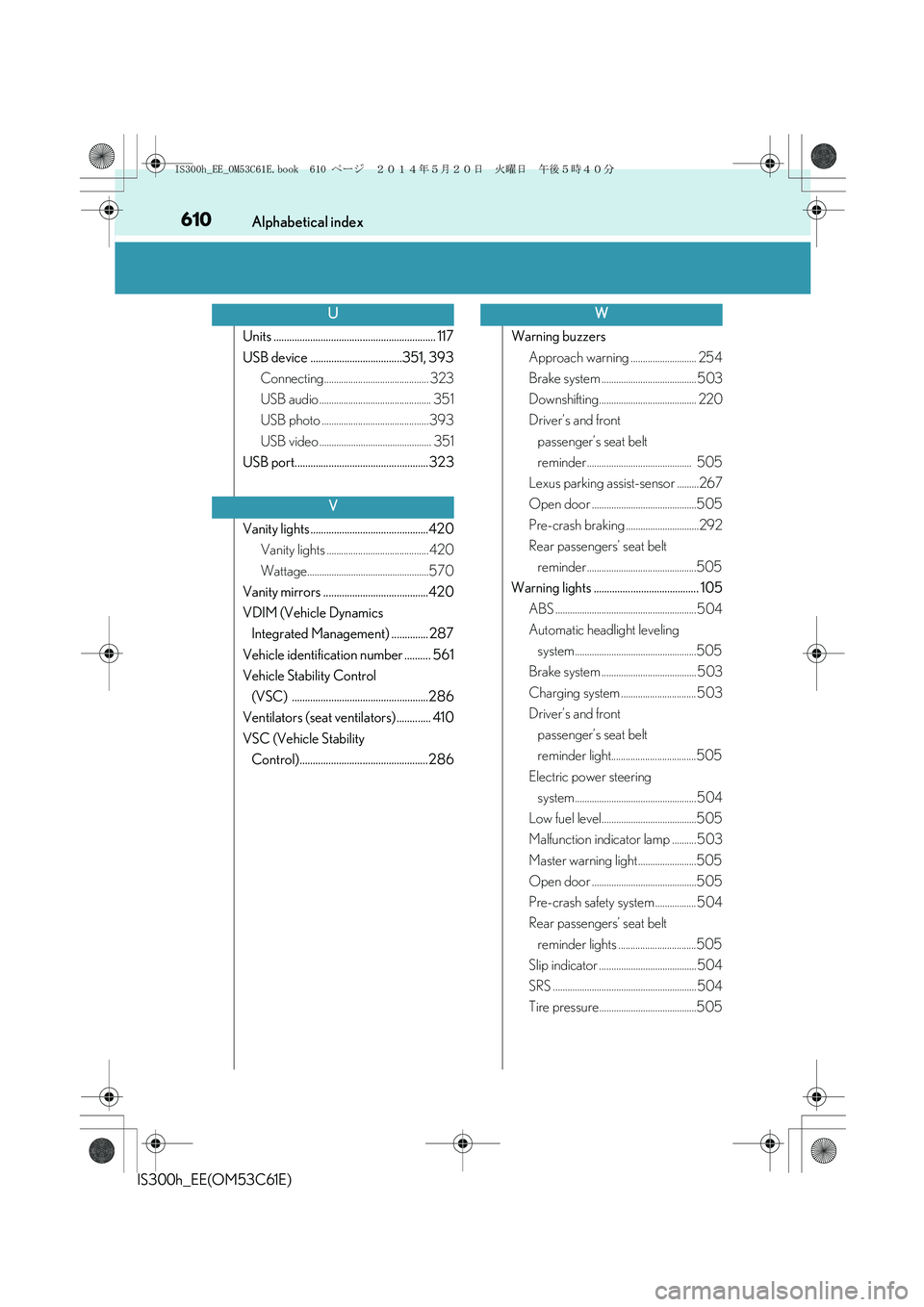
Units .............................................................. 117
USB device ...................................351, 393
Connecting........................................... 323
USB audio .............................................. 351
USB photo ............................................ 393
USB video .............................................. 351
USB port................................................... 323
Vanity lights .............................................420
Vanity lights .......................................... 420
Wattage..................................................570
Vanity mirrors ........................................420
VDIM (Vehicle Dynamics
Integrated Management) .............. 287
Vehicle identification number .......... 561
Vehicle Stability Control
(VSC) ....................................................286
Ventilators (seat ventilators) ............. 410
VSC (Vehicle Stability
Control)................................................. 286Warning buzzers
Approach warning ........................... 254
Brake system ....................................... 503
Downshifting........................................ 220
Driver’s and front
passenger’s seat belt
reminder ........................................... 505
Lexus parking assist-sensor .........267
Open door ...........................................505
Pre-crash braking ..............................292
Rear passengers’ seat belt
reminder .............................................505
Warning lights ........................................ 105
ABS .......................................................... 504
Automatic headlight leveling
system..................................................505
Brake system ....................................... 503
Charging system ............................... 503
Driver’s and front
passenger’s seat belt
reminder light...................................505
Electric power steering
system.................................................. 504
Low fuel level.......................................505
Malfunction indicator lamp .......... 503
Master warning light ........................505
Open door ...........................................505
Pre-crash safety system ................. 504
Rear passengers’ seat belt
reminder lights ................................505
Slip indicator ........................................ 504
SRS ........................................................... 504
Tire pressure........................................505
U
V
W
IS300h_EE_OM53C61E.book 610 ページ 2014年5月20日 火曜日 午後5時40分