air condition Lexus IS300h 2014 Owner's Guide
[x] Cancel search | Manufacturer: LEXUS, Model Year: 2014, Model line: IS300h, Model: Lexus IS300h 2014Pages: 612, PDF Size: 111.33 MB
Page 400 of 612
4006-1. Using the air conditioning system
IS300h_EE(OM53C61E)
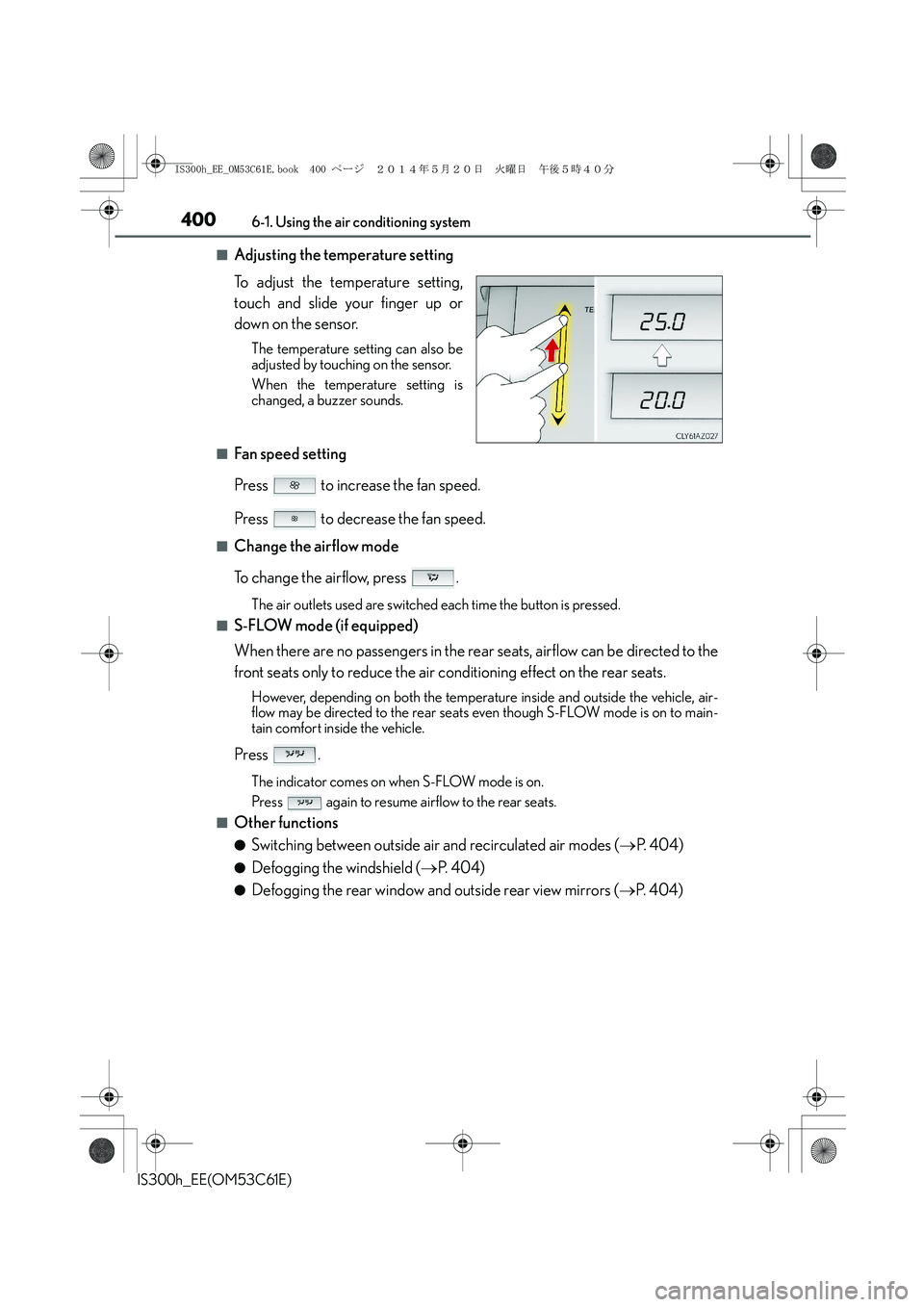
■Adjusting the temperature setting
To adjust the temperature setting,
touch and slide your finger up or
down on the sensor.
The temperature setting can also be
adjusted by touching on the sensor.
When the temperature setting is
changed, a buzzer sounds.
■Fan speed setting
Press to increase the fan speed.
Press to decrease the fan speed.
■Change the airflow mode
To change the airflow, press .
The air outlets used are switched each time the button is pressed.
■S-FLOW mode (if equipped)
When there are no passengers in the rear seats, airflow can be directed to the
front seats only to reduce the air conditioning effect on the rear seats.
However, depending on both the temperature inside and outside the vehicle, air-
flow may be directed to the rear seats even though S-FLOW mode is on to main-
tain comfort inside the vehicle.
Press .
The indicator comes on when S-FLOW mode is on.
Press again to resume airflow to the rear seats.
■Other functions
●Switching between outside air and recirculated air modes (→P. 4 0 4 )
●Defogging the windshield (→P. 404)
●Defogging the rear window and outside rear view mirrors (→P. 404)
IS300h_EE_OM53C61E.book 400 ページ 2014年5月20日 火曜日 午後5時40分
Page 401 of 612
4016-1. Using the air conditioning system
6
Interior features
IS300h_EE(OM53C61E)
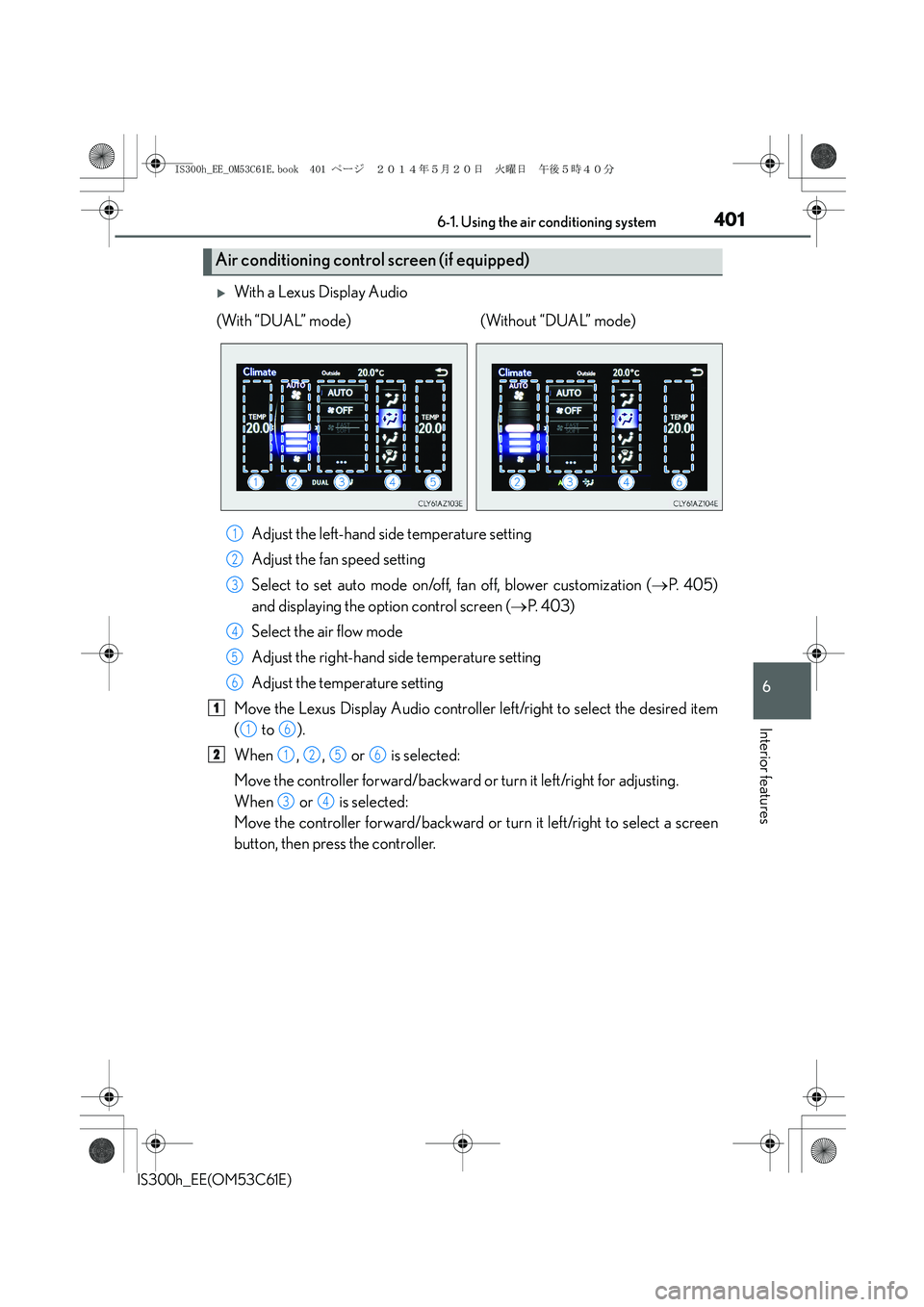
XWith a Lexus Display Audio
Adjust the left-hand side temperature setting
Adjust the fan speed setting
Select to set auto mode on/off, fan off, blower customization (→P. 4 0 5 )
and displaying the option control screen (→P. 4 0 3 )
Select the air flow mode
Adjust the right-hand side temperature setting
Adjust the temperature setting
Move the Lexus Display Audio controller left/right to select the desired item
( to ).
When , , or is selected:
Move the controller forward/backward or turn it left/right for adjusting.
When or is selected:
Move the controller forward/backward or turn it left/right to select a screen
button, then press the controller.
Air conditioning control screen (if equipped)
(With “DUAL” mode) (Without “DUAL” mode)
1
2
3
4
5
6
1
16
21256
34
IS300h_EE_OM53C61E.book 401 ページ 2014年5月20日 火曜日 午後5時40分
Page 402 of 612
4026-1. Using the air conditioning system
IS300h_EE(OM53C61E)
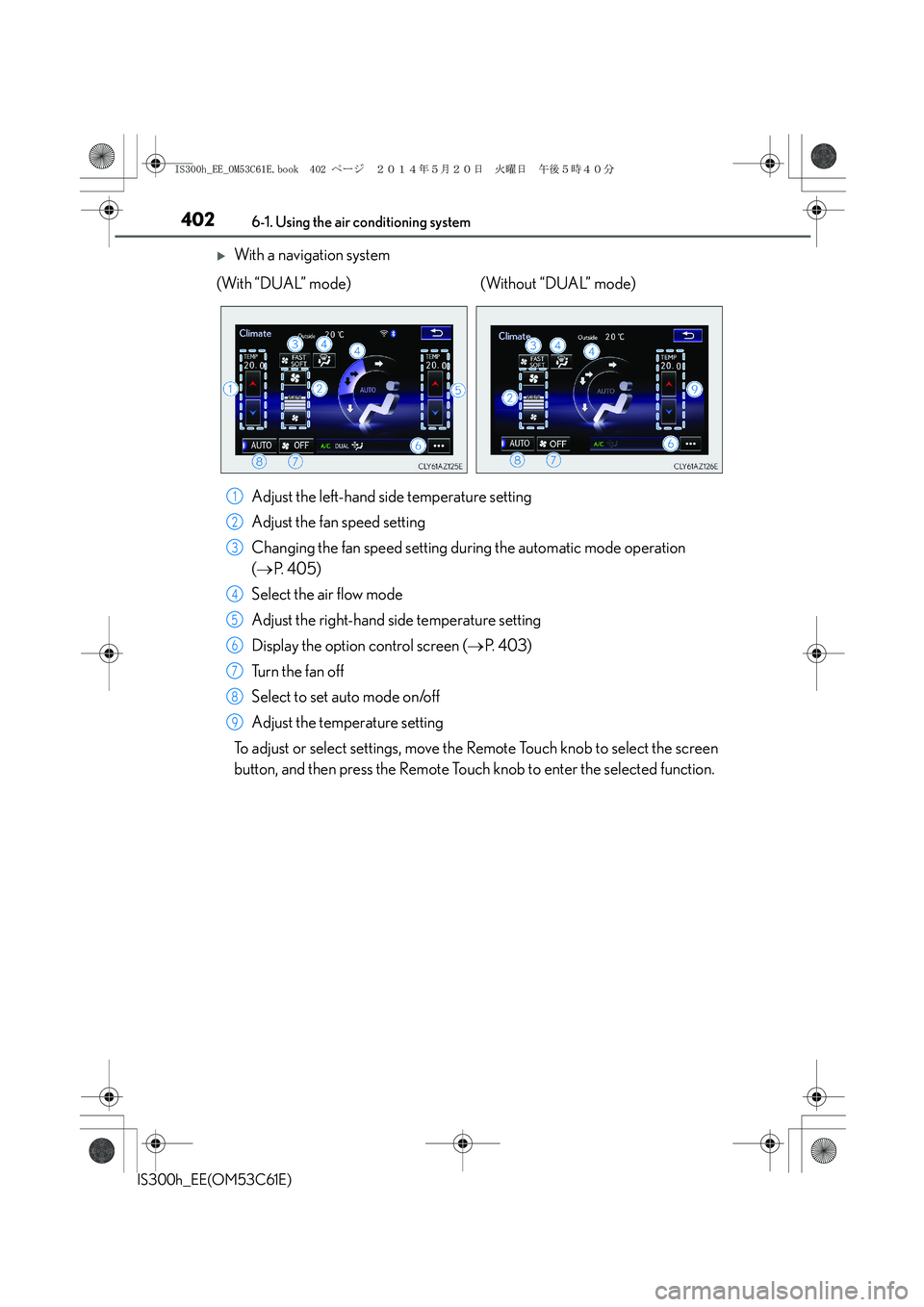
XWith a navigation system
Adjust the left-hand side temperature setting
Adjust the fan speed setting
Changing the fan speed setting during the automatic mode operation
(→P. 4 0 5 )
Select the air flow mode
Adjust the right-hand side temperature setting
Display the option control screen (→P. 4 0 3 )
Tu r n t h e f a n o f f
Select to set auto mode on/off
Adjust the temperature setting
To adjust or select settings, move the Remote Touch knob to select the screen
button, and then press the Remote Touch knob to enter the selected function. (With “DUAL” mode) (Without “DUAL” mode)
1
2
3
4
5
6
7
8
9
IS300h_EE_OM53C61E.book 402 ページ 2014年5月20日 火曜日 午後5時40分
Page 403 of 612
4036-1. Using the air conditioning system
6
Interior features
IS300h_EE(OM53C61E)
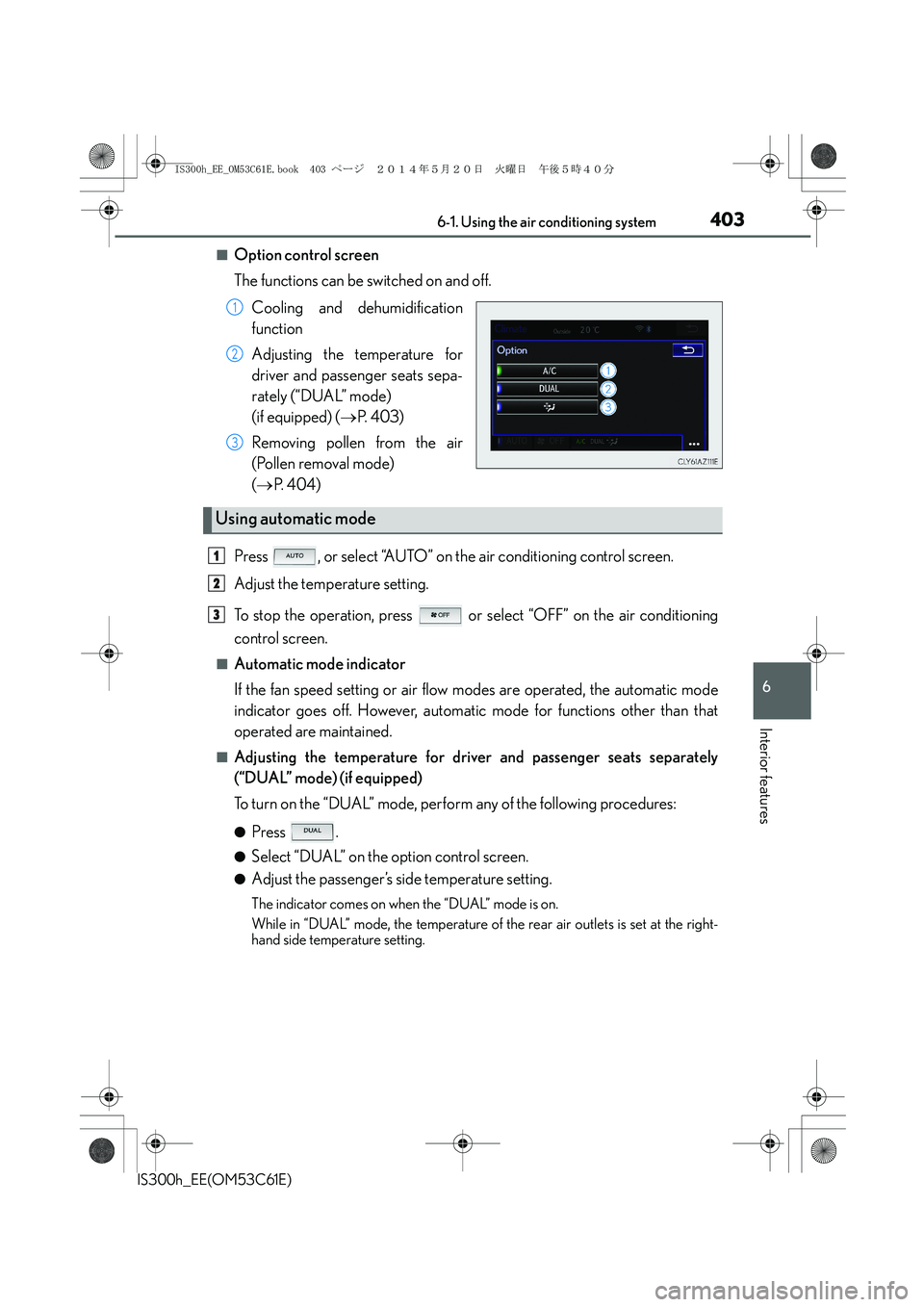
■Option control screen
The functions can be switched on and off.
Cooling and dehumidification
function
Adjusting the temperature for
driver and passenger seats sepa-
rately (“DUAL” mode)
(if equipped) (→P. 4 0 3 )
Removing pollen from the air
(Pollen removal mode)
(→P. 404)
Press , or select “AUTO” on the air conditioning control screen.
Adjust the temperature setting.
To stop the operation, press or select “OFF” on the air conditioning
control screen.
■Automatic mode indicator
If the fan speed setting or air flow modes are operated, the automatic mode
indicator goes off. However, automatic mode for functions other than that
operated are maintained.
■Adjusting the temperature for driver and passenger seats separately
(“DUAL” mode) (if equipped)
To turn on the “DUAL” mode, perform any of the following procedures:
●Press .
●Select “DUAL” on the option control screen.
●Adjust the passenger’s side temperature setting.
The indicator comes on when the “DUAL” mode is on.
While in “DUAL” mode, the temperature of the rear air outlets is set at the right-
hand side temperature setting.
1
2
3
Using automatic mode
1
2
3
IS300h_EE_OM53C61E.book 403 ページ 2014年5月20日 火曜日 午後5時40分
Page 404 of 612
4046-1. Using the air conditioning system
IS300h_EE(OM53C61E)
■Switching between outside air and recirculated air modes
Press to change to recirculated air mode.
Press to change to outside air mode.
The indicator above the selected button comes on.
■Pollen removal mode (if equipped)
Pollen is removed from the air and the air flows to the upper part of the body.
Select
on the option control screen.
When the pollen removal mode is on, is displayed on the air conditioning
control screen.
In order to prevent the windshield from fogging up when the outside air is cold, the
dehumidification function may operate.
The pollens are filtered out even if the pollen removal mode is turned off.
■Defogging the windshield
Defoggers are used to defog the windshield and front side windows.
Press .
Set the outside/recirculated air mode button to outside air mode if the recirculated
air mode is used. (It may switch automatically.)
To defog the windshield and the side windows early, turn the air flow and tempera-
ture up.
To return to the previous mode, press again when the windshield is
defogged.
■Defogging the rear window and outside rear view mirrors
Defoggers are used to defog the rear window, and to remove raindrops, dew
and frost from the outside rear view mirrors.
Press .
The defoggers will automatically turn off after a period of time.
Other functions
IS300h_EE_OM53C61E.book 404 ページ 2014年5月20日 火曜日 午後5時40分
Page 405 of 612
4056-1. Using the air conditioning system
6
Interior features
IS300h_EE(OM53C61E)
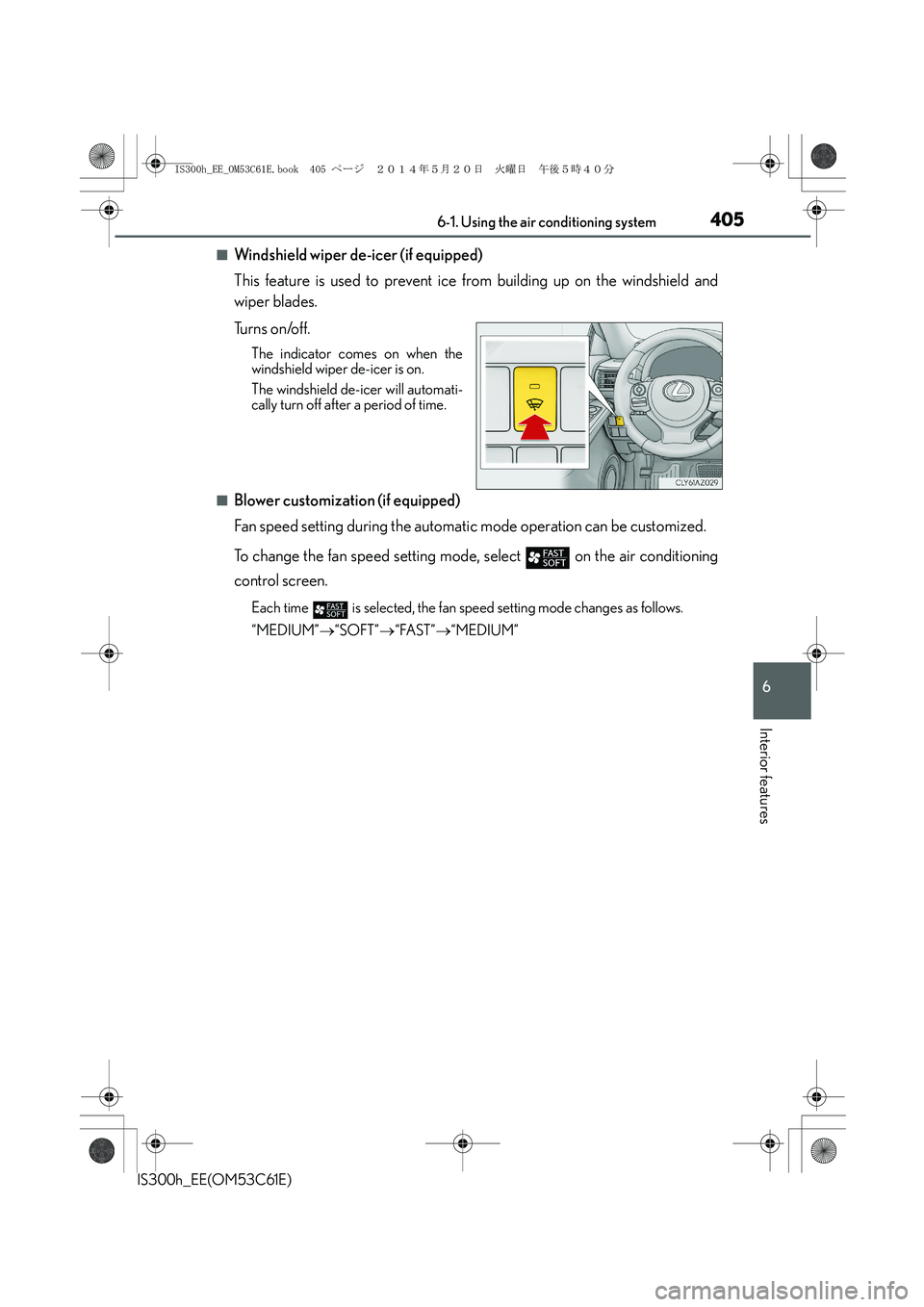
■Windshield wiper de-icer (if equipped)
This feature is used to prevent ice from building up on the windshield and
wiper blades.
Tu r n s o n /o f f .
The indicator comes on when the
windshield wiper de-icer is on.
The windshield de-icer will automati-
cally turn off after a period of time.
■Blower customization (if equipped)
Fan speed setting during the automatic mode operation can be customized.
To change the fan speed setting mode, select
on the air conditioning
control screen.
Each time is selected, the fan speed setting mode changes as follows.
“MEDIUM”→“SOFT”→“FAST”→“MEDIUM”
IS300h_EE_OM53C61E.book 405 ページ 2014年5月20日 火曜日 午後5時40分
Page 406 of 612
4066-1. Using the air conditioning system
IS300h_EE(OM53C61E)
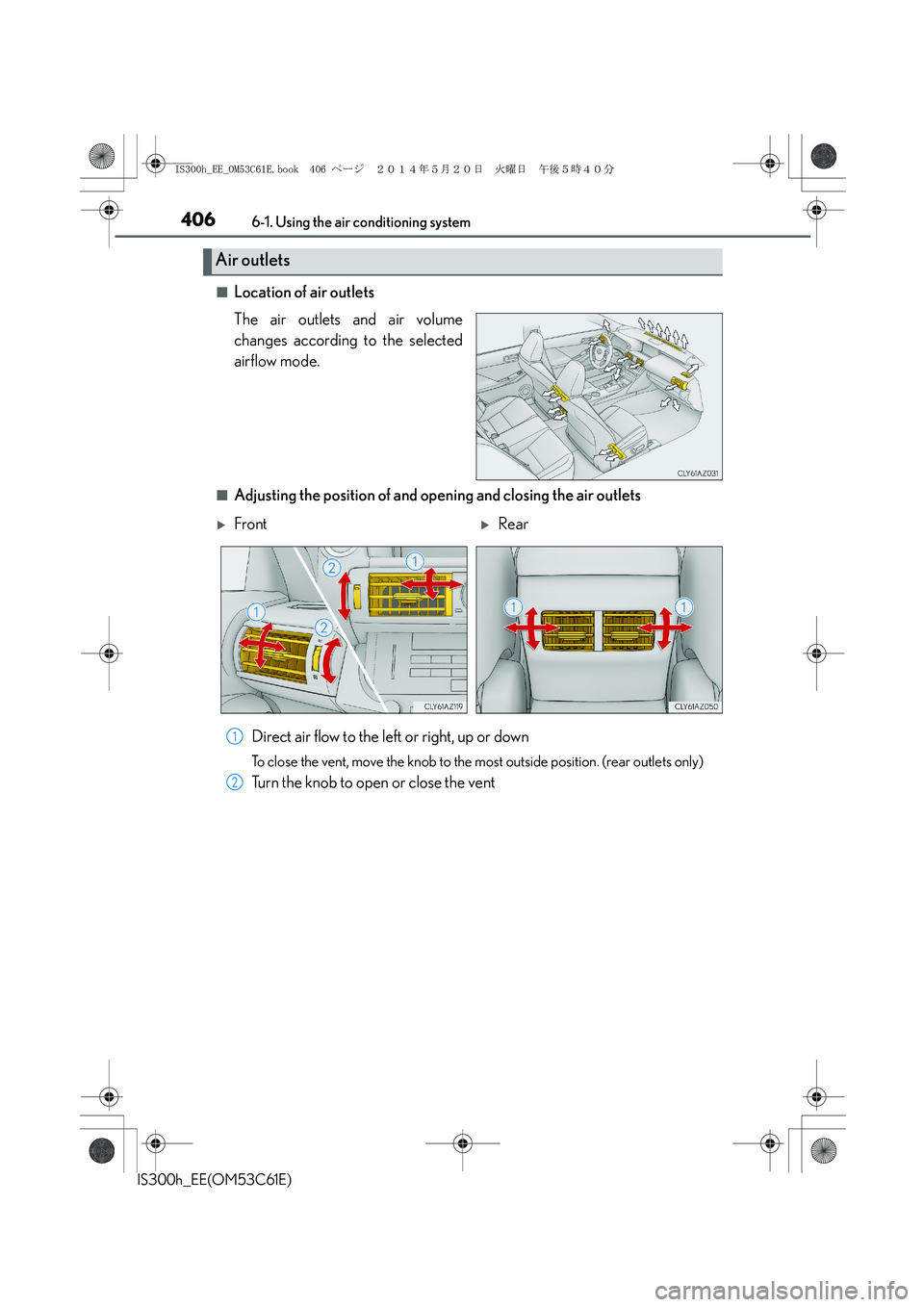
■Location of air outlets
The air outlets and air volume
changes according to the selected
airflow mode.
■Adjusting the position of and opening and closing the air outlets
Direct air flow to the left or right, up or down
To close the vent, move the knob to the most outside position. (rear outlets only)
Turn the knob to open or close the vent
Air outlets
XFrontXRear
1
2
IS300h_EE_OM53C61E.book 406 ページ 2014年5月20日 火曜日 午後5時40分
Page 407 of 612

4076-1. Using the air conditioning system
6
Interior features
IS300h_EE(OM53C61E)
■Registering air conditioning settings to electronic keys (vehicles with driving position
memory)
●Unlocking the vehicle using an electronic key and turning the power switch to ON
mode will recall that key’s registered air conditioning settings.
●When the power switch is turned off, the current air conditioning settings will automati-
cally be registered to the electronic key that was used to unlock the vehicle.
●The system may not operate correctly if more than one electronic key is in the vicinity or
if the smart entry & start system is used to unlock a passenger door.
●The doors that can recall the air conditioning setting when unlocked using the smart
entry & start system can be changed.* For details, contact any authorized Lexus dealer
or repairer, or another duly qualified and equipped professional.
*: The doors that can recall the driving position memory are changed at the same time.
■Using automatic mode
Fan speed is adjusted automatically according to the temperature setting and the ambi-
ent conditions.
Therefore, the fan may stop for a while until warm or cool air is ready to flow immediately
after is pressed or “AUTO” is selected.
■Fogging up of the windows
The windows will easily fog up when the humidity in the vehicle is high. Turning
(“A/C”) on will dehumidify the air from the outlets and defog the windshield effectively.
●If you turn (“A/C”) off, the windows may fog up more easily.
●The windows may fog up if the recirculated air mode is used.
■Outside/recirculated air mode
●When driving on dusty roads such as tunnels or in heavy traffic, set the outside/recircu-
lated air mode button to the recirculated air mode. This is effective in preventing out-
side air from entering the vehicle interior. During cooling operation, setting the
recirculated air mode will also cool the vehicle interior effectively.
●Outside/recirculated air mode may automatically switch depending on the tempera-
ture setting or the inside temperature.
■Operation of the air conditioning system in Eco drive mode
In Eco drive mode, the air conditioning system is controlled as follows to prioritize fuel
efficiency:
●Engine speed and compressor operation controlled to restrict heating/cooling capac-
ity
●Fan speed restricted when automatic mode is selected
To improve air conditioning performance, perform the following operations:
●Adjust the fan speed
●Turn off Eco drive mode
IS300h_EE_OM53C61E.book 407 ページ 2014年5月20日 火曜日 午後5時40分
Page 408 of 612
4086-1. Using the air conditioning system
IS300h_EE(OM53C61E)
■Ventilation and air conditioning odors
●To let fresh air in, set the air conditioning system to the outside air mode.
●During use, various odors from inside and outside the vehicle may enter into and accu-
mulate in the air conditioning system. This may then cause odor to be emitted from the
vents.
●To reduce potential odors from occurring:
• It is recommended that the air conditioning system be set to outside air mode prior
to turning the vehicle off.
• The start timing of the blower may be delayed for a short period of time immediately
after the air conditioning system is started in automatic mode.
■Air conditioning filter
→P. 4 6 9
■Customization
Settings (e.g. A/C Auto switch operation) can be changed.
(Customizable features →P. 5 8 0 )
CAUTION
■To prevent the windshield from fogging up
●Do not use during cool air operation in extremely humid weather. The differ-
ence between the temperature of the outside air and that of the windshield can cause
the outer surface of the windshield to fog up, blocking your vision.
■To prevent burns
●Do not touch the rear view mirror surfaces when the outside rear view mirror defog-
gers are on.
●Do not touch the glass at lower part of the windshield or to the side of the front pillars
when the windshield wiper de-icer is on.
NOTICE
■To prevent 12-volt battery discharge
Do not leave the air conditioning system on longer than necessary when the hybrid sys-
tem is off.
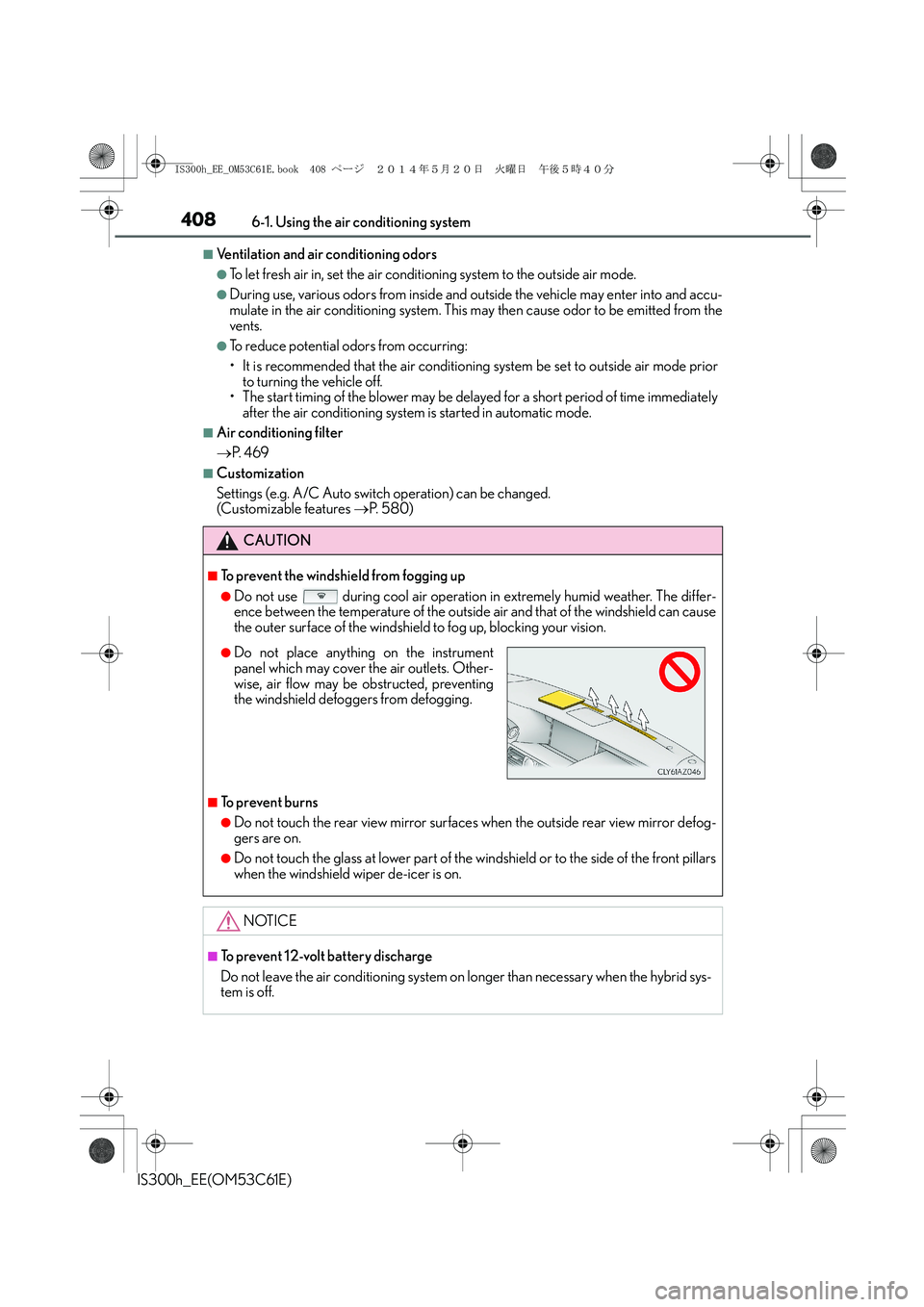
●Do not place anything on the instrument
panel which may cover the air outlets. Other-
wise, air flow may be obstructed, preventing
the windshield defoggers from defogging.
IS300h_EE_OM53C61E.book 408 ページ 2014年5月20日 火曜日 午後5時40分
Page 409 of 612
4096-1. Using the air conditioning system
6
Interior features
IS300h_EE(OM53C61E)
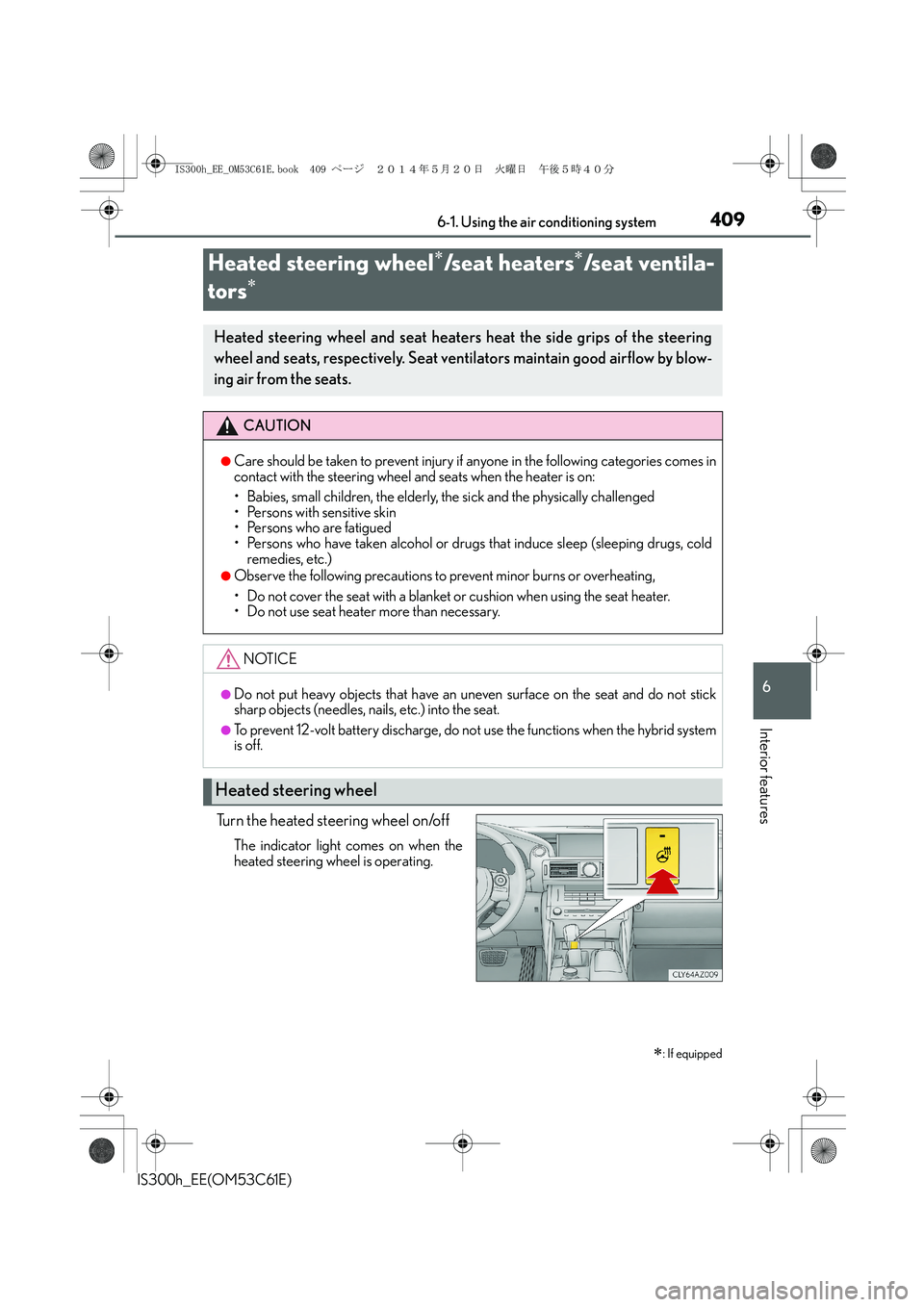
Turn the heated steering wheel on/off
The indicator light comes on when the
heated steering wheel is operating.
Heated steering wheel∗/seat heaters∗/seat ventila-
tors
∗
∗
: If equipped
Heated steering wheel and seat heaters heat the side grips of the steering
wheel and seats, respectively. Seat ventilators maintain good airflow by blow-
ing air from the seats.
CAUTION
●Care should be taken to prevent injury if anyone in the following categories comes in
contact with the steering wheel and seats when the heater is on:
• Babies, small children, the elderly, the sick and the physically challenged
• Persons with sensitive skin
• Persons who are fatigued
• Persons who have taken alcohol or drugs that induce sleep (sleeping drugs, cold
remedies, etc.)
●Observe the following precautions to prevent minor burns or overheating,
• Do not cover the seat with a blanket or cushion when using the seat heater.
• Do not use seat heater more than necessary.
NOTICE
●Do not put heavy objects that have an uneven surface on the seat and do not stick
sharp objects (needles, nails, etc.) into the seat.
●To prevent 12-volt battery discharge, do not use the functions when the hybrid system
is off.
Heated steering wheel
IS300h_EE_OM53C61E.book 409 ページ 2014年5月20日 火曜日 午後5時40分