mirror Lexus IS300h 2014 Owner's Guide
[x] Cancel search | Manufacturer: LEXUS, Model Year: 2014, Model line: IS300h, Model: Lexus IS300h 2014Pages: 612, PDF Size: 111.33 MB
Page 304 of 612
3044-5. Using the driving support systems
IS300h_EE(OM53C61E)
The Blind Spot Monitor function uses radar sensors to detect vehicles that are
traveling in an adjacent lane in the area that is not reflected in the outside rear
view mirror (the blind spot), and advises the driver of the vehicles existence via
the outside rear view mirror indicator.
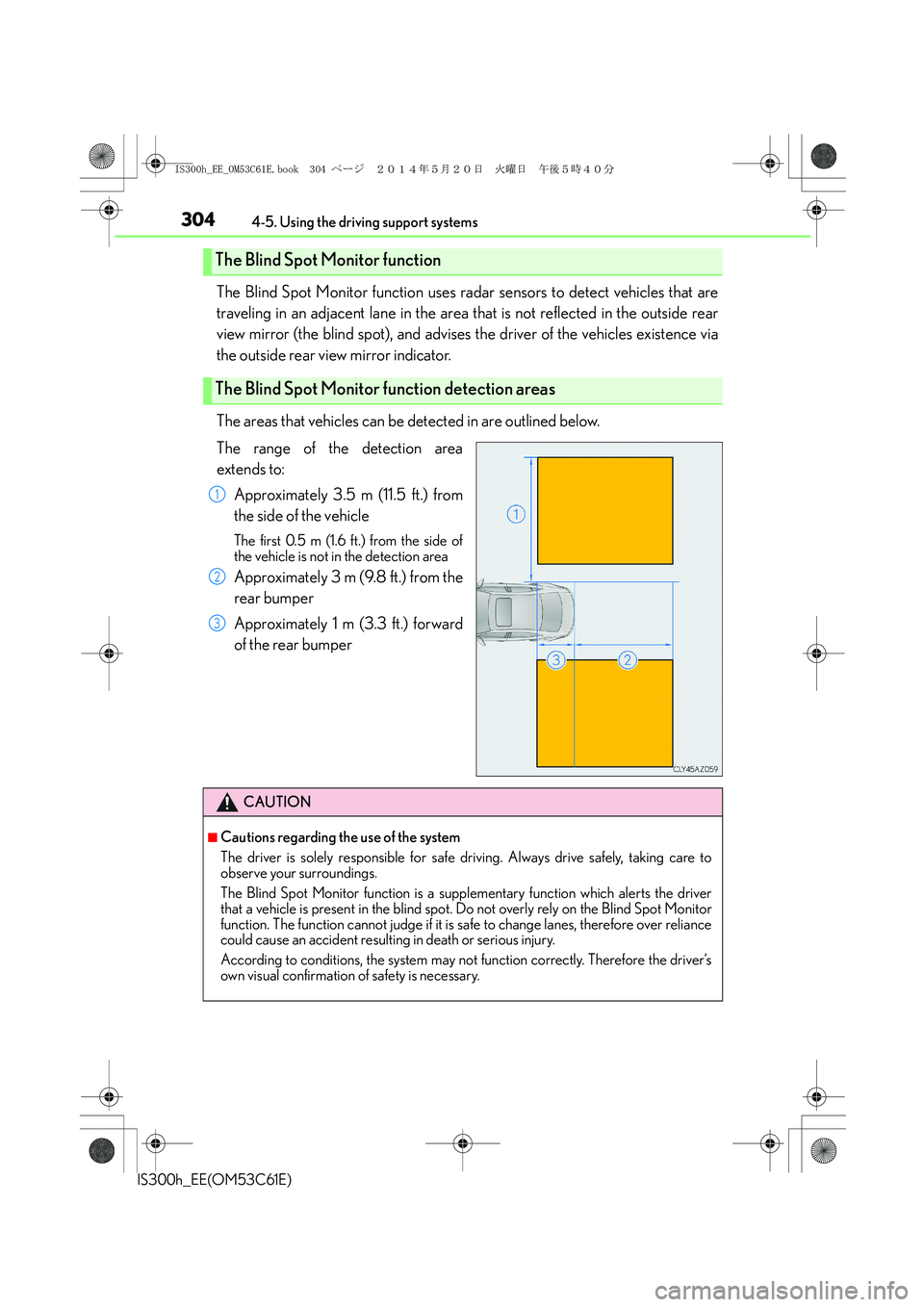
The areas that vehicles can be detected in are outlined below.
The range of the detection area
extends to:
Approximately 3.5 m (11.5 ft.) from
the side of the vehicle
The first 0.5 m (1.6 ft.) from the side of
the vehicle is not in the detection area
Approximately 3 m (9.8 ft.) from the
rear bumper
Approximately 1 m (3.3 ft.) forward
of the rear bumper
The Blind Spot Monitor function
The Blind Spot Monitor function detection areas
1
2
3
CAUTION
■Cautions regarding the use of the system
The driver is solely responsible for safe driving. Always drive safely, taking care to
observe your surroundings.
The Blind Spot Monitor function is a supplementary function which alerts the driver
that a vehicle is present in the blind spot. Do not overly rely on the Blind Spot Monitor
function. The function cannot judge if it is safe to change lanes, therefore over reliance
could cause an accident resulting in death or serious injury.
According to conditions, the system may not function correctly. Therefore the driver’s
own visual confirmation of safety is necessary.
IS300h_EE_OM53C61E.book 304 ページ 2014年5月20日 火曜日 午後5時40分
Page 306 of 612
3064-5. Using the driving support systems
IS300h_EE(OM53C61E)
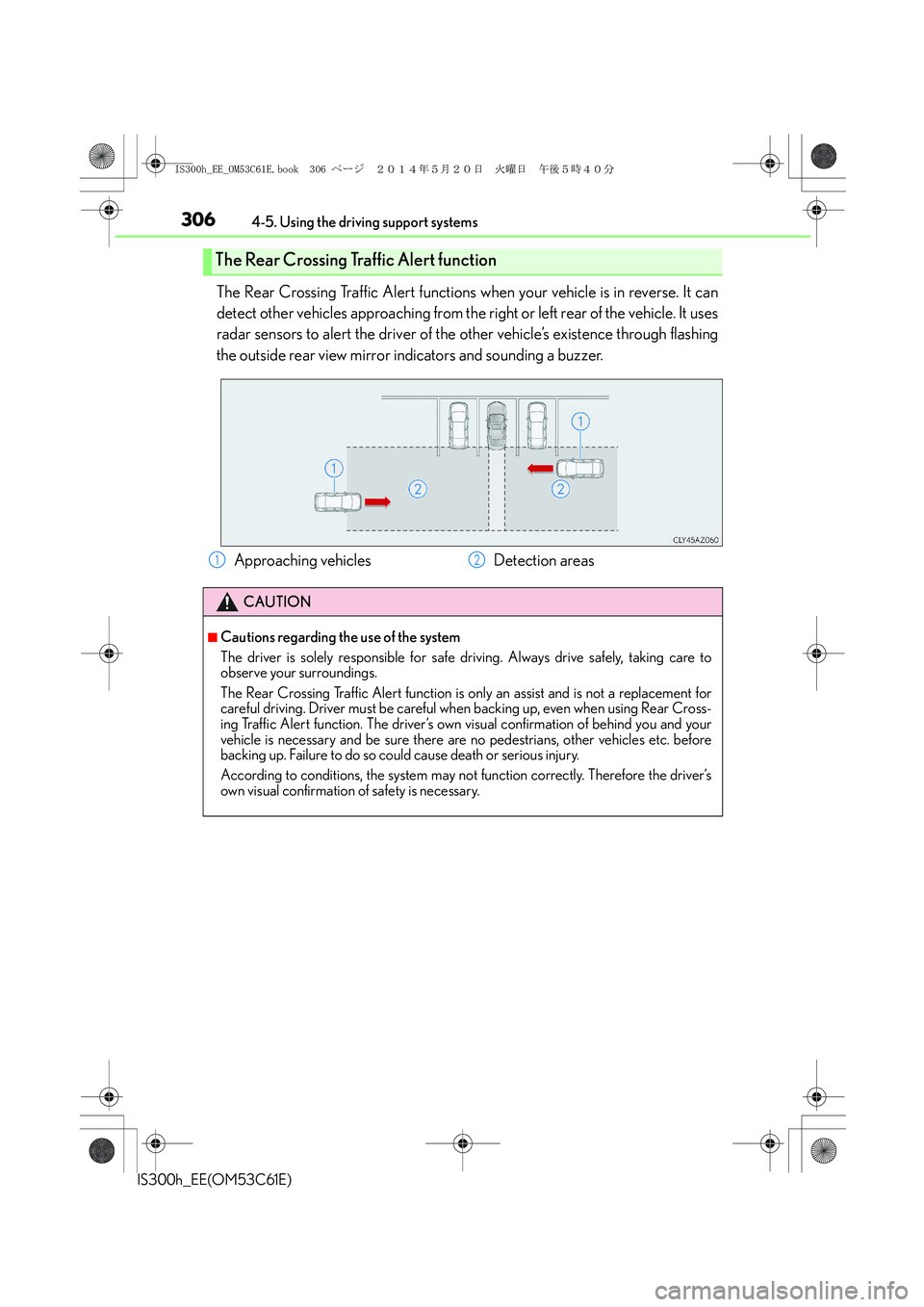
The Rear Crossing Traffic Alert functions when your vehicle is in reverse. It can
detect other vehicles approaching from the right or left rear of the vehicle. It uses
radar sensors to alert the driver of the other vehicle’s existence through flashing
the outside rear view mirror indicators and sounding a buzzer.
The Rear Crossing Traffic Alert function
Approaching vehicles Detection areas
CAUTION
■Cautions regarding the use of the system
The driver is solely responsible for safe driving. Always drive safely, taking care to
observe your surroundings.
The Rear Crossing Traffic Alert function is only an assist and is not a replacement for
careful driving. Driver must be careful when backing up, even when using Rear Cross-
ing Traffic Alert function. The driver’s own visual confirmation of behind you and your
vehicle is necessary and be sure there are no pedestrians, other vehicles etc. before
backing up. Failure to do so could cause death or serious injury.
According to conditions, the system may not function correctly. Therefore the driver’s
own visual confirmation of safety is necessary.
12
IS300h_EE_OM53C61E.book 306 ページ 2014年5月20日 火曜日 午後5時40分
Page 315 of 612

315
5
Lexus Display
Audio system
IS300h_EE(OM53C61E)
5-6. Using an external device
Listening to an iPod .................. 348
Using USB memory
device ............................................ 351
Using the AUX port..................356
5-7. Connecting Bluetooth
®
Steps for using Bluetooth®
devices......................................... 357
Registering a Bluetooth
®
device ...........................................359
Selecting a Bluetooth
®
device .......................................... 360
Connecting a Bluetooth
®
audio player ................................ 361
Connecting a Bluetooth
®
phone ........................................... 362
Displaying a Bluetooth
®
device details ............................363
Detailed Bluetooth
®
settings.........................................364
5-8. Bluetooth
® Audio
Listening to Bluetooth
®
Audio............................................3655-9. Bluetooth
® Phone
Using a Bluetooth
®
Phone........................................... 367
Making a call................................ 369
Receiving a call ............................372
Speaking on the phone ........... 373
Using a Bluetooth
® phone
messages.................................... 375
Using the steering wheel
switches....................................... 378
Bluetooth
® phone
settings ........................................ 379
5-10. Phonebook
Contact settings .......................... 381
Messaging setting......................384
5-11. Bluetooth
®
Bluetooth®..................................385
5-12. Other function
“Information” screen .................390
MirrorLink................................. 391
USB photo .................................... 393
Speech command system ...... 395
IS300h_EE_OM53C61E.book 315 ページ 2014年5月20日 火曜日 午後5時40分
Page 352 of 612
3525-6. Using an external device
IS300h_EE(OM53C61E)
Moving the controller to the right and selecting “Play video” while the USB video
screen is displayed changes to USB video mode.
This function cannot be used while USB photo or MirrorLink is in use.
■Menu screen
→P. 3 3 6
■Selecting a file
Press the “<” or “>” button, turn the right side knob (left-hand drive vehicle) or
left side knob (right-hand drive vehicle) on the audio panel to select the
desired file number.
To fast-forward or reverse, press and hold the “<” or “>” button.
■Selecting a folder
Move the controller to the right and select “Browse”.
Select the desired folder, then select a file to begin using the selected
folder.
■Displaying the now playing list
Move the controller to the right and select “Now playing list”.
■USB memory functions
●Depending on the USB memory device that is connected to the system, the device
itself may not be operable and certain functions may not be available. If the device is
inoperable or a function is unavailable due to a malfunction (as opposed to a system
specification), disconnecting the device and reconnecting it may resolve the problem.
●If the USB memory device still does not begin operation after being disconnected and
reconnected, format the device.
■Error messages for USB memory
■USB memory
●Compatible devices
USB memory devices that can be used for MP3, WMA and AAC (audio mode) or
MP4, WMV and AVI (video mode) playback.
USB video
MessageCause/Correction procedures
“Connection error.”This indicates a problem with the USB memory
device or its connection.
“There are no files available for
playback.”This indicates that no MP3/WMA/AAC files are
included on the USB memory device.
1
2
IS300h_EE_OM53C61E.book 352 ページ 2014年5月20日 火曜日 午後5時40分
Page 390 of 612
390
IS300h_EE(OM53C61E)5-12. Other function
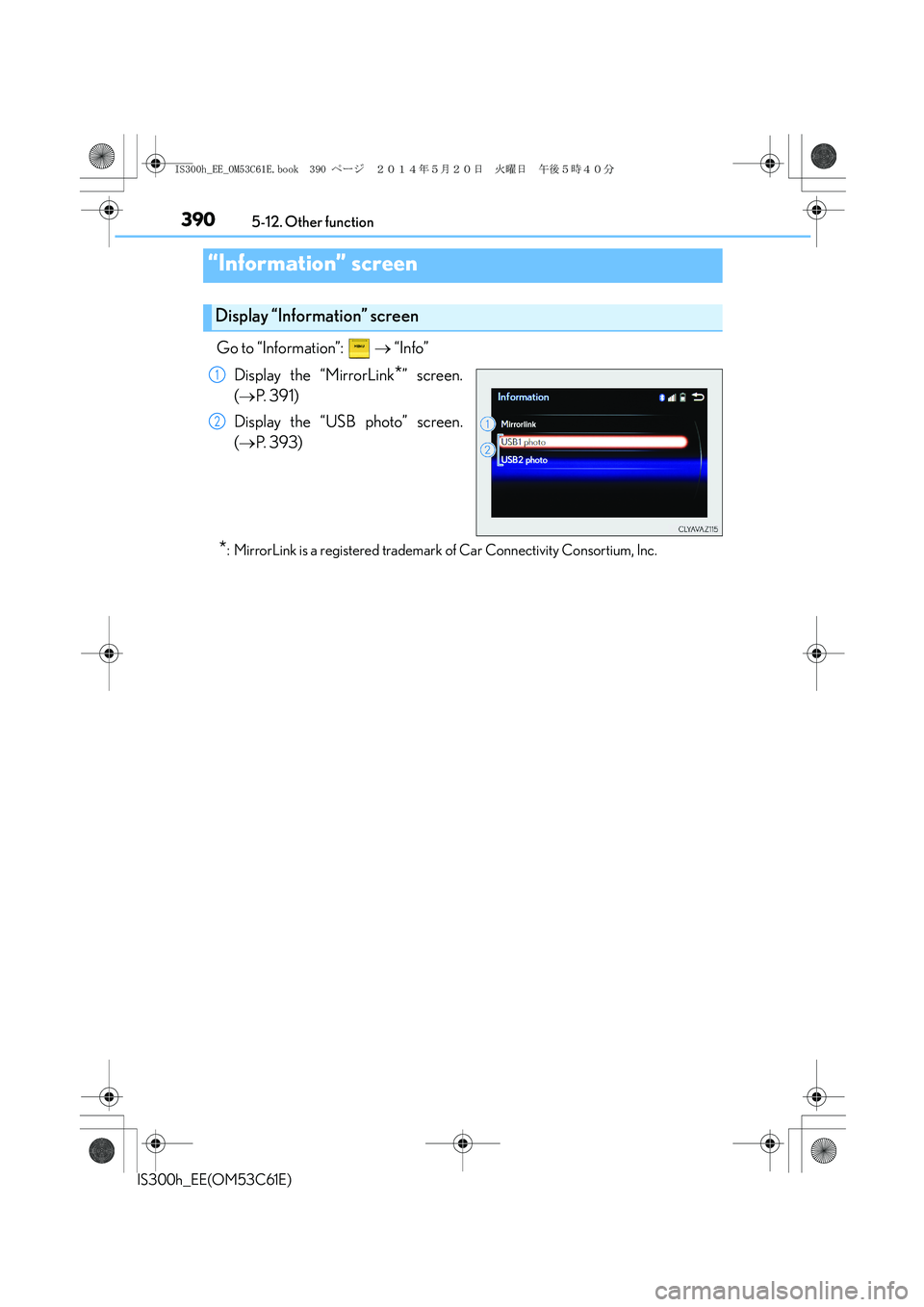
Go to “Information”: → “Info”
Display the “MirrorLink
*” screen.
(→P. 3 9 1 )
Display the “USB photo” screen.
(→P. 393)
*: MirrorLink is a registered trademark of Car Connectivity Consortium, Inc.
“Information” screen
Display “Information” screen
1
2
IS300h_EE_OM53C61E.book 390 ページ 2014年5月20日 火曜日 午後5時40分
Page 391 of 612
3915-12. Other function
5
Lexus Display Audio system
IS300h_EE(OM53C61E)
→P. 3 2 3
Go to “MirrorLink
*”: → “Info” → “MirrorLink*”
Select the desired application on the application list screen.
■MirrorLink screen
Follow the specific operation procedures for the smartphone application.
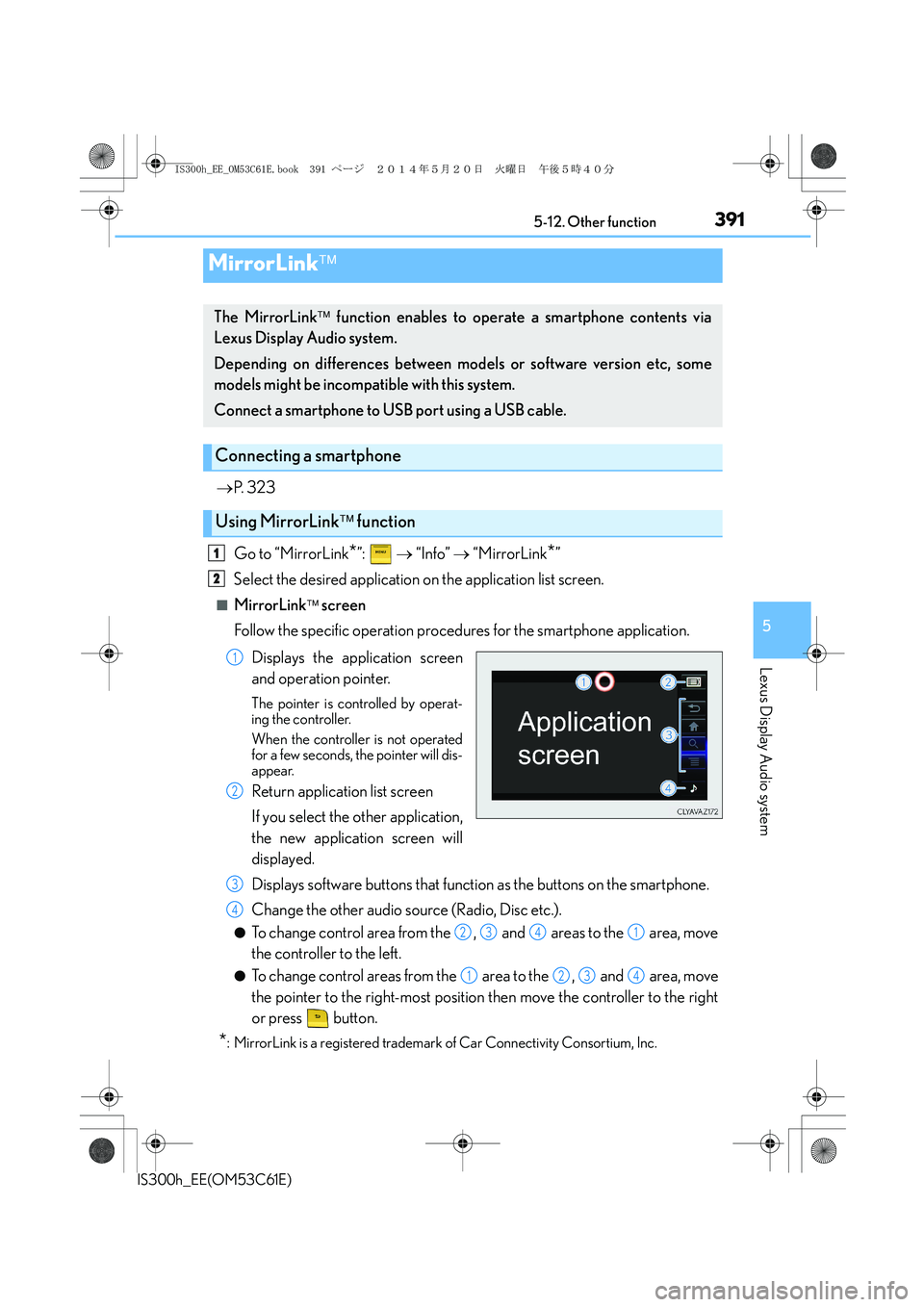
Displays the application screen
and operation pointer.
The pointer is controlled by operat-
ing the controller.
When the controller is not operated
for a few seconds, the pointer will dis-
appear.
Return application list screen
If you select the other application,
the new application screen will
displayed.
Displays software buttons that function as the buttons on the smartphone.
Change the other audio source (Radio, Disc etc.).
●To change control area from the , and areas to the area, move
the controller to the left.
●To change control areas from the area to the , and area, move
the pointer to the right-most position then move the controller to the right
or press button.
*: MirrorLink is a registered trademark of Car Connectivity Consortium, Inc.
MirrorLink
The MirrorLink function enables to operate a smartphone contents via
Lexus Display Audio system.
Depending on differences between models or software version etc, some
models might be incompatible with this system.
Connect a smartphone to USB port using a USB cable.
Connecting a smartphone
Using MirrorLink function
1
2
1
2
3
4
2341
1234
IS300h_EE_OM53C61E.book 391 ページ 2014年5月20日 火曜日 午後5時40分
Page 392 of 612
3925-12. Other function
IS300h_EE(OM53C61E)
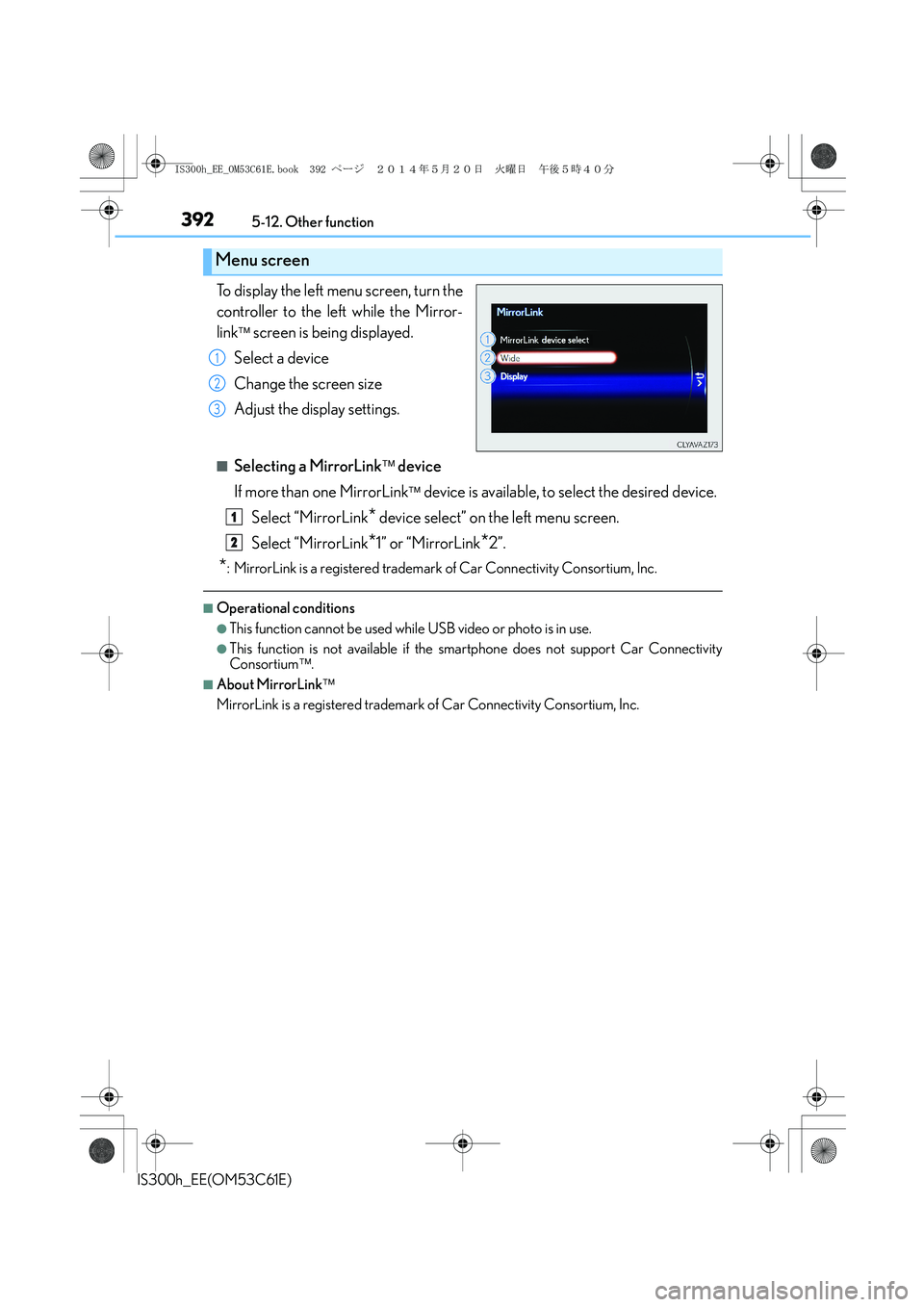
To display the left menu screen, turn the
controller to the left while the Mirror-
link
screen is being displayed.
Select a device
Change the screen size
Adjust the display settings.
■Selecting a MirrorLink device
If more than one MirrorLink
device is available, to select the desired device.
Select “MirrorLink
* device select” on the left menu screen.
Select “MirrorLink
*1” or “MirrorLink*2”.
*: MirrorLink is a registered trademark of Car Connectivity Consortium, Inc.
■Operational conditions
●This function cannot be used while USB video or photo is in use.
●This function is not available if the smartphone does not support Car Connectivity
Consortium.
■About MirrorLink
MirrorLink is a registered trademark of Car Connectivity Consortium, Inc.
Menu screen
1
2
3
1
2
IS300h_EE_OM53C61E.book 392 ページ 2014年5月20日 火曜日 午後5時40分
Page 397 of 612
397
6Interior features
IS300h_EE(OM53C61E)
6-1. Using the air conditioning
system
Automatic air conditioning
system ......................................... 398
Heated steering wheel/
seat heaters/
seat ventilators ........................ 409
6-2. Using the interior lights
Interior lights list.............................411
• Interior lights ........................... 412
• Personal lights......................... 412
6-3. Using the storage features
List of storage features.............. 413
• Glove box................................. 414
• Console box ............................ 414
•Cup holders/
Bottle holders ......................... 415
Trunk features ................................4176-4. Using the other interior
features
Other interior features ............ 420
• Sun visors ................................ 420
• Vanity mirrors ........................ 420
• Clock ........................................ 420
• Power outlet .............................421
• Armrest.................................... 422
• Rear sunshade....................... 422
• Assist grips...............................424
• Coat hooks ..............................424
IS300h_EE_OM53C61E.book 397 ページ 2014年5月20日 火曜日 午後5時40分
Page 400 of 612
4006-1. Using the air conditioning system
IS300h_EE(OM53C61E)
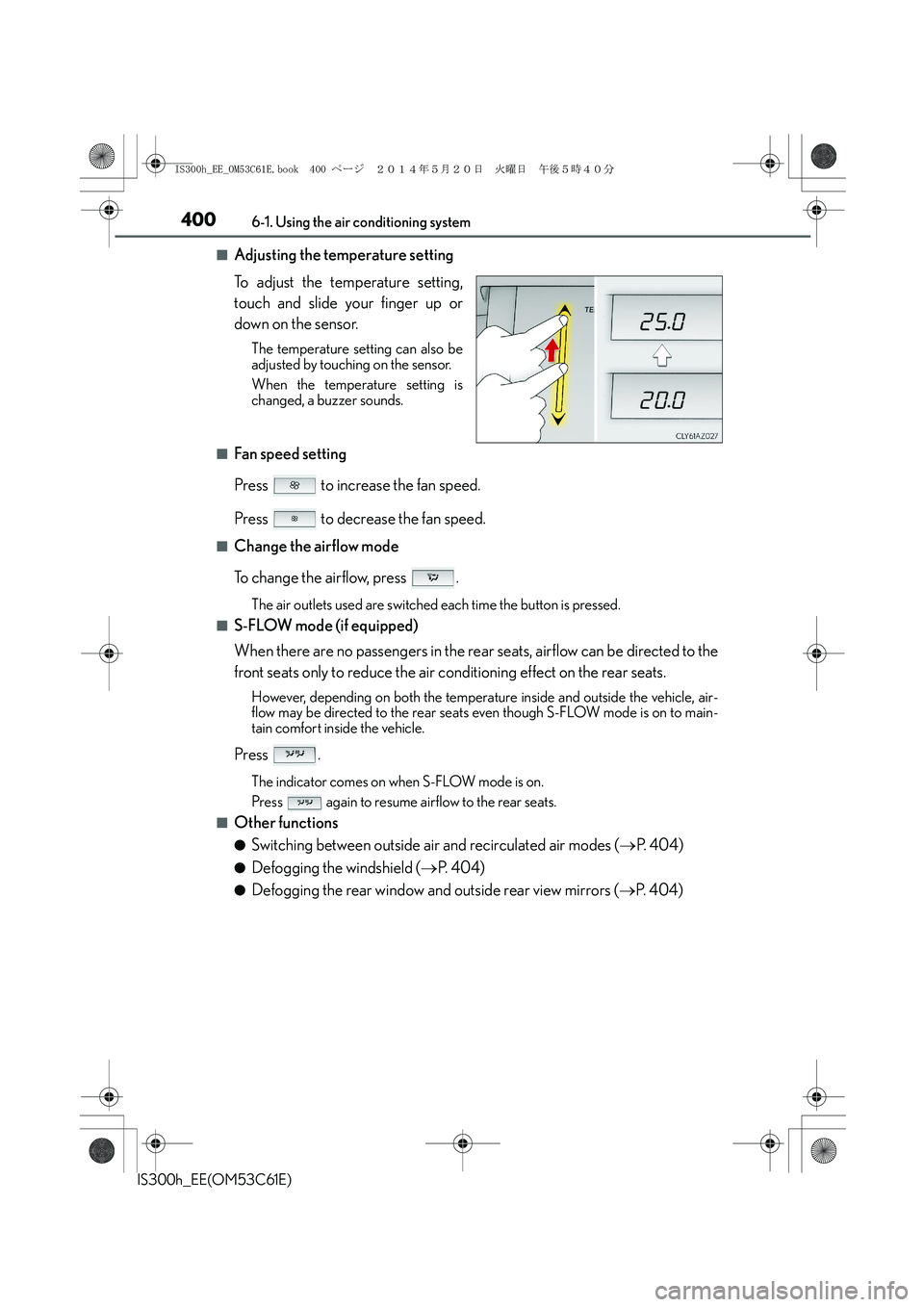
■Adjusting the temperature setting
To adjust the temperature setting,
touch and slide your finger up or
down on the sensor.
The temperature setting can also be
adjusted by touching on the sensor.
When the temperature setting is
changed, a buzzer sounds.
■Fan speed setting
Press to increase the fan speed.
Press to decrease the fan speed.
■Change the airflow mode
To change the airflow, press .
The air outlets used are switched each time the button is pressed.
■S-FLOW mode (if equipped)
When there are no passengers in the rear seats, airflow can be directed to the
front seats only to reduce the air conditioning effect on the rear seats.
However, depending on both the temperature inside and outside the vehicle, air-
flow may be directed to the rear seats even though S-FLOW mode is on to main-
tain comfort inside the vehicle.
Press .
The indicator comes on when S-FLOW mode is on.
Press again to resume airflow to the rear seats.
■Other functions
●Switching between outside air and recirculated air modes (→P. 4 0 4 )
●Defogging the windshield (→P. 404)
●Defogging the rear window and outside rear view mirrors (→P. 404)
IS300h_EE_OM53C61E.book 400 ページ 2014年5月20日 火曜日 午後5時40分
Page 404 of 612
4046-1. Using the air conditioning system
IS300h_EE(OM53C61E)
■Switching between outside air and recirculated air modes
Press to change to recirculated air mode.
Press to change to outside air mode.
The indicator above the selected button comes on.
■Pollen removal mode (if equipped)
Pollen is removed from the air and the air flows to the upper part of the body.
Select
on the option control screen.
When the pollen removal mode is on, is displayed on the air conditioning
control screen.
In order to prevent the windshield from fogging up when the outside air is cold, the
dehumidification function may operate.
The pollens are filtered out even if the pollen removal mode is turned off.
■Defogging the windshield
Defoggers are used to defog the windshield and front side windows.
Press .
Set the outside/recirculated air mode button to outside air mode if the recirculated
air mode is used. (It may switch automatically.)
To defog the windshield and the side windows early, turn the air flow and tempera-
ture up.
To return to the previous mode, press again when the windshield is
defogged.
■Defogging the rear window and outside rear view mirrors
Defoggers are used to defog the rear window, and to remove raindrops, dew
and frost from the outside rear view mirrors.
Press .
The defoggers will automatically turn off after a period of time.
Other functions
IS300h_EE_OM53C61E.book 404 ページ 2014年5月20日 火曜日 午後5時40分