Service Lexus IS300h 2015 User Guide
[x] Cancel search | Manufacturer: LEXUS, Model Year: 2015, Model line: IS300h, Model: Lexus IS300h 2015Pages: 628, PDF Size: 137.89 MB
Page 396 of 628
3965-10. Phonebook
IS300h_EE(OM53D56E)
Go to “Remove favourite”: → “Setup” → “Telephone” → “Contact/call
history settings” → “Remove favourite”
Select the desired contacts.
You can select all contacts by selecting “Select all”
Move the controller to the left and select “Remove”.
Go to “Delete contact”: → “Setup” → “Telephone” → “Contact/call his-
tory settings” → “Delete contacts”
Select the desired contacts.
You can select all contacts by selecting “Select all”.
Move the controller to the left and select “Delete”.
■Phonebook data
Phonebook data is managed separately fo r every registered phone. When another
phone is connected, you cannot read the registered data.
■When transferring contacts
Transfer contacts while the hybrid system is running.
If the cellular phone is OPP or PBAP compat ible, you may need to input “1234” on the
cellular phone for OBEX certification.
■When you have selected “Replace contacts” or “Add contact” to transfer contacts
If the cellular phone does not support OPP service, you cannot use these functions. You
can transfer the phonebook data only by operating your phone.
■Transferring contacts while Bluetooth® audio is playing
Bluetooth® audio will disconnect. It will reconnect automatically when data transfer fin-
ishes. It may not reconnect depending on the phone which is connected.
Removing favorites
Deleting the contacts data
1
2
3
1
2
3
Page 397 of 628
3975-10. Phonebook
5
Lexus Display Audio system
IS300h_EE(OM53D56E)
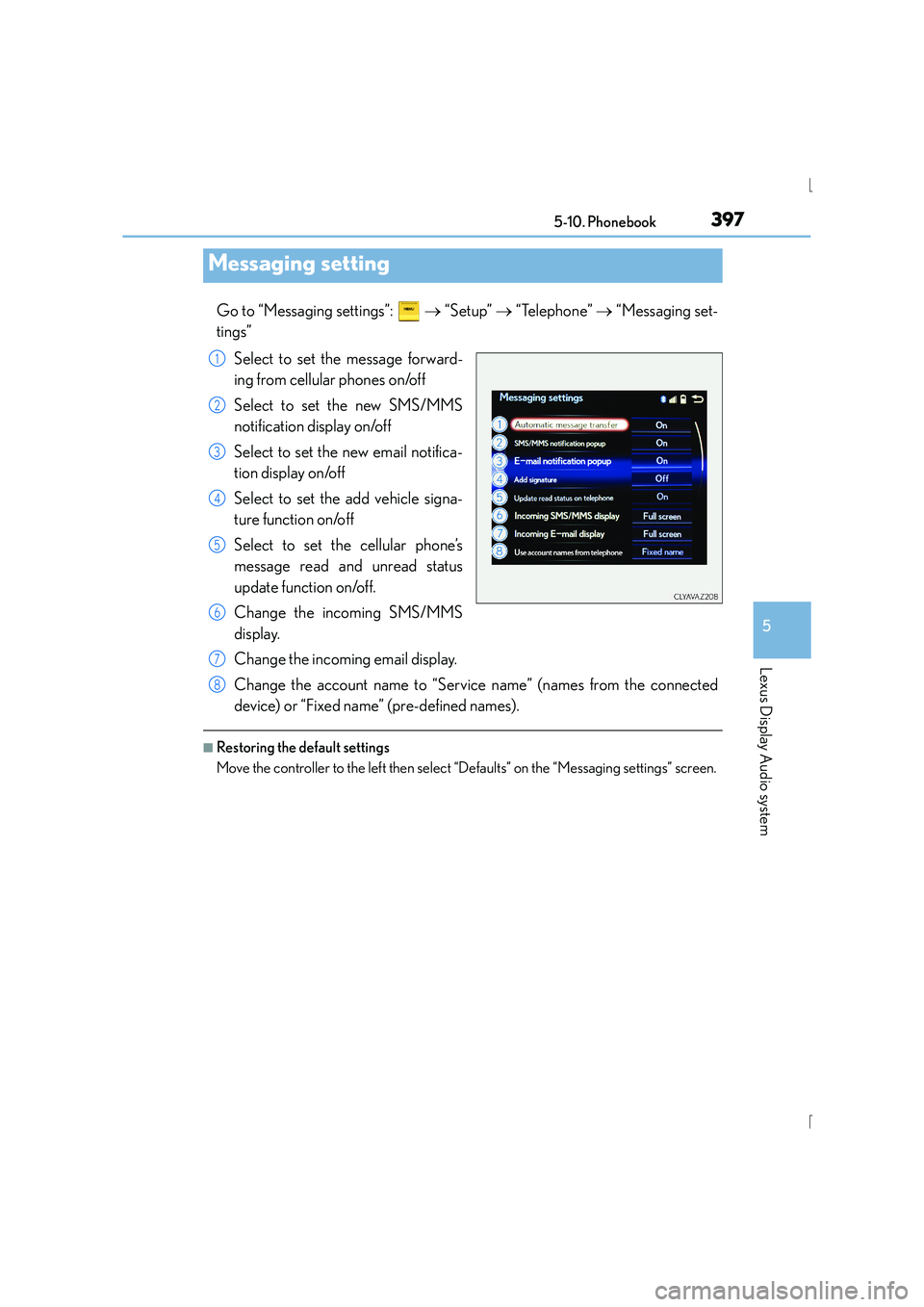
Go to “Messaging settings”: → “Setup” → “Telephone” → “Messaging set-
tings”
Select to set the message forward-
ing from cellular phones on/off
Select to set the new SMS/MMS
notification display on/off
Select to set the new email notifica-
tion display on/off
Select to set the add vehicle signa-
ture function on/off
Select to set the cellular phone’s
message read and unread status
update function on/off.
Change the incoming SMS/MMS
display.
Change the incoming email display.
Change the account name to “Service name” (names from the connected
device) or “Fixed name” (pre-defined names).
■Restoring the default settings
Move the controller to the left then select “Defaults” on the “Messaging settings” screen.
Messaging setting
1
2
3
4
5
6
7
8
Page 398 of 628
398
IS300h_EE(OM53D56E)5-11. Bluetooth
®
■When using the Bluetooth® audio system
●In the following situations, the system may not function.
• If the portable audio player is turned off
• If the portable audio player is not connected
• If the portable audio player’s battery is low
●There may be a delay if a cellular phone connection is made during Bluetooth® audio
play.
●Depending on the type of portable audio player that is connected to the system, opera-
tion may differ slightly and cert ain functions may not be available.
■When using the hands-free system
●The audio system is muted when making a call.
●If both parties speak at the same time, it may be difficult to hear.
●If the received call volume is overly loud, an echo may be heard.
If the Bluetooth® phone is too close to the system, quality of the sound may deteriorate
and connection status may deteriorate.
●In the following situations, it may be difficult to hear the other party:
• When driving on unpaved roads
• When driving at high speeds
•If a window is open
• If the air conditioning is blowing directly on the microphone
• If there is interference from the network of the cellular phone
■Conditions under which th e system will not operate
●If using a cellular phone that does not support Bluetooth®
●If the cellular phone is turned off
●If you are outside of cellular phone service coverage
●If the cellular phone is not connected
●If the cellular phone’s battery is low
●When outgoing calls are controlled, due to heavy traffic on telephone lines, etc.
●When the cellular phone itself cannot be used
●When transferring phonebook data from the cellular phone
Bluetooth®
Page 400 of 628
4005-11. Bluetooth®
IS300h_EE(OM53D56E)
■Compatible models
The Bluetooth® audio system supports portable audio players with the following specifi-
cations
●Bluetooth® specifications:
Ver. 2.0, or higher (Recommended: Ver. 3.0 +EDR or higher)
●Profiles:
• A2DP (Advanced Audio Distribution Profile) Ver. 1.0, or higher (Recommended: Ver. 1.2 or higher)
This is a profile to transmit stereo audio or high quality sound to the audio system.
• AVRCP (Audio/Video Remote Control Profile) Ver. 1.0 or higher (Recommended: Ver. 1.4 or higher)
This is a profile to allow remote control the A/V equipment.
However, please note that some functions may be limited depending on the type of por-
table audio player connected.
The hands-free system supports cellular phones with the following specifications.
●Bluetooth® specification:
Ver. 2.0 or higher (Recommended: Ver. 3.0 +EDR or higher)
●Profiles:
• HFP (Hands Free Profile) Ver. 1.0 or higher (Recommended: Ver. 1.6 or higher) This is a profile to allow hands-free phone calls using a cellular phone or head set. It
has outgoing and incoming call functions.
• OPP (Object Push Profile) Ver. 1.1 or higher (Recommended: Ver. 1.1) This is a profile to transfer phonebook data. When a Bluetooth
® compatible cellular
phone has both PBAP and OPP, OPP cannot be used.
• PBAP (Phone Book Access Profile) Ver. 1.0 or higher (Recommended: Ver. 1.1) This is a profile to tr ansfer phonebook data.
• MAP (Message Access Profile) Ver.1.0 or higher This is a profile to using phone message.
If the cellular phone does not support HFP, you cannot register it with the hands-free sys-
tem. OPP, PBAP or MAP services must be selected individually.
■Reconnecting the portable audio player
If the portable audio player is disconnected due to poor reception when the power
switch is in ACCESSORY or ON mode, the system automatically reconnects the porta-
ble audio player.
If you have switched off the portable audio player yourself, follow the instructions below
to reconnect:
●Select the portable audio player again
●Enter the portable audio player
■When you sell your car
Be sure to delete your personal data. ( →P. 3 4 0 )
Page 441 of 628
441
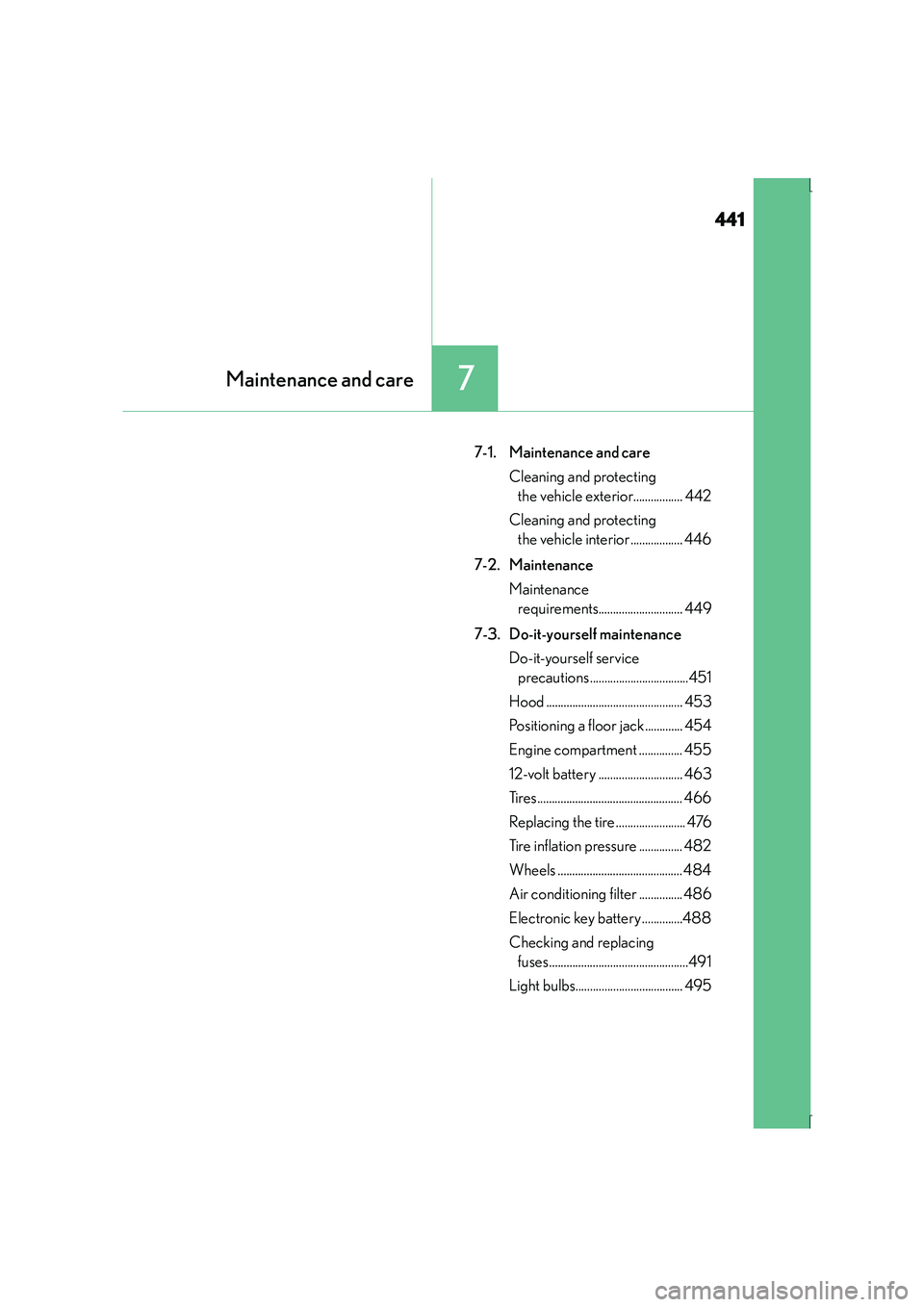
7Maintenance and care
IS300h_EE(OM53D56E)
7-1. Maintenance and careCleaning and protecting the vehicle exterior................. 442
Cleaning and protecting the vehicle interior.................. 446
7-2. Maintenance Maintenance requirements............................. 449
7-3. Do-it-yourself maintenance Do-it-yourself service precautions..................................451
Hood ............................................... 453
Positioning a floor jack............. 454
Engine compartment ............... 455
12-volt battery ............................. 463
Tires.................................................. 466
Replacing the tire ........................ 476
Tire inflation pressure ............... 482
Wheels ........................................... 484
Air conditioning filter ............... 486
Electronic key battery ..............488
Checking and replacing fuses................................................491
Light bulbs..................................... 495
Page 449 of 628
449
7
Maintenance and care
IS300h_EE(OM53D56E)7-2. Maintenance
Scheduled maintenance should be performed at specified intervals according to
the maintenance schedule.
For details about maintenance items and sche
dules, refer to the “Lexus Service Book-
let” or “Lexus Warranty Booklet”.
What about do-it-yourself maintenance?
Many of the maintenance items are easy to do yourself if you have a little mechanical
ability and a few basic automotive tools.
Note, however, that some maintenance ta sks require special tools and skills. These
are best performed by qualified technicians. Even if you’re an experienced do-it-your-
self mechanic, we recommend that repairs and maintenance be conducted by any
authorized Lexus dealer or repairer, or another duly qualified and equipped profes-
sional. Any authorized Lexus dealer or re pairer will keep a record of maintenance,
which could be useful should you ever require Warranty Service. Should you choose
to select a qualified and equipped professional other than an authorized Lexus
repairer to service or maintain your vehicle, we recommend that you request that a
record of maintenance be kept.
Maintenance requirements
To ensure safe and economical driving, day-to-day care and regular mainte-
nance are essential. Lexus recommends the following maintenance:
Scheduled maintenance
Do-it-yourself maintenance
Page 450 of 628
4507-2. Maintenance
IS300h_EE(OM53D56E)
■Where to go for maintenance service?
In order to maintain your vehicle in the best possible condition, Lexus recommends that
maintenance service operations as well as other inspections and repairs be carried out
by authorized Lexus dealers or repairers or other duly qualified and equipped profes-
sionals. For repairs and services covered by your warranty, please visit an authorized
Lexus dealer or repairer, who will use genuine Lexus parts in repairing any difficulties you
may encounter. There can also be advantag es in utilizing authorized Lexus dealers or
repairers for non-warranty repairs and services, as members of the Lexus network will be
able to expertly assist you with any difficulties you may encounter.
Your Lexus dealer or repairer, or another duly qualified and equipped professional will
perform all of the scheduled maintenance on your vehicle reliably and economically due
to their experience with Lexus vehicles.
■Does your vehicle need repairs?
Be on the alert for changes in performance and sounds, and visual tip-offs that indicate
service is needed. Some important clues are:
●Engine missing, stumbling or pinging
●Appreciable loss of power
●Strange engine noises
●A fluid leak under the vehicle (However, water dripping from the air conditioning sys-
tem after use is normal.)
●Change in exhaust sound (This may indicate a dangerous carbon monoxide leak. Drive
with the windows open and have the exhaust system checked immediately.)
●Flat-looking tires, excessive tire squeal when cornering, uneven tire wear
●Vehicle pulls to one side when driven straight on a level road
●Strange noises related to suspension movement
●Loss of brake effectiveness, spongy feeling brake pedal, pedal almost touches the floor,
vehicle pulls to one side when braking
●Engine coolant temperature continually higher than normal ( →P. 1 0 9 )
If you notice any of these clues, take your vehicle to any authorized Lexus dealer or
repairer, or another duly qualified and equipp ed professional as soon as possible. Your
vehicle may need adjustment or repair.
CAUTION
■If your vehicle is not properly maintained
Improper maintenance could result in serious damage to the vehicle and possible
death or serious injury.
■Handling of the 12-volt battery
12-volt battery posts, terminals and related accessories contain lead and lead com-
pounds which are known to cause brain damage. Wash your hands after handling.
( → P. 4 6 3 )
Page 451 of 628
451
7
Maintenance and care
IS300h_EE(OM53D56E)7-3. Do-it-yourself maintenance
Do-it-yourself service precautions
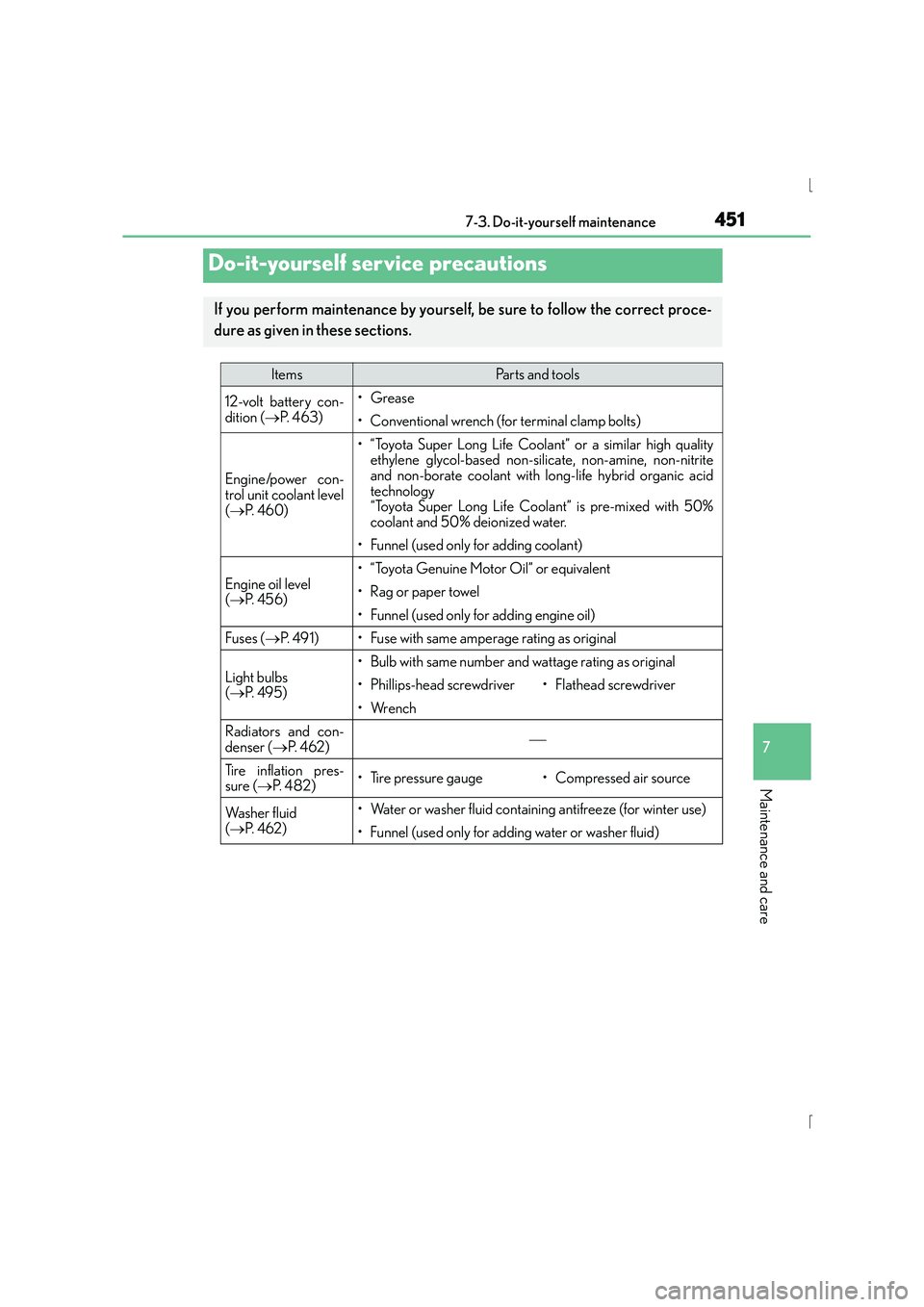
If you perform maintenance by yourself, be sure to follow the correct proce-
dure as given in these sections.
ItemsParts and tools
12-volt battery con-
dition (
→P. 4 6 3 )•Grease
• Conventional wrench (for terminal clamp bolts)
Engine/power con-
trol unit coolant level
(→ P. 4 6 0 )
• “Toyota Super Long Life Coolant” or a similar high quality
ethylene glycol-based non-silicate, non-amine, non-nitrite
and non-borate coolant with long-life hybrid organic acid
technology
“Toyota Super Long Life Coolant” is pre-mixed with 50%
coolant and 50% deionized water.
• Funnel (used only for adding coolant)
Engine oil level
(→ P. 4 5 6 )
• “Toyota Genuine Motor Oil” or equivalent
• Rag or paper towel
• Funnel (used only for adding engine oil)
Fuses ( →P. 4 9 1 )• Fuse with same amperage rating as original
Light bulbs
(→ P. 4 9 5 )
• Bulb with same number and wattage rating as original
• Phillips-head screwdriver•Flathead screwdriver
•Wrench
Radiators and con-
denser ( →P. 4 6 2 )
Tire inflation pres-
sure ( →P. 4 8 2 )• Tire pressure gauge• Compressed air source
Wa s h e r f l u i d
(→ P. 4 6 2 )• Water or washer fluid containing antifreeze (for winter use)
• Funnel (used only for adding water or washer fluid)
Page 459 of 628
4597-3. Do-it-yourself maintenance
7
Maintenance and care
IS300h_EE(OM53D56E)
CAUTION
■Used engine oil
●Used engine oil contains potentially harmful contaminants which may cause skin dis-
orders such as inflammation and skin cancer, so care should be taken to avoid pro-
longed and repeated contact. To remove used engine oil from your skin, wash
thoroughly with soap and water.
●Dispose of used oil and filters only in a safe and acceptable manner. Do not dispose of
used oil and filters in household trash, in sewers or onto the ground.
Call any authorized Lexus dealer or repairer, or another duly qualified and equipped
professional, service station or auto parts store for information concerning recycling
or disposal.
●Do not leave used engine oil within the reach of children.
NOTICE
■To prevent serious engine damage
Check the oil level on a regular basis.
■When replacing the engine oil
●Be careful not to spill engine oil on the vehicle components.
●Avoid overfilling, or the engine could be damaged.
●Check the oil level on the dipstick every time you refill the vehicle.
●Be sure the engine oil filler cap is properly tightened.
Page 475 of 628
4757-3. Do-it-yourself maintenance
7
Maintenance and care
IS300h_EE(OM53D56E)
NOTICE
■Repairing or replacing tires, wheels, tire pressure warning valves, transmitters and
tire valve caps
●When removing or fitting the wheels, tires or the tire pressure warning valves and
transmitters, contact any authorized Lexus dealer or repairer, or another duly quali-
fied and equipped professional as the tire pressure warning valves and transmitters
may be damaged if not handled correctly.
●Make sure to install the tire valve caps. If the tire valve caps are not installed, water
could enter the tire pressure warning valves and the tire pressure warning valves
could be bound.
●When replacing tire valve caps, do not use tire valve caps other than those specified.
The cap may become stuck.
■To avoid damage to the tire pressure warning valves and transmitters
When a tire is repaired with liquid sealants , the tire pressure warning valve and trans-
mitter may not operate properly. If a liquid sealant is used, contact any authorized
Lexus dealer or repairer, or another duly qu alified and equipped professional or other
qualified service shop as soon as possible. After use of liquid sealant, make sure to
replace the tire pressure warning valve and transmitter when repairing or replacing the
tire. ( →P. 4 6 8 )
■Driving on rough roads
Take particular care when driving on roads with loose surfaces or potholes.
These conditions may cause losses in tire inflation pressure, reducing the cushioning
ability of the tires. In addition, driving on rough roads may cause damage to the tires
themselves, as well as the vehicle’s wheels and body.
■Low profile tires (except 16-inch tires)
Low profile tires may cause greater damage than usual to the tire wheel when sustain-
ing impact from the road surface. Therefore, pay attention to the following:
●Be sure to use proper tire inflation pressure. If tires are under-inflated, they may be
damaged more severely.
●Avoid potholes, uneven pavement, curbs and other road hazards. Failure to do so
may lead to severe tire and wheel damage.
■If tire inflation pressure of each tire becomes low while driving
Do not continue driving, or your tires and/or wheels may be ruined.