cruise control Lexus IS300h 2015 User Guide
[x] Cancel search | Manufacturer: LEXUS, Model Year: 2015, Model line: IS300h, Model: Lexus IS300h 2015Pages: 628, PDF Size: 137.89 MB
Page 252 of 628
2524-5. Using the driving support systems
IS300h_EE(OM53D56E)
■Cruise control can be set when
●The shift lever is in D or range 4 or higher of S has been selected.
●Range 4 or higher of D has been selected by using the paddle shift.
●Vehicle speed is above approximately 40 km/h (25 mph).
■Accelerating after setting the vehicle speed
●The vehicle can be accelerated normally. After acceleration, the set speed resumes.
●Even without canceling the cruise control, the set speed can be increased by first accel-
erating the vehicle to the desired speed and then pushing the lever down to set the new
speed.
■Automatic cruise control cancelation
Cruise control will stop maintaining the vehicle speed in any of the following situations.
●Actual vehicle speed falls more than approximately 16 km/h (10 mph) below the preset
vehicle speed.
At this time, the memorized set speed is not retained.
●Actual vehicle speed is below approximately 40 km/h (25 mph).
●VSC is activated.
●TRC is activated for a period of time.
●When the VSC or TRC system is turned off by pressing the VSC OFF switch.
■If the warning message for the cruise control is shown on the multi-information display
Press the “ON/OFF” button once to deactivate the system, and then press the button
again to reactivate the system.
If the cruise control speed cannot be set or if the cruise control cancels immediately after
being activated, there may be a malfunction in the cruise control system. Have the vehi-
cle inspected by any authorized Lexus dealer or repairer, or another duly qualified and
equipped professional.
Page 253 of 628
2534-5. Using the driving support systems
4
Driving
IS300h_EE(OM53D56E)
CAUTION
■To avoid operating the cruise control by mistake
Switch the cruise control off using the “ON/OFF” button when not in use.
■Situations unsuitable for cruise control
Do not use cruise control in any of the following situations.
Doing so may result in loss of control and could cause an accident resulting in death or
serious injury.
●In heavy traffic
●On roads with sharp bends
●On winding roads
●On slippery roads, such as those covered with rain, ice or snow
●On steep hills
Vehicle speed may exceed the set sp eed when driving down a steep hill.
●When your vehicle is towing a trailer or during emergency towing
Page 254 of 628
2544-5. Using the driving support systems
IS300h_EE(OM53D56E)
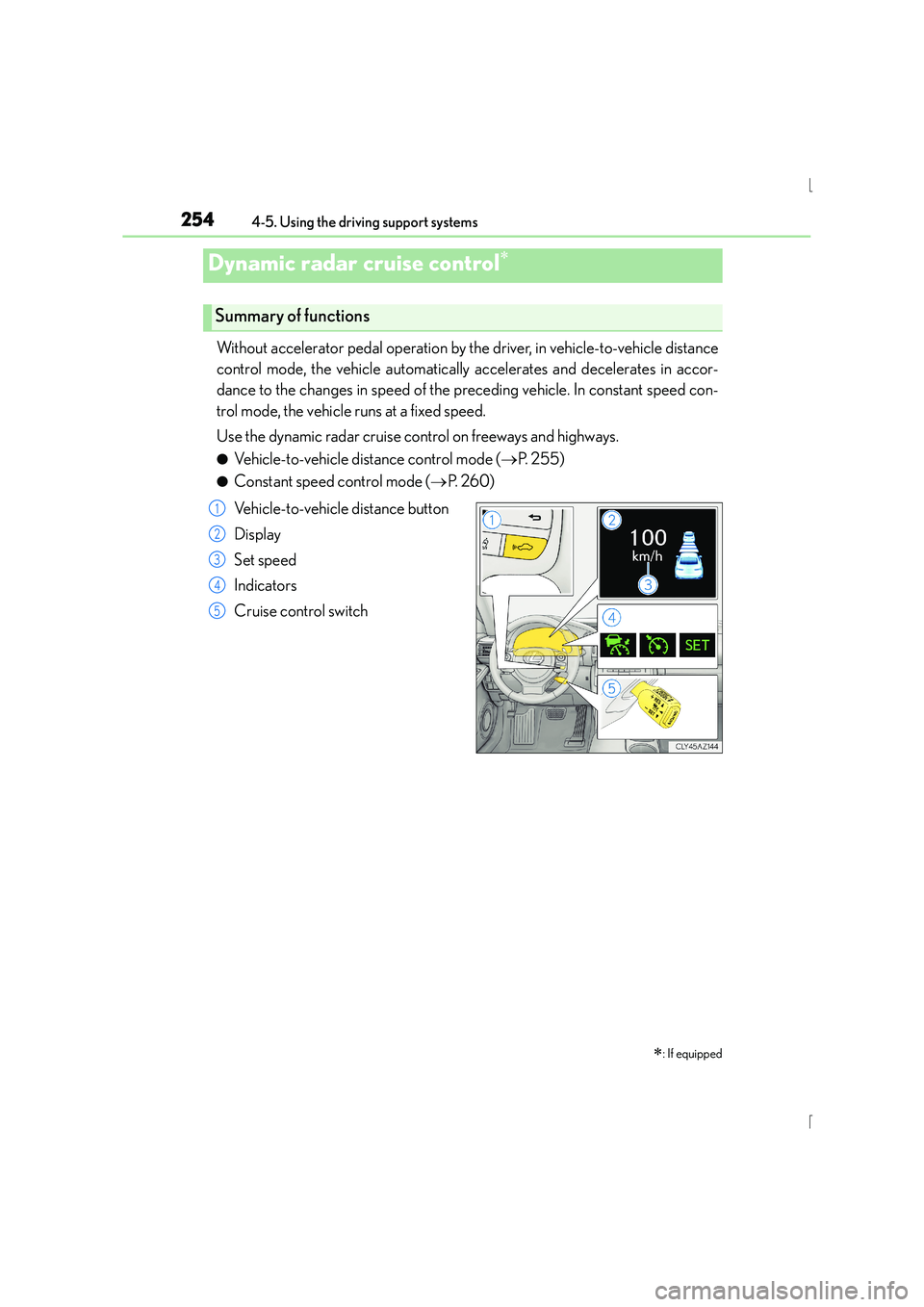
Without accelerator pedal operation by the driver, in vehicle-to-vehicle distance
control mode, the vehicle automatically accelerates and decelerates in accor-
dance to the changes in speed of the preceding vehicle. In constant speed con-
trol mode, the vehicle runs at a fixed speed.
Use the dynamic radar cruise control on freeways and highways.
●Vehicle-to-vehicle distance control mode (→P. 2 5 5 )
●Constant speed control mode ( →P. 2 6 0 )
Vehicle-to-vehicle distance button
Display
Set speed
Indicators
Cruise control switch
Dynamic radar cruise control∗
∗
: If equipped
Summary of functions
1
2
3
4
5
Page 256 of 628
2564-5. Using the driving support systems
IS300h_EE(OM53D56E)
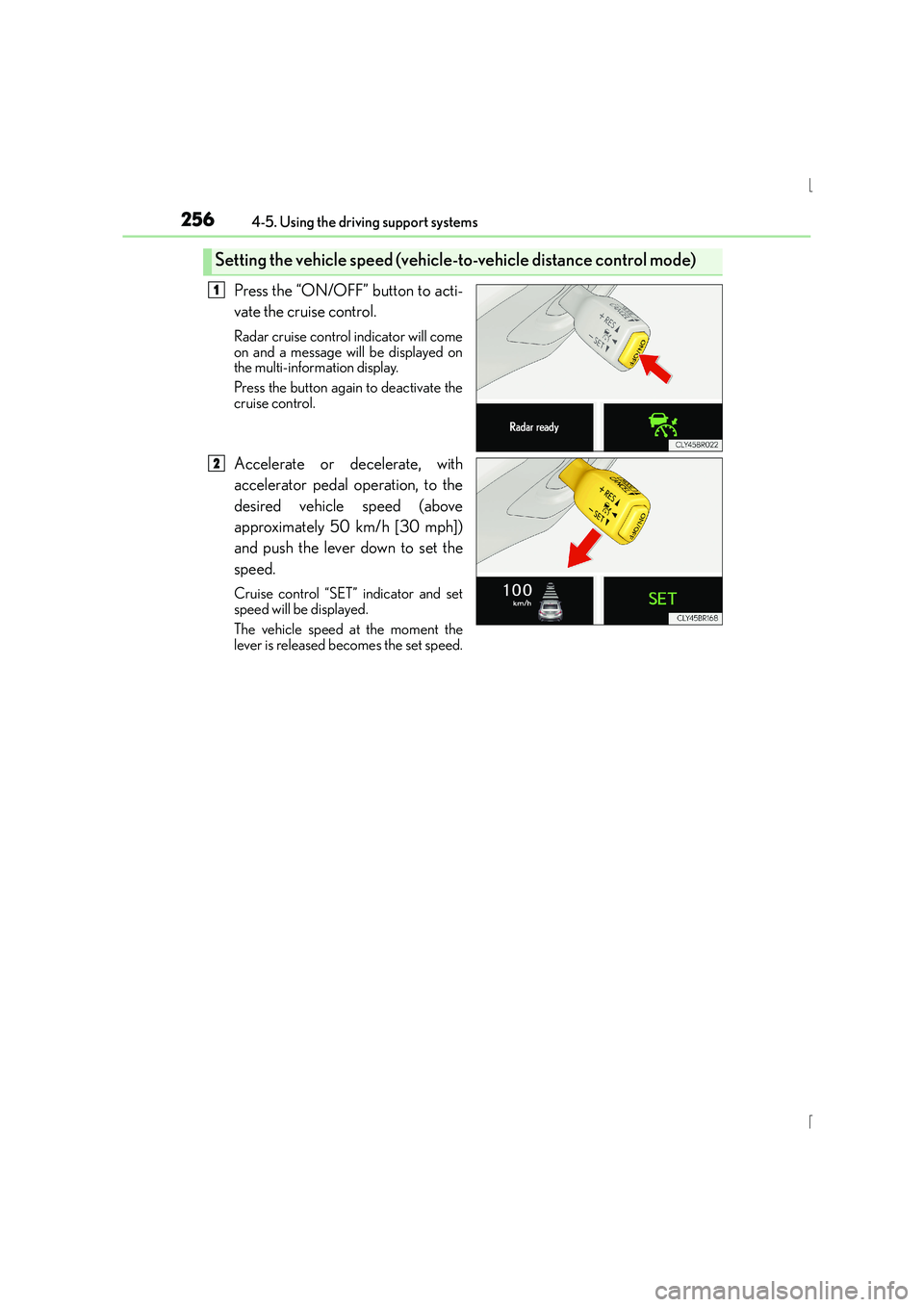
Press the “ON/OFF” button to acti-
vate the cruise control.
Radar cruise control indicator will come
on and a message will be displayed on
the multi-information display.
Press the button again to deactivate the
cruise control.
Accelerate or decelerate, with
accelerator pedal operation, to the
desired vehicle speed (above
approximately 50 km/h [30 mph])
and push the lever down to set the
speed.
Cruise control “SET” indicator and set
speed will be displayed.
The vehicle speed at the moment the
lever is released becomes the set speed.
Setting the vehicle speed (vehicle-to-vehicle distance control mode)
1
2
Page 259 of 628
2594-5. Using the driving support systems
4
Driving
IS300h_EE(OM53D56E)
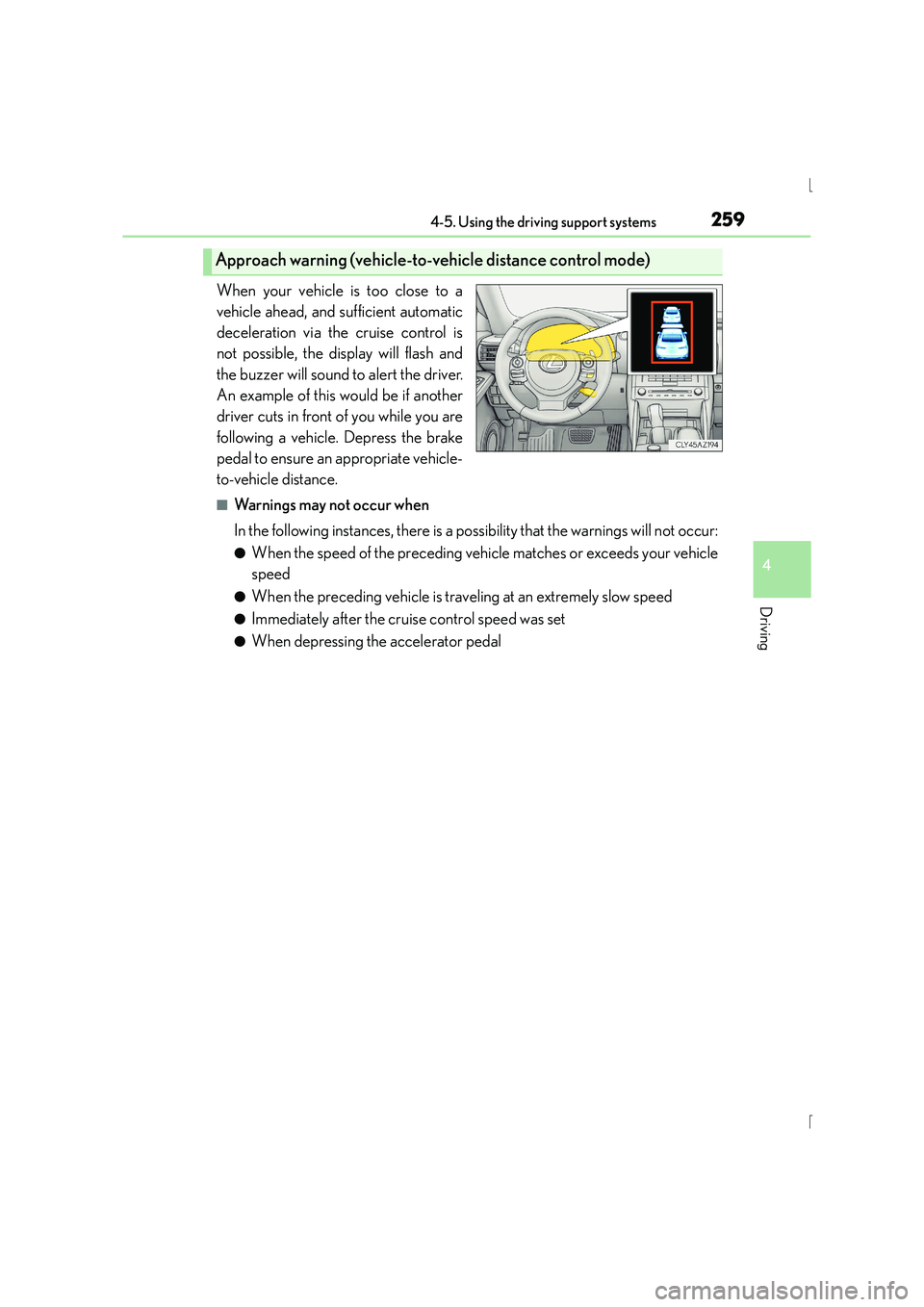
When your vehicle is too close to a
vehicle ahead, and sufficient automatic
deceleration via the cruise control is
not possible, the display will flash and
the buzzer will sound to alert the driver.
An example of this would be if another
driver cuts in front of you while you are
following a vehicle. Depress the brake
pedal to ensure an appropriate vehicle-
to-vehicle distance.
■Wa r n i n g s m a y n o t o c c u r w h e n
In the following instances, there is a possibility that the warnings will not occur:
●When the speed of the preceding vehicle matches or exceeds your vehicle
speed
●When the preceding vehicle is traveling at an extremely slow speed
●Immediately after the cruise control speed was set
●When depressing the accelerator pedal
Approach warning (vehicle-to-vehicle distance control mode)
Page 260 of 628
2604-5. Using the driving support systems
IS300h_EE(OM53D56E)
When constant speed control mode is selected, your vehicle will maintain a set
speed without controlling the vehicle-to-vehicle distance. Select this mode only
when vehicle-to-vehicle distance control mode does not function correctly due
to dirt, etc.
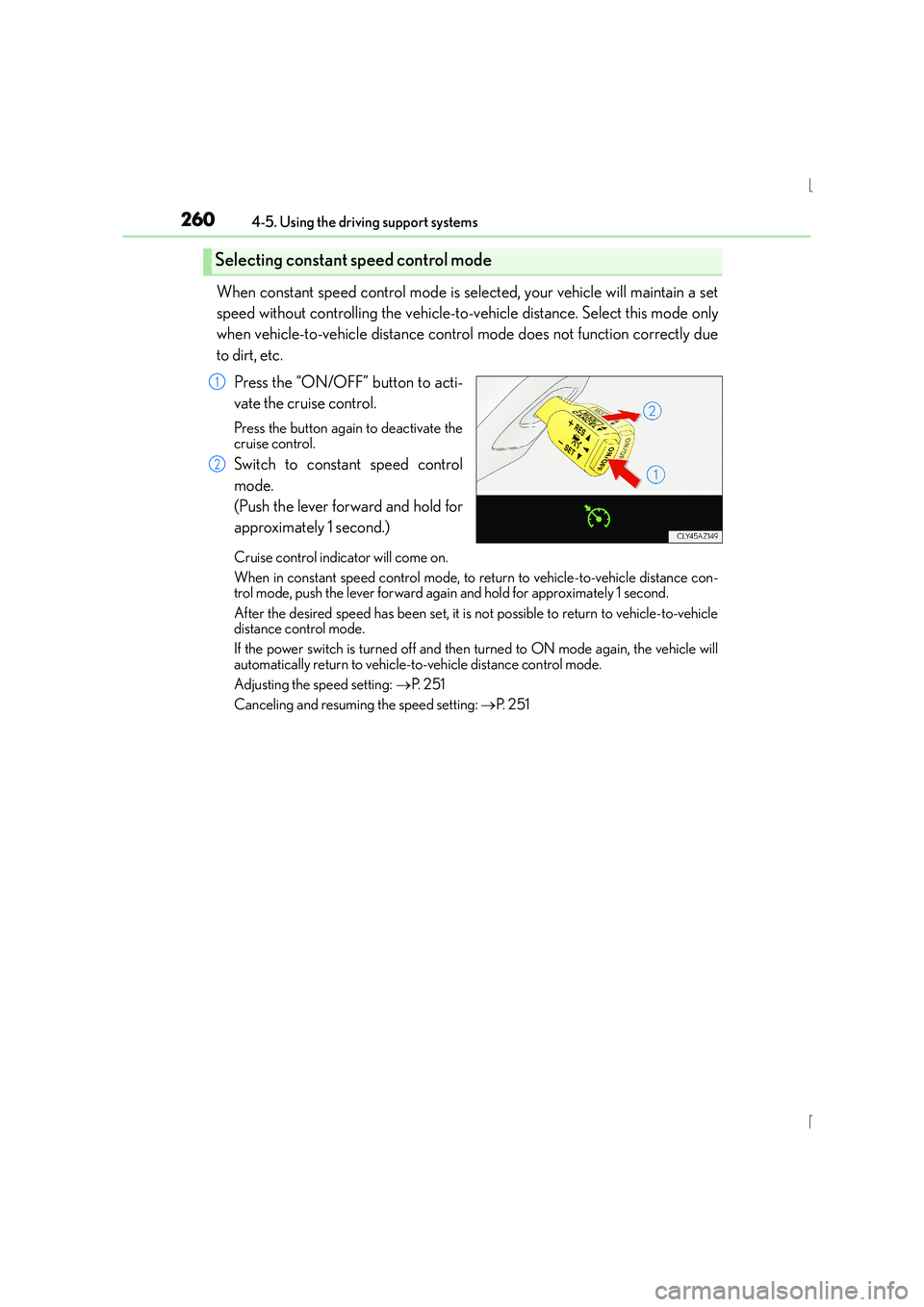
Press the “ON/OFF” button to acti-
vate the cruise control.
Press the button again to deactivate the
cruise control.
Switch to constant speed control
mode.
(Push the lever forward and hold for
approximately 1 second.)
Cruise control indicator will come on.
When in constant speed control mode, to return to vehicle-to-vehicle distance con-
trol mode, push the lever forward again and hold for approximately 1 second.
After the desired speed has been set, it is not possible to return to vehicle-to-vehicle
distance control mode.
If the power switch is turned off and then turned to ON mode again, the vehicle will
automatically return to vehicle-to-vehicle distance control mode.
Adjusting the speed setting: →P. 2 5 1
Canceling and resuming the speed setting: →P. 2 5 1
Selecting constant speed control mode
1
2
Page 261 of 628
2614-5. Using the driving support systems
4
Driving
IS300h_EE(OM53D56E)
■Dynamic radar cruise control can be set when
●The shift lever is in D or range 4 or higher of S has been selected.
●Range 4 or higher of D has been selected by using the paddle shift switch.
●Vehicle speed is above approximately 50 km/h (30 mph).
■Accelerating after setting the vehicle speed
The vehicle can accelerate by operating the accelerator pedal. After accelerating, the
set speed resumes. However, during vehicle-to-vehicle distance control mode, the vehi-
cle speed may decrease below the set speed in order to maintain the distance to the pre-
ceding vehicle.
■Automatic cancelation of vehicle-to-vehicle distance control mode
Vehicle-to-vehicle distance control driving is automatically canceled in the following situ-
ations:
●Actual vehicle speed falls below approximately 40 km/h (25 mph).
●VSC is activated.
●TRC is activated for a period of time.
●When the VSC or TRC system is turned off by pressing the VSC OFF switch.
●The sensor cannot detect correctly because it is covered in some way.
●The windshield wipers are operating at high speed (when the wipers are in AUTO
mode or the high speed wiper operation).
●When snow mode is set.
●Pre-crash braking is activated.
If vehicle-to-vehicle distance control mode is automatically canceled for any other rea-
son, there may be a malfunction in the system. Contact any authorized Lexus dealer or
repairer, or another duly qualified and equipped professional.
■Automatic cancelation of constant speed control mode
The cruise control will stop maintaining th e vehicle speed in the following situations:
●Actual vehicle speed is more than approximately 16 km/h (10 mph) below the set vehi-
cle speed.
●Actual vehicle speed falls below approximately 40 km/h (25 mph).
●VSC is activated.
●TRC is activated for a period of time.
●When the VSC or TRC system is turned off by pressing the VSC OFF switch.
●Pre-crash braking is activated.
Page 262 of 628
2624-5. Using the driving support systems
IS300h_EE(OM53D56E)
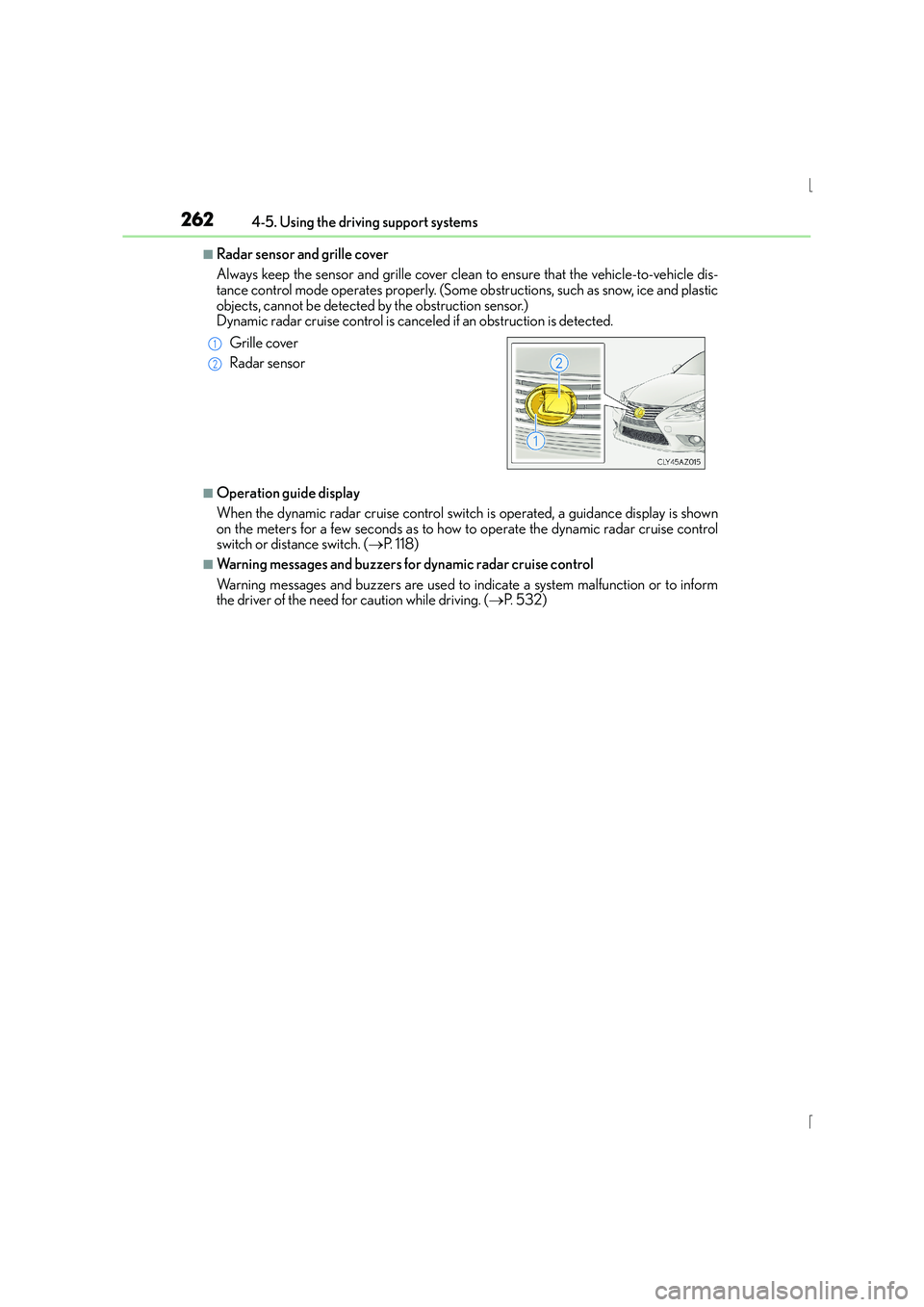
■Radar sensor and grille cover
Always keep the sensor and grille cover clean to ensure that the vehicle-to-vehicle dis-
tance control mode operates properly. (Some obstructions, such as snow, ice and plastic
objects, cannot be detected by the obstruction sensor.)
Dynamic radar cruise control is canceled if an obstruction is detected.
■Operation guide display
When the dynamic radar cruise control switch is operated, a guidance display is shown
on the meters for a few seconds as to how to operate the dynamic radar cruise control
switch or distance switch. ( →P. 1 1 8 )
■Warning messages and buzzers for dynamic radar cruise control
Warning messages and buzzers are used to in dicate a system malfunction or to inform
the driver of the need for caution while driving. ( →P. 5 3 2 )
Grille cover
Radar sensor
1
2
Page 265 of 628
2654-5. Using the driving support systems
4
Driving
IS300h_EE(OM53D56E)
CAUTION
■Before using dynamic radar cruise control
Do not overly rely on vehicle-to-vehicle distance control mode.
Be aware of the set speed. If automatic deceleration/acceleration is not appropriate,
adjust the vehicle speed, as well as the distance between your vehicle and vehicles
ahead by applying the brakes etc.
■Cautions regarding the driving assist systems
Observe the following precautions.
Failure to do so may cause an accident resulting in death or serious injury.
●Assisting the driver to measure following distance
The dynamic radar cruise control is only intended to help the driver in determining
the following distance between the driver’s own vehicle and a designated vehicle
traveling ahead. It is not a mechanism that allows careless or inattentive driving, and it
is not a system that can assist the driver in low-visibility conditions. It is still necessary
for driver to pay close attention to the vehicle’s surroundings.
●Assisting the driver to judge proper following distance
The dynamic radar cruise control determines whether the following distance
between the driver’s own vehicle and a designated vehicle traveling ahead is appro-
priate or not. It is not capable of making any other type of judgement. Therefore, it is
absolutely necessary for the driver to remain vigilant and to determine whether or not
there is a possibility of danger in any given situation.
●Assisting the driver to operate the vehicle
The dynamic radar cruise control has no capability to prevent or avoid a collision with
a vehicle traveling ahead. Therefore, if there is ever any danger, the driver must take
immediate and direct control of the vehicle and act appropriately in order to ensure
the safety of all involved.
■To avoid inadvertent cruise control activation
Switch the dynamic radar cruise control off using the “ON/OFF” button when not in
use.
Page 266 of 628
2664-5. Using the driving support systems
IS300h_EE(OM53D56E)
CAUTION
■Situations unsuitable for dynamic radar cruise control
Do not use dynamic radar cruise control in any of the following situations.
Doing so may result in inappropriate speed control and could cause an accident result-
ing in death or serious injury.
●Roads where there are pedestrians, cyclers, etc.
●In heavy traffic
●On roads with sharp bends
●On winding roads
●On slippery roads, such as those covered with rain, ice or snow
●On steep downhills, or where there are sudden changes between sharp up and down
gradients
Vehicle speed may exceed the set speed when driving down a steep hill.
●At entrances to freeways and highways
●When weather conditions are bad enough that they may prevent the sensors from
detecting correctly (fog, snow, sandstorm, heavy rain, etc.)
●When an approach warning buzzer is heard often
●When your vehicle is towing a trailer or during emergency towing