Driving mode select Lexus IS300h 2015 Owner's Guide
[x] Cancel search | Manufacturer: LEXUS, Model Year: 2015, Model line: IS300h, Model: Lexus IS300h 2015Pages: 628, PDF Size: 137.89 MB
Page 261 of 628
2614-5. Using the driving support systems
4
Driving
IS300h_EE(OM53D56E)
■Dynamic radar cruise control can be set when
●The shift lever is in D or range 4 or higher of S has been selected.
●Range 4 or higher of D has been selected by using the paddle shift switch.
●Vehicle speed is above approximately 50 km/h (30 mph).
■Accelerating after setting the vehicle speed
The vehicle can accelerate by operating the accelerator pedal. After accelerating, the
set speed resumes. However, during vehicle-to-vehicle distance control mode, the vehi-
cle speed may decrease below the set speed in order to maintain the distance to the pre-
ceding vehicle.
■Automatic cancelation of vehicle-to-vehicle distance control mode
Vehicle-to-vehicle distance control driving is automatically canceled in the following situ-
ations:
●Actual vehicle speed falls below approximately 40 km/h (25 mph).
●VSC is activated.
●TRC is activated for a period of time.
●When the VSC or TRC system is turned off by pressing the VSC OFF switch.
●The sensor cannot detect correctly because it is covered in some way.
●The windshield wipers are operating at high speed (when the wipers are in AUTO
mode or the high speed wiper operation).
●When snow mode is set.
●Pre-crash braking is activated.
If vehicle-to-vehicle distance control mode is automatically canceled for any other rea-
son, there may be a malfunction in the system. Contact any authorized Lexus dealer or
repairer, or another duly qualified and equipped professional.
■Automatic cancelation of constant speed control mode
The cruise control will stop maintaining th e vehicle speed in the following situations:
●Actual vehicle speed is more than approximately 16 km/h (10 mph) below the set vehi-
cle speed.
●Actual vehicle speed falls below approximately 40 km/h (25 mph).
●VSC is activated.
●TRC is activated for a period of time.
●When the VSC or TRC system is turned off by pressing the VSC OFF switch.
●Pre-crash braking is activated.
Page 280 of 628
2804-5. Using the driving support systems
IS300h_EE(OM53D56E)
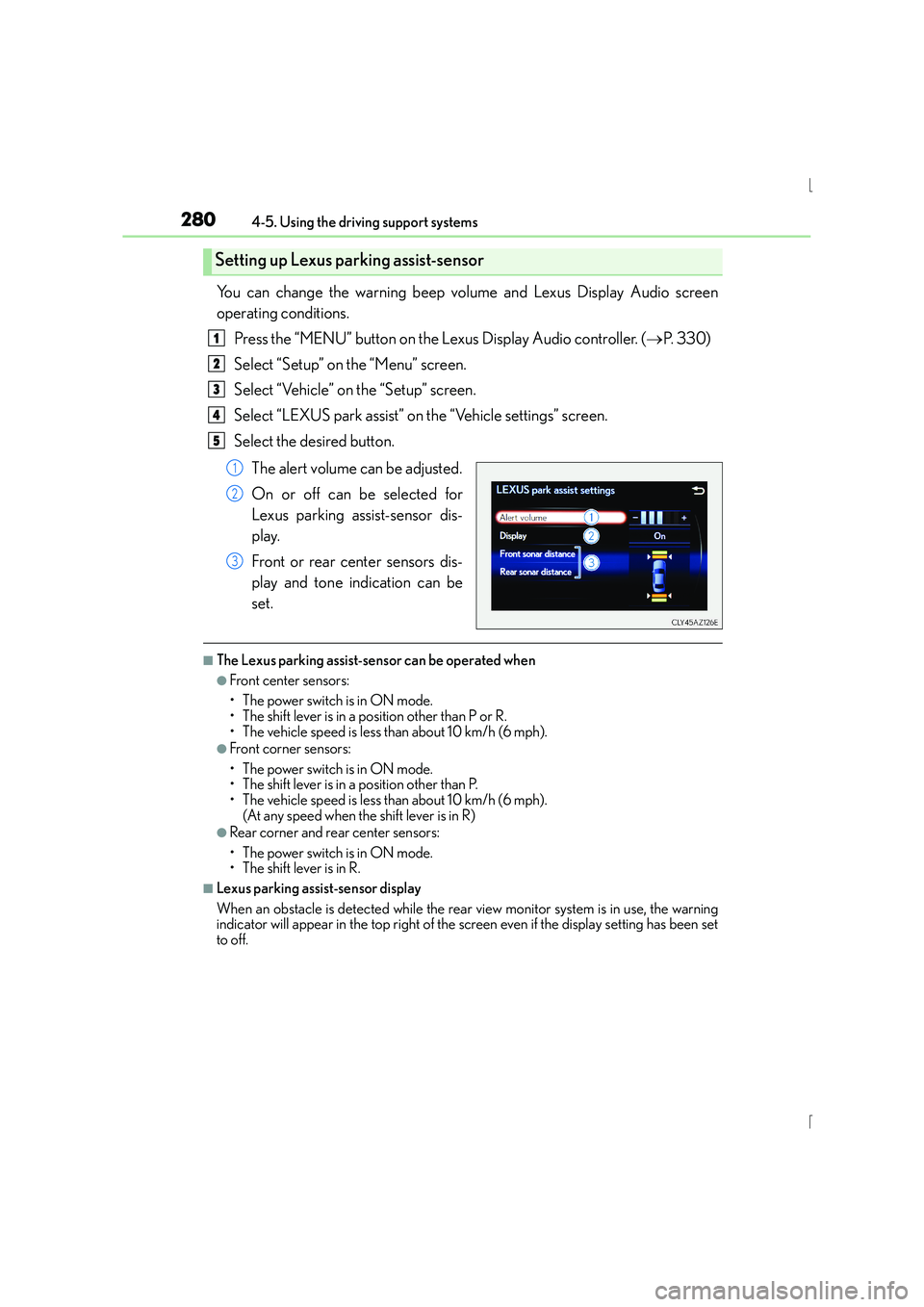
You can change the warning beep volume and Lexus Display Audio screen
operating conditions.Press the “MENU” button on the Lexus Display Audio controller. ( →P. 3 3 0 )
Select “Setup” on the “Menu” screen.
Select “Vehicle” on the “Setup” screen.
Select “LEXUS park assist” on the “Vehicle settings” screen.
Select the desired button.
The alert volume can be adjusted.
On or off can be selected for
Lexus parking assist-sensor dis-
play.
Front or rear center sensors dis-
play and tone indication can be
set.
■The Lexus parking assist-sensor can be operated when
●Front center sensors:
• The power switch is in ON mode.
• The shift lever is in a position other than P or R.
• The vehicle speed is less than about 10 km/h (6 mph).
●Front corner sensors:
• The power switch is in ON mode.
• The shift lever is in a position other than P.
• The vehicle speed is less than about 10 km/h (6 mph). (At any speed when the shift lever is in R)
●Rear corner and rear center sensors:
• The power switch is in ON mode.
• The shift lever is in R.
■Lexus parking assist-sensor display
When an obstacle is detected while the rear view monitor system is in use, the warning
indicator will appear in the top right of the screen even if the display setting has been set
to off.
Setting up Lexus parking assist-sensor
1
2
3
4
5
1
2
3
Page 293 of 628
2934-5. Using the driving support systems
4
Driving
IS300h_EE(OM53D56E)
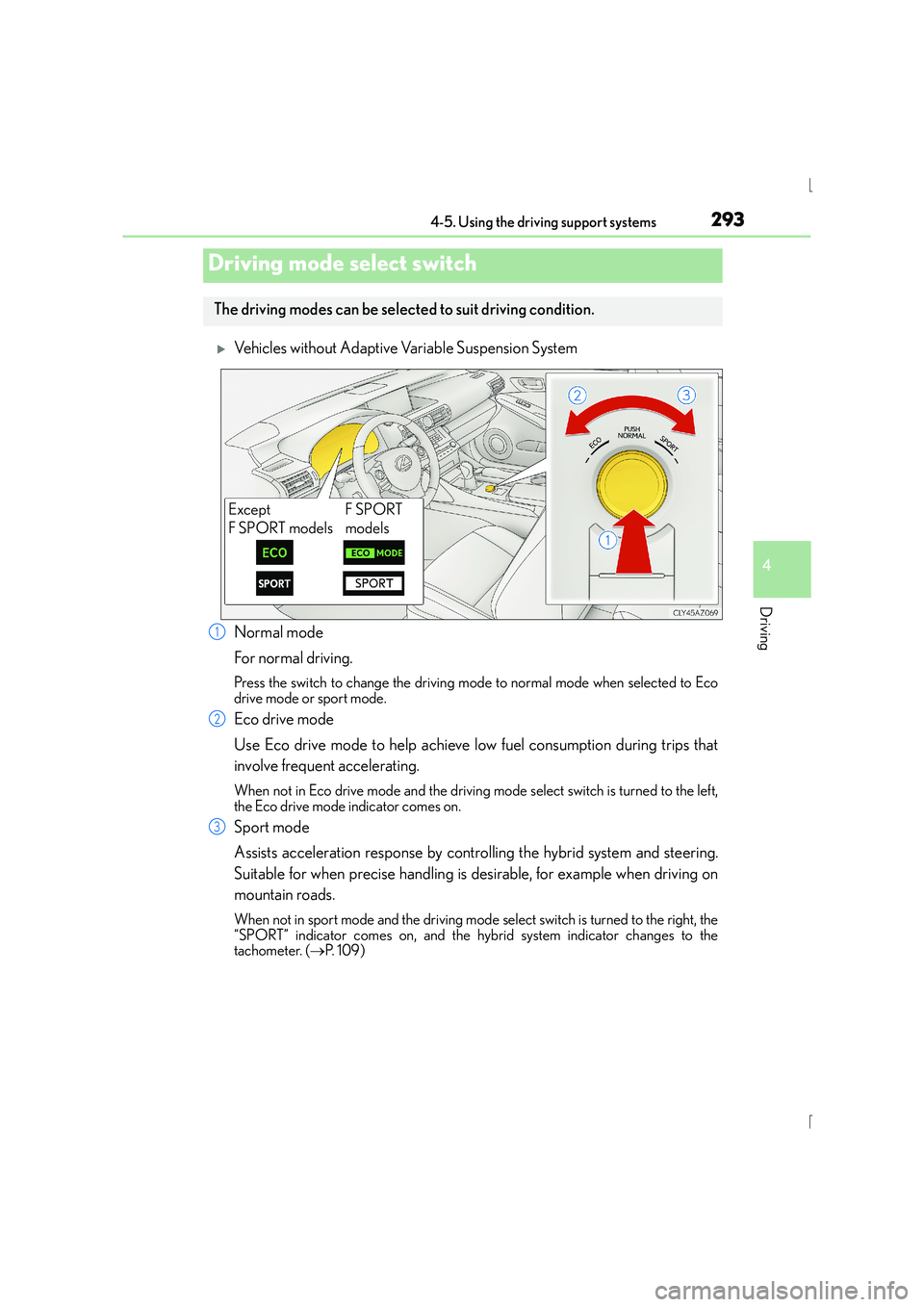
XVehicles without Adaptive Variable Suspension System
Normal mode
For normal driving.
Press the switch to change the driving mode to normal mode when selected to Eco
drive mode or sport mode.
Eco drive mode
Use Eco drive mode to help achieve low fuel consumption during trips that
involve frequent accelerating.
When not in Eco drive mode and the driving mode select switch is turned to the left,
the Eco drive mode indicator comes on.
Sport mode
Assists acceleration response by controlling the hybrid system and steering.
Suitable for when precise handling is desirable, for example when driving on
mountain roads.
When not in sport mode and the driving mode select switch is turned to the right, the
“SPORT” indicator comes on, and the hybrid system indicator changes to the
tachometer. ( →P. 1 0 9 )
Driving mode select switch
The driving modes can be select ed to suit driving condition.
Except
F SPORT modelsF SPORT
models
1
2
3
Page 294 of 628
2944-5. Using the driving support systems
IS300h_EE(OM53D56E)
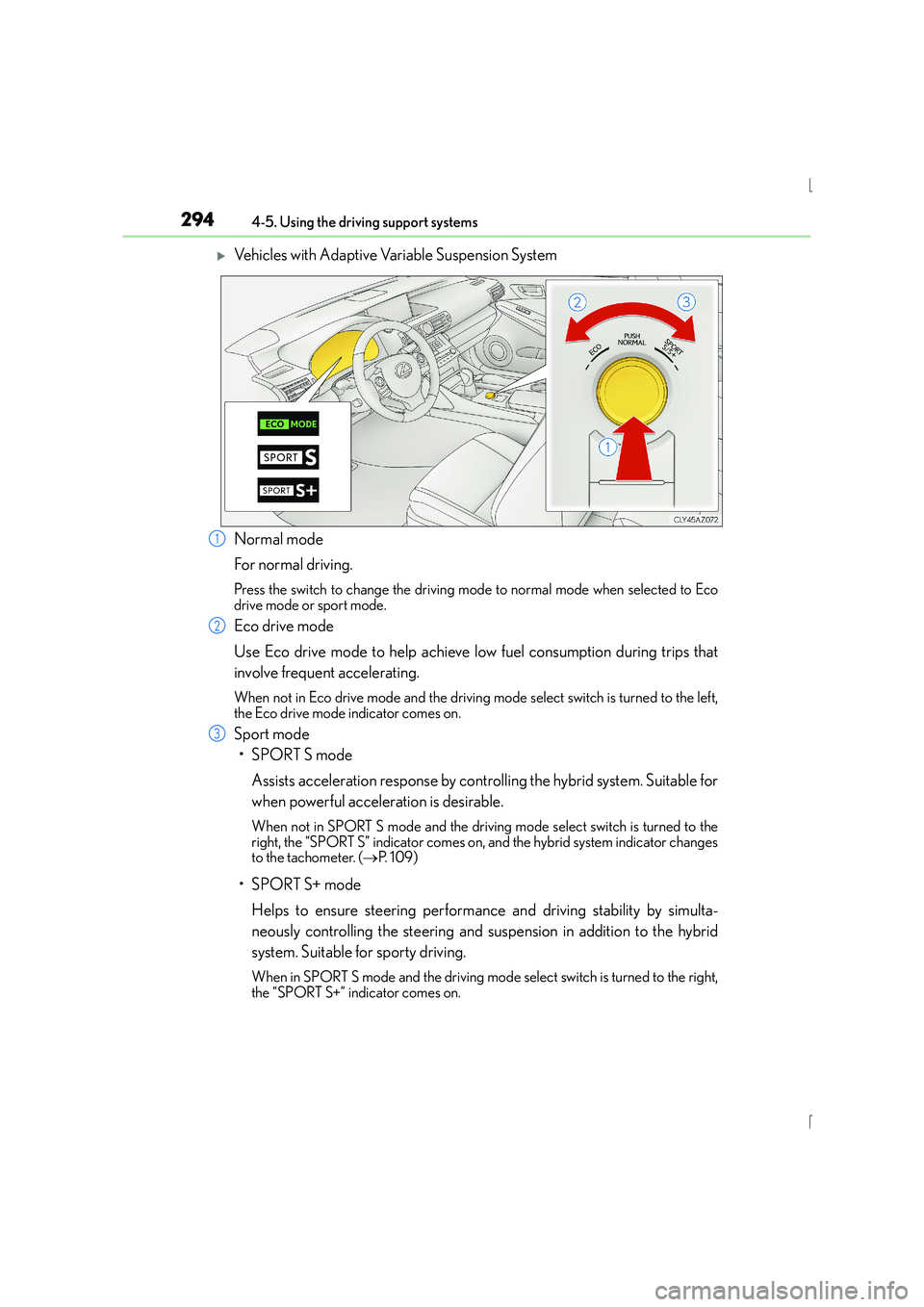
XVehicles with Adaptive Variable Suspension System
Normal mode
For normal driving.
Press the switch to change the driving mode to normal mode when selected to Eco
drive mode or sport mode.
Eco drive mode
Use Eco drive mode to help achieve low fuel consumption during trips that
involve frequent accelerating.
When not in Eco drive mode and the driving mode select switch is turned to the left,
the Eco drive mode indicator comes on.
Sport mode
•SPORT S mode
Assists acceleration response by controlling the hybrid system. Suitable for
when powerful acceleration is desirable.
When not in SPORT S mode an d the driving mode select switch is turned to the
right, the “SPORT S” indicator comes on, and the hybrid system indicator changes
to the tachometer. ( →P. 1 0 9 )
•SPORT S+ mode
Helps to ensure steering performance and driving stability by simulta-
neously controlling the steering and suspension in addition to the hybrid
system. Suitable for sporty driving.
When in SPORT S mode and the driving mode select switch is turned to the right,
the “SPORT S+” indicator comes on.
1
2
3
Page 387 of 628
3875-9. Bluetooth® Phone
5
Lexus Display Audio system
IS300h_EE(OM53D56E)
XPhone number containing a “w” symbol
When the “w” symbol is dialed in an outgoing call, you need to go to the
“Release tones” screen to dial the following digits. Move the controller to the
left and then select “Release tones”.
Select “Handset mode” to change from a hands-free call to a cellular phone call
or vice versa.
Press the switch on the steering wheel or select .
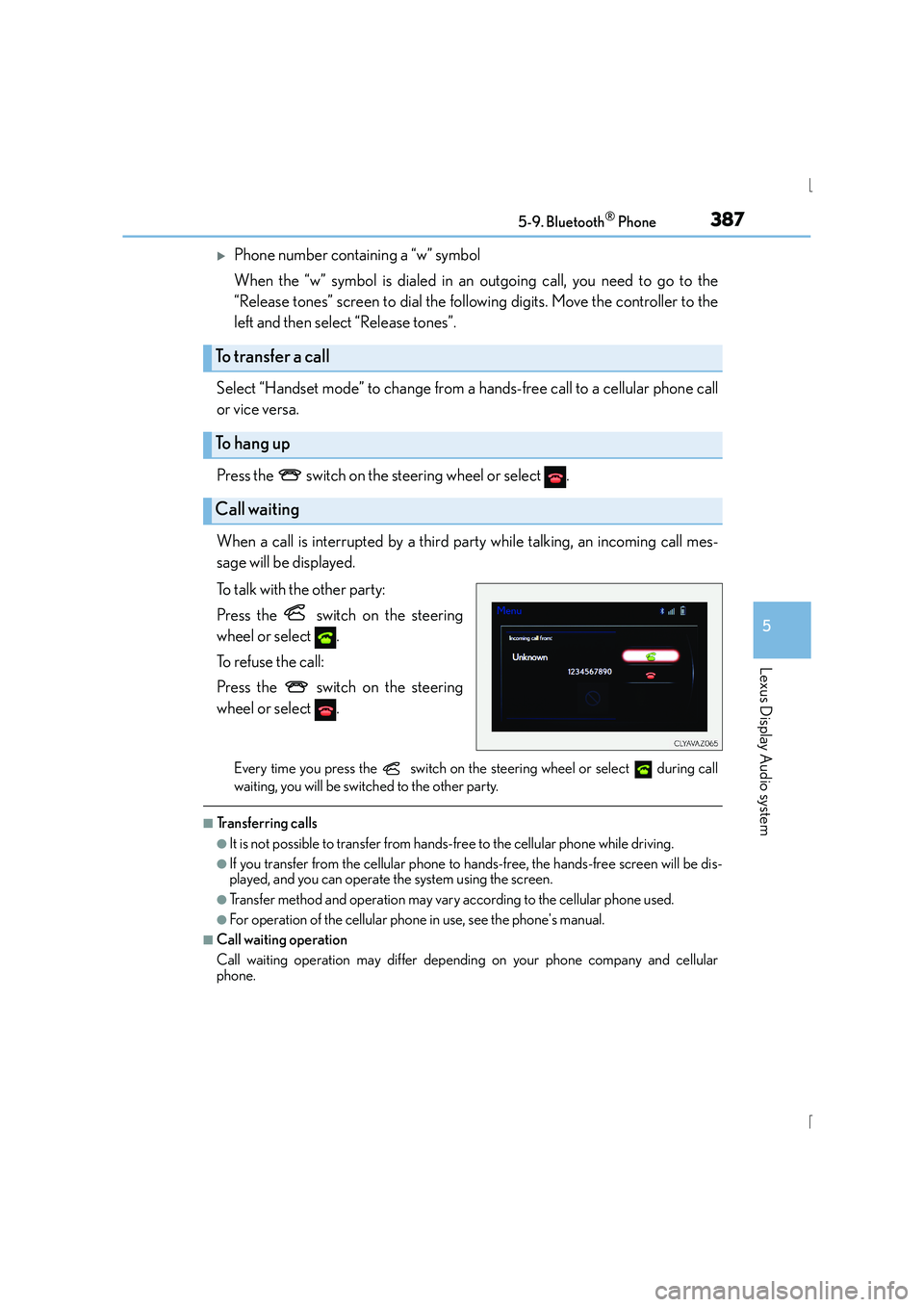
When a call is interrupted by a third party while talking, an incoming call mes-
sage will be displayed.
To talk with the other party:
Press the switch on the steering
wheel or select .
To refuse the call:
Press the switch on the steering
wheel or select .
Every time you press the switch on the steering wheel or select during call
waiting, you will be switched to the other party.
■Tr a n s f e r r i n g c a l l s
●It is not possible to transfer from hand s-free to the cellular phone while driving.
●If you transfer from the cellular phone to ha nds-free, the hands-free screen will be dis-
played, and you can operate the system using the screen.
●Transfer method and operation may vary according to the cellular phone used.
●For operation of the cellular phone in use, see the phone's manual.
■Call waiting operation
Call waiting operation may differ depending on your phone company and cellular
phone.
To transfer a call
To h a n g u p
Call waiting
Page 421 of 628

4216-1. Using the air conditioning system
6
Interior features
IS300h_EE(OM53D56E)
■Registering air conditioning settings to electronic keys (vehicles with driving position
memory)
●Unlocking the vehicle using an electronic key and turning the power switch to ON
mode will recall that key’s regist ered air conditioning settings.
●When the power switch is turned off, the cu rrent air conditioning settings will automati-
cally be registered to the electronic key that was used to unlock the vehicle.
●The system may not operate correctly if more than one electronic key is in the vicinity or
if the smart entry & start system is used to unlock a passenger door.
●The doors that can recall the air conditioni ng setting when unlocked using the smart
entry & start system can be changed.* For details, contact any authorized Lexus dealer
or repairer, or another duly qualified and equipped professional.
*: The doors that can recall the driving position memory are changed at the same time.
■Using automatic mode
Fan speed is adjusted automatically according to the temperature setting and the ambi-
ent conditions.
Therefore, the fan may stop for a while until wa rm or cool air is ready to flow immediately
after is pressed or “AUTO” is selected.
■Fogging up of the windows
The windows will easily fog up when the humidity in the vehicle is high. Turning
(“A/C”) on will dehumidify the air from the outlets and defog the windshield effectively.
●If you turn (“A/C”) off, the windows may fog up more easily.
●The windows may fog up if the recirculated air mode is used.
■Outside/recirculated air mode
●When driving on dusty roads such as tunnels or in heavy traffic, set the outside/recircu-
lated air mode button to the recirculated air mode. This is effective in preventing out-
side air from entering the vehicle interior. During cooling operation, setting the
recirculated air mode will also cool the vehicle interior effectively.
●Outside/recirculated air mode may automatically switch depending on the tempera-
ture setting or the inside temperature.
■Operation of the air conditioning system in Eco drive mode
In Eco drive mode, the air conditioning system is controlled as follows to prioritize fuel
efficiency:
●Engine speed and compressor operation controlled to restrict heating/cooling capac-
ity
●Fan speed restricted when automatic mode is selected
To improve air conditioning performance, perform the following operations:
●Adjust the fan speed
●Turn off Eco drive mode
Page 445 of 628
4457-1. Maintenance and care
7
Maintenance and care
IS300h_EE(OM53D56E)
NOTICE
■To prevent paint deterioration and corrosion on the body and components (aluminum
wheels etc.)
●Wash the vehicle immediately in the following cases:
• After driving near the sea coast
• After driving on salted roads
• If coal tar or tree sap is present on the paint surface
• If dead insects, insect droppings or bird droppings are present on the paint surface
• After driving in an area contaminated with soot, oi ly smoke, mine dust, iron pow-
der or chemical substances
• If the vehicle becomes heavily soiled with dust or mud
• If liquids such as benzene and gaso line are spilled on the paint surface
●If the paint is chipped or scratched, have it repaired immediately.
●To prevent the wheels from corroding, remove any dirt and store in a place with low
humidity when storing the wheels.
■Cleaning the exterior lights
●Wash carefully. Do not use organic substances or scrub with a hard brush.
This may damage the surfaces of the lights.
●Do not apply wax to the surfaces of the lights.
Wax may cause damage to the lenses.
■When using an automatic car wash (vehicles with rain-sensing windshield wipers)
Set the wipers to the intermittent windshield wipers. ( →P. 2 4 1 )
If AUTO mode is selected, the wipers may operate and the wiper blades may be dam-
aged.
■When using a high pressure car wash
●When washing the vehicle, do not spray the camera or its surrounding area directly
with a high pressure washer. Shock applied from high pressure water may cause the
device to not operate normally.
●Do not bring the nozzle tip close to boots (rubber or resin manufactured cover), con-
nectors or the following parts. The parts may be damaged if they come into contact
with high-pressure water.
• Traction related parts
• Steering parts •Suspension parts
•Brake parts
Page 612 of 628
612Alphabetical index
IS300h_EE(OM53D56E)
Doors .......................................................... 136Automatic door locking and
unlocking system............................. 140
Door lock.................................................139
Open door warning buzzer .......... 137
Open door warning
light ........................................................ 523
Outside rear view mirrors................ 181
Rear door child-protector ............ 140
Side windows........................................ 185
Drive information..................................... 116
Drive info 1/Drive info 2........................ 117
Driver’s and front passenger’s seat belt reminder light ...................523
Driver’s seat position memory ......... 169
Driving ........................................................ 194 Break-in tips .......................................... 195
Correct driving posture .................... 36
Driving mode select switch .......... 293
Hybrid vehicle driving tips ............320
Procedures .............................................194
Winter drive tips................................. 322
Dynamic radar cruise control.......... 254 E-mail ........................................................388
Eco drive mode ..................................... 293
Elapsed time .............................................. 116
Electric motor (traction motor) ..........79
Electric Power Steering (EPS) ....... 296
Function.................................................. 296
Warning light........................................522
Electronic key ......................................... 130 Battery-saving function ....................150
If the electronic key does not operate properly ............................ 563
Replacing the battery ......................488
Emergency, in case of
If a warning message is displayed .............................................527
If the 12-volt battery is discharged ........................................ 566
If the electronic key does not operate properly ............................ 563
If the hybrid system will not start .......................................................560
If the shift lever cannot be shifted from P................................... 562
If the warning buzzer sounds........ 521
If the warning light turns on ............ 521E
Page 623 of 628
623Alphabetical index
IS300h_EE(OM53D56E)
Snow mode ............................................. 220
Snow tires................................................. 324
Spark plug............................................... 583
Specifications .........................................578
Speech command system ............... 408
Speedometer .......................................... 109
Speed indicator ........................................ 117
Sport mode.............................................. 293
Steering lock ............................................ 215Column lock release..........................215
Steering wheel .........................................177 Adjustment.............................................. 177
Audio switches.................................... 334
Heated steering wheel.................... 423
Power easy access system ............ 169
Steering wheel position
memory................................................ 169
Stop lights
Emergency brake signal ................ 297
Replacing light bulbs........................507
Storage feature......................................428
Stuck If the vehicle becomes stuck ........575
Sun visors ................................................. 435
Sun shade Rear .......................................................... 437
Roof ........................................................... 190 switch settings ................................... 117
Switches
ASC (Active Sound Control)..... 228
Audio remote control switches .............................................. 334
Automatic High Beam switch......232
BSM (Blind Spot Monitor) switch .....................................................310
Cruise control switch ....................................... 250, 254
Door lock switches............................. 139
Driving mode select switch.......... 293
Driving position memory switches ................................................ 169
Emergency flashers switch............. 512
EV drive mode switch ...................... 217
Fog light switch................................... 236
Heated steering wheel switch ....................................................423
Ignition switch ....................................... 212
LDA (Lane Departure Alert) switch ..................................................... 271
Lexus parking assist-sensor switch ....................................................276
Light switch............................................229
Meter control switches.......................116
Moon roof switches ...........................189
Page 625 of 628
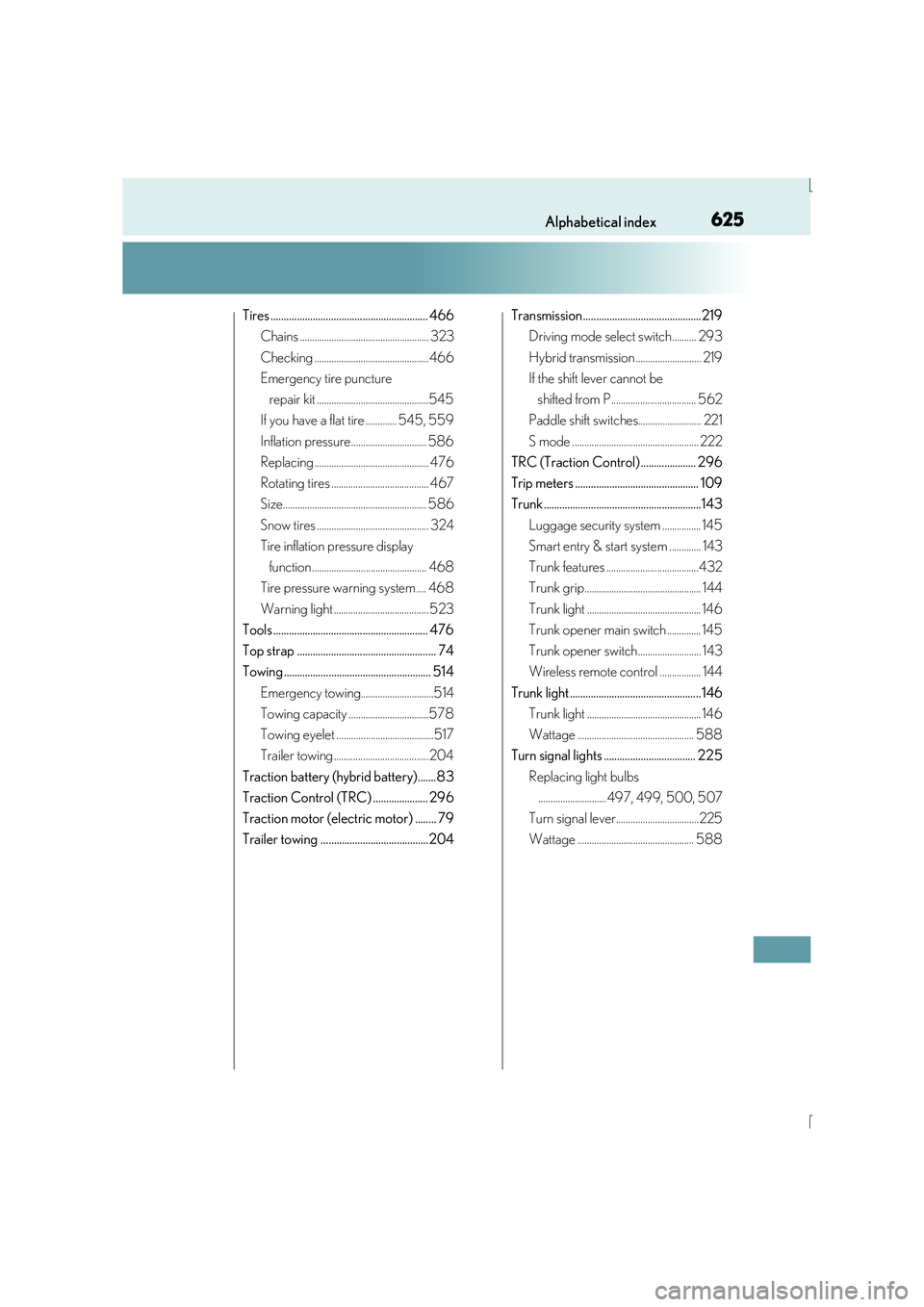
625Alphabetical index
IS300h_EE(OM53D56E)
Tires ............................................................ 466Chains ..................................................... 323
Checking ...............................................466
Emergency tire puncture
repair kit ..............................................545
If you have a flat tire ............. 545, 559
Inflation pressure............................... 586
Replacing ............................................... 476
Rotating tires ........................................ 467
Size........................................................... 586
Snow tires .............................................. 324
Tire inflation pressure display
function ............................................... 468
Tire pressure warning system .... 468
Warning light ....................................... 523
Tools ........................................................... 476
Top strap ..................................................... 74
Towing ........................................................ 514
Emergency towing..............................514
Towing capacity .................................578
Towing eyelet ........................................517
Trailer towing ....................................... 204
Traction battery (hybrid battery).......83
Traction Control (TRC) ..................... 296
Traction motor (electric motor) ........ 79
Trailer towing .........................................204 Transmission.............................................219
Driving mode select switch.......... 293
Hybrid transmission ........................... 219
If the shift lever cannot be
shifted from P................................... 562
Paddle shift switches.......................... 221
S mode .................................................... 222
TRC (Traction Control) ..................... 296
Trip meters ............................................... 109
Trunk ............................................................143
Luggage security system ................ 145
Smart entry & start system ............. 143
Trunk features ......................................432
Trunk grip................................................ 144
Trunk light ............................................... 146
Trunk opener main switch .............. 145
Trunk opener switch.......................... 143
Wireless remote control ................. 144
Trunk light .................................................. 146 Trunk light ............................................... 146
Wattage ................................................ 588
Turn signal lights ................................... 225
Replacing light bulbs............................497, 499, 500, 507
Turn signal lever..................................225
Wattage ................................................ 588