brake Lexus IS300h 2015 Owner's Guide
[x] Cancel search | Manufacturer: LEXUS, Model Year: 2015, Model line: IS300h, Model: Lexus IS300h 2015Pages: 628, PDF Size: 137.89 MB
Page 212 of 628
212
IS300h_EE(OM53D56E)4-2. Driving procedures
Check that the parking brake is set.
Check that the shift lever is in P.
Firmly depress the brake pedal.
and a message will be displayed on the multi-information display.
If it is not displayed, the hybrid system cannot be started.
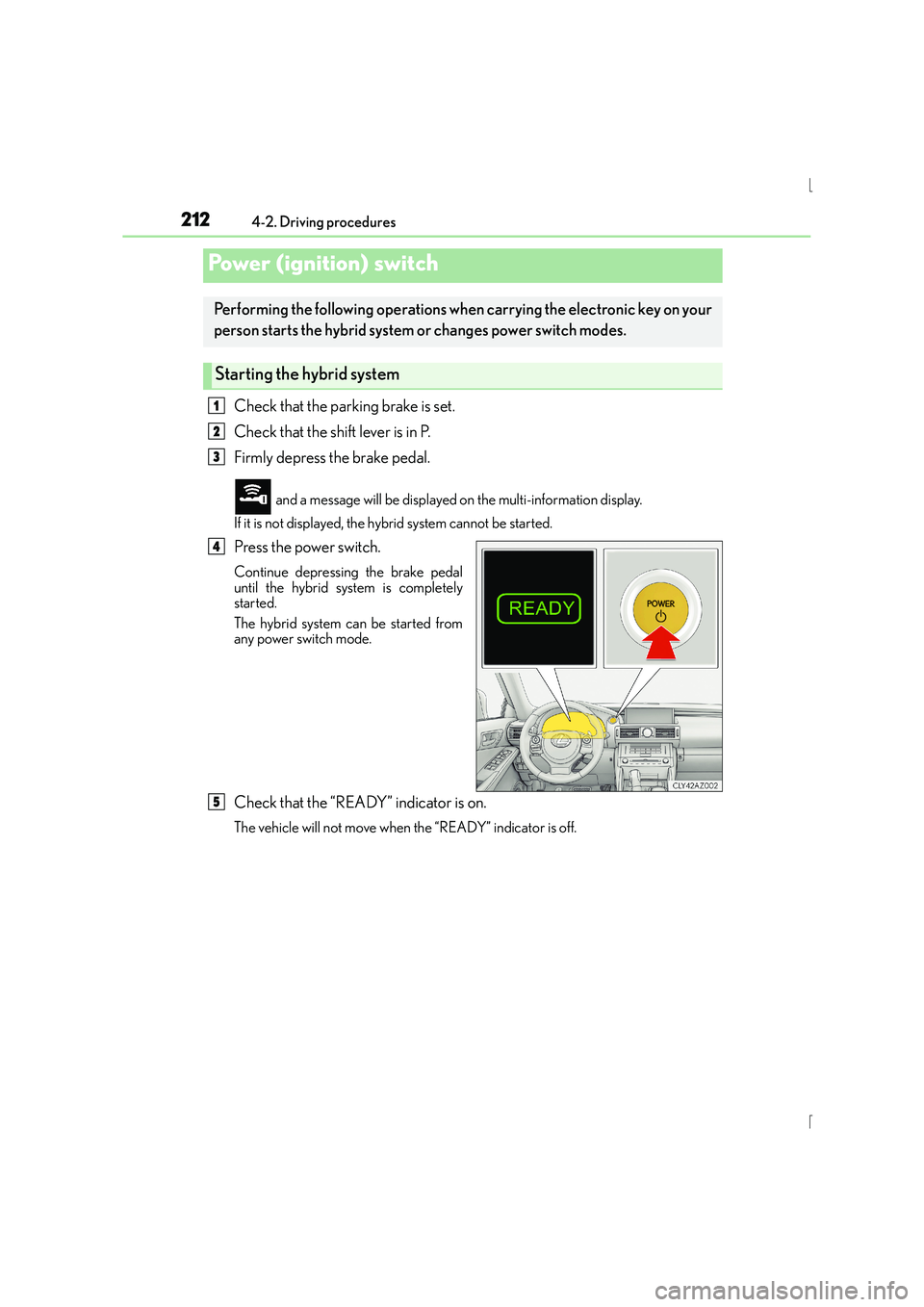
Press the power switch.
Continue depressing the brake pedal
until the hybrid system is completely
started.
The hybrid system can be started from
any power switch mode.
Check that the “READY” indicator is on.
The vehicle will not move when the “READY” indicator is off.
Power (ignition) switch
Performing the following operations when carrying the electronic key on your
person starts the hybrid system or changes power switch modes.
Starting the hybrid system
1
2
3
4
5
Page 213 of 628
2134-2. Driving procedures
4
Driving
IS300h_EE(OM53D56E)
Stop the vehicle.
Shift the shift lever to P.
Set the parking brake. (→P. 2 2 7 )
Press the power switch.
Release the brake pedal and check that the display on the meters is off.
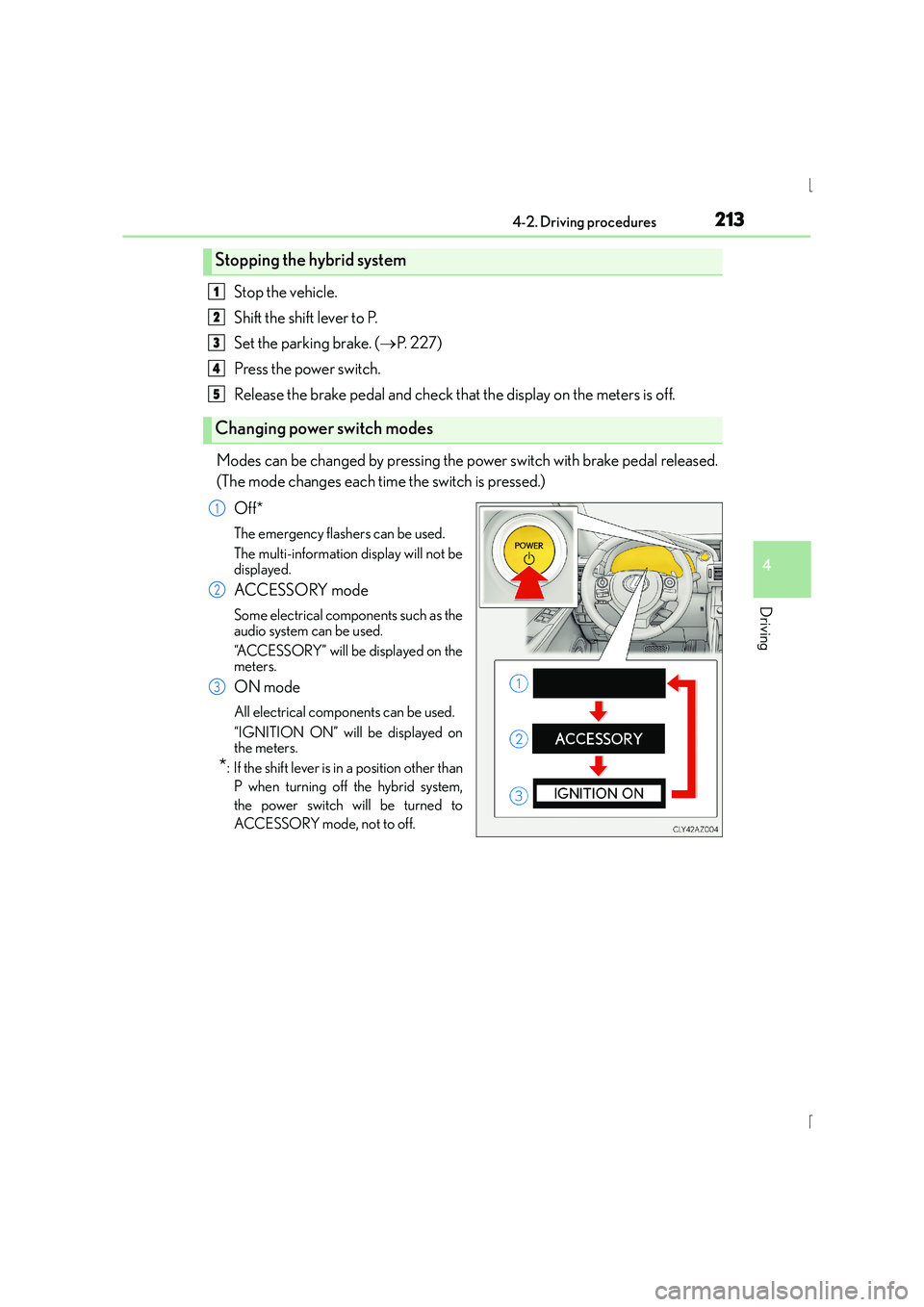
Modes can be changed by pressing the power switch with brake pedal released.
(The mode changes each time the switch is pressed.) Off*
The emergency flashers can be used.
The multi-information display will not be
displayed.
ACCESSORY mode
Some electrical components such as the
audio system can be used.
“ACCESSORY” will be displayed on the
meters.
ON mode
All electrical components can be used.
“IGNITION ON” will be displayed on
the meters.
*: If the shift lever is in a position other thanP when turning off the hybrid system,
the power switch will be turned to
ACCESSORY mode, not to off.
Stopping the hybrid system
Changing power switch modes
1
2
3
4
5
1
2
3
Page 214 of 628

2144-2. Driving procedures
IS300h_EE(OM53D56E)
If the hybrid system is stopped with the shift lever in a position other than P, the
power switch will not be turned off but instead be turned to ACCESSORY
mode. Perform the following procedure to turn the switch off:Check that the parking brake is set.
Shift the shift lever to P.
Check that “Turn Power OFF” is displayed on the multi-information display
and then press the power switch once.
Check that “Turn Power OFF” on the multi-information display is off.
■Auto power off function
If the vehicle is left in ACCESSORY mode for more than 20 minutes or ON mode (the
hybrid system is not operating) for more than an hour with the shift lever in P, the power
switch will automatically turn off. However, this function cannot entirely prevent 12-volt
battery discharge. Do not leave the vehicle with the power switch in ACCESSORY or
ON mode for long periods of time when the hybrid system is not operating.
■Sounds and vibrations specific to a hybrid vehicle
→P. 8 2
■Electronic key battery depletion
→P. 1 3 3
■When the ambient temperature is low, su ch as during winter driving conditions
It may take time before the “READY” indicator comes on.
■Conditions affecting operation
→ P. 1 5 1
■Notes for the entry function
→P. 1 5 2
■If the hybrid system does not start
●Check that the shift lever is securely set in P. The hybrid system may not start if the shift
lever is displaced out of P.
●The immobilizer system may not have been deactivated. ( →P. 9 0 )
Contact any authorized Lexus dealer or repairer, or another duly qualified and
equipped professional.
When stopping the hybrid system with the shift lever in a position other
than P
1
2
3
4
Page 215 of 628

2154-2. Driving procedures
4
Driving
IS300h_EE(OM53D56E)
■Steering lock
After turning the power switch off and opening and closing the doors, the steering wheel
will be locked due to the steering lock function. Operating the power switch again auto-
matically cancels the steering lock.
■When the steering lock cannot be released
■Steering lock motor overheating prevention
To prevent the steering lock motor from overheating, operation of the motor may be sus-
pended if the hybrid system is turned on an d off repeatedly in a short period of time. In
this case, refrain from operating the hybrid system. After about 10 seconds, the steering
lock motor will resume functioning.
■When “Check Entry & Start System” is displayed on the multi-information display
The system may be malfunctioning. Have the vehicle inspected by any authorized Lexus
dealer or repairer, or another duly qualified and equipped professional immediately.
■If the “READY” indicator does not come on
If the “READY” indicator does not come on when you press the power switch with the
shift lever in P and the brake pedal depressed, contact any authorized Lexus dealer or
repairer, or another duly qualified and equipped professional immediately.
■If the hybrid system is malfunctioning
→ P. 5 3 0
■If the electronic key battery is depleted
→P. 5 6 0
■Operation of the power switch
●When operating the power switch, one short, firm press is enough. If the switch is
pressed improperly, the hybrid system may no t start or the power switch mode may not
change. It is not necessary to press and hold the switch.
●If attempting to restart the hybrid system immediately after turning the power switch off,
the hybrid system may not start in some cases. After turning the power switch off,
please wait a few seconds before restarting the hybrid system.
■If the smart entry & start system has been deactivated by a customized setting
→P. 5 6 3
“Steering Lock active” w
ill be displayed on the
multi-information display.
Check that the shift lever is in P. Press the power
switch while turning the steering wheel left and
right.
Page 219 of 628
2194-2. Driving procedures
4
Driving
IS300h_EE(OM53D56E)
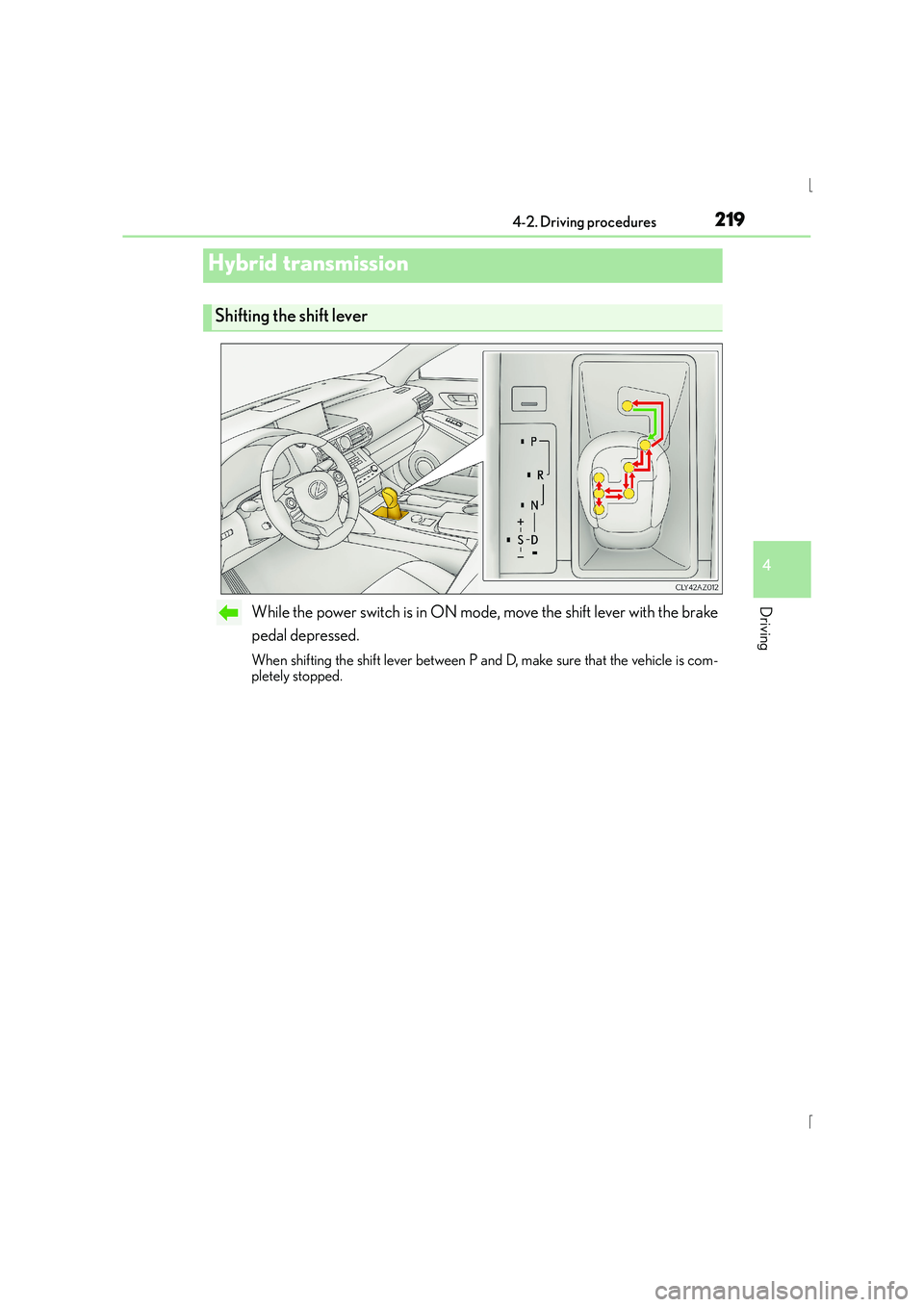
While the power switch is in ON mode, move the shift lever with the brake
pedal depressed.
When shifting the shift lever between P and D, make sure that the vehicle is com-
pletely stopped.
Hybrid transmission
Shifting the shift lever
Page 227 of 628
2274-2. Driving procedures
4
Driving
IS300h_EE(OM53D56E)
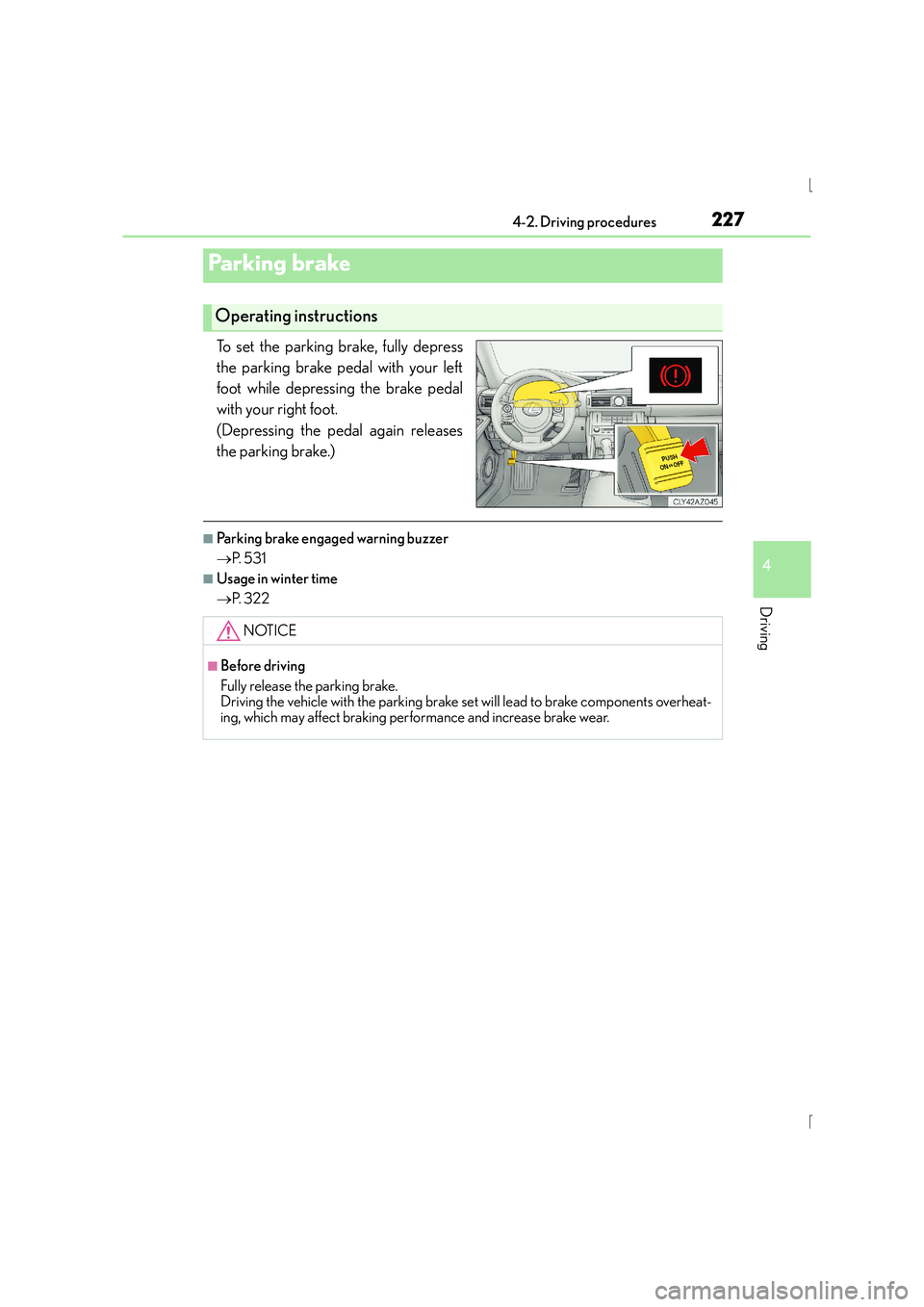
To set the parking brake, fully depress
the parking brake pedal with your left
foot while depressing the brake pedal
with your right foot.
(Depressing the pedal again releases
the parking brake.)
■Parking brake engaged warning buzzer
→P. 5 3 1
■Usage in winter time
→P. 3 2 2
Parking brake
Operating instructions
NOTICE
■Before driving
Fully release the parking brake.
Driving the vehicle with the parking brake set will lead to brake components overheat-
ing, which may affect braking performance and increase brake wear.
Page 230 of 628
2304-3. Operating the lights and wipers
IS300h_EE(OM53D56E)
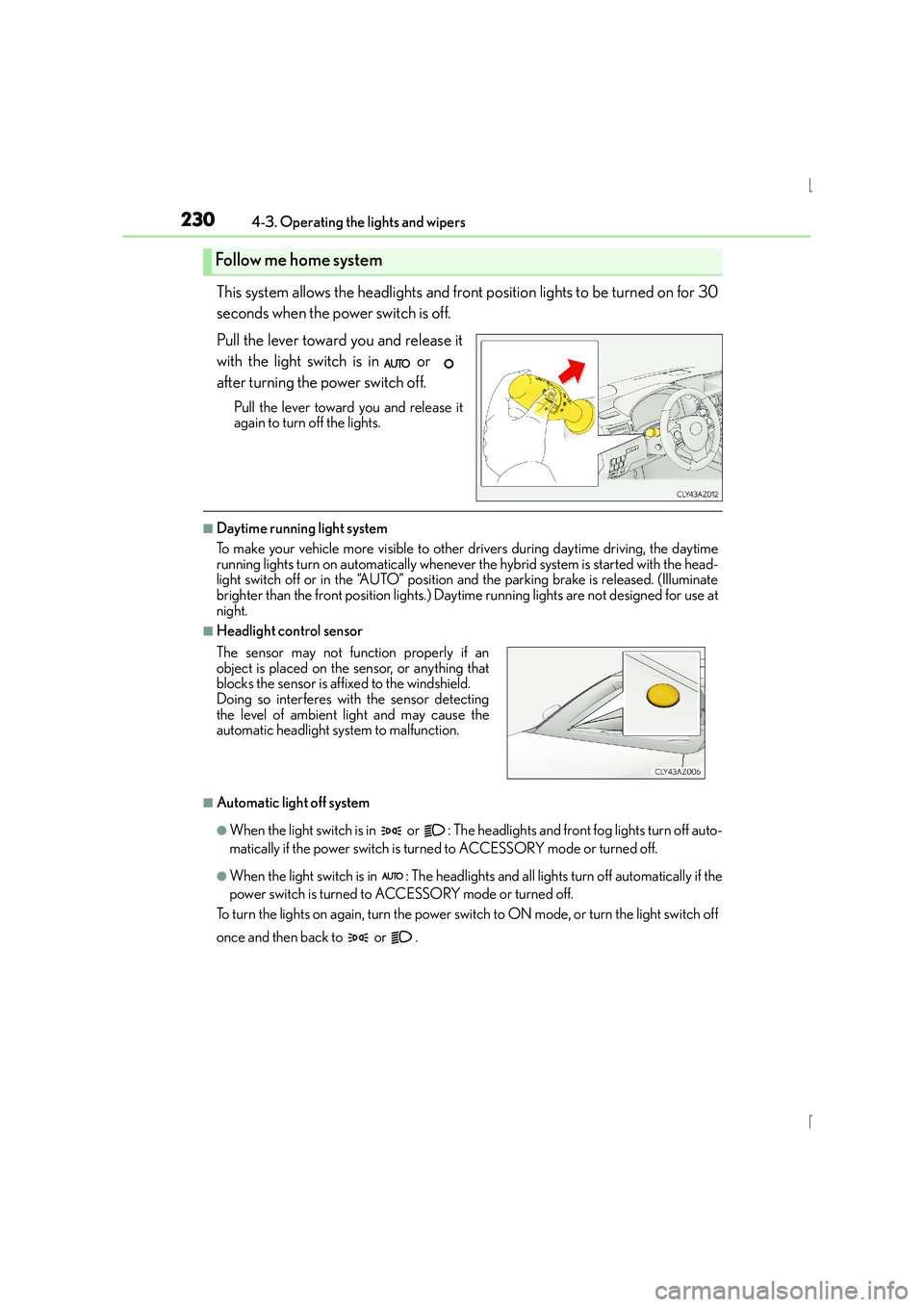
This system allows the headlights and front position lights to be turned on for 30
seconds when the power switch is off.
Pull the lever toward you and release it
with the light switch is in or
after turning the power switch off.
Pull the lever toward you and release it
again to turn off the lights.
■Daytime running light system
To make your vehicle more visible to other drivers during daytime driving, the daytime
running lights turn on automatically whenever the hybrid system is started with the head-
light switch off or in the “AUTO” position and the parking brake is released. (Illuminate
brighter than the front position lights.) Dayt ime running lights are not designed for use at
night.
■Headlight control sensor
■Automatic light off system
●When the light switch is in or : The he adlights and front fog lights turn off auto-
matically if the power switch is turned to ACCESSORY mode or turned off.
●When the light switch is in : The headlights and all lights turn off automatically if the
power switch is turned to ACCESSORY mode or turned off.
To turn the lights on again, turn the power swit ch to ON mode, or turn the light switch off
once and then back to or .
Follow me home system
The sensor may not function properly if an
object is placed on the sensor, or anything that
blocks the sensor is affixed to the windshield.
Doing so interferes with the sensor detecting
the level of ambient light and may cause the
automatic headlight system to malfunction.
Page 251 of 628
2514-5. Using the driving support systems
4
Driving
IS300h_EE(OM53D56E)
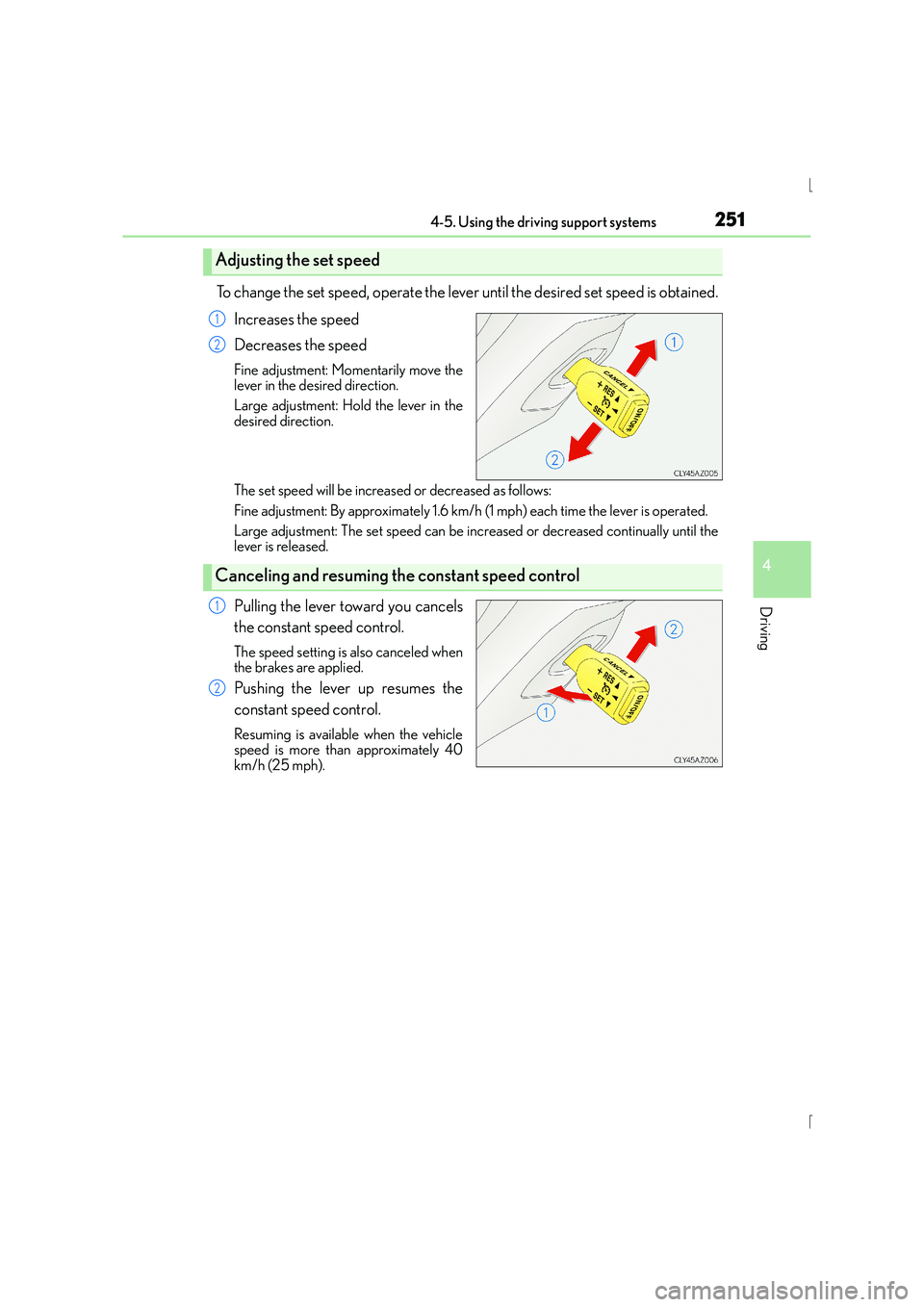
To change the set speed, operate the lever until the desired set speed is obtained.Increases the speed
Decreases the speed
Fine adjustment: Momentarily move the
lever in the desired direction.
Large adjustment: Hold the lever in the
desired direction.
The set speed will be increased or decreased as follows:
Fine adjustment: By approximately 1.6 km/h (1 mph) each time the lever is operated.
Large adjustment: The set speed can be incr eased or decreased continually until the
lever is released.
Pulling the lever toward you cancels
the constant speed control.
The speed setting is also canceled when
the brakes are applied.
Pushing the lever up resumes the
constant speed control.
Resuming is available when the vehicle
speed is more than approximately 40
km/h (25 mph).
Adjusting the set speed
1
2
Canceling and resuming th e constant speed control
1
2
Page 255 of 628
2554-5. Using the driving support systems
4
Driving
IS300h_EE(OM53D56E)
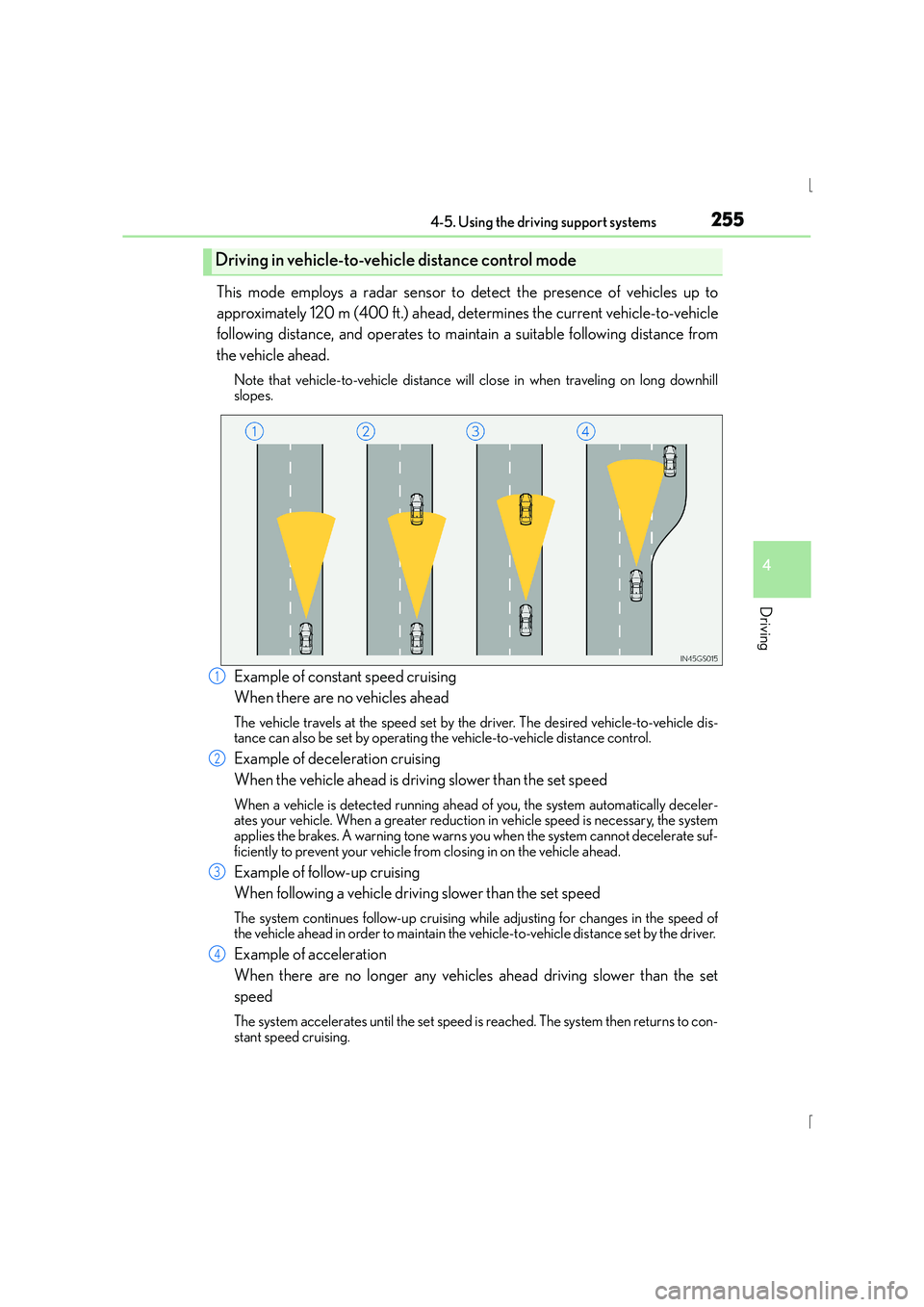
This mode employs a radar sensor to detect the presence of vehicles up to
approximately 120 m (400 ft.) ahead, determines the current vehicle-to-vehicle
following distance, and operates to maintain a suitable following distance from
the vehicle ahead.
Note that vehicle-to-vehicle distance will close in when traveling on long downhill
slopes.
Example of constant speed cruising
When there are no vehicles ahead
The vehicle travels at the speed set by the driver. The desired vehicle-to-vehicle dis-
tance can also be set by operating the vehicle-to-vehicle distance control.
Example of deceleration cruising
When the vehicle ahead is driving slower than the set speed
When a vehicle is detected running ahead of you, the system automatically deceler-
ates your vehicle. When a greater reduction in vehicle speed is necessary, the system
applies the brakes. A warning tone warns you when the system cannot decelerate suf-
ficiently to prevent your vehicle from closing in on the vehicle ahead.
Example of follow-up cruising
When following a vehicle driving slower than the set speed
The system continues follow-up cruising wh ile adjusting for changes in the speed of
the vehicle ahead in order to maintain the vehicle-to-vehicle distance set by the driver.
Example of acceleration
When there are no longer any vehicles ahead driving slower than the set
speed
The system accelerates until the set speed is reached. The system then returns to con-
stant speed cruising.
Driving in vehicle-to-vehic le distance control mode
1
2
3
4
Page 258 of 628
2584-5. Using the driving support systems
IS300h_EE(OM53D56E)
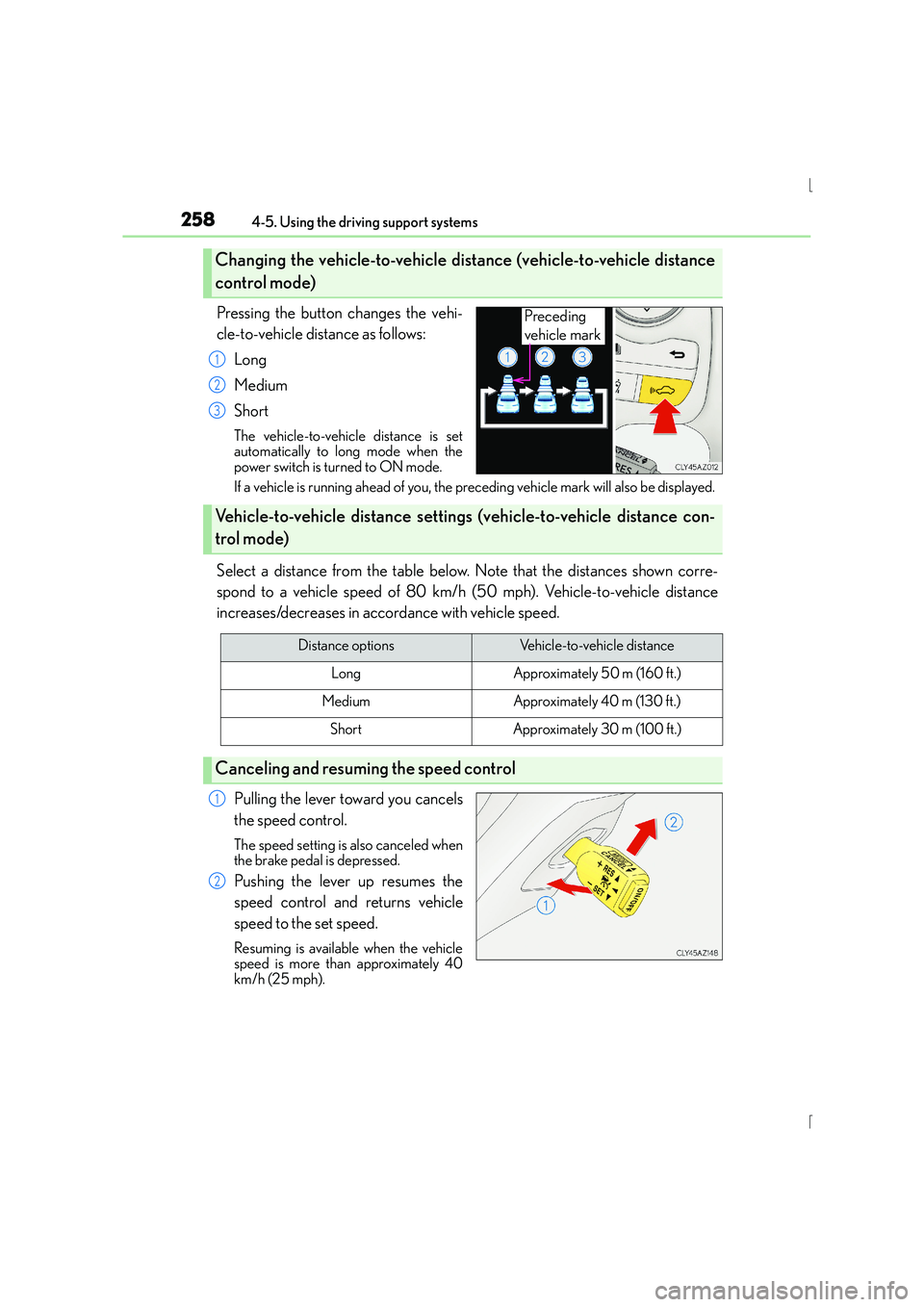
Pressing the button changes the vehi-
cle-to-vehicle distance as follows:Long
Medium
Short
The vehicle-to-vehicle distance is set
automatically to long mode when the
power switch is turned to ON mode.
If a vehicle is running ahead of you, the pr eceding vehicle mark will also be displayed.
Select a distance from the table below. Note that the distances shown corre-
spond to a vehicle speed of 80 km/h (50 mph). Vehicle-to-vehicle distance
increases/decreases in accordance with vehicle speed.
Pulling the lever toward you cancels
the speed control.
The speed setting is also canceled when
the brake pedal is depressed.
Pushing the lever up resumes the
speed control and returns vehicle
speed to the set speed.
Resuming is available when the vehicle
speed is more than approximately 40
km/h (25 mph).
Changing the vehicle-to-vehicle di stance (vehicle-to-vehicle distance
control mode)
Preceding
vehicle mark
1
2
3
Vehicle-to-vehicle distance setting s (vehicle-to-vehicle distance con-
trol mode)
Distance optionsVehicle-to-vehicle distance
LongApproximately 50 m (160 ft.)
MediumApproximately 40 m (130 f t.)
ShortApproximately 30 m (100 ft.)
Canceling and resuming the speed control
1
2