mirrors Lexus IS300h 2015 Owner's Guide
[x] Cancel search | Manufacturer: LEXUS, Model Year: 2015, Model line: IS300h, Model: Lexus IS300h 2015Pages: 628, PDF Size: 137.89 MB
Page 208 of 628
2084-1. Before driving
IS300h_EE(OM53D56E)
■Tire information
●Increase the tire inflation pressure to 20.0 kPa (0.2 kgf/cm2 or bar, 3 psi) greater than
the recommended value when towing. ( →P. 5 8 6 )
●Increase the air pressure of the trailer tires in accordance with the total trailer weight
and according to the values recommended by the manufacturer of your trailer.
■Break-in schedule
Lexus recommends that vehicles fitted with new power train components should not be
used for towing trailers for the first 800 km (500 miles).
■Safety checks before towing
●Check that the maximum load limit for the towing hitch/bracket hitch ball is not
exceeded. Bear in mind that the coupling weight of the trailer will add to the load
exerted on the vehicle. Also make sure that you will not be towing a load that exceeds
the maximum permissible axle capacity.
●Ensure that the trailer load is secure.
●Supplementary outside rear view mirrors shou ld be added to the vehicle if the traffic
behind cannot be clearly seen with standa rd mirrors. Adjust the extending arms of
these mirrors on both sides of the vehicle so that they always provide maximum visibility
of the road behind.
■Maintenance
●Maintenance must be performed more frequently when using the vehicle for towing
due to the greater weight burden placed on the vehicle compared to normal driving.
●Retighten all bolts securing the hitching ball and bracket after towing for approximately
1000 km (600 miles).
NOTICE
■When the rear bumper strengthening material is aluminum
Ensure the steel bracket part does not come directly in contact with that area.
When steel and aluminum come into contact, there is a reaction similar to corrosion,
which will weaken the section concerned and may result in damage. Apply a rust inhib-
itor to parts that will come in co ntact when attaching a steel bracket.
Page 291 of 628

2914-5. Using the driving support systems
4
Driving
IS300h_EE(OM53D56E)
CAUTION
■When using the rear view monitor system
The rear view monitor system is a supplemental device intended to assist the driver
when backing up. When backing up, be sure to check visually behind and all around
the vehicle before proceeding.
Observe the following precautions to avoid an accident that could result in death or
serious injuries.
●Never depend on the rear view monitor system entirely when backing up. The image
and the position of the guide lines displayed on the screen may differ from the actual
state.
Use caution, just as you would when backing up any vehicle.
●Be sure to back up slowly, depressing the brake pedal to control vehicle speed.
●The instructions given are only guidelines.
When and how much to turn the steering wheel will vary according to traffic condi-
tions, road surface conditions, vehicle condition, etc. when parking. It is necessary to
be fully aware of this before using the rear view monitor system.
●When parking, be sure to check that the parking space will accommodate your vehi-
cle before maneuvering into it.
●Do not use the rear view monitor system in the following cases:
• On icy or slick road surfaces, or in snow
• When using tire chains
• When the trunk lid is not closed completely
• On roads that are not flat or straight, such as curves or slopes.
●In low temperatures, the screen may darken or the image may become faint. The
image could distort when the vehicle is moving, or you may become unable to see the
image on the screen. Be sure to check direct visually and with the mirrors all around
the vehicle before proceeding.
●If the tire sizes are changed, the position of the fixed guide lines displayed on the
screen may change.
●The camera uses a special lens. The dist ances between objects and pedestrians that
appear in the image displayed on the screen will differ from the actual distances.
( → P. 2 8 5 )
Page 411 of 628
411
6Interior features
IS300h_EE(OM53D56E)
6-1. Using the air conditioning system
Automatic air conditioning system ........................................... 412
Heated steering wheel/ seat heaters/
seat ventilators ......................... 423
6-2. Using the interior lights Interior lights list.......................... 425• Interior lights .......................... 426
• Personal lights........................ 426
6-3. Using the storage features List of storage features............. 428• Glove box................................ 429
• Console box ........................... 429
•Cup holders/Bottle holders ....................... 430
Trunk features .............................. 432 6-4. Using the other interior
features
Other interior features ............ 435 • Sun visors ................................ 435
• Vanity mirrors ........................ 435
• Clock ........................................ 435
• Power outlet ........................... 436
• Armrest.................................... 437
• Rear sunshade....................... 437
• Assist grips.............................. 439
• Coat hooks ............................. 439
Page 414 of 628
4146-1. Using the air conditioning system
IS300h_EE(OM53D56E)
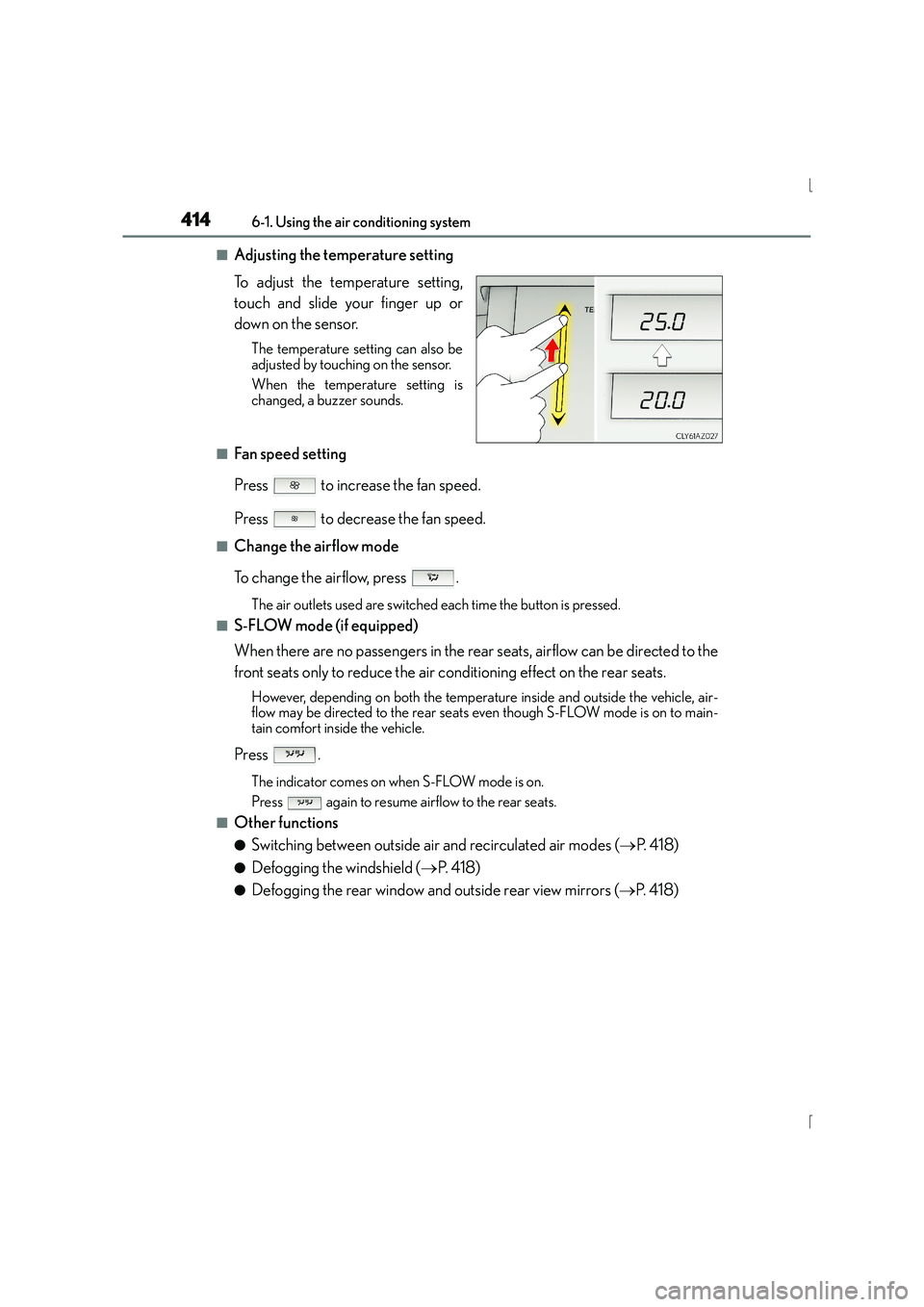
■Adjusting the temperature setting
To adjust the temperature setting,
touch and slide your finger up or
down on the sensor.
The temperature setting can also be
adjusted by touching on the sensor.
When the temperature setting is
changed, a buzzer sounds.
■Fan speed setting
Press to increase the fan speed.
Press to decrease the fan speed.
■Change the airflow mode
To change the airflow, press .
The air outlets used are switched each time the button is pressed.
■S-FLOW mode (if equipped)
When there are no passengers in the rear seats, airflow can be directed to the
front seats only to reduce the air conditioning effect on the rear seats.
However, depending on both the temperature inside and outside the vehicle, air-
flow may be directed to the rear seats even though S-FLOW mode is on to main-
tain comfort inside the vehicle.
Press .
The indicator comes on when S-FLOW mode is on.
Press again to resume airflow to the rear seats.
■Other functions
●Switching between outside air and recirculated air modes (→P. 4 1 8 )
●Defogging the windshield ( →P. 4 1 8 )
●Defogging the rear window and outside rear view mirrors ( →P. 4 1 8 )
Page 418 of 628
4186-1. Using the air conditioning system
IS300h_EE(OM53D56E)
■Switching between outside air and recirculated air modes
Press to change to recirculated air mode.
Press to change to outside air mode.
The indicator above the selected button comes on.
■Pollen removal mode (if equipped)
Pollen is removed from the air and the air flows to the upper part of the body.
Select
on the option control screen.
When the pollen removal mode is on, is displayed on the air conditioning
control screen.
In order to prevent the windshield from fogging up when the outside air is cold, the
dehumidification function may operate.
The pollens are filtered out even if the pollen removal mode is turned off.
■Defogging the windshield
Defoggers are used to defog the windshield and front side windows.
Press .
Set the outside/recirculated air mode button to outside air mode if the recirculated
air mode is used. (It may switch automatically.)
To defog the windshield and the side windows early, turn the air flow and tempera-
ture up.
To return to the previous mode, press again when the windshield is
defogged.
■Defogging the rear window and outside rear view mirrors
Defoggers are used to defog the rear window, and to remove raindrops, dew
and frost from the outside rear view mirrors.
Press .
The defoggers will automatically turn off after a period of time.
Other functions
Page 435 of 628
435
IS300h_EE(OM53D56E)
6
Interior features
6-4. Using the other interior features
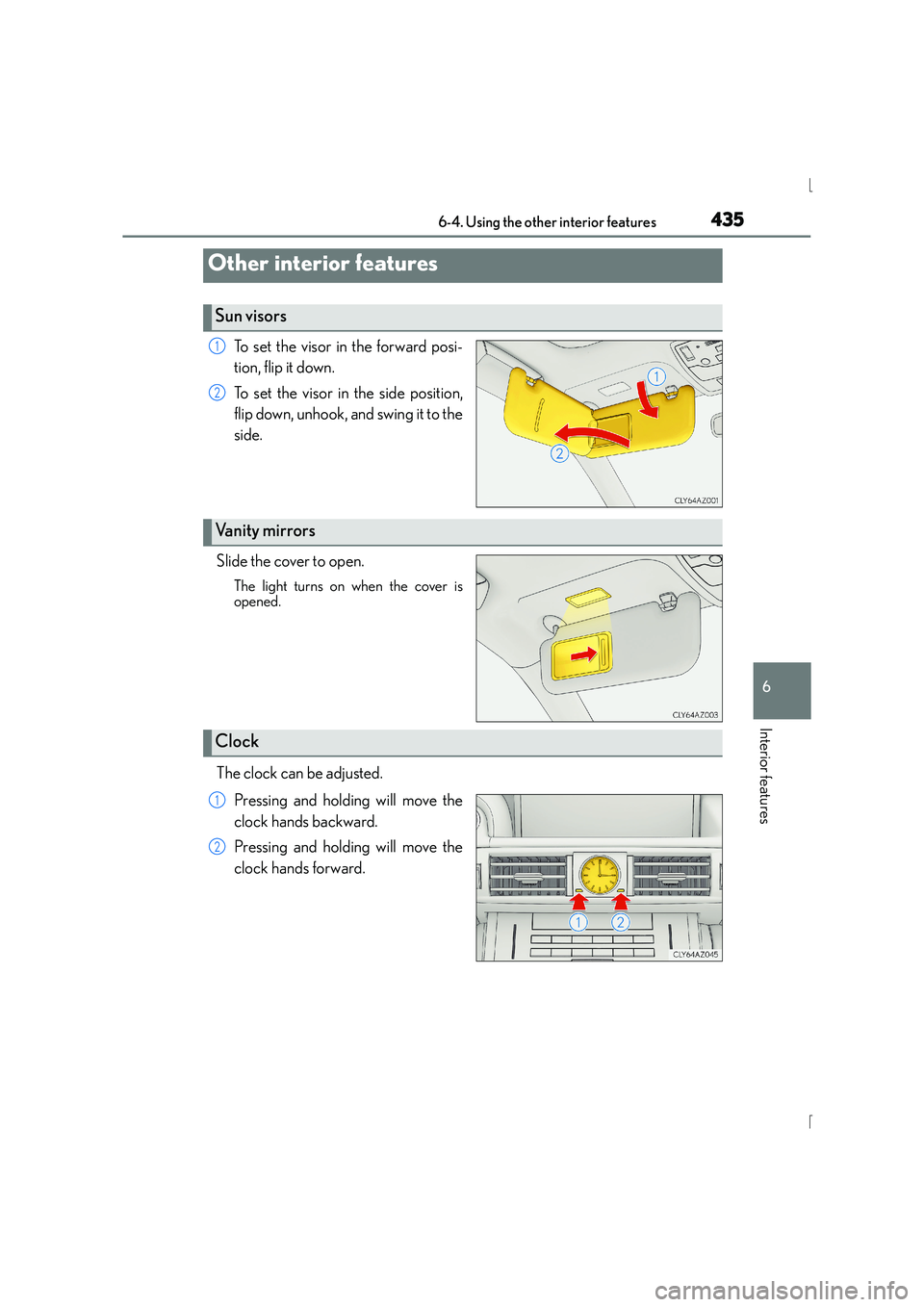
To set the visor in the forward posi-
tion, flip it down.
To set the visor in the side position,
flip down, unhook, and swing it to the
side.
Slide the cover to open.
The light turns on when the cover is
opened.
The clock can be adjusted. Pressing and holding will move the
clock hands backward.
Pressing and holding will move the
clock hands forward.
Other interior features
Sun visors
1
2
Vanity mirrors
Clock
1
2
Page 442 of 628
442
IS300h_EE(OM53D56E)7-1. Maintenance and care
●Working from top to bottom, liberally
apply water to the vehicle body, wheel
wells and underside of the vehicle to remove any dirt and dust.
●Wash the vehicle body using a sponge or soft cloth, such as a chamois.
●For hard-to-remove marks, use car wash soap and rinse thoroughly with
water.
●Wipe away any water.
●Wax the vehicle when the waterproof coating deteriorates.
If water does not bead on a clean surface, apply wax when the vehicle body is cool.
■Self-restoring coat
The vehicle body has a self-restoring coating that is resistant to small surface scratches
caused in a car wash etc.
●The coating lasts for 5 to 8 years from when the vehicle is delivered from the plant.
●The restoration time differs depending on the depth of the scratch and outside temper-
ature.
The restoration time may become shorter when the coating is warmed by applying
warm water.
●Deep scratches caused by keys, coins, etc. cannot be restored.
●Do not use wax that contain abrasives.
■Automatic car washes
●Fold the mirrors before washing the vehicle. Start washing from the front of the vehicle.
Make sure to extend the mirrors before driving.
●Brushes used in automatic car washes may scratch the vehicle surface and harm your
vehicle’s paint.
■High pressure car washes
●Do not allow the nozzles of the car wash to come within close proximity of the windows.
●Before using the car wash, check that the fuel filler door on your vehicle is closed prop-
erly.
■When using a car wash (vehicles with entry function)
If the door handle becomes wet while the electronic key is within the effective range, the
door may lock and unlock repeatedly. In that case, follow the following correction proce-
dures to wash the vehicle:
●Place the key in a position 2 m (6 ft.) or more separate from the vehicle while the vehi-
cle is being washed. (Take care to ensure that the key is not stolen.)
●Set the electronic key to battery-saving mode to disable the smart entry & start system.
( → P. 1 5 0 )
Cleaning and protecti ng the vehicle exterior
Perform the following to protect the vehicle and maintain it in prime condi-
tion:
Page 596 of 628
5969-2. Customization
IS300h_EE(OM53D56E)
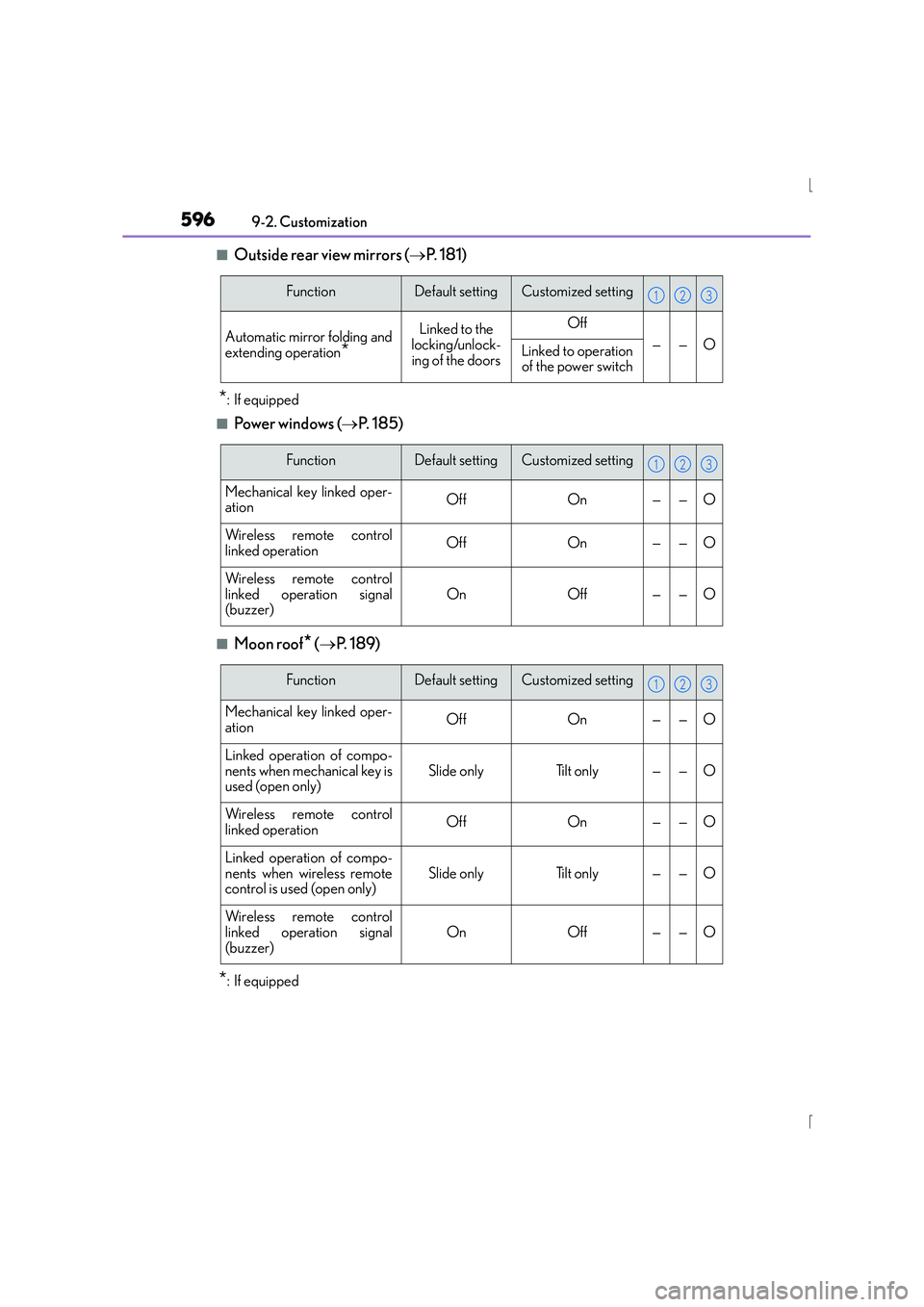
■Outside rear view mirrors ( →P. 1 8 1 )
*: If equipped
■Powe r w i n d ows ( →P. 185)
■Moon roof* (→ P. 1 8 9 )
*: If equipped
FunctionDefault settingCustomized setting
Automatic mirror folding and
extending operation*
Linked to the
locking/unlock-
ing of the doorsOff
——OLinked to operation of the power switch
123
FunctionDefault settingCustomized setting
Mechanical key linked oper-
ationOffOn——O
Wireless remote control
linked operationOffOn——O
Wireless remote control
linked operation signal
(buzzer)OnOff——O
123
FunctionDefault settingCustomized setting
Mechanical key linked oper-
ationOffOn——O
Linked operation of compo-
nents when mechanical key is
used (open only)Slide onlyTilt only——O
Wireless remote control
linked operationOffOn——O
Linked operation of compo-
nents when wireless remote
control is used (open only)Slide onlyTilt only——O
Wireless remote control
linked operation signal
(buzzer)
OnOff——O
123
Page 611 of 628
611Alphabetical index
IS300h_EE(OM53D56E)
Child-protectors ................................... 140
Cleaning ........................................442, 446Aluminum wheels .............................. 443
Exterior.................................................... 442
Interior .....................................................446
Seat belts................................................ 447
Clock .........................................................435
Coat hooks ..............................................439
Condenser ............................................. 462
Console box ........................................... 429
Coolant .....................................................460 Capacity ................................................ 583
Checking .............................................. 460
Preparing and checking
before winter .................................... 322
Cooling system......................................460
Engine overheating ............................571
Hybrid system overheating ............571
Cruise control Cruise control .....................................250
Dynamic radar cruise control ..... 254
Cup holders ............................................430
Current fuel consumption....................116
Curtain shield airbags ........................... 43
Customizable features ....................... 592 DAB (Digital Audio Broadcast) ..... 352
Daytime running light system ......... 230
Defogger
Outside rear view mirrors .............. 418
Rear window..........................................418
Windshield ............................................. 418
Differential............................................... 585
Digital Audio Broadcast (DAB) ..... 352
Dimensions ............................................. 578
Display Drive information...................................116
Dynamic radar cruise control ..... 254
LDA (Lane Departure Alert) ........ 271
Multi-information display...................115
Warning message .............................527
Distance ...................................................... 117
Do-it-yourself maintenance ...............451
Door courtesy lights Location ................................................. 425
Wattage ................................................ 588
Door lock
Doors......................................................... 136
Smart entry & start system ............. 149
Wireless remote control .................130D
Page 612 of 628
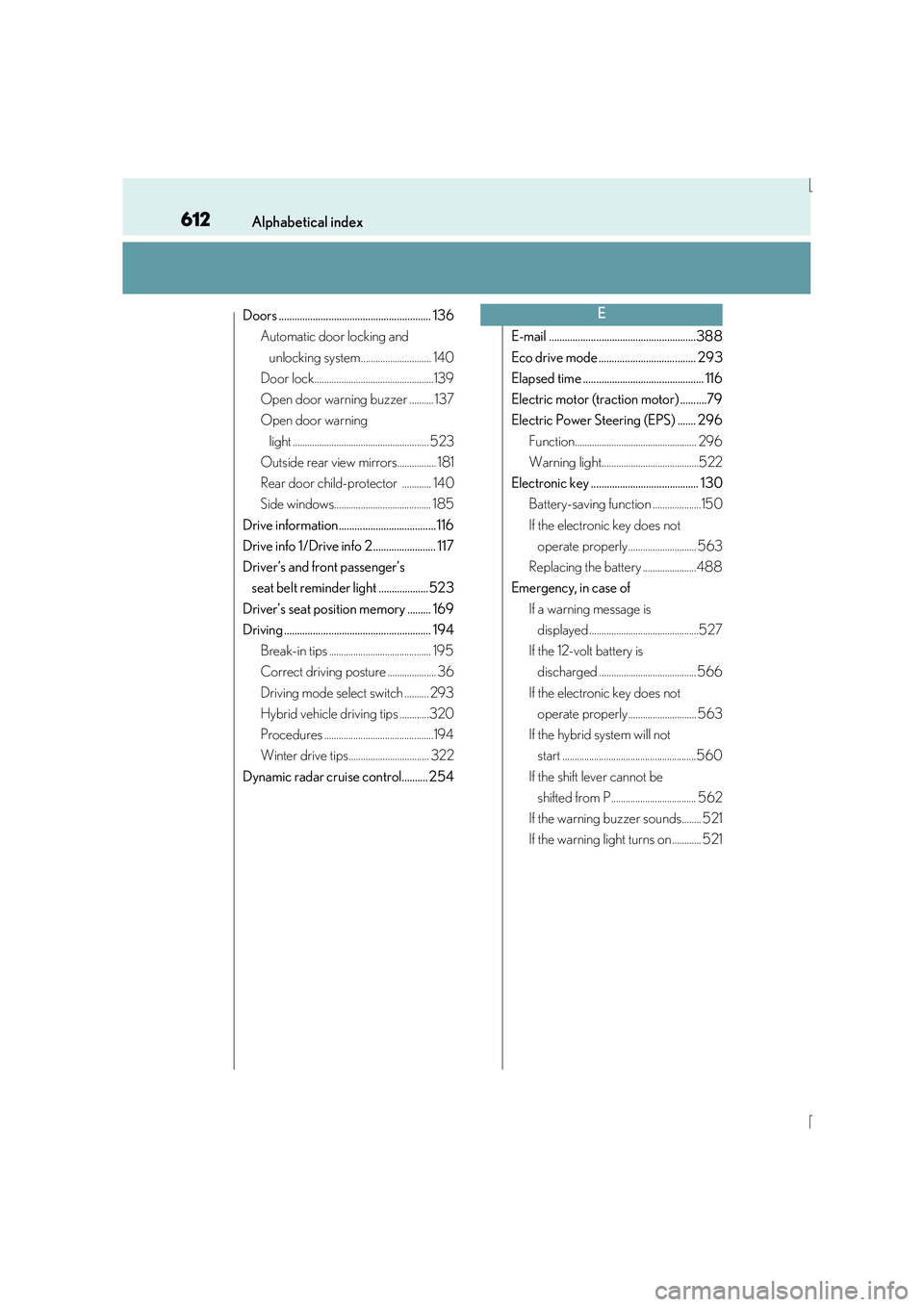
612Alphabetical index
IS300h_EE(OM53D56E)
Doors .......................................................... 136Automatic door locking and
unlocking system............................. 140
Door lock.................................................139
Open door warning buzzer .......... 137
Open door warning
light ........................................................ 523
Outside rear view mirrors................ 181
Rear door child-protector ............ 140
Side windows........................................ 185
Drive information..................................... 116
Drive info 1/Drive info 2........................ 117
Driver’s and front passenger’s seat belt reminder light ...................523
Driver’s seat position memory ......... 169
Driving ........................................................ 194 Break-in tips .......................................... 195
Correct driving posture .................... 36
Driving mode select switch .......... 293
Hybrid vehicle driving tips ............320
Procedures .............................................194
Winter drive tips................................. 322
Dynamic radar cruise control.......... 254 E-mail ........................................................388
Eco drive mode ..................................... 293
Elapsed time .............................................. 116
Electric motor (traction motor) ..........79
Electric Power Steering (EPS) ....... 296
Function.................................................. 296
Warning light........................................522
Electronic key ......................................... 130 Battery-saving function ....................150
If the electronic key does not operate properly ............................ 563
Replacing the battery ......................488
Emergency, in case of
If a warning message is displayed .............................................527
If the 12-volt battery is discharged ........................................ 566
If the electronic key does not operate properly ............................ 563
If the hybrid system will not start .......................................................560
If the shift lever cannot be shifted from P................................... 562
If the warning buzzer sounds........ 521
If the warning light turns on ............ 521E