seat Lexus IS300h 2015 Manual PDF
[x] Cancel search | Manufacturer: LEXUS, Model Year: 2015, Model line: IS300h, Model: Lexus IS300h 2015Pages: 628, PDF Size: 137.89 MB
Page 216 of 628
2164-2. Driving procedures
IS300h_EE(OM53D56E)
CAUTION
■When starting the hybrid system
Always start the hybrid system while sitting in the driver’s seat. Do not depress the
accelerator pedal while starting the hybrid system under any circumstances.
Doing so may cause an accident resulting in death or serious injury.
■Caution while driving
If hybrid system failure occurs while the vehicle is moving, do not lock or open the
doors until the vehicle reaches a safe and complete stop. Activation of the steering lock
in this circumstance may lead to an accident, resulting in death or serious injury.
■Stopping the hybrid system in an emergency
If you want to stop the hybrid system in an emergency while driving the vehicle, press
and hold the power switch for more than 2 se conds, or press it briefly 3 times or more
in succession. ( →P. 5 1 3 )
However, do not touch the power switch while driving except in an emergency. Turning
the hybrid system off while driving will not cause loss of steering or braking control,
however, power assist to the steering will be lost. This will make it more difficult to steer
smoothly, so you should pull over and stop the vehicle as soon as it is safe to do so.
NOTICE
■To prevent 12-volt battery discharge
●Do not leave the power switch in ACCESSORY or ON mode for long periods of
time without the hybrid system on.
●If “ACCESSORY” or “IGNITION ON” is displayed on the meters while the hybrid
system is not operating, the power switch is not off. Exit the vehicle after turning the
power switch off.
●Do not stop the hybrid system when the shift lever is in a position other than P. If the
hybrid system is stopped in another shift lever position, the power switch will not be
turned off but instead be turned to ACCESSORY mode. If the vehicle is left in
ACCESSORY mode, 12-volt battery discharge may occur.
■When starting the hybrid system
●Do not depress the accelerator pedal unnecessarily.
●If the hybrid system becomes difficult to start, have your vehicle checked by any
authorized Lexus dealer or repairer, or another duly qualified and equipped profes-
sional immediately.
■Symptoms indicating a malfunction with the power switch
If the power switch seems to be operating somewhat differently than usual, such as the
switch sticking slightly, there may be a malfunction. Contact any authorized Lexus
dealer or repairer, or another duly qualif ied and equipped professional immediately.
Page 310 of 628
3104-5. Using the driving support systems
IS300h_EE(OM53D56E)
The Blind Spot Monitor is a system that has 2 functions;
●The Blind Spot Monitor function
Assists the driver in making the decision when changing lanes
●The Rear Crossing Traffic Alert function
Assists the driver when backing up
These functions use same sensors.
BSM (Blind Spot Monitor)∗
∗
: If equipped
Summary of the Blind Spot Monitor
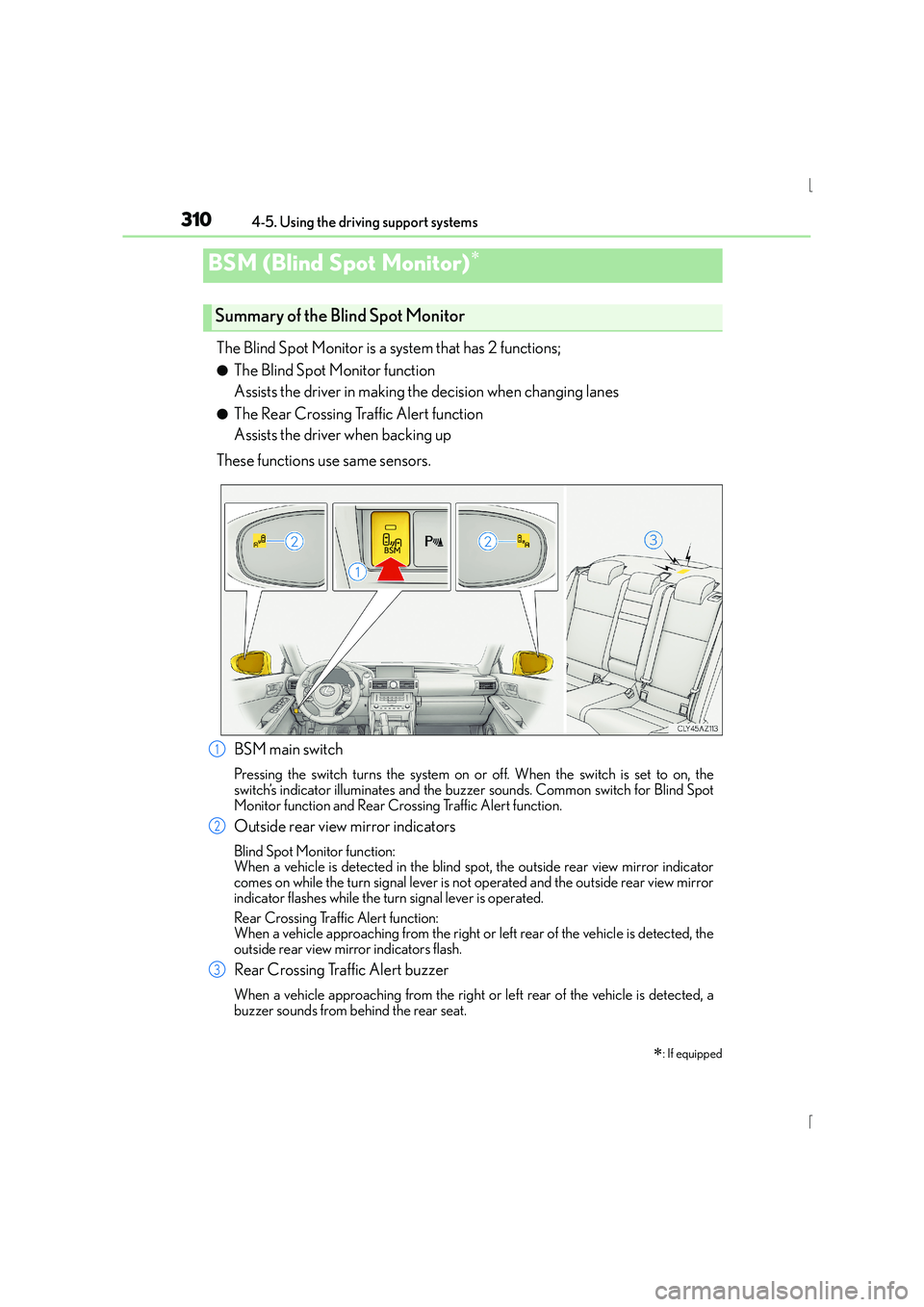
BSM main switch
Pressing the switch turns the system on or off. When the switch is set to on, the
switch’s indicator illuminates and the buzze r sounds. Common switch for Blind Spot
Monitor function and Rear Crossing Traffic Alert function.
Outside rear view mirror indicators
Blind Spot Monitor function:
When a vehicle is detected in the blind spot, the outside rear view mirror indicator
comes on while the turn signal lever is no t operated and the outside rear view mirror
indicator flashes while the turn signal lever is operated.
Rear Crossing Traffic Alert function:
When a vehicle approaching from the right or left rear of the vehicle is detected, the
outside rear view mirror indicators flash.
Rear Crossing Traffic Alert buzzer
When a vehicle approaching from the right or left rear of the vehicle is detected, a
buzzer sounds from behind the rear seat.
1
2
3
Page 399 of 628
3995-11. Bluetooth®
5
Lexus Display Audio system
IS300h_EE(OM53D56E)
■Bluetooth® antenna
The antenna is built into the display.
If the portable audio player is behind the seat or in the glove box or console box, or is
touching or covered by metal objects, the connection status may deteriorate.
If the cellular phone is behind the seat or in the console box, or touching or covered by
metal objects, the connection status may deteriorate.
■Battery charge/signal status
●This display may not correspond exactly with the portable audio player or cellular
phone itself.
●This system does not have a charging function.
●The portable audio player or cellular phon e battery will be depleted quickly when the
device is connected to Bluetooth®.
■When using the Bluetooth® audio and hands-free system at the same time
The following problems may occur.
●The Bluetooth® audio connection may be interrupted.
●Noise may be heard during Bluetooth® audio playback.
■About the contact in this system
The following data is stored for every regi stered cellular phone. When another phone is
connecting, you cannot read the registered data.
●Contact data
●Call history
●Favorite
When removing a Bluetooth® phone from the system, the above-mentioned data is also
deleted.
■About Bluetooth®
Bluetooth® is a registered trademark of
Bluetooth SIG, Inc.
The Bluetooth
® word mark and logos are
owned by the Bluetooth SIG, Inc. and any use of
such marks by FUJITSU TEN LIMITED is under
license. Other trademarks and trade names are
those of their respective owners.
Page 411 of 628
411
6Interior features
IS300h_EE(OM53D56E)
6-1. Using the air conditioning system
Automatic air conditioning system ........................................... 412
Heated steering wheel/ seat heaters/
seat ventilators ......................... 423
6-2. Using the interior lights Interior lights list.......................... 425• Interior lights .......................... 426
• Personal lights........................ 426
6-3. Using the storage features List of storage features............. 428• Glove box................................ 429
• Console box ........................... 429
•Cup holders/Bottle holders ....................... 430
Trunk features .............................. 432 6-4. Using the other interior
features
Other interior features ............ 435 • Sun visors ................................ 435
• Vanity mirrors ........................ 435
• Clock ........................................ 435
• Power outlet ........................... 436
• Armrest.................................... 437
• Rear sunshade....................... 437
• Assist grips.............................. 439
• Coat hooks ............................. 439
Page 414 of 628
4146-1. Using the air conditioning system
IS300h_EE(OM53D56E)
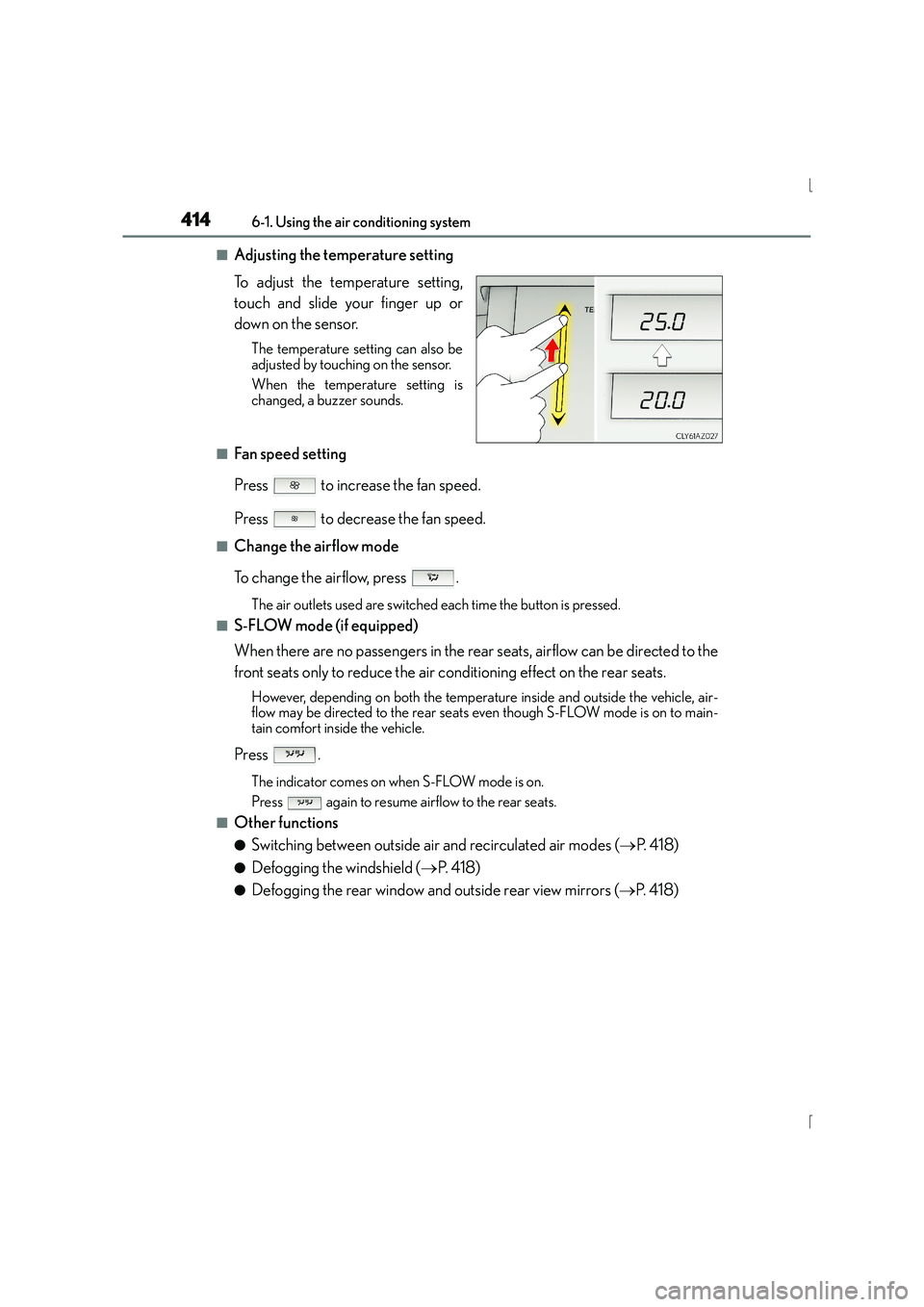
■Adjusting the temperature setting
To adjust the temperature setting,
touch and slide your finger up or
down on the sensor.
The temperature setting can also be
adjusted by touching on the sensor.
When the temperature setting is
changed, a buzzer sounds.
■Fan speed setting
Press to increase the fan speed.
Press to decrease the fan speed.
■Change the airflow mode
To change the airflow, press .
The air outlets used are switched each time the button is pressed.
■S-FLOW mode (if equipped)
When there are no passengers in the rear seats, airflow can be directed to the
front seats only to reduce the air conditioning effect on the rear seats.
However, depending on both the temperature inside and outside the vehicle, air-
flow may be directed to the rear seats even though S-FLOW mode is on to main-
tain comfort inside the vehicle.
Press .
The indicator comes on when S-FLOW mode is on.
Press again to resume airflow to the rear seats.
■Other functions
●Switching between outside air and recirculated air modes (→P. 4 1 8 )
●Defogging the windshield ( →P. 4 1 8 )
●Defogging the rear window and outside rear view mirrors ( →P. 4 1 8 )
Page 417 of 628
4176-1. Using the air conditioning system
6
Interior features
IS300h_EE(OM53D56E)
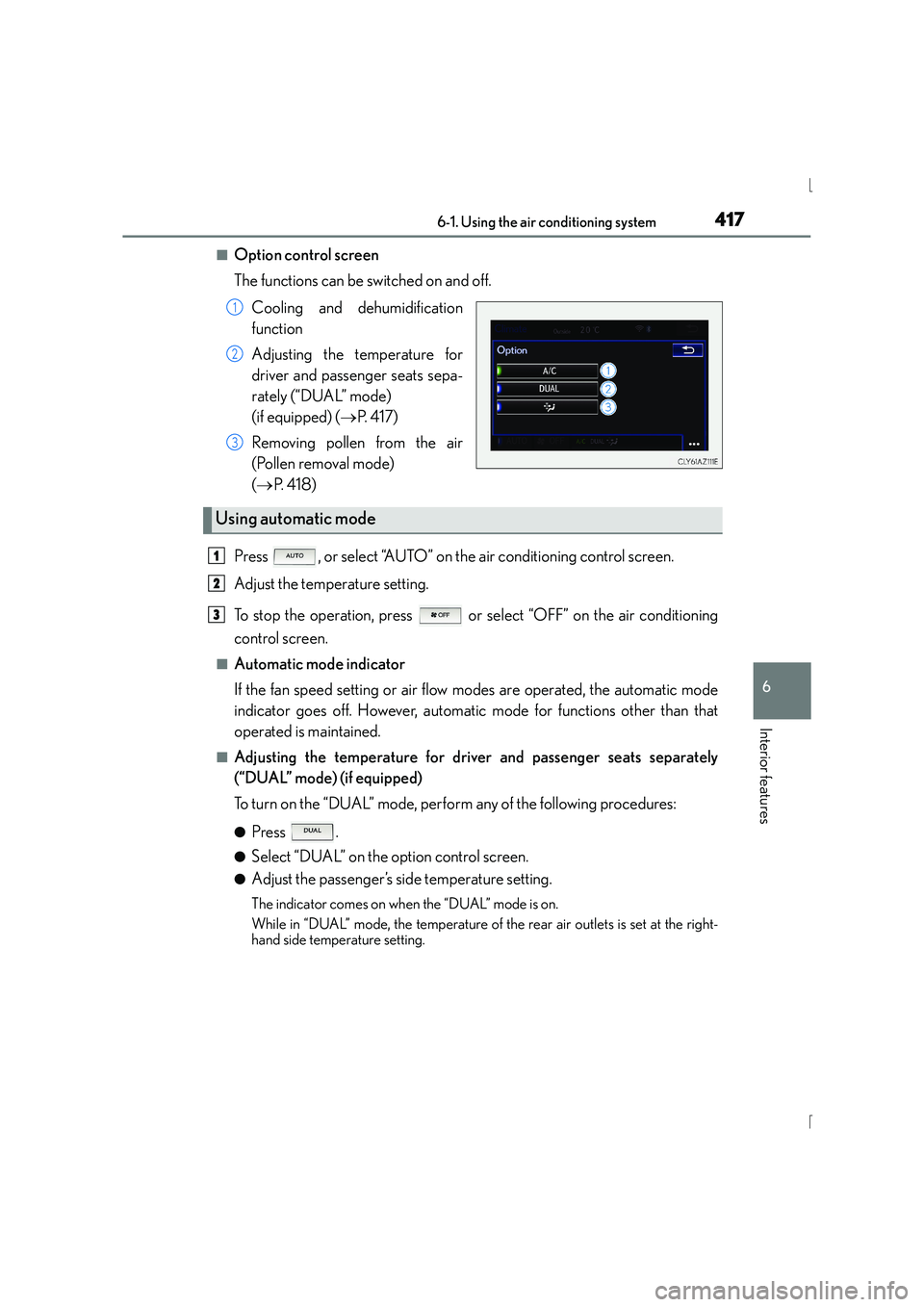
■Option control screen
The functions can be switched on and off.Cooling and dehumidification
function
Adjusting the temperature for
driver and passenger seats sepa-
rately (“DUAL” mode)
(if equipped) ( →P. 4 1 7 )
Removing pollen from the air
(Pollen removal mode)
( → P. 4 1 8 )
Press , or select “AUTO” on the air conditioning control screen.
Adjust the temperature setting.
To stop the operation, press or select “OFF” on the air conditioning
control screen.
■Automatic mode indicator
If the fan speed setting or air flow modes are operated, the automatic mode
indicator goes off. However, automatic mode for functions other than that
operated is maintained.
■Adjusting the temperature for driv er and passenger seats separately
(“DUAL” mode) (if equipped)
To turn on the “DUAL” mode, perform any of the following procedures:
●Press .
●Select “DUAL” on the option control screen.
●Adjust the passenger’s side temperature setting.
The indicator comes on when the “DUAL” mode is on.
While in “DUAL” mode, the temperature of the rear air outlets is set at the right-
hand side temperature setting.
1
2
3
Using automatic mode
1
2
3
Page 423 of 628
4236-1. Using the air conditioning system
6
Interior features
IS300h_EE(OM53D56E)
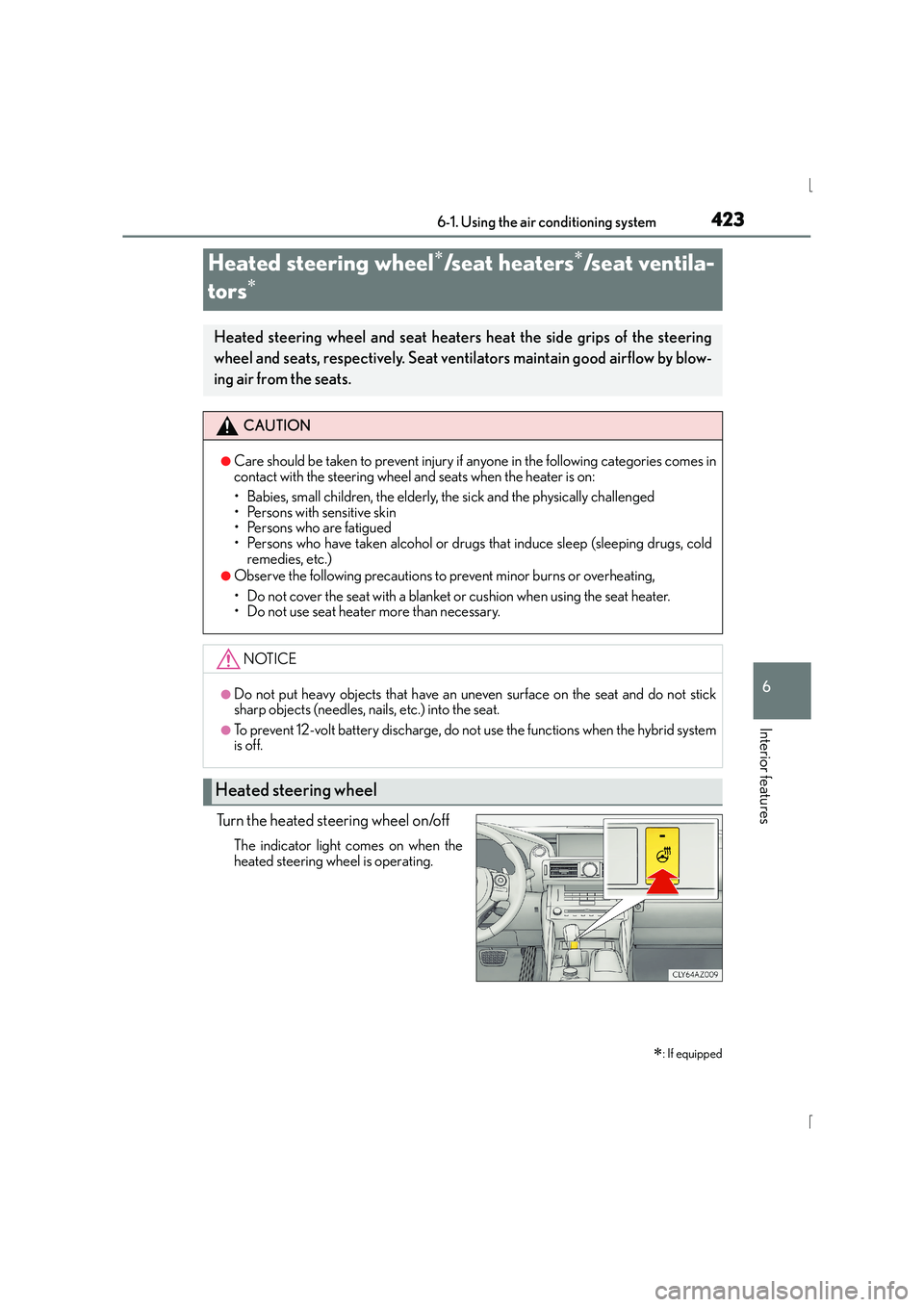
Turn the heated steering wheel on/off
The indicator light comes on when the
heated steering wheel is operating.
Heated steering wheel∗/seat heaters∗/seat ventila-
tors
∗
∗
: If equipped
Heated steering wheel and seat heaters heat the side grips of the steering
wheel and seats, respectively. Seat ventilators maintain good airflow by blow-
ing air from the seats.
CAUTION
●Care should be taken to prevent injury if anyone in the following categories comes in
contact with the steering wheel and seats when the heater is on:
• Babies, small children, the elderly, the sick and the physically challenged
• Persons with sensitive skin
• Persons who are fatigued
• Persons who have taken alcohol or drugs that induce sleep (sleeping drugs, cold
remedies, etc.)
●Observe the following precautions to prevent minor burns or overheating,
• Do not cover the seat with a blanket or cushion when using the seat heater.
• Do not use seat heater more than necessary.
NOTICE
●Do not put heavy objects that have an uneven surface on the seat and do not stick
sharp objects (needles, na ils, etc.) into the seat.
●To prevent 12-volt battery discharge, do not use the functions when the hybrid system
is off.
Heated steering wheel
Page 424 of 628
4246-1. Using the air conditioning system
IS300h_EE(OM53D56E)
●The heated steering wheel can be used when the power switch is in ON mode.
●The heated steering wheel will automatically turn off after about 30 minutes.
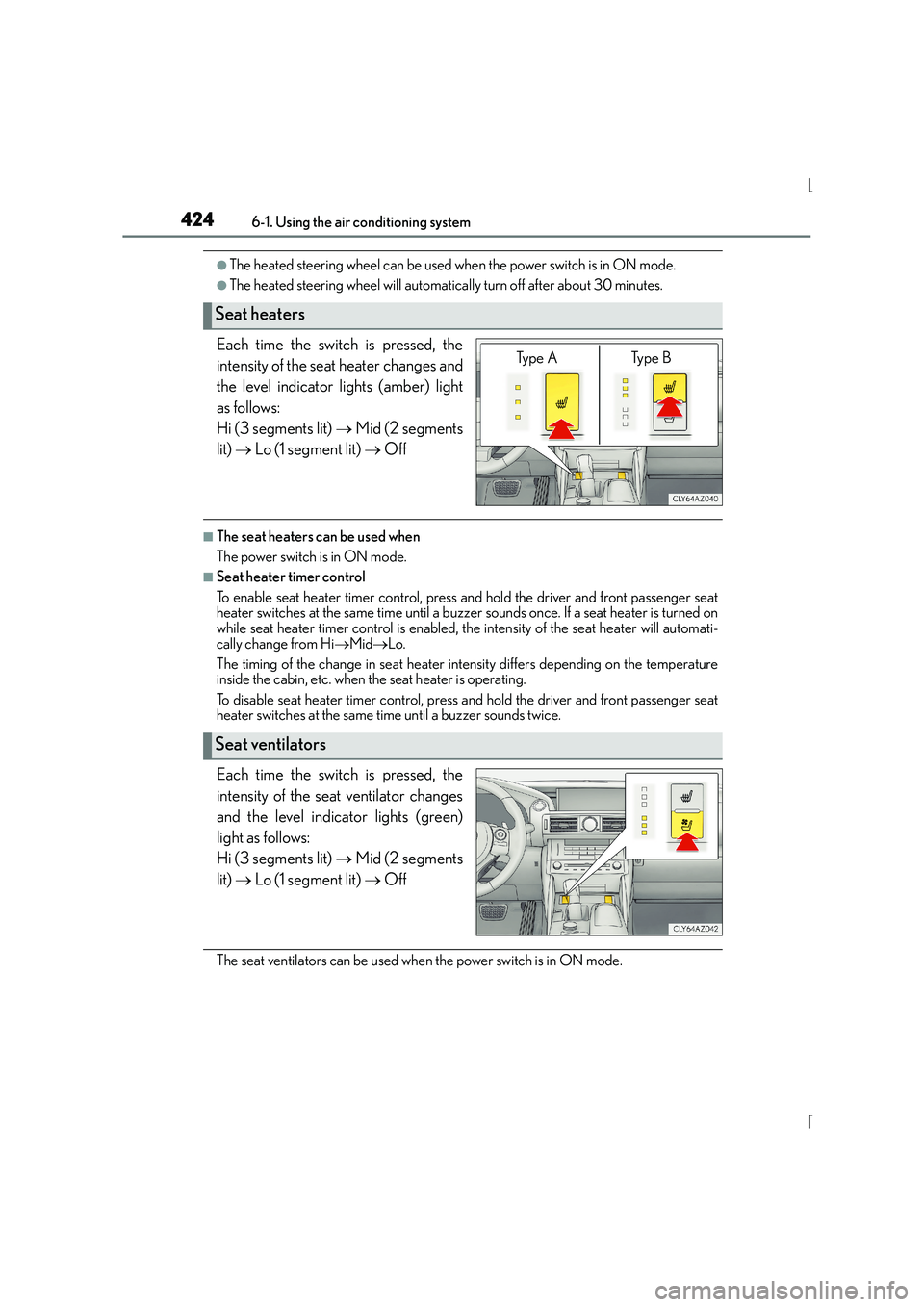
Each time the switch is pressed, the
intensity of the seat heater changes and
the level indicator lights (amber) light
as follows:
Hi (3 segments lit) → Mid (2 segments
lit) → Lo (1 segment lit) → Off
■The seat heaters can be used when
The power switch is in ON mode.
■Seat heater timer control
To enable seat heater timer control, press and hold the driver and front passenger seat
heater switches at the same time until a buzzer sounds once. If a seat heater is turned on
while seat heater timer control is enabled, th e intensity of the seat heater will automati-
cally change from Hi →Mid →Lo.
The timing of the change in seat heater intensity differs depending on the temperature
inside the cabin, etc. when the seat heater is operating.
To disable seat heater timer control, press and hold the driver and front passenger seat
heater switches at the same time until a buzzer sounds twice.
Each time the switch is pressed, the
intensity of the seat ventilator changes
and the level indicator lights (green)
light as follows:
Hi (3 segments lit) → Mid (2 segments
lit) → Lo (1 segment lit) → Off
The seat ventilators can be used when the power switch is in ON mode.
Seat heaters
Ty p e A Ty p e B
Seat ventilators
Page 439 of 628
4396-4. Using the other interior features
6
Interior features
IS300h_EE(OM53D56E)
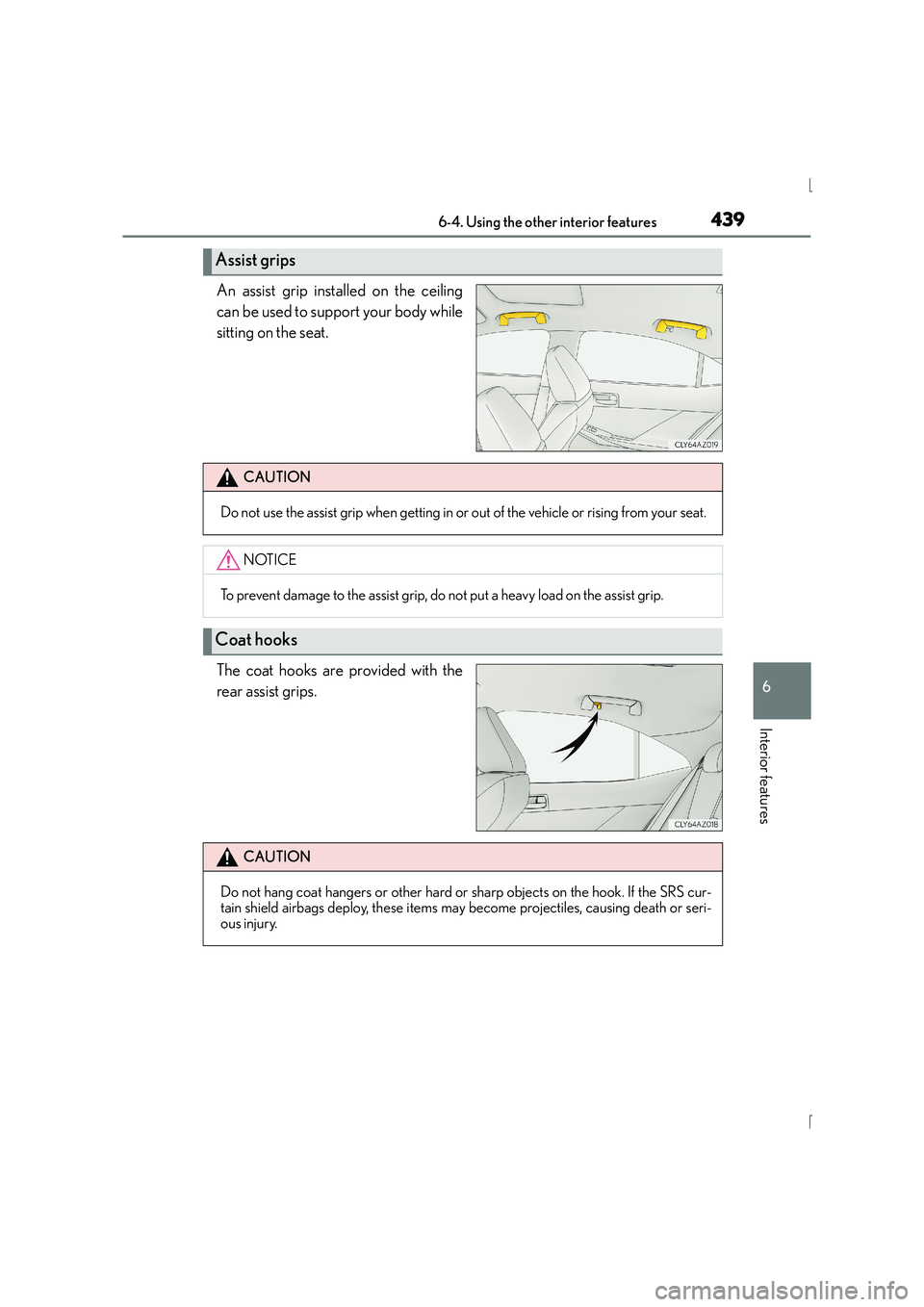
An assist grip installed on the ceiling
can be used to support your body while
sitting on the seat.
The coat hooks are provided with the
rear assist grips.
Assist grips
CAUTION
Do not use the assist grip when getting in or out of the vehicle or rising from your seat.
NOTICE
To prevent damage to the assist grip, do not put a heavy load on the assist grip.
Coat hooks
CAUTION
Do not hang coat hangers or other hard or sharp objects on the hook. If the SRS cur-
tain shield airbags deploy, these items may become projectiles, causing death or seri-
ous injury.
Page 447 of 628
4477-1. Maintenance and care
7
Maintenance and care
IS300h_EE(OM53D56E)
■Caring for leather areas
Lexus recommends cleaning the interior of the vehicle at least twice a year to maintain
the quality of the vehicle’s interior.
■Shampooing the carpets
There are several commercial foaming-type cleaners available. Use a sponge or brush to
apply the foam. Rub in overlapping circles. Do not use water. Wipe dirty surfaces and let
them dry. Excellent results are obtained by keeping the carpet as dry as possible.
■Seat belts
Clean with mild soap and lukewarm water us ing a cloth or sponge. Also check the belts
periodically for excessive wear, fraying or cuts.
■When cleaning the carpeted portions of the glove box, console box, etc.
If a strong adhesive tape is used, there is a possibility that the surface of the carpet could
be damaged.
CAUTION
■Water in the vehicle
●Do not splash or spill liquid in the vehicle, such as on the floor, in the hybrid battery
(traction battery) air vents, and in the trunk.
Doing so may cause the hybrid battery, electrical components, etc. to malfunction or
catch fire.
●Do not get any of the SRS components or wiring in the vehicle interior wet.
( → P. 4 4 )
An electrical malfunction may cause the airbags to deploy or not function properly,
resulting in death or serious injury.
■Cleaning the interior (especially instrument panel)
Do not use polish wax or polish cleaner. The instrument panel may reflect off the wind-
shield, obstructing the driver’s view and leading to an accident, resulting in death or
serious injury.