park assist Lexus IS300h 2015 Owner's Manual
[x] Cancel search | Manufacturer: LEXUS, Model Year: 2015, Model line: IS300h, Model: Lexus IS300h 2015Pages: 628, PDF Size: 137.89 MB
Page 3 of 628
3
1
9 8
7
6 4 3
2
IS300h_EE(OM53D56E)
5
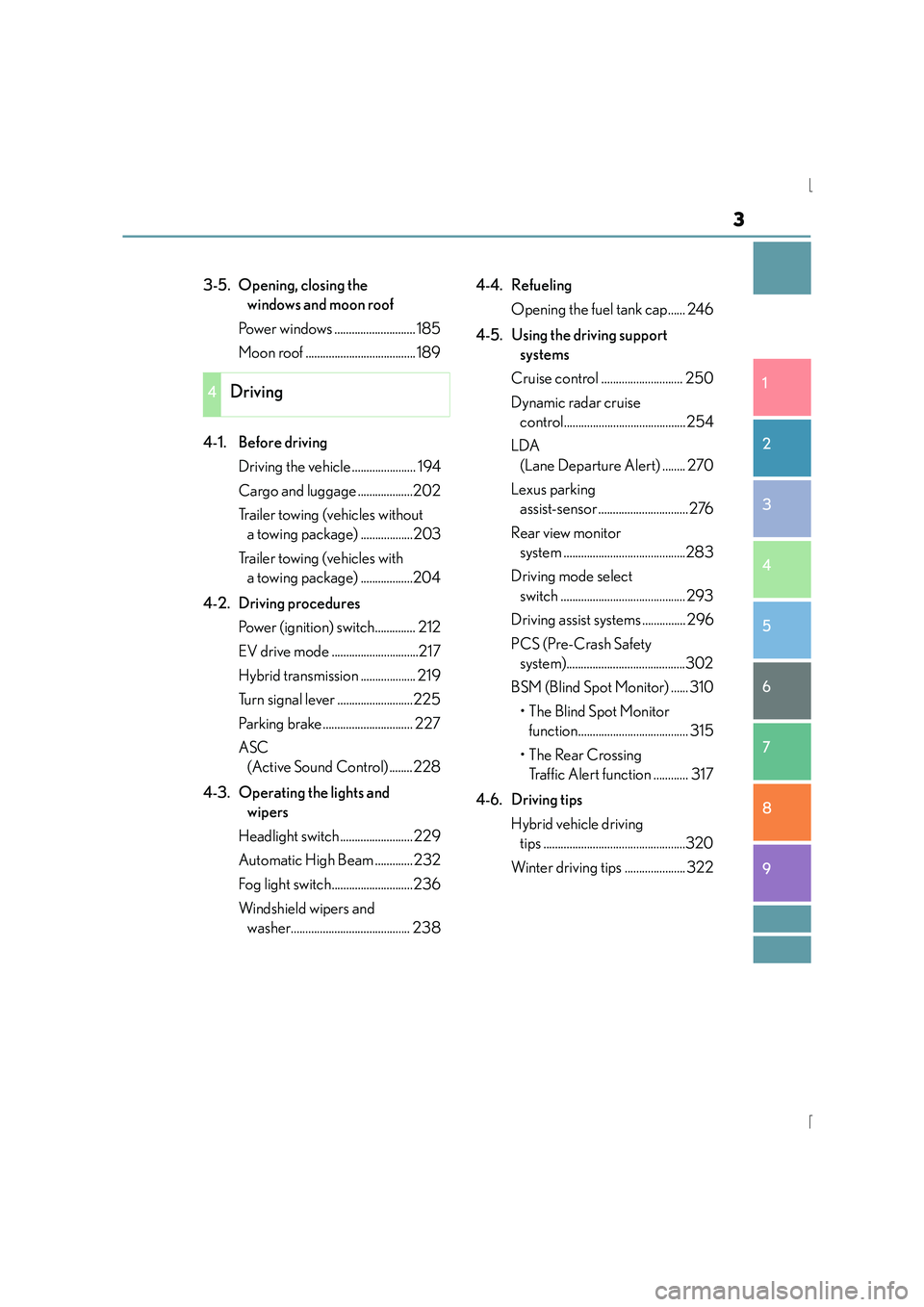
3-5. Opening, closing the windows and moon roof
Power windows ............................ 185
Moon roof ...................................... 189
4-1. Before driving Driving the vehicle ...................... 194
Cargo and luggage ...................202
Trailer towing (vehicles without a towing package) ..................203
Trailer towing (vehicles with a towing package) ..................204
4-2. Driving procedures Power (ignition) switch.............. 212
EV drive mode ..............................217
Hybrid transmission ................... 219
Turn signal lever ..........................225
Parking brake............................... 227
ASC (Active Sound Control) ........228
4-3. Operating the lights and wipers
Headlight switch ......................... 229
Automatic High Beam ............. 232
Fog light switch............................236
Windshield wipers and washer......................................... 238 4-4. Refueling
Opening the fuel tank cap...... 246
4-5. Using the driving support systems
Cruise control ............................ 250
Dynamic radar cruise control..........................................254
LDA (Lane Departure Alert) ........ 270
Lexus parking assist-sensor ...............................276
Rear view monitor system ..........................................283
Driving mode select switch ........................................... 293
Driving assist systems ............... 296
PCS (Pre-Crash Safety system).........................................302
BSM (Blind Spot Monitor) ...... 310 •The Blind Spot Monitor function...................................... 315
•The Rear Crossing Traffic Alert function ............ 317
4-6. Driving tips Hybrid vehicle driving tips .................................................320
Winter driving tips ..................... 322
4Driving
Page 7 of 628
7
1
9 8
7
6 4 3
2
IS300h_EE(OM53D56E)
5
If the electronic key does not operate properly .....................563
If the 12-volt battery is discharged .................................566
If your vehicle overheats ...........571
If the vehicle becomes stuck.............................................. 575
9-1. Specifications Maintenance data (fuel, oil level, etc.)................... 578
Fuel information ......................... 589
9-2. Customization Customizable features.............. 591
9-3. Initialization Items to initialize .......................... 601
What to do if... (Troubleshooting) ................................604
Alphabetical index ................................ 608
9Vehicle specifications
Index
For vehicles with a navigation or multimedia system, refer to “NAVIGATION
AND MULTIMEDIA SYSTEM OWNER’S MANUAL” for information
regarding the equipment listed below.
• Navigation system
• Audio/video system• Lexus parking assist-sensor
• Lexus parking assist monitor
Page 18 of 628

18Pictorial index
IS300h_EE(OM53D56E)
■Switches (Left-hand drive vehicles)
Automatic high beam switch*1. . . . . . . . . . . . . . . . . . . . . . . . . . . . . . . . . . . . . . P. 232
Windshield wiper de-icer switch
*1. . . . . . . . . . . . . . . . . . . . . . . . . . . . . . . . . . . P. 419
ASC (Active Sound Control) switch
*1. . . . . . . . . . . . . . . . . . . . . . . . . . . . . . P. 228
Odometer/trip meter and trip meter reset button . . . . . . . . . . . . . . . . . . . P. 111
Instrument panel light control switches. . . . . . . . . . . . . . . . . . . . . . . . . . . . . . P. 112
Rear sunshade switch
*1 . . . . . . . . . . . . . . . . . . . . . . . . . . . . . . . . . . . . . . . . . . . . . P. 437
Lexus parking assist-sensor switch
*1, 2 . . . . . . . . . . . . . . . . . . . . . . . . . . . . . .P. 276
BSM (Blind Spot Monitor) main switch
*1. . . . . . . . . . . . . . . . . . . . . . . . . . . .P. 310
1
2
3
4
5
6
7
8
Page 26 of 628

26Pictorial index
IS300h_EE(OM53D56E)
■Switches (Right-hand drive vehicles)
Instrument panel light control switches. . . . . . . . . . . . . . . . . . . . . . . . . . . . . . P. 112
Odometer/trip meter and trip meter reset button . . . . . . . . . . . . . . . . . . . P. 111
ASC (Active Sound Control) switch
*1. . . . . . . . . . . . . . . . . . . . . . . . . . . . . . P. 228
Automatic high beam switch
*1. . . . . . . . . . . . . . . . . . . . . . . . . . . . . . . . . . . . . . P. 232
BSM (Blind Spot Monitor) main switch
*1. . . . . . . . . . . . . . . . . . . . . . . . . . . .P. 310
Lexus parking assist-sensor switch
*1, 2 . . . . . . . . . . . . . . . . . . . . . . . . . . . . . .P. 276
Rear sunshade switch
*1 . . . . . . . . . . . . . . . . . . . . . . . . . . . . . . . . . . . . . . . . . . . . . P. 437
1
2
3
4
5
6
7
Page 106 of 628
1062. Instrument cluster
IS300h_EE(OM53D56E)
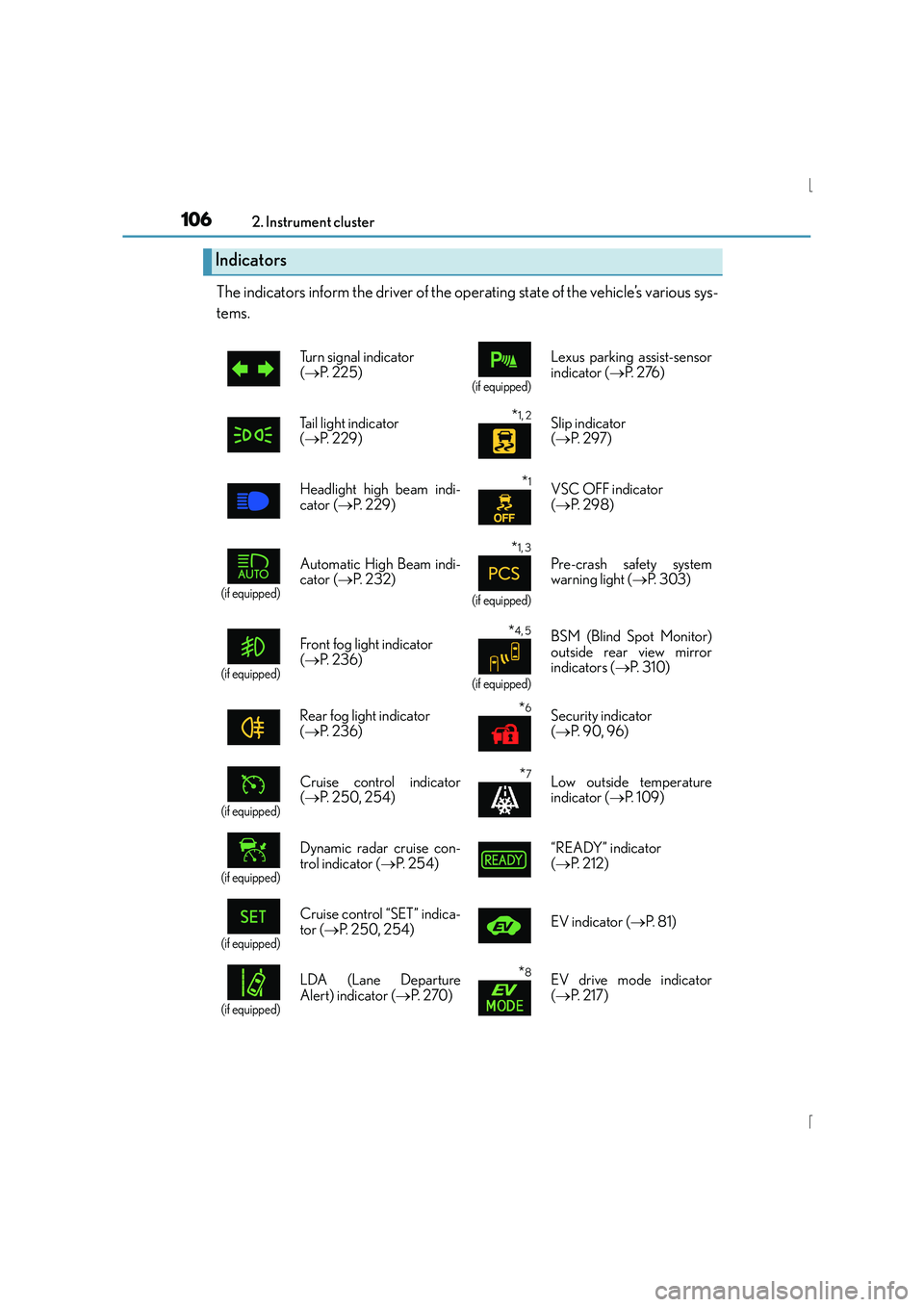
The indicators inform the driver of the operating state of the vehicle’s various sys-
tems.
Indicators
Turn signal indicator
(→ P. 2 2 5 )
(if equipped)
Lexus parking assist-sensor
indicator ( →P. 2 76 )
Tail light indicator
( → P. 229)
*1, 2 Slip indicator
(→ P. 2 9 7 )
Headlight high beam indi-
cator ( →P. 229)
*1VSC OFF indicator
(→ P. 2 9 8 )
(if equipped)
Automatic High Beam indi-
cator ( →P. 232)
*1, 3
(if equipped)
Pre-crash safety system
warning light ( →P. 303)
(if equipped)
Front fog light indicator
(→ P. 2 3 6 )*4, 5
(if equipped)
BSM (Blind Spot Monitor)
outside rear view mirror
indicators ( →P. 3 1 0 )
Rear fog light indicator
( → P. 2 3 6 )
*6Security indicator
(→ P. 9 0 , 9 6 )
(if equipped)
Cruise control indicator
(→ P. 250, 254)*7Low outside temperature
indicator ( →P. 1 0 9 )
(if equipped)
Dynamic radar cruise con-
trol indicator ( →P. 2 5 4 ) “READY” indicator
(
→ P. 212)
(if equipped)
Cruise control “SET” indica-
tor ( →P. 250, 254) EV indicator (
→P. 8 1 )
(if equipped)
LDA (Lane Departure
Alert) indicator ( →P. 2 7 0 )*8EV drive mode indicator
(→ P. 2 1 7 )
Page 193 of 628
193
4Driving
IS300h_EE(OM53D56E)
4-1. Before drivingDriving the vehicle ...................... 194
Cargo and luggage ...................202
Trailer towing (vehicles without a towing
package) .....................................203
Trailer towing (vehicles with a towing package) ..................204
4-2. Driving procedures Power (ignition) switch.............. 212
EV drive mode ..............................217
Hybrid transmission ................... 219
Turn signal lever ..........................225
Parking brake............................... 227
ASC (Active Sound Control) ........228
4-3. Operating the lights and wipers
Headlight switch ......................... 229
Automatic High Beam ............. 232
Fog light switch............................ 236
Windshield w ipers and washer.................................238
4-4. Refueling Opening the fuel tank cap...... 246 4-5. Using the driving support
systems
Cruise control .............................250
Dynamic radar cruise control ......................................... 254
LDA (Lane Departure Alert) ........ 270
Lexus parking assist-sensor............................... 276
Rear view monitor system .......................................... 283
Driving mode select switch ........................................... 293
Driving assist systems............... 296
PCS (Pre-Crash Safety system) ........................................ 302
BSM (Blind Spot Monitor) ...... 310 •The Blind Spot Monitor function ..................................... 315
•The Rear Crossing Traffic Alert function .............317
4-6. Driving tips Hybrid vehicle driving tips..................................320
Winter driving tips ..................... 322
Page 195 of 628
1954-1. Before driving
4
Driving
IS300h_EE(OM53D56E)
■When starting off on an uphill
The hill-start assist control will activate. (→P. 2 9 6 )
■Driving in the rain
●Drive carefully when it is raining, becaus e visibility will be reduced, the windows may
become fogged-up, and the road will be slippery.
●Drive carefully when it starts to rain, beca use the road surface will be especially slip-
pery.
●Refrain from high speeds when driving on an expressway in the rain, because there may
be a layer of water between the tires and the road surface, preventing the steering and
brakes from operating properly.
■Engine speed while driving
In the following conditions, the engine speed may become high while driving. This is due
to automatic up-shifting control or down-shi fting implementation to meet driving condi-
tions. It does not indicate sudden acceleration.
●The vehicle is judged to be driving uphill or downhill
●When the accelerator pedal is released
●When the brake pedal is depressed while sport mode is selected
■Restraining the hybrid system output (Brake Override System)
●When the accelerator and brake pedals are depressed at the same time, the hybrid sys-
tem output may be restrained.
●A warning message is displayed on the mult i-information display while the system is
operating. If a warning message is shown on the multi-information display, read the
message and follow the instructions.
■Breaking in your new Lexus
To extend the life of the vehicle, observing the following precautions is recommended:
●For the first 300 km (186 miles):
Avoid sudden stops.
●For the first 800 km (500 miles):
Do not tow a trailer.
●For the first 1000 km (621 miles):
• Do not drive at extremely high speeds.
• Avoid sudden acceleration.
• Do not drive continuously in low gears.
• Do not drive at a constant speed for extended periods.
■Drum-in-disc type parking brake system
Your vehicle has a drum-in-disc type parkin g brake system. This type of brake system
needs bedding-down of the brake shoes periodically or whenever the parking brake
shoes and/or drum are replaced. Have any authorized Lexus dealer or repairer, or
another duly qualified and equipped professional, perform the bedding down operation.
■Operating your vehicle in a foreign country
Comply with the relevant vehicle registration laws and confirm the availability of the cor-
rect fuel. ( →P. 5 8 0 )
Page 276 of 628
2764-5. Using the driving support systems
IS300h_EE(OM53D56E)
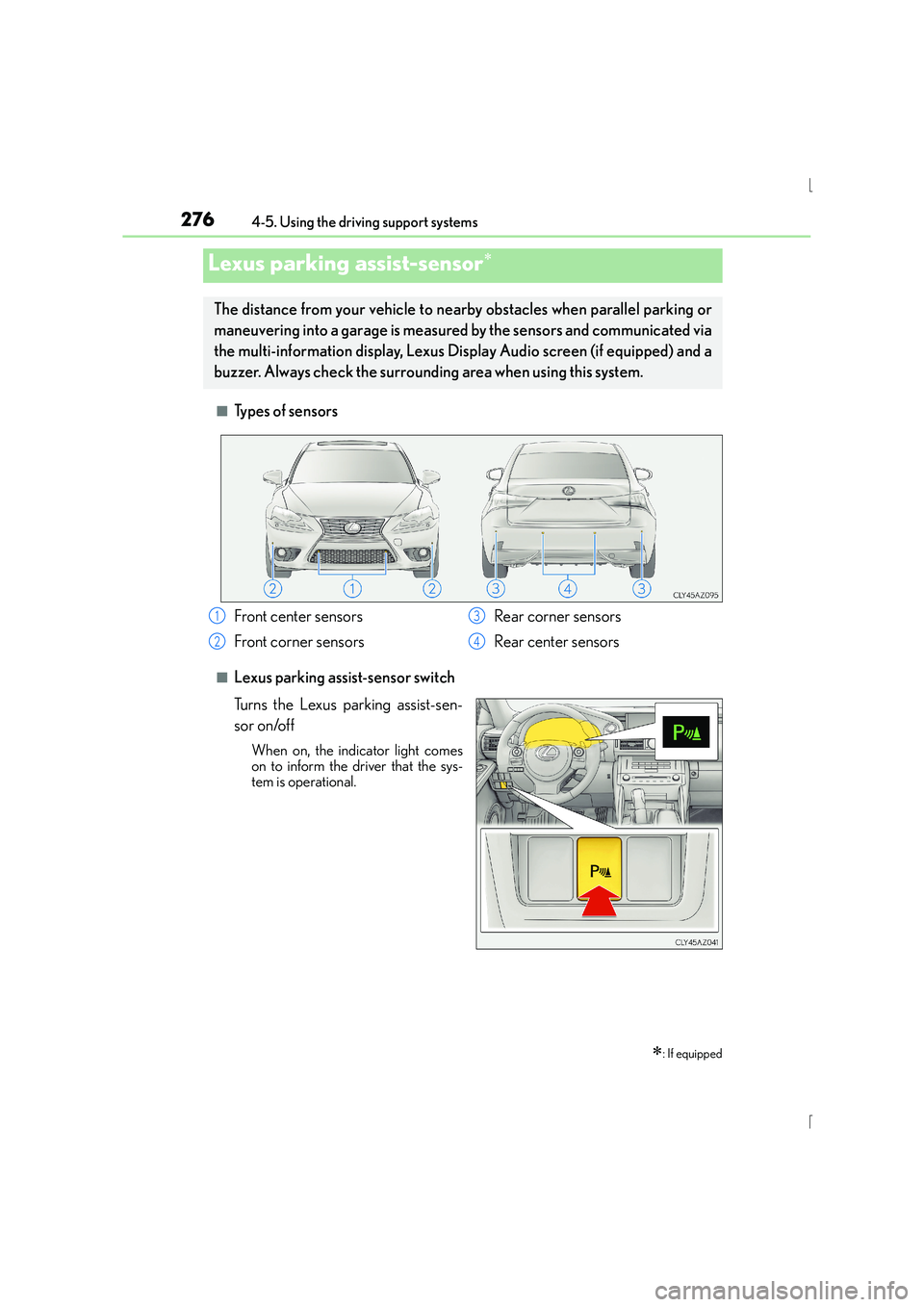
■Types of sensors
■Lexus parking assist-sensor switch
Turns the Lexus parking assist-sen-
sor on/off
When on, the indicator light comes
on to inform the driver that the sys-
tem is operational.
Lexus parking assist-sensor∗
∗: If equipped
The distance from your vehicle to nearby obstacles when parallel parking or
maneuvering into a garage is measured by the sensors and communicated via
the multi-information display, Lexus Display Audio screen (if equipped) and a
buzzer. Always check the surrounding area when using this system.
Front center sensors
Front corner sensors Rear corner sensors
Rear center sensors1
2
3
4
Page 280 of 628
2804-5. Using the driving support systems
IS300h_EE(OM53D56E)
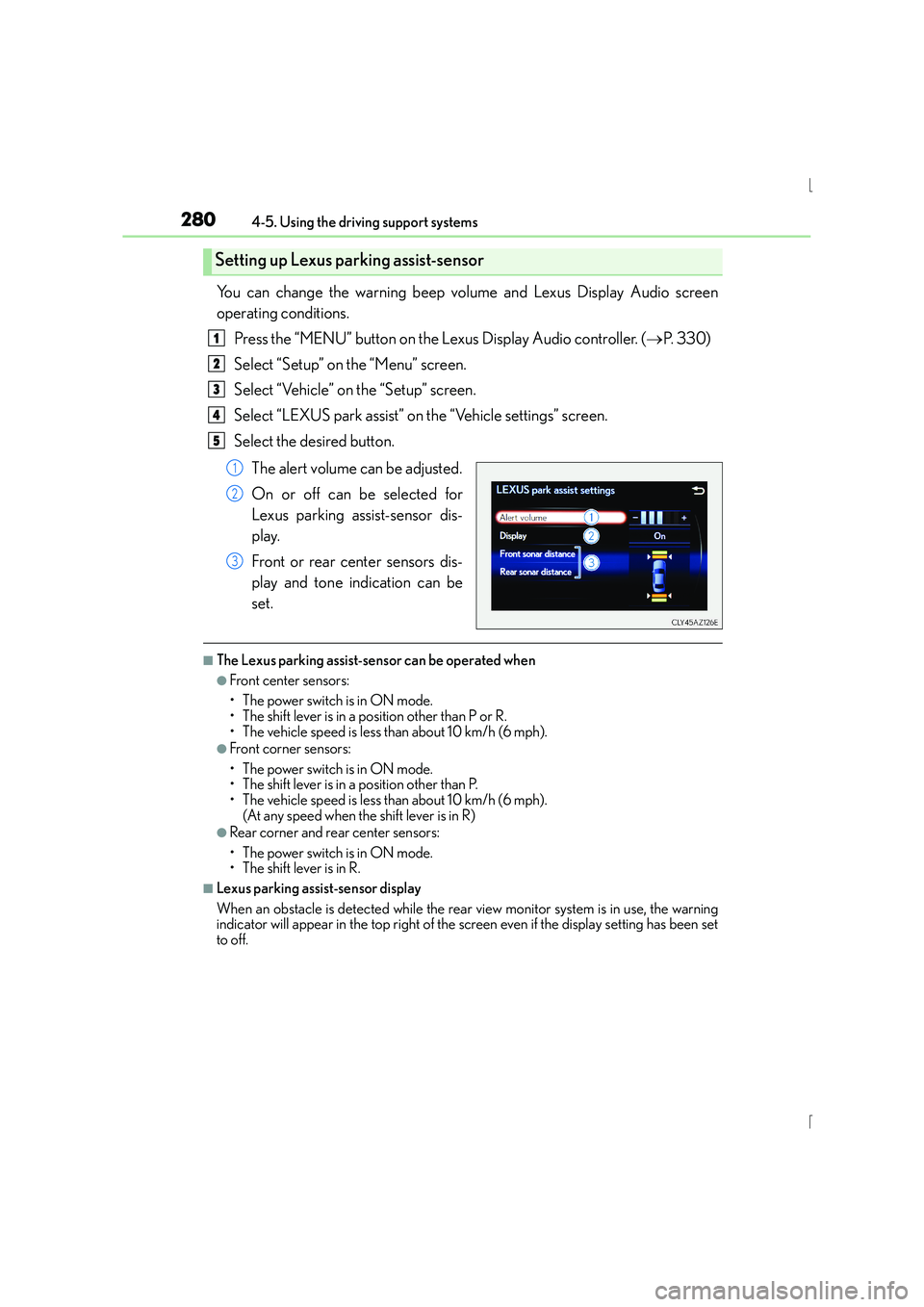
You can change the warning beep volume and Lexus Display Audio screen
operating conditions.Press the “MENU” button on the Lexus Display Audio controller. ( →P. 3 3 0 )
Select “Setup” on the “Menu” screen.
Select “Vehicle” on the “Setup” screen.
Select “LEXUS park assist” on the “Vehicle settings” screen.
Select the desired button.
The alert volume can be adjusted.
On or off can be selected for
Lexus parking assist-sensor dis-
play.
Front or rear center sensors dis-
play and tone indication can be
set.
■The Lexus parking assist-sensor can be operated when
●Front center sensors:
• The power switch is in ON mode.
• The shift lever is in a position other than P or R.
• The vehicle speed is less than about 10 km/h (6 mph).
●Front corner sensors:
• The power switch is in ON mode.
• The shift lever is in a position other than P.
• The vehicle speed is less than about 10 km/h (6 mph). (At any speed when the shift lever is in R)
●Rear corner and rear center sensors:
• The power switch is in ON mode.
• The shift lever is in R.
■Lexus parking assist-sensor display
When an obstacle is detected while the rear view monitor system is in use, the warning
indicator will appear in the top right of the screen even if the display setting has been set
to off.
Setting up Lexus parking assist-sensor
1
2
3
4
5
1
2
3
Page 281 of 628
2814-5. Using the driving support systems
4
Driving
IS300h_EE(OM53D56E)
■Sensor detection information
●The sensor’s detection areas are limited to the areas around the vehicle’s front corner
and rear bumpers.
●Certain vehicle conditions and the surrounding environment may affect the ability of
the sensor to correctly detect obstacles. Particular instances where this may occur are
listed below.
• There is dirt, snow or ice on the sensor. (Wiping the sensors will resolve this prob- lem.)
• The sensor is frozen. (Thawing the area will resolve this problem.)
In especially cold weather, if a sensor is frozen the screen may show an abnormal
display, or obstacles may not be detected.
• The sensor is covered in any way.
• The vehicle is leaning considerably to one side.
• On an extremely bumpy road, on an incline, on gravel, or on grass.
• The vicinity of the vehicle is noisy due to vehicle horns, motorcycle engines, air
brakes of large vehicles, or other loud noises producing ultrasonic waves.
• There is another vehicle equipped with parking assist sensors in the vicinity.
• The sensor is coated with a sheet of spray or heavy rain.
• The vehicle is equipped with a fender pole or wireless antenna.
• Towing eyelets are installed.
• The bumper or sensor receives a strong impact.
• The vehicle is approaching a tall or curved curb.
• In harsh sunlight or intense cold weather.
• The area directly under the bumpers is not detected.
• If obstacles draw too close to the sensor.
• A non-genuine Lexus suspension (low ered suspension etc.) is installed.
• People may not be detected if they are wearing certain types of clothing.
In addition to the examples above, there are instances in which, because of their shape,
signs and other objects may be judged by the sensor to be closer than they are.
●The shape of the obstacle may prevent the sensor from detecting it. Pay particular
attention to the following obstacles:
• Wires, fences, ropes, etc.
• Cotton, snow and other materials that absorb sound waves
• Sharply-angled objects
• Low obstacles
• Tall obstacles with upper sections projecting outwards in the direction of your vehi- cle
●The following situations may occur during use.
• Depending on the shape of the obstacle and other factors, the detection distancemay shorten, or detection may be impossible.
• Obstacles may not be detected if they are too close to the sensor.
• There will be a short delay between obst acle detection and display. Even at slow
speeds, there is a possibility that the obstacl e will come within the sensor’s detection
areas before the display is shown and the warning beep sounds.
• Thin posts or objects lower than the sensor may not be detected when approached, even if they have been detected once.
• It might be difficult to hear beeps due to the volume of the audio system or air flow noise of the air conditioning system.
■If a message is displayed on the multi-information display
→ P. 530, 530