USB port Lexus IS300h 2017 Owner's Manual
[x] Cancel search | Manufacturer: LEXUS, Model Year: 2017, Model line: IS300h, Model: Lexus IS300h 2017Pages: 692, PDF Size: 163.7 MB
Page 4 of 692
TABLE OF CONTENTS4
IS300h_EE(OM53D89E)
5-1. Basic Operations
Lexus Display Audio
system ......................................... 368
Steering wheel audio
switches ....................................... 374
USB/AUX ports ........................ 375
5-2. Setup
Setup menu...................................378
General settings ......................... 379
Voice settings ............................. 382
Display settings .......................... 383
5-3. Using the audio system
Selecting the audio
source ......................................... 385
Optimal use of the audio
system ......................................... 386
Audio settings..............................387
Audio menu screen
operation ..................................... 391
5-4. Using the radio
Radio operation ..........................394
5-5. Playing an audio CD and
MP3/WMA/AAC discs
CD player operation ................396
5-6. Using an external device
Listening to an iPod ...................402
Using USB memory
device...........................................406
Using the AUX port .................... 411
5-7. Connecting Bluetooth®
Steps for using Bluetooth®
devices.......................................... 412
Registering a Bluetooth®
device............................................ 414
Selecting a Bluetooth®
device............................................ 415
Connecting a Bluetooth®
audio player ................................ 416
Connecting a Bluetooth®
phone .............................................417
Displaying a Bluetooth®
device details ............................. 418
Detailed Bluetooth®
settings.......................................... 419
5-8. Bluetooth® Audio
Listening to Bluetooth®
Audio............................................420
5Lexus Display Audio system
Page 366 of 692
366
IS300h_EE(OM53D89E)
5-1. Basic Operations
Lexus Display Audio
system ..........................................368
Steering wheel audio
switches....................................... 374
USB/AUX ports ........................ 375
5-2. Setup
Setup menu .................................. 378
General settings......................... 379
Voice settings .............................. 382
Display settings ...........................383
5-3. Using the audio system
Selecting the audio
source ..........................................385
Optimal use of the audio
system ..........................................386
Audio settings ............................. 387
Audio menu screen
operation ..................................... 391
5-4. Using the radio
Radio operation.......................... 394
5-5. Playing an audio CD and
MP3/WMA/AAC discs
CD player operation ................ 396
Page 367 of 692

367
5
Lexus Display
Audio system
IS300h_EE(OM53D89E)
5-6. Using an external device
Listening to an iPod ...................402
Using USB memory
device...........................................406
Using the AUX port .................... 411
5-7. Connecting Bluetooth®
Steps for usin g Bluetooth®
devices.......................................... 412
Registering a Bluetooth®
device............................................ 414
Selecting a Bluetooth®
device............................................ 415
Connecting a Bluetooth®
audio player ................................ 416
Connecting a Bluetooth®
phone .............................................417
Displaying a Bluetooth®
device details ............................. 418
Detailed Bluetooth®
settings.......................................... 419
5-8. Bluetooth® Audio
Listening to Bluetooth®
Audio............................................420
5-9. Bluetooth® Phone
Using a Bluetooth®
Phone.............................................421
Making a call................................ 423
Receiving a call ........................... 426
Speaking on the phone ........... 427
Using a Bluetooth® phone
messages.................................... 429
Using the steering wheel
switches....................................... 432
Bluetooth® phone
settings ........................................ 433
5-10. Phonebook
Contact settings ......................... 435
Messaging setting .....................438
5-11. Bluetooth®
What to do if...
(Troubleshooting)................... 439
Bluetooth®................................... 442
5-12. Other function
“Information” screen.................450
MirrorLink™ ................................. 451
USB photo .................................... 455
Speech command system ...... 457
Some of the functions cannot be operated while driving.
Page 375 of 692
3755-1. Basic Operations
5
Lexus Display Audio system
IS300h_EE(OM53D89E)
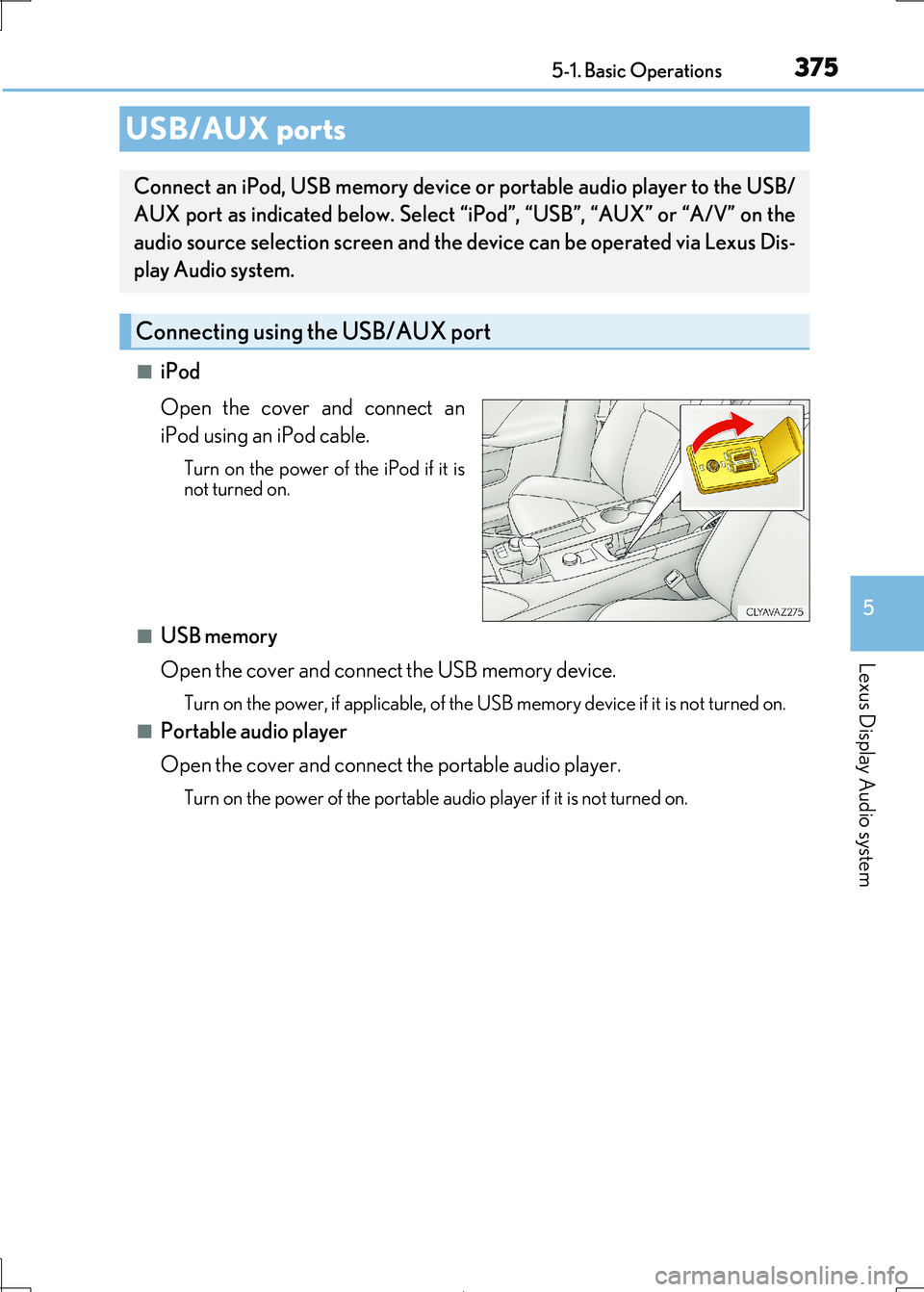
■iPod
Open the cover and connect an
iPod using an iPod cable.
Turn on the power of the iPod if it is not turned on.
■USB memory
Open the cover and connec t the USB memory device.
Turn on the power, if applicable, of the USB memory device if it is not turned on.
■Portable audio player
Open the cover and connect the portable audio player.
Turn on the power of the portable audio player if it is not turned on.
USB/AUX ports
Connect an iPod, USB memory device or portable audio player to the USB/
AUX port as indicated below. Select “iPod”, “USB”, “AUX” or “A/V” on the
audio source selection screen and the device can be operated via Lexus Dis-
play Audio system.
Connecting using the USB/AUX port
Page 376 of 692
3765-1. Basic Operations
IS300h_EE(OM53D89E)
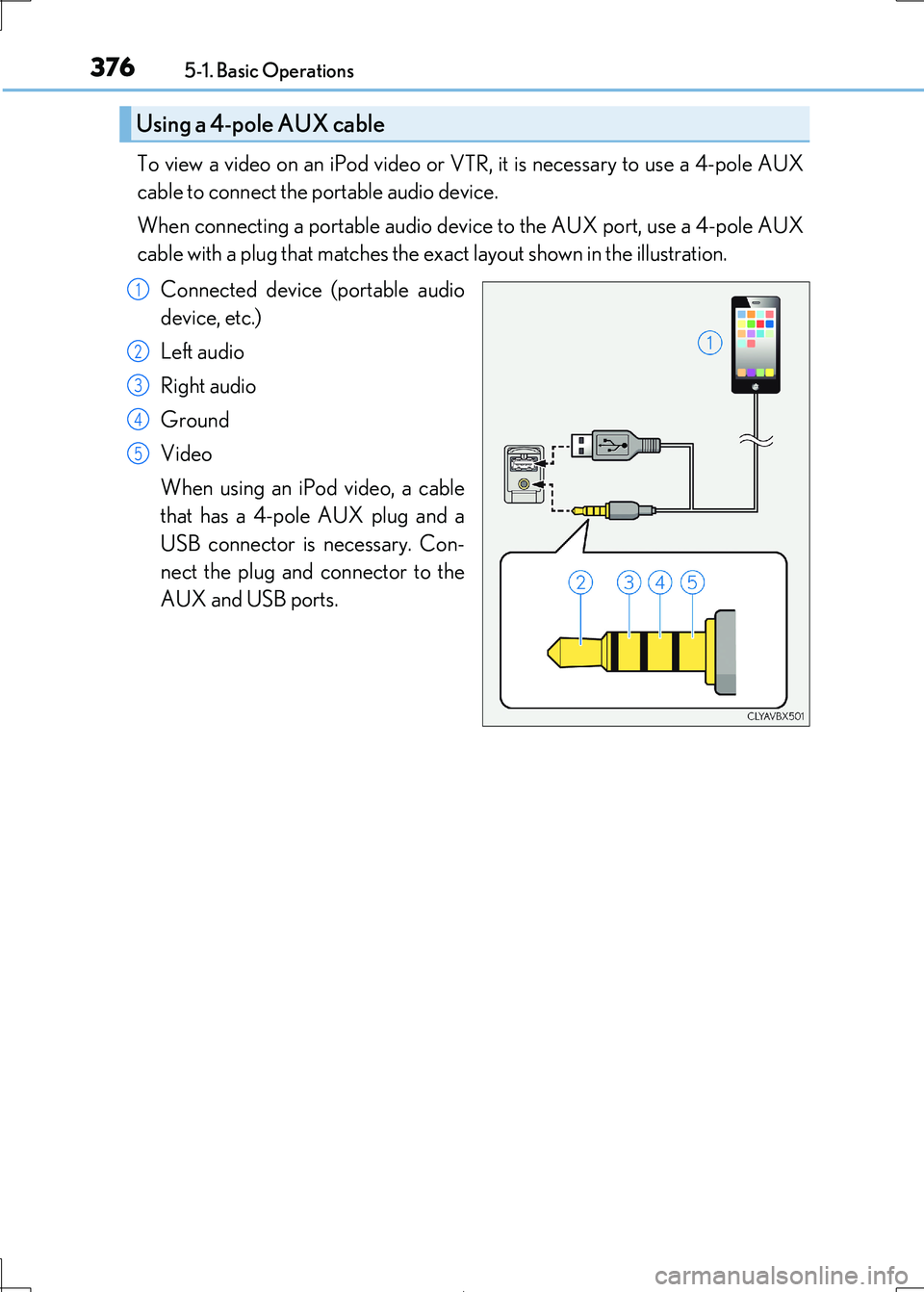
To view a video on an iPod video or VTR, it is necessary to use a 4-pole AUX
cable to connect the portable audio device.
When connecting a portable audio devi ce to the AUX port, use a 4-pole AUX
cable with a plug that matches the ex act layout shown in the illustration.
Connected device (portable audio
device, etc.)
Left audio
Right audio
Ground
Video
When using an iPod video, a cable
that has a 4-pole AUX plug and a
USB connector is necessary. Con-
nect the plug and connector to the
AUX and USB ports.
Using a 4-pole AUX cable
1
2
3
4
5
Page 389 of 692
3895-3. Using the audio system
5
Lexus Display Audio system
IS300h_EE(OM53D89E)
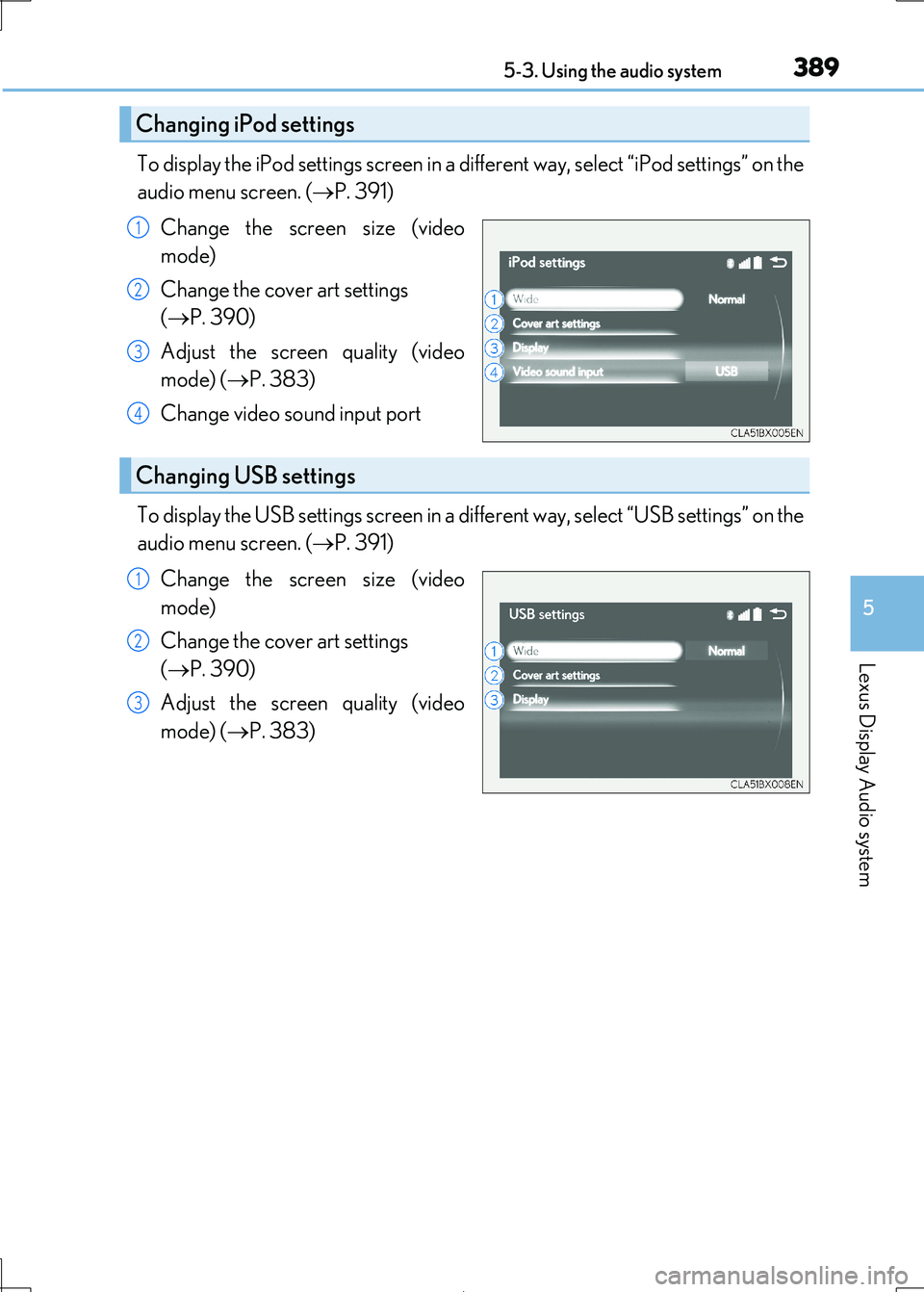
To display the iPod settings screen in a different way, select “iPod settings” on the
audio menu screen. ( P. 391)
Change the screen size (video
mode)
Change the cover art settings
( P. 390)
Adjust the screen quality (video
mode) ( P. 383)
Change video sound input port
To display the USB settings screen in a di fferent way, select “USB settings” on the
audio menu screen. ( P. 391)
Change the screen size (video
mode)
Change the cover art settings
( P. 390)
Adjust the screen quality (video
mode) ( P. 383)
Changing iPod settings
1
2
3
4
Changing USB settings
1
2
3
Page 410 of 692
4105-6. Using an external device
IS300h_EE(OM53D89E)
NOTICE
■To prevent damage to the USB memory device or its terminals
●Depending on the size and shape of the USB memory that is connected to the sys-
tem, the console box may not close fully. In th is case, do not forcibly close the console
box as this may damage the US B memory or the terminal, etc.
●Do not leave the USB memory device in the vehicle. The temperature inside the vehi-
cle may become high.
●Do not push down on or apply unnecessa ry pressure to the USB memory device while it is connected.
●Do not insert foreign objects into the port.
Page 451 of 692
4515-12. Other function
5
Lexus Display Audio system
IS300h_EE(OM53D89E)
P. 375
MirrorLink™
The MirrorLink™ function enables operations of some smartphone content
via the Lexus Display Audio system.
Depending on differences between mode ls or software version etc., some
models might be incompatible with this system.
Connect a smartphone to USB port using a USB cable.
For safety reasons, the safe driving sc reen is displayed while driving depend-
ing on the application.
Connecting a smartphone
Page 673 of 692

673Alphabetical index
IS300h_EE(OM53D89E)
Anti-lock Brake System (ABS) .......352
Warning light ....................................... 576
Approach warning .............................. 300
Armrest..................................................... 493
ASC (Active Sound Control).......... 236
Assist grips ..............................................495
Audio input .............................................. 375
Audio system ..........................................368
Audio CD player ...............................396
Audio input ........................................... 375
AUX port/
USB port ............................................ 375
Bluetooth® audio .............................. 420
iPod........................................................... 402
Optimal use ......................................... 386
Portable music player......................... 411
Radio ........................................................ 394
Steering wheel audio switch ........ 374
USB memory...................................... 406
Automatic headlight leveling
system ................................................... 239
Automatic High Beam .......................240
Automatic light control system ...... 237
AUX port ................................................. 375
Average fuel
economy ............................ 130, 132, 134
Average vehicle speed ....................... 130
Back-up light
Replacing light bulb ......................... 562
Battery (12-volt battery) .................... 522
If the 12-volt battery is
discharged .......................................... 631
Preparing and checking
before winter...................................... 361
Warning light....................................... 575
Battery (traction battery) .......................81
Blind Spot Monitor (BSM) .............. 334
Blower customization......................... 475
Bluetooth®
Audio system....................................... 420
Hands-free system
(for cellular phone) ......................... 421
Bottle holders......................................... 486
Brake
Fluid ............................................................651
Parking brake ...................................... 235
Regenerative braking.......................... 79
Warning light....................................... 575
Brake assist ............................................ 352
Break-in tips ........................................... 203
Brightness control
Instrument panel light control ...... 108
BSM (Blind Spot Monitor) ............... 334
Blind Spot Monitor function ........ 340
Rear Crossing Traffic Alert
function ............................................... 343
B
Page 690 of 692
690Alphabetical index
IS300h_EE(OM53D89E)
Units ..............................................................119
USB device ................................. 406, 455
Connecting........................................... 375
USB audio ............................................ 406
USB photo ............................................455
USB video ............................................ 406
USB port................................................... 375
Vanity lights .............................................. 491
Vanity lights ............................................491
Wattage..................................................654
Vanity mirrors ......................................... 491
VDIM (Vehicle Dynamics
Integrated Management) ..............353
Vehicle identification number ......... 645
Vehicle Stability Control
(VSC) .................................................... 352
Ventilators (seat ventilators) ........... 480
VSC (Vehicle Stability
Control)................................................. 352
Warning buzzers
Approach warning ...........................300
Downshifting........................................ 230
Driver’s and front
passenger’s seat belt
reminder ............................................ 577
Lexus parking assist-sensor ........ 309
Open door ............................................577
Pre-Collision braking...................... 266
Rear passengers’ seat belt
reminder ............................................. 578
Warning lights .......................................... 101
ABS .......................................................... 576
Brake system ....................................... 575
Charging system ............................... 575
Driver’s and front
passenger’s seat belt
reminder light....................................577
Electric power steering
system.................................................. 576
Low fuel level........................................577
Malfunction indicator lamp .......... 575
Master warning light ........................ 578
Open door ............................................577
Pre-Collision System .......................577
Rear passengers’ seat belt
reminder lights ................................ 578
Slip indicator .........................................577
SRS ........................................................... 576
Tire pressure........................................ 578
U
V
W