heater Lexus IS300h 2017 Owner's Manual
[x] Cancel search | Manufacturer: LEXUS, Model Year: 2017, Model line: IS300h, Model: Lexus IS300h 2017Pages: 692, PDF Size: 163.7 MB
Page 5 of 692
5
1
9
8
7
6
4
3
2
IS300h_EE(OM53D89E)
5
5-9. Bluetooth® Phone
Using a Bluetooth®
Phone ............................................ 421
Making a call ................................ 423
Receiving a call ........................... 426
Speaking on the phone............ 427
Using a Bluetooth® phone
messages .................................... 429
Using the steering wheel
switches ....................................... 432
Bluetooth® phone
settings.........................................433
5-10. Phonebook
Contact settings .........................435
Messaging sett ing..................... 438
5-11. Bluetooth®
What to do if...
(Troubleshooting) ...................439
Bluetooth®................................... 442
5-12. Other function
“Information” screen ................ 450
MirrorLink™ ................................. 451
USB photo ....................................455
Speech command system ...... 457
6-1. Basic operation of the
Remote Touch screen
Remote Touch .............................460
10.3-inch display ........................ 464
6-2. Using the air conditioning
system
Automatic air conditioning
system .......................................... 466
Heated steering wheel/
seat heaters/
seat ventilators ......................... 479
6-3. Using the interior lights
Interior lights list........................... 481
• Interior lights ..........................482
• Personal lights .......................482
6-4. Using the storage features
List of storage features ............484
• Glove box .............................. 485
• Console box.......................... 485
•Cup holders/
Bottle holders ........................486
Trunk features ............................ 488
6Interior features
Page 21 of 692
21Pictorial index
IS300h_EE(OM53D89E)
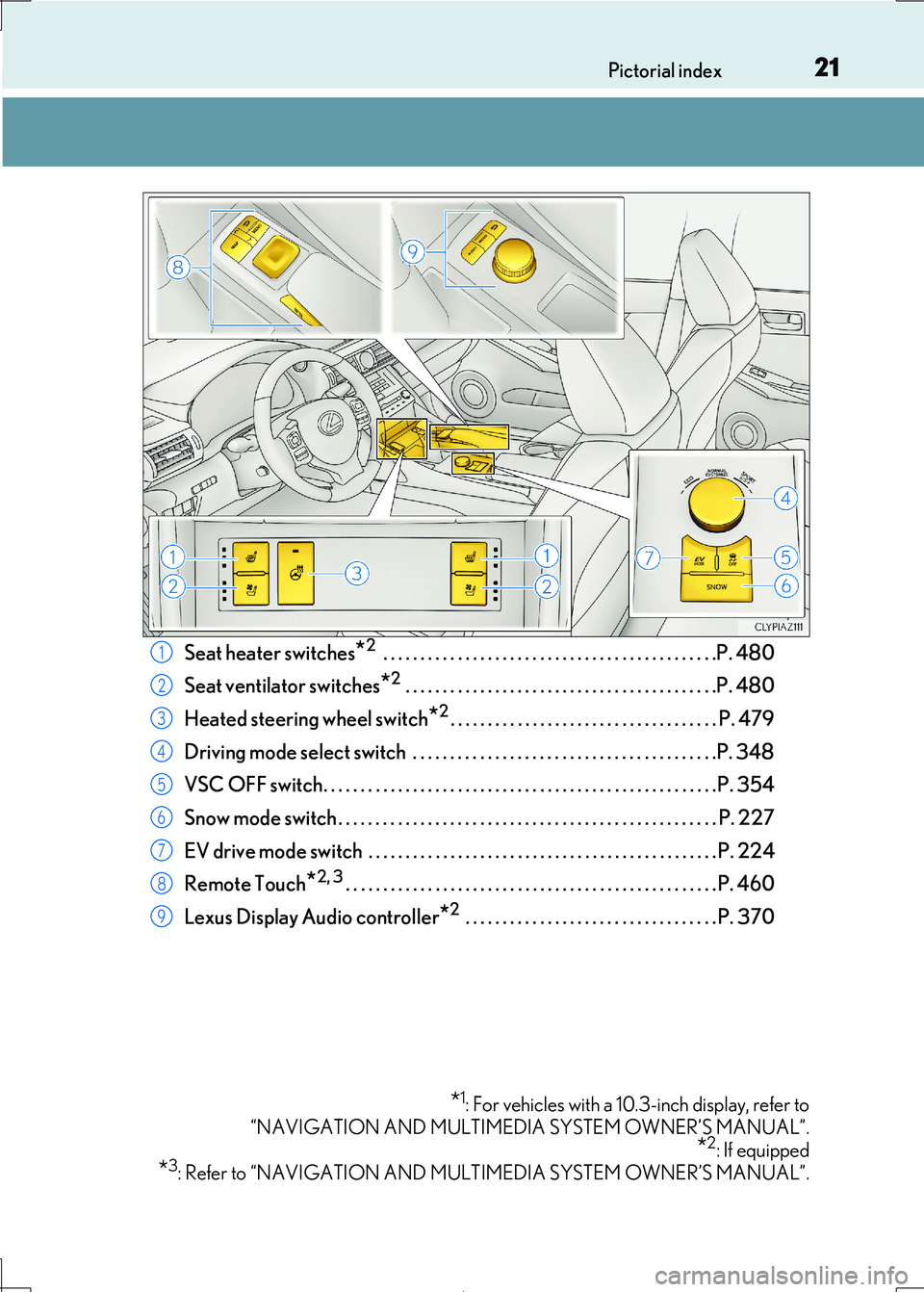
Seat heater switches*2 . . . . . . . . . . . . . . . . . . . . . . . . . . . . . . . . . . . . . . . . . . . . .P. 480
Seat ventilator switches*2 . . . . . . . . . . . . . . . . . . . . . . . . . . . . . . . . . . . . . . . . . .P. 480
Heated steering wheel switch*2. . . . . . . . . . . . . . . . . . . . . . . . . . . . . . . . . . . . P. 479
Driving mode select switch . . . . . . . . . . . . . . . . . . . . . . . . . . . . . . . . . . . . . . . . .P. 348
VSC OFF switch. . . . . . . . . . . . . . . . . . . . . . . . . . . . . . . . . . . . . . . . . . . . . . . . . . . . .P. 354
Snow mode switch . . . . . . . . . . . . . . . . . . . . . . . . . . . . . . . . . . . . . . . . . . . . . . . . . . . P. 227
EV drive mode switch . . . . . . . . . . . . . . . . . . . . . . . . . . . . . . . . . . . . . . . . . . . . . . . P. 224
Remote Touch*2, 3. . . . . . . . . . . . . . . . . . . . . . . . . . . . . . . . . . . . . . . . . . . . . . . . . . P. 460
Lexus Display Audio controller*2 . . . . . . . . . . . . . . . . . . . . . . . . . . . . . . . . . . P. 370
*1: For vehicles with a 10.3-inch display, refer to
“NAVIGATION AND MULTIMEDIA SYSTEM OWNER’S MANUAL”.
*2: If equipped
*3: Refer to “NAVIGATION AND MULTIMEDIA SYSTEM OWNER’S MANUAL”.
1
2
3
4
5
6
7
8
9
Page 29 of 692
29Pictorial index
IS300h_EE(OM53D89E)
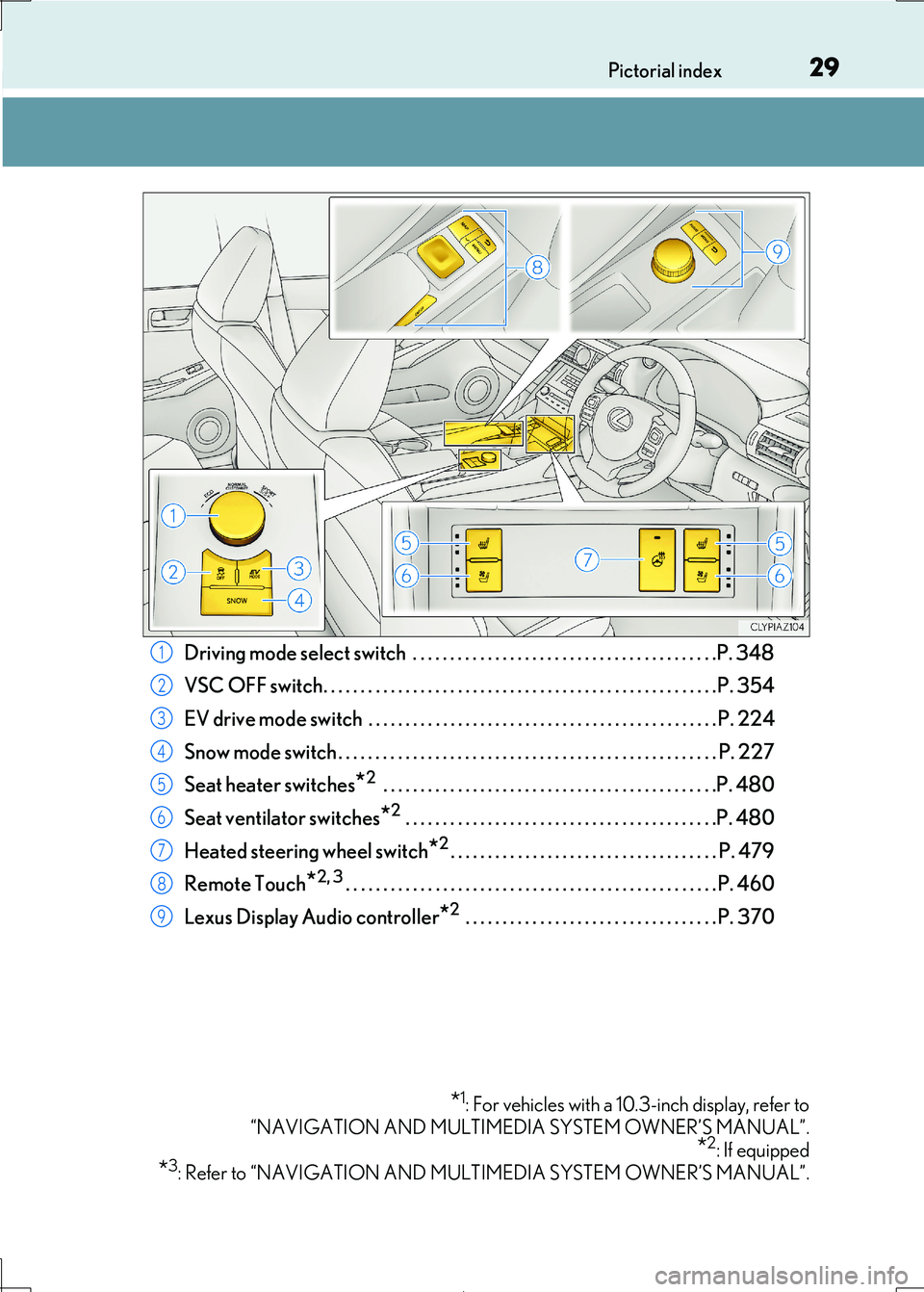
Driving mode select switch . . . . . . . . . . . . . . . . . . . . . . . . . . . . . . . . . . . . . . . . .P. 348
VSC OFF switch. . . . . . . . . . . . . . . . . . . . . . . . . . . . . . . . . . . . . . . . . . . . . . . . . . . . .P. 354
EV drive mode switch . . . . . . . . . . . . . . . . . . . . . . . . . . . . . . . . . . . . . . . . . . . . . . . P. 224
Snow mode switch . . . . . . . . . . . . . . . . . . . . . . . . . . . . . . . . . . . . . . . . . . . . . . . . . . . P. 227
Seat heater switches*2 . . . . . . . . . . . . . . . . . . . . . . . . . . . . . . . . . . . . . . . . . . . . .P. 480
Seat ventilator switches*2 . . . . . . . . . . . . . . . . . . . . . . . . . . . . . . . . . . . . . . . . . .P. 480
Heated steering wheel switch*2. . . . . . . . . . . . . . . . . . . . . . . . . . . . . . . . . . . . P. 479
Remote Touch*2, 3. . . . . . . . . . . . . . . . . . . . . . . . . . . . . . . . . . . . . . . . . . . . . . . . . . P. 460
Lexus Display Audio controller*2 . . . . . . . . . . . . . . . . . . . . . . . . . . . . . . . . . . P. 370
*1: For vehicles with a 10.3-inch display, refer to
“NAVIGATION AND MULTIMEDIA SYSTEM OWNER’S MANUAL”.
*2: If equipped
*3: Refer to “NAVIGATION AND MULTIMEDIA SYSTEM OWNER’S MANUAL”.
1
2
3
4
5
6
7
8
9
Page 79 of 692
791-2. Hybrid system
1
For safety and security
IS300h_EE(OM53D89E)
■Regenerative braking
In the following situations, ki netic energy is converted to electric energy and decelera-
tion force can be obtained in conjunction with the recharging of the hybrid battery (trac- tion battery).
●The accelerator pedal is released while driving with the shift lever in D or S.
●The brake pedal is depressed while driving with the shift lever in D or S.
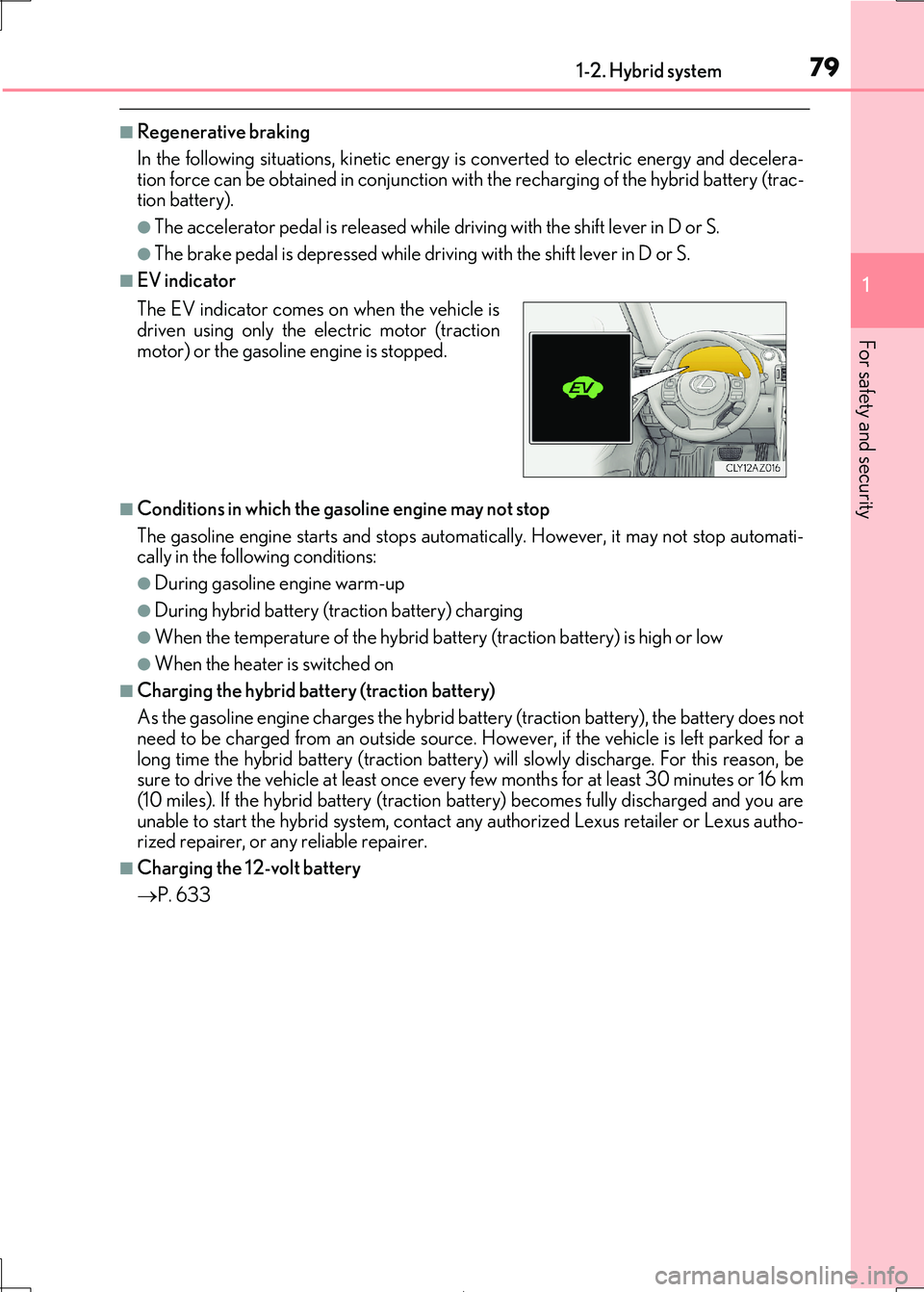
■EV indicator
■Conditions in which the gasoline engine may not stop
The gasoline engine starts and stops automati cally. However, it may not stop automati- cally in the following conditions:
●During gasoline engine warm-up
●During hybrid battery (traction battery) charging
●When the temperature of the hybrid battery (traction battery) is high or low
●When the heater is switched on
■Charging the hybrid battery (traction battery)
As the gasoline engine charges the hybrid ba ttery (traction battery), the battery does not
need to be charged from an ou tside source. However, if the vehicle is left parked for a
long time the hybrid battery (traction batter y) will slowly discharge. For this reason, be sure to drive the vehicle at least once every few months for at least 30 minutes or 16 km
(10 miles). If the hybrid battery (traction battery) becomes fully discharged and you are
unable to start the hybrid system, contact any authorized Lexus retailer or Lexus autho- rized repairer, or an y reliable repairer.
■Charging the 12-volt battery
P. 633
The EV indicator comes on when the vehicle is driven using only the electric motor (traction
motor) or the gasoline engine is stopped.
Page 359 of 692
3594-6. Driving tips
4
Driving
IS300h_EE(OM53D89E)
◆Delays
Repeated acceleration and deceleration, as well as long waits at traffic lights,
will lead to bad fuel economy. Check tr affic reports before leaving and avoid
delays as much as possible. When drivin g in a traffic jam, gently release the
brake pedal to allow the vehicle to move forward slightly while avoiding over-
use of the accelerator pedal. Doing so can help control excessive gasoline
consumption.
◆Highway driving
Control and maintain the vehicle at a co nstant speed. Before stopping at a toll
booth or similar, allow plenty of ti me to release the accelerator and gently
apply the brakes. A greater amount of electrical energy can be regenerated
when slowing down.
◆Air conditioning
Use the air conditioning only when necessary. Doing so can help reduce
excessive gasoline consumption.
In summer: When the ambient temperature is high, use the recirculated air
mode. Doing so will help to reduce the burden on the air conditioning system
and reduce fuel consumption as well.
In winter: Because the gasoline engine will not automatically cut out until it
and the interior of the vehicle are warm , it will consume fuel. Also, fuel con-
sumption can be improved by av oiding overuse of the heater.
◆Checking tire inflation pressure
Make sure to check the tire inflation pr essure frequently. Improper tire infla-
tion pressure can caus e poor fuel economy.
Also, as snow tires can cause large amou nts of friction, their use on dry roads
can lead to poor fuel economy. Use ti res that are appropriate for the season.
◆Luggage
Carrying heavy luggage will lead to poor fuel economy. Avoid carrying
unnecessary luggage. Installing a large roof rack will also cause poor fuel
economy.
Page 459 of 692
459
6Interior features
IS300h_EE(OM53D89E)
6-1. Basic operation of
the Remote Touch
screen
Remote Touch .............................460
10.3-inch display ........................ 464
6-2. Using the air conditioning
system
Automatic air conditioning
system .......................................... 466
Heated steering wheel/
seat heaters/
seat ventilator s ......................... 479
6-3. Using the interior lights
Interior lights list........................... 481
• Interior lights ..........................482
• Personal lights .......................482
6-4. Using the storage features
List of storage features ............484
• Glove box .............................. 485
• Console box.......................... 485
•Cup holders/
Bottle holders ........................486
Trunk features............................. 488
6-5. Using the other interior
features
Other interior features ............. 491
• Sun visors ................................. 491
• Vanity mirrors ........................ 491
• Clock ......................................... 491
• Power outlet........................... 492
• Armrest.................................... 493
• Rear sunshade ...................... 493
• Assist grips ............................. 495
• Coat hooks ............................. 495
ERA-GLONASS ...................... 496
Page 479 of 692
4796-2. Using the air conditioning system
6
Interior features
IS300h_EE(OM53D89E)
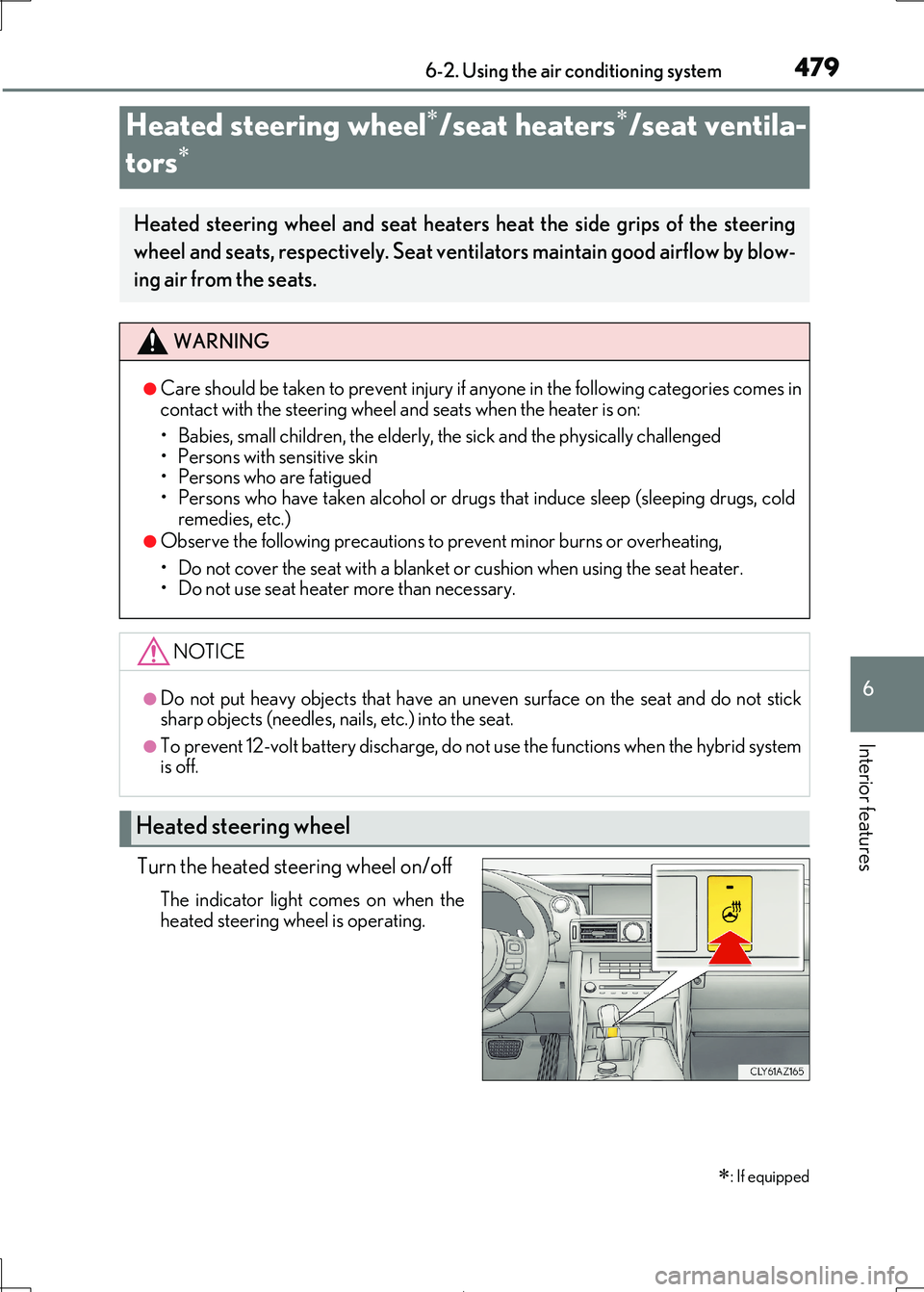
Turn the heated steering wheel on/off
The indicator light comes on when the heated steering wheel is operating.
Heated steering wheel/seat heaters/seat ventila-
tors
: If equipped
Heated steering wheel and seat heaters heat the side grips of the steering
wheel and seats, respectively. Seat vent ilators maintain good airflow by blow-
ing air from the seats.
WARNING
●Care should be taken to prev ent injury if anyone in the following categories comes in contact with the steering wheel and seats when the heater is on:
• Babies, small children, the elderly, the sick and the physically challenged
• Persons with sensitive skin • Persons who are fatigued
• Persons who have taken alcohol or drugs that induce sleep (sleeping drugs, cold
remedies, etc.)
●Observe the following precautions to prevent minor burns or overheating,
• Do not cover the seat with a blanket or cushion when using the seat heater. • Do not use seat heater more than necessary.
NOTICE
●Do not put heavy objects that have an unev en surface on the seat and do not stick sharp objects (needles, nails, etc.) into the seat.
●To prevent 12-volt battery discharge, do no t use the functions when the hybrid system
is off.
Heated steering wheel
Page 480 of 692
4806-2. Using the air conditioning system
IS300h_EE(OM53D89E)
●The heated steering wheel can be used when the power switch is in ON mode.
●The heated steering wheel will automatically turn off after about 30 minutes.
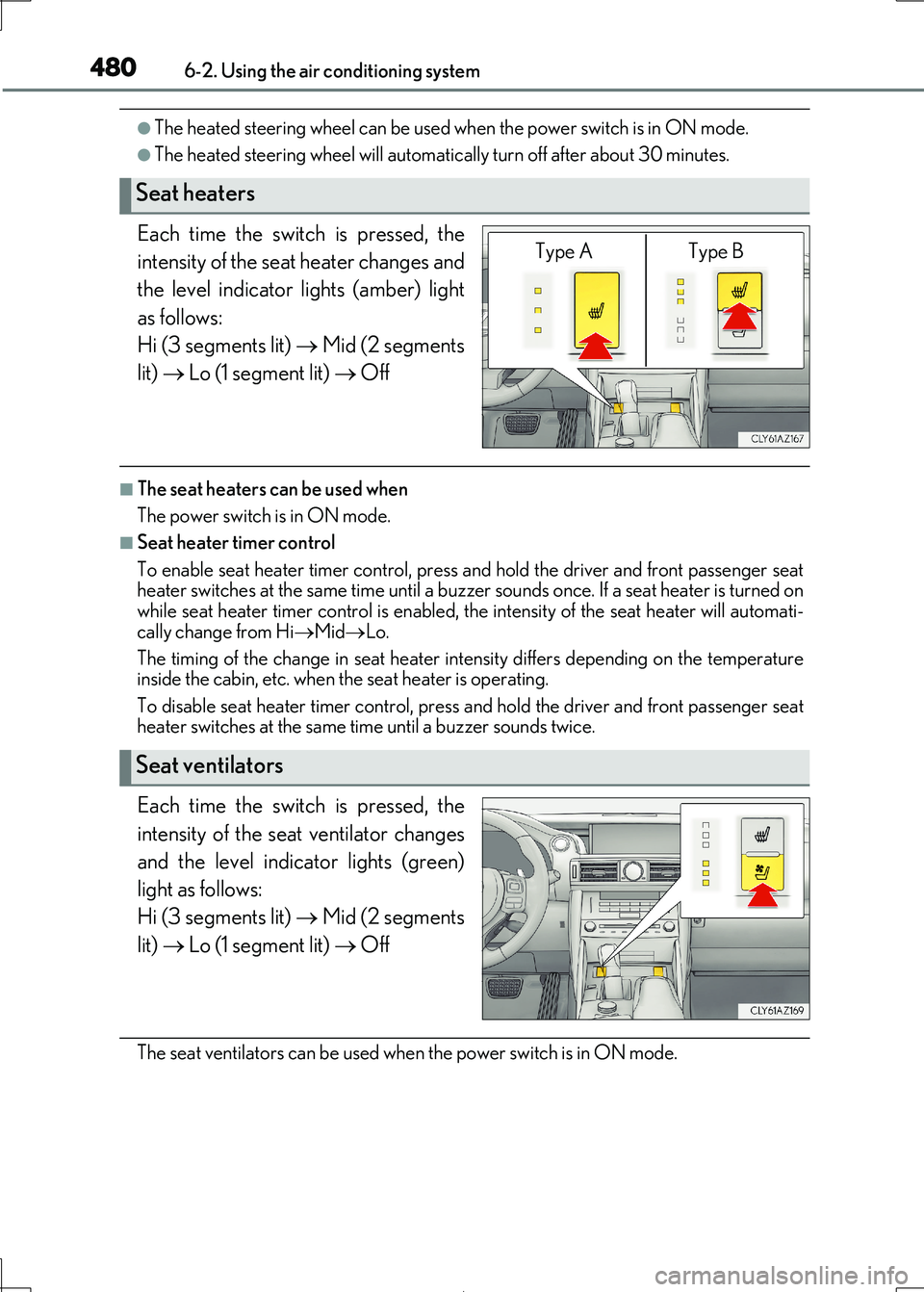
Each time the switch is pressed, the
intensity of the seat heater changes and
the level indicator lights (amber) light
as follows:
Hi (3 segments lit) Mid (2 segments
lit) Lo (1 segment lit) Off
■The seat heaters can be used when
The power switch is in ON mode.
■Seat heater timer control
To enable seat heater timer control, press and hold the driver and front passenger seat heater switches at the same time until a buzzer sounds once. If a seat heater is turned on
while seat heater timer control is enabled, the intensity of the seat heater will automati-
cally change from Hi MidLo.
The timing of the change in seat heater intensity differs depending on the temperature
inside the cabin, etc. when the seat heater is operating.
To disable seat heater timer control, press and hold the driver and front passenger seat heater switches at the same time until a buzzer sounds twice.
Each time the switch is pressed, the
intensity of the seat ventilator changes
and the level indicator lights (green)
light as follows:
Hi (3 segments lit) Mid (2 segments
lit) Lo (1 segment lit) Off
The seat ventilators can be used when the power switch is in ON mode.
Seat heaters
Type A Type B
Seat ventilators
Page 508 of 692
5087-1. Maintenance and care
IS300h_EE(OM53D89E)
NOTICE
■Cleaning detergents
●Do not use the following liquids, as they may discolor the vehicle interior or cause
streaks or damage to painted surfaces:
• Audio system screen: Organic substances such as benzine or gasoline, alkaline solutions, and alcohol
• Seats: Alkaline solutions, organic substances such as thinner or benzine, and alco-
hol • Other parts: Organic substances such as benzine or gasoline, alkaline or acidic
solutions, dye, and bleach
●Do not use polish wax or polish cleaner. The instrument panel’s or other interior part’s
painted surface may be damaged.
■Preventing damage to leather surfaces
Observe the following precautions to avoid damage to and deterioration of leather
surfaces:
●Remove any dust or dirt from leather surfaces immediately.
●Do not expose the vehicle to direct sunlight for extended periods of time. Park the
vehicle in the shade, especially during summer.
●Do not place items made of vinyl, plastic, or containing wax on the upholstery, as they may stick to the leather surface if the vehicle interior heats up significantly.
■Water on the floor
Do not wash the vehicle floor with water. Vehicle systems such as the audio system ma y be damaged if water comes into contact
with electrical components such as the au dio system above or under the floor of the
vehicle. Water may also cause the body to rust.
■When cleaning the inside of the windshie ld (vehicles with Lexus Safety System+)
Do not allow glass cleaner to contact the lens. Also, do not touch the lens. ( P. 259)
■Cleaning the inside of the rear window
●Do not use glass cleaner to clean the rear window, as this may cause damage to the
rear window defogger heater wires or antenna. Use a cloth dampened with luke-
warm water to gently wipe the window clean. Wipe the window in strokes running parallel to the heater wires or antenna.
●Be careful not to scratch or dama ge the heater wires or antenna.
Page 663 of 692

663
9
9-2. Customization
Vehicle specifications
IS300h_EE(OM53D89E)
■Lexus parking assist-sensor*1 ( P. 309)
*1:If equipped
*2: When Lexus parking assist-sensor is operating.
■Driving mode select switch (P. 348)
*:If equipped
■Automatic air conditioning system (P. 466)
■Seat heaters* (P. 479)
*:If equipped
FunctionDefault settingCustomized setting
Detection distance of the front center sensorFarNearOO
Detection distance of the rear
center sensorFarNearOO
Buzzer volume31 to 5OO
Display setting*2All sensors dis-
playedDisplay offOO
12
FunctionDefault settingCustomized setting
Powertrain control in customized
mode*NormalPowerO—Eco
Chassis control in customized mode*NormalSportO—
Air conditioning operation in cus-
tomized mode*NormalEcoO—
12
FunctionDefault settingCustomized setting
Switching between outside air
and recirculated air mode linked
to “AUTO” switch operation
OnOffOO
A/C Auto switch operationOnOffOO
12
FunctionDefault settingCustomized setting
Seat heater timer controlOffOnOO
12